2012 SKODA SUPERB heating
[x] Cancel search: heatingPage 98 of 235

Setting the air conditioning system
Recommended basic settings of the control elements of the air conditioning sys-
tem for the respective operating modes:
Set-up Setting of the control dial
Button
Air outlet vents 2 A B C 1 4
Defrost/defog windscreen and
side windows
a) Desired tempera-
ture 3 or 4
Automatically
switched on Do not switch on Open and align with the side
window
The fastest heating To the right up to
the stop 3
Switched off Briefly switch on
Opening
Comfortable heating Desired tempera-
ture 2 or 3
Switched off Do not switch on
Opening
The fastest cooling To the left up to
the stop briefly 4, then
2 or 3 Activated Briefly switch on
Opening
Optimal cooling Desired tempera-
ture 1, 2 or 3
Activated Do not switch on Open and align to the roof
Fresh air mode - ventilation To the left up to
the stop Desired position
Switched off Do not switch on
Openinga)
We recommend that you do not use this setting in countries with high humidity levels. This can result in heavy cooling of the window glass and the following fogging from outside. Note
■ Controls A
, B
, C
and the button 1
and 4
» Fig. 108 on page 95
.
■ Air outlet vents 2 » Fig. 106 on page 94 .
■ We recommend that you leave the air outlet vents 3 » Fig. 106 on page 94 in the
opened position. ÐRecirculated air mode
Recirculated air mode prevents polluted air outside the vehicle from getting into
the vehicle, for example when driving through a tunnel or when standing in a
traffic jam.
Switching on
› Press the button
4
» Fig. 108
on page
95 and the indicator light in the but-
ton illuminates. Switching off
› Press the button
again - the indicator light in the button goes out.
Recirculated air mode is switched off automatically if the air distribution control C
» Fig. 108
on page
95 is turned to position . Recirculated air mode can be
switched on again from this setting by repeatedly pressing the button .
WARNING
Do not leave recirculated air mode on over a longer period of time, as “stale”
air can cause fatigue of the driver and passengers, reduce attention levels and
also cause the windows to mist up. The risk of having an accident increases.
Switch off recirculated air mode as soon as the windows start to mist up. Ð
96 Using the system
Page 99 of 235
Climatronic (automatic air conditioning system)
Introductory information
The Climatronic maintains fully automatically a convenience temperature. This is
achieved by automatically varying the temperature of the air flow, the blower
stages and air distribution. The system also takes sunlight into account, which
eliminates the need to alter the settings manually. The automatic
mode » page 98 ensures maximum well-being of the occupants at all times of
the year.
Description of Climatronic system
The cooling system only operates if the following conditions are met:
› engine running;
› outside temperature above approx. +2 °C;
› AC 13
» Fig. 109 on page 97 switched on.
The AC compressor is switched off at a high coolant temperature in order to pro-
vide cooling at a high load of the engine.
Recommended setting for all periods of the year.
› Set the desired temperature, we recommend 22 °C.
› Press the button
AUTO 8
» Fig. 109
on page 97.
› Move the air outlet vents
2 and 3 so that the air flow is directed slightly up-
wards.
Aeration of the vehicle when ignition is switched off
On models fitted with power sliding/tilting roof with sollar cells, the fresh air
blower is automatically switched over to
“solar mode” if the sun ray's are suffi-
cient after switching off the ignition. The solar cells on the sliding/tilting roof de-
liver power for the fresh air blower. This supplies the interior of the car with fresh
air.
For an optimum ventilation, the air outlet vents 2 and 3 must be opened » Fig. 106
on page 94.
The ventilation functions only when the sliding/tilting roof is closed. Note
■ We recommend that you have the Climatronic system cleaned by a
ŠKODA spe-
cialist garage once every year. ■ On vehicles equipped with a factory-fitted radio or radio navigation system, the
Climatronic information is also shown on their displays. This function can be
switched off, see operating instructions for the radio or navigation system. Ð Overview of the control elements
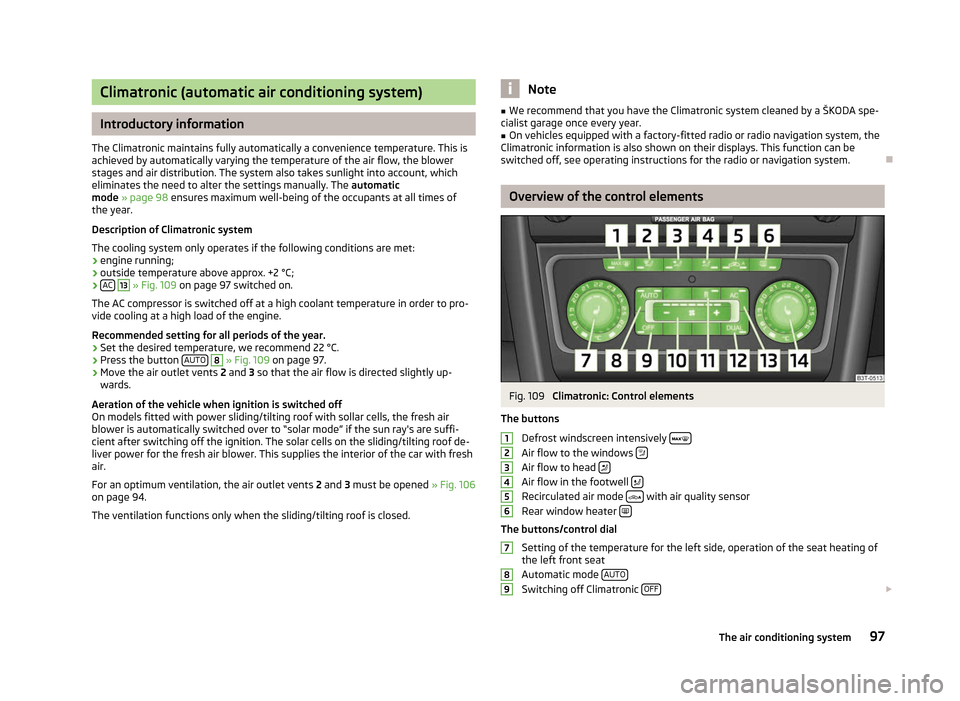
Fig. 109
Climatronic: Control elements
The buttons Defrost windscreen intensively Air flow to the windows
Air flow to head
Air flow in the footwell
Recirculated air mode
with air quality sensor
Rear window heater The buttons/control dial
Setting of the temperature for the left side, operation of the seat heating of
the left front seat
Automatic mode AUTO Switching off Climatronic
OFF £1
2
3
4
5
6
7
8
9
97
The air conditioning system
Page 100 of 235

Setting the blower speed
Depending upon vehicle equipment: Button for direct switching on/off of
auxiliary heating » Fig. 110 on page 101, or switching on/off of windscreen
heater » Fig. 43 on page 58.
Switching on/off of the temperature setting in dual mode DUALSwitching the cooling system on and off
ACSetting of the temperature for the right side, operation of the seat heating of
the right front seat Note
Below the top row of buttons is located the interior temperature sensor. Do not
stick anything on or cover the sensor, otherwise it could have an unfavourable ef-
fect on the Climatronic. ÐAutomatic mode
The automatic mode is used in order to maintain a constant temperature and to
demist the windows in the interior of the car.
Switching on
› Set a temperature between +18 °C and +26
℃.
› Move the air outlet vents
2 and 3 » Fig. 106 on page 94 so that the air flow is
directed slightly upwards.
› Press the button
AUTO 8
» Fig. 109
on page
97. The indicator light in the top
right or left corner lights up, depending on which mode was last selected.
If the indicator light in the top right corner of the button AUTO lights up, the Cli-
matronic operates in
“HIGH” mode. The “HIGH” mode is the standard setting of
the Climatronic.
When pressing again the button AUTO , the Climatronic changes into the “LOW”
mode and the indicator light in the top left corner lights up. The Climatronic uses
only in this mode the lower blower speed. However taking into account the noise
level, this is more comfortable, yet be aware that the effectiveness of the air con-
ditioning system is reduced particularly if the vehicle is fully occupied.
By pressing the button AUTO again, it is changed to “HIGH” mode.
Automatic mode is switched off by pressing one of the buttons for the air distri-
bution or by increasing/decreasing the blower speed. The temperature is never-
theless regulated. Ð10
11
12
13
14 Switching the cooling system on and off
Switching the cooling system on and off › Press the button
AC » Fig. 109
on page
97. The indicator light in the button
lights up.
› When you again press the button
AC , the air conditioning system is switched
off. The indicator light in the button goes out. Only the function of the ventila-
tion remains active when no lower temperature than the outside temperature
can be reached. Ð Setting temperature
The interior temperature for the left and right side can be set separately.
› The temperature for both sides can be set with the control dial 7
» Fig. 109 on
page 97 after switching on the ignition.
› If you wish to set the temperature for the right side, turn the control dial 14
.
The indicator light in the button DUAL lights up, this indicates that differing
temperatures for the left and right side can be set.
If the indicator light in the button DUAL 12
» Fig. 109
on page 97 is illuminated,
the temperature for both sides cannot be set with the control dial 7
. You can re-
activate this function by pressing the button DUAL . The indicator light in the but-
ton goes out.
The interior temperature can be set between +18 °C and +26 ℃. The interior tem-
perature is regulated automatically within this range. If a temperature lower than
+18 °C is selected, a blue symbol lights up at the start of the numerical scale. If a
temperature higher than +26 °C is selected, a red symbol lights up at the start of
the numerical scale. In both limit positions the Climatronic operates at maximum
cooling or heating capacity, respectively. The temperature is not controlled in this
case.
Lengthy and uneven distribution of the air flow out of the vents (especially
around the feet) and large differences in temperature, for example, when getting
out of the vehicle, can cause susceptible individuals to catch a cold. Ð Recirculated air mode
Recirculated air mode largely prevents polluted air from outside the vehicle get-
ting into the vehicle, for example, when driving through a tunnel or when stand-
ing in a traffic jam. If a considerable increase in concentration of pollutants is rec-
ognized by the air quality sensor, when the automatic air distribution control is £
98 Using the system
Page 102 of 235

Auxiliary heating (auxiliary heating and ventilation)
ä
Introduction
This chapter contains information on the following subjects:
Direct switching on/off 101
System settings 101
Radio remote control 101
Changing the battery of the radio remote control 102
Auxiliary heating (parking heating)
The auxiliary heating (auxiliary heating) functions in connection with the air-con-
ditioning system or Climatronic.
It can be used when stationary, when the engine is switched off to preheat the
vehicle and while driving (e.g. during the heating phase of the engine).
The engine is also preheated, if the auxiliary heating is switched on when the ve-
hicle is stationary and the engine is switched off. This is not valid for vehicles with
the 3.6 l/191 kW
FSI engine.
The auxiliary heating (parking heating) warms up the coolant by combusting fuel
from the vehicle tank. The coolant warms up the air, which (if the blower speed is
not set to zero) flows into the passenger compartment.
Auxiliary ventilation
The auxiliary ventilation enables fresh air to flow into the vehicle interior by
switching off the engine, whereby the interior temperature is effectively de-
creased (e.g. with the vehicle parked in the sun). WARNING
■ The auxiliary heating must never be operated in closed rooms - risk of poi-
soning! ■ The auxiliary heating must not be running during refuelling - risk of fire.
■ The exhaust pipe of the auxiliary heating is located on the underside of the
vehicle. Therefore, if you wish to operate the auxiliary heating, do not park the
vehicle in such a way that the exhaust gases from the auxiliary heating can
come into contact with highly flammable materials (e.g. dry grass) or easily in-
flammable substances (e.g. spilt fuel). Note
■ If the auxiliary heating runs, the fuel consumption comes from the vehicle tank.
The auxiliary heating automatically controls the filling level in the fuel tank. If only
a low quantity of fuel is present in the fuel tank, the function of the auxiliary
heating is blocked. ■ The exhaust pipe of the auxiliary heating, which is located on the underside of
the vehicle, must not be clogged and the exhaust flow must not be blocked.
■ If the auxiliary heating and ventilation is running, the vehicle battery discharges.
If the auxiliary heating and ventilation has been operated several times over a
longer period, the vehicle must be driven a few kilometres in order to recharge
the vehicle battery.
■ The auxiliary heating only switches the blower on, if it has achieved a coolant
temperature of approx. 50 °C.
■ At low outside temperatures, this can result in a formation of water vapour in
the area of the engine compartment. This is quite normal and is not an operating
problem.
■ After switching off the auxiliary heating, the coolant pump runs for a short peri-
od.
■ The auxiliary heating and ventilation does not switch on or comes on, if the ve-
hicle battery indicates a low loading state » page 186, Automatic load deactiva-
tion .
■ The auxiliary heating (parking heating) does not switch on, if the following was
shown in the information display or before switching off the ignition: Please re-
fuel! ■ The air inlet in front of the windscreen must be free of ice, snow or leaves in
order to ensure that the auxiliary heating operates properly.
■ So that warm air can flow into the vehicle interior after switching on the auxili-
ary heating, you must maintain the comfort temperature normally selected by
you, leave the fan switched on and leave the air outlet vents in an open position.
It is recommended to put the air flow in the position or . Ð
100 Using the system
Page 103 of 235

Direct switching on/off
Fig. 110
Button for direct switching on/
off of the auxiliary heating (aux-
iliary heating and ventilation) on
the operating part of the air con-
ditioning system
First read and observe the introductory information and safety warn-
ings on page 100.
The auxiliary heating (auxiliary heating and ventilation) can be
directly switched
on or off at any time using the button » Fig. 110 on the operating part of the
air-conditioning system, on the operating part of the Climatronic system or via the
radio remote control » page 101.
If the auxiliary heating and ventilation is not switched off earlier, it switches off
automatically after the set operating period, in the menu Running time has ex-
pired. ÐSystem settings
First read and observe the introductory information and safety warn-
ings on page 100.
The following menu items can be selected in the menu
Aux. heating in the infor-
mation display (depending on the equipment fitted in the vehicle):
■ Weekday - Set the current weekday.
■ Time - Set the desired running time in 5
minute increments. The running time
can be 10 to 60 minutes.
■ Mode - Set the desired heating/ventilation mode.
■ Start time 1-3 - In each pre-set time, the day and the time (hour and minute) can
be set for switching on the auxiliary heating and/or ventilation. An empty posi-
tion can be found between Sunday and Monday when selecting the day. If this
empty position is selected, the activation is performed without taking into ac-
count the day.
■ Activate - Enable pre-set mode.
ä
ä ■
Dectivate - Disable pre-set mode.
■ Factory setting - Restore factory setting.
■ Back - Return to main menu.
Only one programmed pre-set time can be active.
The last programmed pre-set time remains active.
After the auxiliary heating activates at the set time, it is necessary to pre-set a
time again.
If the pre-set menu is closed by selecting the menu item Back or if no changes
are made on the display for more than 10
seconds, the set values are stored, but
the pre-set time is not activated.
An indicator light on the button » Fig. 110 on page 101 is illuminated when the
system is running.
The running system deactivates after expiration of the operating period or can be
deactivated earlier by pressing the button to directly switch on/off the auxiliary
heating or by using the radio remote control.
Ð Radio remote control
Fig. 111
Auxiliary heating: Radio remote control
First read and observe the introductory information and safety warn-
ings on page 100.
›
For switching on, press the button
ON » Fig. 111.
› For switching off, press the button
OFF .
The transmitter and the battery are housed in the housing of the remote control.
The receiver is located in the interior of the vehicle. £
ä
101
The air conditioning system
Page 104 of 235

If the battery is properly charged, the effective range is up to 600
m. To switch
on/off the auxiliary heating, hold the radio remote control vertically with the an-
tenna A
» Fig. 111 facing upwards. The antenna must not be covered with the fin-
gers or the palm of the hand during this process. Obstacles between the radio re-
mote control and the vehicle, bad weather conditions and a weaker battery can
clearly reduce the range.
The auxiliary heating can only be switched on/off safely using the radio remote
control, if the distance between the radio remote control and the vehicle is at
least 2 m.
Warning light in the radio remote control
The indicator light in the radio remote control C
» Fig. 111 indicates after a key-
stroke if the remote control signal was received by the auxiliary heating and if the
battery is adequately charged.
Display indicator light Importance
Lights up green for 2 seconds. The auxiliary heating was switched on.
Lights up red for 2 seconds. The auxiliary heating was switched off.
Slowly flashes green for 2 seconds. The ignition signal was not received.
Quickly flashes green for 2 seconds. The auxiliary heating is blocked, e. g
because the tank is nearly empty or
there is a fault in the auxiliary heating.
Flashes red for 2 seconds. The switch off signal was not received.
Lights up orange for 2 seconds, then
green or red. The battery is weak, however the
switching on or off signal was received.
Lights up orange for 2 seconds, then
flashes green or red. The battery is weak, however the
switching on or off signal was not re-
ceived.
Flashes orange for 5 seconds. The battery is discharged, however the
switching on or off signal was not re-
ceived.CAUTION
The radio remote control comprises electronic components and must therefore be
protected against water, severe impacts and direct sunlight. Ð Changing the battery of the radio remote control
First read and observe the introductory information and safety warn-
ings on page 100.
If the indicator light on the radio remote control indicates a weak or discharged
battery,
C
» Fig. 111 on page 101, it must be replaced. The battery is located under
a cover B
» Fig. 111 on page 101 on the back of the radio remote control.
› Insert a flat, blunt object, such as a coin, into the gap on the battery cover, turn
the cover in the opposite direction of the arrow up to the mark and unlock it.
› Change the battery, replace the battery cover and lock it by moving it in the di-
rection of the arrow. For the sake of the environment
Dispose of the old battery in accordance with environmental regulations. Note
■ Pay attention to the correct polarity when changing the battery.
■ The replacement battery must have the same specification as the original bat-
tery. Ð ä
102 Using the system
Page 107 of 235

Ignition lock
Fig. 113
Positions of the vehicle key in
the ignition lock
First read and observe the introductory information and safety warn-
ings on page 103.
Petrol engines
Ignition switched off, engine off, the steering can be locked
Ignition switched on
Starting engine
Diesel engines Fuel supply interrupted, ignition switched off, engine switched off, the steer-
ing can be locked.
Heating glow plugs on, ignition switched on
Starting engine
To lock the steering , with the ignition key withdrawn, turn the steering wheel
until the steering locking pin engages audibly.
If the steering is locked and the key cannot or can only be turned with difficulty
into the position 2
» Fig. 113
, move the steering wheel back and forth and the
steering lock will unlock. ÐStarting engine
First read and observe the introductory information and safety warn-
ings on page 103.
Vehicles with a diesel engine are equipped with a glow plug system. The pre-
glow indicator light comes on after the ignition has been switched on. The en-
gine should be started immediately after the preglow indicator light goes out. ä 1
2
3
1
2
3
ä You should not switch on any major electrical components during the heating
period otherwise the vehicle battery will be drained unnecessarily.
Procedure for starting the engine
› Before starting the engine, place the gearshift lever into neutral or place the se-
lector lever in the position P or N and firmly put on the handbrake.
› Fully depress and hold the clutch pedal, switch on the ignition 2
» Fig. 113 on
page 105 and start 3
- do not operate the accelerator. Depress the clutch pedal
until the engine starts.
› Let go of the key as soon as the engine starts. After letting go, the vehicle key
will return to position 2
.
› If the engine does not start within 10
seconds, abort the start-up process and
turn the key to position 1
. Repeat the start-up process after approx. half a mi-
nute.
› Release the handbrake before starting off.
The engine will not start if the clutch pedal is not depressed.
The following is displayed in the information display:
Depress clutch to start!
The following is shown in the information display of the information cluster:
CLUTCH Ð Switching the engine off
First read and observe the introductory information and safety warn-
ings on page 103.
Switch off the engine by turning the ignition key into position 1
» Fig. 113 on
page 105. Ð KESSY system
ä
Introduction
This chapter contains information on the following subjects:
Unlocking and locking the steering 106
Switching on the ignition 107
Switching off the ignition 107
£
ä
105
Starting-off and Driving
Page 110 of 235

Emergency start-up of engine
Fig. 115
Emergency start-up of engine
First read and observe the introductory information and safety warn-
ings on page 105.
If the authorised key is tested unsuccessfully, the following is shown in the infor-
mation display or information display of the instrument cluster:
Key not found. or No Key
The emergency start-up must be completed.
›
Press the starter button
» Fig. 115 and then hold the key to the starter button
or
› press the starter button directly with the key. Note
During an emergency start-up of the engine, the correct orientation of the key
must be kept » Fig. 115. ÐSwitching the engine off
First read and observe the introductory information and safety warn-
ings on page 105.
›
Stop the vehicle.
› Switch off the engine by pressing the starter button
» Fig. 114 on page 106, do-
ing so switches off the ignition at the same time. Ð
ä
ä Brakes and brake assist systems
ä
Introduction
This chapter contains information on the following subjects:
Information on braking 109
Handbrake 109
Stabilisation Control (ESC) 110
Antilock brake system (ABS) 111
Traction control system (TCS) 111
Electronic differential lock (EDL) 111
WARNING
■ The brake booster only operates when the engine is running. Greater physi-
cal effort for braking is required when the engine is switched off - risk of acci-
dent!
■ Depress the clutch pedal when stopping or braking a vehicle with a petrol
engine and manual transmission in the low rev range. If you fail to do so, the
functionality of the brake booster can be impaired - risk of accident!
■ If a front spoiler, full wheel trim, etc. is mounted retrospectively, it must be
ensured that the air supply to the front wheel brakes is not reduced. Other-
wise, the functionality of the brake system could be impaired - risk of acci-
dent! ■ Please note that the handbrake must be fully released. A handbrake which
is only partially released can result in the rear brakes overheating, which can
have a negative effect on the operation of the brake system - risk of accident!
■ Never leave children unattended in the vehicle. The children might, for ex-
ample, release the handbrake or take the vehicle out of gear. The vehicle
might then move off - risk of accident!
■ A lack of fuel can cause irregular engine running or cause the engine to shut
down. The brake assist systems would then be without function - risk of acci-
dent! ■ Adjust the speed and driving style to the current visibility, weather, road and
traffic conditions. The increased safety offered by the brake assist systems
must not tempt you to take greater risks than otherwise - risk of an accident!
■ The normal braking system is still fully functional if there is an ABS fault.
Visit a ŠKODA specialist garage immediately and adjust your style of driving
according to the damage to the ABS as you will not know how great the dam-
age is and the limitation it is placing on the braking efficiency. £
108 Using the system