2012 SKODA ROOMSTER instrument cluster
[x] Cancel search: instrument clusterPage 30 of 194

WARNING
If the vehicle is locked from the outside and the safe securing system is acti-
vated, there must not be any person in the vehicle as it is then no longer pos-
sible to open either a door or a window from the inside. The locked doors
make it more difficult for rescuers to get into the vehicle in an emergency -
hazard! Note
■ The anti-theft alarm system is activated when the vehicle is locked even if the
safe securing system is deactivated. The interior monitor is however not activa-
ted. ■ After locking the vehicle, you will be informed that the safe securing system is
activated by means of the message CHECK DEADLOCK on the instrument cluster
display. On vehicles that are equipped with an information display, the following
message will appear Check deadlock! Owner's manual! appears.ÐUnlocking the vehicle using the key
Fig. 12
Turning the key for unlocking
and locking the vehicle
› Turn the key in the locking cylinder of the driver's door in the direction of travel
(unlocking position) A
» Fig. 12.
› Pull the door handle and open the door.
› All the doors (only the driver's door on vehicles with anti-theft alarm system)
are unlocked.
› The boot lid is then unlocked.
› The switched on interior lights come on over the door contact.
› The safe securing system is deactivated. ›
The windows open while the key
is held in the unlock position.
› The warning light in the driver door stops flashing if the car is not fitted with an
anti-theft alarm system
» page 30. Note
If the vehicle is equipped with an anti-theft alarm system, you must insert the key
into the ignition lock and switch the ignition on within 15 seconds after unlocking
the door in order to deactivate the anti-theft alarm system. The alarm is trig-
gered if the ignition is not switched on within 15 seconds. Ð Locking the vehicle with the key
› Turn the key in the locking cylinder of the driver's door in the opposite direction
of travel (lock position) B
» Fig. 12 on page 28.
› All the doors and the boot lid are locked.
› The switched on interior lights will switch off over the door contact.
› The windows close while the key
is held in the lock position.
› The safe securing system is immediately activated.
› The warning light in the driver door begins flashing. Note
If the driver's door has been opened, the vehicle cannot be locked. Ð Vehicle locking/unlocking from the inside
Fig. 13
Centre console: Central locking
button
If the vehicle was not locked from the outside, you can also unlock and lock it
with the rocker switch » Fig. 13 without the ignition switched on. £
28 Using the system
Page 40 of 194

Tourist light
First read and observe the introductory information and safety warn-
ings on page 36.
Halogen projector headlights with cornering light function
This mode makes it possible to drive in countries with opposing traffic system
(driving on the left/right) without dazzling the oncoming vehicles. When the mode
“tourist light
” is active, the side to side swivel of the headlights is deactivated.
Activating tourist light
Before activating the tourist light, the following conditions must be met.
Ignition switched off, light switched off (light switch in the position O), control dial
for the headlamp beam adjustment in the position -, no gear engaged or selector
lever in the position N (automatic gearbox), tourist light deactivated.
› Switch on the ignition.
within 10 seconds of the ignition being switched on:
› Turn the light switch to position
» page 36, Switching lights on and off .
› Engage reverse gear (manual gearbox) or move the selector lever into the posi-
tion R (automatic gearbox),
› Turn the control dial for headlamp beam adjustment from the position
- to the
position 3 » page 39.
Deactivating tourist light
Before deactivating the tourist light, the following conditions must be met.
Ignition switched off, light switched off (light switch in the position O), control dial
for the headlamp beam adjustment in the position 3, no gear engaged or selector
lever in the position N (automatic gearbox), tourist light activated.
› Switch on the ignition.
within 10 seconds of the ignition being switched on:
› Turn the light switch to position
» page 36, Switching lights on and off .
› Engage reverse gear (manual gearbox) or move the selector lever into the posi-
tion R (automatic gearbox),
› Turn the control dial for headlamp beam adjustment from the position
3 to the
position - » page 39.
Further information » page 123, Headlights.
ä Note
When the “tourist light” mode is active, the warning light flashes for 10 sec-
onds each time the ignition is switched on. Ð Fog lights
Fig. 22
Dash panel: Light switch
First read and observe the introductory information and safety warn-
ings on page 36.
Switching on
› First of all, turn the light switch
» Fig. 22 to position or .
› Pull the light switch to position 1
.
The warning light lights up in the instrument cluster when the fog lights are
switched on » page 17. Ð Fog lights with the function CORNER
First read and observe the introductory information and safety warn-
ings on page 36.
The fog lights with the function CORNER are designed to improve the illumination
of the surrounding area near the vehicle when turning, parking, etc. £
ä
ä
38 Using the system
Page 41 of 194

The fog lights with the function CORNER are adjusted according to the steering
angle or after switching on the turn signal light
1)
in the following circumstances:
› the vehicle is stationary and the engine is running or it moves with a speed of
maximum 40 km/h;
› the daytime running lights are not switched on;
› the low beam is switched on;
› the fog lights are not switched on;
› no reverse gear is engaged. ÐRear fog light
First read and observe the introductory information and safety warn-
ings on page 36.
Switching on
› First of all, turn the light switch
» Fig. 22 on page 38 » page 38 to position or
.
› Pull the light switch to position 2
.
If the vehicle is not fitted with fog lights » page 38, the rear fog light is switched
on by turning the light switch to the position or and is pulled out directly to
the position 2
. This switch does not have two positions, but only one position.
The warning light
lights up in the instrument cluster when the rear fog light is
switched on » page 17.
Only the rear fog light on the trailer lights up if the vehicle has a factory-fitted
towing device or a towing device from ŠKODA original accessories and it is driven
with a trailer and the rear fog light switched on. Ð
ä Headlight beam adjustment
Fig. 23
Dash panel: Lights and visibility
First read and observe the introductory information and safety warn-
ings on page 36.
›
Turn the control dial
» Fig. 23 to the desired width of illumination.
Settings
The positions correspond approximately to the following car load. Front seats occupied, boot empty.
All seats occupied, boot empty.
All seats occupied, boot loaded.
Driver seat occupied, boot loaded. CAUTION
Always adjust the headlight range adjustment in such a way that:
■ it does not dazzle other road users, especially oncoming traffic;
■ and the range is sufficient for safe driving. Note
We recommend you adjust the headlight beam when the low beam is switched
on. Ð
ä -
1
2
3
1)
If both switch on versions are conflicting, for example if the steering wheel is turned to the left and
the right turn signal light is switched on, the turn signal light has the higher priority.
39
Lights and visibility
Page 43 of 194

Note
■ The turn signal system only operates when the ignition is switched on. The cor-
responding warning light or in the instrument cluster also flashes.
■ The turn signal is automatically cancelled after negotiating a curve.
■ The warning light flashes at twice its normal rate if a bulb for the turn signal
light fails. ÐInterior light
Interior lights at the front
Fig. 26
Interior lights at the front
Door contact switching mechanism (front and rear doors) › Press switch A
» Fig. 26 towards the middle of the light, the symbol
ap-
pears.
Switching the interior light on
› Press switch A
» Fig. 26 towards the edge of the light, the symbol
appears.
Switching the interior light off
› Press the switch A
» Fig. 26
in the middle position O.
Reading lights
› Press the switches B
» Fig. 26
in order to switch the right or left reading light
on or off.
On vehicles with central locking, the interior light is switched on for about 30 sec-
onds when the vehicle is unlocked, when a door is opened or after withdrawing
the ignition key (if the relevant switch is in the door contact position). The inner
light goes out out immediately after the ignition is switched on. A time delay switch causes the inner lighting on vehicles without a central locking
system stays on for a few seconds after the doors have been closed. The inner
light goes out out immediately after the ignition is switched on.
The interior lighting is switched off after about 10 minutes when a door has been
left open in order to avoid discharging the battery of the vehicle. Ð Interior lights at the rear
Fig. 27
Interior lights at the rear
The interior lighting » Fig. 27 is actuated by moving the switch to the symbol , O
or to the middle position .
The same principles apply for the interior lighting as for » page 41, Interior lights
at the front . Ð Illuminated storage compartment on front passenger side
› When opening the flap of the storage compartment on the front passenger
side the lighting in the storage compartment comes on.
› The light switches on automatically when the parking light is switched on and
goes out when the flap is closed. Ð Boot light
The light comes on automatically when the boot lid is opened. If the lid remains
open for more than about 10
minutes, the boot light switches off automatically. Ð
41
Lights and visibility
Page 82 of 194

Faults in the brake surface
If it is found that the braking distance has suddenly become longer and that the
brake pedal can be depressed further, the brake system may be faulty. Visit a
ŠKODA specialist garage immediately and adjust your style of driving appropriate-
ly as you will not know how great the damage is.
Low brake fluid level
An insufficient level of brake fluid may result in problems in the brake system. The
level of the brake fluid is monitored electronically
» page 18, Brake system .
Brake booster
The brake booster increases the pressure generated with the brake pedal. The
brake booster only operates when the engine is running. ÐHandbrake
Fig. 80
Centre console: Handbrake
First read and observe the introductory information and safety warn-
ings on page 78.
Apply
› Pull the handbrake lever firmly upwards.
Loosening
› Pull the handbrake lever up slightly and
at the same time push in the locking
button » Fig. 80 .
› Move the lever right down while pressing the lock button.
The handbrake warning light lights up when the handbrake is applied, provided
the ignition is on. Ð
ä Stabilisation control (ESC)
First read and observe the introductory information and safety warn-
ings on page 78.
The ESC is automatically activated after starting the engine. The ESC helps to
maintain control of the vehicle in situations where it is being operated at its dy-
namic limits, such as a sudden change to the direction of travel. The risk of skid-
ding is reduced and your car thus offers greater driving stability depending on the
conditions of the road surface.
The direction which the driver wishes to take is determined based on the steering
angle and the speed of the vehicle and is constantly compared with the actual
behaviour of the vehicle. In the event of deviations, such as if the car starts to
skid, the ESC automatically brakes the appropriate wheel.
During an intervention of the system, the warning light flashes in the instru-
ment cluster.
In the event of an ESC fault, the ESC warning light illuminates in the instrument
cluster » page 20.
The following systems are integrated into the electronic stabilisation control
(ESC):
› Antilock brake system (ABS),
› Traction control (TCS),
› Electronic Differential Lock (EDL)
› Brake assist,
› Uphill start assist.
It is not possible to deactivate ESC. You can only use the button » Fig. 81 on
page 81 to switch off ASR. The TCS warning light lights up in the instrument
cluster when the TCS is switched off.
Hydraulic brake assist
The brake assist system is activated by the very quick operation of the brake ped-
al (e.g. in the event of danger). It increases the braking effect and helps to short-
en the braking distance. To achieve the shortest possible braking distance, the
brake pedal must be applied firmly and held in this position until the vehicle has
come to a complete standstill.
The ABS is activated faster and more effectively with the intervention of the
brake assist system.
The brake assist function is automatically switched off when the brake pedal is
released. £
ä
80 Using the system
Page 83 of 194

Uphill start assist
The uphill start assist makes it easier to start off on steep hills. The system holds
the brake pressure produced by the activation of the brake pedal for approx.
2 seconds after the brake pedal is released. The driver can therefore move his
foot from the brake pedal to the accelerator pedal and start off on the slope,
without having to actuate the handbrake. The brake pressure drops gradually the
more you operate the accelerator pedal. If the vehicle does not start off within 2
seconds, it starts to roll back.
The uphill start assist is active as of a 5 % slope, if the driver door is closed. It is
always active on slopes when in forward or reverse start off. When driving down-
hill, it is inactive. ÐAntilock brake system (ABS)
First read and observe the introductory information and safety warn-
ings on page 78.
ABS prevents the wheels locking when braking. Thus helping the driver to main-
tain control of the vehicle.
The intervention of the ABS is noticeable from the pulsating movements of the
brake pedal which is accompanied by noises.
Do not reduce the pressure on the brake pedal during the intervention of the
ABS. The ABS deactivates if the brake pedal is released. Never interrupt the appli-
cation of the brakes during the intervention of the ABS! ÐTraction control system (TCS)
Fig. 81
TCS button
ä First read and observe the introductory information and safety warn-
ings on page 78.
The TCS is automatically activated after starting the engine. If the wheels are
slipping, the TCS adapts the engine speed to the conditions of the road surface.
The TCS makes it much easier to start off, accelerate and climb steep hills even if
the conditions of the road surface are unfavourable.
The TCS should normally always be switched on. It may be advisable to switch off
the system in certain exceptional circumstances, such as:
› when driving with snow chains;
› when driving in deep snow or on a very loose surface;
› when it is necessary to
“rock a vehicle free” when it has got stuck.
Ensure the TCS is switched on again afterwards.
During an intervention of the system, the TCS warning light flashes in the in-
strument cluster.
The TCS warning light » page 23 lights up in the instrument cluster when there
is a fault on the TCS.
You can switch the TCS off and on again as you wish by pressing the button » Fig. 81. The TCS warning light
lights up in the instrument cluster when the
TCS is switched off. Ð Electronic differential lock (EDL)
First read and observe the introductory information and safety warn-
ings on page 78.
If one of the wheels starts to spin, the EDL system brakes the spinning wheel and
transfers the driving force to the other wheels. This ensures the stability of the
vehicle and a quick journey.
The EDL switches off automatically if unusually severe stresses exist in order to
avoid excessive heat generation in the disc brake on the wheel which is being
braked. The vehicle can continue to be driven and has the same characteristics as
a vehicle not fitted with EDL. The EDL switches on again automatically as soon as
the brake has cooled down. Ð
ä
ä
81
Starting-off and Driving
Page 85 of 194

Activating/deactivating the parking aid
The parking aid is activated automatically when
reverse gear is engaged and the
ignition is turned on. This is confirmed by a brief audible signal.
The parking aid is deactivated by removing the reverse gear. WARNING
■ The parking aid is not a substitute for the driver paying proper attention and
it is always the driver's responsibility to take care when reversing the vehicle
or carrying out similar manoeuvres. Pay particular attention to small children
and animals as they are not recognised by the parking aid sensors.
■ Before reversing or parking, check that there is no small obstacle, such as a
rock, thin post, trailer drawbar etc., in front of or behind the vehicle. Such ob-
stacles may not be recognised by the parking aid sensors.
■ Under certain circumstances, surfaces of certain objects and types of cloth-
ing cannot reflect the signals from the parking aid. Thus, these objects or peo-
ple who wear such clothing are not recognised by the parking aid sensors.
■ External sound sources can have a detrimental effect on the parking aid.
Under unfavourable conditions, objects or people may not be recognised. Note
■ If a warning signal sounds for about 3 seconds after activating the system and
there is no obstacle close to your car, this indicates a system fault. Have the fault
rectified by a ŠKODA specialist garage. ■ The sensors must be kept clean (free of ice, etc.) to enable the parking aid to
operate properly.
■ If the parking aid is activated and the selector lever of the automatic gearbox is
in the position P, the warning signal is interrupted (the vehicle cannot move). ÐCruise control system (CCS)
ä
Introduction
This chapter contains information on the following subjects:
Storing a speed 84
Changing a stored speed 84
Switching off the cruise control system temporarily 84
Switching off the cruise control system completely 84The cruise control system (CCS) maintains a constant speed, more than 30 km/h,
once it has been set, without you having to depress the accelerator pedal. This is
only possible within the range which is permitted by the power output and brak-
ing power of the engine.
The warning light
illuminates in the instrument cluster when the cruise control
system is activated. WARNING
■ For safety reasons, the cruise control system must not be used in dense
traffic or on unfavourable road surfaces (such as icy roads, slippery roads,
loose gravel) - risk of accident!
■ The saved speed may only be resumed if it is not too high for the current
traffic conditions.
■ Always switch off the cruise control system after use to prevent uninten-
tional use of the system. CAUTION
■ Always depress the clutch pedal if switching to the neutral position (vehicle
with a manual gearbox) when the cruise control system is switched on! Otherwise
the engine can rev up unintentionally.
■ The cruise control system is not able to maintain a constant speed when driving
in areas with steeper gradients. The weight of the vehicle increases the speed at
which it travels. Therefore, shift to a lower gear in good time or slow the vehicle
down by applying the foot brake. Note
It is not possible on vehicles fitted with an automatic gearbox to switch on the
cruise control system if the selector lever is in the position P, N or R. Ð
83
Starting-off and Driving
Page 87 of 194
START/STOP
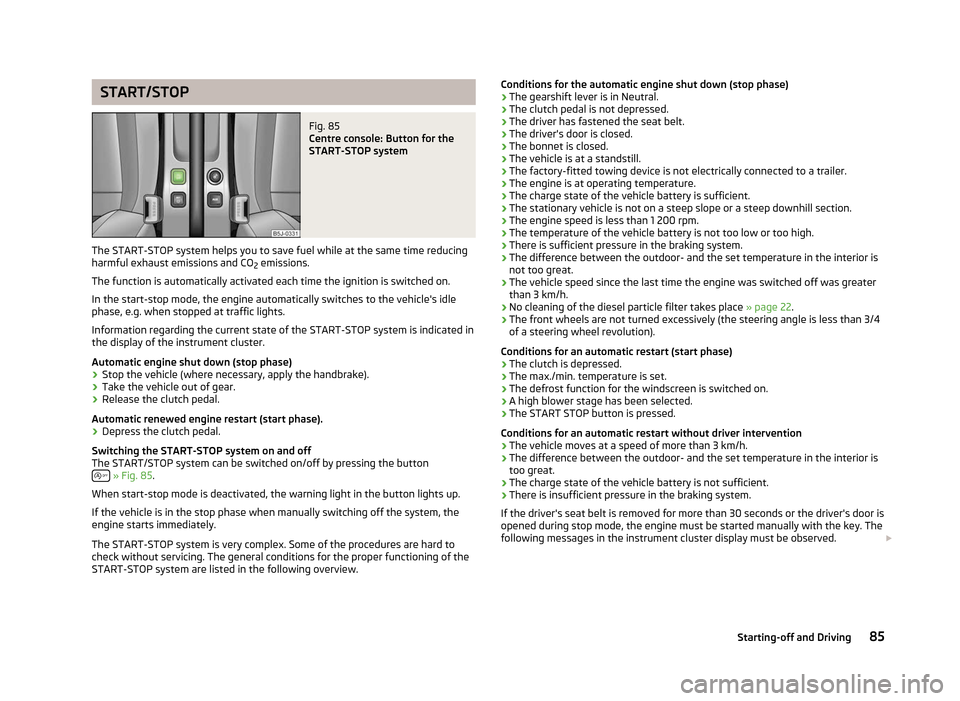
Fig. 85
Centre console: Button for the
START-STOP system
The START-STOP system helps you to save fuel while at the same time reducing
harmful exhaust emissions and CO 2 emissions.
The function is automatically activated each time the ignition is switched on.
In the start-stop mode, the engine automatically switches to the vehicle's idle
phase, e.g. when stopped at traffic lights.
Information regarding the current state of the
START-STOP system is indicated in
the display of the instrument cluster.
Automatic engine shut down (stop phase)
› Stop the vehicle (where necessary, apply the handbrake).
› Take the vehicle out of gear.
› Release the clutch pedal.
Automatic renewed engine restart (start phase).
› Depress the clutch pedal.
Switching the
START-STOP system on and off
The START/STOP system can be switched on/off by pressing the button » Fig. 85.
When start-stop mode is deactivated, the warning light in the button lights up.
If the vehicle is in the stop phase when manually switching off the system, the
engine starts immediately.
The
START-STOP system is very complex. Some of the procedures are hard to
check without servicing. The general conditions for the proper functioning of the
START-STOP system are listed in the following overview. Conditions for the automatic engine shut down (stop phase)
› The gearshift lever is in Neutral.
› The clutch pedal is not depressed.
› The driver has fastened the seat belt.
› The driver's door is closed.
› The bonnet is closed.
› The vehicle is at a standstill.
› The factory-fitted towing device is not electrically connected to a trailer.
› The engine is at operating temperature.
› The charge state of the vehicle battery is sufficient.
› The stationary vehicle is not on a steep slope or a steep downhill section.
› The engine speed is less than 1
200 rpm.
› The temperature of the vehicle battery is not too low or too high.
› There is sufficient pressure in the braking system.
› The difference between the outdoor- and the set temperature in the interior is
not too great.
› The vehicle speed since the last time the engine was switched off was greater
than 3 km/h.
› No cleaning of the diesel particle filter takes place
» page 22.
› The front wheels are not turned excessively (the steering angle is less than 3/4
of a steering wheel revolution).
Conditions for an automatic restart (start phase)
› The clutch is depressed.
› The max./min. temperature is set.
› The defrost function for the windscreen is switched on.
› A high blower stage has been selected.
› The START STOP button is pressed.
Conditions for an automatic restart without driver intervention
› The vehicle moves at a speed of more than 3 km/h.
› The difference between the outdoor- and the set temperature in the interior is
too great.
› The charge state of the vehicle battery is not sufficient.
› There is insufficient pressure in the braking system.
If the driver's seat belt is removed for more than 30 seconds or the driver's door is
opened during stop mode, the engine must be started manually with the key. The
following messages in the instrument cluster display must be observed. £
85
Starting-off and Driving