2012 SKODA FABIA heating
[x] Cancel search: heatingPage 5 of 196

Table of Contents
Abbreviations
Using the system
Cockpit 7
Overview 6
Instruments and Indicator Lights 8
Instrument cluster 8
Multifunction display (onboard computer) 12
MAXI DOT (information display) 15
Warning lights 17
Unlocking and locking 25
Vehicle key 25
Locking/unlocking the vehicle without central
locking 26
Central locking system 27
Remote control 29
Anti-theft alarm system 31
Interior monitor and towing protection 31
Emergency locking of the doors 32
Boot lid 32
Electrical power windows 34
Electric sliding/tilting roof 36
Lights and visibility 38
Lights 38
Interior light 43
Visibility 44
Windscreen wipers and washers 44
Rear window 47
Seats and Stowage 49
Front seats 49
Head restraints 51
Rear seats 52Boot 53
Variable loading floor in the luggage
compartment (Combi) 57
Net partition (Combi) 58
Bicycle carrier in the luggage compartment 60
Roof rack system 62
Cup holders 63
Ashtray 64
Cigarette lighter, 12-volt power socket 64
Storage compartments 65
Clothes hooks 69
Parking ticket holder 69
Heating and air conditioning system 70
Heating and air conditioning system 70
Air outlet vents 71
Heating 71
Air conditioning system (manual air conditioning
system) 73
Climatronic (automatic air conditioning
system) 76
Starting-off and Driving 79
Starting and stopping the engine 79
Brakes and brake assist systems 81
Shifting (manual gearbox) 85
pedals 85
Parking aid 85
Cruise control system (CCS) 86
START/STOP 88
Automatic gearbox 90
Automatic gearbox 90
Communication 95
Mobile phones and two-way radio systems 95
Universal telephone preinstallation GSM II 95
Voice control 99
Multimedia 101 Safety
Passive Safety 103
General information 103
Correct seated position 104
Seat belts 107
Seat belts 107
Airbag system 111
Description of the airbag system 111
Front airbags 112
Side airbags 113
Head airbags 114
Deactivating airbags 115
Transporting children safely 117
Child seat 117
Driving Tips
Driving and the Environment 121
The first 1 500 km 121
Catalytic converter 121
Economical and environmentally friendly
driving 122
Environmental compatibility 124
Driving abroad 125
Avoiding damage to your vehicle 125
Driving through water on the street 126
Towing a trailer 127
Towing a trailer 127
General Maintenance
Taking care of and cleaning the vehicle 129
Taking care of your vehicle 129
3
Table of Contents
Page 9 of 196
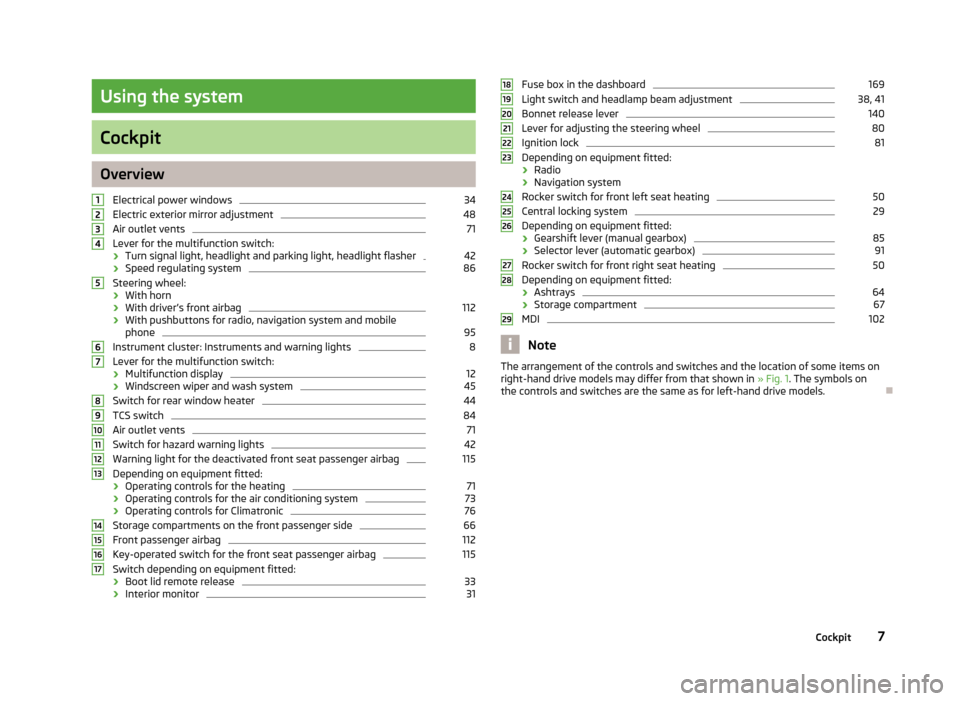
Using the system
Cockpit
Overview
Electrical power windows 34
Electric exterior mirror adjustment 48
Air outlet vents 71
Lever for the multifunction switch:
› Turn signal light, headlight and parking light, headlight flasher 42
› Speed regulating system 86
Steering wheel:
› With horn
› With driver’s front airbag 112
› With pushbuttons for radio, navigation system and mobile
phone 95
Instrument cluster: Instruments and warning lights 8
Lever for the multifunction switch:
› Multifunction display 12
› Windscreen wiper and wash system 45
Switch for rear window heater 44
TCS switch 84
Air outlet vents 71
Switch for hazard warning lights 42
Warning light for the deactivated front seat passenger airbag 115
Depending on equipment fitted:
› Operating controls for the heating 71
› Operating controls for the air conditioning system 73
› Operating controls for Climatronic 76
Storage compartments on the front passenger side 66
Front passenger airbag 112
Key-operated switch for the front seat passenger airbag 115
Switch depending on equipment fitted:
› Boot lid remote release 33
› Interior monitor 311
2
3
4
5
6
7
8
9
10
11
12
13
14
15
16
17 Fuse box in the dashboard 169
Light switch and headlamp beam adjustment 38, 41
Bonnet release lever 140
Lever for adjusting the steering wheel 80
Ignition lock 81
Depending on equipment fitted:
› Radio
› Navigation system
Rocker switch for front left seat heating 50
Central locking system 29
Depending on equipment fitted:
› Gearshift lever (manual gearbox) 85
› Selector lever (automatic gearbox) 91
Rocker switch for front right seat heating 50
Depending on equipment fitted:
› Ashtrays 64
› Storage compartment 67
MDI 102
Note
The arrangement of the controls and switches and the location of some items on
right-hand drive models may differ from that shown in »
Fig. 1. The symbols on
the controls and switches are the same as for left-hand drive models. Ð 18
19
20
21
22
23
24
25
26
27
28
29
7
Cockpit
Page 11 of 196

›
Set hours/minutes
› Activate/deactivate display mode
Fuel gauge »
page 9 ÐEngine revolutions counter
First read and observe the introductory information and safety warn-
ings on page 8.
The red scale of the rev counter 1
» Fig. 2 on page 8 indicates the range in which
the engine control unit begins to limit the engine speed. The engine control unit
restricts the engine speed to a steady limit.
You should shift into the next higher gear before the red scale of the revolution
counter is reached, or move the selector lever into position D if your car is fitted
with an automatic gearbox.
To maintain the optimum motor speed, observe the gearshift indica-
tor » page 11. For the sake of the environment
Shifting to a higher gear in good time helps to lower fuel consumption, minimises
operating noise levels, protects the environment and contributes to a longer life
and reliability of the engine. ÐSpeedometer
First read and observe the introductory information and safety warn-
ings on page 8.
Warning against excessive speeds
An audible warning signal will sound when the vehicle speed exceeds 120
km/h.
The audible warning signal is switched off when the vehicle speed falls below
this speed limit. Note
This function is only valid for some countries. Ð7
ä
ä Coolant temperature gauge
First read and observe the introductory information and safety warn-
ings on page 8.
The coolant temperature gauge 4
» Fig. 2 on page 8 operates only when the ig-
nition is switched on.
The following guidelines regarding the temperature ranges must be observed to
avoid any damage to the engine.
Cold range
If the pointer is still in the left area of the scale it means that the engine has not
yet reached its operating temperature. Avoid high speeds, full throttle and high
engine loads.
The operating range
The engine has reached its operating temperature as soon as the pointer moves
into the mid-range of the scale, for a normal style of driving. The pointer may also
move further to the right at high engine loads and high outside temperatures. CAUTION
Additional headlights and other attached components in front of the fresh air in-
let impair the cooling efficiency of the coolant. There is then a risk of the engine
overheating at high outside temperatures and high engine loads »
page 19. Ð Fuel gauge
First read and observe the introductory information and safety warn-
ings on page 8.
The fuel gauge 7
» Fig. 2 on page 8 only operates when the ignition is switched
on.
The fuel tank has a capacity of about 45 litres. The indicator light in the instru-
ment cluster lights up when the pointer reaches the reserve mark-
ing » page 22 . CAUTION
Never drive until the fuel tank is completely empty! An irregular supply of fuel can
lead to irregular engine running. Unburnt fuel may get into the exhaust system
and damage the catalytic converter. £
ä
ä
9
Instruments and Indicator Lights
Page 36 of 196

Electrical power windows
ä
Introduction
This chapter contains information on the following subjects:
Opening/closing the windows 34
Force limiter of the electrical power windows 35
Window convenience operation 35
Operational faults 35
WARNING
■ If the vehicle is locked from the outside, do not leave anybody in the vehicle
as it is not possible to open the windows from the inside in the event of an
emergency.
■ The system is fitted with a force limiter » page 35. If there is an obstacle,
the closing process is stopped and the window goes down by several centi-
metres. The windows should nevertheless be closed carefully! Otherwise
these can cause severe crushing injuries!
■ It is recommended to deactivate the electrical power windows in the rear
doors (safety pushbutton) S
» Fig. 19 on page 34 when children are being
transported on the rear seats. CAUTION
■ Keep the windows clean to ensure the correct functionality of the electric win-
dows. ■ In the event that the windows are frozen, first of all eliminate the
ice » page 132 , De-icing windows and exterior mirrors and only then operate the
electrical power windows. Otherwise, the electrical power window mechanism
could be damaged. ■ When leaving the locked vehicle make sure that the windows are closed at all
times. Note
■ After switching the ignition off, it is still possible to open or close the windows
for approx. 10
minutes. The electrical power windows are only switched off com-
pletely once the driver's door or front passenger door are opened. ■ When driving always use the existing heating, air conditioning and ventilation
system for ventilating the interior of the vehicle. If the windows are opened, dust
as well as other dirt can get into the vehicle and in addition the wind noise is
more at certain speeds.
■ At high speeds, you should keep the windows closed to prevent unnecessarily
high fuel consumption. Ð Opening/closing the windows
Fig. 19
Buttons on the driver's door/in the rear doors
First read and observe the introductory information and safety warn-
ings on page 34.
The electrical power windows can only be operated when the ignition is switched
on.
Opening
›
A window is opened by pressing lightly on the respective button in the door.
The opening process stops when one releases the button.
› Additionally, the window can be opened automatically (fully open) by pressing
the button to the stop. Renewed pressing of the button causes the window to
stop immediately.
Closing
› A window is closed through pulling lightly on the respective button in the door.
The closing process stops when one releases the button. £
ä
34 Using the system
Page 37 of 196

›
Additionally, the window can be closed automatically (fully closed) by pulling
the button to the stop. Renewed pulling of the button causes the window to
stop immediately.
Buttons for the electrical power windows
Button for electrical power window of the driver's door
Button for electrical power window of the front passenger door
Button for electrical power window of the rear right door
Button for electrical power window of the rear left door
Safety pushbutton
Safety pushbutton
The buttons for electrical power windows in the rear doors can be deactivated by
pressing the safety pushbutton S
» Fig. 19
. The buttons for the electrical power
windows in rear doors are activated again by pressing the safety pushbutton S
again.
If the buttons for the rear doors are deactivated, the warning light
in the safe-
ty switch S
lights up.
Note
The window lift mechanism is equipped with protection against overheating. Re-
peated opening and closing of the window can cause this mechanism to over-
heat. If this happens, it will not be possible to operate the window for a short
time. You will be able to operate the window again as soon as the overheating
protection has cooled down. ÐForce limiter of the electrical power windows
First read and observe the introductory information and safety warn-
ings on page 34.
The electrical power windows are fitted with a force limiter. It reduces the risk of
bruises or injuries when closing the windows.
If there is an obstacle, the closing process is stopped and the window goes down
by several centimetres.
If the obstacle prevents the window from being closed during the next 10 sec-
onds, the closing process is interrupted once again and the window goes down by
several centimetres. A
B
C
D
S
ä If you attempt to close the window again within 10 seconds of the window being
moved down for the second time, even though the obstacle was not yet been re-
moved, the closing process is only stopped. During this time it is not possible to
automatically close the window. The force limiter is still switched on.
The force limiter is only switched off if you attempt to close the window again
within the next 10
seconds - the window will now close with full force!
If you wait longer than 10 seconds, the force limiter is switched on again. Ð Window convenience operation
First read and observe the introductory information and safety warn-
ings on page 34.
The electrical power windows can be opened and closed as follows when unlock-
ing and locking the vehicle.
Opening
› Press and hold the unlock button
on the remote control key.
› Hold the key in the driver's lock in the unlock position.
Closing
› Press and hold the lock button
on the remote control key.
› Hold the key in the driver's lock in the lock position.
You can interrupt the opening or closing process for the windows immediately by
releasing the key or the lock button. Ð Operational faults
First read and observe the introductory information and safety warn-
ings on page 34.
Electrical power windows do not operate
If the battery has been disconnected and then reconnected while the window
was opened, the electrical power windows will not operate. The system must be
activated. Proceed as follows in order to re-establish the function:
›
switch on the ignition;
› pull the top edge of the button in the driver's door to close the window;
› release the button;
› pull the relevant button upwards again for approx. 3
seconds.£
ä
ä
35
Unlocking and locking
Page 46 of 196

Boot light
The light comes on automatically when the boot lid is opened. If the lid remains
open for more than about 10
minutes, the boot light switches off automatically. ÐVisibility
Rear window heater
Fig. 29
Switch for rear window heater
› The rear window heater is switched on or off by pressing the switch
»
Fig. 29
the warning light in the switch comes on or goes out.
The rear window heater only operates when the engine is running.
The rear window heater switches off automatically after 7 minutes. For the sake of the environment
The heating should be switched off as soon as the window is de-iced or free from
mist. The reduced current consumption will have a favourable effect on fuel econ-
omy »
page 124 , Saving electricity .Note
If the on-board voltage drops, the rear window heater switches off automatically,
in order to provide sufficient electrical energy for the engine control »
page 149,
Automatic load deactivation . Ð Sun visors
Fig. 30
Sun visor: swivelling out
The sun visor for the driver or front passenger can be pulled out of the fixture and
swivelled towards the door in the direction of the arrow 1
» Fig. 30.
The vanity mirrors in the sun visors are provided with covers. Push the cover in
the direction of the arrow 2
.
The purpose of the strap A
is to store small, light objects, such as a notepad, etc.
WARNING
The sun visors must not be swivelled towards the side windows in the deploy-
ment area of the head airbags if any objects, such as ball-point pens, etc. are
attached to them. This might result in injuries to the occupants if the head air-
bag is deployed. Ð Windscreen wipers and washers
ä
Introduction
This chapter contains information on the following subjects:
Activating the windscreen wipers and washers 45
Headlight cleaning system 46
Replacing the windscreen wiper blades 46
Replacing the rear window wiper blade - Version 1 46
Replacing the rear window wiper blade - Version 2 47
The windshield wipers and the windshield washer system only operate if the igni-
tion is switched on. £
44 Using the system
Page 47 of 196

The rear window is wiped once if the windscreen wipers are on when reverse
gear is selected.
Top up with windscreen wiper fluid
» page 145.WARNING
■ Properly maintained windscreen wiper blades are essential for clear visibility
and safe driving » page 46. ■ Do not use the windscreen washer system at low temperatures, without
heating the windscreen beforehand. Otherwise the window cleaner could
freeze on the windscreen and restrict the view to the front. CAUTION
■ In cold temperatures and during the winter, check before the journey or before
switching on the ignition that the wiper blades are not frozen to the windscreen.
If the windscreen wipers are switched on when the blades are frozen to the
windscreen, this may damage both the blades and windscreen wiper motor!
■ If the ignition is switched off while the windscreen wipers are switched on, the
windscreen wipers will continue wiping in the same mode after the ignition is
turned back on. The windscreen wipers could freeze up in cold temperatures be-
tween the time the ignition was turned off and when it was turned back on again.
■ Carefully detach frozen wiper blades from the front or rear window.
■ Remove snow and ice from the windscreen wipers before driving.
■ If the windscreen wipers are handled carelessly, there is a risk of damage to the
windscreen.
■ Replace the windscreen wiper blades once or twice a year for safety reasons.
These can be purchased from a ŠKODA Service Partner.Note
■ The windscreen washer nozzles for the windscreen are heated when the en-
gine is running and the outside temperature is less than approx. +10
°C.
■ The content of the windscreen washer fluid reservoir is 3.5 litres. On vehicles
fitted with the headlight cleaning system, the volume is around 5.4
litres.
■ The wiper blades should be cleaned on a regular basis with a windscreen clean-
er to avoid any smears. The wiper blades should be cleaned with a sponge or
cloth if they are heavily soiled by insect residues, for example. Ð Activating the windscreen wipers and washers
Fig. 31
Windscreen wiper lever
First read and observe the introductory information and safety warn-
ings on page 44.
Flick wipe
›
If you only wish to wipe the windscreen
briefly, push the lever into the spring-
tensioned position 4
» Fig. 31.
Periodic wiping
› Position the lever upwards into position 1
» Fig. 31.
› Set the desired break between the individual wiper strokes with the switch A
.
Slow wipe
› Position the lever upwards into position 2
» Fig. 31.
Fast wipe
› Position the lever upwards into position 3
» Fig. 31.
Automatic wipe/wash for windscreen
› Pull the lever towards the steering wheel into the spring-tensioned position 5
» Fig. 31, the wash system and the windshield wipers will operate.
› Release the lever. The windscreen wash system stops and the wiper continues
for another 1 - 3 wiper strokes (depending on the period of spraying of the
windscreen).
Wiping the rear window pane
› Push the lever away from the steering wheel into position 6
» Fig. 31
and the
windscreen wiper will operate every 6 seconds.
Automatic wipe/wash for the rear window
› Push the lever away from the steering wheel into the spring-tensioned position 7
» Fig. 31, the windshield wiper and wash system will operate.
£
ä
45
Lights and visibility
Page 50 of 196

Exterior mirror
Fig. 36
Inner part of door: Rotary knob
Adjust the rear mirror before commencing to drive so that there is a clear view to
the rear.
Heating of the external mirror
› Place the rotary knob into the position
» Fig. 36.
The exterior mirror heater only operates when the engine is running and up to an
outside temperature of +20 °C.
Adjusting the left-hand exterior mirror
› Place the rotary knob into the position
» Fig. 36. The movement of the mirror
surface is identical to the movement of the rotary knob.
Adjusting the right-hand exterior mirror
› Place the rotary knob into the position
» Fig. 36. The movement of the mirror
surface is identical to the movement of the rotary knob. WARNING
■ Convex (curved outward) exterior mirrors increase the field of vision. They
do, however, make objects appear smaller in the mirror. These mirrors are
therefore only of limited use for estimating distances to the following vehi-
cles.
■ Whenever possible use the interior mirror for estimating the distances to
the following vehicles. Note
■ Do not touch the surface of the exterior mirrors if the exterior mirror heater is
switched on. ■ If the power setting function fails at any time, the exterior mirrors can be set by
hand by pressing on the edge of the mirror surface.
■ Contact your ŠKODA specialist garage if there is a fault with the power setting
of the exterior mirrors. Ð48
Using the system