2012 RENAULT MEGANE RS rs mode
[x] Cancel search: rs modePage 72 of 239

menu for customising the vehicle settings
(up to the end of the DU)
customising the vehicle settings ........... (up to the end of the DU)
customised vehicle settings .................. (up to the end of the DU)
1.66
ENG_UD11347_2
Menu de personnalisation des réglages du véhicule (X95 - B95 - D9\
5 - Renault)
ENG_NU_837-6_BDK95_Renault_1
vehicle settings customisation menu
vEHIcLE sETTINgs cUsTOmIsATION mENU
Adjusting the settingsPress one of buttons 2 or 3 to select a
function to change:
a) Auto door locking while driving ;
b) Unlock driver’s door only ;
c) Auto rear wipe with reverse gear ;
d) Auto dipped-beam headlights ;
e) Front parking sensor ;
f) Rear parking sensor ;
g) Parking sensor volume ;
h) LANGUAGE.
= function activated
< function deactivated
On equipped vehicles, this function,
which is integrated in the trip compu
-
ter and warning system 1 , allows you
to activate/deactivate some of the vehi-
cle’s functions.
Accessing the settings
customisation menu
With the vehicle stationary, press either
button 2 or 3 until the message “Settings
menu: press and hold ” appears on dis-
play 1 . Press either button 2 or 3 for
longer than 2 seconds to enter the
menu.
Once a line has been selected, keep
pressing either button 2 or 3 to change
the function: If you select either “Parking
sensor volume ” or “LANGUAGE ”, you
will be given a new choice of options
(parking distance control volume or in-
strument panel language). In this case,
make your selection and confirm it by
holding either button 2 or 3 , the value
selected is shown by a
~ in front
of the line.
To exit the menu, select “ EXIT” or
“ BACK ” then confirm by holding either
button 2 or 3 . It may be necessary to
carry out this operation several times.
2
3
1
The vehicle settings customisation
menu cannot be used when driving.
At speeds of above 12 mph (20 km/h)
for vehicles with a manual gearbox
(0 mph for vehicles with an auto -
matic gearbox), the on-board dis -
play returns automatically to the
trip computer and warning system
mode.
Page 75 of 239

rear view mirrors ................................... (up to the end of the DU)
1.69
ENG_UD6288_1
Rétroviseurs (X95 - B95 - D95 - Renault)
ENG_NU_837-6_BDK95_Renault_1
Rear view mirrors
folding door mirrors
The door mirrors automatically fold in
when the vehicle is locked (switch 2 in
position B ). In this case, they will fold
out when the ignition is next switched
on.
In any case, you can make the door
mirrors fold in (switch 2 in position C) or
fold out (switch 2 in position A).
Automatic mode is then deactivated. To
reactivate it, position switch 2 to B.
REAR vIEW mIRRORs
door mirrors
Adjustment
Select the door mirror using switch 3 ,
then use button 1 to adjust it to the de-
sired position.
Heated door mirrors
Mirror de-icing is carried out at the
same time as rear screen de-icing.
The driver’s door mirror may
have two clearly defined
zones. Zone E shows what
can normally be seen in an
ordinary rear view mirror. Zone D in-
creases rear side visibility.
The objects in zone D look much
further away than they really are.
Interior rear view mirror
Its position can be adjusted.
Rear view mirror with lever 4
When driving at night, to avoid being
dazzled by the headlights of the vehicle
behind, depress the little lever located
behind rear view mirror 4.
Rear view mirror without lever 4
The rear view mirror darkens automati-
cally at night if you are being followed
by a vehicle with its lights on.
1
2
A
c
B
4
dE
3
Page 89 of 239

starting the engine ................................ (up to the end of the DU)
engine start/stop button ........................ (up to the end of the DU)
starting the engine ................................ (up to the end of the DU)
driving ................................................... (up to the end of the DU)
2.3
ENG_UD18932_3
Démarrage / Arrêt moteur avec carte RENAULT mains libres (X95 - B95 - D95 - Renault)
ENG_NU_837-6_BDK95_Renault_2
Starting the engine
STARTING THE ENGINE (1/2)
Remote control RENAULT
card
When you get into the vehicle, insert the
RENAULT card fully into card reader 2.
To start, press button 1. If a gear is en-
gaged, depress the clutch pedal to start
the vehicle.
Hands-free RENAULT card
The RENAULT card must be inserted
in card reader 2 or in detection zone 3.
To start, depress the brake or clutch
pedal and press button 1 . If a gear
is engaged, the vehicle may only be
started by depressing the clutch pedal.
Starting
vehicles with an automatic gearbox
The lever should be in position P.
For all vehicles:
– if one of the starting conditions is
not met the message “Press brake +
START”, “Press clutch + START” or
“Gear lever to P” is displayed on the
instrument panel.
– In some cases it will be necessary to
move the steering wheel while press-
ing start button 1 to assist in unlock-
ing the steering column; a message
on the instrument panel “Turn steer-
ing wheel + START” warns of this.
Starting with the tailgate
open (in hands-free mode)
In this case, the RENAULT card must
not be located in the luggage compart-
ment.
3
12
Page 95 of 239

driving ................................................... (up to the end of the DU)
electronic parking brake ....................... (up to the end of the DU)
2.9
ENG_UD11746_2
Frein de parking assisté (X95 - B95 - D95 - Renault)
ENG_NU_837-6_BDK95_Renault_2
Electronic parking brake
Before leaving the vehicle,
check that the electronic
parking brake is fully ap -
plied. Indicator light 2 on
switch 3 and indicator light
}
on the instrument panel light up to
show that the parking brake is ap -
plied but go out when the doors are
locked.
Note:
To indicate that the electronic parking
brake is applied or released, a beep
sounds and the message “ Apply park-
ing brake ” appears on the instrument
panel:
– with the engine running: when the
driver’s door is opened;
– with the engine switched off (eg.
when the engine stalls): when a front
door is opened.
In this case, pull and release switch 3 to
apply the electronic parking brake.
Automatic releasing of the
electronic parking brake
The brake will be released as soon as
the vehicle moves, by accelerating with
a gear selected and the engine running.
Automatic operation
The electronic parking brake en -
sures vehicle immobilisation when the
engine is stopped and engine Start/
Stop button 1 is pressed.
In all other instances, e.g. engine stall-
ing, the electronic parking brake is not
applied automatically. Manual mode
must be used.
For certain country-specific model ver-
sions, the automatic brake application
function is not activated. Refer to the in-
formation on “Manual operation”.
ELECTRONIC PARkING bRAkE (1/3)
To confirm that the electronic parking
brake is applied, the message “Parking
brake on ” and indicator light
}
on the instrument panel and indicator
light 2 on switch 3 light up.
After the engine is switched off, indi -
cator light 2 goes out several minutes
after the electronic parking brake has
been applied and indicator light
}
goes out when the vehicle is locked.
1
2
3
Page 98 of 239

driving ................................................... (up to the end of the DU)
fuel economy ........................................ (up to the end of the DU)
advice on antipollution .......................... (up to the end of the DU)
antipollution advice .............................................................. (current page)
fuel advice on fuel economy ................................... (current page)
2.12
ENG_UD18947_5
Conseils antipollution, économie de carburant, conduite (X45 - H45 -\
X85 - B85 - C85 - S85 - X83 - X61 - F61 - K61 - K85 - X95 - B95 - D95 -\
J95 - R95 - L38 - X61 BUp
ENG_NU_837-6_BDK95_Renault_2
Jaune NoirNoir texte
Advice: antipollution and fuel economy
ADVICE: antipollution, fuel economy and driving (1/3)
Your vehicle complies with criteria for
recycling and recovering vehicles at the
end of their service life which will come
into force in 2015.
Some parts of your vehicle have there-
fore been designed to facilitate future
recycling.
These parts are easy to remove so
that they can be recovered and reproc-
essed by recycling companies.
By virtue of its design, moderate fuel
consumption and initial settings, your
vehicle also conforms to current anti-
pollution regulations. The manufac -
turer is actively striving to reduce pol -
lutant exhaust gas emissions and to
save energy. But the fuel consumption
of your vehicle and the level of pollutant
exhaust gas emissions are also your
responsibility. Ensure that it is main -
tained and used correctly.Aiding fuel economy
Depending on the vehicle, in order to
optimise consumption, an indicator light
on the instrument panel will inform you
of the best moment to upshift or down -
shift gears:
\ shift up a gear;
[ shift down a gear.
Maintenance
It is important to remember that failure to
respect antipollution regulations could
lead to legal action being taken against
the vehicle owner. In addition, replacing
engine, fuel supply system and exhaust
components with parts other than those
originally recommended by the manu -
facturer may alter your vehicle so that
it no longer complies with antipollution
regulations. Have your vehicle adjusted and
checked by an approved Dealer, in ac-
cordance with the instructions given in
your maintenance schedule: they will
have all the equipment necessary for
ensuring that your vehicle is maintained
to its original standard.
Engine adjustments–
ignition: this does not require ad -
justment.
– spark plugs: for optimum fuel econ-
omy, efficiency and performance
the specifications laid down by our
Design Department must be strictly
applied.
If the spark plugs have to be
changed, use the make, type and
gap specified for your vehicle’s
engine. Contact an approved dealer
for this.
– idle: this does not require adjust -
ment.
– air filter, diesel filter: a clogged ele-
ment reduces performance. It must
be replaced.
Page 99 of 239

JauneNoirNoir texte
2.13
ENG_UD18947_5
Conseils antipollution, économie de carburant, conduite (X45 - H45 -\
X85 - B85 - C85 - S85 - X83 - X61 - F61 - K61 - K85 - X95 - B95 - D95 -\
J95 - R95 - L38 - X61 BUp
ENG_NU_837-6_BDK95_Renault_2
ADVICE: antipollution, fuel economy and driving (2/3)
– Brake as little as possible. If you an-
ticipate an obstacle or bend in ad -
vance, you may then simply release
the accelerator pedal.
– Avoid sudden acceleration.
– Do not overrev the engine in the in-
termediate gears.
Always use the highest gear possi -
ble without labouring the engine.
On versions with an automatic gear-
box, it is preferable to keep the gear
lever in position D.
– Do not try to maintain the same
speed up a hill, accelerate no more
than you would on the level. Keep
your foot in the same position on the
accelerator pedal.
– Double declutching and accelerating
before switching off are unnecessary
in modern vehicles.
– Bad weather, flooded roads:
Do not drive through floods
if the water is above the
lower edge of the wheel
rims.
Driving
– Drive carefully for the first few miles
until the engine reaches its normal
operating temperature, rather than
let it warm up while the vehicle is sta-
tionary.
– Speed is expensive.
– Sporty driving uses a lot of fuel: drive
with a light right foot.
Exhaust gas monitoring
system
The exhaust gas monitoring system will
detect any operating faults in the vehi-
cle’s antipollution system.
If this system malfunctions, toxic sub -
stances may be released into the at -
mosphere or damage may occur.
ÄThis warning light on the in -
strument panel will indicate if
there are any faults in the system:
This lights up when the ignition is
switched on and goes out when the
engine is started.
– If it lights up continuously, consult an
approved Dealer as soon as possi -
ble;
– if it flashes, reduce the engine speed
until the light stops flashing. Contact
your approved dealer as soon as
possible.
Page 119 of 239
automatic gearbox (use) ....................... (up to the end of the DU)
automatic gearbox selector lever ..........(up to the end of the DU)
changing gear ....................................... (up to the end of the DU)
reverse gear selecting .......................................... (up to the end of the DU)
driving ................................................... (up to the end of the DU)
2.33
ENG_UD14762_4
Boîte automatique (X95 - B95 - D95 - Renault)
ENG_NU_837-6_BDK95_Renault_2
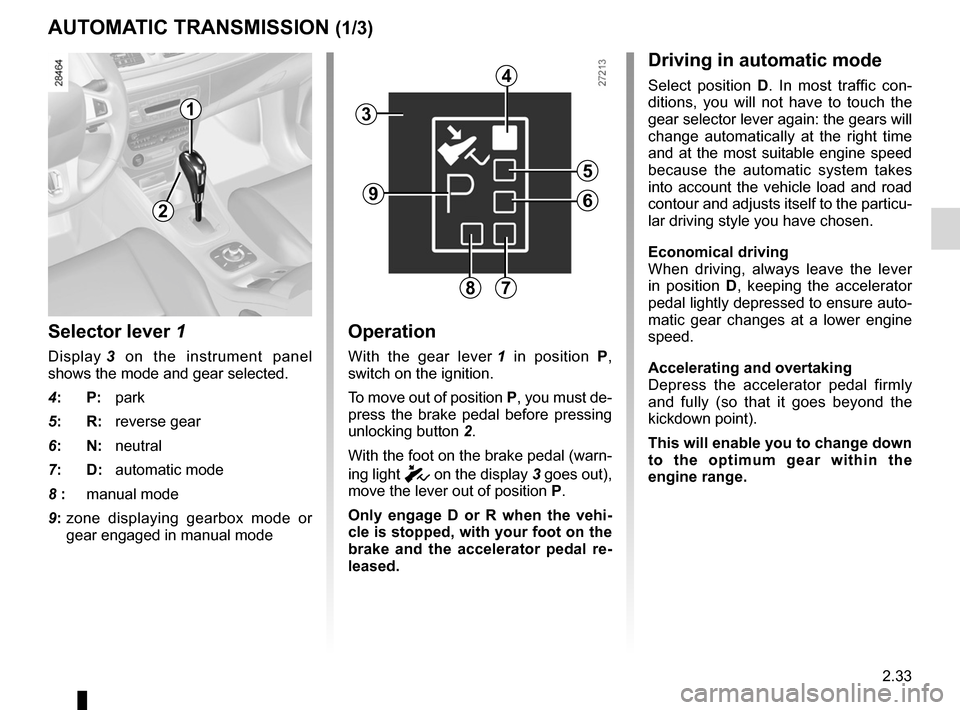
Selector lever 1
Display 3 on the instrument panel
shows the mode and gear selected.
4: P: park
5: R: reverse gear
6: N: neutral
7: D: automatic mode
8 : manual mode
9: zone displaying gearbox mode or
gear engaged in manual mode
Operation
With the gear lever 1 in position P,
switch on the ignition.
To move out of position P, you must de-
press the brake pedal before pressing
unlocking button 2.
With the foot on the brake pedal (warn-
ing light
c on the display 3 goes out),
move the lever out of position P.
Only engage D or R when the vehi -
cle is stopped, with your foot on the
brake and the accelerator pedal re -
leased.
Automatic gearbox
AUTOMATIC TRANSMISSION (1/3)
Driving in automatic mode
Select position D. In most traffic con -
ditions, you will not have to touch the
gear selector lever again: the gears will
change automatically at the right time
and at the most suitable engine speed
because the automatic system takes
into account the vehicle load and road
contour and adjusts itself to the particu-
lar driving style you have chosen.
Economical driving
When driving, always leave the lever
in position D, keeping the accelerator
pedal lightly depressed to ensure auto-
matic gear changes at a lower engine
speed.
Accelerating and overtaking
Depress the accelerator pedal firmly
and fully (so that it goes beyond the
kickdown point).
This will enable you to change down
to the optimum gear within the
engine range.
3
2
1
4
5
6
78
9
Page 120 of 239

2.34
ENG_UD14762_4
Boîte automatique (X95 - B95 - D95 - Renault)
ENG_NU_837-6_BDK95_Renault_2
Jaune NoirNoir texte
Parking the vehicle
When the vehicle is stopped, move the
lever to position P while keeping your
foot on the brake pedal: the gearbox is
in neutral and the drive wheels are me-
chanically locked by the driveshaft.
Apply the handbrake or, depending
on the vehicle, ensure that the elec-
tronic parking brake is applied.
Special circumstances
– If the road contours and bends
do not allow you to stay in auto -
matic mode (e.g.: in the mountains),
we recommend that you change to
manual mode.
This will prevent the automatic gear-
box from changing gears repeatedly
when climbing, and permit engine
braking on long descents.
– In cold weather, to prevent the
engine from stalling, wait a few mo-
ments before shifting the selector
lever from position P or N and en -
gaging D or R.
Driving in manual mode
With the selector lever in position D,
move the lever to the left. Shifting the
lever repeatedly allows you to change
gears manually:
– To move down through the gears,
push the lever backwards;
– To move up through the gears, push
the lever forwards.
The gear selected is displayed on the
instrument panel.
Special cases
In certain driving conditions (e.g.:
engine protection, operation of the
Electronic Stability Program) the auto -
mated system may change the gear au-
tomatically.
Likewise, to prevent incorrect manoeu -
vres, a gear change may be refused by
the automatic system: in this case the
gear display flashes for a few seconds
as a warning.
AUTOMATIC TRANSMISSION (2/3)
In very cold weather, the system
may prevent the gears from being
shifted in manual mode until the
gearbox reaches the right tempera-
ture.
An impact to the under -
side of the vehicle while
manoeuvring (e.g.: strik -
ing a post, raised kerb or
other street furniture) may result in
damage to the vehicle (e.g.: defor -
mation of an axle).
To avoid any risk of accident, have
your vehicle checked by an ap -
proved Dealer.