Page 125 of 264
automatic gearbox (use) ....................... (up to the end of the DU)
changing gear ....................................... (up to the end of the DU)
driving ................................................... (up to the end of the DU)
automatic gearbox selector lever ..........(up to the end of the DU)
2.31
ENG_UD12577_2
Boîte automatique (X85 - B85 - C85 - S85 - K85 - Renault)
ENG_NU_853-8_BCSK85_Renault_2
Automatic gearbox
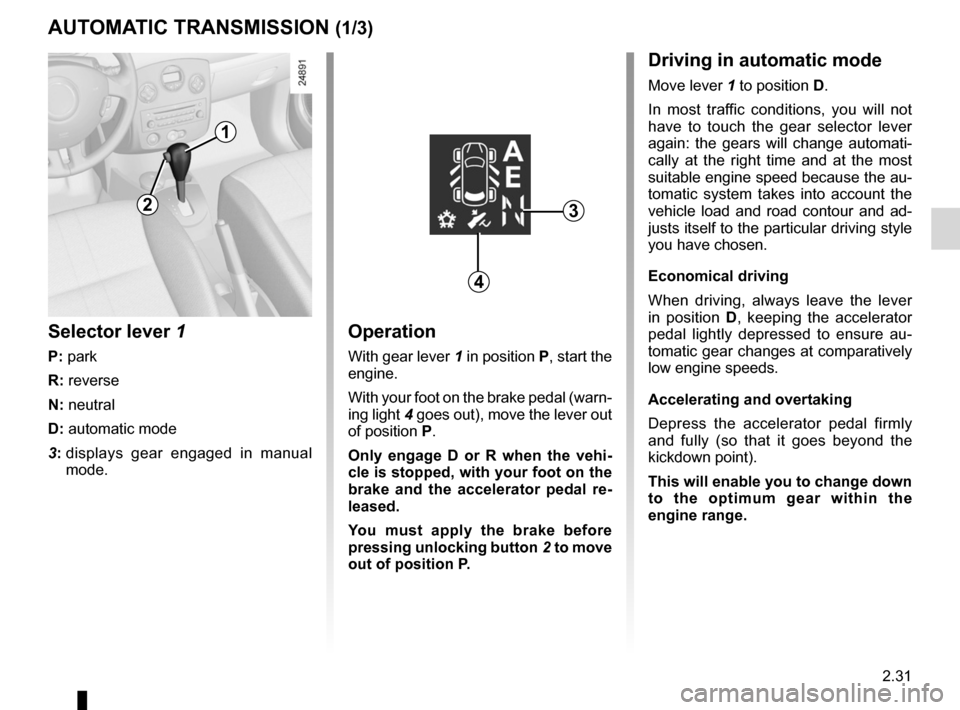
Operation
With gear lever 1 in position P, start the
engine.
With your foot on the brake pedal (warn-
ing light 4 goes out), move the lever out
of position P.
Only engage D or R when the vehi -
cle is stopped, with your foot on the
brake and the accelerator pedal re -
leased.
You must apply the brake before
pressing unlocking button 2 to move
out of position P.
Selector lever 1
P: park
R: reverse
N: neutral
D: automatic mode
3: displays gear engaged in manual
mode.
AUTOMATIC TRANSMISSION (1/3)
1
3
Driving in automatic mode
Move lever 1 to position D.
In most traffic conditions, you will not
have to touch the gear selector lever
again: the gears will change automati -
cally at the right time and at the most
suitable engine speed because the au-
tomatic system takes into account the
vehicle load and road contour and ad-
justs itself to the particular driving style
you have chosen.
Economical driving
When driving, always leave the lever
in position D, keeping the accelerator
pedal lightly depressed to ensure au -
tomatic gear changes at comparatively
low engine speeds.
Accelerating and overtaking
Depress the accelerator pedal firmly
and fully (so that it goes beyond the
kickdown point).
This will enable you to change down
to the optimum gear within the
engine range.
4
2
Page 126 of 264
2.32
ENG_UD12577_2
Boîte automatique (X85 - B85 - C85 - S85 - K85 - Renault)
ENG_NU_853-8_BCSK85_Renault_2
Jaune NoirNoir texte
AUTOMATIC TRANSMISSION (2/3)
1
Driving in manual modeWith selector lever 1 in position D,
move the lever to the left.
Shifting the lever repeatedly allows you
to change gears manually:
– To move down through the gears,
push the lever backwards;
– to move up through the gears, push
the lever forwards.
The gear selected is displayed on the
instrument panel.Special circumstances
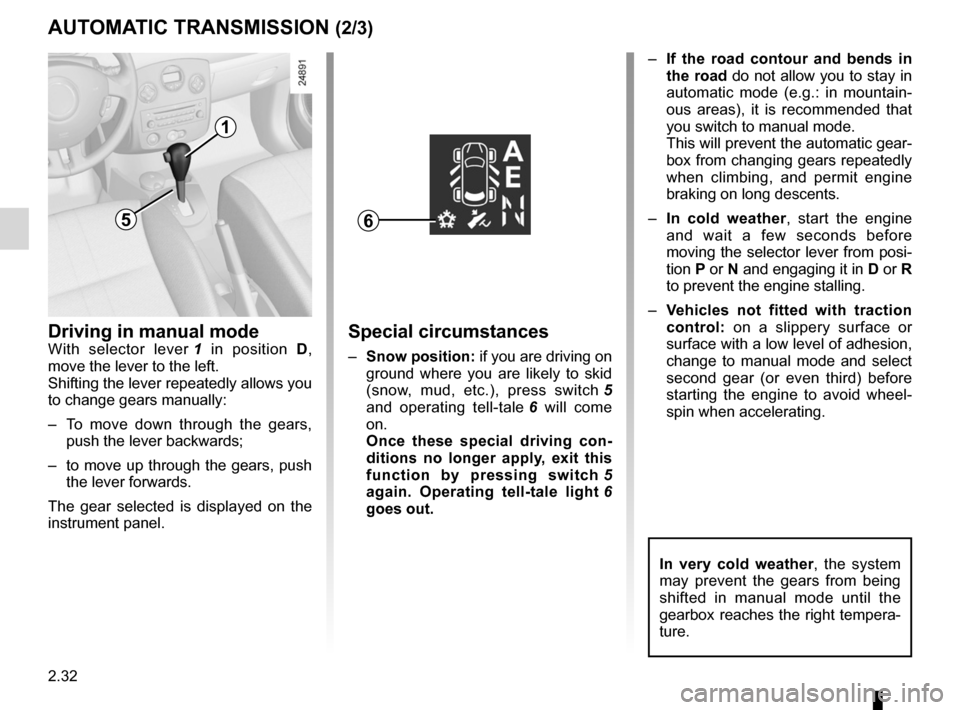
– Snow position: if you are driving on
ground where you are likely to skid
(snow, mud, etc.), press switch 5
and operating tell-tale 6 will come
on.
Once these special driving con -
ditions no longer apply, exit this
function by pressing switch 5
again. Operating tell-tale light 6
goes out. –
If the road contour and bends in
the road do not allow you to stay in
automatic mode (e.g.: in mountain -
ous areas), it is recommended that
you switch to manual mode.
This will prevent the automatic gear-
box from changing gears repeatedly
when climbing, and permit engine
braking on long descents.
– In cold weather , start the engine
and wait a few seconds before
moving the selector lever from posi-
tion P or N and engaging it in D or R
to prevent the engine stalling.
– Vehicles not fitted with traction
control: on a slippery surface or
surface with a low level of adhesion,
change to manual mode and select
second gear (or even third) before
starting the engine to avoid wheel -
spin when accelerating.
65
In very cold weather , the system
may prevent the gears from being
shifted in manual mode until the
gearbox reaches the right tempera-
ture.
Page 129 of 264
JauneNoirNoir texte
2.35
ENG_UD10569_1
Aide au parking (X85 - B85 - C85 - S85 - K85 - Renault)
ENG_NU_853-8_BCSK85_Renault_2
Prolonged deactivation of the
system
You can deactivate the system for pro-
longed periods by pressing the switch
for longer than approximately three
seconds.
The warning light built into the switch
remains lit constantly.
Once deactivated, the system can
be reactivated by pressing the button
again for longer than approximately
three seconds.
Temporary deactivation of
the system
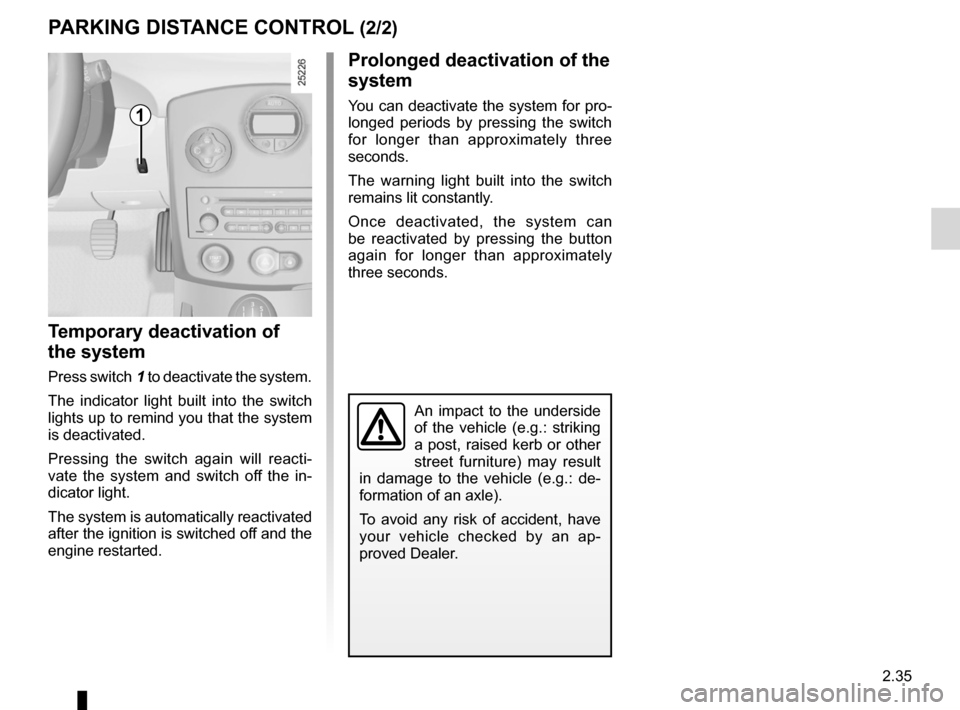
Press switch 1 to deactivate the system.
The indicator light built into the switch
lights up to remind you that the system
is deactivated.
Pressing the switch again will reacti -
vate the system and switch off the in -
dicator light.
The system is automatically reactivated
after the ignition is switched off and the
engine restarted.
PARkING DISTANCE CONTROL (2/2)
1
An impact to the underside
of the vehicle (e.g.: striking
a post, raised kerb or other
street furniture) may result
in damage to the vehicle (e.g.: de -
formation of an axle).
To avoid any risk of accident, have
your vehicle checked by an ap -
proved Dealer.
Page 137 of 264
JauneNoirNoir texte
3.7
ENG_UD19786_3
Chauffage / air conditionné (X85 - B85 - C85 - S85 - K85 - Renault)
ENG_NU_853-8_BCSK85_Renault_3
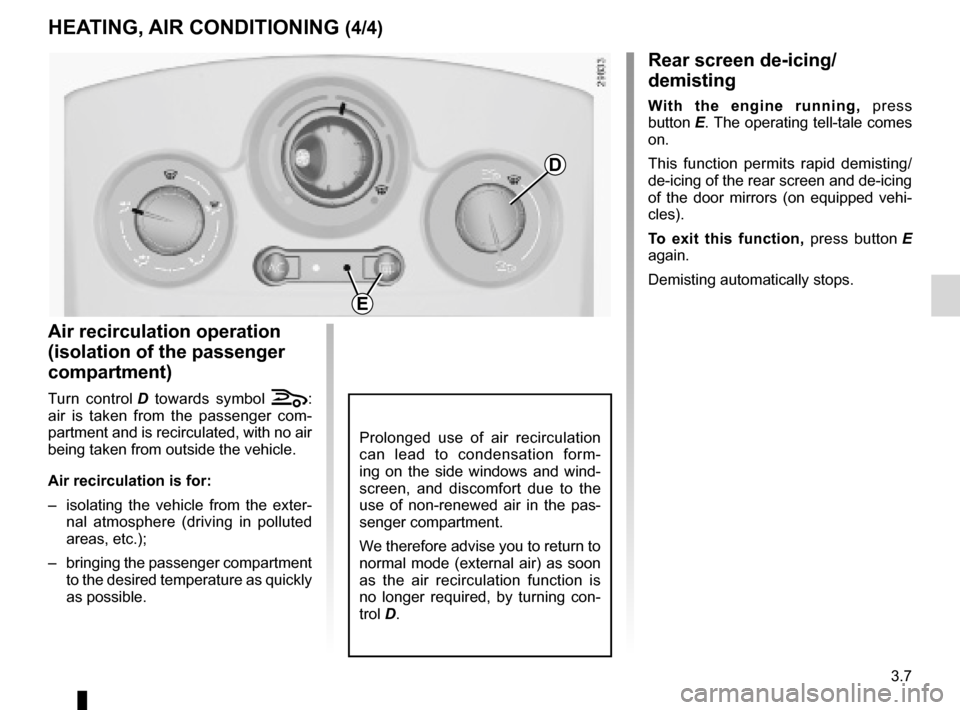
rear screen de-icing/
demisting
With the engine running, press
button E. The operating tell-tale comes
on.
This function permits rapid demisting/
de-icing of the rear screen and de-icing
of the door mirrors (on equipped vehi -
cles).
t o exit this function, press button E
again.
Demisting automatically stops.
air recirculation operation
(isolation of the passenger
compartment)
Turn control D towards symbol á:
air is taken from the passenger com -
partment and is recirculated, with no air
being taken from outside the vehicle.
air recirculation is for:
– isolating the vehicle from the exter -
nal atmosphere (driving in polluted
areas, etc.);
– bringing the passenger compartment
to the desired temperature as quickly
as possible.
HeatinG, air COnDitiOninG (4/4)
Prolonged use of air recirculation
can lead to condensation form -
ing on the side windows and wind -
screen, and discomfort due to the
use of non-renewed air in the pas -
senger compartment.
We therefore advise you to return to
normal mode (external air) as soon
as the air recirculation function is
no longer required, by turning con -
trol D.
D
e
Page 140 of 264
\
ENG_NU_853-8_BCSK85_Renault_3
Jaune NoirNoir texte
adjusting automatic mode
The automatic mode is the sys")
3.10
ENG_UD19787_3
Air conditionné automatique (X85 - B85 - C85 - S85 - K85 - Renault)\
ENG_NU_853-8_BCSK85_Renault_3
Jaune NoirNoir texte
adjusting automatic mode
The automatic mode is the system’s
normal operating mode (AUTO light on)
but you may alter the selections made
by the system (air distribution, etc.).
These options are explained on the fol-
lowing pages.
aUtOMatiC CLiMate COntrOL (3/8)
this is the recommended mode
of use: the automatic heating and
air conditioning system guarantees
comfort (except in the event of ex -
treme conditions) in the passenger
compartment and good visibility
while optimising consumption.
r eturn to automatic mode as
soon as possible.
ambient temperature:
automatic mode (continued)
Operation
To reach and keep the chosen comfort
level and to maintain good visibility, the
system controls:
– ventilation speed;
– air distribution;
– air recirculation management;
– air conditioning start/stop;
– the air temperature.
The displayed temperature values
show a comfort level.
When starting the engine, increas -
ing or decreasing the value dis -
played will not allow the com -
fort level to be reached any more
quickly. The system will always op-
timise the temperature increase or
decrease (the ventilation system
does not start instantly at maximum
speed: it gradually increases). This
may take several minutes.
Generally speaking, unless there is
a particular reason not to, the dash-
board air vents should remain open.
Page 142 of 264
\
ENG_NU_853-8_BCSK85_Renault_3
Jaune NoirNoir texte
note: the Clear View function auto -
matically activa")
3.12
ENG_UD19787_3
Air conditionné automatique (X85 - B85 - C85 - S85 - K85 - Renault)\
ENG_NU_853-8_BCSK85_Renault_3
Jaune NoirNoir texte
note: the Clear View function auto -
matically activates the air condition -
ing system (indicator light on). Press
button 6 to return to automatic mode.
aUt OMatiC CLiMate COntrOL (5/8)
In automatic mode, in cold weather,
the ventilation will not start imme -
diately at maximum power but will
increase progressively until the
engine temperature is warm enough
to heat the passenger compartment
air. This may take from a few sec -
onds to several minutes.
v arying the ventilation speed
In automatic mode, the system uses
the most suitable amount of air to reach
and maintain the desired comfort level.
Automatic mode is switched off by
pressing buttons 9 and 11.
These buttons allow you to increase or
decrease ventilation speed. If you set it
to zero, the system switches off.
switching air conditioning on
or off
In automatic mode, the system switches
the air conditioning system on or off,
depending on the climate conditions.
Exit automatic mode by pressing
button 3 : the AUTO warning light on
display 5 goes out.
Button 3 activates (display warning
light comes on) or stops (warning light
goes out) the air conditioning function.
356
9
11
Page 143 of 264
demistingrear screen ....................................................... (current page)
JauneNoirNoir texte
3.13
ENG_UD19787_3
Air conditionné automatique (X85 - B85 - C85 - S85 - K85 - Renault)\
ENG_NU_853-8_BCSK85_Renault_3
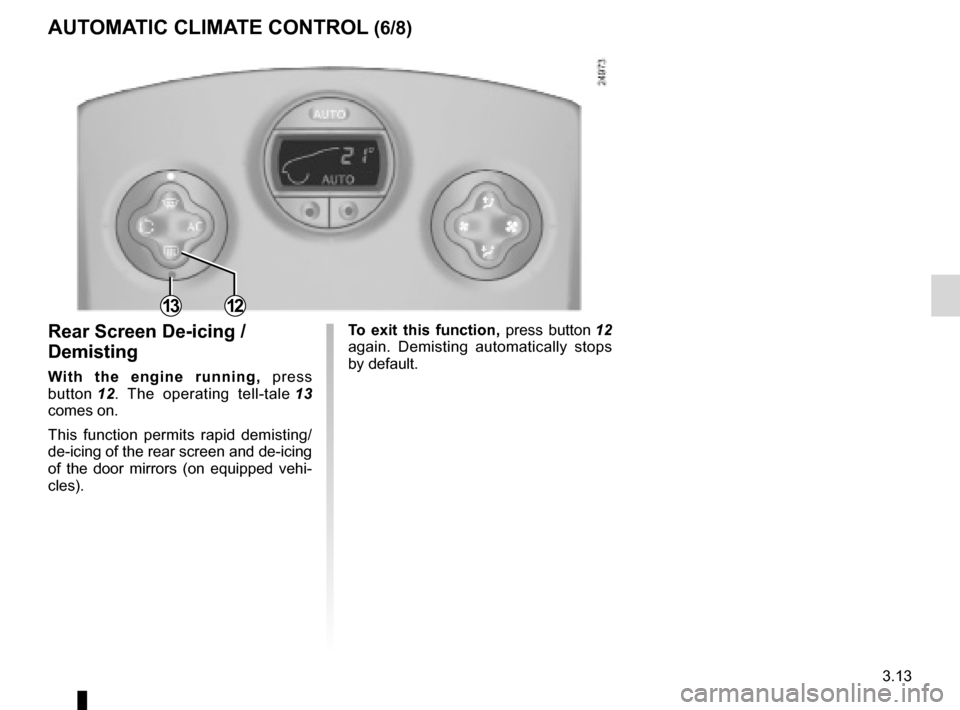
t o exit this function, press button 12
again. Demisting automatically stops
by default.rear screen De-icing /
Demisting
With the engine running, press
button 12 . The operating tell-tale 13
comes on.
This function permits rapid demisting/
de-icing of the rear screen and de-icing
of the door mirrors (on equipped vehi -
cles).
aUt OMatiC CLiMate COntrOL (6/8)
1312
Page 144 of 264

3.14
ENG_UD19787_3
Air conditionné automatique (X85 - B85 - C85 - S85 - K85 - Renault)\
ENG_NU_853-8_BCSK8")
demistingwindscreen ....................................................... (current page)
3.14
ENG_UD19787_3
Air conditionné automatique (X85 - B85 - C85 - S85 - K85 - Renault)\
ENG_NU_853-8_BCSK85_Renault_3
Jaune NoirNoir texte
aUtOMatiC CLiMate COntrOL (7/8)
note: if you wish to reduce the air flow
(which may produce a certain amount
of noise in the passenger compart -
ment), press button 11.
t o exit this function, press either:
– button 1 again;
– button 6 (the AUTO indicator light on
the display will light up).
This function rapidly demists/de-ices
the windscreen, the front side windows
and the door mirrors (depending on the
vehicle).
It imposes automatic operation of the
air conditioning and heating of the rear
screen (warning light 13 ), and inhibits
air recirculation.
Press button 12 if you do not want the
heated rear screen to be activated.
Warning light 13 will go out.
Clear view function
With the engine running, press
button 1 , and operating tell-tale 2
comes on.
The AUTO button indicator light (on the
display) goes out.
126
111213