2012 PEUGEOT 5008 lock
[x] Cancel search: lockPage 209 of 340
PRACTICAL INFORMATION
Do not disconnect the termi-
nals while the engine is run-
ning.
Do not charge the batteries
without disconnecting the ter-
minals fi rst.
Do not push the vehicle to start the
engine if it is fi tted with a 6-speed
electronic gear control gearbox or an
automatic gearbox.
The batteries contain harmful
substances such as sulphuric
acid and lead. They must be
disposed of in accordance with regu-
lations and must not, in any circum-
stances, be discarded with household
waste.
Take used remote control batteries
and vehicle batteries to a special col-
lection point.
Charging the battery using a
battery charger
)
Disconnect the battery from the vehicle.
)
Follow the instructions for use pro-
vided by the manufacturer of the
charger.
)
Reconnect starting with the nega-
tive terminal (-).
)
Check that the terminals and con-
nectors are clean. If they are
covered with sulphate (whitish or
greenish deposit), remove them and
clean them.
It is advisable to disconnect
the battery if the vehicle is to
be left unused for more than
one month.
Before disconnecting the battery
Wait 2 minutes after switching off the ig-
nition before disconnecting the battery.
Close the windows and the doors be-
fore disconnecting the battery.
Following reconnection of the
battery
Following reconnection of the battery,
switch on the ignition and wait 1 minute
before starting to permit initialisation
of the electronic systems. However, if
problems remain following this opera-
tion, contact a PEUGEOT dealer or a
qualifi ed workshop.
Referring to the corresponding section,
you must yourself reinitialise:
- the remote control key,
- the panoramic sunroof blind,
- the satellite navigation system.
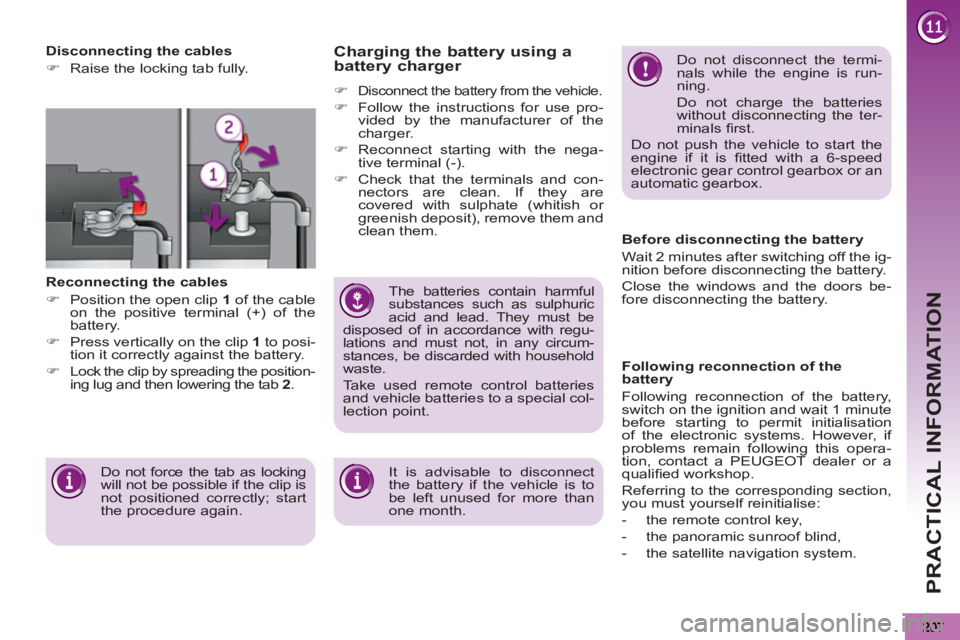
Disconnecting the cables
)
Raise the locking tab fully.
Reconnecting the cables
)
Position the open clip 1
of the cable
on the positive terminal (+) of the
battery.
)
Press vertically on the clip 1
to posi-
tion it correctly against the battery.
)
Lock the clip by spreading the position-
ing lug and then lowering the tab 2
.
Do not force the tab as locking
will not be possible if the clip is
not positioned correctly; start
the procedure again.
Page 212 of 340
PRACTICAL INFORMATION
210
TOWING A TRAILER, A CARAVAN, ETC.
Your vehicle is primarily designed for
transporting people and luggage, but it
may also be used for towing a trailer.
Driving advice
Side wind
)
Take into account the increased
sensitivity to side wind.
Cooling
Towing a trailer on a slope increases
the temperature of the coolant.
As the fan is electrically controlled, its
cooling capacity is not dependent on
the engine speed.
)
To lower the engine speed, reduce
your speed.
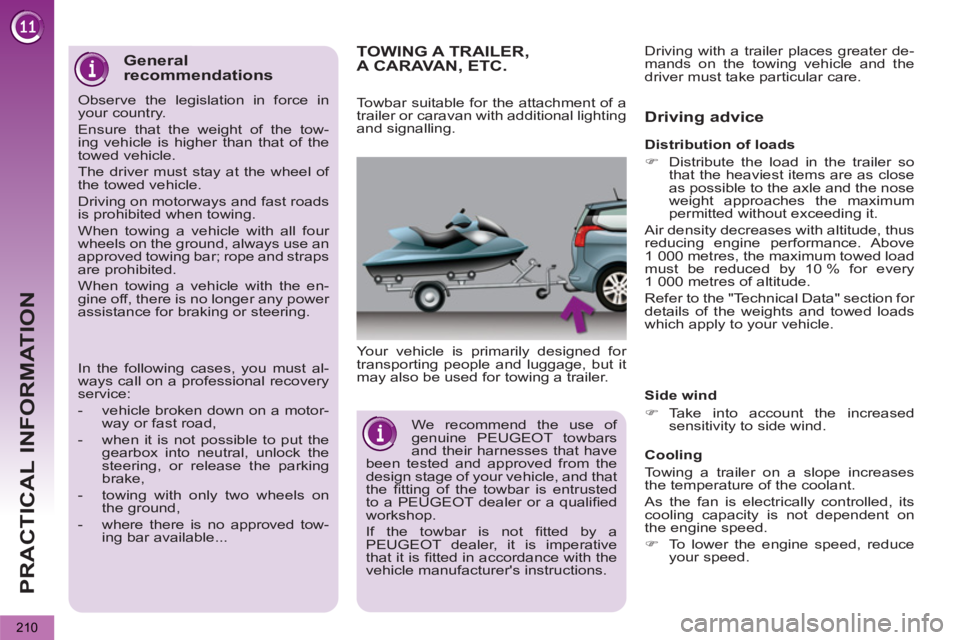
Towbar suitable for the attachment of a
trailer or caravan with additional lighting
and signalling.
Distribution of loads
)
Distribute the load in the trailer so
that the heaviest items are as close
as possible to the axle and the nose
weight approaches the maximum
permitted without exceeding it.
Air density decreases with altitude, thus
reducing engine performance. Above
1 000 metres, the maximum towed load
must be reduced by 10 % for every
1 000 metres of altitude.
Refer to the "Technical Data" section for
details of the weights and towed loads
which apply to your vehicle. Driving with a trailer places greater de-
mands on the towing vehicle and the
driver must take particular care.
We recommend the use of
genuine PEUGEOT towbars
and their harnesses that have
been tested and approved from the
design stage of your vehicle, and that
the fi tting of the towbar is entrusted
to a PEUGEOT dealer or a qualifi ed
workshop.
If the towbar is not fi tted by a
PEUGEOT dealer, it is imperative
that it is fi tted in accordance with the
vehicle manufacturer's instructions.
General
recommendations
Observe the legislation in force in
your country.
Ensure that the weight of the tow-
ing vehicle is higher than that of the
towed vehicle.
The driver must stay at the wheel of
the towed vehicle.
Driving on motorways and fast roads
is prohibited when towing.
When towing a vehicle with all four
wheels on the ground, always use an
approved towing bar; rope and straps
are prohibited.
When towing a vehicle with the en-
gine off, there is no longer any power
assistance for braking or steering.
In the following cases, you must al-
ways call on a professional recovery
service:
- vehicle broken down on a motor-
way or fast road,
- when it is not possible to put the
gearbox into neutral, unlock the
steering, or release the parking
brake,
- towing with only two wheels on
the ground,
- where there is no approved tow-
ing bar available...
Page 213 of 340

PRACTICAL INFORMATION
211
The maximum towed load on a long in-
cline depends on the gradient and the
ambient temperature.
In all cases, keep a check on the cool-
ant temperature.
Braking
Towing a trailer increases the braking
distance.
To avoid overheating of the brakes on a
long mountain type of descent, the use
of engine braking is recommended.
Tyres
)
Check the tyre pressures of the tow-
ing vehicle and of the trailer, observ-
ing the recommended pressures.
Lighting
)
Check the electrical lighting and sig-
nalling on the trailer.
The rear parking sensors will
be deactivated automatically if
a genuine PEUGEOT towbar
is used.
)
If the warning lamp and the
STOP
warning lamp come
on, stop the vehicle and
switch off the engine as
soon as possible.
FITTING ROOF BARS
Maximum authorised weight
on the roof rack, for a loading
height not exceeding 40 cm
(with the exception of bicycle
carriers): 65
kg.
If the height exceeds 40 cm, adapt
the speed of the vehicle to the pro-
fi le of the road to avoid damaging the
roof bars and the fi xings on the roof.
Be sure to refer to national legislation
in order to comply with the regula-
tions for transporting objects that are
longer than the vehicle.
When fi tting transverse roof bars, use
the four quick-fi t fi xings provided for this
purpose:
)
lift the concealing fl aps,
)
open the fi xing covers on each bar
using the key,
)
put each fi xing in place and lock
them on the roof one by one,
)
ensure that roof bars are correctly
fi tted (by shaking them),
)
close the fi xing covers on each bar
using the key.
If your vehicle is fi tted with
roof fi nishers, do not use them
for carrying loads.
Page 236 of 340
234
03 GENERAL OPERATION
Pressing OK gives access to short-cut
menus according to the display on the screen.
DISPLAY ACCORDING TO THE CONTEXT
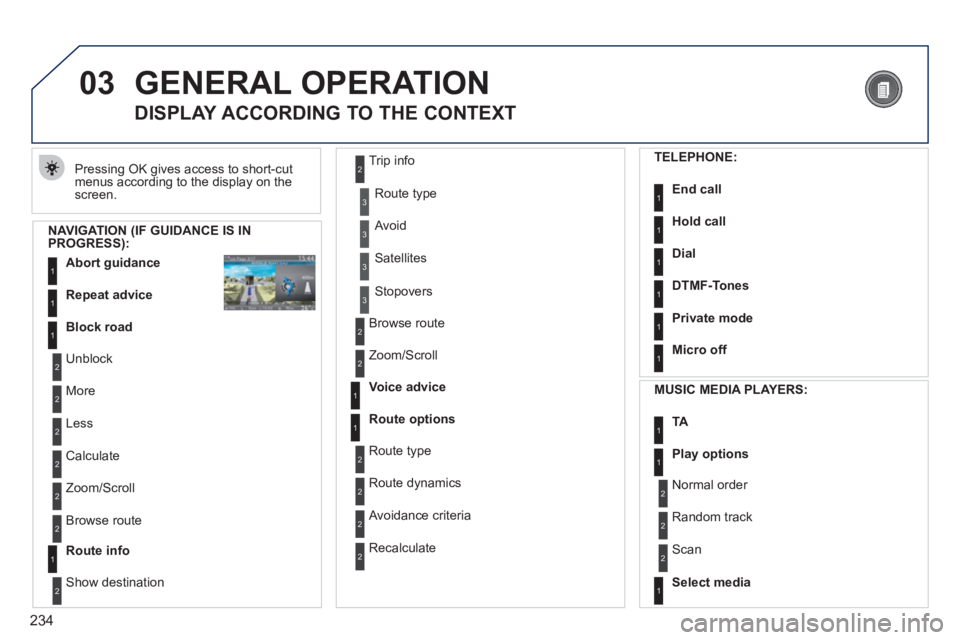
NAVIGATION (IF GUIDANCE IS IN PROGRESS):
Abort guidanc
e1
1
1
Repeat advice
Block road
2
2
Unblock
M
ore
2
Less
3
3
Route type
Avoid
3 Satellites
2
2
Calculate
Z
oom/Scroll
2
Browse route
1Route info
2
2
Show destination Trip in
fo
3
Stopovers
2
2
Browse route
Zoom/Scroll
1
1
Voice advice
Route options
2
2
Route type
Route dynamics
2 Avoidance criteria
2
Recalculate
TELEPHONE:
End call1
1
1
1
Hold call
Dial
DTMF-Tones
1Private mode
1Micro off
MU
SIC MEDIA PLAYERS:
TA1
1Play options
1Select media
2
2
Normal order
R
andom track
2 Scan
Page 269 of 340
267
QUESTION
ANSWER
SOLUTION
The stored stations donot function (no sound, 87.5 Mhz is displayed...).
An incorrect waveband is selected.
Press RADIO, select Radio Menu then"Waveband" to return to the waveband on which the stations are stored.
The quality of receptionof the radio station listened to graduallydeteriorates or the stored stations do not function(no sound, 87.5 Mhz is displayed...).
The vehicle is too far from the transmitter used by the station listenedto or there is no transmitter in the geographical area through which the vehicle is travelling.
Activate the "RDS" function by means of theshort-cut menu to enable the system to check whether there is a more powerful transmitter in thegeographical area.
The environment (hills, buildings, tunnels, basement car parks...) block reception, including in RDS mode.
This phenomenon is normal and does not indicate a failure of the audio equipment.
The aerial is absent or has been damaged (for example when goingthrough a car wash or into an underground car park).
Have the aerial checked by a PEUGEOT dealer.
Sound cut-outs of 1 to2 seconds in radio mode.During this brief sound cut-out, the RDS searches for any frequency permitting better reception of the station.
Deactivate the "RDS" function by means of the short-cut menu if the phenomenon is too frequentand always on the same route.
With the engine off, the system switches off after a few minutes of use.
When the engine is switched off, the system's operating time depends on the battery charge.
The switch-off is normal: the system switches to economy mode and switches off to prevent discharging of the vehicle's battery.
Start the vehicle's engine to increase the batterycharge.
Page 277 of 340
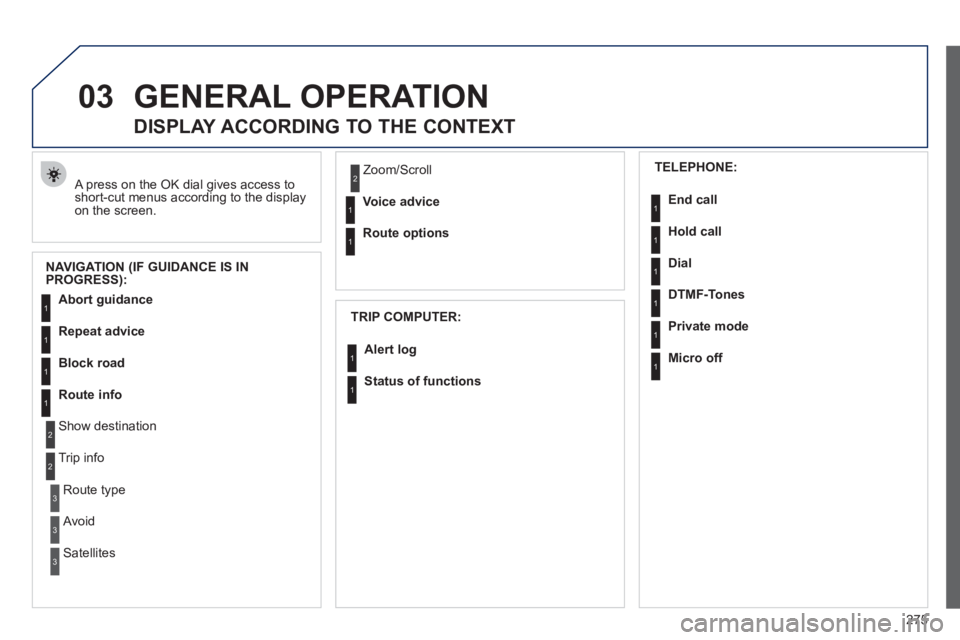
275
03GENERAL OPERATION
A press on the OK dial gives access to short-cut menus according to the displayon the screen.
DISPLAY ACCORDING TO THE CONTEXT
NAVIGATION (IF GUIDANCE IS IN
PROGRESS):
TRIP COMPUTER:
Abort guidance
Repeat advice
Block road
Route info
Show destination
Trip info
Route t
ype
Avoid
SatellitesZ
oom/Scroll
Voice advice
Route options
Alert log
Status of functions
1
2
3
3
2
1
1
1
3
1
1
1
1
2
TELEPHONE:
End call
Hold call
Dial
DTMF-Tones
Private mod
e
Micro off
1
1
1
1
1
1
Page 302 of 340
300
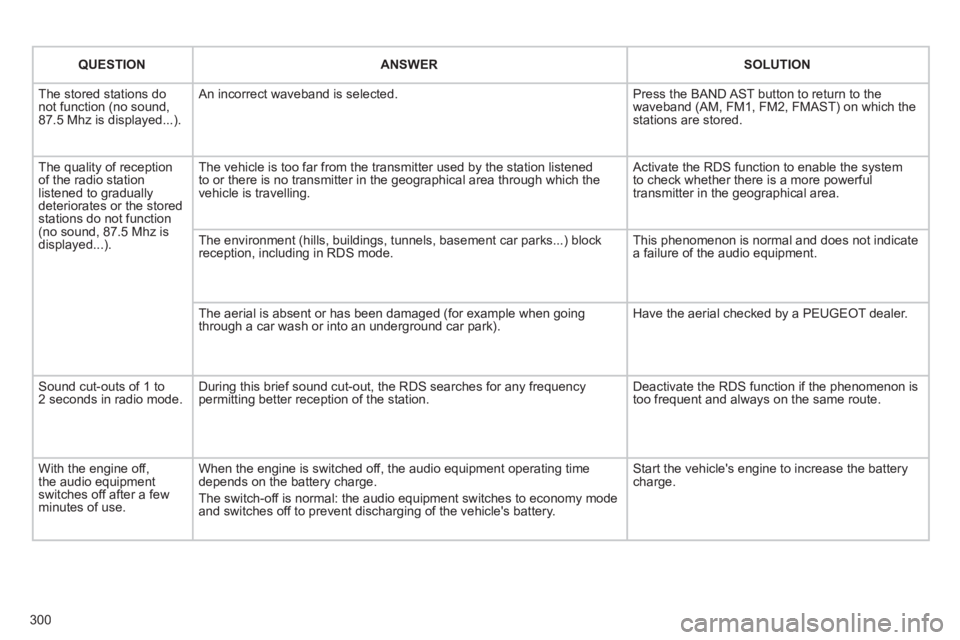
QUESTIONANSWERSOLUTION
The stored stations donot function (no sound, 87.5 Mhz is displayed...).
An incorrect waveband is selected.
Press the BAND AST button to return to the waveband (AM, FM1, FM2, FMAST) on which thestations are stored.
The quality of receptionof the radio station listened to graduallydeteriorates or the stored stations do not function(no sound, 87.5 Mhz is displayed...).
The vehicle is too far from the transmitter used by the station listenedto or there is no transmitter in the geographical area through which the vehicle is travelling.
Activate the RDS function to enable the system to check whether there is a more powerful transmitter in the geographical area.
The environment (hills, buildings, tunnels, basement car parks...) block reception, including in RDS mode.
This phenomenon is normal and does not indicate a failure of the audio equipment.
The aerial is absent or has been damaged (for example when goingthrough a car wash or into an underground car park).
Have the aerial checked by a PEUGEOT dealer.
Sound cut-outs of 1 to2 seconds in radio mode.During this brief sound cut-out, the RDS searches for any frequency permitting better reception of the station.
Deactivate the RDS function if the phenomenon is too frequent and always on the same route.
With the engine off, the audio equipment switches off after a few minutes of use.
When the engine is switched off, the audio equipment operating timedepends on the battery charge.
The switch-off is normal: the audio equipment switches to economy mode and switches off to prevent discharging of the vehicle's battery.
Start the vehicle's engine to increase the batterycharge.
Page 309 of 340
307
04
1
2
3
4
1
2
3
4
SOURCE
BANDAST
LISTREFRESH
MENU
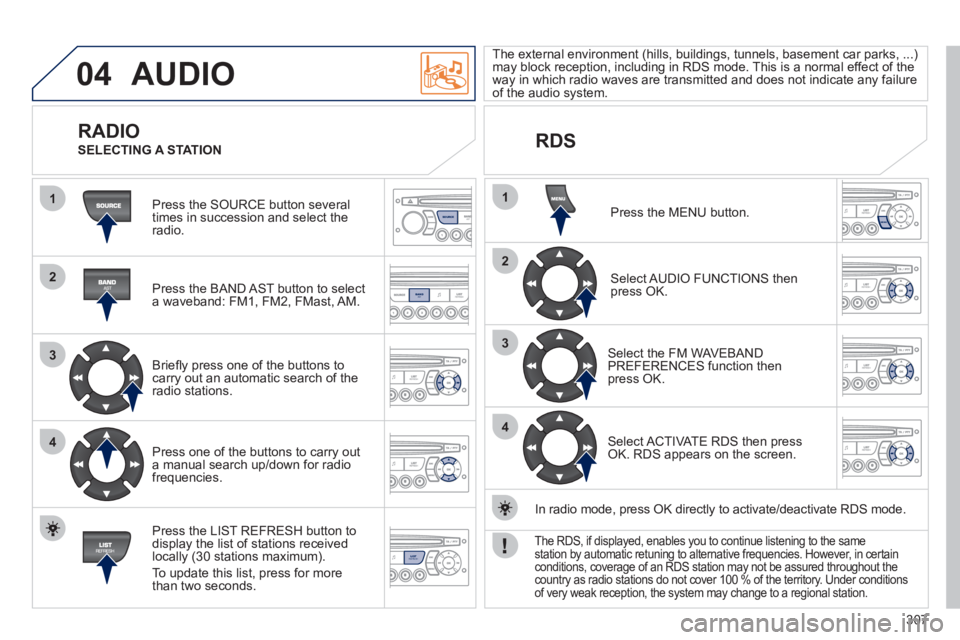
AUDIO
Press the SOURCE button several
times in succession and select theradio.
Press the BAND A
ST button to select
a waveband: FM1, FM2, FMast, AM.
Briefl
y press one of the buttons tocarry out an automatic search of theradio stations.
Press one o
f the buttons to carry out
a manual search up/down for radiofrequencies.
Press the LI
ST REFRESH button to
display the list of stations received
locally (30 stations maximum).
To update this list, press for more
t
han two seconds.
The external environment
(hills, buildings, tunnels, basement car parks, ...)may block reception, including in RDS mode. This is a normal effect of the
way in which radio waves are transmitted and does not indicate any failure of the audio system.
RDS
RADIO
SELECTING A STATION
Press the MENU button.
Select AUDIO FUNCTIONS thenpress OK.
Select the FM WAVEBANDPREFERENCES function thenpress OK.
Select ACTIVATE RDS then pressOK. RDS appears on the screen.
In radio mode, press
OK directly to activate/deactivate RDS mode.
The RDS, if displayed, enables you to continue listening to the samestation by automatic retuning to alternative frequencies. However, in certainconditions, coverage of an RDS station may not be assured throughout thecountry as radio stations do not cover 100 % of the territory. Under conditions
of very weak reception, the system may change to a regional station.