Page 293 of 714
3-178 Features and controls
3
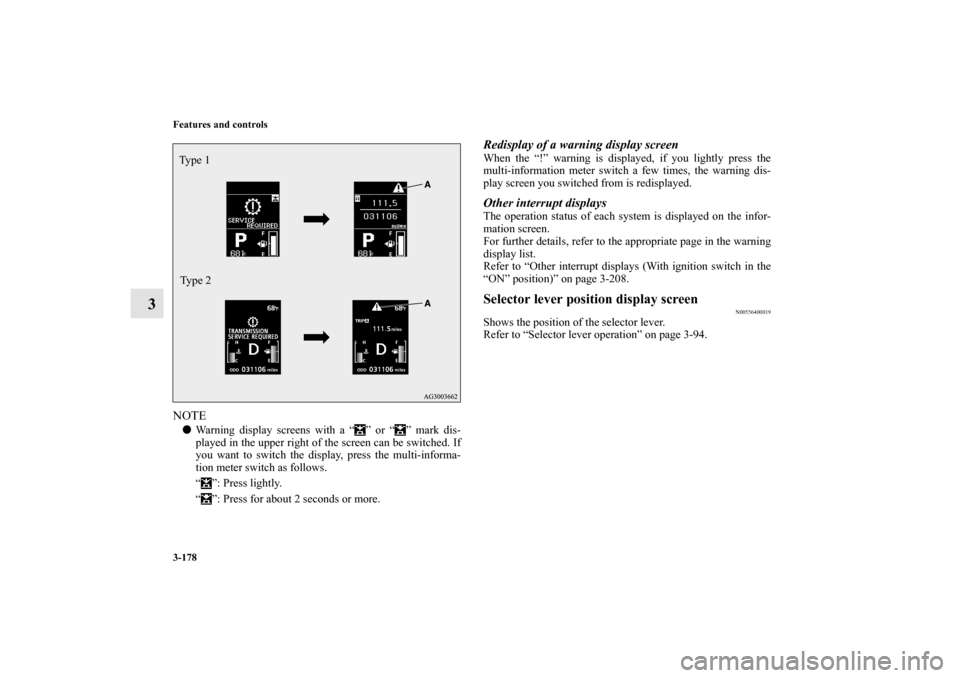
NOTE�Warning display screens with a “ ” or “ ” mark dis-
played in the upper right of the screen can be switched. If
you want to switch the display, press the multi-informa-
tion meter switch as follows.
“ ”: Press lightly.
“ ”: Press for about 2 seconds or more.
Redisplay of a warning display screenWhen the “!” warning is displayed, if you lightly press the
multi-information meter switch a few times, the warning dis-
play screen you switched from is redisplayed.Other interrupt displaysThe operation status of each system is displayed on the infor-
mation screen.
For further details, refer to the appropriate page in the warning
display list.
Refer to “Other interrupt displays (With ignition switch in the
“ON” position)” on page 3-208.Selector lever position display screen
N00556400019
Shows the position of the selector lever.
Refer to “Selector lever operation” on page 3-94.
Ty p e 1
Type 2BK0138000US.book 178 ページ 2011年4月13日 水曜日 午前11時17分
Page 294 of 714
Features and controls
3-179
3
Outside temperature display screen
N00556500078
Shows the temperature outside the vehicle.NOTE�The display setting can be changed to the preferred units
(°F or °C).
Refer to “Changing the function settings (With ignition
switch in the “ON” position)” on page 3-183.
�Depending on factors such as the driving conditions, the
displayed temperature may vary from the actual outside
temperature.Fuel remaining display screen
N00556600167
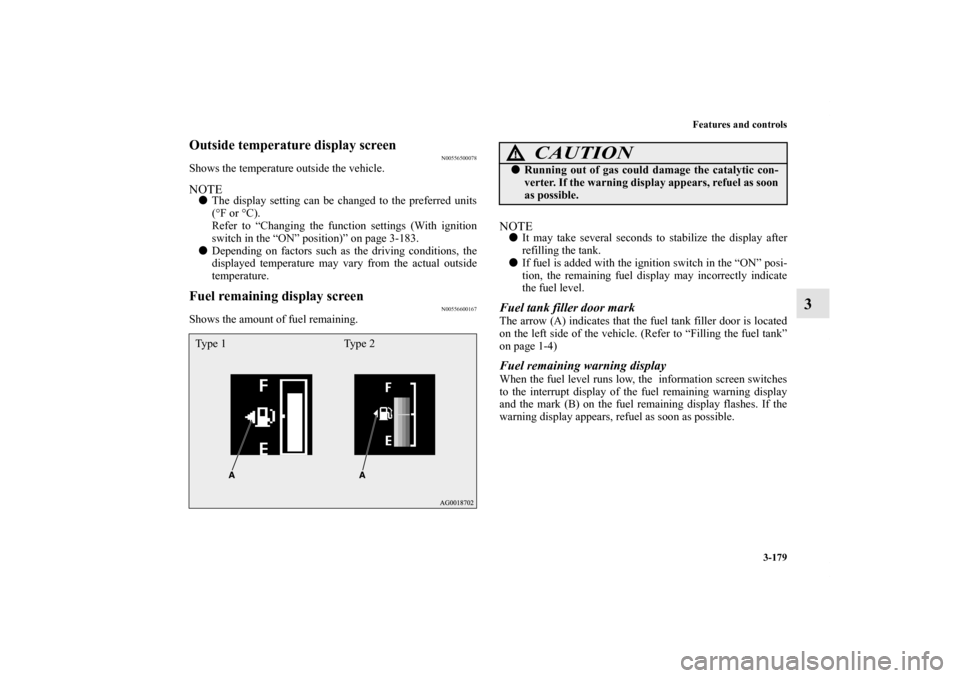
Shows the amount of fuel remaining.
NOTE�It may take several seconds to stabilize the display after
refilling the tank.
�If fuel is added with the ignition switch in the “ON” posi-
tion, the remaining fuel display may incorrectly indicate
the fuel level.Fuel tank filler door markThe arrow (A) indicates that the fuel tank filler door is located
on the left side of the vehicle. (Refer to “Filling the fuel tank”
on page 1-4)Fuel remaining warning displayWhen the fuel level runs low, the information screen switches
to the interrupt display of the fuel remaining warning display
and the mark (B) on the fuel remaining display flashes. If the
warning display appears, refuel as soon as possible.
Type 1 Type 2
CAUTION
!�Running out of gas could damage the catalytic con-
verter. If the warning display appears, refuel as soon
as possible.
BK0138000US.book 179 ページ 2011年4月13日 水曜日 午前11時17分
Page 296 of 714
Features and controls
3-181
3
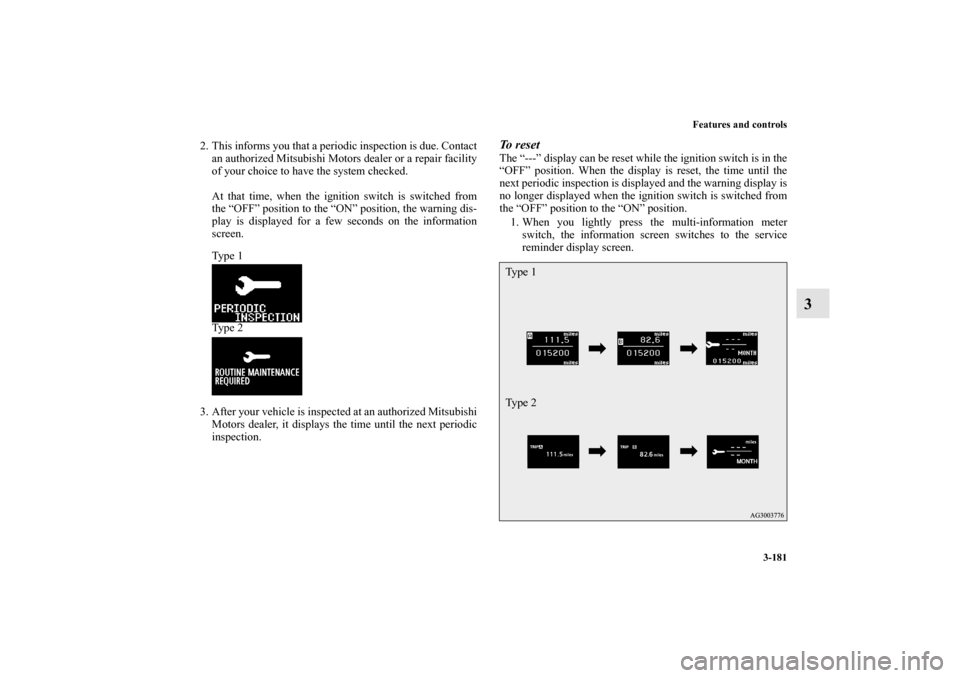
2. This informs you that a periodic inspection is due. Contact
an authorized Mitsubishi Motors dealer or a repair facility
of your choice to have the system checked.
At that time, when the ignition switch is switched from
the “OFF” position to the “ON” position, the warning dis-
play is displayed for a few seconds on the information
screen.
Ty p e 1
Ty p e 2
3. After your vehicle is inspected at an authorized Mitsubishi
Motors dealer, it displays the time until the next periodic
inspection.
To reset The “---” display can be reset while the ignition switch is in the
“OFF” position. When the display is reset, the time until the
next periodic inspection is displayed and the warning display is
no longer displayed when the ignition switch is switched from
the “OFF” position to the “ON” position.
1. When you lightly press the multi-information meter
switch, the information screen switches to the service
reminder display screen.Ty p e 1
Ty p e 2
BK0138000US.book 181 ページ 2011年4月13日 水曜日 午前11時17分
Page 297 of 714
3-182 Features and controls
3
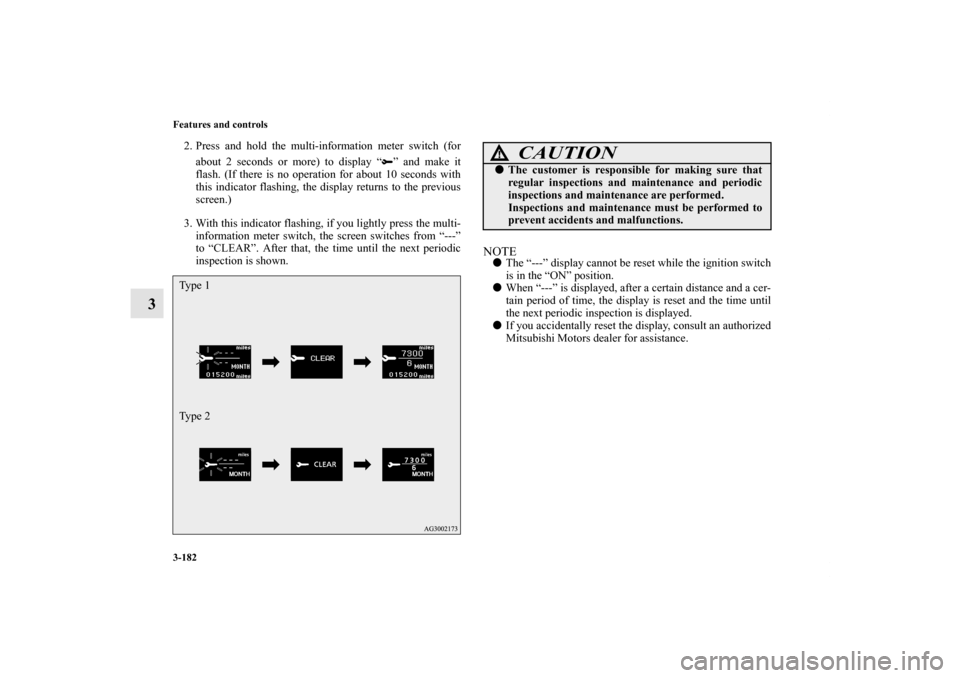
2. Press and hold the multi-information meter switch (for
about 2 seconds or more) to display “ ” and make it
flash. (If there is no operation for about 10 seconds with
this indicator flashing, the display returns to the previous
screen.)
3. With this indicator flashing, if you lightly press the multi-
information meter switch, the screen switches from “---”
to “CLEAR”. After that, the time until the next periodic
inspection is shown.
NOTE�The “---” display cannot be reset while the ignition switch
is in the “ON” position.
�When “---” is displayed, after a certain distance and a cer-
tain period of time, the display is reset and the time until
the next periodic inspection is displayed.
�If you accidentally reset the display, consult an authorized
Mitsubishi Motors dealer for assistance.
Ty p e 1
Ty p e 2
CAUTION
!�The customer is responsible for making sure that
regular inspections and maintenance and periodic
inspections and maintenance are performed.
Inspections and maintenance must be performed to
prevent accidents and malfunctions.
BK0138000US.book 182 ページ 2011年4月13日 水曜日 午前11時17分
Page 298 of 714
Features and controls
3-183
3
Door ajar warning display screen (With ignition
switch in the “ON” position)
N00555700129
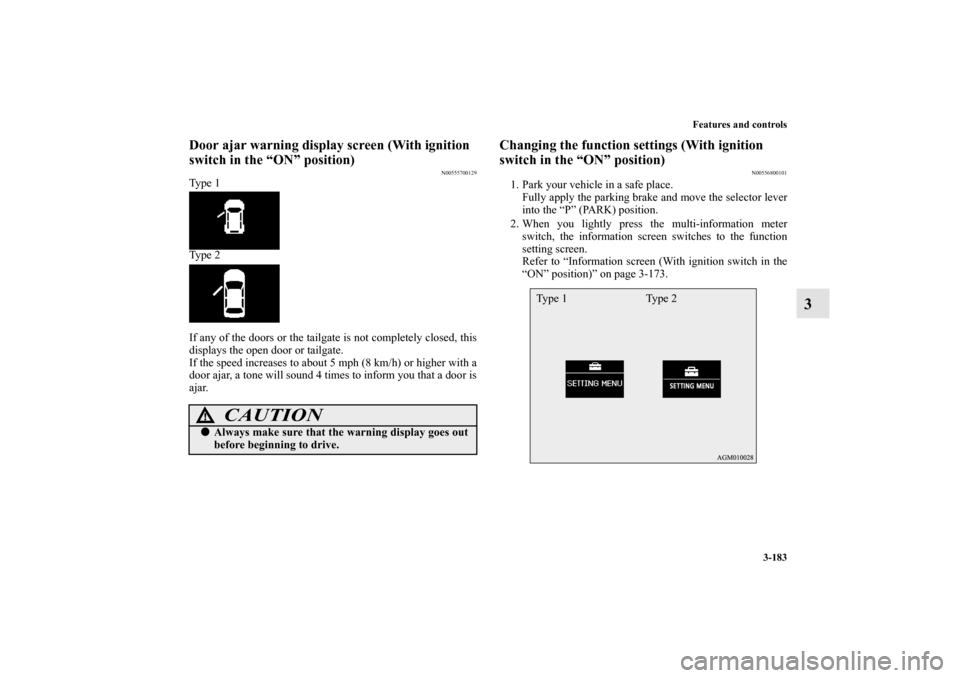
Ty p e 1
Ty p e 2
If any of the doors or the tailgate is not completely closed, this
displays the open door or tailgate.
If the speed increases to about 5 mph (8 km/h) or higher with a
door ajar, a tone will sound 4 times to inform you that a door is
ajar.
Changing the function settings (With ignition
switch in the “ON” position)
N00556800101
1. Park your vehicle in a safe place.
Fully apply the parking brake and move the selector lever
into the “P” (PARK) position.
2. When you lightly press the multi-information meter
switch, the information screen switches to the function
setting screen.
Refer to “Information screen (With ignition switch in the
“ON” position)” on page 3-173.
CAUTION
!�Always make sure that the warning display goes out
before beginning to drive.
Ty p e 1 Ty p e 2
BK0138000US.book 183 ページ 2011年4月13日 水曜日 午前11時17分
Page 300 of 714
Features and controls
3-185
3
Changing the reset mode for average fuel consumption
and average speed
N00557000171
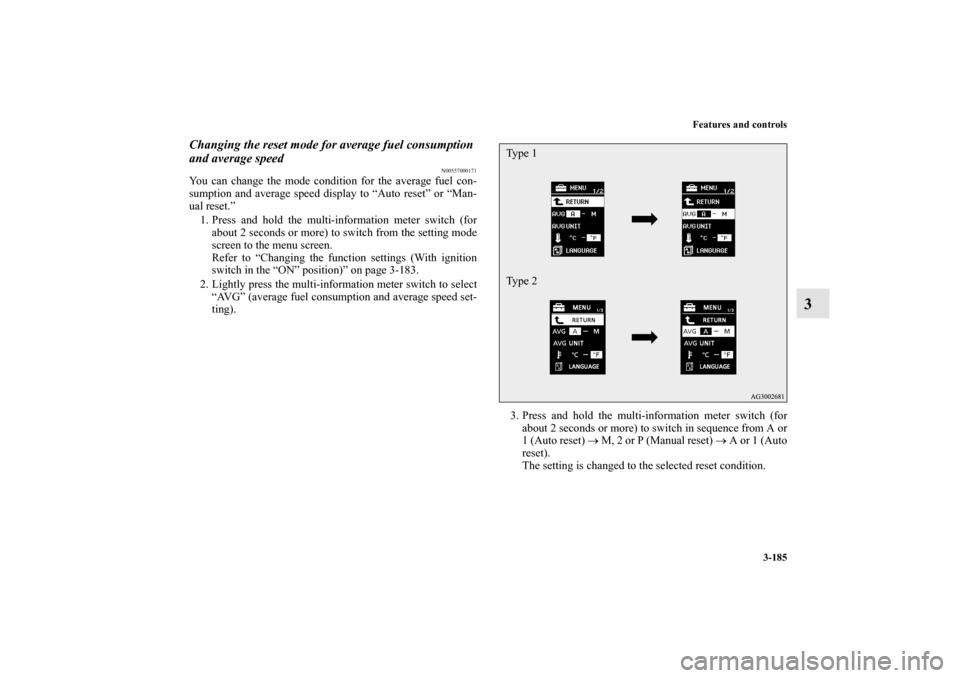
You can change the mode condition for the average fuel con-
sumption and average speed display to “Auto reset” or “Man-
ual reset.”
1. Press and hold the multi-information meter switch (for
about 2 seconds or more) to switch from the setting mode
screen to the menu screen.
Refer to “Changing the function settings (With ignition
switch in the “ON” position)” on page 3-183.
2. Lightly press the multi-information meter switch to select
“AVG” (average fuel consumption and average speed set-
ting).
3. Press and hold the multi-information meter switch (for
about 2 seconds or more) to switch in sequence from A or
1 (Auto reset) → M, 2 or P (Manual reset) → A or 1 (Auto
reset).
The setting is changed to the selected reset condition.
Type 1
Type 2
BK0138000US.book 185 ページ 2011年4月13日 水曜日 午前11時17分
Page 301 of 714
3-186 Features and controls
3
Manual reset mode
�If you press and hold the multi-information meter switch
when the average fuel consumption and average speed are
displayed, these calculations will be reset to zero.
�When the ignition switch is turned to the “ON” position
from the “ACC” or “LOCK” position, the mode setting
changes automatically from manual to auto.
Auto reset mode
�When the average fuel consumption and average speed
are being displayed, if you hold down the multi-informa-
tion meter switch, these calculations will be reset to zero.
�When the ignition switch has been set to the “ACC” or
“LOCK” position for about 4 hours or more, the average
fuel consumption display and the average speed display
will automatically reset.NOTE�Disconnecting the battery cable will erase from memory
the manual reset mode or auto reset mode setting for the
average speed display and average fuel consumption dis-
play.
�The initial (default) setting is “Auto reset mode”.
Changing the fuel consumption display unit
N00557100127
The fuel consumption display unit can be changed. The dis-
tance, speed, and amount units are also changed to match the
selected fuel consumption unit.
1. Press and hold the multi-information meter switch (for
about 2 seconds or more) to change from the setting mode
screen to the menu screen.
Refer to “Changing the function settings (With ignition
switch in the “ON” position)” on page 3-183.
BK0138000US.book 186 ページ 2011年4月13日 水曜日 午前11時17分
Page 303 of 714
3-188 Features and controls
3
NOTE�The display units for the driving range, the average fuel
consumption, the average speed and the momentary fuel
consumption are changed, but the units for the indicating
needle (speedometer), the odometer and the trip odometer
will remain unchanged.
�If the battery is disconnected, the memory of the unit set-
ting is erased and is automatically set to {mpg (US) or
L/100 km}.
The distance and speed units are also changed in the following
combinations to match the selected fuel consumption unit.
Changing the temperature unit
N00557200128
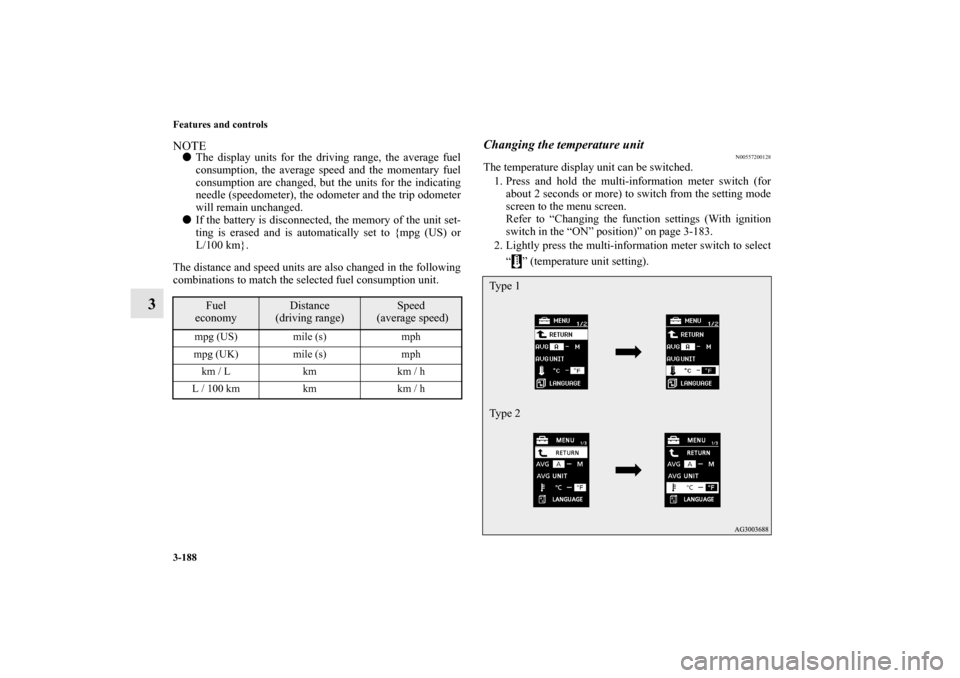
The temperature display unit can be switched.
1. Press and hold the multi-information meter switch (for
about 2 seconds or more) to switch from the setting mode
screen to the menu screen.
Refer to “Changing the function settings (With ignition
switch in the “ON” position)” on page 3-183.
2. Lightly press the multi-information meter switch to select
“ ” (temperature unit setting).
Fuel
economy
Distance
(driving range)
Speed
(average speed)
mpg (US) mile (s) mph
mpg (UK) mile (s) mph
km / L km km / h
L / 100 km km km / h
Type 1
Type 2
BK0138000US.book 188 ページ 2011年4月13日 水曜日 午前11時17分