Page 221 of 714

3-106 Features and controls
3
NOTE�To prevent mistakes in operating the lever, make sure you
stop briefly at each position. After operating, check the
position in the multi-information display.
�If the brake pedal is not depressed and held, the shift-lock
device activates to prevent the selector lever from being
moved from the “P” (PARK) position.
�For a shift indicated by in the illustration, depress the
brake pedal before moving the selector lever. If you
attempt to move the selector lever before depressing the
brake pedal, the selector lever may be immovable.
When the selector lever cannot be shifted from the “P”
(PARK) position
N00563300010
When the selector lever cannot be shifted from the “P” (PARK)
position to another position while the brake pedal is pressed
and held down with the ignition switch at the “ON” position,
the battery may be flat or the shift-lock mechanism may be
malfunctioning.
Immediately have your vehicle checked by an authorized Mit-
subishi Motors dealer or a repair facility of your choice.
If you need to move the vehicle, shift the selector lever as fol-
lows.
1. Make sure the parking brake is fully applied.
2. Stop the engine if it is running.
3. Insert a screwdriver with a cloth over its tip into the notch
(A) of the cover. Pry gently as shown to remove the cover.
BK0138000US.book 106 ページ 2011年4月13日 水曜日 午前11時17分
Page 222 of 714
Features and controls
3-107
3
4. Depress the brake pedal with the right foot.
5. Turn the ignition switch to the “ACC” position.NOTE�For vehicles with the Free-hand Advanced Security
Transmitter (F.A.S.T.-key), turn the ignition switch to the
“ACC” position with the emergency key if the vehicle
battery is flat.
6. Insert a screwdriver in the shift-lock release hole (B).
Shift the selector lever to the “N” (NEUTRAL) position
while pressing the screwdriver down.
Selector lever position display
N00560400049
When the ignition switch is turned to the “ON” position, the
selector lever position is shown on the multi-information dis-
play.
Ty p e 2 Ty p e 1
BK0138000US.book 107 ページ 2011年4月13日 水曜日 午前11時17分
Page 229 of 714
3-114 Features and controls
3Electronically controlled 4WD system
(if so
equipped)N00517200142
The electronically controlled 4WD system is an all-wheel drive
system that allows one of three drive modes to be selected with
a switch, in accordance with the driving conditions.
The following drive modes are available.
4-wheel drive operation requires special driving skills.
Carefully read the “4-wheel drive operation” section on page 3-
122 and take care to drive safely.
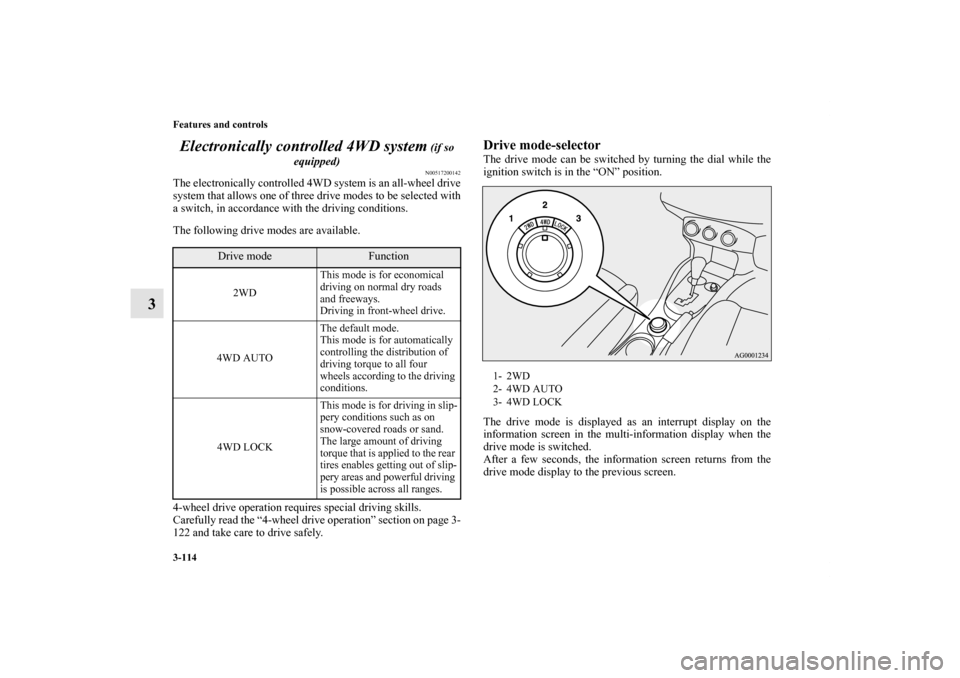
Drive mode-selectorThe drive mode can be switched by turning the dial while the
ignition switch is in the “ON” position.
The drive mode is displayed as an interrupt display on the
information screen in the multi-information display when the
drive mode is switched.
After a few seconds, the information screen returns from the
drive mode display to the previous screen.
Drive mode
Function
2WDThis mode is for economical
driving on normal dry roads
and freeways.
Driving in front-wheel drive.
4WD AUTOThe default mode.
This mode is for automatically
controlling the distribution of
driving torque to all four
wheels according to the driving
conditions.
4WD LOCKThis mode is for driving in slip-
pery conditions such as on
snow-covered roads or sand.
The large amount of driving
torque that is applied to the rear
tires enables getting out of slip-
pery areas and powerful driving
is possible across all ranges.
1- 2WD
2- 4WD AUTO
3- 4WD LOCK
BK0138000US.book 114 ページ 2011年4月13日 水曜日 午前11時17分
Page 230 of 714
Features and controls
3-115
3
NOTE�The drive mode can be switched while driving or stopped.Drive mode indicatorNormally the indicator illuminates when the ignition switch is
turned to the “ON” position, and then the drive mode is dis-
played a few seconds after the engine is started.
The status of each drive mode display is as follows.
Drive mode
Display
Ty p e 1
Ty p e 2
2WD
4WD AUTO
4WD LOCKCAUTION
!�Do not operate the drive mode-selector with the
front wheels spinning on a snowy road or in similar
conditions. The vehicle could lunge in an unexpected
direction. �Driving on dry, paved roads in “4WD LOCK” mode
causes increased fuel consumption, noise, and pre-
mature tire wear.�Do not drive with the tires spinning in “2WD” mode.
Doing so could generate heat in the drive-system
components.
Type 1 Type 2
Drive
Mode
Drive mode
indicator
“4WD” indicator
“LOCK” indicator
2WD OFF OFF
4WD AUTO ON OFF
4WD LOCK ON ON
BK0138000US.book 115 ページ 2011年4月13日 水曜日 午前11時17分
Page 233 of 714
3-118 Features and controls
3
S-AWC control mode
N00542400034
Select the control mode from the following three types to suit
the driving conditions.
S-AWC control mode-selectorThe control mode can be selected by turning the dial while the
ignition switch is in the “ON” position.
S-AWC control
mode
Operation
TA R M A CNormally, use this control mode. Use this
mode for paved roads.
SNOWUse this control mode when driving on slip-
pery road surfaces, such as snow-covered
roads.
LOCKUse this control mode when driving on rough
roads where tires may slip or when necessary
to get out of mud or deep snow.
1- TARMAC
2- SNOW
3- LOCK
BK0138000US.book 118 ページ 2011年4月13日 水曜日 午前11時17分
Page 235 of 714
3-120 Features and controls
3
S-AWC operation display
N00542500022
The S-AWC operation status can be displayed on the informa-
tion screen in the multi-information display.
To display the status, press the multi-information meter switch
to change the information screen.
Refer to “Information screen (With ignition switch in the “ON”
position)” on page 3-173.
CAUTION
!�When the S-AWC control mode display blinks and
“SLOW DOWN” is displayed on the information
screen in the multi-information display, the S-AWC
has been temporarily suspended to prevent over-
heating.
At that time, the drive system of your vehicle is auto-
matically switched to front wheel drive from all
wheel drive. Reduce your speed to cool down the S-
AW C .
After driving for a while, if the S-AWC control
modes display stops blinking and the “SLOW
DOWN” on the information screen in the multi-
information display disappears, the drive system of
your vehicle will return to the all wheel drive.
If the S-AWC control mode display continues blink-
ing for more than about 5 minutes, have the vehicle
inspected at an authorized Mitsubishi Motors dealer
or a repair facility of your choice.
BK0138000US.book 120 ページ 2011年4月13日 水曜日 午前11時17分
Page 245 of 714
3-130 Features and controls
3Hill start assist
(if so equipped)
N00562600016
The hill start assist makes it easy to start off on a steep uphill
slope by preventing the vehicle from moving backwards. It
keeps the braking force for about 2 second when you move
your foot from the brake pedal to the accelerator pedal.
To operate
N00562700075
1. Stop the vehicle completely using the brake pedal.
2. Release the brake pedal and the hill start assist will main-
tain the braking force applied while stopping for approxi-
mately 2 seconds.
3. Depress the accelerator pedal and the hill start assist grad-
ually will decrease the braking force as the vehicle starts
moving.NOTE�The hill start assist is activated when all of the following
conditions are met.
• The engine is running.
(The hill start assist will not be activated while the
engine is starting or immediately after the engine is
started.)
• The selector lever is in any position other than “P”
(PARK) or “N” (NEUTRAL).
• The vehicle is completely stationary, with the brake
pedal depressed.
• The parking brake is released.
�The hill start assist will not operate if the accelerator pedal
is depressed before the brake pedal is released.
�The hill start assist also operates when reversing on an
uphill slope.
CAUTION
!�Do not overly rely on the hill start assist to prevent
backwards movement of the vehicle. Under certain
circumstances, even when hill start assist is acti-
vated, the vehicle may move backwards if the brake
pedal is not sufficiently depressed, if the vehicle is
heavily loaded, or if the road is very steep or slip-
pery. �The hill start assist is not designed to keep the vehi-
cle stopped in place on uphill slopes for more than 2
seconds.�When facing uphill, do not rely on using the hill
start assist to maintain a stopped position as an
alternative to depressing the brake pedal.
Doing so could cause an accident.�Do not turn the ignition switch to the “LOCK” or
“ACC” position while the hill start assist is operat-
ing. The hill start assist could stop operating, which
could result in an accident.
BK0138000US.book 130 ページ 2011年4月13日 水曜日 午前11時17分
Page 249 of 714
3-134 Features and controls
3
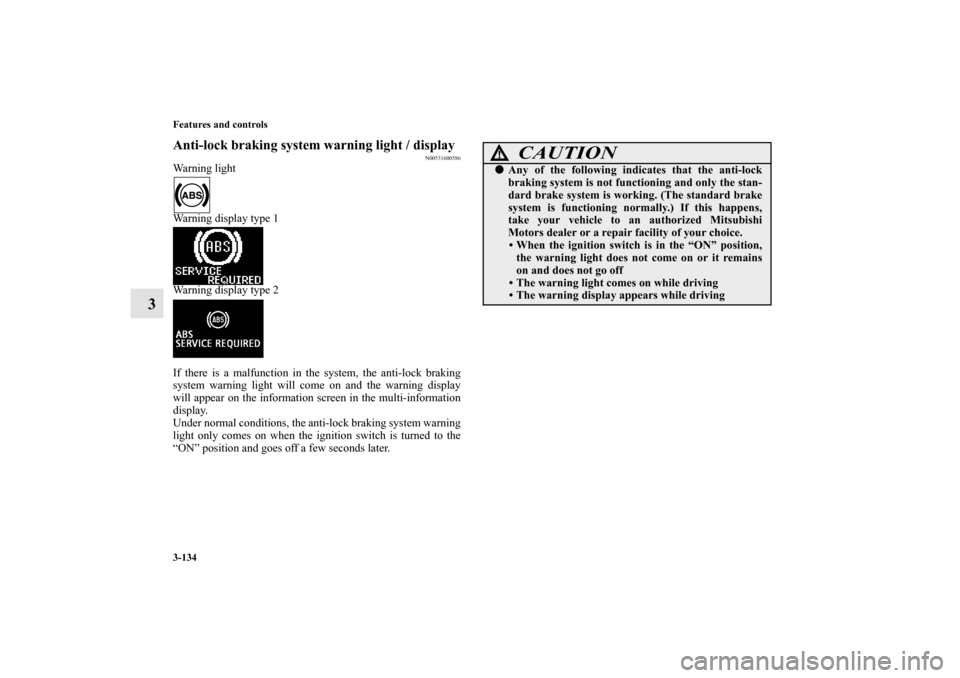
Anti-lock braking system warning light / display
N00531600586
Warning light
Warning display type 1
Warning display type 2
If there is a malfunction in the system, the anti-lock braking
system warning light will come on and the warning display
will appear on the information screen in the multi-information
display.
Under normal conditions, the anti-lock braking system warning
light only comes on when the ignition switch is turned to the
“ON” position and goes off a few seconds later.
CAUTION
!�Any of the following indicates that the anti-lock
braking system is not functioning and only the stan-
dard brake system is working. (The standard brake
system is functioning normally.) If this happens,
take your vehicle to an authorized Mitsubishi
Motors dealer or a repair facility of your choice.
• When the ignition switch is in the “ON” position,
the warning light does not come on or it remains
on and does not go off
• The warning light comes on while driving
• The warning display appears while driving
BK0138000US.book 134 ページ 2011年4月13日 水曜日 午前11時17分