Page 467 of 618

5-98 Comfort controls
5
NOTE�Press and hold the DISP button (5) again until you hear a
beep, and the tag information display returns to the folder
title display.
�Up to 10 characters are shown in the display at once. If the
title is cut off in the middle, press the PAGE button (4).
The next characters are displayed every time this button is
pressed.
�If no title is stored, “NO TITLE” is shown in the display.
�Characters that cannot be displayed are substituted
by “ • ”.
To play USB memory device tracks via voice
operation (vehicles with Bluetooth
® 2.0 interface)
N00765200057
Desired tracks can be selected and played from your USB
memory device by “Artist”, “Album”, “Playlist” and “Genre”
using voice commands.
For information concerning the voice recognition function or
speaker registration function, refer to “Bluetooth
® 2.0 inter-
face” on page 3-222.
The playback sequence of tracks is the same as when an iPod is
connected. Refer to the “To play iPod tracks via voice opera-
tion” on page 5-87.
BK0142300US.book 98 ページ 2011年8月7日 日曜日 午前10時44分
Page 468 of 618
Comfort controls
5-99
5
Preparation for voice operationTo use the voice operation, press the SPEECH button (1) first.
To play tracks from a Bluetooth
® device
(vehicles with Bluetooth
® 2.0 interface)
N00765300087
You can wirelessly connect a digital audio player or cellular
phone supporting Bluetooth
® to listen to the tracks on the con-
nected device.
Refer to “Bluetooth
® 2.0 interface” for the connecting method,
etc. on page 3-222.
The following explains the basic playback method.
NOTE�Depending on the connected device, operation of the con-
nected device is limited to its available functions.
�Depending on the connected device, the device may not
operate correctly.
�A file protected by copyright might not be able to start
playback.
�It is recommended to leave the equalizer of the connected
device flat.
�The voice operation is not available to access music files
on the connected Bluetooth
® device.
BK0142300US.book 99 ページ 2011年8月7日 日曜日 午前10時44分
Page 470 of 618

Comfort controls
5-101
5
To listen to tracks from a device connected via
Bluetooth
®
N00765500050
1. Press the PWR button (2) to turn on the audio system. The
system turns on in the last mode used.
2. Press the CD button (1) several times to switch to the
B(Bluetooth
®) mode. The input mode changes as follows
every time the CD button is pressed.
CD mode → USB (iPod) mode → Bluetooth
® mode
NOTE�For vehicles equipped with audio/video input RCA termi-
nals, pressing and holding the CD button for 2 seconds or
more switches the system to the AUX mode.
3. Connect your Bluetooth
® device.
Refer to “Connecting the Bluetooth
® 2.0 interface and
Bluetooth
® device” on page 3-230.
4. Playback starts automatically.
NOTE�Depending on the connected device, the playback may not
start automatically.
In this case, operate the connected device to start the play-
back.To stop the playback (if supported by the device)
N00765600019
To stop the playback, press the DISC DOWN button (7).
To restart the playback, press the DISC UP button (8).
To pause the playback (if supported by the device)
N00765700010
To pause the playback, press the DISC DOWN button (7).
To restart the playback, press the DISC UP button (8).To select a track (if supported by the device)
N00765800011
Press the TRACK button (10) to select the desired track num-
ber.
If the side of the button is pressed once while a track is
playing, playback returns to the start of that track.NOTE�Every time the track selection button is pressed, the track
number in the display changes.To play the same track repeatedly (if supported by the
device)
N00765900012
Press the RPT button (5) during playback to show “RPT” in the
display.
To exit this mode, press the button again.Press : The track number increases by one.
Press : The track number decreases by one.
Press for a long
period (approx. 2
seconds or more): The track number increases continu-
ously while the button is pressed.
Press for a long
period (approx. 2
seconds or more): The track number decreases continu-
ously while the button is pressed.
BK0142300US.book 101 ページ 2011年8月7日 日曜日 午前10時44分
Page 471 of 618

5-102 Comfort controls
5
To play tracks in random order (if supported by the
device)
N00766000010
Press the RDM button (6) to show “RDM” in the display.
The system randomly selects and plays tracks from all tracks in
the Bluetooth
® device.
To exit this mode, press the button again.
To find the start of each track for playback (if supported
by the device)
N00766100037
Press the SCAN button (9). “SCAN” is shown in the display
and all tracks in the Bluetooth
® device are played for several
seconds from the beginning.
To exit this mode, press the button again.
To switch the display (if supported by the device)
N00766200012
The system can display tag information.
1. Press and hold the DISP button (4) until you hear a beep
to show “TAG” in the display.2. The display changes as follows every time the DISP but-
ton (4) is pressed briefly:
Album title → Title name → Artist name → Genre
→Normal display
NOTE�Press and hold the DISP button (4) again until you hear a
beep, and the tag information disappears.
�Up to 10 characters are shown in the display at once. If the
title is cut off in the middle, press the PAGE button (3).
The next characters are displayed every time this button is
pressed.
�If no title is stored, “NO TITLE” is shown in the display.
�Characters that cannot be displayed are substituted
by “ • ”.Album title
Title name Example
Artist name
BK0142300US.book 102 ページ 2011年8月7日 日曜日 午前10時44分
Page 473 of 618
5-104 Comfort controls
5
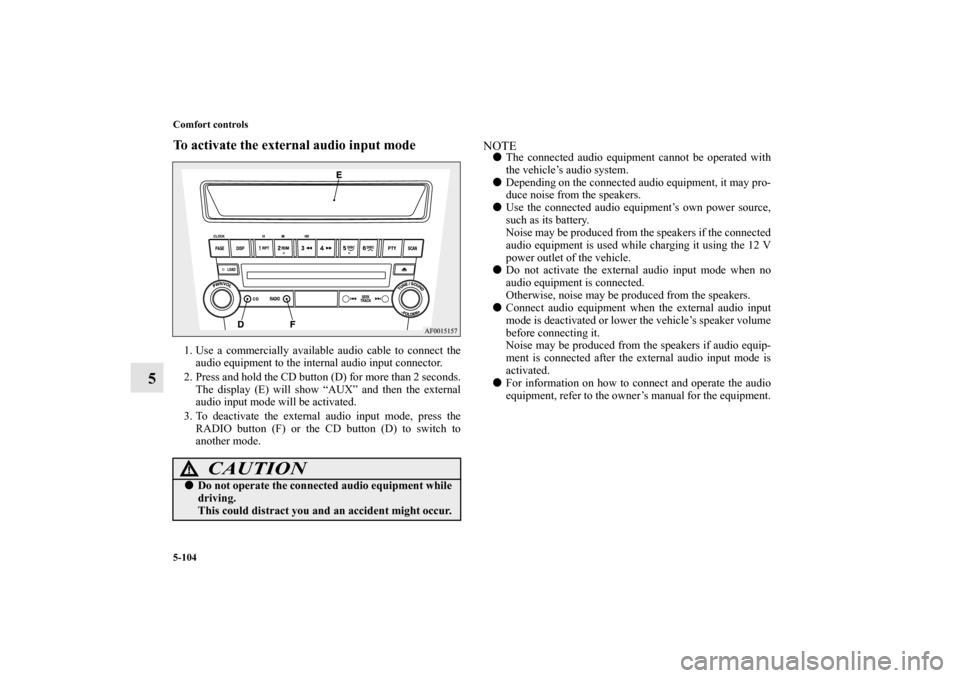
To activate the external audio input mode1. Use a commercially available audio cable to connect the
audio equipment to the internal audio input connector.
2. Press and hold the CD button (D) for more than 2 seconds.
The display (E) will show “AUX” and then the external
audio input mode will be activated.
3. To deactivate the external audio input mode, press the
RADIO button (F) or the CD button (D) to switch to
another mode.
NOTE�The connected audio equipment cannot be operated with
the vehicle’s audio system.
�Depending on the connected audio equipment, it may pro-
duce noise from the speakers.
�Use the connected audio equipment’s own power source,
such as its battery.
Noise may be produced from the speakers if the connected
audio equipment is used while charging it using the 12 V
power outlet of the vehicle.
�Do not activate the external audio input mode when no
audio equipment is connected.
Otherwise, noise may be produced from the speakers.
�Connect audio equipment when the external audio input
mode is deactivated or lower the vehicle’s speaker volume
before connecting it.
Noise may be produced from the speakers if audio equip-
ment is connected after the external audio input mode is
activated.
�For information on how to connect and operate the audio
equipment, refer to the owner’s manual for the equipment.
CAUTION
!�Do not operate the connected audio equipment while
driving.
This could distract you and an accident might occur.
BK0142300US.book 104 ページ 2011年8月7日 日曜日 午前10時44分
Page 474 of 618

Comfort controls
5-105
5 Steering wheel audio remote control switch
(if so equipped)
N00714800442
The remote control switch is located on the left side of the
steering wheel.
The switch can be operated when the ignition switch is in
either the “ON” or “ACC” position.NOTE�Do not press multiple buttons at the same time when using
the steering wheel audio remote control switch.
To turn on the powerPress the power switch (3) to turn on the power. When the
power is turned on, the last mode used before turning off is dis-
played. To turn off the power, press and hold down the power
switch (3) for about 2 seconds until you hear a beep.Vo l u m e c o n t r o lVolume up button - 1While the button is pressed, the volume will continue to
increase.Volume down button - 2While the button is pressed, the volume will continue to
decrease.Mode selectionPress the mode selector button (3) to select the desired mode.
The mode changes in the following order.
AM → FM1 → FM2 → (SAT1 → SAT2 → SAT3 → SAT4) →
CD → (RSES) → USB or iPod* → Bluetooth
®* → AM
*: If you connect these devices.
To listen to the radioPress the mode selector button (3) and select AM or FM mode.Automatic tuningSeek up button - 4 / Seek down button - 5
After pressing one of these buttons, a receivable station will be
automatically selected and reception of the station will begin.
1- Volume up button
2- Volume down button
3- Power switch/Mode selector button
4- Seek up/Track up/File up/Fast-forward button
5- Seek down/Track down/File down/Fast-reverse button
BK0142300US.book 105 ページ 2011年8月7日 日曜日 午前10時44分
Page 475 of 618

5-106 Comfort controls
5
Channel selection / Category selection (Vehicles with
satellite radio)Seek up button - 4 / Seek down button - 5
Press the button to select the desired channel.
Pressing down the button for 2 seconds or longer will change
the system to category selection mode. While the button is
pressed, the category will change in order. When you reach the
desired category, release the button.To listen to a CDPress the mode selector button (3) and select CD mode.To fast forward/reverse the disc (music CDs only)To fast forward or fast reverse the disc, press the fast-forward
button (4) or the fast-reverse button (5).
Fast forward
You can fast forward the disc by holding down the fast-forward
button (4). While the button is kept pressed, the disc will be
fast-forwarded.
Fast reverse
You can fast reverse the disc by holding down the fast-reverse
button (5). While the button is kept pressed, the disc will be
fast-reversed.NOTE�With an MP3 CD, you can fast forward and fast reverse
tracks in the same folder.
To select a desired trackYou can select your desired track by using the track up button
(4) or the track down button (5).NOTE�Pressing the track down button once during the song will
cause the system to restart playing from the beginning of
the song.To listen to an iPodPress the mode selector button (3) and select iPod mode.To select a desired trackTrack up button - 4
Press the button repeatedly until the desired track number
appears on the display.NOTE�The track number continues to increase while the button is
pressed.
Track down button - 5
Press the button repeatedly until the desired track number
appears on the display.NOTE�The track number continues to decrease while the button
is pressed.
BK0142300US.book 106 ページ 2011年8月7日 日曜日 午前10時44分
Page 481 of 618
5-112 Comfort controls
5Error codes (iPod)
N00766300013
If an error code (1) appears in the display, take action in accordance with the table below.
Error display
Item
Repair
NO SONG There are no playable music files. Record music files in the iPod.
VER ERROR (Blink) The iPod or its software cannot be recognized. Connect a supported iPod.
USB BUS PWR (Blink)An overcurrent or other power-supply error has
occurred.Remove the iPod.
Have the vehicle inspected at an authorized Mitsubishi
Motors dealer or a repair facility of your choice.BK0142300US.book 112 ページ 2011年8月7日 日曜日 午前10時44分

