2012 MINI COUPE ROADSTER CONVERTIBLE lock
[x] Cancel search: lockPage 12 of 283

CockpitAT A GLANCE
11
1Adjusting the exterior mirrors, folding them
in and out 54
3 MINI Roadster, MINI Convertible: Always
Open Timer 72
7 Ignition lock 60 8
Buttons on steering wheel,
Right side
Left side
9 Horn: the entire surface
10 Adjusting the steering wheel 55
11 Releasing the hood 222
2
Parking lamps 96
Low beams 96
Automatic headlamp control 96
Adaptive Light Control 97
Turn signals 65
High beams 98
Headlamp flasher 65
Roadside parking lamps 98
Computer 71
4 Tachometer 12
Instrument lighting 99
Resetting the trip odometer 71
5 Wiper system 66
6 Switching the ignition on/off and
starting/stopping the engine
60
Resuming cruise control68
Storing speed and accelerating or
decelerating
or Activating/deactivating cruise
control
68
Increasing or reducing volume
Telephone:
Press: accepting and ending a call,
starting dialing of selected phone
number and redialing if no phone
number is selected
Microphone on steering column
Activating/deactivating voice
activation system 23
Microphone on steering column
Changing the radio station
Selecting a music track
Scrolling through the redial list
00320051004F004C00510048000300280047004C0057004C005200510003
Page 16 of 283
CockpitAT A GLANCE
15
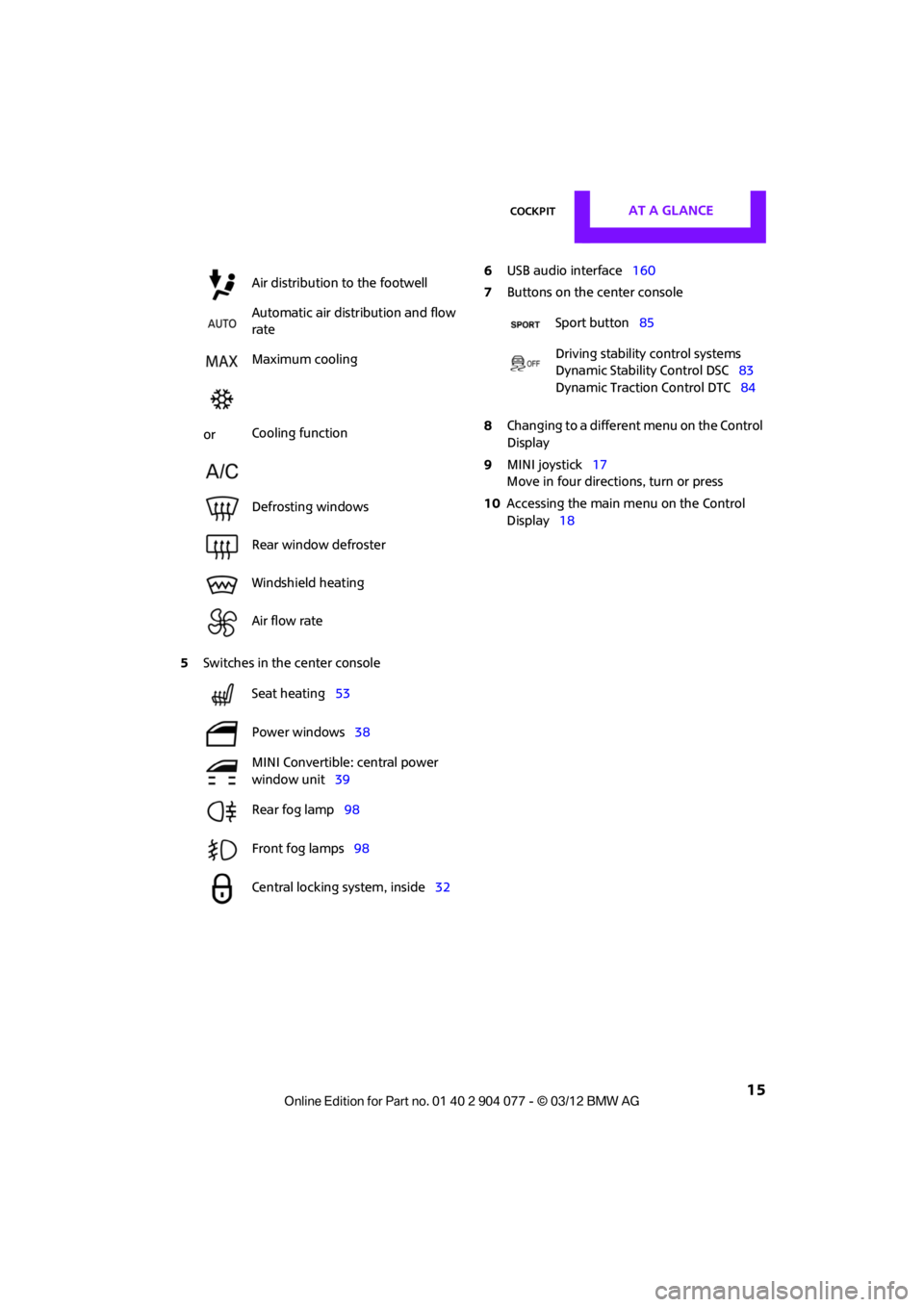
5Switches in the center console 6
USB audio interface 160
7 Buttons on the center console
8 Changing to a differen t menu on the Control
Display
9 MINI joystick 17
Move in four directions, turn or press
10 Accessing the main me nu on the Control
Display 18
Air distribution to the footwell
Automatic air distribution and flow
rate
Maximum cooling
or Cooling function
Defrosting windows
Rear window defroster
Windshield heating
Air flow rate
Seat heating
53
Power windows 38
MINI Convertible: central power
window unit 39
Rear fog lamp 98
Front fog lamps 98
Central locking system, inside 32
Sport button85
Driving stability control systems
Dynamic Stability Control DSC 83
Dynamic Traction Control DTC 84
00320051004F004C00510048000300280047004C0057004C005200510003
Page 21 of 283

AT A GLANCEOnboard computer
20
Adjusting settings
1.Select a field.
2. Turn the MINI joystick until the desired
setting is displayed.
3. Press the MINI joystick to confirm the
setting.
Activating/deactivating functions
Some menu items are preceded by a check box.
It indicates whether the function is activated or
deactivated.
Selecting the menu item activates or deactivates
the function.
Function is activated.
Function is deactivated.
Example: setting the clock
1. Press the button.
The main menu is displayed.
2. Turn the MINI joystick until "Settings" is
selected, and press the MINI joystick.
3. Turn the MINI joystick until "Time/Date" is
selected, and press the MINI joystick.
4. Turn the MINI joystick until "Time:" is
selected, and press the MINI joystick.
5. Turn the MINI joystick to set the hours and
press the MINI joystick.
6. Turn the MINI joystick to set the minutes and
press the MINI joystick.
00320051004F004C00510048000300280047004C0057004C005200510003
Page 29 of 283
CONTROLSOpening and closing
28
Opening and closing
Vehicle equipment
In this chapter, all production, country, and
optional equipment that is offered in the model
range is described. Equipment is also described
that is not available because of, for example,
selected options or coun try version. This also
applies to safety relate d functions and systems.
Keys/remote controls
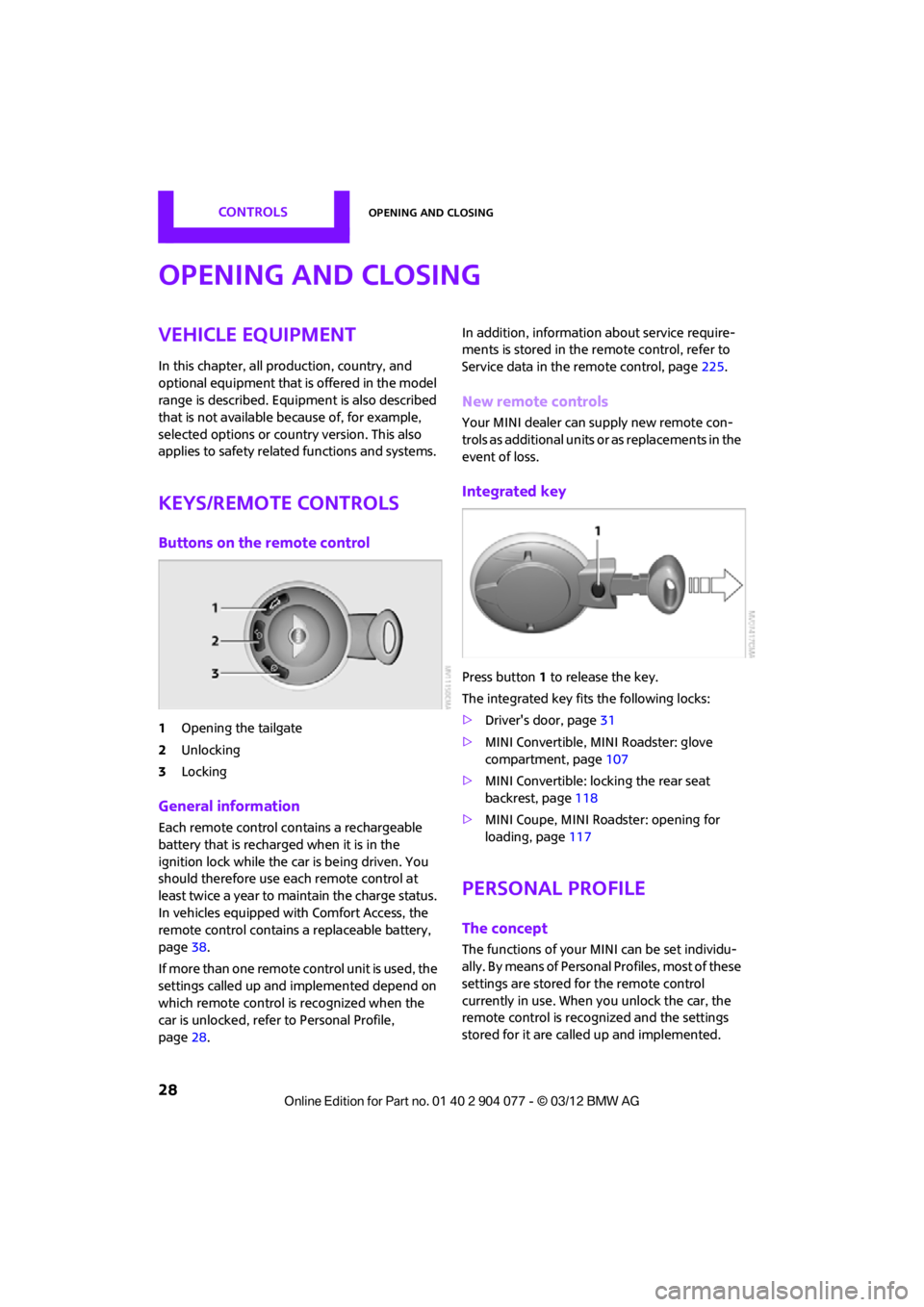
Buttons on the remote control
1Opening the tailgate
2 Unlocking
3 Locking
General information
Each remote control co ntains a rechargeable
battery that is recharged when it is in the
ignition lock while the car is being driven. You
should therefore use each remote control at
least twice a year to maintain the charge status.
In vehicles equipped with Comfort Access, the
remote control contains a replaceable battery,
page 38.
If more than one remote control unit is used, the
settings called up and implemented depend on
which remote control is recognized when the
car is unlocked, refer to Personal Profile,
page 28. In addition, information about service require-
ments is stored in the remote control, refer to
Service data in the remote control, page
225.
New remote controls
Your MINI dealer can supply new remote con-
trols as additional units or as replacements in the
event of loss.
Integrated key
Press button1 to release the key.
The integrated key fits the following locks:
> Driver's door, page 31
> MINI Convertible, MINI Roadster: glove
compartment, page 107
> MINI Convertible: locking the rear seat
backrest, page 118
> MINI Coupe, MINI Roadster: opening for
loading, page 117
Personal Profile
The concept
The functions of your MINI can be set individu-
ally. By means of Personal Profiles, most of these
settings are stored fo r the remote control
currently in use. When you unlock the car, the
remote control is recognized and the settings
stored for it are called up and implemented.
00320051004F004C00510048000300280047004C0057004C005200510003
Page 30 of 283

Opening and closingCONTROLS
29
This means that your settings will be activated
for you, even if in the meantime your car was
used by someone else with another remote
control and the corresponding settings.
At most three remote co ntrols can be set for
three different people. A prerequisite is that
each person uses a separate remote control.
Personal Profile settings
For more information on specific settings, refer
to the specified pages.
> Response of the central locking system
when the car is being unlocked 30
> Automatic locking of the vehicle 33
> Triple turn signal activation 65
> Settings for the displays on the onboard
computer, in the speedometer and in the
tachometer:
>12 h/24 h mode of the clock 76
> Date format 77
> Brightness of the Control Display 80
> Language on the Control Display 80
> Units of measure for fuel consumption,
distance covered/re maining distances
and temperature 74
> Light settings:
>Pathway lighting 97
> Daytime running lights 97
> Automatic climate control: activating/
deactivating the AUTO program, setting the
temperature, air volume and air
distribution 103
> Entertainment:
>Tone control 147
> Adjusting vo lume levels 147
Central locking system
The concept
The central locking system is ready for operation
whenever the driver's door is closed.
The system simultaneously engages and
releases the locks on the following:
>Doors
> Tailgate
> Fuel filler flap
Operating from outside
>Via the remote control
> Using the door lock
> In cars with Comfor t Access, via the door
handles on the driver's and passenger's
sides
The anti-theft system is also operated at the
same time. It prevents the doors from being
unlocked using the lock buttons or door han-
dles. The remote control can also be used to
switch on/off the welcome lamps and interior
lamps. The alarm system is also activated or
deactivated, page 34.
Operating from inside
Button for central locking system, page 32.
In the event of a sufficiently severe accident,
the central locking system unlocks automati-
cally. In addition, the hazard warning flashers
and interior lamps come on.
Opening and closing:
from outside
Persons or animals in a parked vehicle
could lock the doors from the inside. Take
the key with you when you leave the vehicle
so that the vehicle can be opened from the
outside. <
00320051004F004C00510048000300280047004C0057004C005200510003
Page 31 of 283
CONTROLSOpening and closing
30
Using the remote control
Unlocking
Press the button.
The welcome lamps and interior lamps come on.
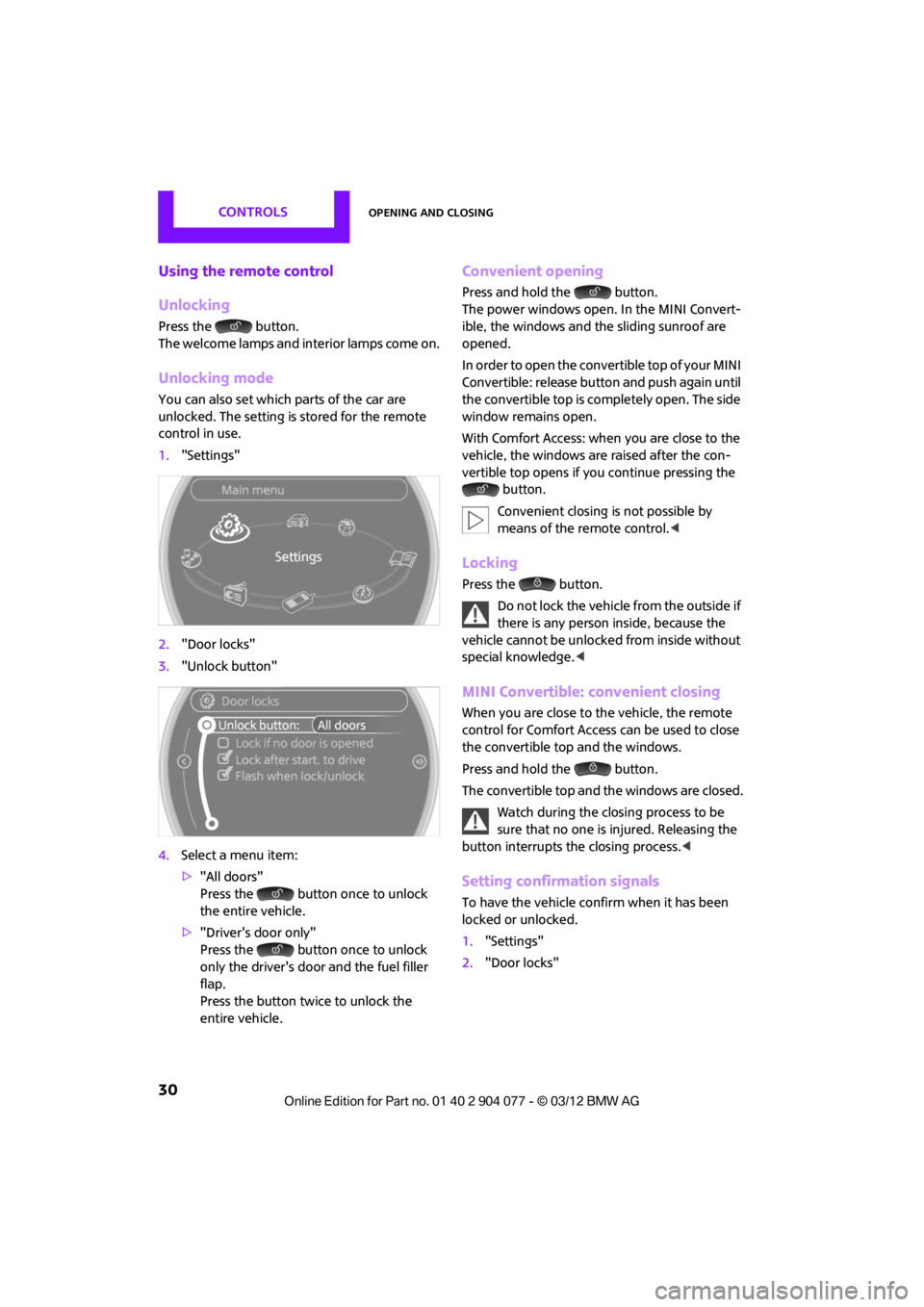
Unlocking mode
You can also set which parts of the car are
unlocked. The setting is stored for the remote
control in use.
1."Settings"
2. "Door locks"
3. "Unlock button"
4. Select a menu item:
>"All doors"
Press the button once to unlock
the entire vehicle.
> "Driver's door only"
Press the button once to unlock
only the driver's door and the fuel filler
flap.
Press the button twice to unlock the
entire vehicle.
Convenient opening
Press and hold the button.
The power windows open. In the MINI Convert-
ible, the windows and the sliding sunroof are
opened.
In order to open the convertible top of your MINI
Convertible: release butt on and push again until
the convertible top is completely open. The side
window remains open.
With Comfort Access: when you are close to the
vehicle, the windows are raised after the con-
vertible top opens if yo u continue pressing the
button.
Convenient closing is not possible by
means of the remote control. <
Locking
Press the button.
Do not lock the vehicle from the outside if
there is any person inside, because the
vehicle cannot be unlocked from inside without
special knowledge. <
MINI Convertible: convenient closing
When you are close to the vehicle, the remote
control for Comfort Access can be used to close
the convertible top and the windows.
Press and hold the button.
The convertible top and the windows are closed.
Watch during the closing process to be
sure that no one is injured. Releasing the
button interrupts the closing process. <
Setting confirmation signals
To have the vehicle confirm when it has been
locked or unlocked.
1."Settings"
2. "Door locks"
00320051004F004C00510048000300280047004C0057004C005200510003
Page 32 of 283
Opening and closingCONTROLS
31
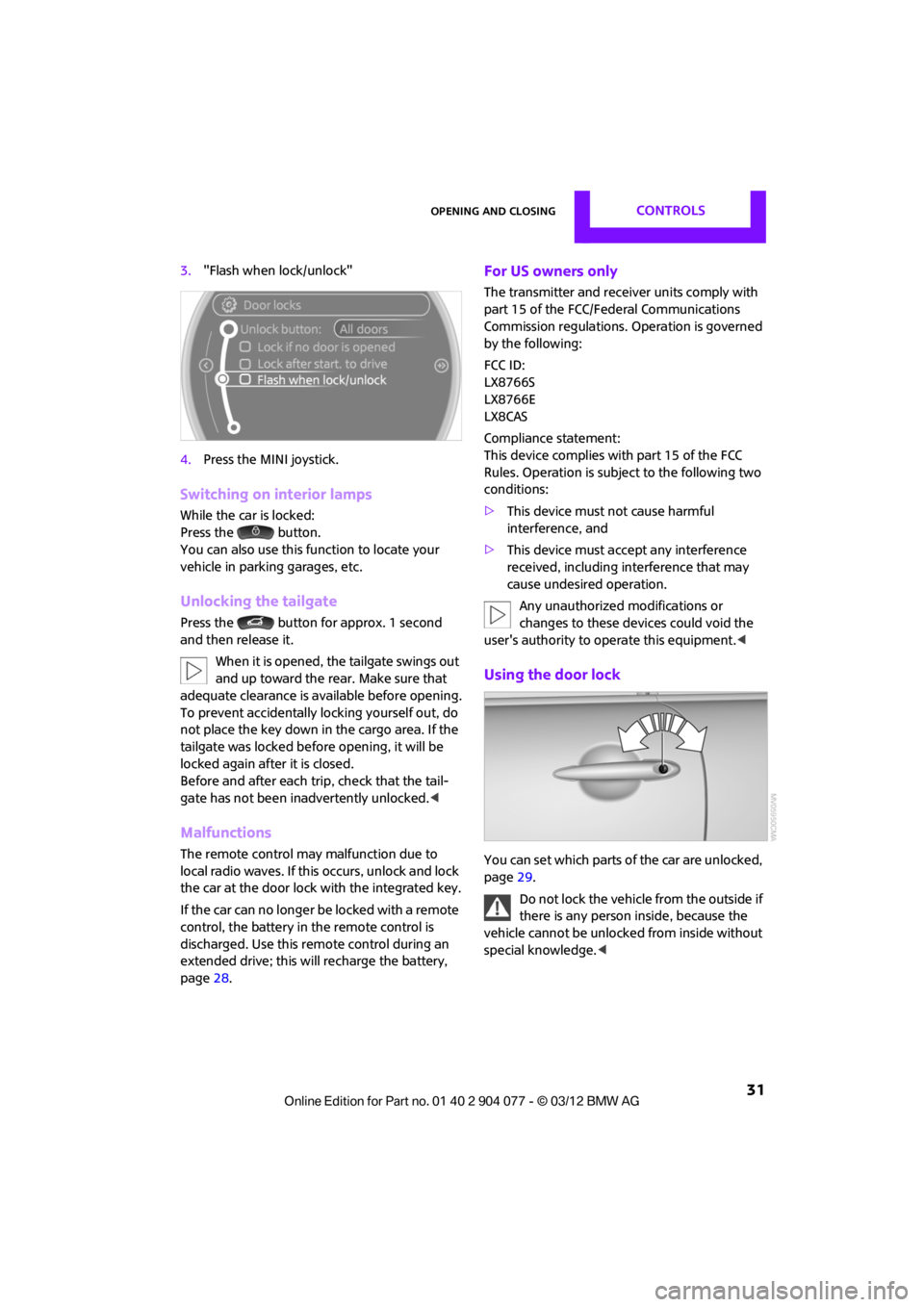
3."Flash when lock/unlock"
4. Press the MINI joystick.
Switching on interior lamps
While the car is locked:
Press the button.
You can also use this function to locate your
vehicle in parking garages, etc.
Unlocking the tailgate
Press the button for approx. 1 second
and then release it.
When it is opened, the tailgate swings out
and up toward the rear. Make sure that
adequate clearance is av ailable before opening.
To prevent accidentally locking yourself out, do
not place the key down in the cargo area. If the
tailgate was locked befo re opening, it will be
locked again after it is closed.
Before and after each trip, check that the tail-
gate has not been inadvertently unlocked. <
Malfunctions
The remote control may malfunction due to
local radio waves. If this occurs, unlock and lock
the car at the door lock with the integrated key.
If the car can no longer be locked with a remote
control, the battery in the remote control is
discharged. Use this remote control during an
extended drive; this wi ll recharge the battery,
page 28.
For US owners only
The transmitter and receiv er units comply with
part 15 of the FCC/Federal Communications
Commission regulations. Operation is governed
by the following:
FCC ID:
LX8766S
LX8766E
LX8CAS
Compliance statement:
This device complies with part 15 of the FCC
Rules. Operation is subj ect to the following two
conditions:
> This device must not cause harmful
interference, and
> This device must acce pt any interference
received, including in terference that may
cause undesired operation.
Any unauthorized modifications or
changes to these devices could void the
user's authority to operate this equipment. <
Using the door lock
You can set which parts of the car are unlocked,
page29.
Do not lock the vehicle from the outside if
there is any person inside, because the
vehicle cannot be unlocked from inside without
special knowledge. <
00320051004F004C00510048000300280047004C0057004C005200510003
Page 33 of 283
CONTROLSOpening and closing
32
When there is no alarm system or Comfort
Access, only the driver's door is locked
with the door lock. <
To lock all doors, the fuel filler flap, and the
tailgate together:
With the doors closed, press the interior central
locking button, page 32, to lock the vehicle.
Unlocking and opening the driver or passenger
door, page 32.
Lock the vehicle.
>Lock the driver's door with the integrated
key via the door lock, or
> Press the safety lo ck button on the
passenger's door and close the door
from the outside.
Convenience operation
With an alarm system or Comfort Access, the
windows can be operated via the door lock.
Opening/closing
Hold the key in the position for unlocking or
locking.
In the MINI Convertible, the convertible top
closes first, followed by the folding sunroof, and
finally the side windows close.
During the roof closing process (in case of
the convertible top also during the open-
ing process) ensure no one gets pinched.
Releasing the key stops the operation. <
Manual operation
In the event of an electrical malfunction, the
driver's door can be unlocked or locked by turn-
ing the integrated key in the door lock to the end
positions.
Opening and closing:
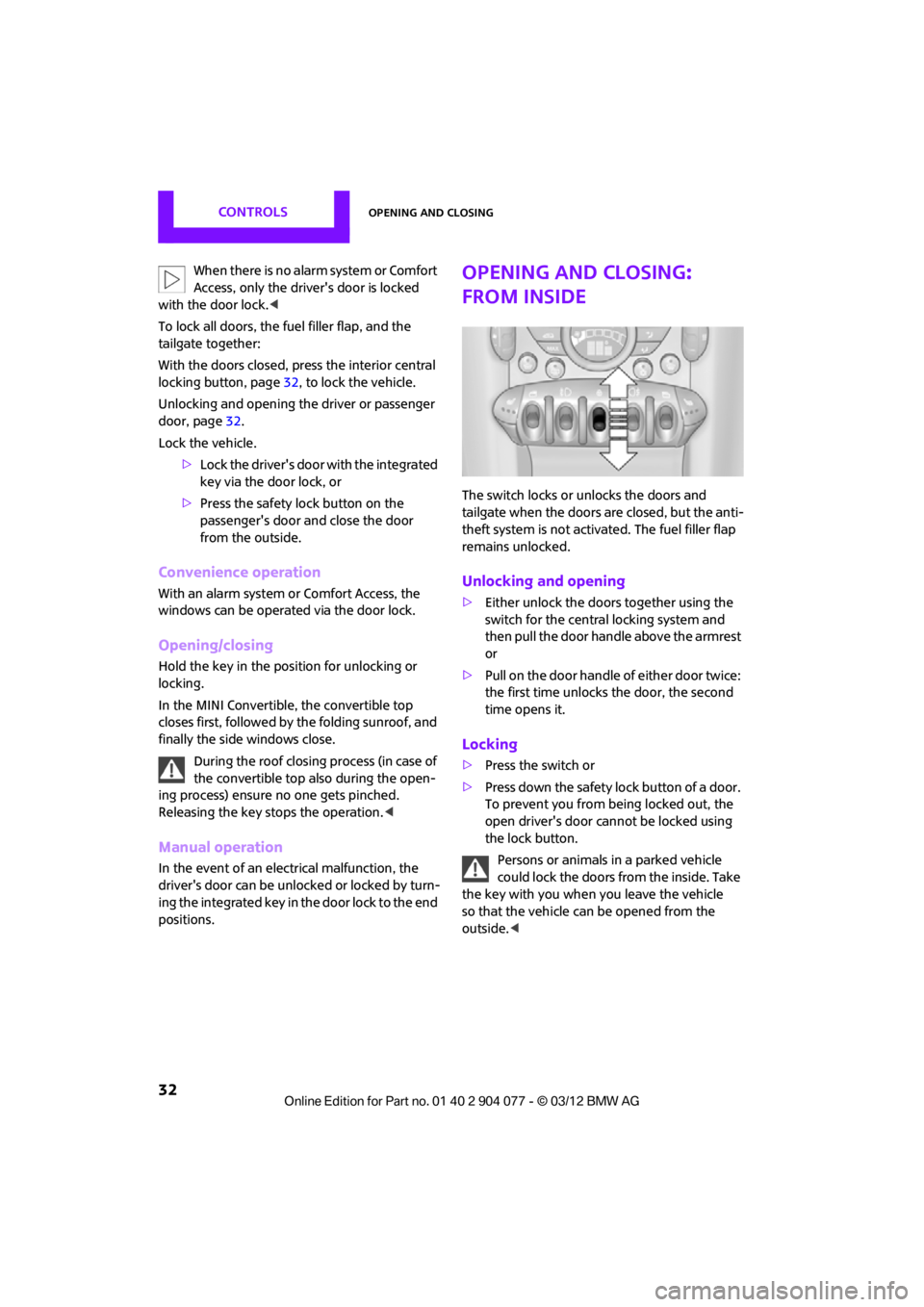
from inside
The switch locks or unlocks the doors and
tailgate when the doors are closed, but the anti-
theft system is not activated. The fuel filler flap
remains unlocked.
Unlocking and opening
>Either unlock the doors together using the
switch for the central locking system and
then pull the door handle above the armrest
or
> Pull on the door handle of either door twice:
the first time unlocks the door, the second
time opens it.
Locking
>Press the switch or
> Press down the safety lo ck button of a door.
To prevent you from being locked out, the
open driver's door cannot be locked using
the lock button.
Persons or animals in a parked vehicle
could lock the doors from the inside. Take
the key with you when you leave the vehicle
so that the vehicle can be opened from the
outside. <
00320051004F004C00510048000300280047004C0057004C005200510003