2012 MERCEDES-BENZ SPRINTER brake light
[x] Cancel search: brake lightPage 120 of 292
Cruise control
General notes Cruise control maintains the speed of the
vehicle for you.
Use cruise control if road and traffic
conditions make it appropriate to maintain a
steady speed
for
a prolonged period. You can
set any speed from 20 mph upwards in
increments of 1 mph.
i If you have set km/h as the unit for the
digital speedometer , you can set any speed
from 30 km/h upwards in increments of
1 km/h. G
Warning
Cruise control is unable to take account of
road and traffic conditions.
Always pay attention
to the traffic conditions,
even when cruise control is activated.
Cruise control is only an aid designed to assist
driving. You are always responsible for the
vehicle's speed and for braking in good time.
If there is a change of drivers, make sure that
you inform the new driver about the set cruise
speed. Otherwise, sudden acceleration or
braking could endanger you or others. G
Warning
Do not use cruise control:
R in road and traffic conditions which do not
allow you to
maintain a constant speed (e.g.
heavy traffic or winding roads). You could
otherwise cause an accident.
R on slippery roads. Braking or accelerating
could cause the drive wheels to lose
traction and the vehicle could then skid.
R when there is poor visibility, e.g. due to fog,
heavy rain or snow
i Cruise control may not be able to
maintain the stored speed on uphill or
downhill gradients. The stored speed is
resumed if the gradient evens out and the
vehicle's speed does not fall below 20 mph
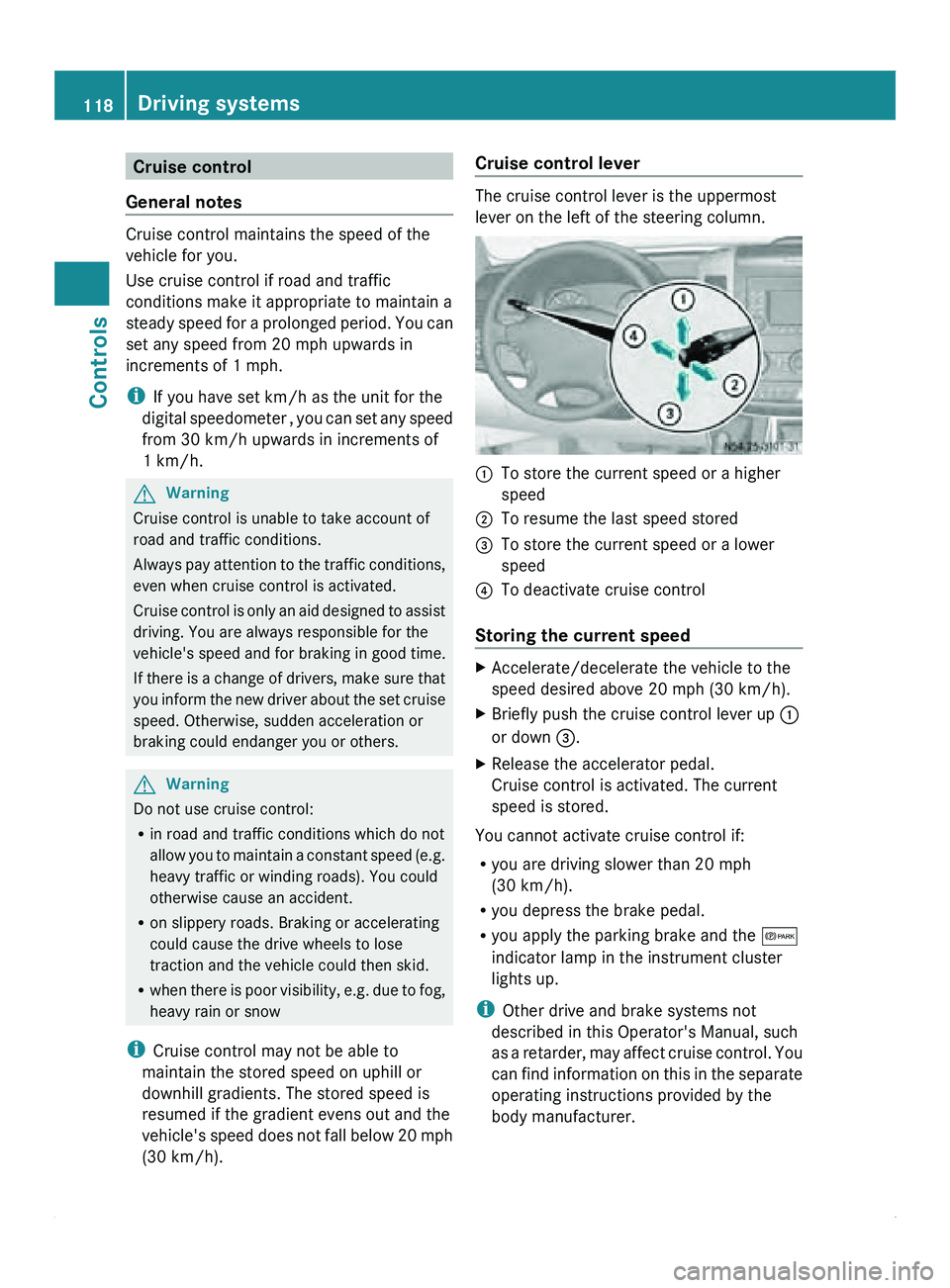
(30 km/h). Cruise control lever The cruise control lever is the uppermost
lever on the left of the steering column.
0046
To store the current speed or a higher
speed
0047 To resume the last speed stored
008A To store the current speed or a lower
speed
0088 To deactivate cruise control
Storing the current speed X
Accelerate/decelerate the vehicle to the
speed desired above 20 mph
(30 km/h).
X Briefly push the cruise control lever up 0046
or down 008A
.
X Release the accelerator pedal.
Cruise control is activated. The current
speed is stored.
You cannot activate cruise control if:
R you are driving slower than 20 mph
(30 km/h).
R you depress the brake pedal.
R you apply the parking brake and the 0066
indicator lamp in the instrument cluster
lights up.
i Other drive and brake systems not
described in this Operator's Manual, such
as a
retarder,
may affect cruise control. You
can find information on this in the separate
operating instructions provided by the
body manufacturer. 118
Driving systems
Controls
Page 121 of 292
Resuming the stored speed
G
Warning
Only select a stored speed if you know what
that speed is
and whether it is suitable for the
current driving and traffic situation. You can
otherwise endanger yourself and others by
unintentionally triggering sudden
acceleration or braking.
X Briefly pull the cruise control lever in the
direction of arrow 0047.
X Release the accelerator pedal.
Cruise control is
activated and resumes the
vehicle's speed to the last speed stored.
i When you first move the cruise control
lever in the direction of arrow 0047 after
starting the engine, cruise control is
activated and the current road speed is
stored.
Setting the speed G
Warning
The rate at which you increase the speed in
increments of 1 mph (1 km/h) may be faster
than your vehicle is able to accelerate. Your
vehicle may
then continue to accelerate up to
the newly set speed even after you have
released the cruise control lever.
Only increase the speed as the prevailing
conditions permit. Sudden acceleration could
otherwise endanger you and others.
X Briefly push the cruise control lever
upwards 0046 to increase the speed or
downwards 008A to reduce the speed.
The last speed stored is increased/
reduced in increments of 1 mph
(1 km/h
).
or
X Press and hold the cruise control lever
up 0046 or down 008A until the desired speed
has been reached.
X Release the cruise control lever.
The current speed is stored. i
Cruise control is not deactivated if you
depress the accelerator pedal. If you
accelerate briefly, e.g. to overtake, and
then ease off the accelerator pedal again,
cruise control adjusts the vehicle's speed
to the last speed stored.
Deactivating cruise control There are various ways to deactivate cruise
control:
X
Briefly push the cruise control lever
forwards 0088.
or
X Apply the brakes.
The last speed set remains stored.
i The last speed set is deleted when you
switch off the engine.
i Cruise control is deactivated
automatically when:
R you apply the brakes.
R you apply the parking brake and the
0066 indicator lamp in the instrument
cluster lights up.
R you are driving slower than 20 mph
(30 km/h).
R ESP ®
or ASR intervenes.
R you shift the automatic transmission to
neutral position N while the vehicle is in
motion.
R there is a malfunction in the ESP ®
, ASR
or ABS system. PARKTRONIC
General notes G
Warning
PARKTRONIC is only an aid and may not
detect all obstacles. It is not a substitute for
attentive driving.
You are always responsible for safety and
must continue to pay attention to your Driving systems
119
Controls
Z
Page 123 of 292

If an obstacle is within this range, all
segments of
the
warning displays light up and
you hear a warning tone. If the distance
between the vehicle and the obstacle falls
below the minimum range, it is possible that
the distance may no longer be displayed.
! Pay particular attention to obstacles
above or below the sensors when parking,
such as flower pots or trailer towbars.
PARKTRONIC does not recognize such
objects when they are in the immediate
vicinity of the vehicle. You could damage
the vehicle or objects.
PARKTRONIC can suffer interference from:
R ultrasonic sources such as a lorry's
compressed-air brakes, an automatic car
wash or a pneumatic drill
R attachments to the vehicle, e.g. rear
mounted racks
R number plates (vehicle license plates)
that are not affixed flat against the
bumper
R dirty or icy sensors
Warning displays The warning displays show the distance
between the sensor and the obstacle.
Warning display, front area
0046
Left-hand side of vehicle
0047 Right-hand side of vehicle
008A Segments Warning display for the left-hand rear area in the
left-hand exterior mirror
0088
Warning display segments
0086 Readiness indicator segment
The warning display is divided into five yellow
and two red segments for each side of the
vehicle. PARKTRONIC is operational if yellow
indicator segments 008A and 0086 light up.
There is a malfunction if only the red
segments of the warning display light up
(Y page 215).
The position of
the selector lever determines
whether the front and/or rear area is
monitored. Selector lever
position Monitoring
D
Front area
R or N Front and rear area
P
No areas activated
One or more segments light up as the vehicle
approaches an obstacle, depending on the
vehicle's distance from the obstacle.
From the:
R
sixth segment, an intermittent warning
tone sounds for approximately
two seconds.
R seventh segment, a continuous warning
tone sounds. You have reached the
minimum distance. Driving systems
121
Controls Z
Page 124 of 292

Roll-back warning
PARKTRONIC automatically monitors the
area behind the vehicle if the vehicle begins
to roll backwards without reverse gear
engaged, e.g. after stopping on an uphill
gradient.
If PARKTRONIC recognizes an obstacle at a
distance of at most 31 in (80 cm), all the
segments in the warning display light up. A
continuous warning tone also sounds as the
vehicle approaches the obstacle and for a
further two seconds after the vehicle has
come to a halt.
Activating/deactivating PARKTRONIC You can activate/deactivate PARKTRONIC
manually.
X
Press button 0046.
If PARKTRONIC is deactivated, the
indicator lamp in the switch lights up.
Towing a trailer If your vehicle is equipped with the electric
wiring required for towing a trailer and you
attach a trailer, PARKTRONIC is deactivated
for the rear area as soon as you have
established an
electrical
connection between
your vehicle and the trailer. If you use an
adapter for the socket, remove it from the
socket after detaching the trailer. Otherwise,
PARKTRONIC remains deactivated for the
rear area.
If the trailer coupling is detachable, remove it
when it is no longer required. PARKTRONIC measures the minimum detection range to an
obstacle from the bumper, not the ball
coupling.
Rear view camera
The rear view camera is a visual parking aid.
It shows you
the area behind the vehicle on a
separate monitor on the center console.
The rear view camera is activated when you
engage reverse gear.
The camera is in the middle of the roof above
the high-mounted brake lamp ( Y page 163). 0046
Monitor for rear view camera G
Warning
The rear-view camera is only a driving aid and
may display obstacles as foreshortened,
incorrectly or not
at all. It cannot replace your
attentiveness.
The rear-view camera cannot display all
objects located very near and/or under the
rear bumper. It does not warn you of a
collision, persons or objects.
You are responsible for safety at all times and
must continue to pay attention to your
immediate surroundings during parking and
maneuvering. This applies not only to the area
behind, but also to the area in front of and
beside your vehicle.
You may otherwise not recognize people or
objects, if any, and by driving onwards, injure
people or damage objects and the vehicle. We
recommend also using PARKTRONIC at all
times during parking. 122
Driving systems
Controls
Page 150 of 292

G
Warning
Do not attempt to modify or repair the lashing
points, cargo tie-down
rings or tie downs. The
load or the cargo tie-down rings could work
loose and cause serious injury to you and
other people as well as material damage.
Spread the load evenly between the lashing
points or cargo tie-down rings.
Observe the loading guidelines.
i Secure loose loads with a tested lashing
net or a tarpaulin.
X Always fasten the lashing net or tarpaulin
to all available
cargo tie-down points. Make
sure that the retaining hooks are secured
against accidental opening.
! Observe the information
on the maximum
loading capacity of the lashing points.
If you use multiple lashing points to secure
a load, you should observe the maximum
loading capacity of the weakest lashing
point.
When you brake hard, for example, forces
apply that can be far higher than the weight
force of the transported load. Always use
multiple lashing points to distribute these
forces, and distribute the load equally
among them.
Information about the maximum loading
capacity of the cargo tie-down points can be
found in the "Technical data" section
(Y page 283).
i If your vehicle is equipped with loading
rails in the cargo floor, you should place
lashing rods directly in front of and behind
the load. The lashing rods directly absorb
the potential shifting forces. G
Warning
If you
tension the lashing straps between the
side walls, or between a side wall and the
cargo floor, the
maximum permissible load for
the loading rails or lashing points or eyelets
could be exceeded if the brakes are applied suddenly, if
the vehicle's direction is changed
abruptly or in the event of an accident.
The load would no longer be secured,
resulting in a risk of serious injury being
caused by the load slipping.
For this reason,
do not tension a lashing strap
between the side walls or between a side wall
and the cargo floor.
Only lashing rods are to be used between the
loading rails on the side walls. Observe the
operating instructions of the lashing rod
manufacturer.
i Securing loads on the cargo floor by
lashing them down is only recommended
for lightweight loads. Place non-slip mats
(anti-slip mats) on the cargo floor to
increase load security. G
Warning
Before releasing
the lashing straps, you must
make sure that
the load is standing firmly and
that it cannot tip over once the straps have
been removed. Otherwise, you or others could
be injured by the load slipping.
Installing/removing cargo tie-down
points for the loading rails X
To install: slide the cargo tie-down ring
through a recess
in the loading rail close to
the load until locking mechanism 0046
engages in the recess.
i When you pull locking mechanism 0046 up
and out of the recess, the cargo tie-down
ring is able to move within the loading rail. 148
Transporting loads with the vehicle
Operation
Page 152 of 292

Towing a trailer
Notes on trailer towing Important safety notes
The trailer coupling is one of the most
important vehicle parts with regard to road
safety. The notes on operation, care and
maintenance issued by the manufacturer
should be observed.
G
Warning!
Improper equipment or driving technique
while driving with a trailer can cause you to
lose control of your vehicle.
Improper towing or failure to observe the
Operator's Manual can lead to vehicle
damage and/or serious
injuries. Observe the
following guidelines in order to guarantee safe
driving with trailers.
Contact an authorized Sprinter Dealer if you
require any explanation of the information
contained in the Operator's Manual.
General notes
R Install only an approved trailer coupling on
your vehicle.
Further information about availability and
installation of trailer couplings can be
obtained from any authorized Sprinter
Dealer.
R The bumpers of your vehicle are not
suitable for installing detachable trailer
couplings.
R Do not install rented trailer couplings or
other detachable trailer couplings to the
bumpers.
R To reduce the risk of damage to the ball
coupling when using a detachable trailer
coupling, remove the ball coupling from its
mounting when it is not needed.
Coupling up a trailer Observe the maximum permissible trailer
dimensions (width and length). Most federal states and all Canadian
provinces require by law:
R
safety chains between the towing vehicle
and the
trailer.
The chains should be cross-
wound under the trailer drawbar. They must
be fastened to the vehicle's trailer
coupling, not to the bumper or the axle.
Allow for enough play in the chains to
facilitate turning tight corners.
R a separate brake system for certain types
of trailer.
R a safety switch for braked trailers. Check
the specific legal requirements applicable
to your federal state.
If the trailer detaches from the towing
vehicle, the safety switch applies the
trailer's brakes.
i The vehicle's subharness has an electric
cable to the brake light indicator lamp. G
Warning
Follow the manufacturer's operating
instructions for the trailer tow hitch when
using a detachable trailer tow hitch.
Couple and decouple the trailer carefully. A
trailer which is incorrectly coupled to the
towing vehicle could break away. A correctly
coupled trailer must be positioned
horizontally behind the vehicle.
Ensure that the following weights are not
exceeded:
R the permissible noseweight
R the permissible trailer load
R the permissible rear
axle load of the towing
vehicle
R the permissible gross weight for both the
towing vehicle and the trailer
The permissible values, which must not be
exceeded, can be found in your vehicle
documents and on the trailer tow hitch type
plates for the trailer and the vehicle. Where
the values differ, the lowest is valid. 150
Transporting loads with the vehicle
Operation
Page 153 of 292

X
Make sure that the automatic transmission
is set to position P.
X Engage the vehicle's parking brake.
X Close the rear doors.
X Couple the trailer.
X Establish all electrical connections. Trailer coupled ready for use
Towing a trailer
There are numerous legal requirements
concerning the
towing
of a trailer, e.g. speed
restrictions. Make sure that your vehicle/
trailer combination complies with the local
requirements not only in your area of
residence but also at any location to which
you are traveling. The police and local
authorities can provide reliable information.
Please observe the following when towing a
trailer:
R To acquaint yourself with driving with a
trailer and with the resulting changes to
handling, you should practice cornering,
stopping and reversing in a traffic-free
location.
R Before driving, check:
-trailer coupling
- safety switch for braked trailers
- safety chains
- electrical connection
- lights
- wheels R
Adjust the exterior mirrors to provide an
unobstructed view of
the rear section of the
trailer.
R If the trailer has electronically controlled
brakes, pull away slowly, brake manually
using the brake controller and check that
the brakes are functional.
R Secure any objects on the trailer to prevent
the cargo from slipping when the vehicle is
in motion.
R If you couple up a trailer, regularly check
that the cargo is secure and make sure that
the trailer lamps and (if applicable) the
trailer brakes are functioning correctly.
R Bear in mind that the handling will be less
stable when towing a trailer than when
driving without one. Avoid sudden steering
movements.
R The vehicle/trailer combination is heavier,
accelerates more slowly and has a
decreased gradient climbing capability and
a longer braking distance.
It is more susceptible to crosswinds and
requires cautious steering.
R If possible, do not brake abruptly; apply the
brakes moderately to begin with to allow
the trailer to activate its brakes. Then
increase the pressure on the brake pedal.
R If the automatic transmission repeatedly
shifts between gears when driving on
inclines, restrict the shift range. Select shift
range 4, 3, 2 or 1.
Driving in a low gear and at a low speed
reduces the risk of damaging the engine.
R When driving on a downhill gradient, shift
to a low gear and take advantage of the
engine's braking effect.
Avoid continuous brake application as this
may overheat the vehicle brakes and, if
installed, the trailer brakes.
R If the coolant temperature increases
dramatically while the air-conditioning
system is switched on, switch off the air-
conditioning system. Transporting loads with the vehicle
151
Operation Z
Page 171 of 292

X
Push hood catch release handle 0047
upwards. X
Swing the hood upwards until support strut
008A engages and the hood is supported.
Closing the hood G
Warning
When closing the hood be careful that nobody
becomes trapped.
X Lift the hood slightly.
X Press support strut 008A towards the back.
! When you press the support strut back,
make sure that you do not press it against
the detent position and cause it to bend.
X Lower the hood and let it drop shut from a
height of approximately 1 ft (30 cm).
The hood engages audibly. If the hood can
be raised slightly, it is not properly
engaged.
X If
the hood is not properly engaged, open it
once more and
allow it to drop shut from a
slightly greater height.
! Do not use your hands to push the hood
down. You could damage it otherwise. Maintenance points under the hood
0046
Coolant tank cap (Y page 169)
0047 Diesel Exhaust Fluid (DEF) filler neck
cap 4
(Y page 143)
008A Engine oil filler neck cap (Y page 171)
0088 Brake fluid reservoir cap (Y page 170)
0086 Washer fluid reservoir cap (Y page 171) Coolant level
Only add coolant
with the vehicle standing on
a level surface and with the engine switched
off. The coolant temperature must have
dropped below 122 ‡ (50 †). G
Warning
When opening the coolant expansion tank,
there is a risk of scalding from hot coolant
spraying out. The cooling system and the
coolant expansion tank
are pressurized when
the engine is at normal operating
temperature. Wear gloves and eye protection.
4 Only on Cargo Van/Passenger Van. Maintenance
169
Operation
Z