2012 MERCEDES-BENZ SLK-Class cd change
[x] Cancel search: cd changePage 140 of 234
Star
ting route guidance toan add ress X
Select theaddress datafieldbyturnin g
cVd theCOMAND controller andpress
W toconf irm.
The route tothe destination addressis
calculated androute guidancestarts
(Y page 57).
Calling ateleph onenum ber X
Sele ctthephon enum berdata fieldby
tur nin gcVd theCOMA NDcontroller and
pres sW tocon firm.
This initiate sdialin gand youcan then mak e
your call(Ypage 122).
Showing thedet ails ofan address book
entr y X
Sele ctthelist symbo lto therigh tofthe
entr yby sliding VYtheCOMAND
cont roller andpress Wtoconfirm .
X Select Details and
press Wtoconfirm .
The displa yis shown infull.
X To close thedetailed display:pressthe
% button. Changing
anadd ress book entry
Changing anentry X
Option 1:search foranaddress bookentry
and turn cVd theCOMAND controller to
select itin the selection list(Ypage 136).
X Select thelistsymbol tothe right ofthe
entr yby sliding VYtheCOMAND
cont roller andpress Wtoconfirm .
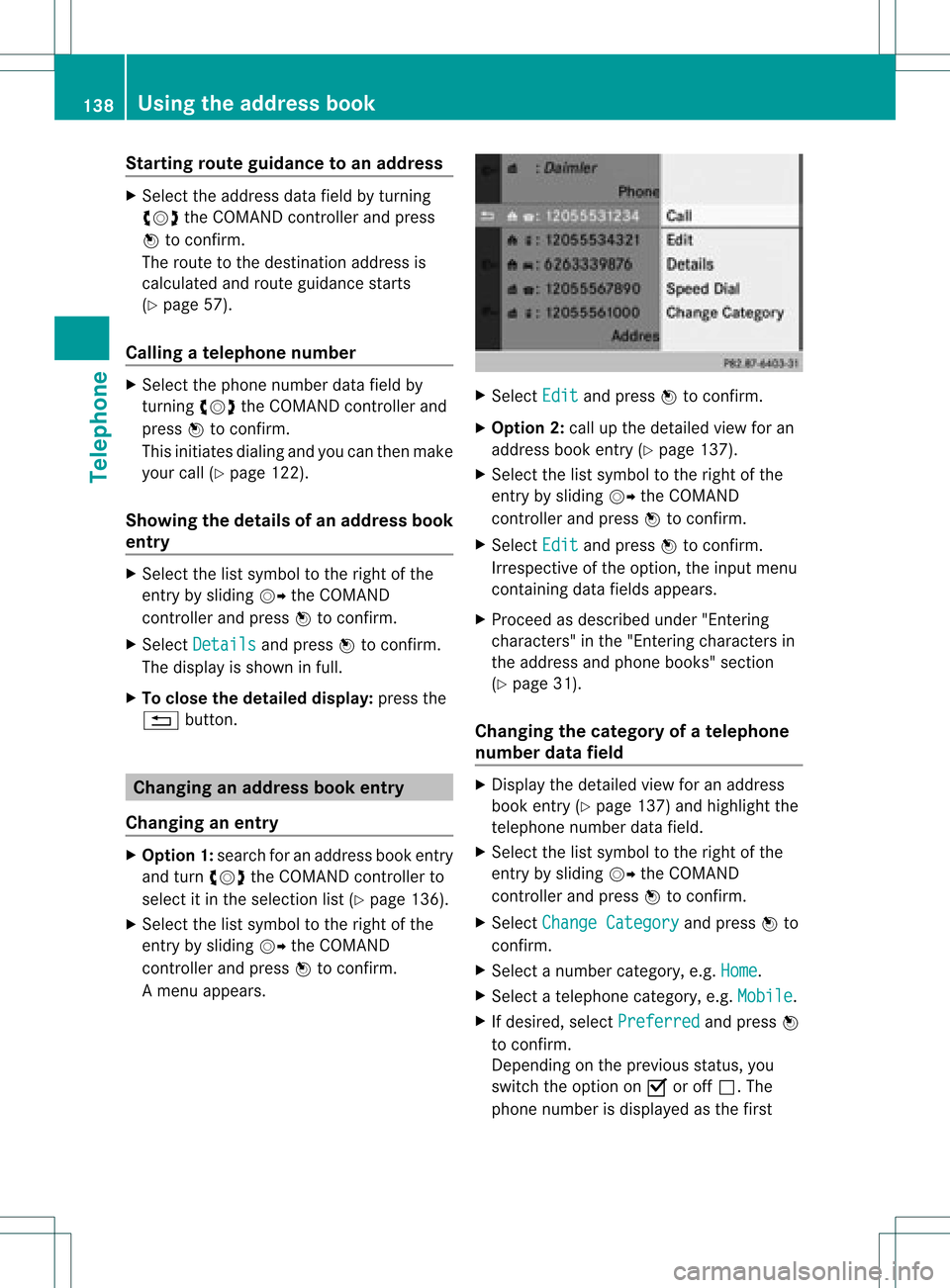
Am enu appears. X
Select Edit and
press Wtocon firm.
X Opt ion 2:call upthe detailed viewforan
address bookentry(Y page 137).
X Select thelistsymbol tothe right ofthe
ent ryby sliding VYtheCOMAND
con troller andpress Wtocon firm.
X Select Edit and
press Wtocon firm.
Irrespec tiveofthe option ,the input menu
con tainin gdata fields appears.
X Proceed asdescribed under"Entering
charact ers"inthe "Ent ering charact ersin
the address andphone books" section
(Y page 31).
Changing thecategory ofatelephone
number datafield X
Display thedetailed viewforanaddress
book entry(Y page 137)and highlight the
telephon enumber datafield.
X Select thelistsymbol tothe right ofthe
ent ryby sliding VYtheCOMAND
con troller andpress Wtocon firm.
X Select Change Category and
press Wto
con firm.
X Select anumber category,e.g. Home .
X Select atelephon ecategor y,e.g. Mobile .
X Ifdesired, selectPreferr ed and
press W
to con firm.
Depen dingonthe previous status,you
switch theoption onO oroff ª.T he
phone number isdispla yedasthe first 138
Using
theaddress bookTelephone
Page 142 of 234
match
thedigitalmap, COMAND promptsyou
to re-enter theaddress.
i Itis best then tostore thenew address
under theaddress book entry. Thiswill
provid eyou with anadd ress book entry that
is sui table fornaviga tion.
X Enter thedestina tionaddress (Ypag e54).
X Select Save from
theaddress entry menu
and press Wtoconfirm.
X Assigning adestina tiontoan add ress book
entry (Ypag e96). Voic
etags
Adding orchang ingavoice tag You
canentervoic etag svia theVoic eCont rol
Syst em(see thesepar ateoper ating
ins truct ions).Onceyou have assign edavoic e
tag toan addre ssbook entry,you can callup
th is ent rywith avoic ecom man dand diala
phon enum ber,forexam ple.You canadd one
voic etag per addre ssbook entry.
X Sear chfor anaddre ssbook entrywith or
with outavoic etag (¦ symbo l)
(Y page 136).
X Sele ctthelist symbo lto therigh tofthe
entr yby sliding VYtheCOMAND
cont roller andpress Wtoconfirm .
X Select Voice Name and
press Wto
confirm .
X Select Add or
Change and
press Wto
confirm .
Subsequent operationisvoice-con trolled.
The Voice Control System guidesyou
through thedialo gs.
Dele ting avoice tag X
Sear chfor anaddre ssbook entrywith a
voic etag (Ypage 136).
X Sele ctthelist symbo lto therigh tofthe
entr yby sliding VYtheCOMAND
cont roller andpress Wtoconfirm . X
Select Voice Name and
press Wto
confirm .
X Select Delete and
press Wtoconfirm .
Ad eletion prompt appears.
X Select Yes or
No and
press the9button
to con firm.
If you select Yes ,
COMAND deletesthe
voice tag.
If you select No ,
the process willbeaborted.
Listening toav oice tag X
Sear chfor anaddre ssbook entrywith a
voic etag (Ypage 136).
X Sele ctthelist symbo lto therigh tofthe
entr yby sliding VYtheCOMAND
cont roller andpress Wtoconfirm .
X Select Voice Name and
press Wto
confirm .
X Select Listen and
press Wtoconfirm .
You hear thevoice tag. Storing
aphone bookentry fromthe
mobile phoneinthe address book
Using thisfunct ionyou can save imported
phone bookentriesinthe address book.
The following canbeused asasource:
R the mobile phone
R the memory card
R the USB device
R the Bluetooth ®
Int erface
Imported phonebookentriesare indicated in
the phone bookbydifferent icons
(Y page 126). 140
Using
theaddress bookTelephone
Page 147 of 234

Note
son HD Radi o™
i Thefu nctio nsofHD Radio™ include:
R digital transmi ssion inthe same
wa veb and sas ana log AM/FM .The
analog AM/FMstations remaininthe
same position whenselecting astati on.
R the ability tobro adcas tseveral program
str eams overasingle FMfrequenc y(e.g.
HD 1,HD 2etc .).
R int erferen ce-free, clear recept ion.
R FM: sound inCD quality; AM:sound as
on analog FMstat ions.
R tex t-based information (e.g.artist ,trac k
name) inthe display.
For furth erinfor mation onHD Radio™, visit
htt p://ww w.hdradio.com.
You candeactivat eHD Radio™ forthe
select edfrequenc yin the radio submenu. X
Select Radio in
the radio display bysliding
VÆ theCOMAND controller andpress W
to con firm.
X Select HDRadio and
press Wtocon firm.
HD Radio™ isdeactivat edifthe ªchec k
box isempty.
You hear theanalog program ofthis
frequenc y.
As soon asyou change toanoth erHD Radio
frequenc y,the HDRadio™ isreact ivated. Switching
wavebands
Opt ion 1 You
canswitch theradio between theFM, AM
and WBwaveband.
X Press the$ function button repeatedly
until thedesired waveband isselect ed.
i Repeatedly pressingthisfunc tion button
switch esbetween theFM, AMand WB
wavebands inthat order andthen calls up
SatRadio mode.Pressin gthe button again
takes youback toFM radio mode.
Opt ion 2 X
Select FM ,
AM or
WB in
the radio display by
sliding VÆandturningcVd theCOMAND
con troller andpress Wtocon firm.
Waveband submenuisopened. 1
Waveband submenu
The #dot shows thecurren tlyselect ed
waveband.
X Select awaveband andpress Wtocon firm.
You willhear thelast stationplayed onthe
select edwaveband. Rad
iomod e
145Audio
Page 156 of 234

Aud
ioCD/DVD andMP3 mode Imp
ortant safety notes G
WAR
NING
COMA NDisclas sified asaClass 1laser
prod uct.You must notopen thecasing. Ifyou
open thecasing, orifthe casing isfaulty or
damaged, thereisarisk ofexposure to
invisible laserradiation. Thismay damage
your eyes, orthose ofothers.
COMAND doesnotcont ainany parts thatcan
be serviced bythe user. Forsafety reasons,
all mainten ancework must becarried outby
quali fiedaftersales technicians. G
WARNING
Only when thevehicle isstation aryshould
you:
R load adisc
R eject adisc
There isarisk ofbeing distract edfrom the
road andtraffic conditionsifthis isdone while
the vehicle isin motion. <001E000E00130005001200140009000E000700210005000A0005000300140009
000E0007H
CDs/DVDs
Notes If
the CD/D VDhas aprinted side,thismust
face upwards whentheCD/D VDisinsert ed.
If neither sideisprinted, theside tobe playe d
should facedownwards. Thesystem maynot
be able toplay CDs/D VDswith copy
protect ion.
i Ifamedium contains other filesin
addition tomusic files,theloading time
before thefirst track startsto play may be
longer.
Inserting discsintotheDVD changer The
DVD changer hasafixed magazine with
six trays. X
To insert aCD/DVD intoth ema gaz ine
tr ay :pre sstheV load/ejec tb utt on.
Am enu shows thecurren tload status of
the magazine trays.Thelasttray selected
is identified byared digit. Magazine
menu
X Select amagazine traytobe filled by
turnin gcVd theCOMAND controller and
press Wtoconf irm.
or
X Press anumber key,e.g.j.
The DVD changer switches tothe selected
magazine tray.YouseethePlease wait... message.
You then seethePlease insertdisc
i Never insertadata medium before
COMAND promptsyoutodo so. Never
insert morethanonedisc intoamagazine
tray atatime. X
Insert adisc intothedisc slotwith the
printed sidefacing upwards. 154
Audio
CD/DVD andMP3 modeAudio
Page 157 of 234
The
DVD changer loadsthedisc intothe
selected magazine tray.TheLoading disc
appears.
i Itmay take some timeforthe disc tobe
loaded, depending onthe type ofdisc. Ifno
disc isinsert edfor approximately 20
seconds, thedisplay returnstothe
magazine menu.
The DVD changer playsthedisc if:
R ithas been insert edcorrec tly.
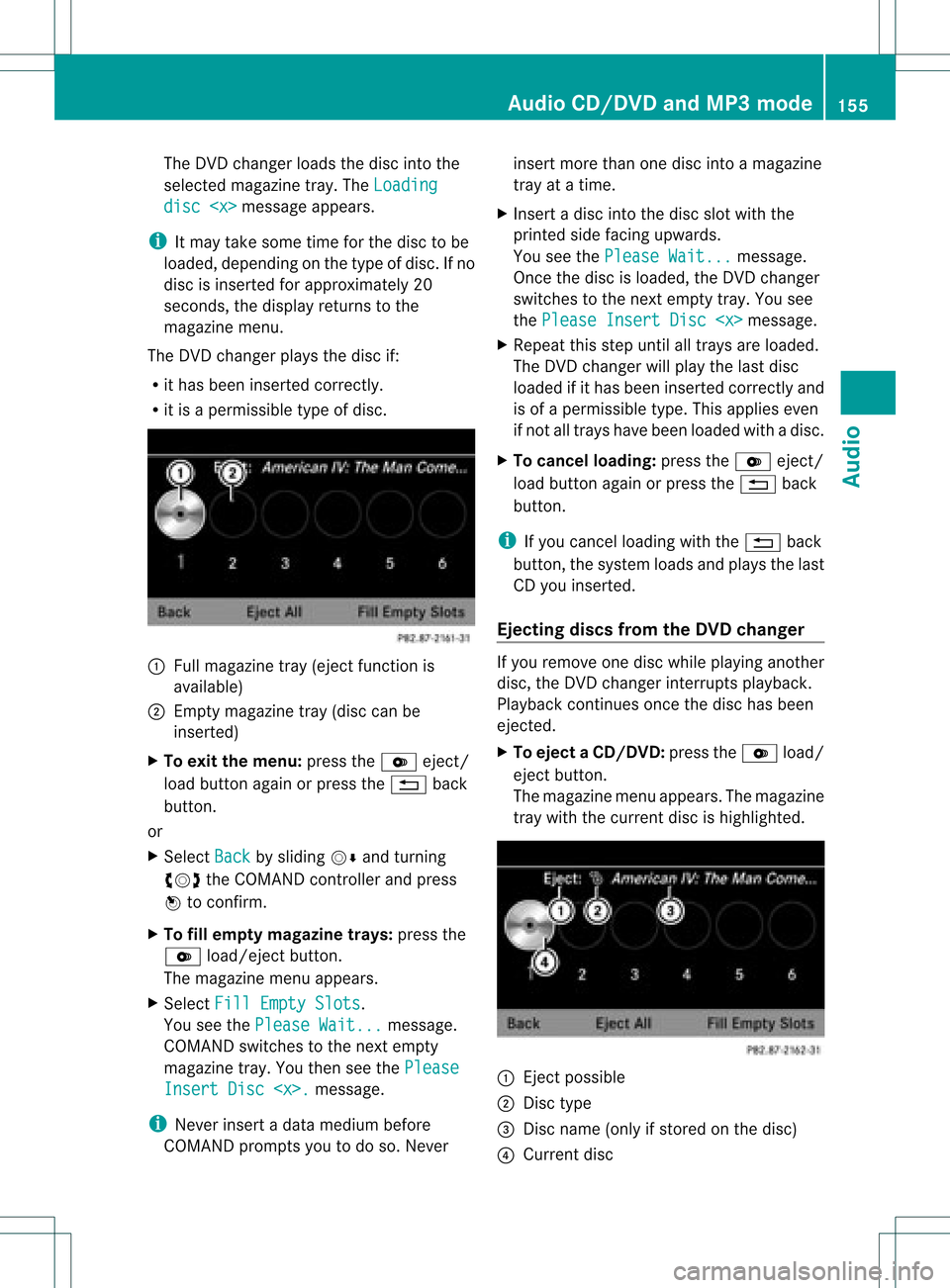
R itis apermissible typeofdisc. :
Full magazine tray(eject functionis
availa ble)
; Empt ymagazine tray(disc canbe
insert ed)
X To exit themenu: presstheV eject/
load button againorpress the% back
button .
or
X Select Back by
sliding VÆandturnin g
cVd theCOMAND controller andpress
W toconf irm.
X To fill empt ymagaz inetrays: press the
V load/eject button.
The magazine menuappears.
X Select FillEmpty Slots .
You seethePlease Wait... message.
COMAND switchestothe next empty
magazine tray.Youthen seethePlease Insert
Disc
i Never insertadata medium before
COMAND promptsyoutodo so. Never insert
morethanonedisc intoamagazine
tray atatime.
X Insert adisc intothedisc slotwith the
printed sidefacing upwards.
You seethePlease Wait... message.
Once thedisc isloaded, theDVD changer
switches tothe next empty tray.Yousee
the Please InsertDisc
X Repeat thisstep until alltrays areloaded.
The DVD changer willplay thelast disc
loaded ifit has been insert edcorrec tlyand
is of apermissible type.Thisapplies even
if not alltrays havebeen loaded withadisc.
X To cancel loading: presstheV eject/
load button againorpress the% back
button .
i Ifyou cancel loading withthe% back
button ,the system loadsandplays thelast
CD you insert ed.
Ejecting discsfromtheDVD changer If
you remove onedisc while playinganother
disc, theDVD changer interruptsplayb ack.
Playba ckcont inues oncethedisc hasbeen
eject ed.
X To eject aCD/DVD: presstheV load/
ej ec tbut ton.
The mag azine men uappea rs.T he magazine
tray with thecurrent discishighlighted. :
Ejec tpossible
; Disc type
= Disc name (onlyifstored onthe disc)
? Current disc Audio
CD/DVD andMP3 mode
155Audio Z
Page 158 of 234

X
Sel ect amag azine tray conta ining adi sc by
turni ngcVd theCOMAND controllerand
pre ssW toconfi rm.
or
X Pre ssanumb erkey ,e.g. j.
Yo usee themes sage: Eje ctingDisc
... Yo
uthen seethefollowi ng
mes sage: X
Ta ke the disc outo fthe slot.
If you donot take thedisc outofthe slot,
COMAND willdraw itin again automatically
after ashort while andload itagain.
X To eject allCDs/ DVDs: presstheV
load/eject button.
The magazine menuappears. X
Select Eject All by
sliding ÆVand
turning cVdtheCOMAND controller and
press Wtoconfirm .
The DVD changer ejectsthe last disc
selected. Youseethemessage: Ejecting Disc
Take thedisc outofthe disc slotwhen you
see thePlease RemoveDisc
The DVD changer switches tothe next
loaded magazine trayandeject sthe disc.
X Repea tthe last step until themagazine is
empty.
X To exit themenu: presstheV eject/
load button againorpress the% back
button.
or
X Select Back by
sliding VÆandturning
cVd theCOMAND controller andpress
W toconfirm . Inserting
andejecting anSD memory
card
General informat ion COMAND
supportsSDmemory cards
(Secure Digital)andSDH Cmemory cards
(Secure DigitalHighCapacity).
i Not allmemory cardsavailableonthe
market aredesigned forthe temperatures
which maybereached inthe vehicle.
If you arenolonger usingtheSDmemory
card, remove itfrom COMAND, ashigh
temperatures coulddamage thecard.
Due tothe wide range ofSD memory cards
availa bleonthe market, playback cannot
be guaranteed forallbrands ofSD memory
card.
The readabl estorage capacity depends on
the memory cardused. Youcanobtain
further information atany authorized
Mercedes-Ben zCent er. 156
Audio
CD/DVD andMP3 modeAudio
Page 161 of 234

In
audio DVD modeonly X
To pause playba ck:swit chon audio DVD
mod e(Y page 157).
X Se lec tË byslidi ngVÆ andturnin g
cVd theCOMA NDcontrol ler and press
W toconfirm .
The Ë displaychang estoÌ.
X To cont inuepla yba ck:sele ctÌ and
pre ssW toconfirm .
Playbac kcont inues fromthepoint where it
was inter rupted. TheÌ display changes
to Ë. Stop
function
This funct ionisonly availa bleinaudio DVD
mode.
X Switch onaudio DVDmode (Ypage 157).
X To interr uptplayback: selectÉby
sliding VÆandturnin gcVd theCOMAND
cont roller andpress Wtoconf irm.
The Ë display changes toÌ. É
remains highlighted.
X To continue playback: selectÌand
press Wtoconf irm.
Playba ckcont inues fromthepoint where it
was inter rupted.
X To stop playback: whileplaybackis
inter rupted, selectÉagain andpress
W toconf irm.
or
X Select Éandconf irmbypressing W
twice inrapid succession.
Ì ishighlighted.
X To resta rtplayback: selectÌand
press Wtoconf irm.
Playba ckstart sat the beginning ofthe
DVD . Selecting
audioCD/DVD/MP3 discs
Selecting viathe media list X
In audio CD/DVDand MP3 mode: select
Media by
sliding VÆorturnin gcVd the
COMAND controller andpress Wto
conf irm.
The media listappears. The#dot
indicates thecurrent medium beingplayed. Media
listwhen equipped withaDVD changer
: Todisplay allmagazine trays
The media listshows thediscs current ly
availa ble. Media
list Magazine
trays,positions 1to6: readable
data media areaudio CDs,MP3CDsorMP3
DVD s,audio DVDsand video DVDs. Memory
card,position 7 MUSIC
REGISTER, position8 USB
storage device,position 9 Media
Interface, position 0 Bluetooth
®
audio i
Ifadisc cann otbe read, anentr yappears
next tothe correspon dingmagazine tray.
X To show allmagaz inetrays: press Wthe
COMAND controller when :is
highlighted. Audio
CD/DVD andMP3 mode
159Audio Z
Page 166 of 234

see
acorresponding displayin the displa y/
selection window.Seetheexample ofthe
displa yin audi oCD mode (Ypage 158).
i The "Normal tracksequence" optionis
automaticall yselected whenyouchange
the medium youarecurrently listeningto
or when youselect adifferent medium. If
an option isselected, itremains selected
after COMAND isswitched onoroff. Notes
onMP3 mode
General informat ion Depending
onthe volume andformat ofthe
MP3 data, thelength oftime required for
reading thedata mayincrease.
Permissible datacarriers R
CD-R andCD-RW
R DVD-R andDVD-RW
R DVD+R andDVD+RW
R SD memory card
R USB storag edevi ce
Permis siblefilesyste ms R
ISO 9660/Jol ietstanda rdfor CDs
R UDF foraudio and videoDVDs
R FAT16 orFAT32 forSD memory cardsand
USB storag emedi a
Multis ession CD s For
multises sionC Ds, theconte ntofthe first
se ssi on determ inesho wCO MAND will
pro ces sthe CD. COMAND play sonl yone
se ssi on and gives priorityto the audio CD
se ssi on.
If po ssi ble, useCO MAND toplay onl yCDs
wh ich have been writte nino neses sion.
Fi le struc tureofadata carrie r Whe
nyou create adisc with compressed
music files,thetrack scan beorganized infolders.
Afolder mayalsocontainsubfolders.
A disc cancont ainam axim umof25 5fold ers.
Eac hfold ercan contain amax imum of
25 5track sand 255subf older s.
The disc may contain nomor eth an eigh t
dire ctory leve ls.File sbeyon dth eeight hleve l
will notb erecogn izedbythe system.
Tr ack and filenames When
youcreat eadisc with compr essed
music files,youcan assign names tothe
trac ksand folders.
COMAND usesthese names accordingly for
the display. Folderswhichcontain data other
than MP3 orWMA tracksare not displayed by
COMAND .
If MP3 orWMA filesarestor edinthe root
direct oryitself, theroot direct orywill also be
treat edasafolder. COMAND willthen show
the name ofthe root direct oryasthe folder
name.
You must observe thefollowing when
assigning tracknames :
R track nam esmust haveatleast one
ch arac ter.
R track nam esmust havetheex tens ion
"mp3 "or "wma".
R there must beafull stop bet ween thetrack
nam eand theex tens ion .
Ex ample ofaco rrect track nam e:
"Trac k1.m p3".
Per missibl efor ma ts COMA
NDsuppo rts th efoll owin gfor mat s:
R MPE G1Audi oLayer 3(MP3)
R Microsoft WindowsMediaAudioV2,V7,V8
and V9(WMA)
R additional musicfilesinAAC format with
the fileexten sions .aac,.mp4, .m4a
and .m4b, butnot copy-protect ediTunes
music fileswith theexten sion.m4p.
i If,inaddition toMP3 files, there areother
music filesinthese audioformats storedon 164
Audio
CD/DVD andMP3 modeAudio