2012 MERCEDES-BENZ SL ROADSTER tyre pressure
[x] Cancel search: tyre pressurePage 8 of 637

Adjusting the vehicle height
Active Body Control (AMG vehi-
cles) .............................................. .202
Active Body Control (except AMG
vehicles) ........................................ 199
Adjusting the volume
COMAND ....................................... 299
Navigation messages ..................... 299
Traffic announcements .................. 299
AIR FLOW .......................................... .144
Air pressure
see Tyre pressure
Air vents
Glove compartment ....................... 150
Important safety notes .................. 150
Setting .......................................... .150
Setting the blower output of the
AIRSCARF vents ............................ .151
Setting the centre air vents ........... 150
Setting the side air vents .............. .150
Switching AIRSCARF on/off .......... 117
Air-conditioning system
see Climate control
Airbag
Headbag .......................................... 55
Airbags
Front airbag (driver, front
passenger) ....................................... 54
Important safety guidelines ............. 52
Sidebag ............................................ 54
Triggering ......................................... 51
AIRSCARF
Switching on/off ........................... 117
AIRSCARF vents
Setting the blower output .............. 151
Alarm
ATA (Anti-Theft Alarm system) ......... 79
Switching off (ATA) .......................... 79
Switching the function on/off
(ATA) ................................................ 79
Alarm system
see ATA (Anti-Theft Alarm system)
Alternate route .................................. 357
Ambient lighting
Setting the brightness (on-board
computer) ...................................... 241
Setting the colour (on-board com-
puter) ............................................. 241 AMG
Button for AMG menu .................... 168
SETUP ............................................ 168
AMG menu (on-board computer) ..... 244
Anti-glare film ................................... .559
Anti-lock braking system
see ABS (Anti-lock Braking System)
Anti-Theft Alarm system
see ATA (Anti-Theft Alarm system)
Aquaplaning ....................................... 181
Ashtray ............................................... 549
Assistance display (on-board com-
puter) ................................................. .237
Assistance menu (on-board com-
puter) ................................................. .237
ASSYST PLUS
Displaying a service message ....... .567
Hiding a service message .............. 567
Resetting the service interval dis-
play ................................................ 567
Service message ............................ 566
Special service requirements ......... 567
ATA (Anti-Theft Alarm system)
Activating/deactivating ................... 79
Function .......................................... .79
Interior motion sensor .....................80
Switching off the alarm .................... 79
Tow-away protectio n ........................80
ATTENTION ASSIST
Activating/deactivating ................. 238
Display message ............................ 261
Function/notes ............................ .214
Audio
Radio mode ................................... 462
Audio CD/DVD or MP3 mode
Switching to (Rear Seat Entertain-ment System) ................................ 528
Audio DVD
Pause function ............................... 474
Playback options ........................... 478
Safety notes .................................. 468
Setting the audio format ................ 478
Stop function ................................. 474
Switching to ................................... 472
Audio menu (COMAND Online) ......... 463
Audio menu (on-board computer) .... 234 Index
5
Page 10 of 637
Bonnet
Active bonnet (pedestrian protec-tion) ............................................... 562
Closing ........................................... 563
Display message ............................ 270
Important safety notes .................. 562
Opening ......................................... 563
Boot
Emergency release .......................... 99
Important safety notes .................... 94
Locking separately ........................... 98
Opening/closing (automatically
from inside) ...................................... 98
Opening/closing (automatically
from outside) ................................... 95
Opening/closing (from the out-
side, HANDS-FREE ACCESS) ............ 96
Opening/closing (manually from
outside) ............................................ 95
Overview .......................................... 94
Power closing .................................. 93
Boot lid
Display message ............................ 270
Opening dimensions ...................... 629
Opening/closing .............................. 94
Boot load (maximum) ........................ 629
Boot separator
Display message ............................ 271
Fitting ............................................ 106
General notes ................................ 105
Opening/closing ............................ 106
Removing ....................................... 106
Bottle holders .................................... 549
Brake Assist
see BAS (Brake Assist System)
Brake fluid
Display message ............................ 253
Notes ............................................. 627
Brake lamps
Adaptive ........................................... 73
Display message ............................ 256
Brakes
ABS .................................................. 71
BAS .................................................. 71
BAS PLUS ........................................ 72
Brake fluid (notes) ......................... 627
Display message ............................ 248
Driving tips .................................... 179 High-performance brake system .... 180
Important safety notes .................. 179
Parking brake ................................ 176
Warning lamp ................................. 275
Breakdown
see Flat tyre
see Towing away
Buttons on the COMAND control-
ler ........................................................ 296 C
Call ...................................................... 397
Accepting/ending/rejecting .......... 396
Connecting .................................... 397
see Telephone
Call list
Display details ............................... 406
Call lists
Deleting ......................................... 407
Opening and selecting an entry ..... 405
Saving an entry in the address
book .............................................. 406
Calling up a fault
see Display messages
Capacities (technical data) ............... 622
Car
see Vehicle
Car key
see Key
Car wash (care) ................................. 568
Care
Automatic car wash ....................... 568
Carpets .......................................... 574
Display ........................................... 572
Exhaust pipe .................................. 572
Exterior lighting ............................. 571
Gear or selector lever .................... 573
High-pressure cleaner .................... 569
Interior ........................................... 572
Matt paintwork .............................. 570
Night View Assist Plus ................... 572
Notes ............................................. 568
Paint .............................................. 570
Plastic trim .................................... 573
Reversing camera .......................... 572
Roof lining ...................................... 574
Seat belt ........................................ 574 Index
7
Page 31 of 637
Further options .............................. 509
Information about the current pro-
gramme ......................................... 506
Operating (on-board computer) ..... 235
Picture setting s.............................. 502
Programme preview ....................... 506
Reception quality ........................... 502
Selecting channels (COMAND
Online) ........................................... 503
Selecting channels (Rear Seat
Entertainment System) .................. 532
Selecting language and subtitles ... 509
Setting the reception regio n.......... 507
Showing/hiding the menu ............. 503
Showing/hiding the navigation
menu ............................................. 503
Sound settings (balance, bass,
treble) ............................................ 299
Storing channels (COMAND
Online) ........................................... 505
Storing channels (Rear Seat
Entertainment System) .................. 533
Switching on .................................. 502
Teletext .......................................... 508
Two-way radio
Frequencies ................................... 620
Installation ..................................... 620
Transmission output (maximum) .... 620
Type identification plate
see Vehicle identification plate
Tyre pressure
Calling up (on-board computer) ..... 602
Display message ............................ 267
Important safety notes .................. 602
Not reached (TIREFIT) .................... 581
Reached (TIREFIT) .......................... 581
Recommended ............................... 600
Tyre pressure loss warning
General notes ................................ 601
Important safety notes .................. 601
Restarting ...................................... 601
Tyre pressure monitor
Checking the tyre pressure elec-
tronically ........................................ 603
Function/note s............................. 602
General notes ................................ 602
Important safety notes .................. 602 Radio type approval for the tyre
pressure monitor ........................... 605
Restarting ...................................... 604
Warning lamp ................................. 284
Warning message .......................... 604
Tyres
Changing a whee l.......................... 605
Checking ........................................ 597
Direction of rotation ...................... 605
Display message ............................ 267
Important safety notes .................. 596
M+S tyre s...................................... 598
MOExtended tyre s......................... 598
Overview ........................................ 596
Replacing ....................................... 605
Service life ..................................... 597
Storing ........................................... 606
Summer tyre s................................ 598
Tyre size (data) .............................. 610
Tyre tread ...................................... 597
Wheel and tyre combinations ........ 612
see Flat tyre U
Umbrella holder ................................. 545
Unlocking
Emergency unlocking ....................... 93
From inside the vehicle (central
unlocking button) ............................. 92
Updating the digital map .................. 382
USB
see Media Interface V
Vanity mirror (in sun visor) .............. 549
Variable SPEEDTRONIC
see SPEEDTRONIC
Vehicle
Correct use ...................................... 34
Data acquisition ....................... 35, 287
Display message ............................ 269
Electronics ..................................... 620
Equipment ....................................... 32
Implied warranty .............................. 35
Individual settings .......................... 239
Leaving parked up ......................... 178 28
Index
Page 32 of 637
Locking (in an emergency) ............... 93
Locking (key) ................................... 85
Lowering ........................................ 609
Pulling away ................................... 158
Raising ........................................... 607
Registration ..................................... 34
Securing from rolling away ............ 606
Tow-starting ................................... 588
Towing away .................................. 588
Transporting .................................. 591
Unlocking (in an emergency) ........... 93
Unlocking (key) ................................ 85
Vehicle data ................................... 629
Vehicle battery
see Battery (vehicle)
Vehicle data ....................................... 629
Vehicle dimensions ........................... 629
Vehicle emergency locking ................ 93
Vehicle identification number
see VIN
Vehicle identification plate .............. 622
Vehicle level
Active Body Control (AMG vehi-
cles) ............................................... 202
Active Body Control (except AMG
vehicles) ........................................ 199
Display message ............................ 260
Vehicle tool kit .................................. 577
Video
Operating the DVD ......................... 235
see Video DVD
Video DVD .......................................... 514
Automatic picture shutoff .............. 501
Data carrier .................................... 511
DVD menu ..................................... 514
Fast forward/rewind ...................... 513
Function restrictions ...................... 511
Interactive content ........................ 516
Operation ....................................... 511
Pause function ............................... 513
Playing conditions .......................... 511
Safety notes .................................. 511
Selecting ........................................ 514
Selecting a film/title ...................... 514
Selecting a scene/chapter ............ 513
Setting the audio format ................ 515
Setting the language ...................... 515 Setting the picture ......................... 502
Showing/hiding the menu ............. 512
Showing/hiding the navigation
menu ............................................. 512
Stop function ................................. 513
Subtitles ........................................ 516
Switching on .................................. 512
Video-AUX
Setting the picture ......................... 502
VIN ...................................................... 622 W
Warning and indicator lamps ABS ................................................ 275
Brakes ........................................... 275
Distance warning signal ................. 283
ESP® ............................................. 277
ESP® OFF ...................................... 278
LIM (cruise control) ........................ 182
LIM (DISTRONIC PLUS) .................. 186
LIM (variable SPEEDTRONIC) ......... 194
Overview .......................................... 42
PASSENGER AIRBAG OFF ................ 63
Reserve fuel ................................... 280
Seat belt ........................................ 274
SRS ................................................ 280
Tyre pressure monitor ................... 284
Warning triangle ................................ 576
Washer fluid
Display message ............................ 272
Waypoints .......................... 335, 337, 338
Accepting waypoints for the
route .............................................. 338
Creating ......................................... 335
Editing ........................................... 337
Entering ......................................... 335
Searching for a filling station when the fuel level is lo w........................ 338
Weather display (COMAND
Online) ........................................ 447, 448
Calling up the weather map ........... 448
Information chart ........................... 447
Selecting locations in the informa-
tion chart ....................................... 447
Selecting the location .................... 447
Selecting the location in the
weather map .................................. 448 Index
29
Page 34 of 637

Protection of the environment
General notes
H
Environmental note
Daimler's declared policy is one of compre-
hensive environmental protection.
Our objectives are to use the natural resour-
ces which form the basis of our existence on
this planet sparingly and in a manner which
takes the requirements of both nature and
humanity into consideration.
You too can help to protect the environment
by operating your vehicle in an environmen-
tally-responsible manner.
Fuel consumption and the rate of engine,
transmission, brake and tyre wear depend on
the following factors:
R operating conditions of your vehicle
R your personal driving style
You can influence both factors. Therefore,
please bear the following in mind:
Operating conditions:
R avoid short trips, as these increase fuel
consumption.
R observe the correct tyre pressure.
R do not carry any unnecessary weight in the
vehicle.
R remove the roof rack once you no longer
need it.
R a regularly serviced vehicle will contribute
to environmental protection. You should
therefore adhere to the service intervals.
R all maintenance work should be carried out
at a qualified specialist workshop.
Personal driving style:
R do not depress the accelerator pedal when
starting the engine.
R do not warm up the engine when the vehicle
is stationary.
R drive carefully and maintain a safe distance
from the vehicle in front.
R avoid frequent, sudden acceleration and
braking. R
change gear in good time and use each gear
only up to Ôof its maximum engine speed.
R switch off the engine in stationary traffic.
R monitor the vehicle's fuel consumption. Returning an end-of-life vehicle
EU countries only:
Mercedes-Benz will take back your old vehicle to dispose of it in an environmentally-respon-sible manner in accordance with the Euro-
pean Union (EU) End of Life Vehicles Direc-
tive.
There is a network of return points and dis-
assembly plants available. You can return
your vehicle to these plants free of charge.
This makes a valuable contribution to the
recycling process and the conservation of
resources.
For further information on recycling old vehi- cles, recovery and the terms of the policy,
visit the Mercedes-Benz homepage. Genuine Mercedes-Benz parts
H
Environmental note
Daimler AG also supplies reconditioned
assemblies and parts which are of the same
quality as new parts. For these, the same war-
ranty applies as for new parts.
! Airbags and seat belt tensioners, as well
as control units and sensors for these
restraint systems, may be installed in the
following areas of your vehicle:
R doors
R door pillars
R door sills
R seats
R dashboard
R instrument cluster
R centre console Introduction
31 Z
Page 45 of 637
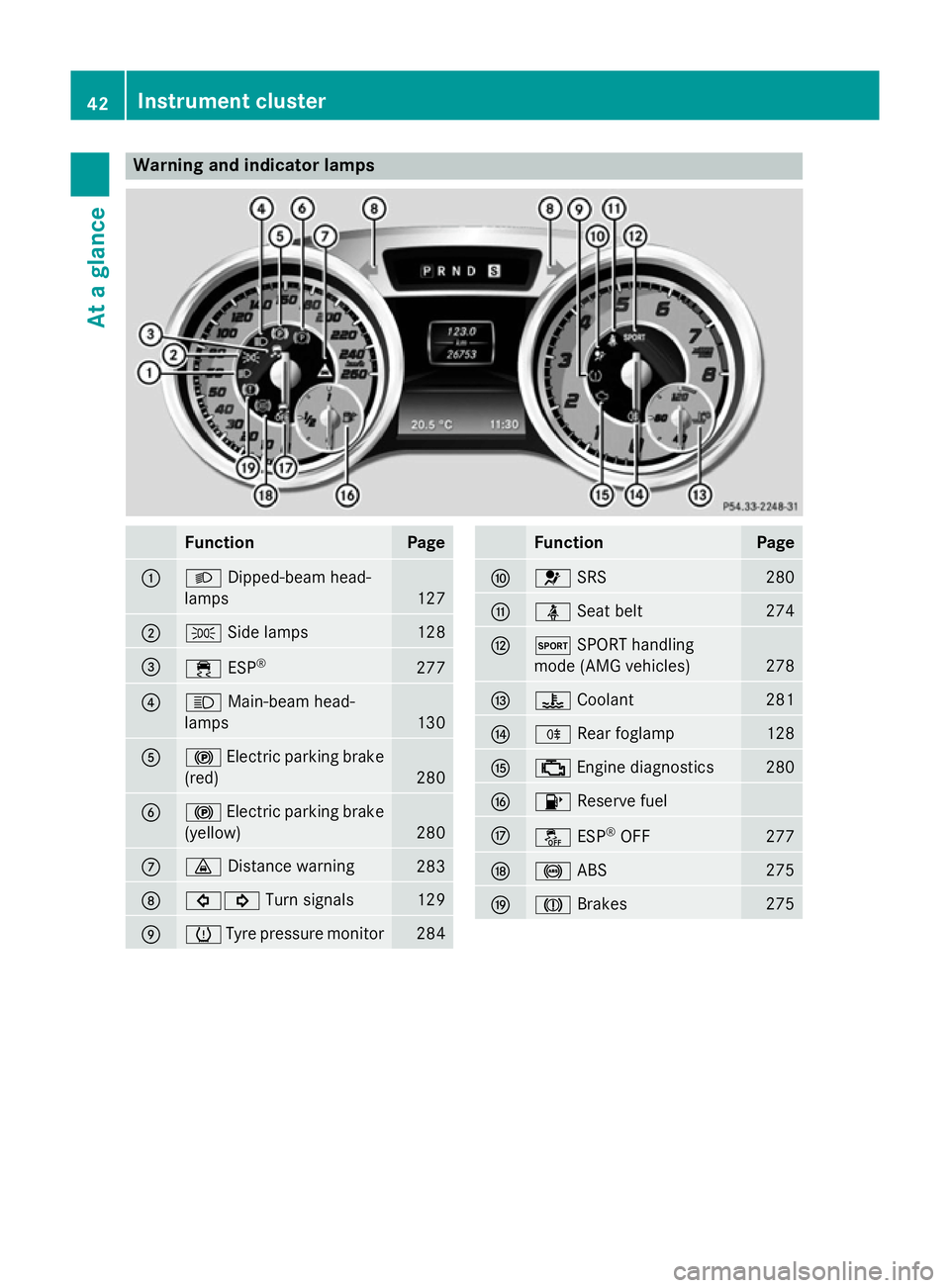
Warning and indicator lamps
Function Page
:
L
Dipped-beam head-
lamps 127
;
T
Side lamps 128
=
÷
ESP® 277
?
K
Main-beam head-
lamps 130
A
!
Electric parking brake
(red) 280
B
!
Electric parking brake
(yellow) 280
C
·
Distance warning 283
D
#!
Turn signals 129
E
h
Tyre pressure monitor 284 Function Page
F
6
SRS 280
G
ü
Seat belt 274
H
M
SPORT handling
mode (AMG vehicles) 278
I
?
Coolant 281
J
R
Rear foglamp 128
K
;
Engine diagnostics 280
L
8
Reserve fuel M
å
ESP®
OFF 277
N
!
ABS 275
O
J
Brakes 27542
Instrument clusterAt a glance
Page 74 of 637
tance from the vehicle in front. Drive care-
fully.
i The driving safety systems described only
work as effectively as possible when there
is adequate contact between the tyres and the road surface. Please pay special atten-
tion to the notes on tyres, recommended
minimum tyre tread depths etc.
(Y page 596).
In wintry driving conditions, always use
winter tyres (M+S tyres) and, if necessary,
snow chains. Only in this way will the driv-
ing safety systems described in this section work as effectively as possible. ABS (Anti-lock Braking System)
General notes ABS regulates brake pressure in such a way
that the wheels do not lock when you brake.
This allows you to continue steering the vehi-
cle when braking.
The yellow !ABS warning lamp in the
instrument cluster lights up when the ignition is switched on. It goes out when the engine is
running.
Important safety notes i
Observe the "Important safety notes" sec-
tion (Y page 70). G
WARNING
If ABS is faulty, the wheels could lock when
braking. The steerability and braking charac-
teristics may be severely impaired. Addition-
ally, further driving safety systems are deac-
tivated. There is an increased danger of skid- ding and accidents.
Drive on carefully. Have ABS checked imme-
diately at a qualified specialist workshop.
If ABS is malfunctioning, other systems,
including driving safety systems, will also
become inoperative. Observe the information on the ABS warning lamp (Y page 275) anddisplay messages which may be shown in the
instrument cluster (Y page 248).
ABS works from a speed of about
8 km/hupwards, regardless of road-surface
conditions. ABS works on slippery surfaces,
even when you only brake gently.
Brakes X
If ABS intervenes: continue to depress the
brake pedal with force until the braking sit- uation is over.
X To make a full brake application:
depress the brake pedal with full force.
If ABS intervenes when braking, you will feel a
pulsing in the brake pedal.
The pulsating brake pedal can be an indica-
tion of hazardous road conditions, and func-
tions as a reminder to take extra care while
driving. BAS (Brake Assist System)
General notes BAS operates in emergency braking situa-
tions. If you depress the brake pedal quickly,
BAS automatically boosts the braking force,
thus shortening the stopping distance.
Important safety notes i
Observe the "Important safety notes" sec-
tion (Y page 70). G
WARNING
If BAS is malfunctioning, the braking distance
in an emergency braking situation is
increased. There is a risk of accident.
In an emergency braking situation, depress
the brake pedal with full force. ABS prevents
the wheels from locking. Driving safety systems
71Safety Z
Page 177 of 637
fuel. Otherwise, fuel can enter the fuel sys-
tem. Even small amounts of the wrong fuel could result in damage to the fuel system
and the engine. Notify a qualified specialist
workshop and have the fuel tank and fuel
lines drained completely.
! Overfilling the fuel tank could damage the
fuel system.
! Take care not to spill any fuel on painted
surfaces. You could otherwise damage the
paintwork.
! Use a filter when adding fuel from a fuel
can. The fuel lines and/or the diesel injec-
tion system could otherwise be blocked by
particles from the fuel can.
Do not get into the vehicle again during the
refuelling process. Otherwise, electrostatic
charge could build up again.
If you overfill the fuel tank, some fuel may
spray out when you remove the fuel pump
nozzle.
Further information on fuel and fuel quality
(Y page 623). Refuelling
General notes The fuel filler flap is unlocked or locked auto-
matically when you open or close the vehicle
with the key or using KEYLESS-GO.
The position of the 8fuel filler cap is dis-
played in the instrument cluster. The arrow
next to the filling pump indicates the side of
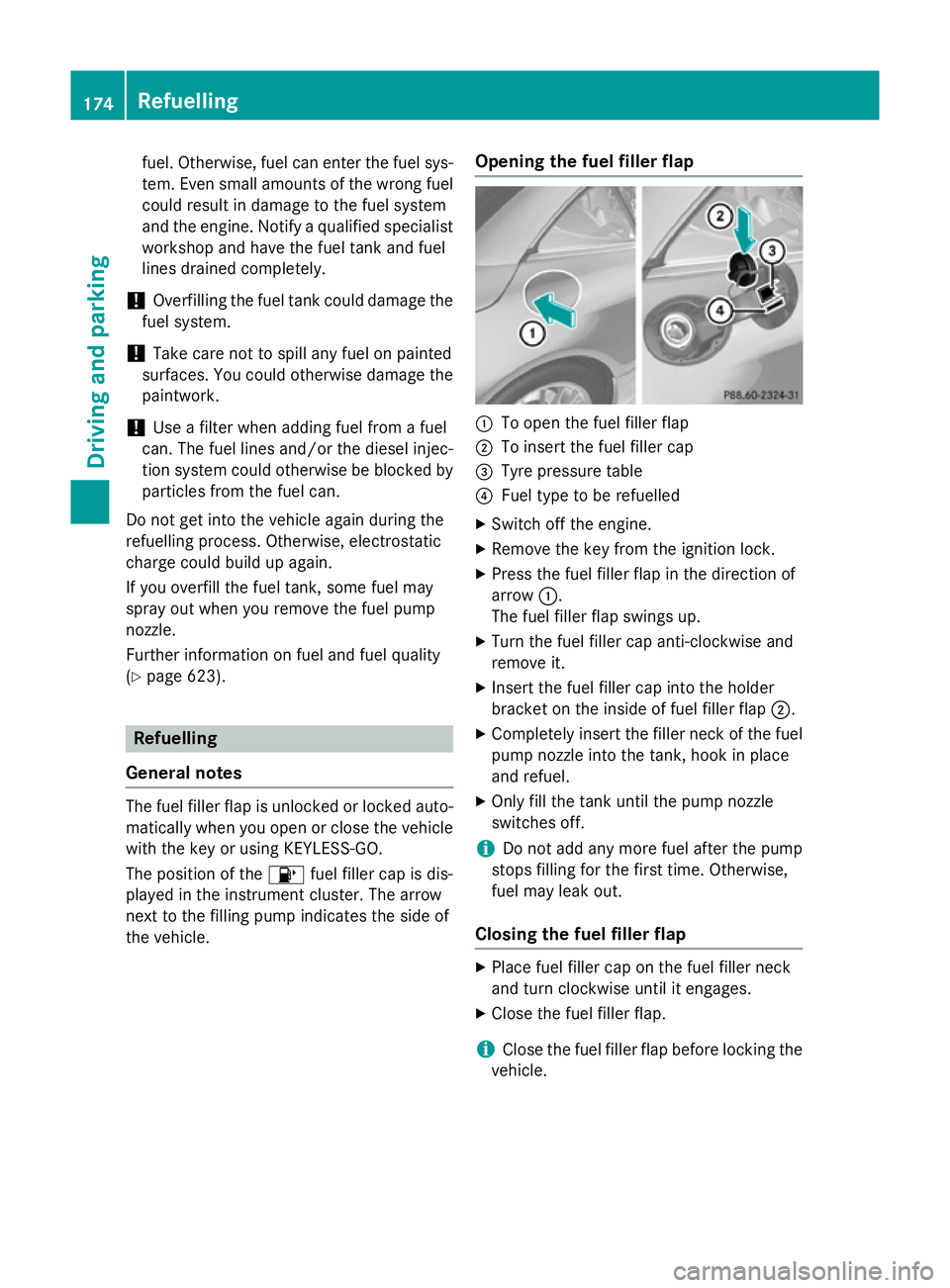
the vehicle. Opening the fuel filler flap :
To open the fuel filler flap
; To insert the fuel filler cap
= Tyre pressure table
? Fuel type to be refuelled
X Switch off the engine.
X Remove the key from the ignition lock.
X Press the fuel filler flap in the direction of
arrow :.
The fuel filler flap swings up.
X Turn the fuel filler cap anti-clockwise and
remove it.
X Insert the fuel filler cap into the holder
bracket on the inside of fuel filler flap ;.
X Completely insert the filler neck of the fuel
pump nozzle into the tank, hook in place
and refuel.
X Only fill the tank until the pump nozzle
switches off.
i Do not add any more fuel after the pump
stops filling for the first time. Otherwise,
fuel may leak out.
Closing the fuel filler flap X
Place fuel filler cap on the fuel filler neck
and turn clockwise until it engages.
X Close the fuel filler flap.
i Close the fuel filler flap before locking the
vehicle. 174
RefuellingDriving and parking