2012 MERCEDES-BENZ SL ROADSTER low beam
[x] Cancel search: low beamPage 20 of 637
Switching the surround lighting
on/off (on-board computer) .......... 241
Turn signals ................................... 129
see Interior lighting
see Replacing bulbs
LIM indicator lamp
Cruise control ................................ 182
DISTRONIC PLUS ........................... 186
Variable SPEEDTRONIC ................. 194
Limiting the speed
see SPEEDTRONIC
LINGUATRONIC .................................. 312
Setting s......................................... 312
List of access data ............................ 437
New provider ................................. 437
List of mobile phone network pro-
viders ......................................... 434, 435
Calling up ....................................... 434
Empty ............................................ 434
With the selected provider ............. 435
Load/eject button ............................. 469
Loading aid (boot)
Raising/lowering the roof .............. 546
Locking
see Central locking
Locking (doors)
Automatic ........................................ 92
Emergency locking ........................... 93
From inside (central locking but-
ton) .................................................. 92
Locking centrally
see Central locking
Locking verification signal (on-
board computer) ............................... 242
Luggage cover
see Boot separator
Lumbar support
Adjusting (COMAND Online) .......... 319 M
M+S tyres ........................................... 598
MAGIC SKY CONTROL ....................... 109
Main-beam headlamps
Display message ............................ 256
Switching on/of f........................... 130
Map (navigation)
Adjusting the scale ........................ 372 Arrival time/distance to the des-
tination .......................................... 375
City model ..................................... 376
Geo-coordinate display .................. 375
Heading ......................................... 374
Information in the display .............. 375
Map settings .................................. 373
Moving ........................................... 373
North orientation ........................... 374
Notes ............................................. 372
POI symbols ................................... 374
RDS-TMC display
s......................... 365
Road display .................................. 375
Saving the crosshair position ......... 373
Showing the map data version ....... 382
Topographical map ........................ 376
Updating ........................................ 382
Updating process ........................... 383
Matt finish (cleaning instructions) .. 570
Media Inter-
fac
e ........................... 494, 495, 496, 497, 499
Alphabetical track selection .......... 498
Basic menu .................................... 495
Connecting an external audio
source ............................................ 494
Connecting an external video
source ............................................ 516
Connection options ....................... 494
iPod® ............................................ 494
Mode ............................................. 494
MP3 player .................................... 494
Notes for the MP3 player ............... 499
Playback options ........................... 499
Selecting categories ...................... 497
Selecting folders ............................ 497
Selecting music files ...................... 496
Selecting playlists .......................... 497
Switching on .................................. 495
USB mass storage device .............. 494
see Separate operating instructions
Media list ........................................... 474
Memory card (audio) ......................... 234
Memory function ............................... 123
Mercedes-Benz Contact .................... 427 Index
17
Page 45 of 637
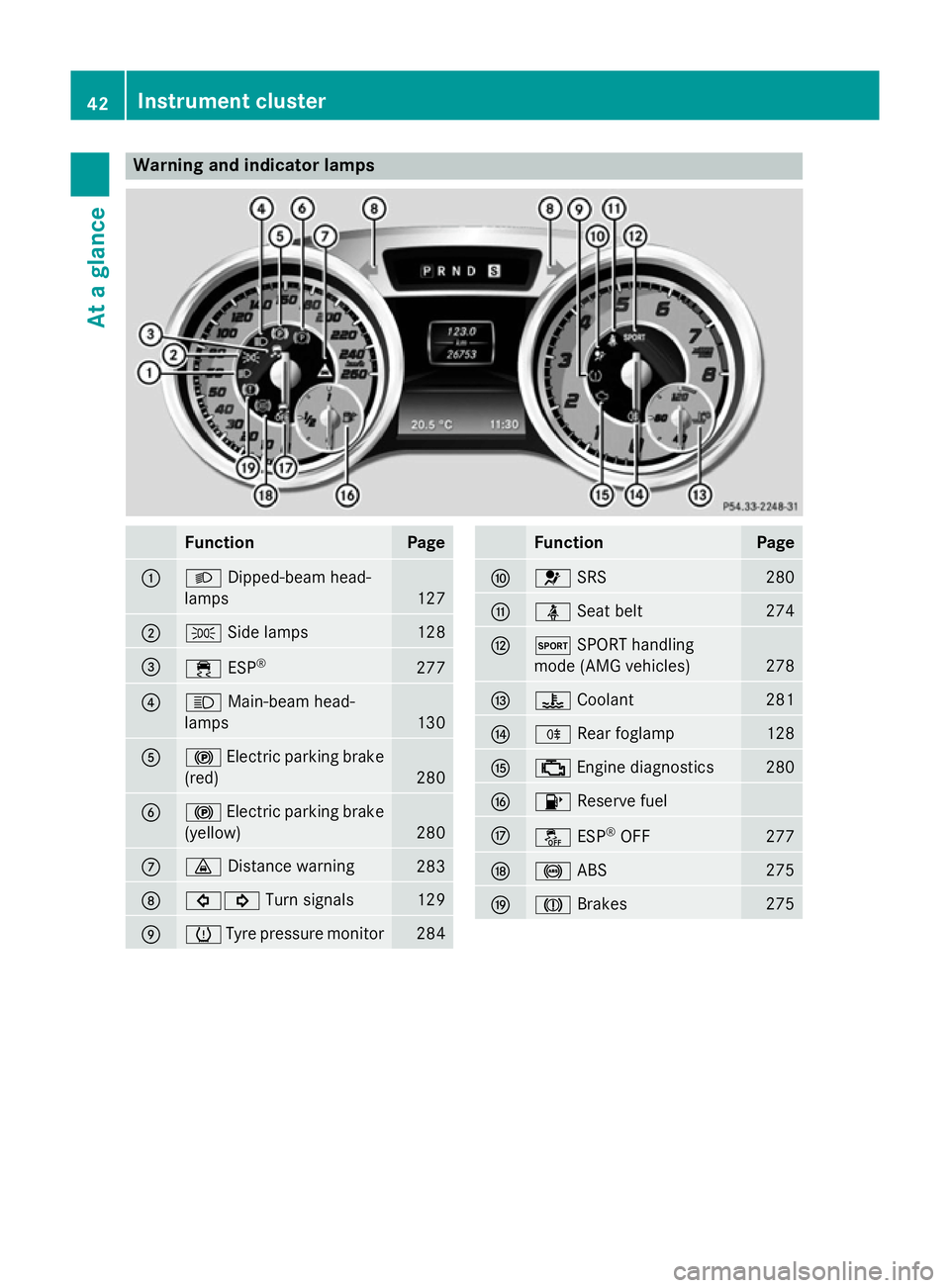
Warning and indicator lamps
Function Page
:
L
Dipped-beam head-
lamps 127
;
T
Side lamps 128
=
÷
ESP® 277
?
K
Main-beam head-
lamps 130
A
!
Electric parking brake
(red) 280
B
!
Electric parking brake
(yellow) 280
C
·
Distance warning 283
D
#!
Turn signals 129
E
h
Tyre pressure monitor 284 Function Page
F
6
SRS 280
G
ü
Seat belt 274
H
M
SPORT handling
mode (AMG vehicles) 278
I
?
Coolant 281
J
R
Rear foglamp 128
K
;
Engine diagnostics 280
L
8
Reserve fuel M
å
ESP®
OFF 277
N
!
ABS 275
O
J
Brakes 27542
Instrument clusterAt a glance
Page 131 of 637
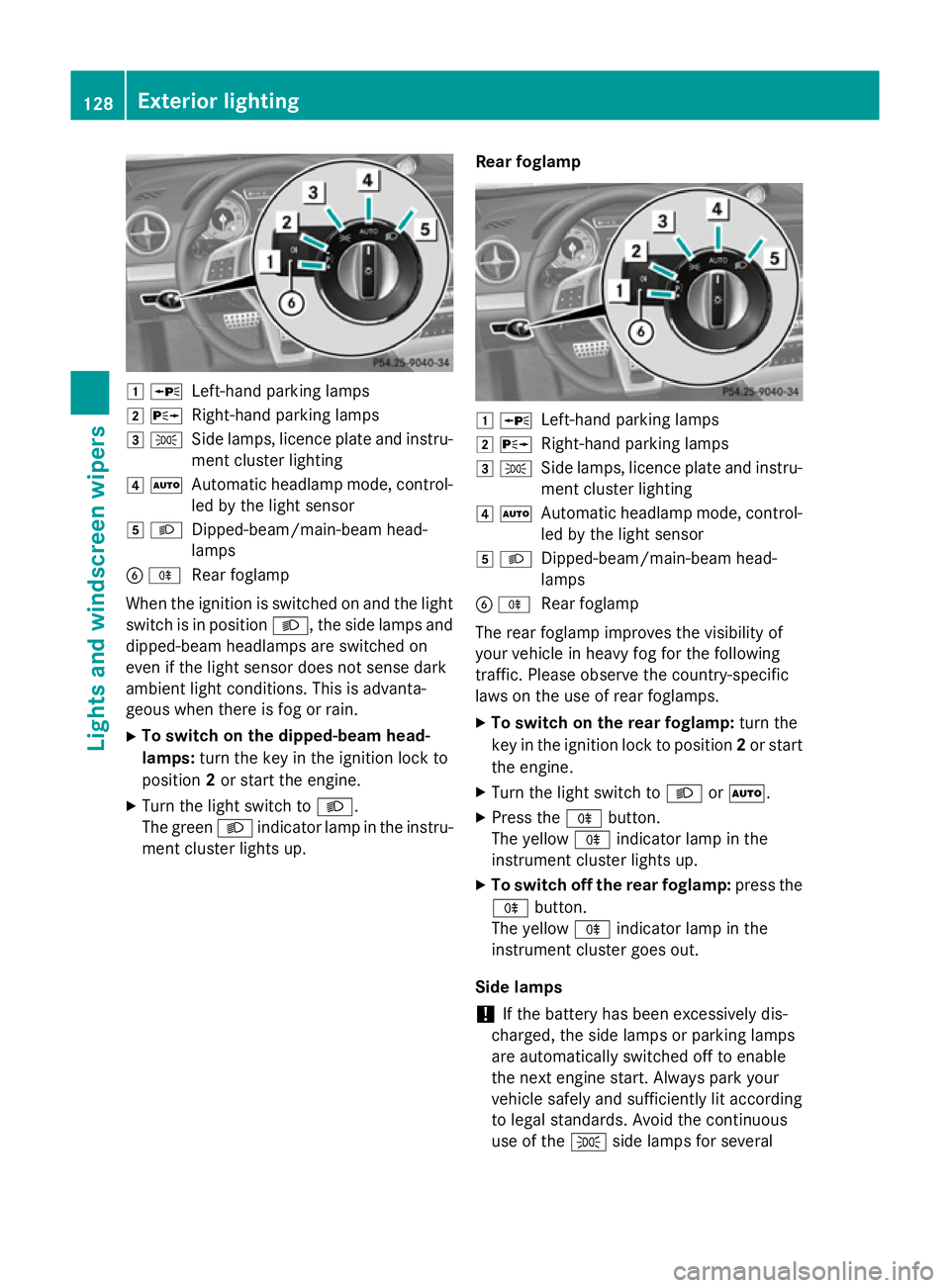
1
W
Left-hand parking lamps
2 X
Right-hand parking lamps
3 T
Side lamps, licence plate and instru-
ment cluster lighting
4 Ã
Automatic headlamp mode, control-
led by the light sensor
5 L
Dipped-beam/main-beam head-
lamps
B R
Rear foglamp
When the ignition is switched on and the light
switch is in position L, the side lamps and
dipped-beam headlamps are switched on
even if the light sensor does not sense dark
ambient light conditions. This is advanta-
geous when there is fog or rain.
X To switch on the dipped-beam head-
lamps: turn the key in the ignition lock to
position 2or start the engine.
X Turn the light switch to L.
The green Lindicator lamp in the instru-
ment cluster lights up. Rear foglamp 1
W
Left-hand parking lamps
2 X
Right-hand parking lamps
3 T
Side lamps, licence plate and instru-
ment cluster lighting
4 Ã
Automatic headlamp mode, control-
led by the light sensor
5 L
Dipped-beam/main-beam head-
lamps
B R
Rear foglamp
The rear foglamp improves the visibility of
your vehicle in heavy fog for the following
traffic. Please observe the country-specific
laws on the use of rear foglamps.
X To switch on the rear foglamp: turn the
key in the ignition lock to position 2or start
the engine.
X Turn the light switch to LorÃ.
X Press the Rbutton.
The yellow Rindicator lamp in the
instrument cluster lights up.
X To switch off the rear foglamp: press the
R button.
The yellow Rindicator lamp in the
instrument cluster goes out.
Side lamps ! If the battery has been excessively dis-
charged, the side lamps or parking lamps
are automatically switched off to enable
the next engine start. Always park your
vehicle safely and sufficiently lit according
to legal standards. Avoid the continuous
use of the Tside lamps for several 128
Exterior lightingLights and windscreen wipers
Page 134 of 637
The hazard warning lamps switch on auto-
matically if:
R an airbag is deployed or
R the vehicle decelerates rapidly from a
speed of above 70 km/h and comes to a
standstill
The hazard warning lamps switch off auto-
matically if the vehicle reaches a speed of
above 10 km/ha gain after a full brake appli-
cation.
i The hazard warning lamps continue to
operate even if the ignition is switched off. Headlamp cleaning system
The headlamps are cleaned automatically if
the "Wipe with washer fluid" function is oper-
ated five times (Y page 135) while the lights
are on and the engine is running. When you
switch off the ignition, the automatic head-
lamp cleaning system is reset and counting is
resumed from 0. Intelligent Light System
General notes The Intelligent Light System is a system that
adjusts the headlamps automatically to suit
the prevailing driving and weather conditions. It offers advanced functions for improved illu-
mination of the road surface, e.g. depending
on the vehicle speed or weather conditions.
The system includes the active light function, cornering light function, motorway mode and
extended range foglamps. The system is only
active when it is dark.
You can activate or deactivate the "Intelligent Light System" using the on-board computer
(Y page 240). Active light function
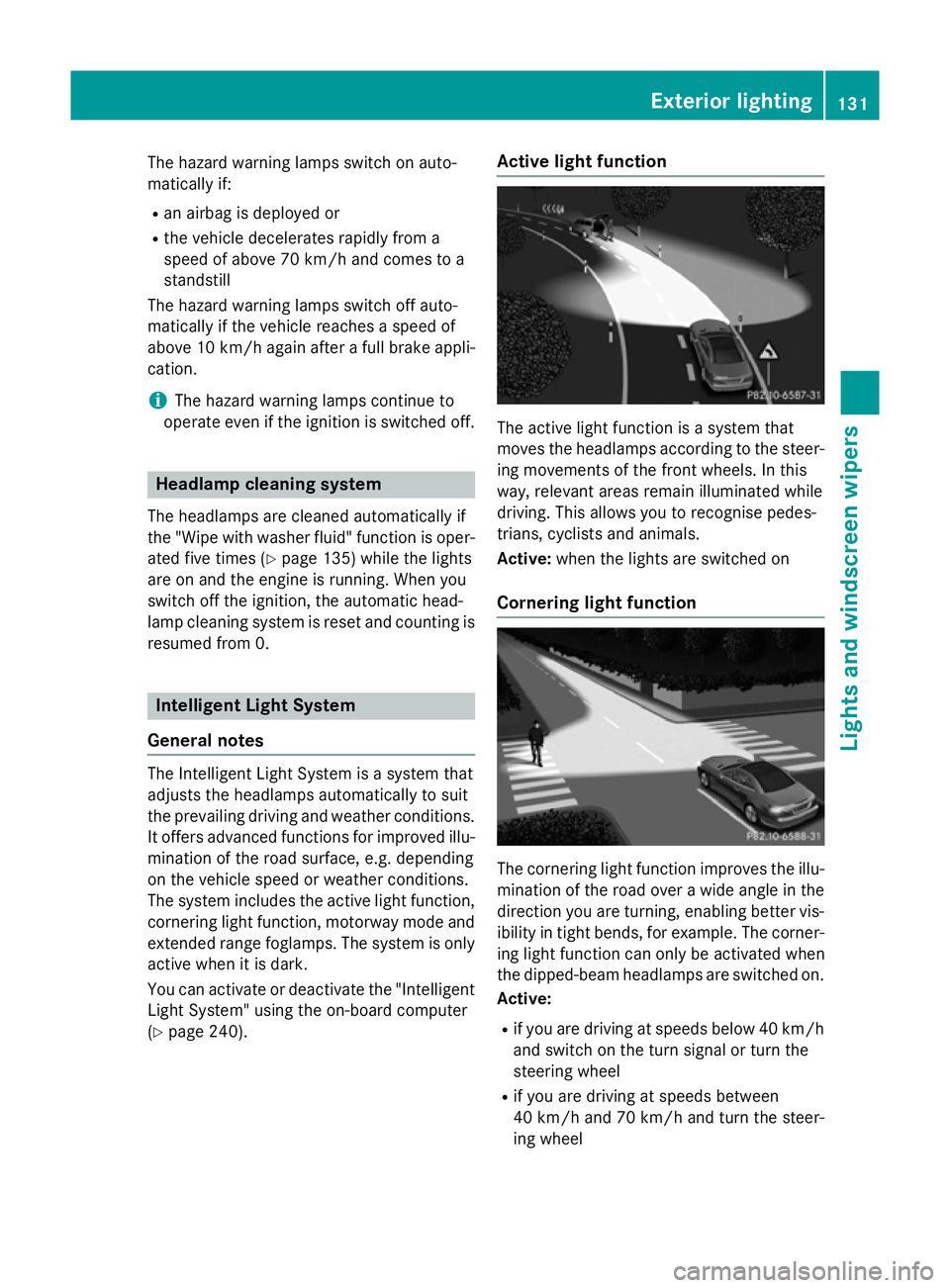
The active light function is a system that
moves the headlamps according to the steer-
ing movements of the front wheels. In this
way, relevant areas remain illuminated while
driving. This allows you to recognise pedes-
trians, cyclists and animals.
Active: when the lights are switched on
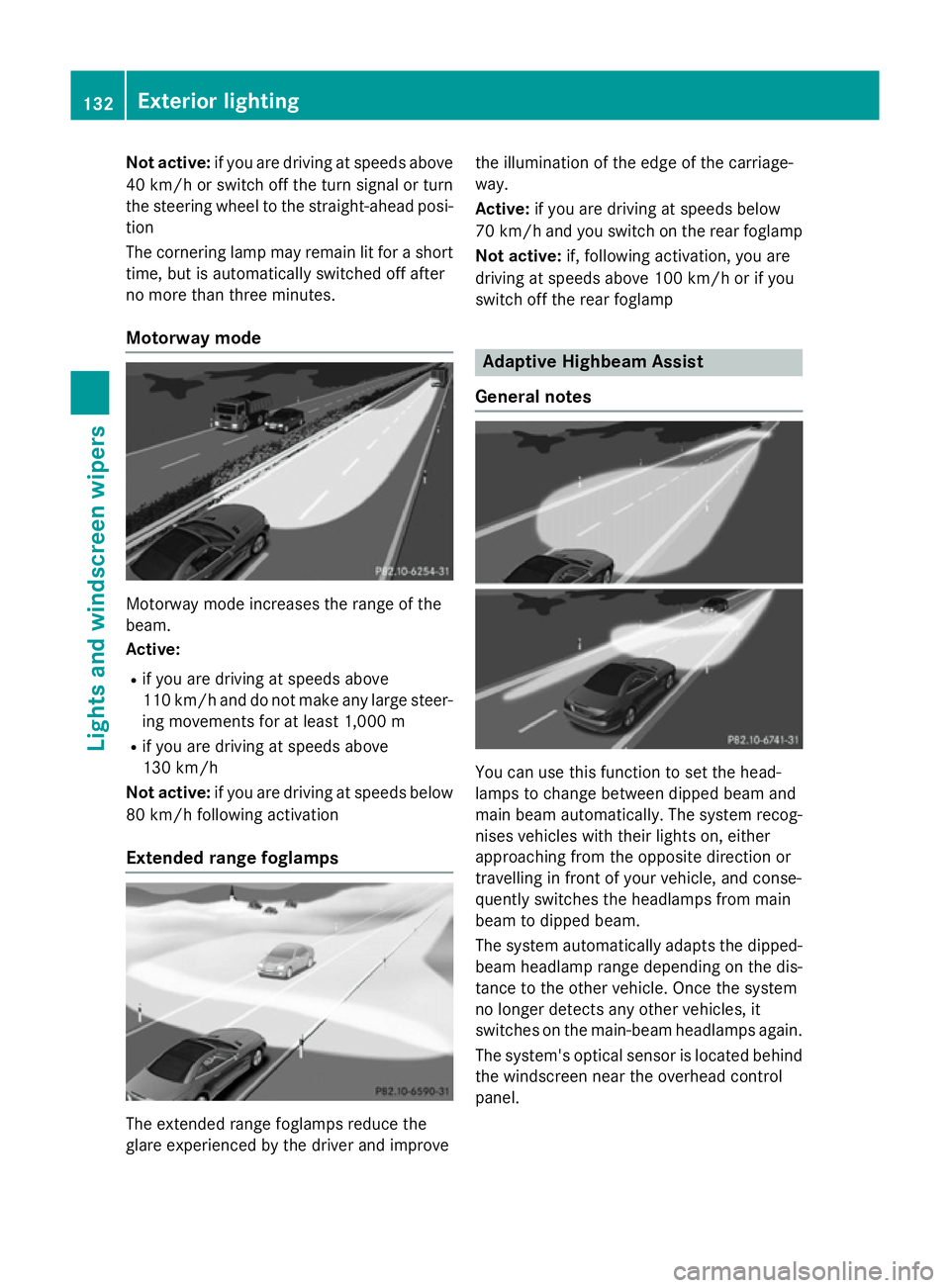
Cornering light function The cornering light function improves the illu-
mination of the road over a wide angle in the direction you are turning, enabling better vis-
ibility in tight bends, for example. The corner- ing light function can only be activated when
the dipped-beam headlamps are switched on.
Active:
R if you are driving at speeds below 40 km/h
and switch on the turn signal or turn the
steering wheel
R if you are driving at speeds between
40 km/ha nd 70 km/h and turn the steer-
ing wheel Exterior lighting
131Lights andwindscreen wipers Z
Page 135 of 637
Not active:
if you are driving at speeds above
40 km/h or switch off the turn signal or turn
the steering wheel to the straight-ahead posi- tion
The cornering lamp may remain lit for a short
time, but is automatically switched off after
no more than three minutes.
Motorway mode Motorway mode increases the range of the
beam.
Active:
R if you are driving at speeds above
110 km/h and do not make any large steer-
ing movements for at least 1,000 m
R if you are driving at speeds above
130 km/h
Not active: if you are driving at speeds below
80 km/h following activation
Extended range foglamps The extended range foglamps reduce the
glare experienced by the driver and improve the illumination of the edge of the carriage-
way.
Active:
if you are driving at speeds below
70 km/h and you switch on the rear foglamp
Not active: if, following activation, you are
driving at speeds above 100 km/h or if you
switch off the rear foglamp Adaptive Highbeam Assist
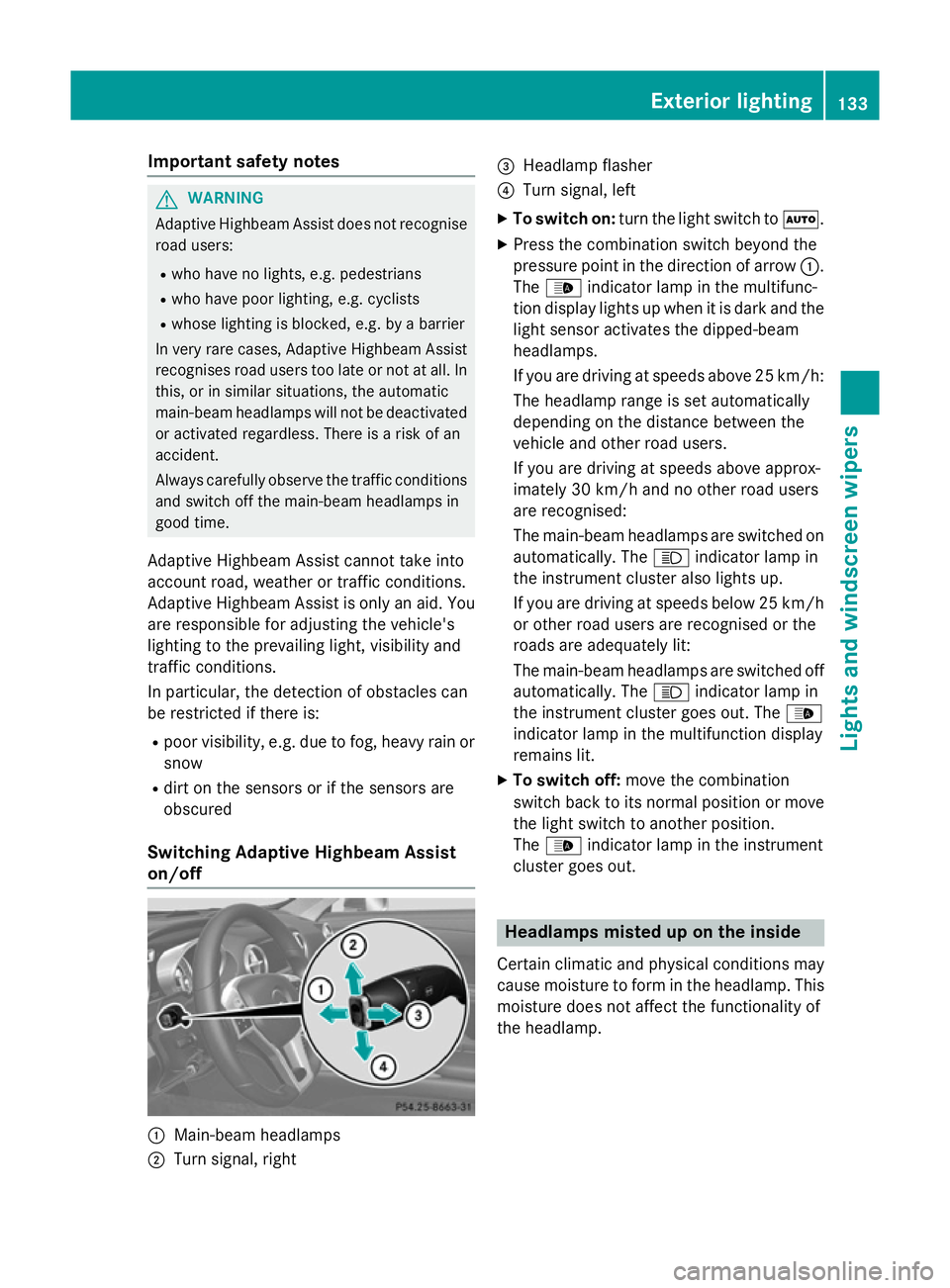
General notes You can use this function to set the head-
lamps to change between dipped beam and
main beam automatically. The system recog-
nises vehicles with their lights on, either
approaching from the opposite direction or
travelling in front of your vehicle, and conse-
quently switches the headlamps from main
beam to dipped beam.
The system automatically adapts the dipped-
beam headlamp range depending on the dis-
tance to the other vehicle. Once the system
no longer detects any other vehicles, it
switches on the main-beam headlamps again.
The system's optical sensor is located behind
the windscreen near the overhead control
panel. 132
Exterior lightingLights and
windscreen wipers
Page 136 of 637
Important safety notes
G
WARNING
Adaptive Highbeam Assist does not recognise road users:
R who have no lights, e.g. pedestrians
R who have poor lighting, e.g. cyclists
R whose lighting is blocked, e.g. by a barrier
In very rare cases, Adaptive Highbeam Assist
recognises road users too late or not at all. In
this, or in similar situations, the automatic
main-beam headlamps will not be deactivated
or activated regardless. There is a risk of an
accident.
Always carefully observe the traffic conditions and switch off the main-beam headlamps in
good time.
Adaptive Highbeam Assist cannot take into
account road, weather or traffic conditions.
Adaptive Highbeam Assist is only an aid. You
are responsible for adjusting the vehicle's
lighting to the prevailing light, visibility and
traffic conditions.
In particular, the detection of obstacles can
be restricted if there is:
R poor visibility, e.g. due to fog, heavy rain or
snow
R dirt on the sensors or if the sensors are
obscured
Switching Adaptive Highbeam Assist
on/off :
Main-beam headlamps
; Turn signal, right =
Headlamp flasher
? Turn signal, left
X To switch on: turn the light switch to Ã.
X Press the combination switch beyond the
pressure point in the direction of arrow :.
The _ indicator lamp in the multifunc-
tion display lights up when it is dark and the
light sensor activates the dipped-beam
headlamps.
If you are driving at speeds above 25 km/h:
The headlamp range is set automatically
depending on the distance between the
vehicle and other road users.
If you are driving at speeds above approx-
imately 30 km/h and no other road users
are recognised:
The main-beam headlamps are switched on automatically. The Kindicator lamp in
the instrument cluster also lights up.
If you are driving at speeds below 25 km/h
or other road users are recognised or the
roads are adequately lit:
The main-beam headlamps are switched off automatically. The Kindicator lamp in
the instrument cluster goes out. The _
indicator lamp in the multifunction display
remains lit.
X To switch off: move the combination
switch back to its normal position or move the light switch to another position.
The _ indicator lamp in the instrument
cluster goes out. Headlamps misted up on the inside
Certain climatic and physical conditions may
cause moisture to form in the headlamp. This
moisture does not affect the functionality of
the headlamp. Exterior lighting
133Lights and windscreen wipers Z
Page 222 of 637
red headlamps are deactivated at speeds
below 5 km/h. The Night View image con-
tinues to be displayed.
Automatic activation
You can use COMAND Online to select the
Night View Assist Automatic activa‐
Night View Assist Automatic activa‐
tion tion option. The pedestrian and animal
search function remains active even when the
Night View image is not displayed. In the dark, in unlit surroundings and at speeds of more
than 60 km/h, the Night View image is auto-
matically displayed in the COMAND display as
soon as pedestrians or animals are detected.
X In COMAND Online, select automatic acti-
vation of Night View Assist Plus
(Y page 322).
Deactivating Night View Assist Plus X
Press button :.
The Night View Assist Plus display goes off in the COMAND display. Night View Assist
Plus is deactivated.
Spotlight function General notes
i The function described below is not avail-
able in all countries.
Under certain conditions, the spotlight func-
tion uses the headlamps to flash at detected
pedestrians.
The spotlight function is only active if:
R pedestrian recognition is active
R the road surface is not lit R
the driving speed is at least 60 km/h
R the "Adaptive Highbeam Assist"
(Y page 133) or "Adaptive Highbeam Assist
PLUS" function is activated
R reverse gear has not been engaged
The spotlight function is not active or is active
only to a limited extent if:
R you are driving in city traffic
R there are pedestrians located in the area of
an oncoming vehicle or a vehicle in front
Activating the spotlight function
The pedestrian detection with spotlight func- tion runs in the background. If the prerequi-
sites are met, the spotlight function uses the
headlamps to flash four short pulses at a
pedestrian detected on or near to the road
surface.
X In the light menu, select the spotlight func-
tion of Night View Assist Plus
(Y page 240).
The spotlight function does not flash at ani-
mals.
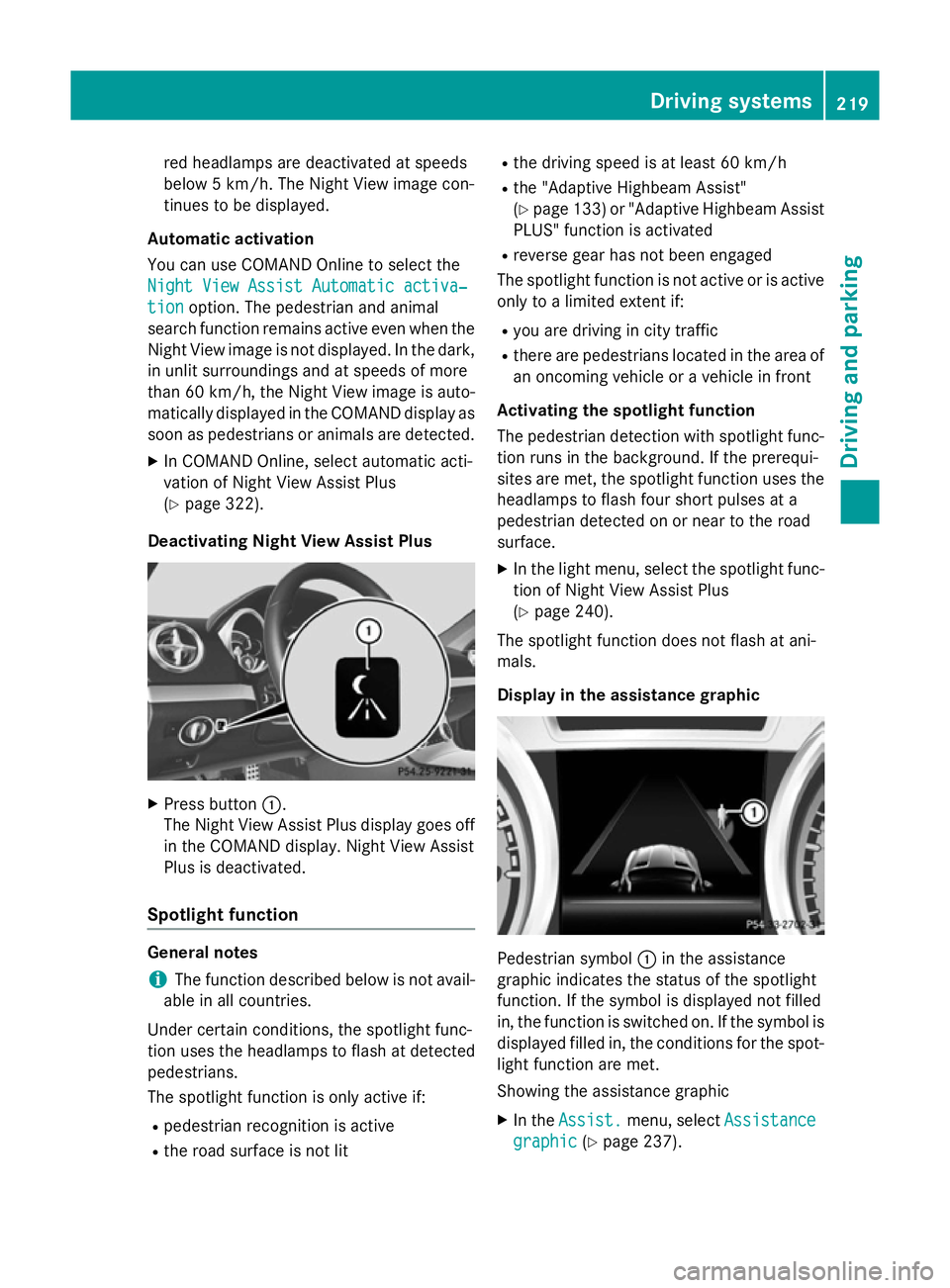
Display in the assistance graphic Pedestrian symbol
:in the assistance
graphic indicates the status of the spotlight
function. If the symbol is displayed not filled
in, the function is switched on. If the symbol is displayed filled in, the conditions for the spot-
light function are met.
Showing the assistance graphic
X In the Assist. Assist. menu, select Assistance
Assistance
graphic
graphic (Ypage 237). Driving systems
219Driving and parking Z
Page 234 of 637
A
Time (Y page 312)
B Outside temperature or speed
(Ypage 239)
Text field =shows the selected menu or
submenu as well as display messages.
X To show menu bar ?:press the =
or ; button on the steering wheel.
Menu bar ?disappears after a few sec-
onds of inactivity.
The following messages may appear in the
multifunction display:
Z Gearshift recommendation
(Ypage 169)
XjY Active Parking Assist
(Ypage 207)
¯ Cruise control (Y page 182)
È SPEEDTRONIC (Y page 193)
_ Adaptive Highbeam Assist
(Ypage 133)
¤ ECO start/stop function
(Ypage 158)
ë HOLD function (Y page 196)
120 km/h!
120 km/h! Maximum permissible speed
exceeded (only for certain coun-
tries) Menus and submenus
Menu overview
Press the =or; button on the steer-
ing wheel to call up the menu bar and select a
menu.
Operating the on-board computer
(Y page 229).
Depending on the equipment fitted in the
vehicle, you can call up the following menus:
R Trip Trip menu (Y page 231)
R Navi
Navi menu (navigation instructions)
(Y page 233)
R Audio
Audio menu (Y page 234)
R Tel
Tel menu (telephone) (Y page 235)
R Assist.
Assist. menu (assistance) (Y page 237)R
Serv.
Serv. menu (service) (Y page 238)
R Settings
Settings menu (Ypage 239)
R AMG
AMG menu in AMG vehicles (Y page 244) Trip menu
Standard display X
Press and hold the %button on the
steering wheel until the Trip
Tripmenu with
trip meter :and total distance
recorder ;is shown.
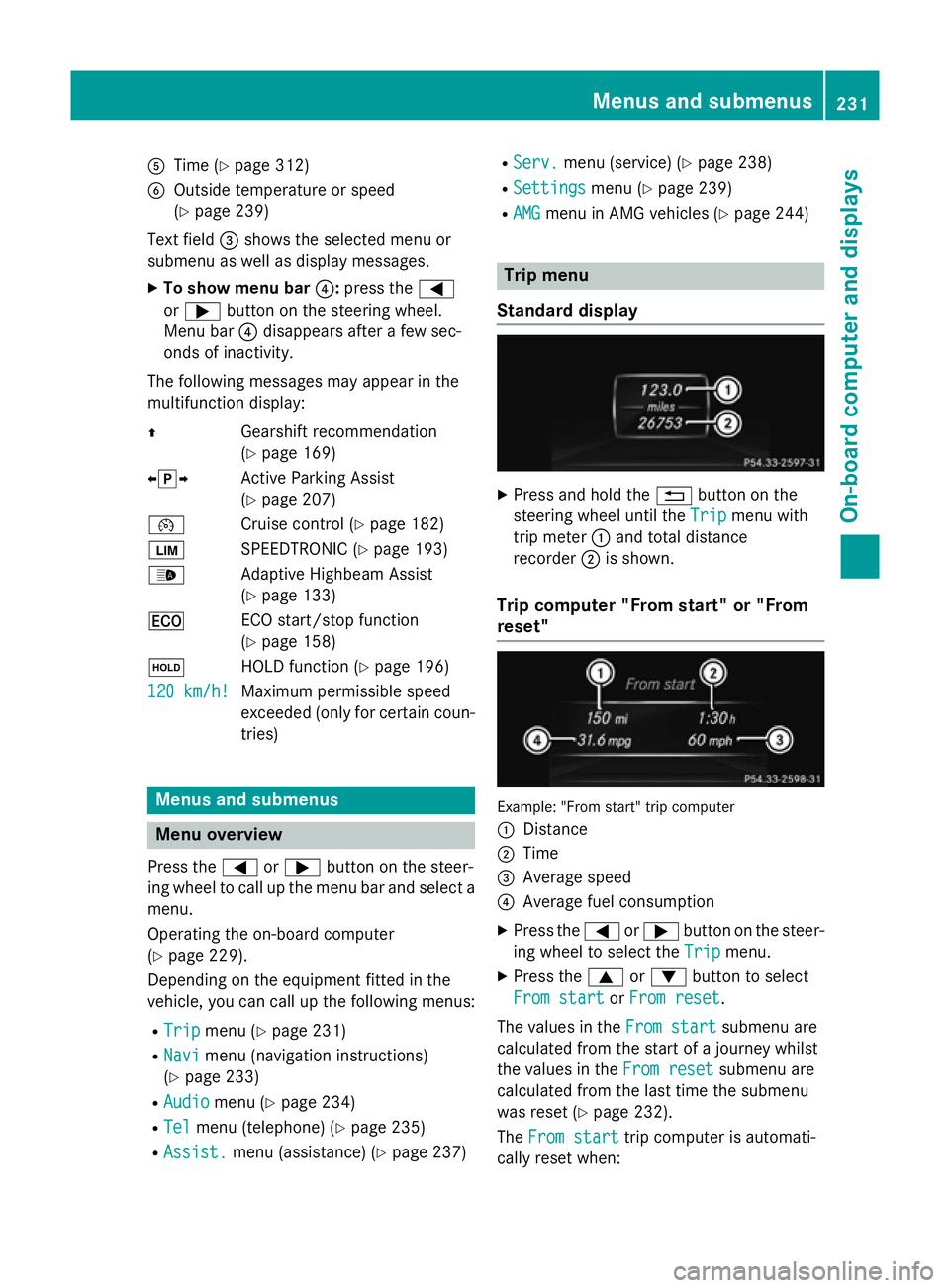
Trip computer "From start" or "From
reset" Example: "From start" trip computer
:
Distance
; Time
= Average speed
? Average fuel consumption
X Press the =or; button on the steer-
ing wheel to select the Trip Tripmenu.
X Press the 9or: button to select
From start
From start orFrom reset
From reset.
The values in the From start
From startsubmenu are
calculated from the start of a journey whilst
the values in the From reset From resetsubmenu are
calculated from the last time the submenu
was reset (Y page 232).
The From start From start trip computer is automati-
cally reset when: Menus and submenus
231On-board computer and displays Z