2012 MERCEDES-BENZ S-Class massage
[x] Cancel search: massagePage 17 of 536

Low-beam headlampsDisplay message ............................ 401
Setting for driving abroad
(symmetrical) ................................. 276
Switching on/off ........................... 277
Lubricant additives
see Additives
Lumbar support
Adjusting ....................................... 108
Lumbar support (COMAND) .............. 269
M
M+S tires ............................................ 492
Maintenance see ASSYST PLUS service interval
display
Malfunction message
see Display messages
Malfunctions relevant to safety
Reporting ......................................... 31
Map (navigation)
Adjusting the scale ........................182
Arrival time/distance to the
destination ..................................... 185
City model ..................................... 186
Display ........................................... 184
Geo-coordinate display ..................186
Heading ......................................... 184
Information in the display ..............185
Map settings .................................. 182
Moving ........................................... 183
North orientation ........................... 184
Notes ............................................. 182
Point of interest symbols ...............184
Road display .................................. 185
Saving the crosshair position .........183
Setting to the vehicle destination ..183
Topographical map ........................186
Map display (also see navigation)
Traffic reports ................................ 174
Massage function (PULSE) ............... 272
Matte finish (cleaning
instructions) ...................................... 465
mbrace Automatic retrieval of vehicle data
(service due date) ..........................449
Call priority .................................... 447
Display message ............................ 396
Downloading destinations
(COMAND) ..................................... 447
Emergency call .............................. 444
Important safety notes ..................443
Locating a stolen vehicle ...............450
MB info call button ........................446
Remote vehicle locking ..................449
Roadside Assistance button ..........445
Search & Send ............................... 448
Self-test ......................................... 444
System .......................................... 443
Vehicle remote unlocking ..............449
Mechanical key
Function/notes ................................ 81
Unlocking the driver's door ..............87
Media Interface
Active partition .............................. 238
Alphabetical track selection ..........237
Connecting an external audio
source ............................................ 234
Connection options .......................233
iPod ®
............................................. 233
Mode ............................................. 233
Notes on USB devices ...................238
Playback options ........................... 238
Selecting categories ......................236
Selecting folders ............................ 236
Selecting music files ......................236
Selecting playlists ..........................236
Switching to ................................... 234
USB mass storage device ..............233
Media list
Audio mode (CD, DVD, MP3) .........224
Video DVD ..................................... 242
Memory card (audio) ......................... 379
Memory function ............................... 113
Menu item Selecting ........................................ 126
Message memory (on-board
computer) .......................................... 388
Messages see Display messages
Microphone, switching on/off ......... 201Index15
Page 20 of 536

Position of exterior mirror, front-
passenger side ............................... 113
Rear view camera .......................... 354
see PARKTRONIC
Parking aid
Parking Guidance ........................... 350
see Exterior mirrors
see PARKTRONIC
Parking brake
Display message ............................ 392
Electric parking brake ....................324
Parking Guidance
Display message ............................ 412
Important safety notes ..................350
Parking position
Exterior mirrors (COMAND) ...........262
PARKTRONIC
Deactivating/activating .................349
Driving system ............................... 347
Function/notes ............................. 347
Problem (malfunction) ...................350
Range of the sensors .....................347
Warning display ............................. 348
PASSENGER AIRBAG OFF indicator
lamp ...................................................... 50
Pause function Audio mode (CD, DVD, MP3) .........223
Rear Seat Entertainment System ...255
Video DVD ..................................... 243
Pedals ................................................. 326
Permanent four-wheel drive see 4MATIC (permanent four-
wheel drive)
Phone book
Calling up ....................................... 205
Creating an entry ........................... 206
Deleting an entry ........................... 207
Entering characters .......................132
Introduction ................................... 203
Picture settings (TV, video) .............. 240
Plastic trim (cleaning instructions) . 468
Playback options Audio mode (CD, DVD, MP3) .........228
Point of interest (navigation)
Assigning a category ...................... 163
Entering ......................................... 162
Entering a point of interest using
the map ......................................... 165List ................................................. 164
ZAGAT ®
survey service ..................164
Power closing feature ......................... 87
Power washers .................................. 464
Power windows see Side windows
PRE-SAFE ®
(Preventive occupant
safety system) Display message ............................ 396
Operation ......................................... 55
PRE-SAFE ®
Brake (vehicles with
DISTRONIC PLUS) Display message ............................ 397
Function/notes ................................ 73
Switching on/off ........................... 384
Warning lamp ................................. 428
Preventive occupant safety
system
see PRE-SAFE ®
(Preventive
occupant safety system)
Previous destinations (navigation) .. 181
Product information ............................ 28
Programmable button ....................... 120
Program selector button .................. 314
Pulling away (automatic
transmission) ..................................... 305
PULSE see Massage function (PULSE)
Q
Qualified specialist workshop ........... 31
R
RACETIMER (on-board computer) .... 380
Radar sensor system Activating/deactivating .................387
Display message ............................ 411
Radiator cover ................................... 457
Radio HD Radio™ .................................... 215
Selecting a station .................212, 378
Sound settings (balance, bass,
fader, treble) .................................. 135
Storing stations ............................. 213
Switching on .................................. 211
Switching wavebands ....................212
18Index
Page 110 of 536

You can adjust side bolsters : of the luxury
head restraint individually.
XTo adjust the side bolsters of the head
restraint: push or pull side bolsters : into
the desired position.XTo adjust the head restraint angle: hold
the head restraint by the upper edge and
slide it forwards or back in the direction of
arrow ;.
Adjusting the multicontour seat
You can adjust the multicontour seat using
COMAND ( Y page 270).
Adjusting the multicontour seat in the
rear compartment
You can use the buttons on the center
console to adjust the multicontour seats for
the outer seats in the rear compartment.
XTo select a rear-compartment seat: push
or pull rocker switch : or C forwards or
backwards.
The indicator lamp in the selected button
lights up briefly.XTo adjust the side bolsters of the seat
backrest: push or pull rocker switch B
forwards or backwards.XTo adjust the backrest contour: push or
pull rocker switch A forwards or
backwards.XTo adjust the position of the backrest
contour: push or pull rocker switch ?
forwards or backwards.XTo activate/deactivate the gentle
massage function: push or pull rocker
switch = forwards or backwards.XTo activate/deactivate the strong
massage function: push or pull rocker
switch ; forwards or backwards.
Adjusting the active multicontour
seat
You can adjust the active multicontour seat
using COMAND ( Y page 272).
i If PRE-SAFE ®
has been activated, the air
pressure in the air chambers (the side
bolsters of the seat cushion and backrest)
of the multicontour seat or active
multicontour seat is increased.
Adjusting the lumbar support
You can adjust the lumbar support using
COMAND ( Y page 269).
Switching the seat heating on/off
Switching on/off
The three red indicator lamps in the button
indicate the heating level you have selected.
108SeatsSeats, steering wheel and mirrors
Page 122 of 536

Assigning the programmable button
(favorites):Programmable button
You can assign the following predefined
functions to the h programmable button:
R ECO : you can activate or deactivate the ECO
start/stop function.
R Massage, Driver's Seat : you can switch
the massage function for the driver's seat
on and off.
R Massage, Front Passenger's Seat :
you can switch the massage function for
the front-passenger seat on and off.
R Massage, Driver's and Front
Passenger's Seat : you can switch the
massage function for the driver's and front-
passenger seats on and off.
R Display OFF : you can switch the
COMAND display off or on.
R Tow-away Alarm : you can arm or
deactivate the tow-away alarm.
R Interior Motion Sensor : you can arm or
deactivate the interior motion sensor.
R Tow-away Alarm and Interior Motion
Sensor : you can arm or deactivate the tow-
away alarm and the interior motion sensor.
R Repeat Navigation Command : you can
have the most recent recommendation by
the navigation system repeated.
XTo assign the programmable button:
select Vehicle by sliding VÆ and turningcVd the COMAND controller and press
W to confirm.XSelect System and press W to confirm.XSelect Favorites Button and press W to
confirm.
The list of predefined functions appears.
The # dot in front of the list entry indicates
the current setting.XTo change the setting: turn cVd the
COMAND controller and select the desired
function.XTo store the setting and exit the menu:
press W the COMAND controller.
Telephone keypad
:Telephone keypad;Folding cover120At a glanceCOMAND
Page 274 of 536
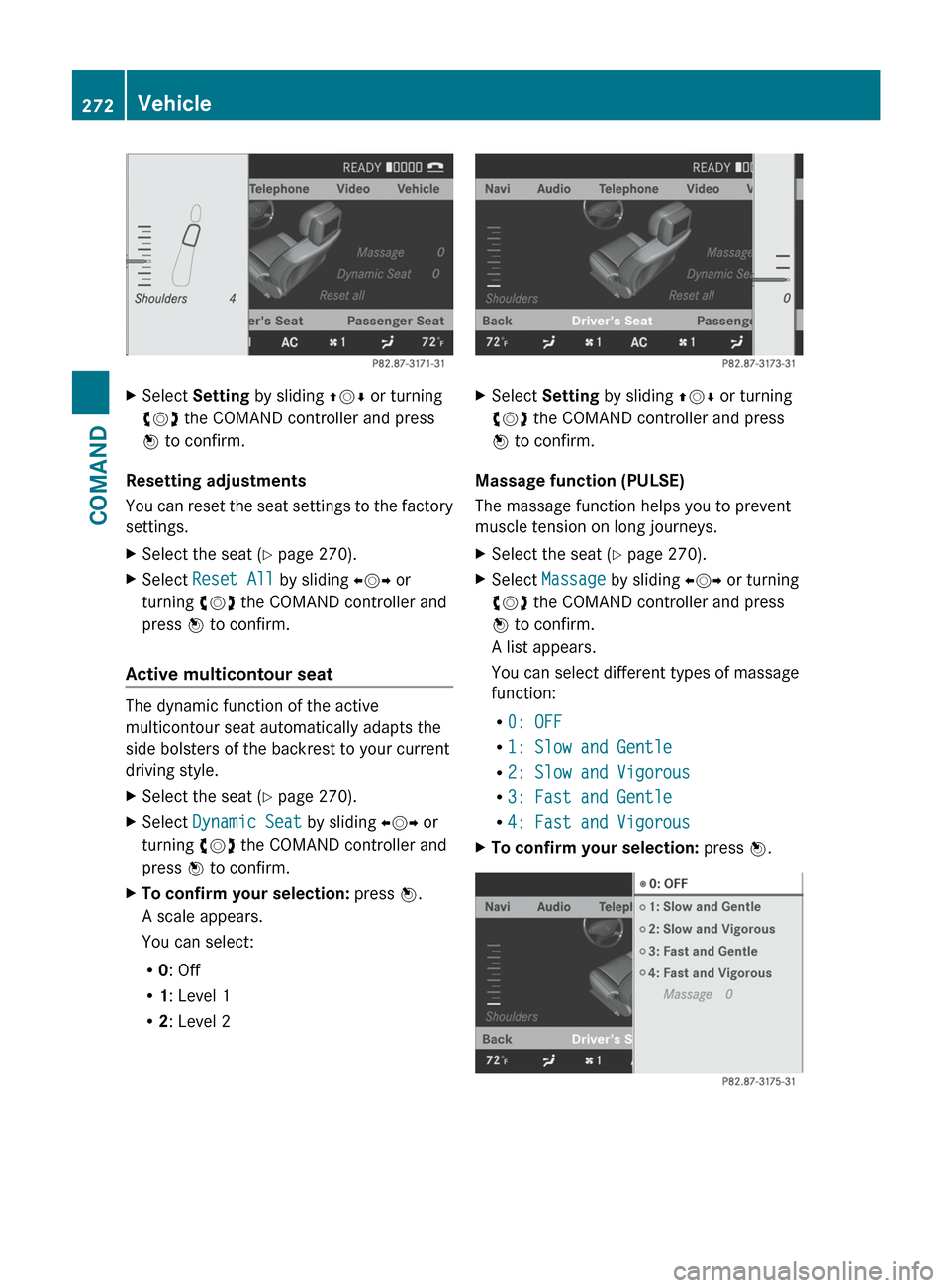
XSelect Setting by sliding ZVÆ or turning
cVd the COMAND controller and press
W to confirm.
Resetting adjustments
You can reset the seat settings to the factory
settings.
XSelect the seat ( Y page 270).XSelect Reset All by sliding XVY or
turning cVd the COMAND controller and
press W to confirm.
Active multicontour seat
The dynamic function of the active
multicontour seat automatically adapts the
side bolsters of the backrest to your current
driving style.
XSelect the seat ( Y page 270).XSelect Dynamic Seat by sliding XVY or
turning cVd the COMAND controller and
press W to confirm.XTo confirm your selection: press W.
A scale appears.
You can select:
R 0: Off
R 1: Level 1
R 2: Level 2XSelect Setting by sliding ZVÆ or turning
cVd the COMAND controller and press
W to confirm.
Massage function (PULSE)
The massage function helps you to prevent
muscle tension on long journeys.
XSelect the seat ( Y page 270).XSelect Massage by sliding XVY or turning
cVd the COMAND controller and press
W to confirm.
A list appears.
You can select different types of massage
function:
R 0: OFF
R 1: Slow and Gentle
R 2: Slow and Vigorous
R 3: Fast and Gentle
R 4: Fast and VigorousXTo confirm your selection: press W.272VehicleCOMAND
Page 275 of 536

XSelect Setting by sliding ZVÆ or turning
cVd the COMAND controller and press
W to confirm.
The massage function runs for
approximately 6 to 20 minutes, depending
on the setting.
Uploading/downloading data
With this function, you can transfer COMAND
data from one system (vehicle) to another
system (vehicle). You can use either a USB
stick or an SD card as temporary storage.
You can only transfer the complete
transferable data record.
The following data is included in the complete
transferable data record:
R navigation destination memory and last
destination
R address book entries
R audio station/video channel presets
R system settings
Copying data to a storage medium
XInsert an SD card into the SD card slot
or
XInsert a USB stick into the socket on the
side in the glove box.XSelect Vehicle in the main function bar by
turning cVd the COMAND controller and
press W to confirm.
The "Vehicle" menu appears.XSelect System and press W to confirm.XSelect Upload/Download Data and press
W to confirm.XSelect Copy Data to Storage Medium
and press W to confirm.XSelect the storage medium to which the
data should be copied.XSelect Start Copying .
COMAND checks whether the storage
medium has enough storage capacity. If
there is enough storage capacity, the data
is copied to the storage medium.XIf there is not enough storage capacity,
remove the storage medium. Make more
storage space available on the storage
medium. Then, try to copy the COMAND
data to the storage medium again.XRemove the storage medium.
Transferring data to another system
(vehicle)
XInsert/connect the storage medium (SD
card or USB stick) with the saved data into/
to the relevant interface.XSelect Vehicle in the main function bar by
turning cVd the COMAND controller and
press W to confirm.
The "Vehicle" menu appears.XSelect System and press W to confirm.XSelect Upload/Download Data and press
W to confirm.XSelect Import Data from Storage
Medium and press W to confirm.XSelect Start Data Import .
A prompt appears, asking whether the
COMAND data should be overwritten.XPress Yes to confirm that the data saved in
COMAND should be overwritten.
COMAND imports the data and restarts the
system.
or
XPress No to cancel the import process.Vehicle273COMANDZ