2012 MERCEDES-BENZ S-Class Alarm setting
[x] Cancel search: Alarm settingPage 7 of 536
Rear ............................................... 299
Setting ........................................... 298
Setting the center air vents ...........298
Setting the side air vents ...............299
Alarm system
see ATA (Anti-Theft Alarm system)
Alertness Assistant
see ATTENTION ASSIST
Alternative route ............................... 171
Ambient light setting (COMAND) ..... 263
AMG menu (on-board computer) ..... 379
Anti-lock Braking System see ABS (Anti-lock Braking System)
Anti-Theft Alarm system
see ATA (Anti-Theft Alarm system)
Anti-theft system
ATA (Anti-Theft Alarm system) .........75
Ashtray ............................................... 440
Assistance menu (on-board
computer) .......................................... 383
ASSYST PLUS see ASSYST PLUS service interval
display
ATA (Anti-Theft Alarm system)
Activating/deactivating ...................75
Function ........................................... 75
Switching off the alarm ....................75
ATTENTION ASSIST
Activating/deactivating .................384
Display message ............................ 408
Function/notes ............................. 356
Audio
Radio mode ................................... 211
Audio database
see MUSIC REGISTER
Audio DVD
Mode, switching to ........................221
Pause function ............................... 223
Playback options ........................... 228
Safety notes .................................. 220
Setting the audio format ................227
Stop function ................................. 223
Audio format, setting
Audio DVD ..................................... 227
Rear Seat Entertainment System ...258
Video DVD ..................................... 245
Audio menu (on-board computer) .... 378Authorized Mercedes-Benz Center
see Qualified specialist workshop
AUTO lights
Display message ............................ 403
see Lights
Automatic engine start (ECO start/
stop function) .................................... 307
Automatic engine switch-off (ECO
start/stop function) .......................... 307
Automatic headlamp mode .............. 277
Automatic transmission Automatic drive program ...............314
Changing gear ............................... 313
DIRECT SELECT lever .....................310
Display message ............................ 417
Driving tips .................................... 313
Emergency running mode ..............317
Kickdown ....................................... 313
Manual drive program ....................316
Problem (malfunction) ...................317
Program selector button ................314
Pulling away ................................... 305
Shift ranges ................................... 315
Starting the engine ........................305
Steering wheel paddle shifters ......314
Transmission position display ........312
Transmission positions ..................312
Automatic transmission
emergency mode ............................... 317
Autostore ........................................... 213
see Station memory (radio)
AUX (audio)
Notes/socket ................................ 239
Switching to ................................... 239
AUX (video)
Setting the picture .........................240
Setting the volume and sound .......246
Showing/hiding the menu .............246
Switching to ................................... 246
B
Back button ....................................... 119
Back support see Lumbar support
Bag hook ............................................ 435
Balance, adjusting ............................. 135
Bang & Olufsen sound system ......... 137
Index5
Page 19 of 536

Selecting your home address ........159
Setting route options (avoiding:
highways, toll roads, tunnels,
ferries) ........................................... 152
Setting the route type (short
route, fast route, dynamic route or
economic route) ............................ 152
Showing/hiding the menu .............152
Starting route calculation ..............156
Switching announcements on/off . 170
Switching to ................................... 151
Traffic report .................................. 174
Troubleshooting ............................. 192
NECK-PRO head restraints
Operation ......................................... 55
Resetting after being triggered ........56
NECK-PRO luxury head restraints
Operation ......................................... 55
Resetting after being triggered ........56
Night View Assist Plus
Activating/deactivating .................357
Cleaning ......................................... 467
Display message ............................ 408
Function/notes ............................. 357
Problem (malfunction) ...................360
North orientation (navigation) ......... 184
Notes on breaking-in a new
vehicle ................................................ 302
Number keypad ................................. 129
O
Occupant Classification System
(OCS) Faults ............................................... 54
Operation ......................................... 50
System self-test ............................... 53
Occupant safety
Children in the vehicle .....................62
System overview .............................. 44
Octane number (fuel) ........................ 525
Odometer ........................................... 376
see Trip odometer
Off-road .............................................. 173
Oil see Engine oil
On-board computer
AMG menu ..................................... 379
Assistance menu ........................... 383
Audio menu ................................... 378
Displaying a service message ........462
Display messages ..........................388
DISTRONIC PLUS ........................... 339
Important safety notes ..................372
Menu overview .............................. 375
Message memory .......................... 388
Navigation menu ............................ 377
Operating video DVD .....................379
Operation ....................................... 373
RACETIMER ................................... 380
Service menu ................................. 385
Settings menu ............................... 385
Standard display ............................ 376
Telephone menu ............................ 382
Trip menu ...................................... 376
Opening height restriction for
trunk lid .............................................. 265
Operating system see On-board computer
Outside lighting
Delayed switch-off (COMAND) .......263
Outside temperature display ........... 373
Overhead control panel ...................... 39
Override feature Rear side windows ...........................67
Own address (navigation)
see Home address
P
Paint code number ............................ 521
Paintwork (cleaning instructions) ... 465
Panic alarm .......................................... 68
Panorama roof with power tilt/
sliding panel Opening/closing .............................. 97
Problem (malfunction) ...................100
Resetting ......................................... 99
Panorama sliding sunroof
Important safety notes ....................95
Parcel net ........................................... 435
Parking ............................................... 323
Important safety notes ..................323
Index17
Page 24 of 536

Speed, controllingsee Cruise control
Speed Limit Assist
see Speed Limit Assist
Speedometer
Activating/deactivating the
additional speedometer .................386
Digital ............................................ 376
In the Instrument cluster .................35
Selecting the unit of
measurement ................................ 386
see Instrument cluster
SPLITVIEW ......................................... 122
SRS (Supplemental Restraint
System) Display message ............................ 397
Introduction ..................................... 44
Warning lamp ................................. 426
Warning lamp (function) ................... 44
Standing lamps
Display message ............................ 402
Switching on/off ........................... 276
Starting (engine) ................................ 304
Station memory ................................. 213
Steering (display message) .............. 418
Steering wheel Adjusting (electrically) ...................110
Button overview ............................... 37
Buttons (on-board
computer) ...................................... 373
Important safety notes ..................109
Paddle shifters ............................... 314
Steering wheel heating ..................110
Storing settings (memory
function) ........................................ 113
Steering wheel (cleaning
instructions) ...................................... 468
Steering wheel heating Switching on/off ........................... 110
Steering wheel paddle shifters ........ 314
Stop function Audio DVD ..................................... 223
Rear Seat Entertainment System ...255
Video DVD ..................................... 243
Stopwatch (RACETIMER) ................... 380
Storing stations Manually ........................................ 213Storing stations (radio)
Automatically ................................. 213
Stowage compartments
Armrest (under) ............................. 433
Cup holders ................................... 437
Door ............................................... 433
Eyeglasses compartment ...............433
Glove box ....................................... 432
Important safety information .........432
Parcel net ...................................... 435
Rear ............................................... 434
Rear seat backrest ......................... 434
Rear seats (between) .....................434
Stowage well ..................................... 436
Stowage well beneath the trunk
floor .................................................... 436
Summer opening see Convenience opening feature
Summer tires ..................................... 492
Sun visor ............................................ 438
Supplemental Restraint System see SRS (Supplemental Restraint
System)
Surround sound
see 3D sound (Harman Kardon ®
surround sound system)
Surround sound (harman/
kardon ®
surround sound system)
Notes ............................................. 136
Switching on/off ........................... 136
Suspension tuning
Active Body Control .......................346
AIRMATIC ...................................... 344
Switching air-recirculation mode
on/off ................................................. 297
Switching between picture
formats (TV, video) ............................ 240
Switching between summer time
and standard time ............................. 144
Switching off the alarm (ATA) ............ 75
Switching the hands-free
microphone on/off ............................ 201
Switching wavebands (radio) ........... 212
System settings
Bluetooth ®
..................................... 147
Date ............................................... 144
Language ....................................... 14922Index
Page 83 of 536

X To unlock the vehicle: pull the door
handle.XTo lock the vehicle: touch sensor
surface :.XConvenience closing feature: touch
recessed sensor surface ; for an
extended period ( Y page 94).
If you pull on the handle of the trunk lid, only
the trunk of the vehicle is unlocked.
Changing the settings of the locking
system
You can change the setting of the locking
system in such a way that only the driver's
door and the fuel filler flap are unlocked. This
is useful if you frequently travel on your own.
XTo change the setting: press and hold
down the % and & buttons
simultaneously for approximately six
seconds until the battery check lamp
( Y page 82) flashes twice.
i
If the setting of the locking system is
changed within the signal range of the
vehicle, pressing the & or % button
locks or unlocks the vehicle.
The SmartKey now functions as follows:
XTo unlock the driver's door: press the
% button once.XTo unlock centrally: press the %
button twice.XTo lock centrally: press the & button.
The KEYLESS-GO function is changed as
follows:
XTo unlock the driver's door : pull the door
handle on the driver's door.XTo unlock centrally: pull the door handle
on the front-passenger door or on the rear
doors.XTo lock centrally: touch the outer sensor
surface on one of the door handles.Restoring the factory settingsXPress the % and & buttons
simultaneously for approximately six
seconds until the battery check lamp
flashes twice.
Mechanical key
General notes
If you use the mechanical key to unlock and
open the driver's door or the trunk lid, the
anti-theft alarm system will be triggered
( Y page 75).
There are several ways to turn off the alarm:
XTo turn the alarm off with the
SmartKey: press the % or & button
on the SmartKey.
or
XInsert the SmartKey into the ignition lock.
or
XTo deactivate the alarm with KEYLESS-
GO: press the Start/Stop button in the
ignition lock. The SmartKey must be in the
vehicle.
or
XLock or unlock the vehicle using KEYLESS-
GO. The SmartKey must be outside the
vehicle.
Removing the mechanical key
SmartKey81Opening/closingZ
Page 88 of 536
GWARNING
Do not carry heavy or hard objects in the
passenger compartment unless they are
firmly secured in place.
Unsecured or improperly positioned cargo
increases a child's risk of injury in the event
of:
R strong braking maneuvers
R sudden changes of direction
R an accident
Unlocking and opening doors from
inside
You can open a door from inside the vehicle
even if it has been locked. You can only open
the rear doors from inside the vehicle if they
are not secured by the child-proof locks
( Y page 67).
Only open the door when the traffic situation
permits.
If the vehicle was previously locked with the
SmartKey or with KEYLESS-GO, opening the
vehicle from the inside will activate the anti-
theft alarm system. Switch off the alarm
( Y page 75).
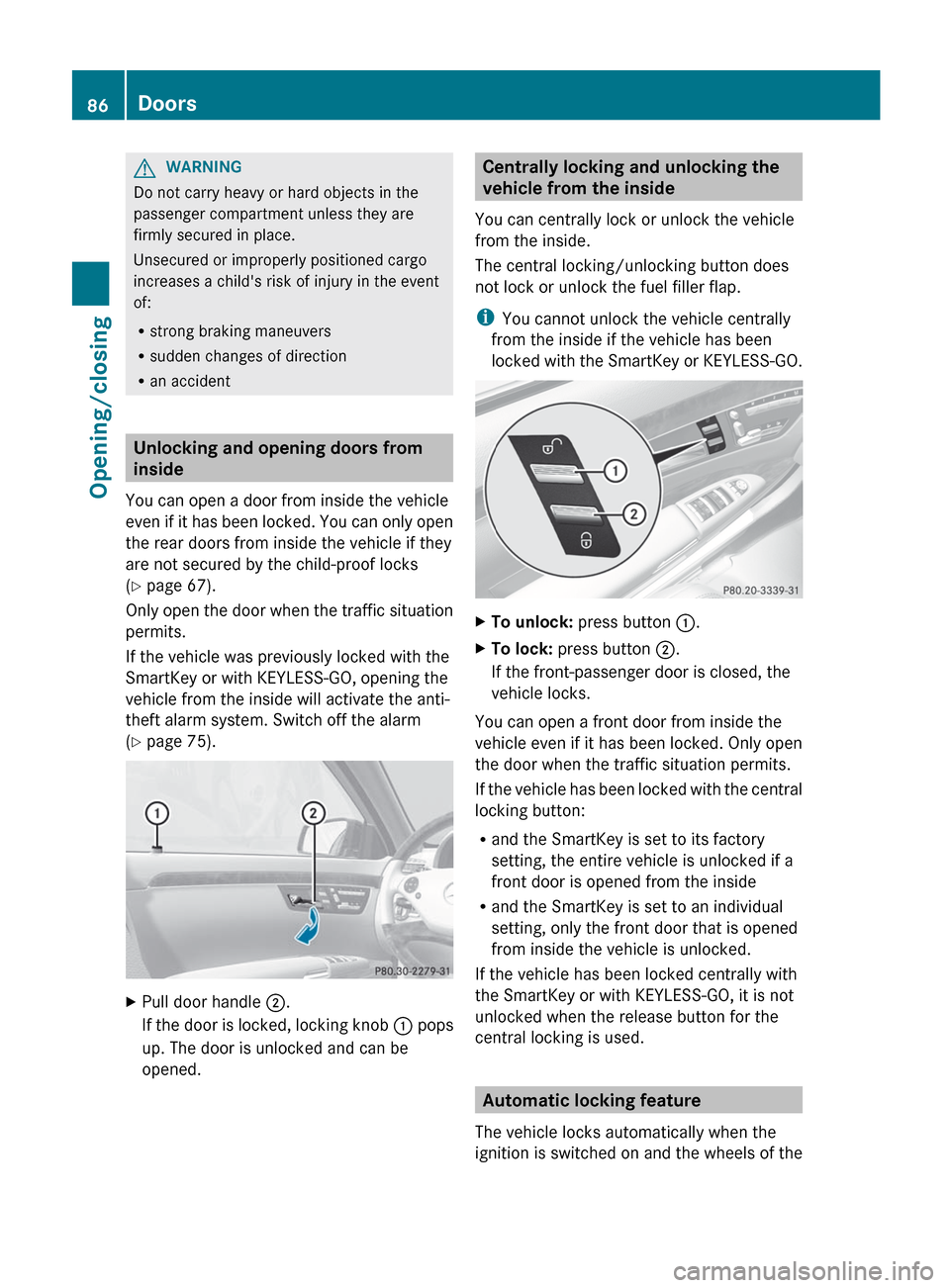
XPull door handle ;.
If the door is locked, locking knob : pops
up. The door is unlocked and can be
opened.Centrally locking and unlocking the
vehicle from the inside
You can centrally lock or unlock the vehicle
from the inside.
The central locking/unlocking button does
not lock or unlock the fuel filler flap.
i You cannot unlock the vehicle centrally
from the inside if the vehicle has been
locked with the SmartKey or KEYLESS-GO.XTo unlock: press button :.XTo lock: press button ;.
If the front-passenger door is closed, the
vehicle locks.
You can open a front door from inside the
vehicle even if it has been locked. Only open
the door when the traffic situation permits.
If the vehicle has been locked with the central
locking button:
R and the SmartKey is set to its factory
setting, the entire vehicle is unlocked if a
front door is opened from the inside
R and the SmartKey is set to an individual
setting, only the front door that is opened
from inside the vehicle is unlocked.
If the vehicle has been locked centrally with
the SmartKey or with KEYLESS-GO, it is not
unlocked when the release button for the
central locking is used.
Automatic locking feature
The vehicle locks automatically when the
ignition is switched on and the wheels of the
86DoorsOpening/closing
Page 122 of 536

Assigning the programmable button
(favorites):Programmable button
You can assign the following predefined
functions to the h programmable button:
R ECO : you can activate or deactivate the ECO
start/stop function.
R Massage, Driver's Seat : you can switch
the massage function for the driver's seat
on and off.
R Massage, Front Passenger's Seat :
you can switch the massage function for
the front-passenger seat on and off.
R Massage, Driver's and Front
Passenger's Seat : you can switch the
massage function for the driver's and front-
passenger seats on and off.
R Display OFF : you can switch the
COMAND display off or on.
R Tow-away Alarm : you can arm or
deactivate the tow-away alarm.
R Interior Motion Sensor : you can arm or
deactivate the interior motion sensor.
R Tow-away Alarm and Interior Motion
Sensor : you can arm or deactivate the tow-
away alarm and the interior motion sensor.
R Repeat Navigation Command : you can
have the most recent recommendation by
the navigation system repeated.
XTo assign the programmable button:
select Vehicle by sliding VÆ and turningcVd the COMAND controller and press
W to confirm.XSelect System and press W to confirm.XSelect Favorites Button and press W to
confirm.
The list of predefined functions appears.
The # dot in front of the list entry indicates
the current setting.XTo change the setting: turn cVd the
COMAND controller and select the desired
function.XTo store the setting and exit the menu:
press W the COMAND controller.
Telephone keypad
:Telephone keypad;Folding cover120At a glanceCOMAND
Page 124 of 536

NaviAudioTelephoneVideoVehicleModeFM/AM radioVideo DVDECOMap orientationSat radioAUXMulticontour
seat/lumbar
settingsPoint of interest
symbols on the mapDiscVideo offRear window
blindTraffic symbols on the
mapMemory cardEASY-ENTRY/
EXIT systemText information on
mapMUSIC
REGISTERExterior
lighting
delayed
switch-offO Topographical
mapMedia
InterfaceInterior
lighting
delayed
switch-offO City viewUSBAmbient
lightingO Freeway
informationRearO Automatic
mirror fold-in
functionO Volume reductionAUXO Locator
lightingSIRIUS serviceAudio offO Automatic
lockingMap versionO Interior
motion sensorO Tow-away
alarmO Trunk lid
opening height
restrictionSPLITVIEW
SPLITVIEW allows you to simultaneously use
different COMAND functions on the front-
passenger side and on the driver's side.
Depending on the viewing angle of the display
(from the driver's seat or from the front-
passenger seat), you will see two different
displays.122At a glanceCOMAND