2012 MERCEDES-BENZ S-Class Speed limit
[x] Cancel search: Speed limitPage 24 of 536

Speed, controllingsee Cruise control
Speed Limit Assist
see Speed Limit Assist
Speedometer
Activating/deactivating the
additional speedometer .................386
Digital ............................................ 376
In the Instrument cluster .................35
Selecting the unit of
measurement ................................ 386
see Instrument cluster
SPLITVIEW ......................................... 122
SRS (Supplemental Restraint
System) Display message ............................ 397
Introduction ..................................... 44
Warning lamp ................................. 426
Warning lamp (function) ................... 44
Standing lamps
Display message ............................ 402
Switching on/off ........................... 276
Starting (engine) ................................ 304
Station memory ................................. 213
Steering (display message) .............. 418
Steering wheel Adjusting (electrically) ...................110
Button overview ............................... 37
Buttons (on-board
computer) ...................................... 373
Important safety notes ..................109
Paddle shifters ............................... 314
Steering wheel heating ..................110
Storing settings (memory
function) ........................................ 113
Steering wheel (cleaning
instructions) ...................................... 468
Steering wheel heating Switching on/off ........................... 110
Steering wheel paddle shifters ........ 314
Stop function Audio DVD ..................................... 223
Rear Seat Entertainment System ...255
Video DVD ..................................... 243
Stopwatch (RACETIMER) ................... 380
Storing stations Manually ........................................ 213Storing stations (radio)
Automatically ................................. 213
Stowage compartments
Armrest (under) ............................. 433
Cup holders ................................... 437
Door ............................................... 433
Eyeglasses compartment ...............433
Glove box ....................................... 432
Important safety information .........432
Parcel net ...................................... 435
Rear ............................................... 434
Rear seat backrest ......................... 434
Rear seats (between) .....................434
Stowage well ..................................... 436
Stowage well beneath the trunk
floor .................................................... 436
Summer opening see Convenience opening feature
Summer tires ..................................... 492
Sun visor ............................................ 438
Supplemental Restraint System see SRS (Supplemental Restraint
System)
Surround sound
see 3D sound (Harman Kardon ®
surround sound system)
Surround sound (harman/
kardon ®
surround sound system)
Notes ............................................. 136
Switching on/off ........................... 136
Suspension tuning
Active Body Control .......................346
AIRMATIC ...................................... 344
Switching air-recirculation mode
on/off ................................................. 297
Switching between picture
formats (TV, video) ............................ 240
Switching between summer time
and standard time ............................. 144
Switching off the alarm (ATA) ............ 75
Switching the hands-free
microphone on/off ............................ 201
Switching wavebands (radio) ........... 212
System settings
Bluetooth ®
..................................... 147
Date ............................................... 144
Language ....................................... 14922Index
Page 26 of 536

Tiredness assistantsee ATTENTION ASSIST
Tire pressure
Calling up (on-board computer) .....497
Checking manually ........................497
Display message ............................ 415
Maximum ....................................... 496
Notes ............................................. 495
Recommended ............................... 493
Tire pressure monitoring system
Function/notes ............................. 497
Restarting ...................................... 499
Warning lamp ................................. 429
Tires
Aspect ratio (definition) .................512
Average weight of the vehicle
occupants (definition) ....................511
Bar (definition) ............................... 510
Characteristics .............................. 510
Checking ........................................ 491
Definition of terms .........................510
Direction of rotation ......................514
Display message ............................ 415
Distribution of the vehicle
occupants (definition) ....................513
DOT, Tire Identification Number
(TIN) ............................................... 509
DOT (Department of
Transportation) (definition) ............510
GAWR (Gross Axle Weight Rating)
(definition) ..................................... 511
GVW (Gross Vehicle Weight)
(definition) ..................................... 511
GVWR (Gross Vehicle Weight
Rating) (definition) .........................511
Important safety notes ..................490
Increased vehicle weight due to
optional equipment (definition) ......511
Kilopascal (kPa) (definition) ...........512
Labeling (overview) ........................506
Load bearing index (definition) ......513
Load index ..................................... 509
Load index (definition) ...................512
Maximum loaded vehicle weight
(definition) ..................................... 511
Maximum load on a tire
(definition) ..................................... 512Maximum permissible tire
pressure (definition) ....................... 512
Maximum tire load .........................504
Maximum tire load (definition) .......512
Optional equipment weight
(definition) ..................................... 512
PSI (pounds per square inch)
(definition) ..................................... 512
Replacing ....................................... 513
Service life ..................................... 491
Sidewall (definition) .......................512
Speed rating (definition) ................511
Storing ........................................... 514
Structure and characteristics
(definition) ..................................... 510
Temperature .................................. 506
TIN (Tire Identification Number)
(definition) ..................................... 513
Tire bead (definition) ......................512
Tire pressure (definition) ................512
Tire pressures (recommended) ......511
Tire size (data) ............................... 514
Tire size designation, load-bearing
capacity, speed rating .................... 507
Tire tread ....................................... 491
Tire tread (definition) .....................512
Total load limit (definition) .............513
Traction ......................................... 505
Traction (definition) .......................513
Tread wear ..................................... 505
Uniform Tire Quality Grading
Standards ...................................... 505
Uniform Tire Quality Grading
Standards (definition) ....................511
Unladen weight (definition) ............512
Wear indicator (definition) .............513
Wheel rim (definition) ....................511
see Flat tire
Tonal properties
see Sound settings
Top Tether ............................................ 65
Towing Important safety guidelines ...........483
Installing the towing eye ................483
Removing the towing eye ...............484
With the rear axle raised ................484
Towing away
With both axles on the ground .......48424Index
Page 63 of 536

Belt warning for the driver and front
passenger
Regardless of whether the driver and front
passenger have fastened their seat belts
already, the 7 seat belt warning lamp
lights up for 6 seconds after every engine
start. It then goes out if the driver and the
front passenger have fastened their seat
belts.
If the driver's seat belt is not fastened after
the engine is started, an additional warning
tone will sound. The warning tone goes out
after approximately six seconds or once the
driver's seat belt is fastened.
If the driver or front passenger have not
fastened their seat belt after 6 seconds and
the doors are closed, the 7 seat belt
warning lamp lights up.
R until the driver or the front passenger have
fastened their seat belts
R if a vehicle speed of 15 mph(25 km/h) is
exceeded once, a warning tone with
increasing intensity sounds additionally for
a maximum of 60 seconds or until the driver
or front passenger have fastened their seat
belts.
If the driver or front passenger undo their seat
belts during the journey, the 7 seat belt
warning lamp lights up and the warning tone
sounds again.
The warning tone ceases even if the driver or
front passenger have still not fastened their
seat belt after 60 seconds. The 7 seat belt
warning lamp stops flashing but continues to
be lit.
Once the vehicle is stationary, the warning
tone is reactivated and the 7 seat belt
warning lamp starts to flash again if the
vehicle speed exceeds 15 mph(25 km/h)
once.
The 7 seat belt warning lamp only goes
out if:
R both the driver and the front passenger
have fastened their seat belts.
or
R the vehicle is stationary and a door is open.
i For more information on the 7 seat
belt warning lamp, see "Warning and
indicator lamps in the instrument cluster,
seat belt" ( Y page 420).
Emergency Tensioning Devices, belt
force limiters
The front seat belts and the outer seat belts
in the rear are equipped with ETDs and seat
belt force limiters.
The ETDs tighten the seat belts in an accident,
pulling them close against the body.
The ETDs do not correct incorrect seat
positions or incorrectly fastened seat belts.
The ETDs do not pull vehicle occupants back
towards the backrest.
Seat belt force limiters, when triggered, help
to reduce the peak force exerted by the seat
belt on the vehicle occupant.
The seat belt force limiters for the front seats
are synchronized with the front air bags.
These take on a part of the deceleration force.
Thus, the force exerted on the occupant is
distributed over a greater area.
The ETDs can only be activated when:
R the ignition is switched on.
R the restraint systems are operational; see
"SRS warning lamp" ( Y page 44).
R the belt tongue is engaged in the buckle on
each of the lap-shoulder belts in the front.
R the front-passenger seat is occupied and
the belt tongue is engaged in the buckle on
the front-passenger side.
The ETDs on the outside seats in the rear
compartment are triggered independently of
the lock status of the seat belts.
The ETDs are triggered depending on the type
and severity of an accident:
R if, in the event of a head-on or rear-end
collision, the vehicle decelerates or
accelerates rapidly in a longitudinal
Occupant safety61SafetyZ
Page 73 of 536

The brakes will work normally again if:
R you release the brake pedal.
R there is no longer any danger of a rear-end
collision.
R no obstacle is detected in front of your
vehicle.
BAS PLUS is then deactivated.
For BAS PLUS to assist you when driving, the
radar sensor system must be switched on and
operational, see "Radar sensor system" in the
index.GWARNING
BAS PLUS cannot always clearly identify
objects and complex traffic situations. BAS
PLUS cannot intervene in these cases.
There is a risk of an accident. Always pay
careful attention to the traffic situation and be
ready to brake.
In particular, the detection of obstacles can
be impaired if there is:
R dirt on the sensors or anything else
covering the sensors
R snow or heavy rain
R interference by other radar sources
R the possibility of strong radar reflections,
for example in parking garages
R a narrow vehicle traveling in front, e.g. a
motorbike
R a vehicle traveling in front on a different line
GWARNING
BAS PLUS does not react:
R to people or animals
R to oncoming vehicles
R to crossing traffic
R in curves
As a result, BAS PLUS cannot intervene in
critical situations. There is a risk of an
accident. Always pay careful attention to the
traffic situation and be ready to brake.
Following damage to the front end of the
vehicle, have the configuration and operation
of the radar sensors checked at a qualified
specialist workshop. This also applies to
collisions at low speeds where there is no
visible damage to the front of the vehicle.
If BAS PLUS is not available due to a
malfunction in the radar sensor system, the
brake system remains available with full
brake boosting effect and BAS.
ESP ®
(Electronic Stability Program)
Important safety notes
i See the "Important safety notes" section
( Y page 69).
If ESP ®
detects that the vehicle is deviating
from the direction desired by the driver, one
or more wheels are braked to stabilize the
vehicle. If necessary, the engine output is also
modified to keep the vehicle on the desired
course within physical limits. ESP ®
assists
the driver when pulling away on wet or
slippery roads. ESP ®
can also stabilize the
vehicle during braking.
If ESP ®
intervenes, the ÷ ESP®
warning
lamp flashes in the instrument cluster.
GWARNING
Under no circumstances should you
deactivate ESP ®
when the ÷ ESP®
warning lamp in the instrument cluster
flashes. Proceed as follows:
R when driving off, apply as little throttle as
possible.
R while driving, ease up on the accelerator
pedal.
R adapt your speed to suit the prevailing road
and weather conditions.
Failure to observe these guidelines could
cause the vehicle to skid. ESP ®
cannot
prevent accidents resulting from excessive
speed.
! The ignition must be switched off if the
vehicle is being towed with the front or rear
Driving safety systems71SafetyZ
Page 75 of 536

When you deactivate ESP®
:
R ESP ®
no longer improves driving stability.
R the engine's torque is no longer limited and
the drive wheels can spin. The spinning of
the wheels results in a cutting action, which
provides better grip.
R traction control is still activated.
R ESP ®
still provides support when you
brake.
If ESP ®
is deactivated and one or more wheels
start to spin, the ÷ ESP®
warning lamp in
the instrument cluster flashes. In such
situations, ESP ®
will not stabilize the vehicle.XTo deactivate: (Y page 384).
The å ESP®
OFF warning lamp in the
instrument cluster lights up.GWARNING
When the å ESP®
OFF warning lamp is lit,
ESP ®
is deactivated.
If the ÷ ESP®
warning lamp and the
å ESP®
OFF warning lamp remain lit,
ESP ®
is not available due to a malfunction.
When ESP ®
is deactivated or not operational,
vehicle stability in standard driving
maneuvers is reduced.
Adapt your speed and driving to the prevailing
road conditions and to the non-operating
status of the ESP ®
.
! Avoid spinning the driven wheels for an
extended period with ESP ®
deactivated.
You could otherwise damage the drivetrain.
XTo activate: (Y page 384).
The å ESP®
OFF warning lamp in the
instrument cluster goes out.
EBD (electronic brake force
distribution)
i Observe the "Important safety notes"
section ( Y page 69).
EBD monitors and controls the brake
pressure on the rear wheels to improve
driving stability while braking.GWARNING
If EBD has malfunctioned, the braking system
remains available with full brake boosting
effect. However, the rear wheels can still lock,
e.g. under full braking. This could cause you
to lose control of your vehicle and cause an
accident. You should therefore adapt your
driving style to the different handling
characteristics.
XObserve the notes on warning and indicator
lamps ( Y page 423) as well as display
messages ( Y page 392).
ADAPTIVE BRAKE
ADAPTIVE BRAKE enhances braking safety
and offers increased braking comfort. In
addition to the braking function, ADAPTIVE
BRAKE also has the HOLD function
( Y page 342) and hill start assist
( Y page 306). For further information, see
Driving tips ( Y page 327).
PRE-SAFE ®
Brake
PRE-SAFE ®
Brake is only available in vehicles
with DISTRONIC PLUS.
i Observe the "Important safety notes"
section ( Y page 69).
PRE-SAFE ®
Brake can help you to minimize
the risk of a frontal collision with a vehicle
ahead or reduce the effects of such a
collision. If PRE-SAFE ®
Brake has detected a
risk of collision, you will be warned visually
and acoustically as well as by automatic
braking. PRE-SAFE ®
Brake cannot prevent a
collision without your intervention.
At speeds above approximately
4 mph (7 km/h), this function warns you
when you are rapidly approaching the vehicle
in front. An intermittent warning tone will
Driving safety systems73SafetyZ
Page 169 of 536
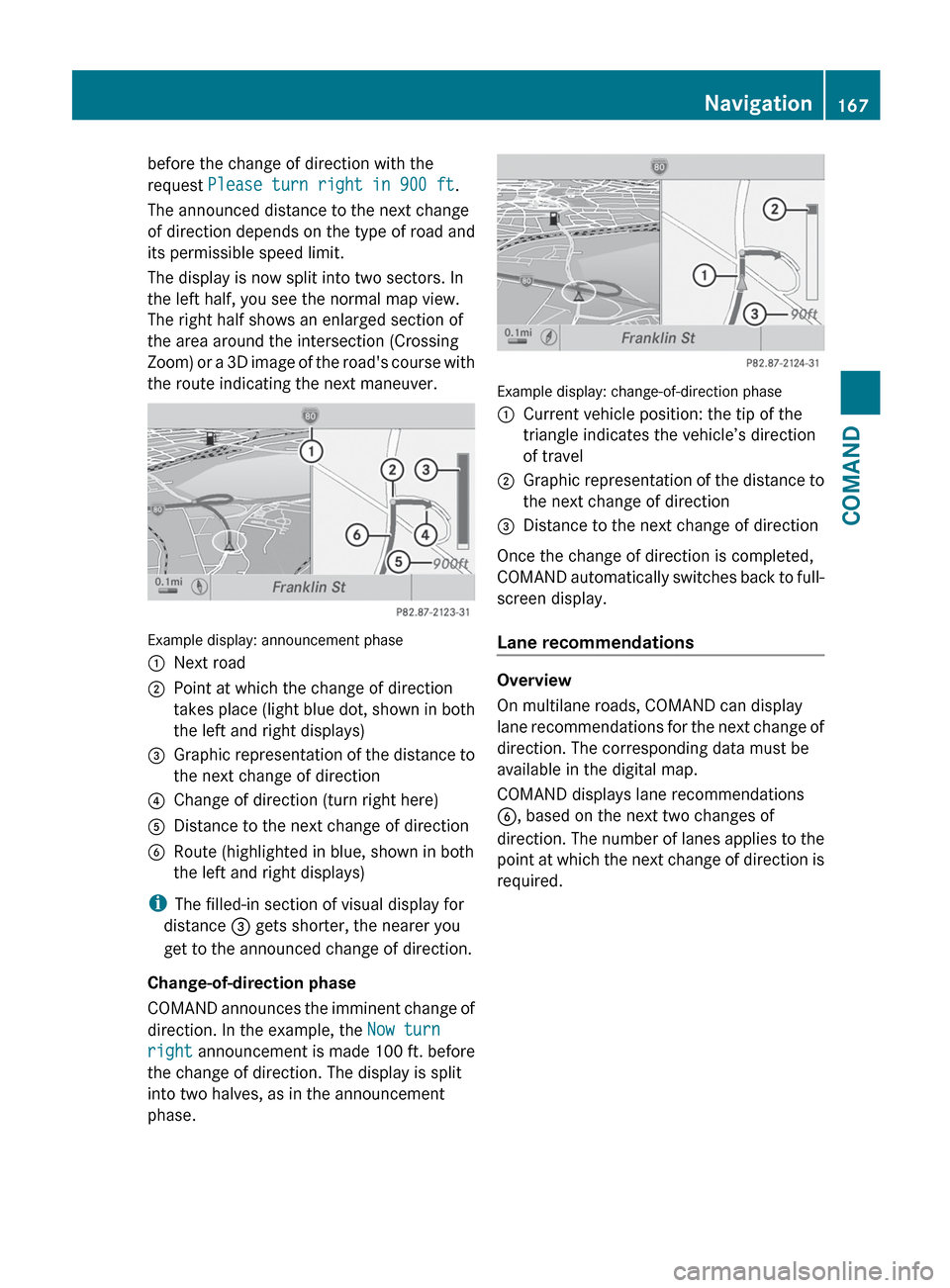
before the change of direction with the
request Please turn right in 900 ft .
The announced distance to the next change
of direction depends on the type of road and
its permissible speed limit.
The display is now split into two sectors. In
the left half, you see the normal map view.
The right half shows an enlarged section of
the area around the intersection (Crossing
Zoom) or a 3D image of the road's course with
the route indicating the next maneuver.
Example display: announcement phase
:Next road;Point at which the change of direction
takes place (light blue dot, shown in both
the left and right displays)=Graphic representation of the distance to
the next change of direction?Change of direction (turn right here)ADistance to the next change of directionBRoute (highlighted in blue, shown in both
the left and right displays)
i The filled-in section of visual display for
distance = gets shorter, the nearer you
get to the announced change of direction.
Change-of-direction phase
COMAND announces the imminent change of
direction. In the example, the Now turn
right announcement is made 100 ft. before
the change of direction. The display is split
into two halves, as in the announcement
phase.
Example display: change-of-direction phase
:Current vehicle position: the tip of the
triangle indicates the vehicle’s direction
of travel;Graphic representation of the distance to
the next change of direction=Distance to the next change of direction
Once the change of direction is completed,
COMAND automatically switches back to full-
screen display.
Lane recommendations
Overview
On multilane roads, COMAND can display
lane recommendations for the next change of
direction. The corresponding data must be
available in the digital map.
COMAND displays lane recommendations
B , based on the next two changes of
direction. The number of lanes applies to the
point at which the next change of direction is
required.
Navigation167COMANDZ
Page 315 of 536
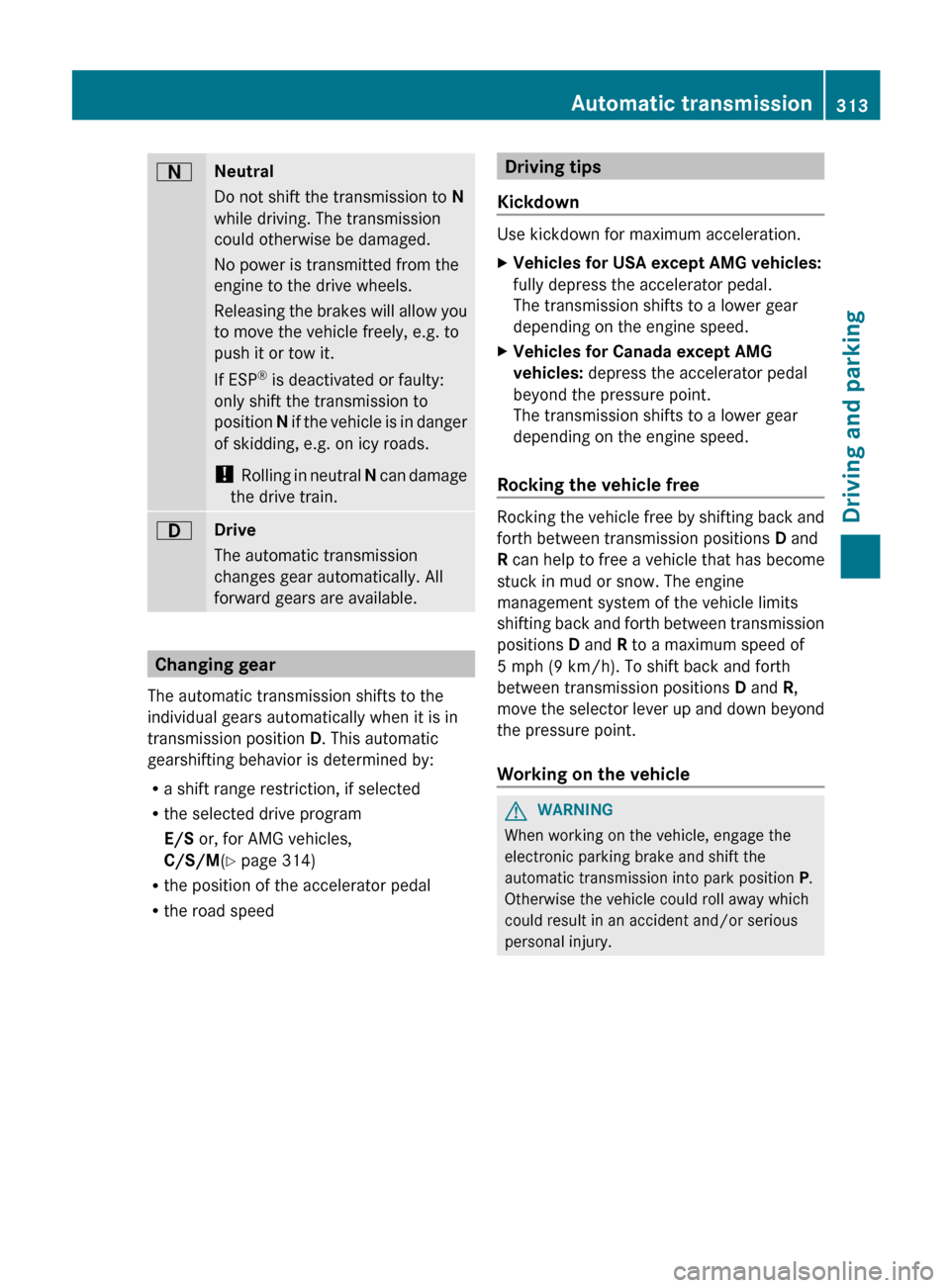
ANeutral
Do not shift the transmission to N
while driving. The transmission
could otherwise be damaged.
No power is transmitted from the
engine to the drive wheels.
Releasing the brakes will allow you
to move the vehicle freely, e.g. to
push it or tow it.
If ESP ®
is deactivated or faulty:
only shift the transmission to
position N if the vehicle is in danger
of skidding, e.g. on icy roads.
! Rolling in neutral N can damage
the drive train.7Drive
The automatic transmission
changes gear automatically. All
forward gears are available.
Changing gear
The automatic transmission shifts to the
individual gears automatically when it is in
transmission position D. This automatic
gearshifting behavior is determined by:
R a shift range restriction, if selected
R the selected drive program
E/S or, for AMG vehicles,
C/S/M (Y page 314)
R the position of the accelerator pedal
R the road speed
Driving tips
Kickdown
Use kickdown for maximum acceleration.
XVehicles for USA except AMG vehicles:
fully depress the accelerator pedal.
The transmission shifts to a lower gear
depending on the engine speed.XVehicles for Canada except AMG
vehicles: depress the accelerator pedal
beyond the pressure point.
The transmission shifts to a lower gear
depending on the engine speed.
Rocking the vehicle free
Rocking the vehicle free by shifting back and
forth between transmission positions D and
R can help to free a vehicle that has become
stuck in mud or snow. The engine
management system of the vehicle limits
shifting back and forth between transmission
positions D and R to a maximum speed of
5 mph (9 km/h). To shift back and forth
between transmission positions D and R,
move the selector lever up and down beyond
the pressure point.
Working on the vehicle
GWARNING
When working on the vehicle, engage the
electronic parking brake and shift the
automatic transmission into park position P.
Otherwise the vehicle could roll away which
could result in an accident and/or serious
personal injury.
Automatic transmission313Driving and parkingZ
Page 318 of 536

Manual drive program
Switching on the manual drive program
The manual drive program is only available for
AMG vehicles.
Manual drive program M is different from
drive program S with regard to spontaneity,
responsiveness and smoothness of gear
changes.
Manual drive program M can be selected
using the program selector button. In manual
drive program M, you can change gear
yourself using the steering wheel paddle
shifters if the transmission is in position D.
The gear currently selected and engaged is
shown in the multifunction display.
XPress the program selector button
( Y page 314) repeatedly until M appears in
the multifunction display.
Upshifting
! In manual drive program M, the automatic
transmission does not shift up
automatically even when the engine
limiting speed for the current gear is
reached. When the engine limiting speed is
reached, the fuel supply is cut to prevent
the engine from overrevving. Always make
sure that the engine speed does not reach
the red area of the tachometer. There is
otherwise a risk of engine damage.
XPull the right-hand steering wheel paddle
shifter ( Y page 314).
The automatic transmission shifts up to the
next gear.
Before the engine speed reaches the red area,
an upshift indicator appears in the
multifunction display.
:Gear indicator;Upshift indicator
Downshifting
XPull the left-hand steering wheel paddle
shifter ( Y page 314).
The automatic transmission shifts down to
the next gear.
i If you brake the vehicle or stop without
shifting down, the automatic transmission
will shift down to a gear that will allow the
vehicle to accelerate or pull away again.
i For maximum acceleration, pull the left-
hand steering wheel paddle shifter until the
transmission selects the optimum gear for
the current speed.
Kickdown
i Kickdown is not possible in manual drive
program M.
Switching off the manual drive program
XPress the program selector button
( Y page 314) repeatedly until C or S
appears in the multifunction display.316Automatic transmissionDriving and parking