2012 MERCEDES-BENZ GLK SUV engine
[x] Cancel search: enginePage 19 of 381

MP3
Operating ...................................... .233
see Separate operating instructions
Multifunction display
4-button multifunction steering
wheel ............................................. 226
Permanent display (12-button
multifunction steering wheel) ........239
Multi-function display
12-button multifunction steering
wheel ............................................. 229N
Navigation Menu (on-board computer) ............232
On-board computer (12-button
multifunction steering wheel) ........232
see separate operating instructions
NECK-PRO head restraints
Operation ........................................ .49
Resetting after being triggered ........49
NECK-PRO luxury head restraints
Operation ........................................ .49
Resetting after being triggered ........49
Notes on running in a new vehicle ..146 O
Occupant safety Children in the vehicle .....................54
Important safety notes ....................42
Odometer
4-button multifunction steering
wheel ............................................. 226
see Total distance recorder
see Trip meter
Off-road drive program .....................215
Off-road driving Checklist after driving off-road ......171
Checklist before driving off-road .... 171
General information .......................170
Important safety notes ..................170
Travelling uphill .............................. 172
Off-road lights ................................... .115
Off-road system 4MATIC .......................................... 213
DSR ............................................... 213Off-road ABS
.................................... 66
Off-road drive program ..................215
Off-road ESP ®
.................................. 69
Oil
see Engine oil
On-board computer
Light submenu ............................... 239
Operating the TV ............................ 234
On-board computer (12-button
multifunction steering wheel)
Assist menu ................................... 236
Audio menu ................................... 233
Convenience submenu ..................243
Important safety notes ..................224
Instrument cluster submenu ..........238
Lights submenu ............................. 239
Menu overview .............................. 230
Navigation menu ............................ 232
Operating ...................................... .228
Operating the video DVD ...............234
Range ............................................ 231
Service menu ................................. 238
Standard display submenu ............230
Telephone menu ............................ 234
Trip menu ...................................... 230
On-board computer (12-button
multifunction steering wheel)
Displaying service messages .........312
Display messages ..........................245
Heating submenu ........................... 242
Message memory .......................... 246
Vehicle submenu ........................... 241
On-board computer (12-button
multifunction steering wheel)Set-
tings menu ......................................... 238
On-board computer (12-button
multifunction steering wheel) sub-
menu
Factory setting ............................... 244
On-board computer (4-button mul-
tifunction steering wheel)
Important safety notes ..................224
Menu overview .............................. 226
Switching daytime driving lights
on/off ............................................ 22716
Index
Page 22 of 381

Roller sunblind
Opening/closing .............................. 93
Panorama sliding sunroo f................ 93
Roof carrier ........................................ 304
Roof lining and carpets (cleaning
instructions) ...................................... 323
Roof load (maximum) ........................372
Route (navigation) see Route guidance (navigation)
Route guidance (navigation) ............232 S
Safety Children in the vehicle .....................54
Child restraint systems ....................54
Safety net
Attaching ....................................... 302
Important safety information .........301
Safety system
see Driving safety system
Seat
Folding the backrest (rear com-
partment) forwards/back ..............299
Seat belt
Activating/deactivating seat-belt
adjustment (12-button multifunc-
tion steering wheel) .......................243
Adjusting the driver's and front-
passenger seat belt .........................51
Adjusting the height ......................... 52
Belt force limiter .............................. 53
Belt tensioner .................................. 53
Centre rear-compartment sea t........ 52
Cleaning ......................................... 323
Display message (12-button mul-
tifunction steering wheel) ..............255
Display message (4-button multi-
function steering wheel) ................249
Fastening ......................................... 51
Important safety guidelines .............50
Rear seat belt status indicator .........53
Releasing ......................................... 52
Warning lamp ................................. 284
Warning lamp (function) ................... 52 Seats
Adjusting (electrically) .....................98
Adjusting (manually and electri-
cally) ................................................ 98
Adjusting lumbar support ..............100
Adjusting the 4-way lumbar sup-
port ................................................ 100
Adjusting the head restraint ............98
Cleaning the cover .........................323
Correct driver's seat position ........... 96
Folding the rear bench seat for-
wards/back ................................... 298
Important safety notes ....................97
Seat heating problem ....................101
Seat ventilation problem ................101
Storing settings (memory func-
tion) ............................................... 106
Switching seat heating on/off .......100
Switching the seat ventilation on/
off .................................................. 101
Sensors (cleaning instructions) .......321
Service see ASSYST PLUS
Service Centre
see Qualified specialist workshop
Service menu (12-button multi-
function steering wheel) ..................238
Service products
AdBlue ®
special additive s.............. 368
Brake fluid ..................................... 371
Coolant (engine) ............................ 371
Engine oil ....................................... 369
Fuel ................................................ 365
Important safety notes ..................365
Washer fluid .................................. .372
Settings
Factory (12-button multifunction
steering wheel) .............................. 244
On-board computer (12-button
multifunction steering wheel) ........238
Setting the air distribution ...............133
Setting the airflow ............................134
Shifting to neutral (manual trans-
mission) ............................................. 154
Short journeys (diesel particle fil-
ter) ...................................................... 167
Sidebag ................................................ 47 Index
19
Page 23 of 381
Side lamps
Changing bulbs .............................. 120
Switching on/off ........................... 112
Side windows
Convenience closing ........................90
Convenience opening ......................90
Important safety notes ....................88
Opening/closing .............................. 89
Problem (malfunction) .....................91
resetting .......................................... 91
Sliding sunroof
see Panorama sliding sunroof
Snow chains ...................................... 353
Socket Centre console .............................. 308
Luggage compartment ...................308
Rear compartment .........................308
Sockets
General notes ................................ 307
Spare wheel
Storage location ............................ 328
Storing ........................................... 328
Specialist workshop ............................ 27
Speed, controlling see Cruise control
Speed Limit Assist
Activating/deactivating the warn-
ing function ................................... .236
Displaying ...................................... 236
Display message (12-button mul-
tifunction steering wheel) ..............271
Display message in the multifunc-
tion displa y.................................... 203
Important safety notes ..................202
Speedometer
Activating/deactivating the addi-
tional speedometer ........................239
Digital ............................................ 231
In the instrument cluster (12-but-
ton multifunction steering wheel) ....33
In the instrument cluster (4-but-
ton multifunction steering wheel) ....31
Segments ...................................... 228
Selecting the unit of measure-
ment .............................................. 238
see Instrument cluster SPEEDTRONIC
Deactivating variable .....................177
Display message (12-button mul-
tifunction steering wheel) ..............275
Display message (4-button multi-
function steering wheel) ................270
Function/notes ............................. 176
Important safety notes ..................176
LIM indicator lamp .........................176
Permanent ..................................... 178
Selecting ........................................ 176
Variabl e......................................... 176
SRS (Supplemental Restraint Sys-
tem)
Display message (12-button mul-
tifunction steering wheel) ..............256
Display message (4-button multi-
function steering wheel) ................250
Introduction ..................................... 43
Warning lamp ................................. 291
Warning lamp (function) ................... 43
Starting (engine) ................................ 148
Steering Display message (12-button mul-
tifunction steering wheel) ..............281
Display message (4-button multi-
function steering wheel) ................279
Steering wheel
Adjusting (electrically) ...................102
Adjusting (manually). .....................102
Buttons (12-button multifunction
steering wheel) .............................. 228
Buttons (4-button multifunction
steering wheel) .............................. 225
Cleaning ......................................... 322
Gearshift paddles ........................... 159
Important safety notes ..................101
Storing settings (memory func-
tion) ............................................... 106
Steering wheel gearshift paddles ....159
Stowage areas ................................... 296
Stowage compartments Armrest (under) ............................. 297
Centre console .............................. 297
Cup holder ..................................... 305
Glove compartment .......................297
Important safety information .........296 20
Index
Page 25 of 381

Towing
Important safety notes ..................342
With the rear axle raised ................344
Towing a trailer
Active Blind Spot Assist .................210
Active Lane Keeping Assist .... 207, 213
Active Parking Assist .....................196
Lights display message (12-but-
ton multifunction steering wheel) ..260
Lights display message (4-button
multifunction steering wheel) ........257
Towing away
Fitting the towing eye ....................343
Removing the towing eye ...............344
With both axles on the ground .......344
Tow-starting
Emergency engine starting ............345
Fitting the towing eye ....................343
Important safety notes ..................342
Removing the towing eye ...............344
Trailer coupling
see Towing a trailer
Trailer towing
7-pin connector ............................. 221
Blind Spot Assist ............................ 205
Cleaning the trailer tow hitch ......... 321
Coupling up a trailer ......................220
Decoupling a trailer .......................220
Driving tips .................................... 215
ESP ®
................................................ 69
Fitting the ball coupling .................217
Important safety notes ..................215
Mounting dimensions ....................373
Parktroni c...................................... 191
Power supply ................................. 221
Removing the ball coupling ............220
Shift range ..................................... 158
Storing the ball coupling ................220
Trailer loads ................................... 374
Transmission
see Automatic transmission
see Manual transmission
Transmission position display .........156
Transmission position display
(DIRECT SELECT lever) ......................156
Transporting the vehicle ..................345Travelling uphill
Brow of hill ..................................... 173
Driving downhill ............................. 173
Maximum gradient-climbing capa-
bility .............................................. .173
Trim pieces (cleaning instructions) .323
Trip computer On-board computer (12-button
multifunction steering wheel) ........230
On-board computer (4-button
multifunction steering wheel) ........226
Trip meter
Displaying/resetting (4-button
multifunction steering wheel) ........226
Displaying (12-button multifunc-
tion steering wheel) .......................230
Resetting (12-button multifunc-
tion steering wheel) .......................232
Turn signal
Display message (12-button mul-
tifunction steering wheel) ..............261
Display message (4-button multi-
function steering wheel) ................258
see Turn signals
Turn signals
Changing bulbs (front) ...................120
Changing bulbs (rear) ....................121
Switching on/off ........................... 113
TV
Operating (on-board computer) .....234
see Separate operating instructions
Two-way radio
Frequencies ................................... 363
Installation ..................................... 363
Transmission output (maximum) .... 363
Type identification plate
see Vehicle identification plate
Tyre pressure
Display message (12-button mul-
tifunction steering wheel) ..............277
Display message (4-button multi-
function steering wheel) ................276
Not reached (TIREFIT) ....................331
Pressure loss warning ....................355
Reached (TIREFIT) ..........................331
Recommended ............................... 353
Tyres
Checking ........................................ 351 22
Index
Page 28 of 381
Protection of the environment
General notes
H
Environmental note
Daimler's declared policy is one of compre-
hensive environmental protection.
The objectives are for the natural resources
which form the basis of our existence on this
planet to be used sparingly and in a manner
which takes the requirements of both nature
and humanity into account.
You too can help to protect the environment
by operating your vehicle in an environmen-
tally-responsible manner.
Fuel consumption and the rate of engine,
transmission, brake and tyre wear depend on
the following factors:
R operating conditions of your vehicle
R your personal driving style
You can influence both factors. You should
bear the following in mind:
Operating conditions:
R avoid short trips as these increase fuel con-
sumption.
R make sure that the tyre pressures are
always correct.
R do not carry any unnecessary weight.
R keep an eye on the vehicle's fuel consump-
tion.
R remove roof racks once you no longer need
them.
R a regularly serviced vehicle will contribute
to environmental protection. You should
therefore adhere to the service intervals.
R always have service work carried out at a
qualified specialist workshop.
Personal driving style:
R do not depress the accelerator pedal when
starting the engine.
R do not warm up the engine with the vehicle
stationary.
R drive carefully and maintain a safe distance
from the vehicle in front. R
avoid frequent, sudden acceleration.
R change gear in good time and use each gear
only up to Ôof its maximum engine speed.
R switch off the engine in stationary traffic. Returning an end-of-life vehicle
Mercedes-Benz will take back your
Mercedes-Benz to dispose of it in an environ-
mentally responsible manner, in accordance
the European Union (EU) End of Life Vehicles
Directive.
The End of Life Vehicles Directive applies to
vehicles with a gross vehicle weight of up to
3.5 t, in accordance with national regulations.
For several years, Mercedes-Benz has been
meeting all the legal requirements for a
design which allows for recycling and re-use.
There is a network of return points and dis-
assembly plants which can recycle your vehi-
cle in an environmentally-responsible man-
ner. The methods employed in vehicle and
parts recycling are constantly being devel-
oped and improved. This means that your
Mercedes-Benz will also continue to meet
even the increased recycling quotas in the
future in good time. You can obtain further
information from your national Mercedes-
Benz homepage or your national hotline num-
ber. Vehicle equipment
This Owner's Manual describes all models
and all standard and optional equipment
available for your vehicle at the time of pub-
lication of the Owner's Manual. Country-spe-
cific deviations are possible. Note that your
vehicle may not be fitted with all features
described. This is also the case for systems
and functions relevant to safety. Therefore,
the equipment on your vehicle may differ from
that in the descriptions and illustrations. Introduction
25 Z
Page 29 of 381

The original purchase contract documenta-
tion for your vehicle contains a list of all of the
systems in your vehicle.
Contact a Mercedes-Benz Service Centre if
you have any questions about equipment or
operation.
The Owner's Manual and the Service Booklet
are important documents and should be kept
in the vehicle. Operating safety
Important safety notes
G
WARNING
All work on the vehicle and, in particular, work
relevant to safety or on safety-related sys-
tems must be carried out at a qualified spe-
cialist workshop. G
WARNING
Some safety systems only function when the
engine is running. You should therefore never
switch off the engine when driving. Otherwise,
the safety systems of your vehicle may not
function correctly and as a result will no lon-
ger protect you and other persons as inten-
ded. In addition, there is a risk that you may
lose control of your vehicle and thus cause an
accident. G
WARNING
Work carried out incorrectly, or alterations
made to the vehicle, e.g. re-routing of cables
under coverings, could cause the safety sys-
tems of your vehicle to stop working properly.
The safety systems would thus no longer pro-
tect you and other persons as intended. In
addition, there is a risk that you may lose con-
trol of your vehicle and thus cause an acci-
dent.
All work and alterations to the vehicle, e.g.
installations or modifications, should there-
fore be carried out at a qualified specialist
workshop. G
WARNING
If work on electronic equipment and its soft-
ware is carried out incorrectly, this equipment
could stop working. The electronic systems
are networked via interfaces. Tampering with
these electronic systems could cause mal-
functions in systems which have not been
modified. Malfunctions such as these can
seriously jeopardise the vehicle's operating
safety and therefore your own safety.
You should therefore have all work and mod-
ifications to electronic components carried
out at a qualified specialist workshop. Declarations of conformity
Wireless vehicle components The following information applies to all com-
ponents of the vehicle and the COMAND sys-
tem which receive and/or transmit radio
waves:
The components of this vehicle which receive
and/or transmit radio waves are compliant
with the basic requirements and other rele-
vant provisions of Directive 1999/5/EC. You
can obtain further information from any
Mercedes-Benz Service Centre.
Electromagnetic compatibility
The electromagnetic compatibility of the vehi-
cle components has been checked and certi-
fied according to the currently valid version
of Directive 72/245/EEC or the equivalent
ECE Regulation ECE-R 10.
Diagnostics connection
G
WARNING
If you connect equipment to a diagnostics
connection, it can affect the operation of the
vehicle systems. This could compromise the
operating safety of your vehicle while driving.
There is a risk of an accident. 26
Introduction
Page 30 of 381

Do not connect any equipment to a diagnos-
tics connection. G
WARNING
Loose equipment or cables hanging from a
device which are connected to a diagnostic
connection could impede pedal clearance.
The equipment or cables could get caught
between the pedals when driving and braking
suddenly. This could impair the function of the
pedals. There is a risk of accident.
Do not attach any equipment or cables in the
driver's footwell.
! If the engine is switched off and equip-
ment on the diagnostics connection is
used, the starter battery may discharge.
The diagnostics connection is only intended
for the connection of diagnostic equipment at
a qualified specialist workshop.
Connecting equipment to the diagnostics
connection can lead to emissions monitoring
information being reset, for example. This
may lead to the vehicle failing to meet the
requirements of the next emissions test dur-
ing the main inspection. Qualified specialist workshop
A qualified specialist workshop has the nec-
essary special skills, tools and qualifications
to correctly carry out any necessary work on
your vehicle. This particularly applies to work
relevant to safety.
Observe the notes in the Service Booklet.
Always have the following work carried out at
a qualified specialist workshop:
R work relevant to safety
R service and maintenance work
R repair work
R modifications, installations and conver-
sions
R work on electronic components
Mercedes-Benz recommends that you use a
Mercedes-Benz Service Centre. Vehicle registration
Mercedes-Benz may ask its Service Centres
to carry out technical inspections on certain
vehicles. The quality or safety of the vehicle
is improved as a result of the inspection.
Mercedes-Benz can only inform you about
vehicle checks if it has your registration data.
It is possible that your vehicle has not yet
been registered in your name in the following
cases:
R if your vehicle was not purchased at an
authorised specialist dealer.
R if your vehicle has not yet been examined
at a Mercedes-Benz Service Centre.
It is advisable to register your vehicle with a
Mercedes-Benz Service Centre.
Inform Mercedes-Benz as soon as possible
about any change in address or vehicle own-
ership. Correct use
G
WARNING
Various warning stickers are affixed to your
vehicle. Their purpose is to draw your atten-
tion, and the attention of others, to various
dangers. Therefore, do not remove any warn-
ing stickers unless the sticker clearly states
that you may do so.
If you remove the warning stickers, you or
others could be injured by failing to recognise
certain dangers.
Observe the following information when driv-
ing your vehicle:
R the safety notes in this manual
R the "Technical data" section in this manual
R traffic rules and regulations
R laws and safety standards pertaining to
motor vehicles Introduction
27 Z
Page 35 of 381
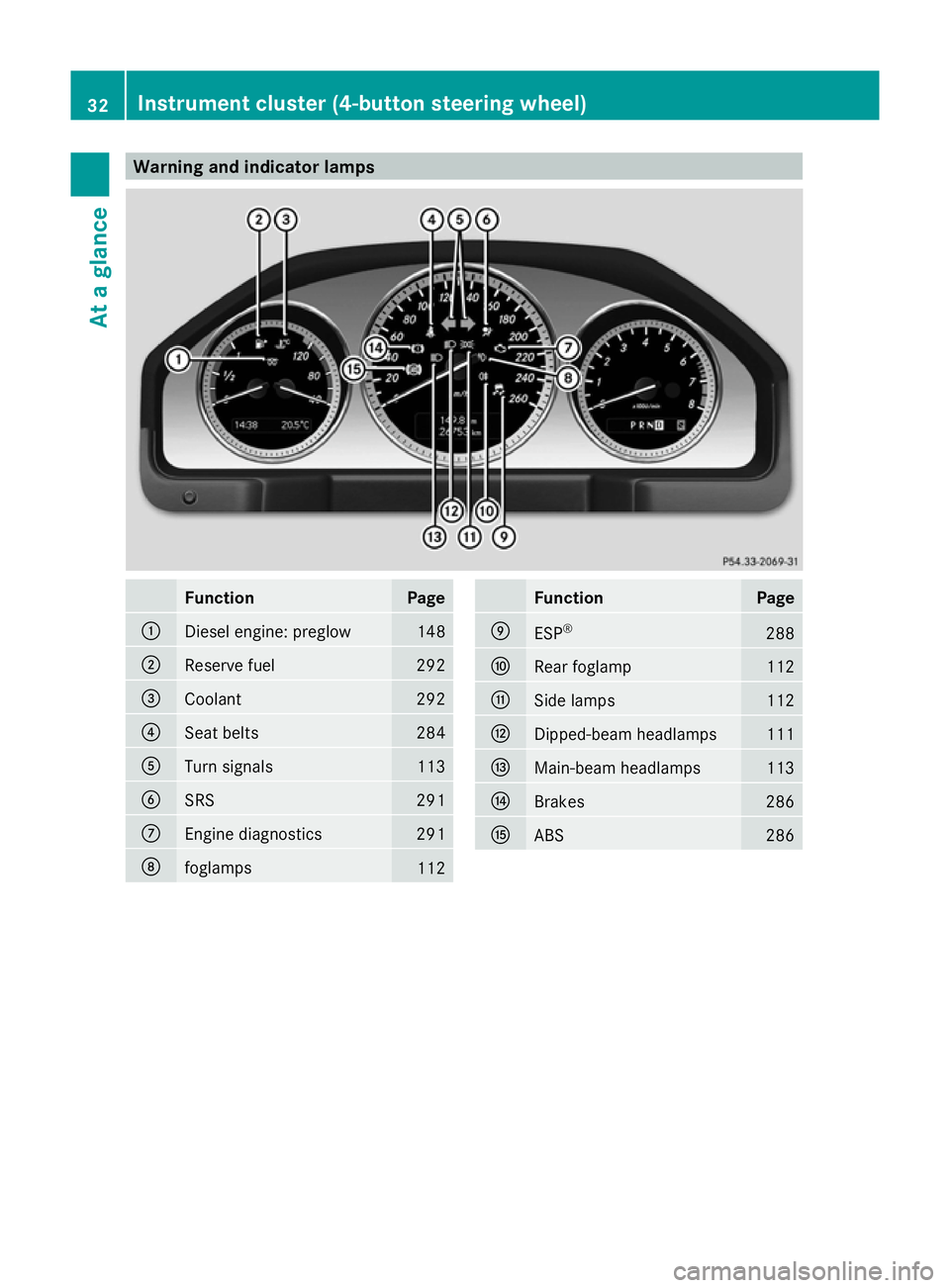
Warning and indicator lamps
Function Page
:
Diesel engine: preglow 148
;
Reserve fuel 292
=
Coolant 292
?
Seat belts 284
A
Turn signals 113
B
SRS 291
C
Engine diagnostics 291
D
foglamps
112 Function Page
E
ESP
® 288
F
Rear foglamp 112
G
Side lamps 112
H
Dipped-beam headlamps 111
I
Main-beam headlamps 113
J
Brakes 286
K
ABS 28632
Instrument cluster (4-button steering wheel)At a glance