2012 MERCEDES-BENZ GLK SUV check oil
[x] Cancel search: check oilPage 14 of 381

E
EASY-ENTRY feature Activating/deactivating (12-but-
ton multifunction steering wheel) ..243
Function/notes ............................. 102
EASY-EXIT feature
Activating/deactivating (12-but-
ton multifunction steering wheel) ..243
Crash-responsive ........................... 103
Function/notes ............................. 102
EBD (electronic brake force distri-
bution)
Display message (12 button mul-
tifunction steering wheel) ..............253
Function/notes ................................ 69
EBD (Electronic Brake-force Distri-
bution)
Display message (4-button multi-
function steering wheel) ................248
ECO display
Function/notes ............................. 166
On-board computer (12-button
multifunction steering wheel) ........231
ECO start/stop function
Deactivating/activating .................150
General information .......................150
Electrical fuses
see Fuses
Electronic Stability Program
see ESP ®
(Electronic Stability Program)
Electronic Traction System
see ETS/4ETS (Electronic Trac-
tion System)
Emergency key
Unlocking the driver's door ..............84
Emergency key element
Function/notes ................................ 78
Locking vehicle ................................ 84
Emergency release
Driver's door .................................... 84
Emergency spare wheel
Inflating the collapsible spare
wheel ............................................. 336
Notes/data .................................... 359
Storage location ............................ 328
Stowing .......................................... 328 Emergency unlocking
Tailgate ............................................ 88
Vehicle ............................................. 84
Engine
ECO start/stop function ................150
Engine number ............................... 365
Jump-starting ................................. 341
Running irregularl y......................... 153
Starting problems ..........................153
Starting the engine with the key ....148
Starting with KEYLESS GO .............149
Stopping ........................................ 164
Tow-starting (vehicle) ..................... 345
Warning lamp (engine diagnos-
tics) ............................................... 291
Engine electronics
Notes ............................................. 363
Problem (fault) ............................... 153
Engine oil
Additives ........................................ 370
Checking the oil level ..................... 315
Checking the oil level using the
dipstick .......................................... 315
Display message (12-button mul-
tifunction steering wheel) ..............268
Display message (4-button multi-
function steering wheel) ................265
Filling capacity ............................... 370
Notes about oil grades ................... 369
Notes on oil level/consumption ....315
Topping up ..................................... 316
Viscosity ........................................ 370
Environmental protection
Returning an end-of-life vehicle .......25
ESP ®
(Electronic Stability Pro-
gram) Deactivating/activating ...................68
Display message (12-button mul-
tifunction steering wheel) ..............252
Display message (4-button multi-
function steering wheel) ................247
ETS/4ETS ........................................ 68
Function/notes ................................ 67
Important safety guidelines .............67
Trailer stabilisatio n.......................... 69
Warning lamp ................................. 288
ETS/4ETS (Electronic Traction Sys-
tem) ...................................................... 68 Index
11
Page 19 of 381

MP3
Operating ...................................... .233
see Separate operating instructions
Multifunction display
4-button multifunction steering
wheel ............................................. 226
Permanent display (12-button
multifunction steering wheel) ........239
Multi-function display
12-button multifunction steering
wheel ............................................. 229N
Navigation Menu (on-board computer) ............232
On-board computer (12-button
multifunction steering wheel) ........232
see separate operating instructions
NECK-PRO head restraints
Operation ........................................ .49
Resetting after being triggered ........49
NECK-PRO luxury head restraints
Operation ........................................ .49
Resetting after being triggered ........49
Notes on running in a new vehicle ..146 O
Occupant safety Children in the vehicle .....................54
Important safety notes ....................42
Odometer
4-button multifunction steering
wheel ............................................. 226
see Total distance recorder
see Trip meter
Off-road drive program .....................215
Off-road driving Checklist after driving off-road ......171
Checklist before driving off-road .... 171
General information .......................170
Important safety notes ..................170
Travelling uphill .............................. 172
Off-road lights ................................... .115
Off-road system 4MATIC .......................................... 213
DSR ............................................... 213Off-road ABS
.................................... 66
Off-road drive program ..................215
Off-road ESP ®
.................................. 69
Oil
see Engine oil
On-board computer
Light submenu ............................... 239
Operating the TV ............................ 234
On-board computer (12-button
multifunction steering wheel)
Assist menu ................................... 236
Audio menu ................................... 233
Convenience submenu ..................243
Important safety notes ..................224
Instrument cluster submenu ..........238
Lights submenu ............................. 239
Menu overview .............................. 230
Navigation menu ............................ 232
Operating ...................................... .228
Operating the video DVD ...............234
Range ............................................ 231
Service menu ................................. 238
Standard display submenu ............230
Telephone menu ............................ 234
Trip menu ...................................... 230
On-board computer (12-button
multifunction steering wheel)
Displaying service messages .........312
Display messages ..........................245
Heating submenu ........................... 242
Message memory .......................... 246
Vehicle submenu ........................... 241
On-board computer (12-button
multifunction steering wheel)Set-
tings menu ......................................... 238
On-board computer (12-button
multifunction steering wheel) sub-
menu
Factory setting ............................... 244
On-board computer (4-button mul-
tifunction steering wheel)
Important safety notes ..................224
Menu overview .............................. 226
Switching daytime driving lights
on/off ............................................ 22716
Index
Page 164 of 381
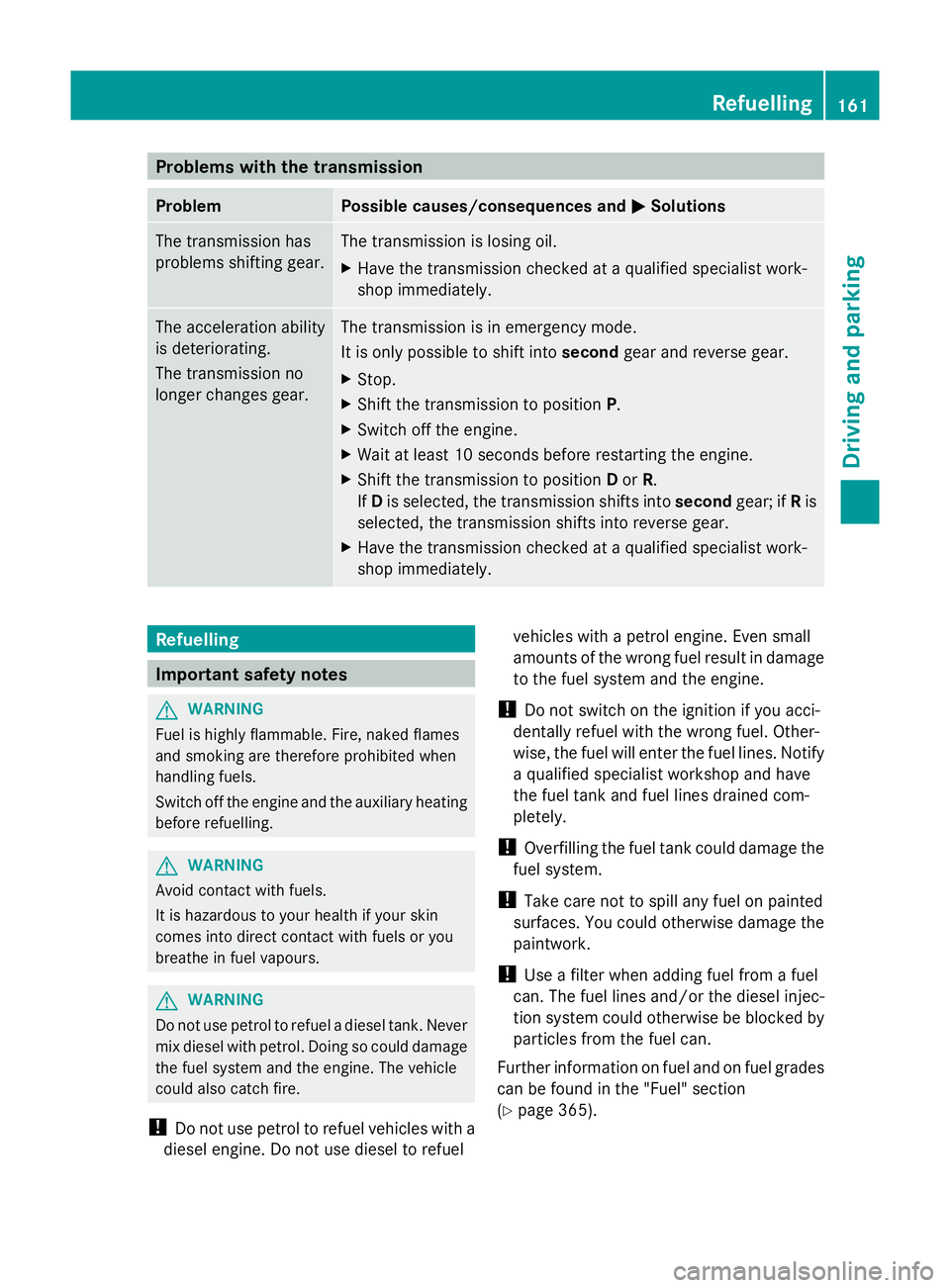
Problems with the transmission
Problem Possible causes/consequences and
M
MSolutions The transmission has
problems shifting gear. The transmission is losing oil.
X
Have the transmission checked at a qualified specialist work-
shop immediately. The acceleration ability
is deteriorating.
The transmission no
longer changes gear. The transmission is in emergency mode.
It is only possible to shift into
secondgear and reverse gear.
X Stop.
X Shift the transmission to position P.
X Switch off the engine.
X Wait at least 10 seconds before restarting the engine.
X Shift the transmission to position Dor R.
If D is selected, the transmission shifts into secondgear; ifRis
selected, the transmission shifts into reverse gear.
X Have the transmission checked at a qualified specialist work-
shop immediately. Refuelling
Important safety notes
G
WARNING
Fuel is highly flammable. Fire, naked flames
and smoking are therefore prohibited when
handling fuels.
Switch off the engine and the auxiliary heating
before refuelling. G
WARNING
Avoid contact with fuels.
It is hazardous to your health if your skin
comes into direct contact with fuels or you
breathe in fuel vapours. G
WARNING
Do not use petrol to refuel a diesel tank. Never
mix diesel with petrol. Doing so could damage
the fuel system and the engine. The vehicle
could also catch fire.
! Do not use petrol to refuel vehicles with a
diesel engine. Do not use diesel to refuel vehicles with a petrol engine. Even small
amounts of the wrong fuel result in damage
to the fuel system and the engine.
! Do not switch on the ignition if you acci-
dentally refuel with the wrong fuel. Other-
wise, the fuel will enter the fuel lines. Notify
a qualified specialist workshop and have
the fuel tank and fuel lines drained com-
pletely.
! Overfilling the fuel tank could damage the
fuel system.
! Take care not to spill any fuel on painted
surfaces. You could otherwise damage the
paintwork.
! Use a filter when adding fuel from a fuel
can. The fuel lines and/or the diesel injec-
tion system could otherwise be blocked by
particles from the fuel can.
Further information on fuel and on fuel grades
can be found in the "Fuel" section
(Y page 365). Refuelling
161Driving and parking Z
Page 173 of 381
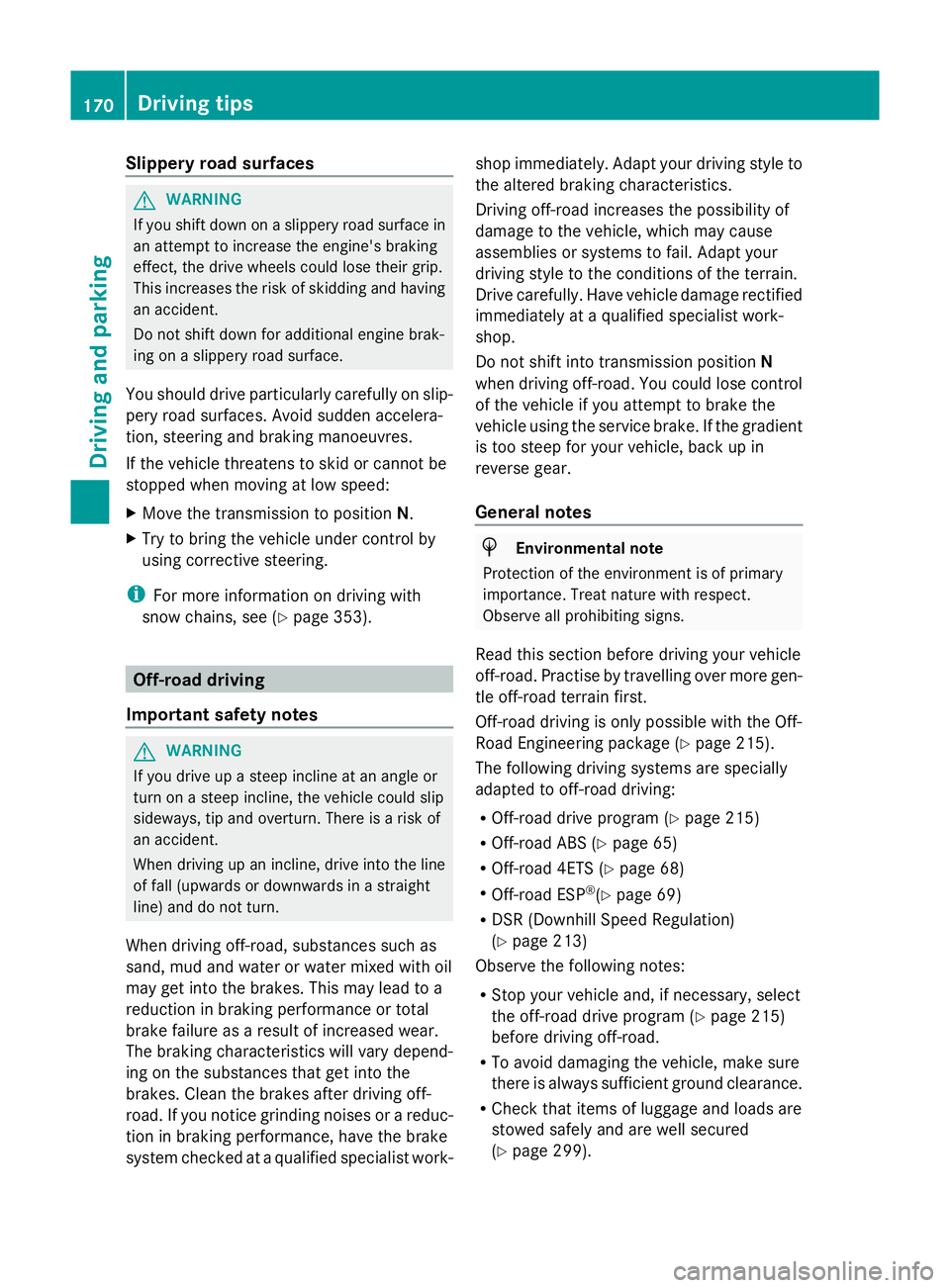
Slippery road surfaces
G
WARNING
If you shift down on a slippery road surface in
an attempt to increase the engine's braking
effect, the drive wheels could lose their grip.
This increases the risk of skidding and having
an accident.
Do not shift down for additional engine brak-
ing on a slippery road surface.
You should drive particularly carefully on slip-
pery road surfaces. Avoid sudden accelera-
tion, steering and braking manoeuvres.
If the vehicle threatens to skid or cannot be
stopped when moving at low speed:
X Move the transmission to position N.
X Try to bring the vehicle under control by
using corrective steering.
i For more information on driving with
snow chains, see (Y page 353).Off-road driving
Important safety notes G
WARNING
If you drive up a steep incline at an angle or
turn on a steep incline, the vehicle could slip
sideways, tip and overturn. There is a risk of
an accident.
When driving up an incline, drive into the line
of fall (upwards or downwards in a straight
line) and do not turn.
When driving off-road, substances such as
sand, mud and water or water mixed with oil
may get into the brakes. This may lead to a
reduction in braking performance or total
brake failure as a result of increased wear.
The braking characteristics will vary depend-
ing on the substances that get into the
brakes. Clean the brakes after driving off-
road. If you notice grinding noises or a reduc-
tion in braking performance, have the brake
system checked at a qualified specialist work- shop immediately. Adapt your driving style to
the altered braking characteristics.
Driving off-road increases the possibility of
damage to the vehicle, which may cause
assemblies or systems to fail. Adapt your
driving style to the conditions of the terrain.
Drive carefully. Have vehicle damage rectified
immediately at a qualified specialist work-
shop.
Do not shift into transmission position
N
when driving off-road. You could lose control
of the vehicle if you attempt to brake the
vehicle using the service brake. If the gradient
is too steep for your vehicle, back up in
reverse gear.
General notes H
Environmental note
Protection of the environment is of primary
importance. Treat nature with respect.
Observe all prohibiting signs.
Read this section before driving your vehicle
off-road. Practise by travelling over more gen-
tle off-road terrain first.
Off-road driving is only possible with the Off-
Road Engineering package (Y page 215).
The following driving systems are specially
adapted to off-road driving:
R Off-road drive program (Y page 215)
R Off-road ABS (Y page 65)
R Off-road 4ETS (Y page 68)
R Off-road ESP ®
(Y page 69)
R DSR (Downhill Speed Regulation)
(Y page 213)
Observe the following notes:
R Stop your vehicle and, if necessary, select
the off-road drive program (Y page 215)
before driving off-road.
R To avoid damaging the vehicle, make sure
there is always sufficient ground clearance.
R Check that items of luggage and loads are
stowed safely and are well secured
(Y page 299). 170
Driving tipsDriving and parking
Page 174 of 381
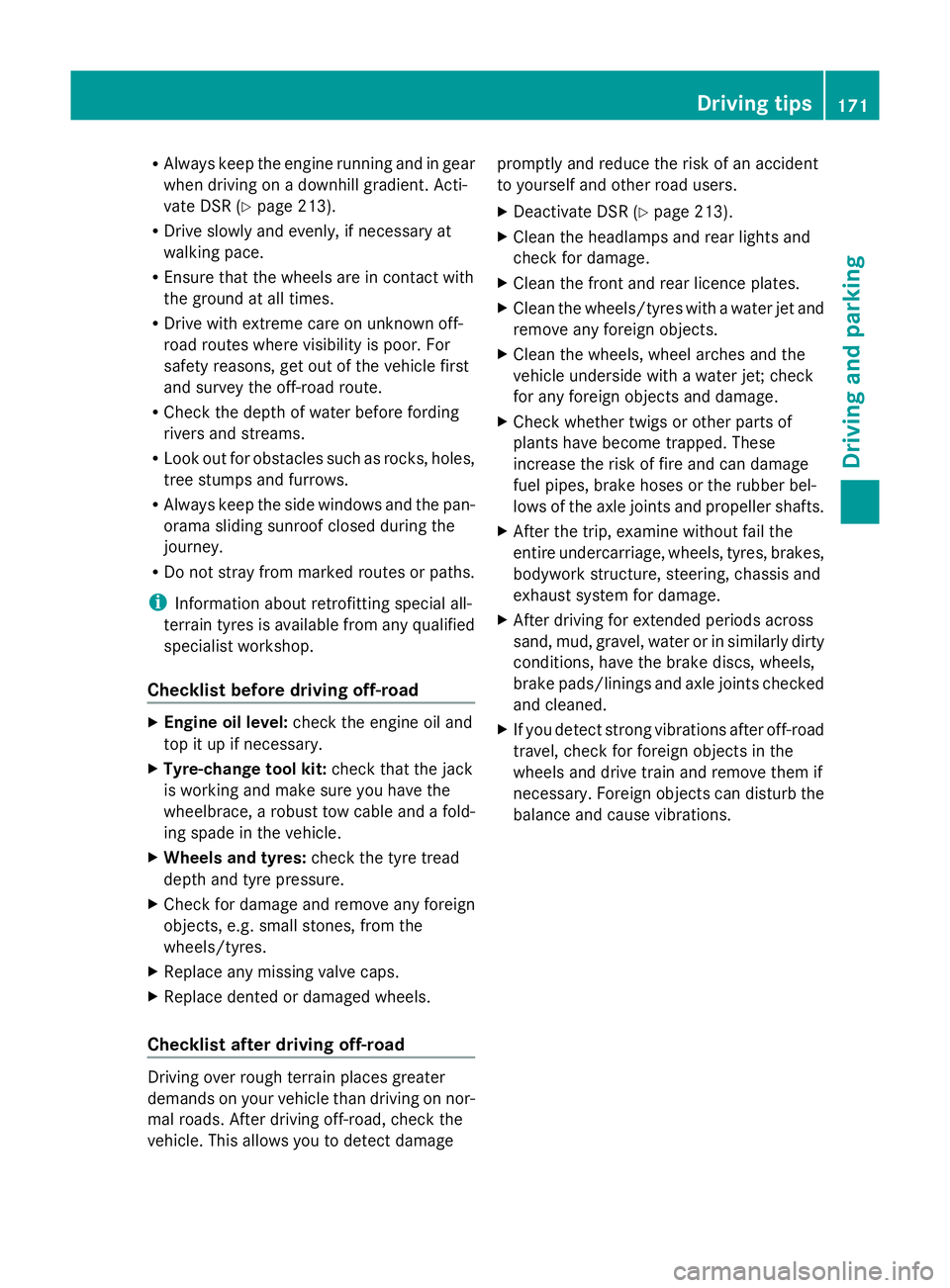
R
Always keep the engine running and in gear
when driving on a downhill gradient. Acti-
vate DSR (Y page 213).
R Drive slowly and evenly, if necessary at
walking pace.
R Ensure that the wheels are in contact with
the ground at all times.
R Drive with extreme care on unknown off-
road routes where visibility is poor. For
safety reasons, get out of the vehicle first
and survey the off-road route.
R Check the depth of water before fording
rivers and streams.
R Look out for obstacles such as rocks, holes,
tree stumps and furrows.
R Always keep the side windows and the pan-
orama sliding sunroof closed during the
journey.
R Do not stray from marked routes or paths.
i Information about retrofitting special all-
terrain tyres is available from any qualified
specialist workshop.
Checklist before driving off-road X
Engine oil level: check the engine oil and
top it up if necessary.
X Tyre-change tool kit: check that the jack
is working and make sure you have the
wheelbrace, a robust tow cable and a fold-
ing spade in the vehicle.
X Wheels and tyres: check the tyre tread
depth and tyre pressure.
X Check for damage and remove any foreign
objects, e.g. small stones, from the
wheels/tyres.
X Replace any missing valve caps.
X Replace dented or damaged wheels.
Checklist after driving off-road Driving over rough terrain places greater
demands on your vehicle than driving on nor-
mal roads. After driving off-road, check the
vehicle. This allows you to detect damage promptly and reduce the risk of an accident
to yourself and other road users.
X Deactivate DSR ( Ypage 213).
X Clean the headlamps and rear lights and
check for damage.
X Clean the front and rear licence plates.
X Clean the wheels/tyres with a water jet and
remove any foreign objects.
X Clean the wheels, wheel arches and the
vehicle underside with a water jet; check
for any foreign objects and damage.
X Check whether twigs or other parts of
plants have become trapped. These
increase the risk of fire and can damage
fuel pipes, brake hoses or the rubber bel-
lows of the axle joints and propeller shafts.
X After the trip, examine without fail the
entire undercarriage, wheels, tyres, brakes,
bodywork structure, steering, chassis and
exhaust system for damage.
X After driving for extended periods across
sand, mud, gravel, water or in similarly dirty
conditions, have the brake discs, wheels,
brake pads/linings and axle joints checked
and cleaned.
X If you detect strong vibrations after off-road
travel, check for foreign objects in the
wheels and drive train and remove them if
necessary. Foreign objects can disturb the
balance and cause vibrations. Driving tips
171Driving and parking Z
Page 268 of 381
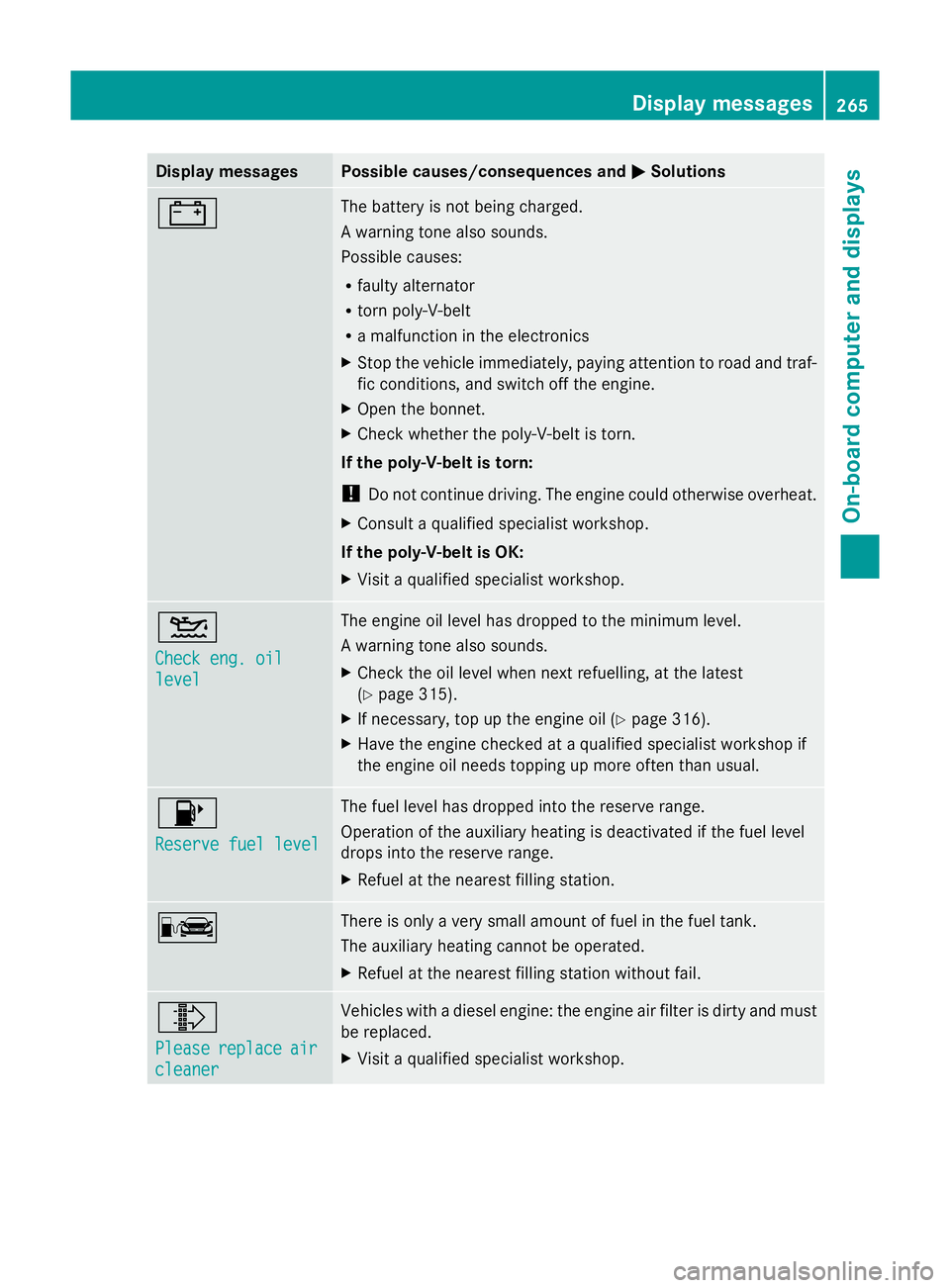
Display messages Possible causes/consequences and
M
MSolutions # The battery is not being charged.
A warning tone also sounds.
Possible causes:
R
faulty alternator
R torn poly-V-belt
R a malfunction in the electronics
X Stop the vehicle immediately, paying attention to road and traf-
fic conditions, and switch off the engine.
X Open the bonnet.
X Check whether the poly-V-belt is torn.
If the poly-V-belt is torn:
! Do not continue driving. The engine could otherwise overheat.
X Consult a qualified specialist workshop.
If the poly-V-belt is OK:
X Visit a qualified specialist workshop. 4
Check eng. oil Check eng. oil
level level The engine oil level has dropped to the minimum level.
A warning tone also sounds.
X
Check the oil level when next refuelling, at the latest
(Y page 315).
X If necessary, top up the engine oil (Y page 316).
X Have the engine checked at a qualified specialist workshop if
the engine oil needs topping up more often than usual. 8
Reserve fuel level Reserve fuel level The fuel level has dropped into the reserve range.
Operation of the auxiliary heating is deactivated if the fuel level
drops into the reserve range.
X
Refuel at the nearest filling station. C There is only a very small amount of fuel in the fuel tank.
The auxiliary heating cannot be operated.
X
Refuel at the nearest filling station without fail. ¸
Please Please
replace
replace air
air
cleaner
cleaner Vehicles with a diesel engine: the engine air filter is dirty and must
be replaced.
X
Visit a qualified specialist workshop. Display
messages
265On-board computer and displays Z
Page 271 of 381
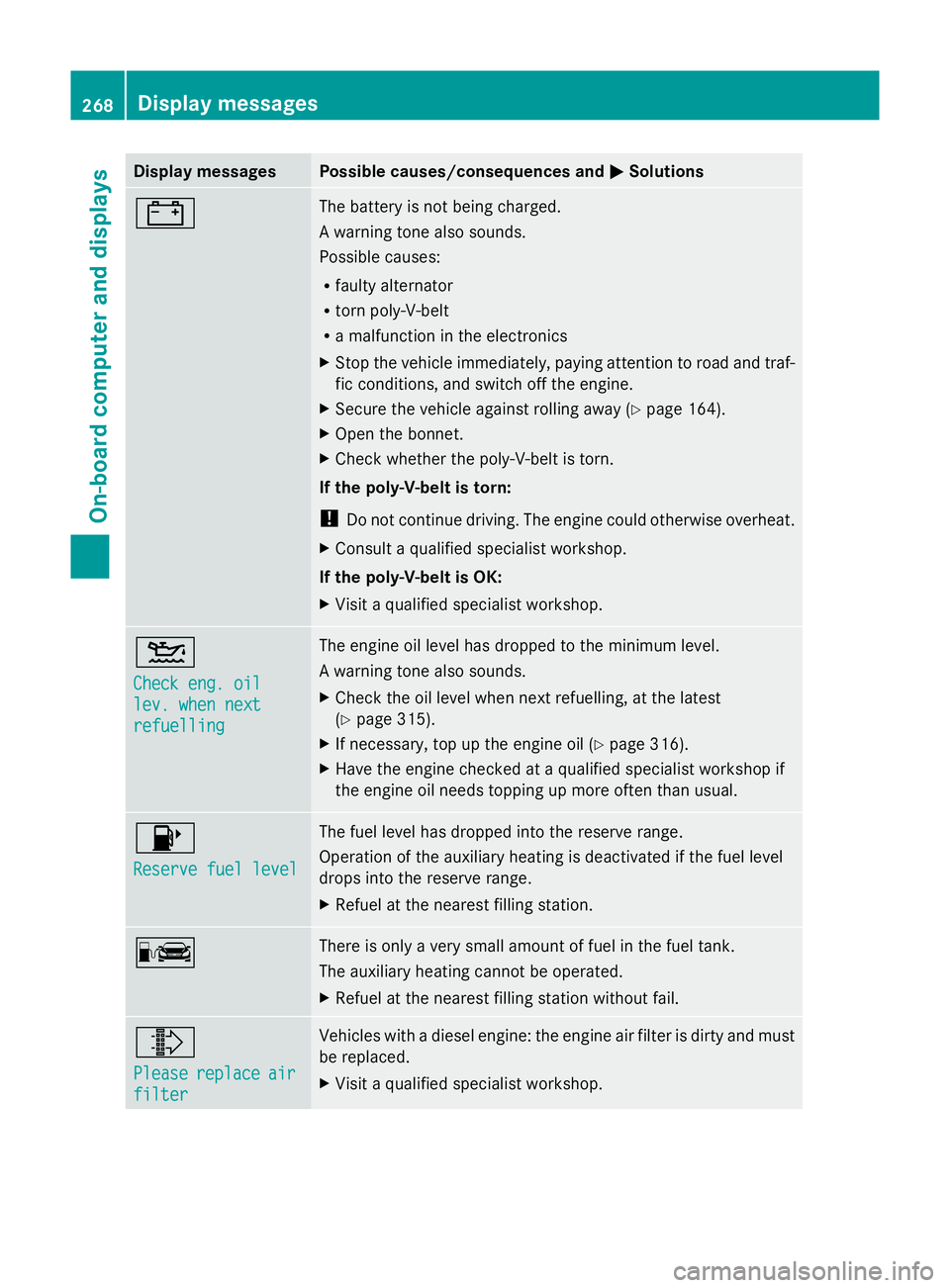
Display messages Possible causes/consequences and
M
MSolutions # The battery is not being charged.
A warning tone also sounds.
Possible causes:
R
faulty alternator
R torn poly-V-belt
R a malfunction in the electronics
X Stop the vehicle immediately, paying attention to road and traf-
fic conditions, and switch off the engine.
X Secure the vehicle against rolling away ( Ypage 164).
X Open the bonnet.
X Check whether the poly-V-belt is torn.
If the poly-V-belt is torn:
! Do not continue driving. The engine could otherwise overheat.
X Consult a qualified specialist workshop.
If the poly-V-belt is OK:
X Visit a qualified specialist workshop. 4
Check eng. oil Check eng. oil
lev. when next lev. when next
refuelling refuelling The engine oil level has dropped to the minimum level.
A warning tone also sounds.
X
Check the oil level when next refuelling, at the latest
(Y page 315).
X If necessary, top up the engine oil (Y page 316).
X Have the engine checked at a qualified specialist workshop if
the engine oil needs topping up more often than usual. 8
Reserve fuel level Reserve fuel level The fuel level has dropped into the reserve range.
Operation of the auxiliary heating is deactivated if the fuel level
drops into the reserve range.
X
Refuel at the nearest filling station. C There is only a very small amount of fuel in the fuel tank.
The auxiliary heating cannot be operated.
X
Refuel at the nearest filling station without fail. ¸
Please Please
replace
replace air
air
filter
filter Vehicles with a diesel engine: the engine air filter is dirty and must
be replaced.
X
Visit a qualified specialist workshop. 268
Display
messagesOn-board computer and displays
Page 316 of 381
Have service work carried out as described
in the Service Booklet. This may otherwise
lead to increased wear and damage to the
major assemblies or the vehicle.
A qualified specialist workshop, e.g. a
Mercedes-Benz Service Centre, will reset the
ASSYST PLUS service interval display after
the service work has been carried out. You
can also obtain further information on main-
tenance work, for example.
Special service requirements
Arduous operating conditions or increased
loads on the vehicle will require some service
work to be performed more often than for a
vehicle in normal use. Such arduous condi-
tions include regular city driving with frequent
intermediate stops and use in mountainous
terrain or on poor road surfaces.
For example, if the vehicle is used under ardu-
ous operating conditions, have air filters,
engine oil and oil filters changed frequently
and check the wheels often. Further informa-
tion can be obtained at a qualified specialist
workshop, e.g. a Mercedes-Benz Service
Centre.
Driving abroad
An extensive Mercedes-Benz Service network
is also available in other countries. The
Service Hotline's current telephone numbers
for use when you are abroad are to be found
in the "Mercedes-Benz Service24h" section
of the Service Booklet. AdBlue
®
service display
i For BlueTEC vehicles only.
To function properly, BlueTEC exhaust gas
aftertreatment must be operated with the
reducing agent AdBlue ®
. AdBlue ®
is topped
up as part of the service. Under normal oper-
ating conditions, a full tank of AdBlue ®
should
last until the next service due date.
Depending on how and where the vehicle is
used, there may be an increase in the AdBlue
®
consumption, resulting in the next
service due date being brought forward.
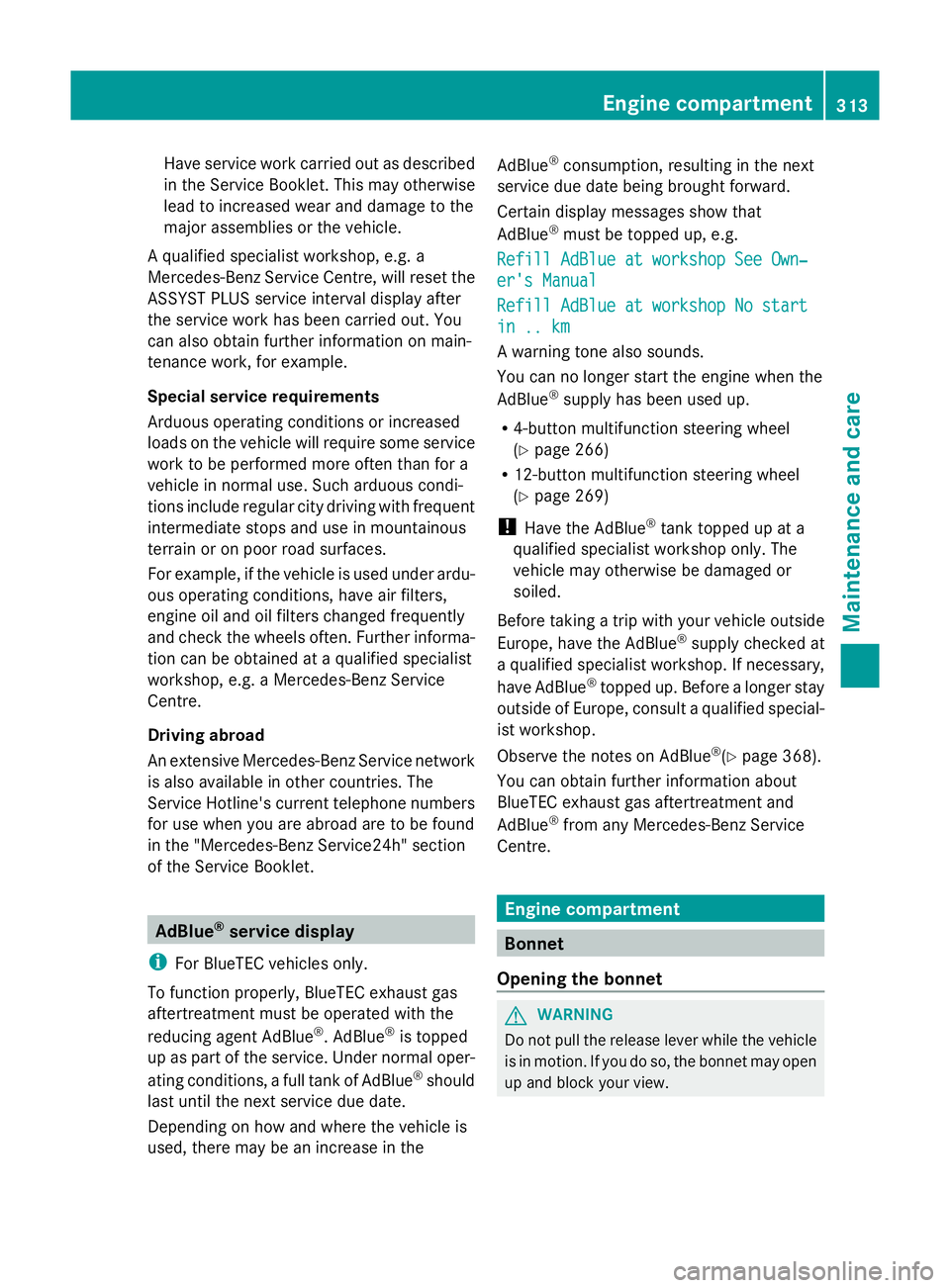
Certain display messages show that
AdBlue ®
must be topped up, e.g.
Refill AdBlue at workshop See Own‐
Refill AdBlue at workshop See Own‐
er's Manual er's Manual
Refill AdBlue at workshop No start Refill AdBlue at workshop No start
in .. km in .. km
A warning tone also sounds.
You can no longer start the engine when the
AdBlue ®
supply has been used up.
R 4-button multifunction steering wheel
(Y page 266)
R 12-button multifunction steering wheel
(Y page 269)
! Have the AdBlue ®
tank topped up at a
qualified specialist workshop only. The
vehicle may otherwise be damaged or
soiled.
Before taking a trip with your vehicle outside
Europe, have the AdBlue ®
supply checked at
a qualified specialist workshop. If necessary,
have AdBlue ®
topped up. Before a longer stay
outside of Europe, consult a qualified special-
ist workshop.
Observe the notes on AdBlue ®
(Y page 368).
You can obtain further information about
BlueTEC exhaust gas aftertreatment and
AdBlue ®
from any Mercedes-Benz Service
Centre. Engine compartment
Bonnet
Opening the bonnet G
WARNING
Do not pull the release lever while the vehicle
is in motion. If you do so, the bonnet may open
up and block your view. Engine compartment
313Maintenance and care Z