2012 MERCEDES-BENZ GL SUV belt
[x] Cancel search: beltPage 203 of 441
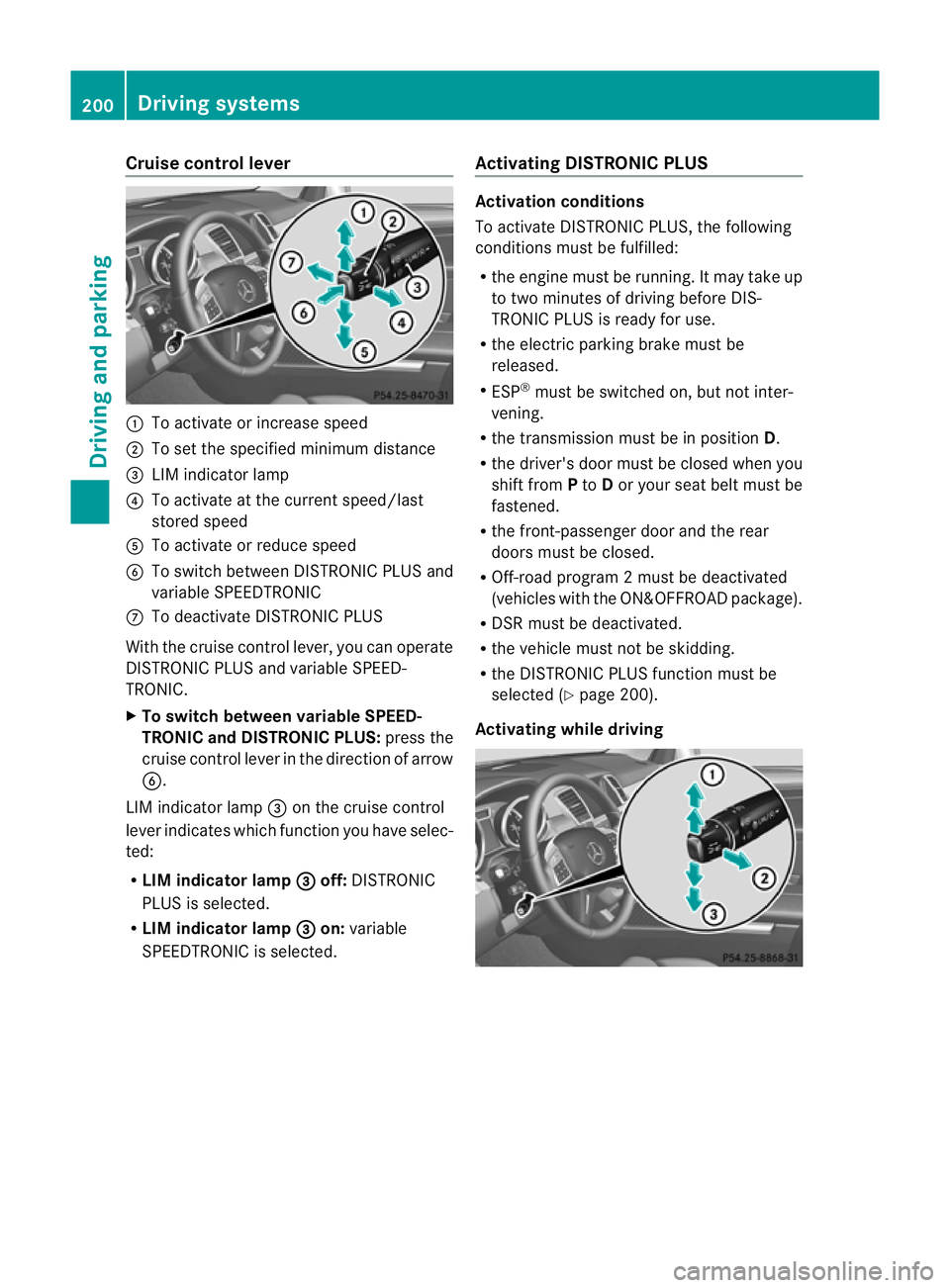
Cruise control lever
:
To activat eorincrease speed
; To set the spe cified minimum distance
= LIM indica torlamp
? To activat eatthe current speed/la st
stored speed
A To activate or reduc espeed
B To switc hbetween DI STRONIC PLUS and
variable SPEEDTRONIC
C To deactivate DISTRONIC PLUS
With the cruise contro llever ,you can operate
DI ST RONIC PLUS and variable SPEED-
TRONIC.
X To switch between variable SPEED-
TRONIC and DISTRONIC PLUS: press the
cruise contro llever in the direc tion of arrow
B.
LI Mi ndicator lamp =on the cruise control
lever indicates which function you have selec-
ted:
R LIM indicator lamp = off:
DISTRONIC
PLUS is selected.
R LIM indicator lamp = on:
variable
SPEEDTRONIC is selected. Activating DISTRO
NICP LUS Activation conditions
To activate DISTRONIC PLU
S,the following
conditions must be fulfilled:
R the engine must be running. It may take up
to two minutes of driving before DIS-
TRONIC PLUS is ready for use.
R the electric parking brake must be
released.
R ESP ®
must be switched on, but not inter-
vening.
R the transmission must be in position D.
R the driver' sdoor must be closed when you
shift from Pto Dor your seat belt must be
fastened.
R the front-passenger door and the rear
doors must be closed.
R Off -road program 2must be deactivated
(vehicles with the ON&OFFROA Dpackage).
R DS Rm ust be deactivated.
R the vehicle must not be skidding.
R the DI STRONIC PLUS function must be
selected (Y page 200).
Activating while driving 200
Driving systemsDrivin
gand parking
Page 206 of 441

Even if the vehicl
einfront leaves th edetec-
tion range ,DIST RONICP LUSt emporarily
maintains the curren tdriving spee dand does
not accelerate. This is base donthe current
map data in the navigation system.
The current spee dismaintained:
R approximately 10 second sbefore the
roundabout/ T-junctio nand approximately
1.5 second swhen drivin gonaroundabout.
R approximately 12 second sbefor ereaching
am otorway exit and approximately
4s econds after the motorway exit.
Af terw ards, the vehicle accelerates back to
the set spee dyou specified.
Stopping G
WARNING
Never get out of the vehicle when DISTRONIC
PLU Sisa ctivated.
DISTRONIC PLUS must als onever be oper-
ated, activated or deactivated by apassenger
or from outside the vehicle.
DISTRONI CPLUS does no treplace the elec-
tri cp arking brake and must not be used for
parking.
The DISTRONI CPLUS brakin geffect is can-
celle dand the vehicl ecan start moving if:
R DISTRONI CPLUS is deactivate dusing the
cruise con trollever.
R you accelerate.
R there is amalfunction in the system or an
interruption in the power supply ,e.g. bat-
tery failure.
R the electrical system in the engine com-
partment, the battery or the fuses are tam-
pere dwith.
R the battery is disconnected.
If you wish to leave the vehicle or park it,
deactivate DISTRONIC PLU Sand secure the
vehicl eagainst rolling away.
If DI STRONIC PLUS detects that the vehicle
in front is stopping, it brakes your vehicle until
it is stationary. Once your vehicle is stationary, it remains
stationary and you do not need to depres
sthe
brake.
Af terat ime, the electric parkin gbrake
secure sthe vehicle and relieves the service
brake.
Depending on the specifie dminimum dis-
tance, your vehicle will come to astandstill at
as ufficient distance behind the vehicle in
front .The specifie dminimum distance is set
using the control on the cruise control lever.
The electric parkin gbrake secure sthe vehicle
automatically if DI STRONIC PLUS is activated
and:
R the driver's doo risopen and the driver's
seat belt is unfastened.
R the engine is switched off ,unles sitisa uto-
matically switched off by the ECO start/
stop function.
R as ystem fault occurs.
R the powe rsupply is not sufficient.
On steep uphill or downhill inclines or if there
is am alfunction, the transmission may also
be automatically shifted into position P.
Setting aspeed X
Press the cruise control lever up :for a
high er spee dordown;for alower speed.
X Keep the cruise contr ol leverpresse duntil
the desired speed is reached.
X Release the cruise contro llever.
The new speed is stored. DI STRONIC PLUS
is activated and adjusts the vehicle's speed
to the new speed stored. Driving systems
203Drivingand parking Z
Page 214 of 441

HOL
Dfunction
Gen eral notes Th
eH OLD function ca nassist the driver in the
foll owing situations:
R when pulling away, especially on steep
slopes
R when manoeuvrin gonsteep slopes
R when waiting in traffic
The vehicle is kept stationary without the
driver having to depress the brake pedal.
The braking effect is cancelled and the HOLD
function is deactivated when you depress the
accelerator peda ltop ull away.
i Do not use the HOLD function when driv-
ing off-road, on steep downhill or uphill
inclines or on aslippery or loose surface.
Under such circumstances, the HOLD func-
tion may not be able to keep the vehicle
stationary.
Activation conditions You can activate the HOLD func
tion if:
R the vehicle is stationary.
R the engin eisrunning or if it has been auto-
matically switched off by the ECO start/
stop function.
R the driver' sdoor is closed or if your seat
belt is fastened.
R the electric parkin gbrake is released.
R thet ransmission is in position D,Ror N.
R DISTRONIC PLUS is deactivated.
Activatin gthe HOL Dfunction G
WARNING
Th ev ehicle' sbrake sare applied when the
HOLD functio nisactivated. For thi sreason,
deactivat ethe HOL Dfunction if the vehicle is
to be set in motion by other means (e.g. in a
car wash or by towing). X
Make sure that the activation conditions
are met.
X Depress the brake pedal.
X Quickly depres sthe brake pedal further
until ë appears in the multifunction dis-
play.
The HOL Dfunction is activated. You can
release the brake pedal.
i If depressing the brake pedal the first
time does not activate the HOLD function,
wait briefly and then try again.
Deactivating the HOLD function G
WARNING
Never get out of the vehicle when the HOLD
function is activated.
The HOLD function must never be operated
or deactivated by apassenger or from outside
the vehicle.
The HOLD function does not replace the elec-
tric parking brake and must not be used for
parking.
The braking effect of the HOLD function is
cancelled and the vehicle could roll away if:
R the HOLD function is deactivated by
depressing the accelerator pedal or the
brake pedal.
R there is amalfunction in the system or an
interruption in the power supply ,e.g. bat-
tery failure.
R the electrical system in the engine com-
partment, the battery or the fuses are tam-
pere dwith.
R the battery is disconnected.
If you leave the vehicle or park it, deactivate
the HOLD func tion and secur ethe vehicle
against rolling away.
The HOL Dfunction is deactivated automati-
cally if:
R you accelerate and the transmission is in
position Dor R.
R you shift the transmission to position P. Driving systems
211Drivingand pa rking Z
Page 215 of 441

R
you depress the brak epedal again wit ha
certain amount of pressure until ëdis-
appears from themultifun ctiondisplay.
R you secur ethe vehi cleu sing the elec tric
parking brake.
R you activat eDISTRONIC PLU S.
i After atime, the electric parking brake
secures the vehicle and relieves the service
brake.
The electric parking brak esecures the vehicle
automatically if the HOL Dfunction is activa-
ted and:
R the driver' sdoor is open and the driver's
seat belt is unfastened.
R the engin eisswitched off, unless it is auto-
matically switched off by the ECO start/
stop function.
R as ystem fault occurs.
R the powe rsupply is not sufficient.
On steep uphill or downhill inclines or if there
is am alfunction, the transmissio nmay also
be automatically shifted int oposition P. AIRMATIC package
Genera lnotes AIRMATI
Cenable sasuspension tuning set-
ting to be selected and regulates the damping
behaviour and level of your vehicle. The sys-
tem comprises aminimum of two compo-
nents. These are AD S(Adaptive Damp ingS ys-
tem) (Y page 212) and level control
(Y page 213) .Your vehicle ma yalso be equip-
ped with the Active Curv eSystem
(Y page 213).
Observe the notes on driving with atrailer
(Y page 257).
ADS (Adaptive Damping System) General notes
ADS adapts th
edamping characteristic sto
the curren toperatin gand driving situation. Thi
sd epends on:
R your drivin gstyle
R the road surface conditions
R the AD Ssetting
R the vehicle level setting
Your selection remains stored even if you
remov ethe key from the igni tion lock.
Sports tuning Example: vehicles wit
hthe ON&OFFROA Dpackage
X Start the engine.
X Press button :.
Indicator lamp ;ligh tsup. You have sele c-
ted "Sport stuning". The vehicle is lowered
by 15 mm.
The firmer suspension tuning in Spor tmode
ensures even bette rcontac twith th eroad.
Select this mode when empl oyingasporty
driving style, e.g .onwindingcountr yroads.
Comfor ttun ing
X Press button :.
Indicator lamp =light sup. You have selec-
ted "Comfor ttuning". The vehicle is raised
by 15 mm.
In com fort mode, the dri ving characteristics
of your vehicl eare more comfortable. There-
fore, select this mode if you prefer amore
comfortable drivin gstyle. Select comfort
mode also when driving fast on straigh troads,
e.g. on straight stretches of motorway. 212
Driving systemsDriving and pa
rking
Page 236 of 441
R
if you are cur rently using COM ANDOnline
or ma kingatelephon ecall with it
R if the tim ehas been set incorrectly
R in active drivin gsituations, such as when
you change lanes or change your speed
Warning and display messages in the
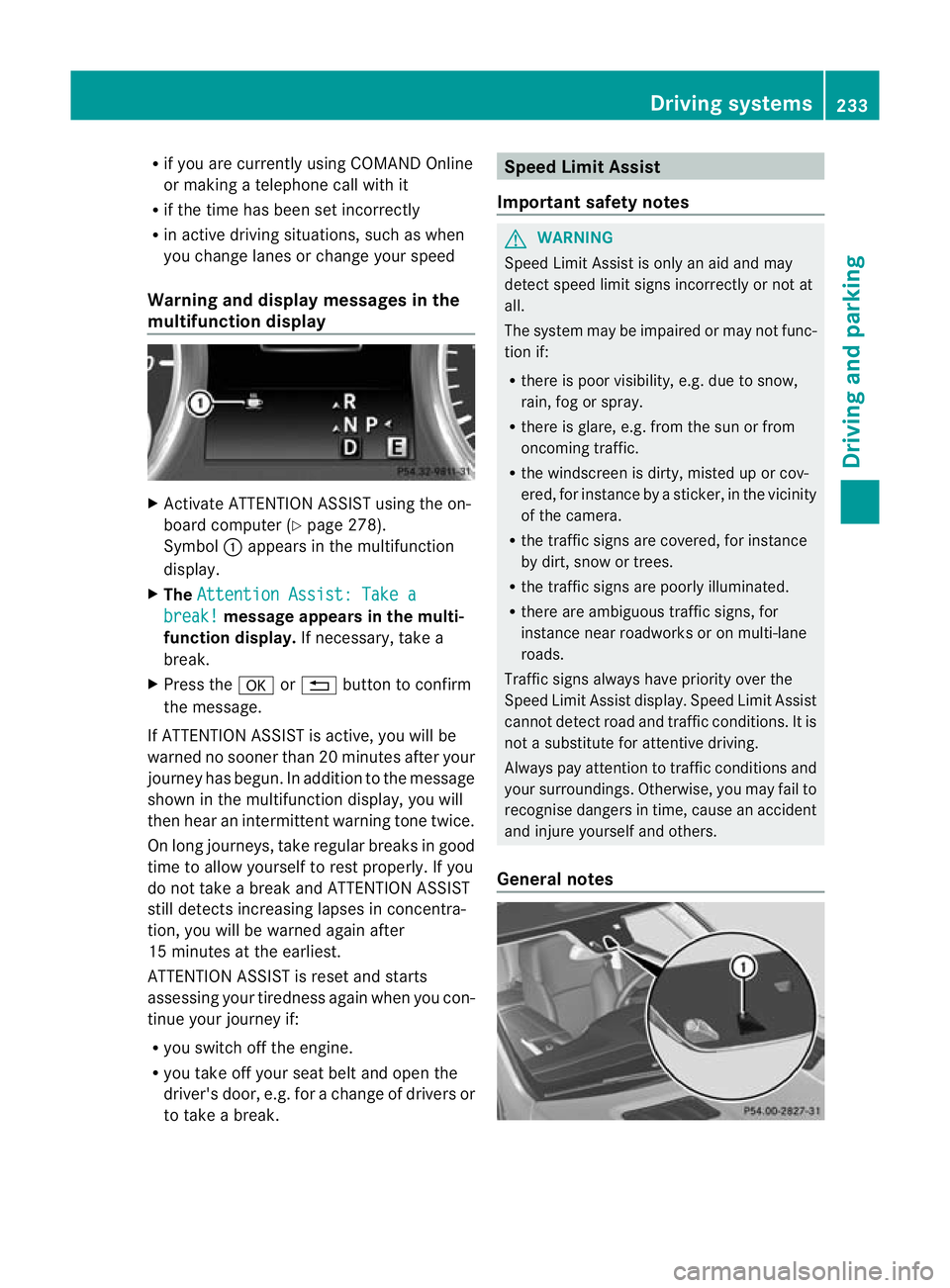
multifunction display X
Activate ATTE NTION ASSIS Tusing the on-
boar dcomputer (Y page 278).
Symbol :appears in the multifunction
display.
X The Attentio nA ssist: Take a break! mess
agea ppears in th emulti-
function display. If necessary, takea
break.
X Press the aor% button to confirm
the message.
If ATTENTION ASSI STis active, you will be
warne dnosooner than 20 minutes after your
journey has begun. In additio ntothe message
shown in the multifunc tion display, you will
then hear an intermit tent warning tone twice.
On long journeys ,take regular breaks in good
time to allow yourself to rest properly. If you
do not take abrea kand ATTENTION ASSIST
stil ldetect sincreasing lapses in concentra-
tion, you will be warned agai nafter
15 minutes at th eearliest.
ATTENTION ASSIST is reset and starts
assessing your tiredness again when you con-
tinue your journey if:
R you switch off the engine.
R you take off your seat belt and open the
driver' sdoor, e.g. for achange of driver sor
to take abreak. Speed Limit Assist
Important safety notes G
WARNING
Speed Limit Assis tiso nly an aid and may
detect speed limit signs incorrectly or not at
all.
The system may be impaired or may not func-
tion if:
R there is poo rvisibility, e.g. due to snow,
rain, fog or spray.
R there is glare, e.g. from the sun or from
oncoming traffic.
R the windscreen is dirty, misted up or cov-
ered, for instance by asticker, in the vicinity
of the camera.
R the traffic signs are covered, for instance
by dirt, snow or trees.
R the traffic signs are poorly illuminated.
R there are ambiguous traffic signs, for
instance near roadworks or on multi-lane
roads.
Traffic signs alway shave priority over the
Speed Limit Assis tdisplay .Speed Limit Assist
cannot detec troad and traffic conditions. It is
not asubstitute for atten tivedriving.
Alway spay atten tion to traffic condition sand
your surroundings. Otherwise ,you may fai lto
recognise dangers in time ,cause an accident
and injure yourself and others.
General notes Driving systems
233Drivingand parking Z
Page 288 of 441

X
Press the :or9 button to select A ,
B or
Change C .
X Press ato confirm.
You can now change the departur etime.
X Press the =or; button to select the
display to be changed: hours, minutes.
X Press the :or9 button to set the
selected display.
X Press the abutton to store the entry.
The yellow indicator lamp on the auxiliary
heating button lights up.
Convenience submenu Activating/deactivating the EASY-
ENTRY/EXIT feature
G
WARNING
The steerin gwheel moves when the EASY-
ENTRY/ EXIT feature is active. There is arisk
of occupant sbecoming trapped. Before acti-
vating the EASY-ENTRY/EXI Tfeature, make
sure that nobody can becom etrapped.
Do not leave children unsupervised in the
vehicle, eve nifthey ar esecured in achild
rest raint system. The children could open the
driver's door and thereby unintentionally acti-
vate the EASY-ENTRY/EXIT featur eand
become trapped.
X Pres sthe = or; button on the steer-
ing wheel to selec tthe Settings menu.
X Press the :or9 button to selec tthe
Convenie nce submenu.
X Press ato con firm.
X Press :or9 to select the Easy Entry/Ex
it function.
If the Easy Entry/Exit function is activa-
ted ,the vehicle steerin gwheel is displayed
in red in the multifunction display.
X Press the abutton to sav ethe setting.
Further information on the EASY- ENTRY/EXIT
feature (Y page 111). Switching the belt adjustment on/off
X
Press the =or; button on the steer-
ing whee ltoselect the Settings menu.
X Press the :or9 button to select the
Convenie nce submenu.
X Press ato con firm.
X Press the :or9 buttontos elect the
Belt adjustme nt function.
When the Belt adjustment function is
activated, th evehicle seat belt is displayed
in red in the multifunction display.
X Press the abutton to save the setting.
For further information on belt adjustment,
see (Y page 48).
Switching th eFold in mirrors when lock-
ing function on/off
This func tion is only available on vehicles with
Memor yFunction (Y page 115).
When you activat ethe Auto. fold-in mir‐
rors func
tion, the exterior mirror sare folded
in when th evehicle is locked. When you
unloc kthe vehicle and then open adoor, the
exterior mirror sfold out again.
X Press the =or; button on the steer-
ing wheel to select the Settings menu.
X Press the :or9 button to select the
Convenie nce submenu.
X Press ato con firm.
X Press :or9 to select the Auto. fold-in mirrors function.
If the Auto. fold-in mirrors function is
activated, th evehicle' sexterior mirror is
displaye dinred in the multifunction dis-
play.
X Press the abutton to save the setting. Menus and submenus
285On-board computera nd displays Z
Page 301 of 441

Displa
ymessages Possible causes/consequences and
M Solutions
PR
E-SAFE Functions cur‐
rently limited See
Owner'
sManual Vehicles with the Active Driving Assistance package:
PRE-SAFE
®
Brake is tempora rily inoperative. Possibl ecauses:
R thef unction is impaire ddue to heav yrain or snow.
R thes ensor sint he ra diatortrim and in th ebumpers are dirty.
R the rada rsensor system is temporarily inoperative, e.g. due to
electromagnetic radiation emit tedbyn earby TV or radi osta-
tions or othe rsources of elect romagnetic radiation.
R AM Gvehicles: ESP ®
is deactiva ted.
R the system is outside the operatin gtemperatur erange.
R the on-board voltage is too low.
Onc ethe causes listed abov enolonger apply ,the displa ymessage
goes out.
PRE- SAFE ®
Brake is operational again.
If the displa ymessage does not disappear:
X Pull over and stop the vehicle safely as soon as possible, paying
attention to road and traffic conditions.
X Secure the vehicle against rollin gaway (Y page 181).
X Clean the sensors in the radiator grille and the bumper
(Y page 370).
X Restart the engine.
X AMG vehicles: reactivate ESP ®
(Y page 67). PRE-SA
FE Functions limited
See Owner's Manual Vehicles withou
tthe Activ eDriving Assistance package: Adapti ve
Brake Assis tisf aulty. The distanc ewarning function may also have
failed.
Vehicles with the Active Driving Assis tance package:
PRE-SAFE ®
Brak eisf aulty. BA SPLUS or th edistanc ewarning
function may also have failed.
X Visit aqualified specialist workshop. ü If the symbol appears in the multifunction display,
aseat belt
tongue has been inser tedi nto arear seat belt buckle.
Fur ther information on the status indicator for the rear seat belts
(Y page 49). 298
Display messagesOn-boar
dcomputer and displays
Page 302 of 441

Displa
ymessages Possible causes/consequences and
M Solutions
ý If th
esymbol appears in the multifunction display, aseat belt
tongue has not been inser tedinar ear seat belt buckle.
G WAR
NING
As eat belt which is not worn cor rectly, or which has not been
engage dinthe seat belt buckle cor rectly, cannot provide the
intende dlevel of protection.
This poses an inc reased risk of injury.
X If necessary, ask the occupants in the rear to fasten their seat
belts (Y page 47).
Further information on the status indicator for the rear seat belts
(Y page 49). 6
Restra
int sys. mal‐
functio
nConsult workshop There is
amalfunction in the SRS (Supplemental Restraint Sys-
tem).
The 6 warning lamp also lights up in the instrument cluster.
G WARNING
The airbags or belt tensioners may either be triggered uninten-
tionally or, in the event of an accident, may not be triggered.
This pose sanincreased risk of injury.
X Visit aqualified specialist workshop.
Further information on occupant safety (Y page 41).6
Front
left malfun
c‐ tion Consult work‐
shop or
Front right malfunction Con‐
sult workshop SRS ha
smalfunctioned at the fron tonthe lef torright. The 6
warnin glamp also lights up in the instrument cluster.
G WARNING
The airbags or belt tensioners may either be triggered uninten-
tionally or, in the event of an accident, may not be triggered.
This pose sanincreased risk of injury.
X Visit aqualified specialist workshop. 6
Rear left malfun
c‐ tion Consult work‐
shop or
Rear right malfunction Con‐
sult workshop SRS ha
smalfunctioned at the rear on the left or right. The 6
warning lamp also lights up in the instrument cluster.
G WARNING
The airbags or belt tensioners may either be triggered uninten-
tionally or, in the event of an accident, may not be triggered.
This pose sanincreased risk of injury.
X Visit aqualified specialist workshop. Display messages
299On-board computer and displ ays Z