2012 MERCEDES-BENZ E-CLASS ESTATE sensor
[x] Cancel search: sensorPage 289 of 457
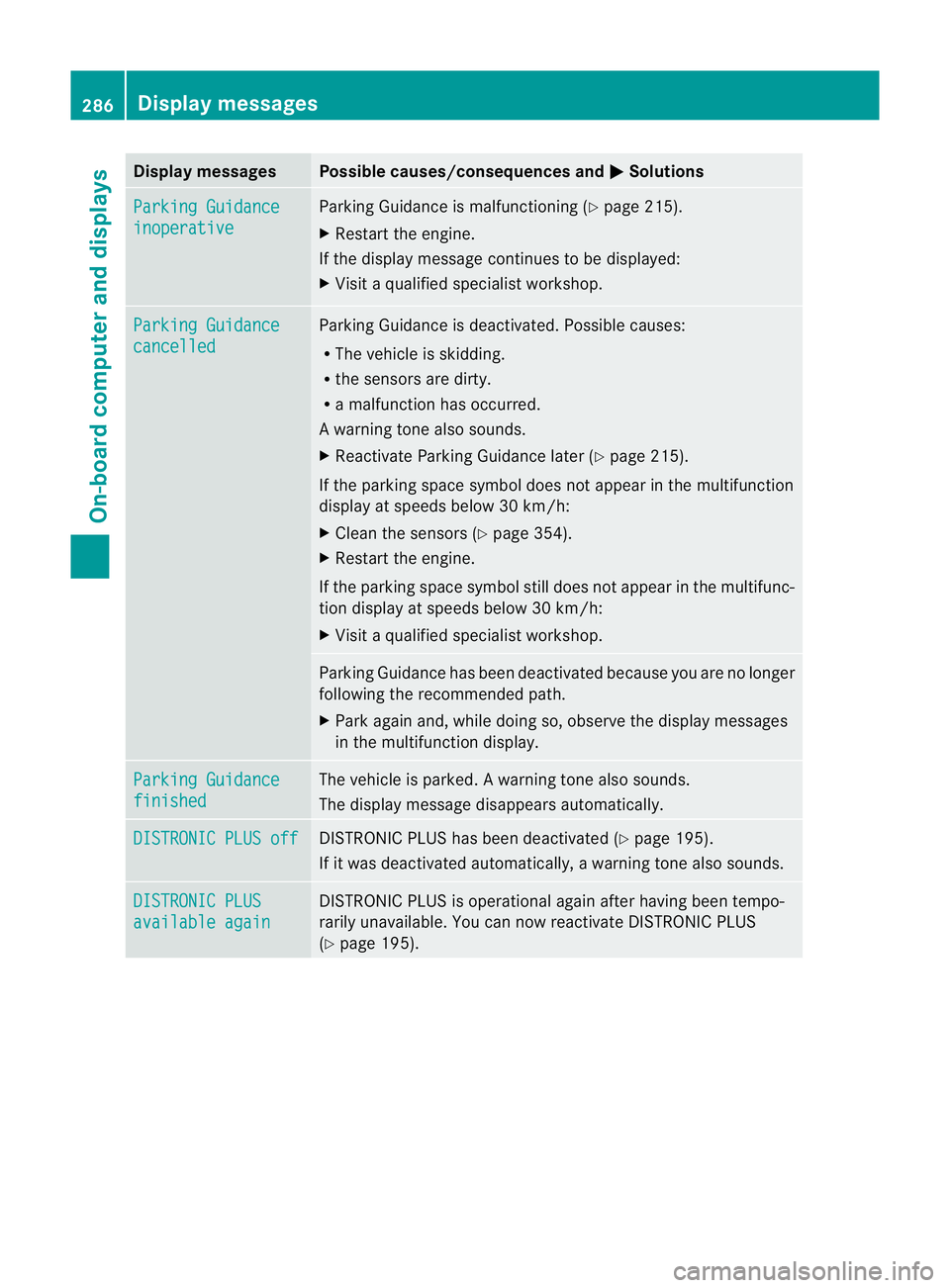
Display messages Possible causes/consequences and
M Solutions
Parking Guidance
inoperative Parking Guidance is malfunctioning (
Ypage 215).
X Restart the engine.
If the display message continues to be displayed:
X Visit a qualified specialist workshop. Parking Guidance
cancelled Parking Guidance is deactivated. Possible causes:
R
The vehicle is skidding.
R the sensors are dirty.
R a malfunction has occurred.
Aw arning tone also sounds.
X Reactivate Parking Guidance late r(Y page 215).
If the parking space symbol does not appear in the multifunction
display at speeds below 30 km/h:
X Clean the sensors (Y page 354).
X Restart the engine.
If the parking space symbol still does not appear in the multifunc-
tion display at speeds below 30 km/h:
X Visit a qualified specialist workshop. Parking Guidance has been deactivated because you are no longer
following the recommended path.
X
Park again and, while doing so, observe the display messages
in the multifunction display. Parking Guidance
finished The vehicle is parked.
Awarning tone also sounds.
The display message disappears automatically. DISTRONIC PLUS off DISTRONIC PLU
Shas been deactivated (Y page 195).
If it was deactivated automatically, a warning tone also sounds. DISTRONIC PLUS
available again DISTRONIC PLU
Sis operational againa fter having beentempo-
rarily unavailable. You can now reactivate DISTRONIC PLUS
(Y page 195). 286
Display messagesOn-board computer and displays
Page 290 of 457
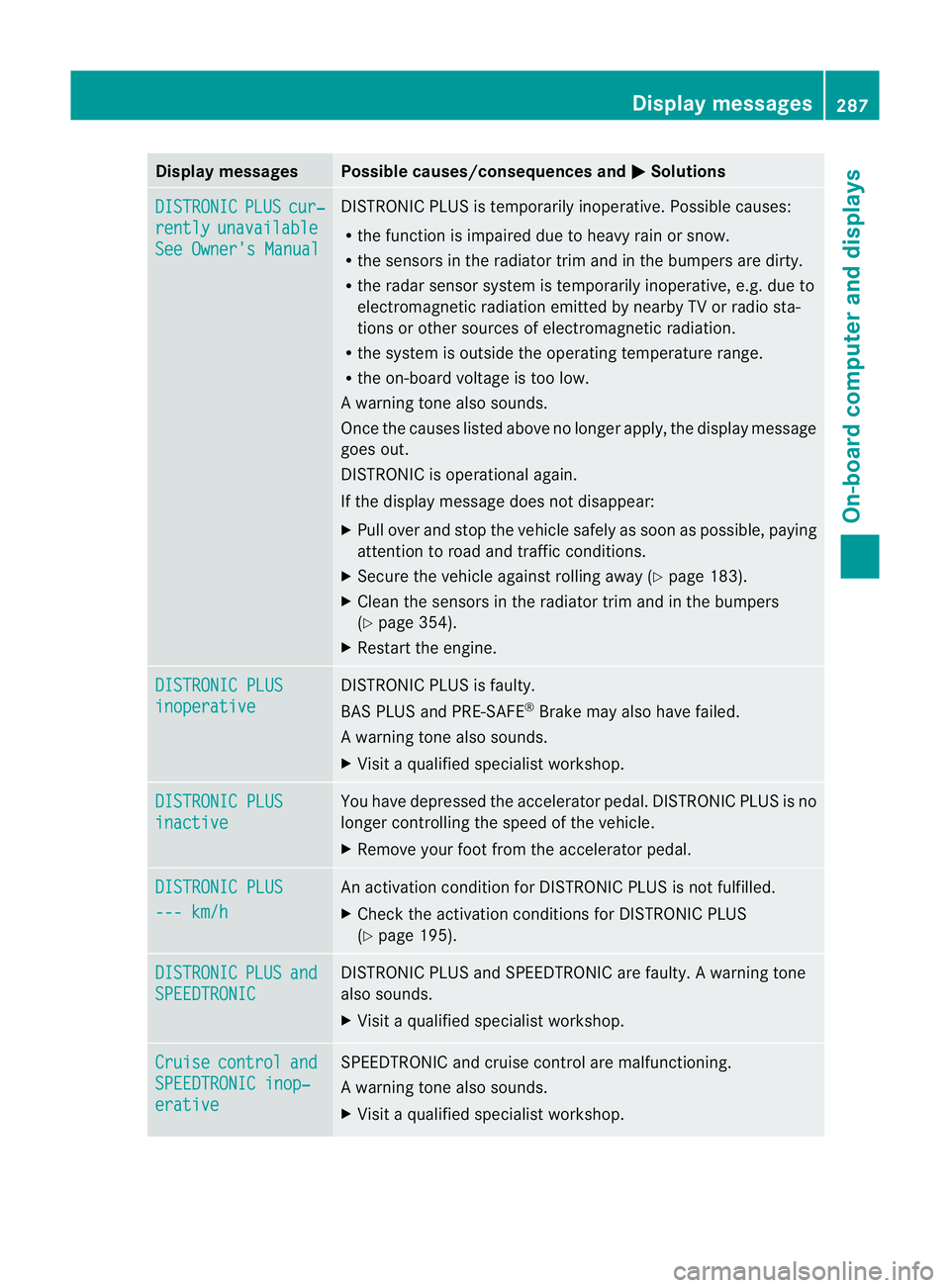
Display messages Possible causes/consequences and
M Solutions
DISTRONIC PLUS cur‐
rently unavailable
See Owner's Manual DISTRONIC PLU
Sis temporarily inoperative. Possible causes:
R the function is impaired due to heavy rain or snow.
R the sensors in the radiator trim and in the bumpers are dirty.
R the radar sensor system is temporarily inoperative, e.g. due to
electromagnetic radiation emitted by nearby TV or radio sta-
tions or other sources of electromagnetic radiation.
R the system is outside the operating temperature range.
R the on-board voltage is too low.
Aw arning tone also sounds.
Once the causes listed abov eno longer apply, the display message
goes out.
DISTRONIC is operational again.
If the display message does not disappear:
X Pull over and stop the vehicle safely as soon as possible, paying
attention to road and traffic conditions.
X Secure the vehicle against rolling away (Y page 183).
X Clean the sensors in the radiator trim and in the bumpers
(Y page 354).
X Restart the engine. DISTRONIC PLUS
inoperative DISTRONIC PLUS is faulty.
BAS PLUS and PRE-SAFE
®
Brake may also have failed.
Aw arning tone also sounds.
X Visi taqualified specialist workshop. DISTRONIC PLUS
inactive You have depressed the accelerator pedal. DISTRONIC PLUS is no
longer controlling the speed of the vehicle.
X
Remove your foot from the accelerator pedal. DISTRONIC PLUS
--- km/h An activation condition for DISTRONIC PLUS is not fulfilled.
X
Check the activation conditions for DISTRONIC PLUS
(Y page 195). DISTRONIC PLUS and
SPEEDTRONIC DISTRONIC PLUS and SPEEDTRONIC are faulty. A warning tone
also sounds.
X Visit a qualified specialist workshop. Cruise control and
SPEEDTRONIC inop‐
erative SPEEDTRONIC and cruise control are malfunctioning.
Aw arning tone also sounds.
X Visi taqualified specialist workshop. Display messages
287On-board computer and displays Z
Page 293 of 457
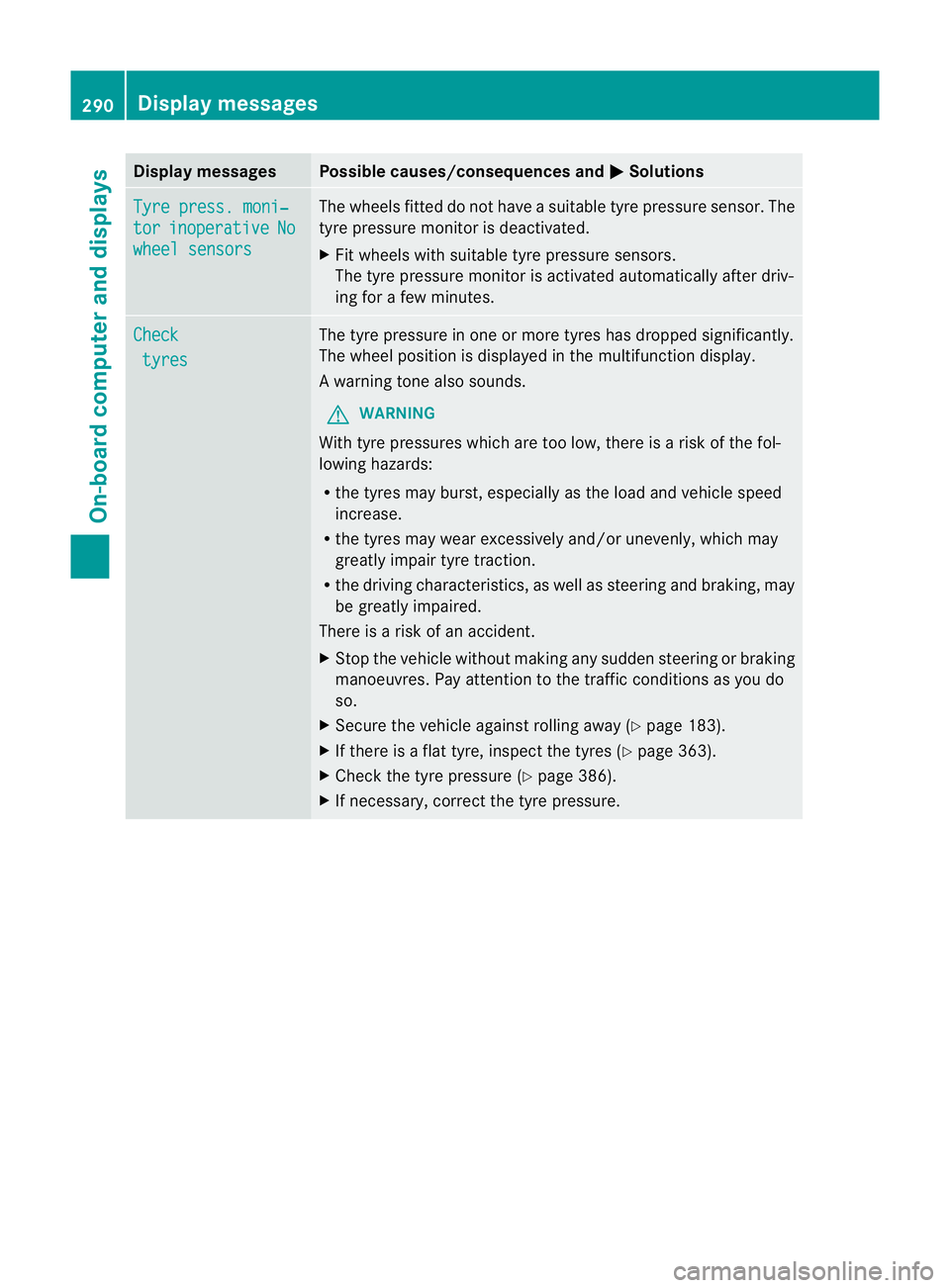
Display messages Possible causes/consequences and
M Solutions
Tyre press. moni‐
tor inoperative No
wheel sensors The wheels fitted do no
thave a suitable tyre pressure sensor .The
tyre pressure monitor is deactivated.
X Fit wheels with suitable tyre pressure sensors.
The tyre pressure monitor is activated automatically after driv-
ing for a few minutes. Check
tyres The tyre pressure in one or more tyres has dropped significantly.
The wheel position is displayed in the multifunction display.
Aw
arning tone also sounds.
G WARNING
With tyre pressures which are too low, there is a ris kofthe fol-
lowing hazards:
R the tyres may burst, especially as the load and vehicle speed
increase.
R the tyres may wear excessively and/or unevenly, which may
greatly impair tyre traction.
R the driving characteristics, as well as steering and braking, may
be greatly impaired.
There is a risk of an accident.
X Stop the vehicle without making any sudden steering or braking
manoeuvres. Pay attention to the traffic conditions as you do
so.
X Secure the vehicle against rolling away (Y page 183).
X If there is a flat tyre, inspect the tyres (Y page 363).
X Check the tyre pressure (Y page 386).
X If necessary, correct the tyre pressure. 290
Display messagesOn-board computer and displays
Page 294 of 457
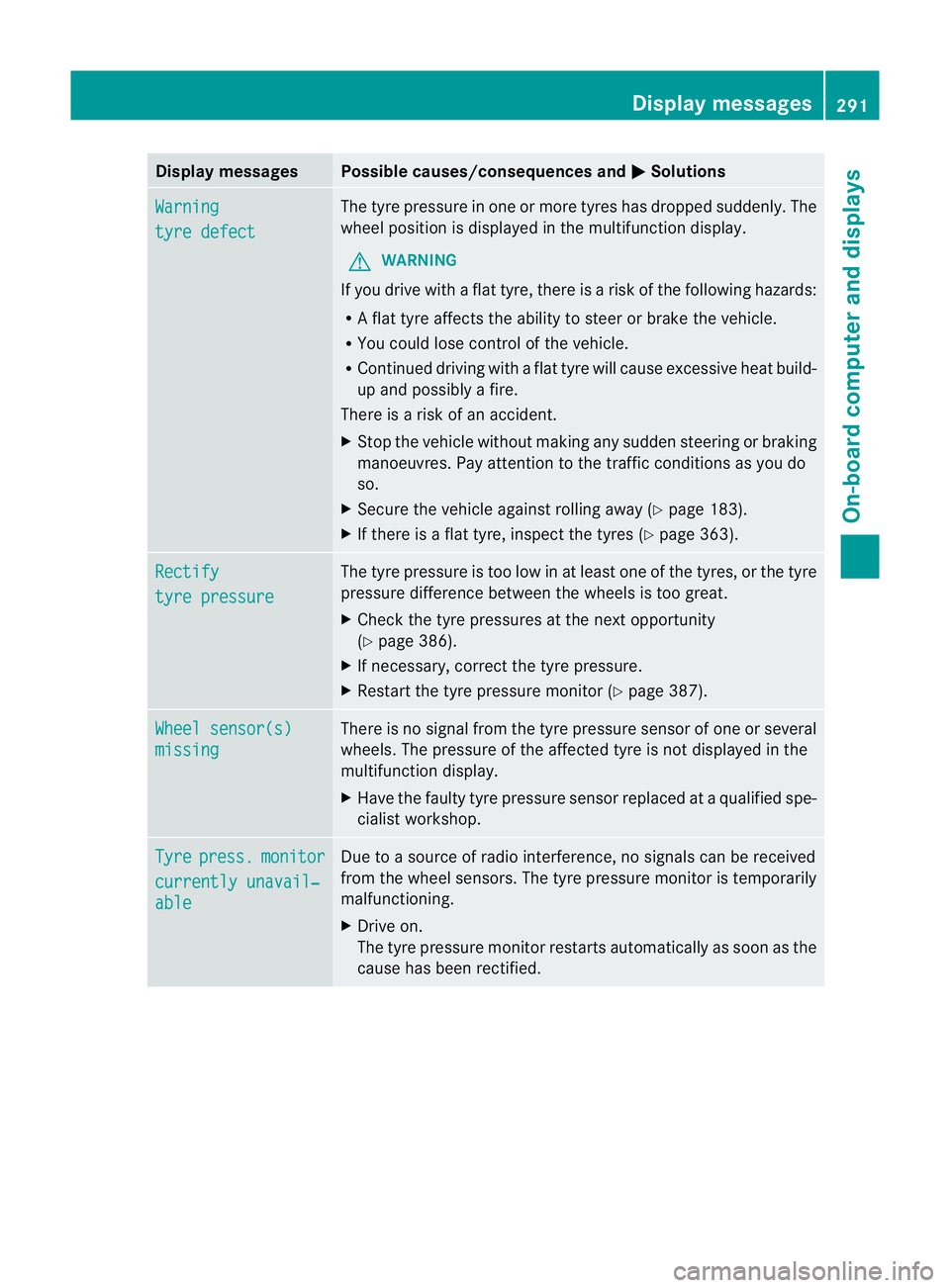
Display messages Possible causes/consequences and
M Solutions
Warning
tyre defect The tyre pressure in on
eormore tyres has dropped suddenly. The
wheel position is displayed in the multifunction display.
G WARNING
If you drive with a flat tyre, there is a risk of the following hazards:
R A flat tyre affects the ability to steer or brake the vehicle.
R You could lose control of the vehicle.
R Continued driving with a flat tyre will cause excessive heat build-
up and possibly a fire.
There is a risk of an accident.
X Stop the vehicle without making any sudden steering or braking
manoeuvres. Pay attention to the traffic conditions as you do
so.
X Secure the vehicle against rolling away (Y page 183).
X If there is a flat tyre, inspect the tyres (Y page 363).Rectify
tyre pressure The tyre pressure is too low in at least one of the tyres, or the tyre
pressure difference between the wheels is too great.
X
Check the tyre pressures at the next opportunity
(Y page 386).
X If necessary, correct the tyre pressure.
X Restart the tyre pressure monitor (Y page 387).Wheel sensor(s)
missing There is no signal from the tyre pressure sensor of one or several
wheels. The pressure of the affected tyre is not displayed in the
multifunction display.
X
Have the faulty tyre pressure sensor replaced at a qualified spe-
cialist workshop. Tyre press. monitor
currently unavail‐
able Due to a source of radio interference, no signals can be received
from the wheel sensors. The tyre pressure monitor is temporarily
malfunctioning.
X Drive on.
The tyre pressure monitor restarts automatically as soon as the
cause has been rectified. Display messages
291On-board computer and displays Z
Page 308 of 457
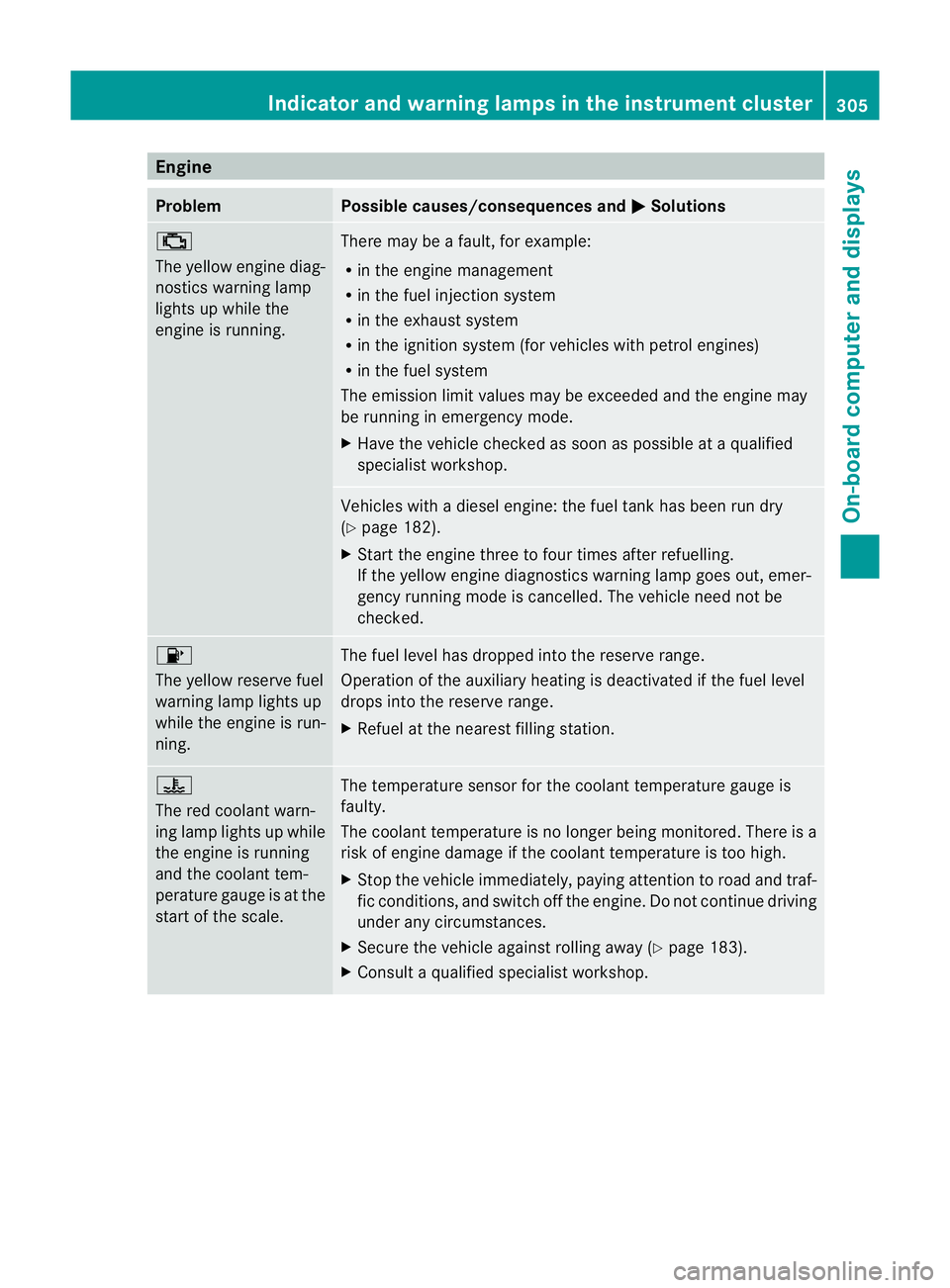
Engine
Problem Possible causes/consequences and
M Solutions
;
The yellow engine diag-
nostics warning lamp
lights up while the
engine is running.
There may be a fault, for example:
R in the engine management
R in the fuel injection system
R in the exhaust system
R in the ignition system (for vehicles with petrol engines)
R in the fuel system
The emission limit values may be exceeded and the engin emay
be running in emergency mode.
X Have the vehicle checked as soon as possible at a qualified
specialist workshop. Vehicles with a diesel engine: the fuel tan
khas been run dry
(Y page 182).
X Start the engine three to four times after refuelling.
If the yellow engine diagnostics warning lamp goes out, emer-
gency running mode is cancelled. The vehicle need no tbe
checked. 8
The yellow reserve fuel
warning lamp lights up
while the engine is run-
ning.
The fuel level has dropped into the reserve range.
Operation of the auxiliary heating is deactivated if the fuel level
drops into the reserve range.
X
Refuel at the nearest filling station. ?
The red coolant warn-
ing lamp lights up while
the engine is running
and the coolant tem-
perature gauge is at the
star toft he scale. The temperature sensor for the coolant temperature gauge is
faulty.
The coolant temperature is no longer being monitored. There is a
risk of engine damage if the coolant temperature is too high.
X Stop the vehicle immediately, paying attention to road and traf-
fic conditions, and switch off the engine. Do not continue driving
under any circumstances.
X Secure the vehicle against rolling away (Y page 183).
X Consult a qualified specialist workshop. Indicator and warning lamps in the instrument cluster
305On-board computer and displays Z
Page 357 of 457
the windscree
northe wiper blades. On vehi-
cles with KEYLESS-GO, press the Start/Stop
button repeatedly until all indicator lamps in
the instrument cluster have gone off. The
windscreen wipers could otherwise move and
injure you.
! Do not pull on the wiper blade. Otherwise,
the wiper blade could be damaged.
! Do not clean wiper blades too often and
do not rub them too hard. Otherwise, the
graphite coating could be damaged. This
could cause wiper noise.
! Hold the wiper arm securely when folding
back. The windscreen could be damaged if
the wiper arm hits against it suddenly.
X Fold the wiper arms away from the wind-
screen.
X Carefully clean the wiper blades with a
damp cloth.
X Fold the windscreen wipers back again
before switching on the ignition.
Cleaning the exterior lighting !
Only use cleaning agents or cleaning
cloths that are suitable for plastic lenses.
Unsuitable cleaning agents or cleaning
cloths could scratch or damage the plastic
lenses of the exterior lighting.
X Cleant he plastic lenses of the exterior
lighting using a wet sponge and a mild
cleaning agent, e.g. Mercedes-Ben zcar
shampoo or cleaning cloths.
Mirror turn signal !
Only use cleaning agents or cleaning
cloths that are suitable for plastic lenses.
Unsuitable cleaning agents or cleaning
cloths could scratch or damage the plastic
lenses of the mirror tur nsignals.
X Clean the plastic lenses of the mirror turn
signals in the exterior mirror housing using
a wet sponge and mild cleaning agent, e.g. Mercedes-Ben
zcar shampoo or cleaning
cloths.
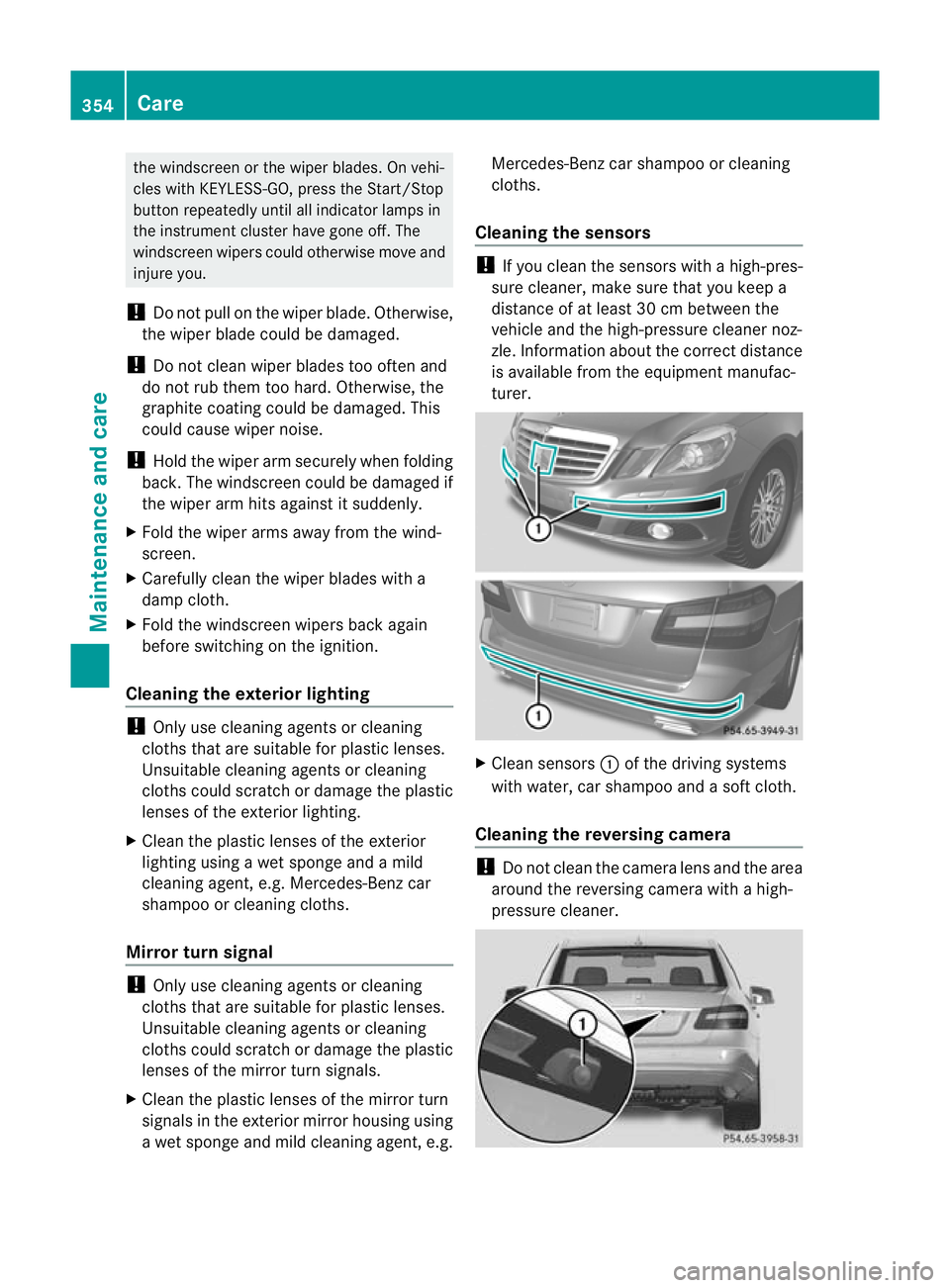
Cleaning the sensors !
If you clean the sensors with a high-pres-
sure cleaner, make sure that you keep a
distance of at least 30 cm between the
vehicle and the high-pressure cleane rnoz-
zle. Information about the correct distance
is available from the equipment manufac-
turer. X
Clean sensors :of the driving systems
with water, car shampoo and a soft cloth.
Cleaning the reversing camera !
Do not clean the camera lens and the area
around the reversing camera with a high-
pressure cleaner. 354
CareMaintenance and care
Page 389 of 457
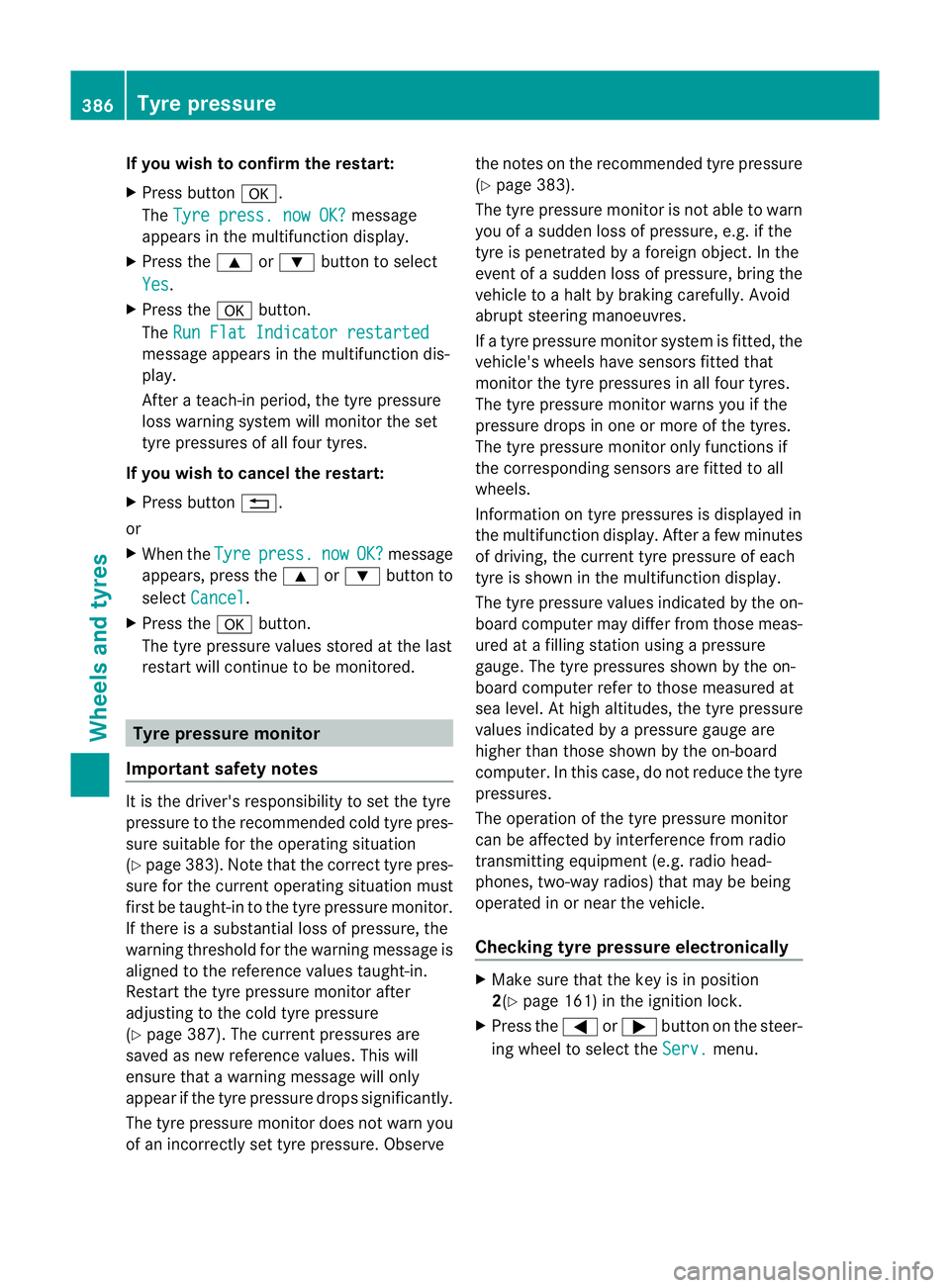
If you wish to confirm the restart:
X
Press button a.
The Tyre press. now OK? message
appears in the multifunction display.
X Press the 9or: buttonto select
Yes .
X Press the abutton.
The Run Flat Indicator restarted message appears in the multifunction dis-
play.
After a teach-in period, the tyre pressure
loss warning system will monitor the set
tyre pressures of all four tyres.
If you wish to cancel the restart:
X Press button %.
or
X When the Tyre press. now OK? message
appears, press the 9or: button to
select Cancel .
X Press the abutton.
The tyre pressure values stored at the last
restart will continue to be monitored. Tyre pressure monitor
Important safety notes It is the driver's responsibility to set the tyre
pressure to the recommended cold tyre pres-
sure suitable for the operating situation
(Y
page 383). Note that the correc ttyre pres-
sure fo rthe current operating situation must
first be taught-in to the tyre pressure monitor.
If there is a substantial loss of pressure, the
warning threshold for the warning message is
aligned to the reference values taught-in.
Restart the tyre pressure monitor after
adjusting to the cold tyre pressure
(Y page 387). The current pressures are
saved as new reference values. This will
ensure that a warning message will only
appearift he tyre pressure drops significantly.
The tyre pressure monitor does not warn you
of an incorrectly set tyre pressure. Observe the notes on the recommended tyre pressure
(Y
page 383).
The tyre pressure monitor is not able to warn
you of a sudden loss of pressure, e.g. if the
tyre is penetrated by a foreign object. In the
event of a sudden loss of pressure, bring the
vehicle to a halt by braking carefully. Avoid
abrupt steering manoeuvres.
If a tyre pressure monitor system is fitted, the
vehicle's wheels have sensors fitted that
monitor the tyre pressures in all four tyres.
The tyre pressure monitor warns you if the
pressure drops in one or more of the tyres.
The tyre pressure monitor only functions if
the corresponding sensors are fitted to all
wheels.
Information on tyre pressures is displayed in
the multifunction display. After a few minutes
of driving, the current tyre pressure of each
tyre is shown in the multifunction display.
The tyre pressure values indicated by the on-
board computer may differ from those meas-
ured at a filling station using a pressure
gauge. The tyre pressures shown by the on-
board computer refer to those measured at
sea level. At high altitudes, the tyre pressure
values indicated by a pressure gauge are
higher than those shown by the on-board
computer. In this case, do not reduce the tyre
pressures.
The operation of the tyre pressure monitor
can be affected by interference from radio
transmitting equipment (e.g. radio head-
phones, two-way radios) that may be being
operated in or near the vehicle.
Checking tyre pressure electronically X
Make sure that the key is in position
2(Y page 161) in the ignition lock.
X Press the =or; button on the steer-
ing wheel to select the Serv. menu.386
Tyre pressureWheels and tyres
Page 390 of 457
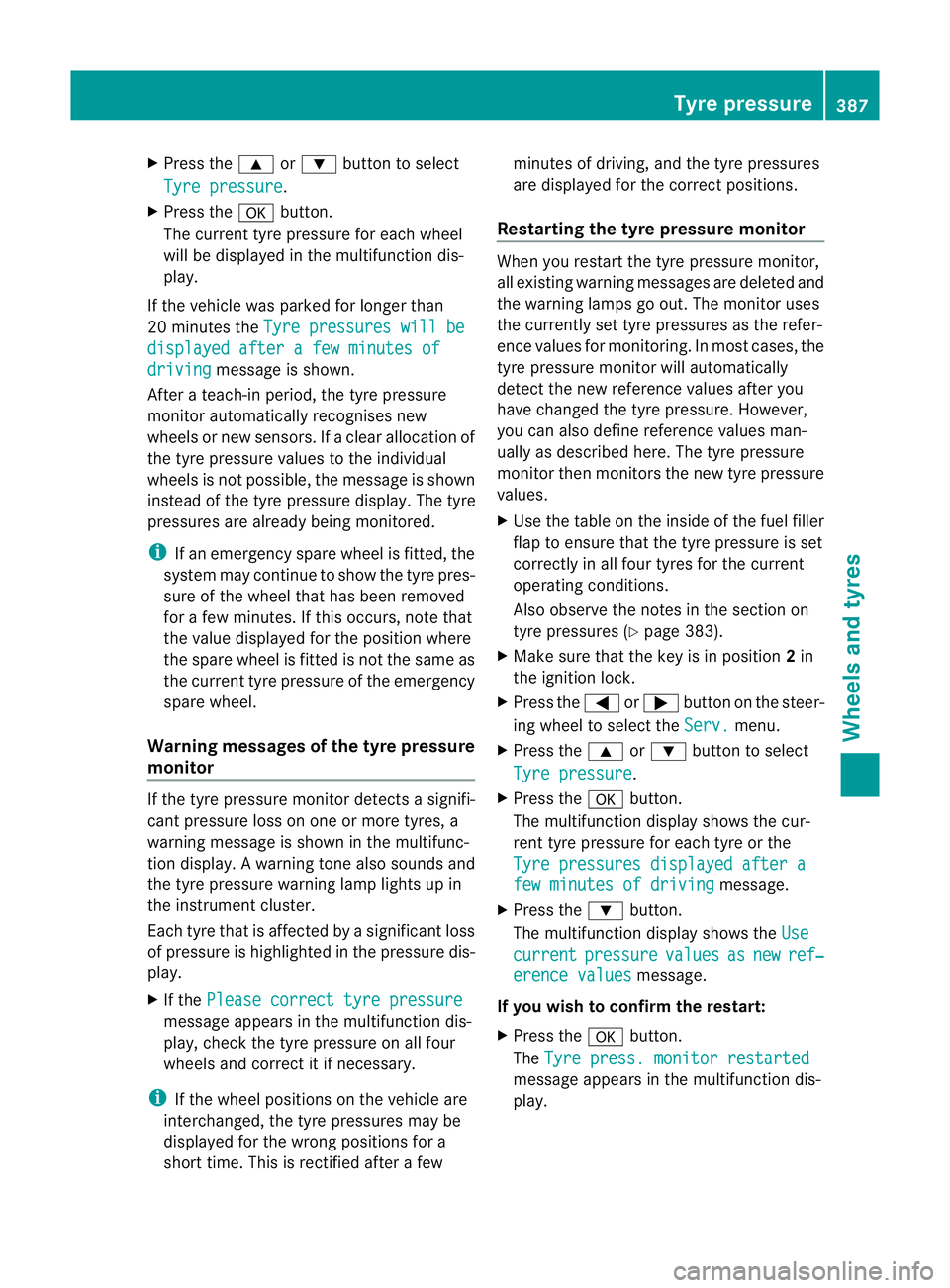
X
Press the 9or: button to select
Tyre pressure .
X Press the abutton.
The curren ttyre pressur efor each wheel
will be displayed in the multifunction dis-
play.
If the vehicle was parked for longer than
20 minutes the Tyre pressures will be displayed after a few minutes of
driving message is shown.
After a teach-in period, the tyre pressure
monitor automatically recognises new
wheels or new sensors. If a clear allocation of
the tyre pressure values to the individual
wheels is not possible, the message is shown
instead of the tyre pressure display .The tyre
pressures are already being monitored.
i If an emergency spare wheel is fitted, the
system may continue to show the tyre pres-
sure of the wheel that has been removed
for a few minutes. If this occurs, note that
the value displayed for the position where
the spare wheel is fitted is not the same as
the current tyre pressure of the emergency
spare wheel.
Warning messages of the tyre pressure
monitor If the tyre pressure monitor detects a signifi-
cant pressure loss on one or more tyres, a
warning message is shown in the multifunc-
tion display. Awarning tone also sounds and
the tyre pressure warning lamp lights up in
the instrument cluster.
Each tyre that is affected by a significant loss
of pressure is highlighted in the pressure dis-
play.
X If the Please correct tyre pressure message appears in the multifunction dis-
play, check the tyre pressure on all four
wheels and correct it if necessary.
i If the wheel positions on the vehicle are
interchanged, the tyre pressures may be
displayed for the wrong positions for a
short time. This is rectified after a few minutes of driving, and the tyre pressures
are displayed for the correct positions.
Restarting the tyre pressure monitor When you restar
tthe tyre pressure monitor,
all existing warning messages are deleted and
the warning lamps go out. The monitor uses
the currently set tyre pressures as the refer-
ence values for monitoring. In most cases, the
tyre pressure monitor will automatically
detect the new referencev alues after you
have changed the tyre pressure .However,
you can also define reference values man-
ually as described here. The tyre pressure
monitor then monitors the new tyre pressure
values.
X Use the table on the inside of the fuel filler
flap to ensure that the tyre pressure is set
correctly in all four tyres for the current
operating conditions.
Also observe the notes in the section on
tyre pressures (Y page 383).
X Make sure that the key is in position 2in
the ignition lock.
X Press the =or; button on the steer-
ing wheel to select the Serv. menu.
X Press the 9or: button to select
Tyre pressure .
X Press the abutton.
The multifunction display shows the cur-
rent tyre pressure for each tyre or the
Tyre pressures displayed after a few minutes of driving message.
X Press the :button.
The multifunction display shows the Use current pressure values as new ref‐
erence values message.
If you wish to confirm the restart:
X Press the abutton.
The Tyre press. monitor restarted message appears in the multifunction dis-
play. Tyre pressure
387Wheels and tyres Z