2012 MERCEDES-BENZ CLS COUPE audio
[x] Cancel search: audioPage 12 of 373
Driver's door
see Door
Drive system
Active Blind Spot Assis t................. 201
Driving abroad
Service24h .................................... 301
Symmetrical dipped bea m............. 110
Driving on flooded roads ..................164
Driving safety system BAS PLUS (Brake Assist System
PLUS) .............................................. .64
Electroni cBrake-force Distribu-
tio n.................................................. 68
ESP ®
(Electroni cStability Pro-
gram) ............................................... 65
ETS/4ETS (Electroni cTraction
System) ........................................... 66
Important safety guidelines .............62
Driving safety systems
ABS (Anti-lock Braking System) .......63
ADAPTIVE BRAKE ............................. 68
Adaptive brake lamps ......................65
BAS (Brake Assist System) ..............63
Overview .......................................... 62
PRE-SAFE ®
Brake ............................ .68
Driving system
Active Lan eKeepin gAssist. ........... 204
Active Parking Assist .....................187
Driving systems
Active Driving Assistance pack-
age ................................................. 201
AIRMATIC ...................................... 181
AMG RIDE CONTROL sports sus-
pension .......................................... 183
ATTENTION ASSIST ........................192
Blind Spot Assist ............................ 197
Cruise control ................................ 165
Display message ............................ 243
Distronic Plu s................................ 170
HOLD function ............................... 179
Lane Keeping Assist ......................199
Lane package ................................ 197
Nigh tView Assist Plus ...................194
PARKTRONI C................................. 185
RAC ESTART (AMG vehicles) ..........180
Reversing camera ..........................190Speed Limi
tAssist ......................... 193
SPEEDTRONIC ............................... 168
Driving tips
AMG cerami cbrakes ..................... 163
Aquaplaning ................................... 164
Automatic transmission .................151
Brakes ........................................... 162
Downhill gradient ........................... 162
Driving abroad ............................... 110
Driving in winter ............................ .164
Driving on flooded road s................ 164
Driving on wet road s...................... 164
General .......................................... 161
Icy road surfaces ........................... 165
Limited braking efficiency on sal-
ted road s....................................... 163
New brake pads/linings ................163
Running-in tips ............................... 140
Snow chains .................................. 331
Symmetrical dipped bea m............. 110
Wet road surface ........................... 163
DVD audio
Operating (on-board computer) .....216
DVD video
Operating (on-board computer) .....216 E
EASY-ENTRY feature Activating/deactivating .................226
Function/notes ............................. 104
EASY-EXIT feature
Crash-responsive ........................... 104
Function/notes ............................. 104
Switching on/off ........................... 226
EASY-PACKc onvenience box ...........277
EBD (electronic brake force distri-
bution) Display message ............................ 234
Function/notes ................................ 68
ECOd isplay
Function/notes ............................. 161
On-board computer .......................213
ECOs tart/stop function
Deactivating/activating .................145
General information .......................144
Electrical fuses
see Fuses Index
9
Page 16 of 373
L
Lamps see Warning and indicator lamps
Lane detection (automatic)
see Lan eKeeping Assist
Lane Keeping Assist
Activating/deactivating .................220
Display message ............................ 246
Function/informatio n.................... 199
Lane package ..................................... 197
Lap time (RACETIMER) ......................228
Lashing eyelets ................................. 276
Lighting see Lights
Lights
Activating/deactivating the Intel-
ligent Ligh tSystem ........................ 222
Activating/deactivating the inte-
rior lighting delayed switch-off .......224
Active light function .......................115
Automatic headlamp mode ............111
Cornering light function .................115
Dipped-bea mheadlamps ............... 111
Driving abroad ............................... 110
Foglamps (extende drange )........... 116
Hazard warning lamps ...................114
Headlamp flasher ........................... 114
Ligh tswitc h................................... 110
Main-beam headlamps ................... 113
Motorway mode ............................. 115
Parking lamps ................................ 113
Rea rfoglamp ................................. 112
Setting brightness for display/
switches (on-board computer) .......222
Setting the ambient lighting
brightness (on-board computer) ....223
Setting the ambient lighting col-
our (on-board computer) ................ 223
Side lamps ..................................... 112
Switching Adaptive Highbeam
Assist on/off ................................. 223
Switching the daytime driving
lights on/off (on-board computer) .222
Switching the exterio rlighting
delayed switch-off on/off (on-
board computer )............................ 223Switching the surround lighting
on/off (on-board computer)
..........223
Turn signals ................................... 113
see Changing bulbs
see Interior lighting
Light sensor (display message) .......239
LIMi ndicator lamp
Cruise control ................................ 165
DISTRONI CPLUS ........................... 172
Variabl eSPEEDTRONIC .................168
Limiting the speed
see SPEEDTRONIC
Loading guidelines ............................272
Locking see Centra llocking
Locking (doors)
Automatic ........................................ 84
Emergency locking ........................... 84
From insid e(central locking but-
ton) .................................................. 83
Locking centrally
see Centra llocking
Locking verification signal (on-
board computer) ............................... 225
Lumbar support Adjusting ....................................... 101
Adjusting the 4-way lumba rsup-
por t................................................ 101
Luxu ry head restraint .........................99 M
M+S tyres ........................................... 330
Main-beam headlamps Display message ............................ 238
Switching Adaptive Highbeam
Assist on/off ................................. 117
Switching on/off ........................... 113
Massag efunction (PULSE) ...............101
Matt finish (cleaning instructions) ..303
Memory card (audio) .........................216
Memory function ............................... 107
Mercedes-Benz Service Centre see Qualified specialist workshop
Message memory (on-board com-
puter) ................................................. .231
Messages see Display messages Index
13
Page 36 of 373
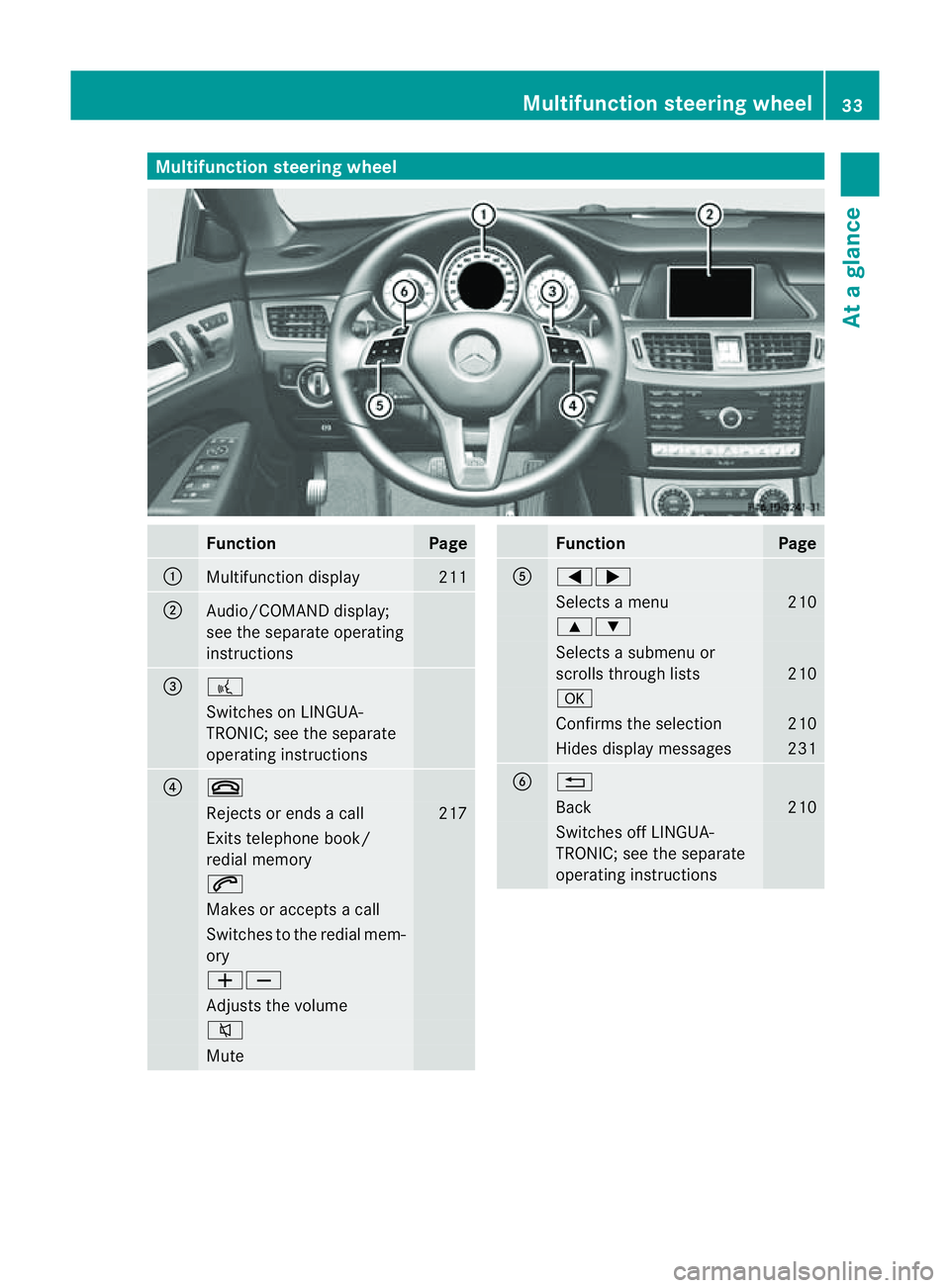
Multifunction steering wheel
Function Page
:
Multifunction display 211
;
Audio/COMAND display;
see the separate operating
instructions
=
?
Switches on LINGUA-
TRONIC; see the separate
operating instructions
?
~
Rejects or ends
acall 217
Exits telephone book/
redial memory
6
Makes or accepts
acall Switches to the redial mem-
ory
WX
Adjusts the volume
8
Mute Function Page
A
=;
Selects
amenu 210
9:
Selects
asubmenu or
scroll sthrough lists 210
a
Confirm
sthe selection 210
Hides display messages 231
B
%
Back 210
Switches off LINGUA-
TRONIC; see the separate
operating instructionsMultifunction steering wheel
33Atag lance
Page 67 of 373
BAS PLUS (Brak
eAssis tSystem Plus)
i Observ ethe "Important safety notes "sec-
tio n(Ypage 62).
BAS PLU Sisonly available on vehicles with
DISTRONIC PLUS.
BAS PLUS provides braking assistance in haz-
ardous situations at speeds greater than
7k m/h and uses rada rsensor technology to
assess the traffic situation.
With the help of the radar sensor system, BAS
PLUS can detec tobstacles that are in the
path of your vehicle for an extended period of
time.
At speeds up to approximately 70 km/h, BAS
PLUS may also detect stationar yobstacles,
for example, stopped or parked vehicles.
To prevent afront-end collision, BAS PLUS
calculates the brake force necessary if:
R yo ua pproach an obstacle, and
R BAS PLUS ha sdetected arisk of collision
If you ar edriving at aspeed over
30 km/h:ify ou depress the brake sharply,
BAS PLUS automatically raises the brake
pressure to avalue adapted to the traffic sit-
uation.
If you are driving at aspeed under
30 km/h:ify ou depress the brake, BAS PLUS
is activated. Brakin gwill be carried out at the
last possible moment.
If BAS PLUS demands particularly high brak-
ing force, preventative passenger protection
measures (PRE-SAFE ®
)a re activated simul-
taneously.
X Keep the brake pedal depressed until the
emergenc ybraking situation is over.
ABS prevent sthe wheels from locking.
BAS PLUS is deactivated and the brakes func-
tion as usual,i f:
R you release the brake pedal.
R there is no longer any danger of arear-end
collision.
R no obstacle is detected in front of your
vehicle. The radar sensor system is switched off auto-
matically in the vicinit
yofradio telescope
facilities in the following vehicles:
R vehicles with COMAND Online and naviga-
tion
R vehicles with Audio 20 and Becker ®
MAP
PILOT
Becker ®
MAP PILOT must be connected;
see the separate operating instructions.
The radar sensor system must be switched off
using the on-board computer in the vicinit yof
radio telescope facilities in the following vehi-
cles:
R vehicles without COMAND Online and nav-
igation
R vehicles without Audio 20 and Becker ®
MAP PILOT
R vehicles for Australia
For information on switching off the radar
sensor system using the on-board computer,
see (Y page 225).
For BAS PLUS to assist you when driving, the
radar sensor system must:
R be switched on (Y page 225)
R be operational (Y page 245)
If the radar sensor system is malfunctioning,
BAS PLUS will not be available. The brake
system is still available with complete brake
boosting effect and BAS. G
WARNING
BAS PLUS cannot alwaysc learly identify
object sand complex traffic situations. BAS
PLUS cannot intervene in these cases. There
is ar isk of an accident.
Always pay careful attention to the traffic sit-
uation and be ready to brake.
In particular, the detection of obstacles can
be impaired if there is:
R dirt on the sensors or anything else cover-
ing the sensors
R snow or heavy rain
R interference by other radar sources 64
Driving safety systemsSafety
Page 73 of 373
In particular, the detection of obstacle
scan
be impaired if there is:
R dirt on the sensors or anything else cover-
ing the sensors
R snow or heavy rain
R interference by other radars ources
R the possibility of strongr adar reflections,
for example, in multi-storey car parks
R an arrow vehicle travelling in front,e .g. a
motorcycle
R av ehicle travelling in front on adifferent
line G
WARNING
PRE-SAFE ®
Brake does not react:
R to people or animals
R to oncoming vehicles
R to crossin gtraffic
R when cornering
As aresult, PRE-SAFE ®
Brake may neither
give warnings nor intervene in all critical sit-
uations. There is arisk of an accident.
Always pay careful attention to the traffic sit-
uation and be ready to brake.
In order to maintain the appropriate distance
to the vehicle in front and thus prevent acol-
lision, you must apply the brakes yourself.
X To activate/deactivate: activate or deac-
tivate PRE-SAFE ®
Brake in the on-board
computer (Y page 219).
When PRE-SAFE ®
Brake is activated, the
Ä symbol appears in multifunction dis-
play, as long as the HOLD function is deac-
tivated (Y page 179). On vehicles with the
Active Parking Assist driving system, the
Ä symbol is displayed when position P
is engaged or you are driving faster than
35 km/h.
For PRE-SAFE ®
Brake to assist you when driv-
ing, the radar sensor system must be
switched on (Y page 225) and be opera-
tional. The radar sensor system is switched off auto-
matically in the vicinit
yofradio telescope
facilities in the following vehicles:
R vehicles with COMAND Online and naviga-
tion
R vehicles with Audio 20 and Becker ®
MAP
PILOT
Becker ®
MAP PILOT must be connected;
see the separate operating instructions.
The radar sensor system must be switched off
using the on-board computer in the vicinit yof
radio telescope facilities in the following vehi-
cles:
R vehicles without COMAND Online and nav-
igation
R vehicles without Audio 20 and Becker ®
MAP PILOT
R vehicles for Australia
For information on switching off the radar
sensor system using the on-board computer,
see (Y page 225).
Following damage to the front end of the vehi-
cle, have the configuration and operation of
the radar sensors checked at aqualified spe-
cialist workshop. This also applies to colli-
sions at slow speeds where there is no visible
damage to the front of the vehicle. Anti-theft systems
Immobiliser
X To activat ewith th ekey: remove th ekey
fro mt heignitio nlock.
X To activat ewith KEYLESS-GO: switch the
ignitio noff and open the driver's door.
X To deactivate: switch on the ignition.
The immobiliser prevents you rvehicle from
being started without the correct key.
When leaving the vehicle, alway stake the key
with you and lock the vehicle. Anyone can
start the engin eifavalid key has been left
inside the vehicle. 70
Anti-theft systemsSafety
Page 214 of 373
X
To activate the on-board computer: turn
the key to position 1in the ignition lock.
Yo uc an contro lthe multifunctio ndisplay and
the settings in the on-board computer using
the buttons on the multifunction steering
wheel.
Left control panel =
; R
Calls up the men uand men ubar 9
:
Pres
sbriefly:
R Scrolls through lists
R Selects asubmen uorfunction
R In the Audio menu: selects a
stored station ,anaudio track or
av ideo scene
R In the Tel (telephone) menu:
switches to the phon ebook and
selects aname or telephone
number 9
:
Pres
sand hold:
R In the Audio menu: selects the
previous/next station or selects
an audio track or avideo scene
using rapid scrolling
R In the Tel (Telephone) menu:
start srapid scrolling if the phone
book is open a R
Confirms selection/display mes-
sage
R In the Tel (telephone) menu:
switches to the telephon ebook
and start sdialling the selected
number
R In the Audio menu: stops the
station searc hfunction at the
desire dstation Righ
tcontrol panel ~ R
Reject sorendsac all
R Exits telephone book/redial
memory 6 R
Makes or accept sacall
R Switche stotheredial memory W
X R
Adjust sthe volume 8 R
Mute Back button
%
Press briefly:
R
Back
R Switche soff LINGUATRONIC;
see th eseparate operating
instructions
R Hide sdisplay messages/calls
up th elast Trip men
ufunction
used
R Exits th etelephone book/redial
memory %
Press and hold:
R
Calls up th estandar ddisplay in
the Trip menu
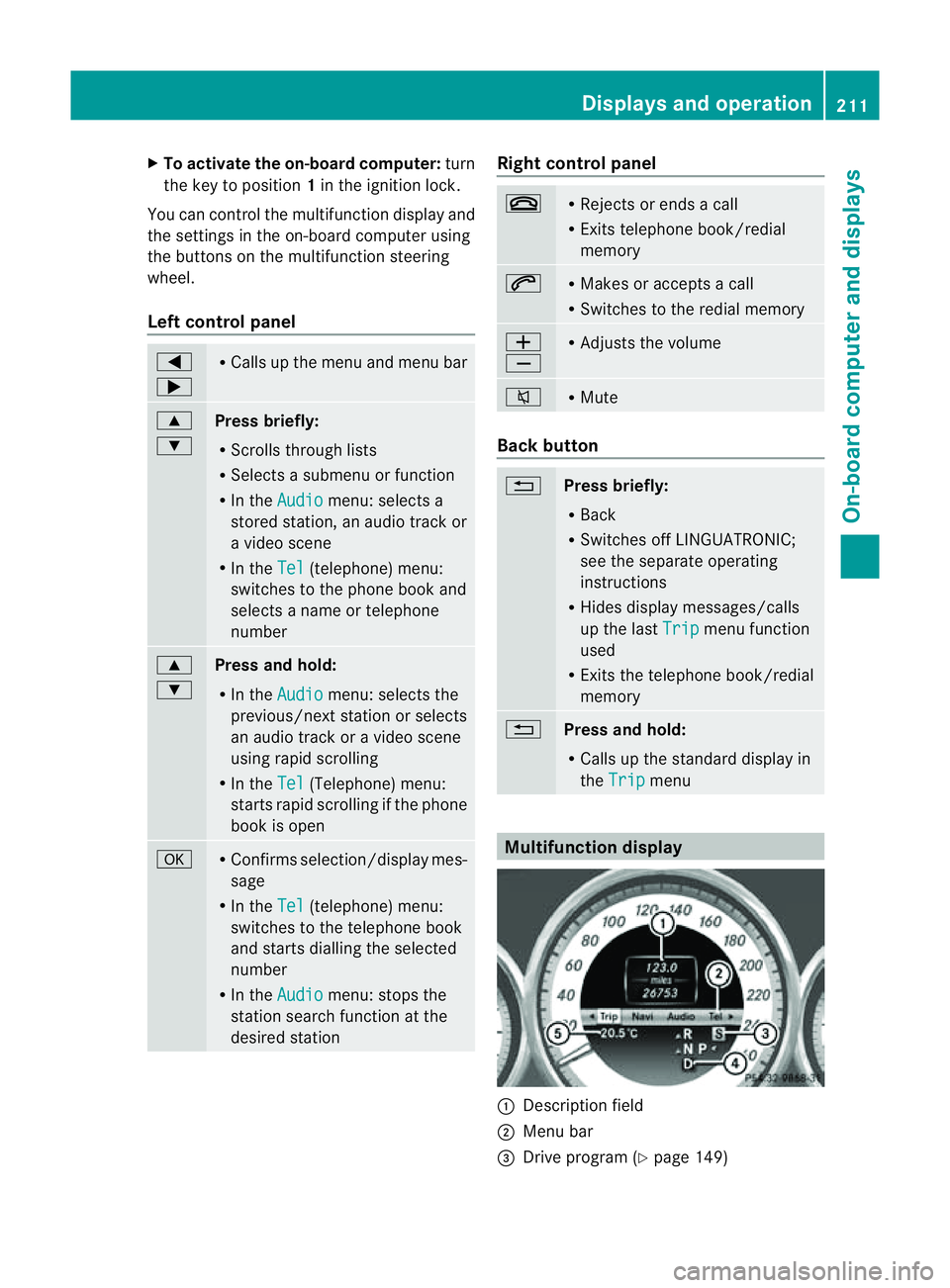
Multifunction display
:
Description field
; Men ubar
= Drive program (Y page 149) Displays and operation
211On-boardcomputer and displays Z
Page 215 of 373
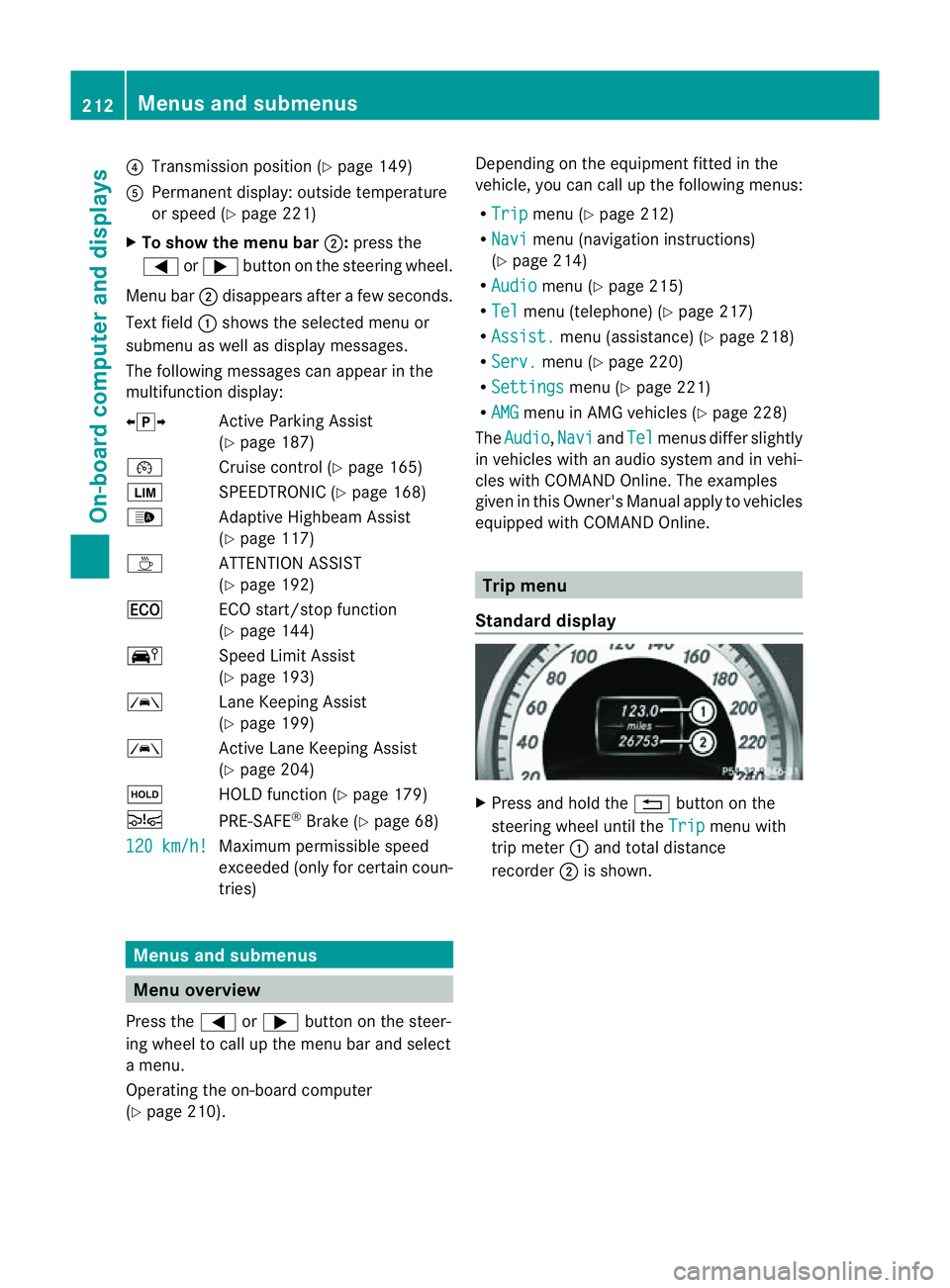
?
Transmission position (Y page 149)
A Permanen tdisplay: outside temperature
or speed (Y page 221)
X To show th emenu bar ;:press the
= or; button on the steerin gwheel.
Menu bar ;disappears after afew seconds.
Text field :shows the selected menu or
submenu as well as displaym essages.
The following messages can appearint he
multifunction display:
XjY Active Parking Assist
(Y page 187)
¯ Cruise control (Y page 165)
È SPEEDTRONIC (Y page 168)
_ Adaptive Highbeam Assist
(Ypage 117)
À ATTENTION ASSIST
(Ypage 192)
¤ ECO start/stop function
(Ypage 144)
Ä Speed Limit Assist
(Ypage 193)
à Lane Keeping Assist
(Ypage 199)
à Active Lane Keeping Assist
(Ypage 204)
ë HOLD function (Y page 179)
Ä PRE-SAFE®
Brake (Y page 68)
120 km/h! Maximum permissible speed
exceeded (only for certain coun-
tries)
Menus and submenus
Menu overview
Press the =or; button on the steer-
ing wheel to call up the menu bar and select
am enu.
Operating the on-board computer
(Y page 210). Depending on the equipment fitted in the
vehicle, you can call up the following menus:
R
Trip menu (Y
page 212)
R Navi menu (navigation instructions)
(Y page 214)
R Audio menu (Y
page 215)
R Tel menu (telephone) (Y
page 217)
R Assist. menu (assistance) (Y
page 218)
R Serv. menu (Y
page 220)
R Settings menu (Y
page 221)
R AMG menu in AMG vehicles (Y
page 228)
The Audio ,
Navi and
Tel menus differ slightly
in vehicles with an audios ystem and in vehi-
cles with COMAND Online. The examples
given in this Owner's Manual apply to vehicles
equipped with COMAND Online. Trip menu
Standard display X
Press and hold the %button on the
steering wheel until the Trip menu with
trip meter :and total distance
recorder ;is shown. 212
Menus and submenusOn-board computer and displays
Page 217 of 373
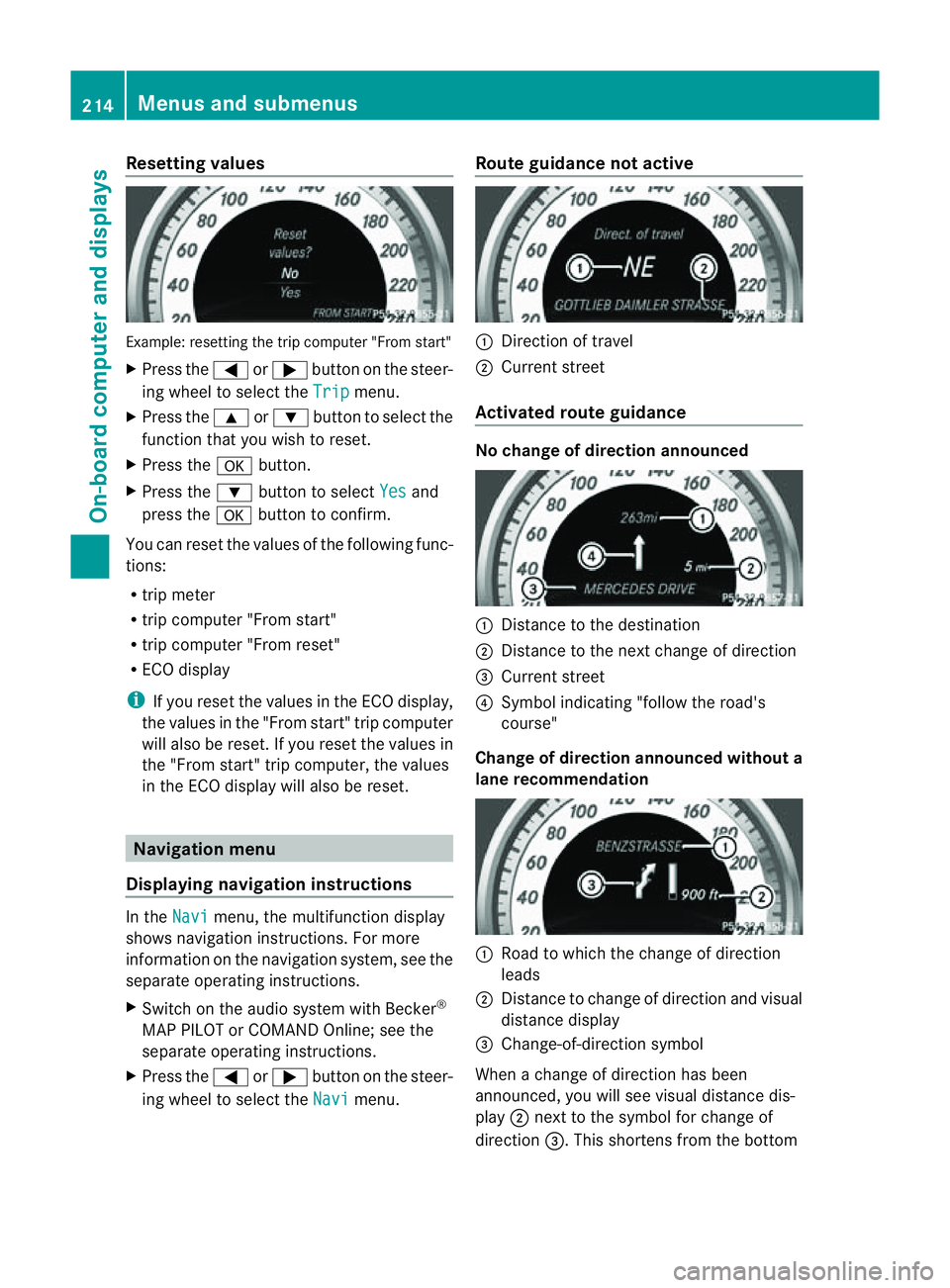
Resetting values
Example
:resetting the trip compute r"Fro ms tart"
X Press the =or; button on the steer-
ing wheel to select the Trip menu.
X Press the 9or: button to select the
function that yo uwishtor eset.
X Press the abutton.
X Press the :button to select Yes and
press the abutton to confirm.
Yo uc an reset the value softhe following func-
tions:
R trip meter
R trip compute r"Fro ms tart"
R trip compute r"Fro mr eset"
R ECO display
i If yo ureset the value sinthe ECO display,
the values in the "From start" trip computer
will also be reset. If you reset the values in
the "From start" trip computer, the values
in the ECO displayw ill also be reset.Navigation menu
Displaying navigation instructions In the
Navi menu, the multifunction display
shows navigation instructions. For more
information on the navigation system, see the
separate operating instructions.
X Switch on the audios ystem with Becker®
MAP PILOT or COMAND Online; see the
separate operating instructions.
X Press the =or; button on the steer-
ing wheel to select the Navi menu.Route guidance not active :
Direction of travel
; Current street
Activated route guidance No change of direction announced
:
Distancetot he destination
; Distancetot he next change of direction
= Current street
? Symbol indicating "follow the road's
course"
Change of direction announced without a
lane recommendation :
Road to which the change of direction
leads
; Distancetoc hange of direction and visual
distance display
= Change-of-direction symbol
When achange of direction has been
announced, you will see visual distance dis-
play ;next to the symbol for change of
direction =.This shortens from the bottom 214
Menus and submenusOn-board computer and displays