2012 MERCEDES-BENZ CLS COUPE turn signal
[x] Cancel search: turn signalPage 10 of 373
Centre console
Lower section .................................. 35
Lowe rsection (AMG vehicles) ..........36
Uppe rsection .................................. 34
Changing bulbs
Important safety notes ..................119
Overview of bul btypes .................. 120
Reversing lamps ............................ 120
Child-proof locks
Important safety notes ....................61
Rea rdoors ....................................... 62
Children
In the vehicle ................................... 52
Restraint systems ............................ 52
Child seat
Automatic recognition .....................54
ISOFIX .............................................. 56
On the front-passenger sea t............ 54
Problem (malfunction) .....................58
Recommendations ...........................60
Suitable positions ............................ 58
Top Tether ....................................... 57
Cigarette lighter ................................ 283
Cleaning Mirro rturn signal ........................... 304
Climate control
Auxiliary heating/ventilatio n.......... 132
Controlling automatically ...............128
Convenience opening/closing
(air-recirculatio nmode) ................. 131
Cooling with aird ehumidification..127
Demisting the windows .................. 130
Demisting the windscree n............. 130
Important safety notes ..................124
Indicator lamp ................................ 128
Information on using
THERMOTRONIC automatic cli-
mate control .................................. 127
Notes on using THERMATI Cauto-
matic climate control .....................125
Overview of systems ......................124
Problems with cooling with air
dehumidification ............................ 128
Problem with the rear window
heating .......................................... 131
Rea rcontrol panel ......................... 126
Setting the aird istribution.............129
Setting the airflow .........................129Setting the airv
ents...................... 136
Setting the climate mode (AIR
FLOW) ............................................ 128
Setting the temperature ................128
Switching air-recirculation mode
on/off ............................................ 131
Switching on/off ........................... 127
Switching residua lheato n/off ......132
Switching the rear window heat-
ing on/off ...................................... 131
Switching the ZONE function on/
off .................................................. 130
THERMATI Cautomatic climate
control (2-zone) ............................. 125
THERMOTRONIC (3-zone) auto-
matic climate control .....................126
Cockpit
Overview .......................................... 28
see Instrument cluster
Collapsibl eemergency spare
wheel see Emergency spare wheel
COMAND display
Cleaning ......................................... 305
COMAND Online
see separate operating instructions
Combination switch ..........................113
Consumptio nstatistic s(on -board
computer) .......................................... 213
Convenience box ............................... 277
Convenience closing feature ..............89
Convenience opening/closing (air-
recirculation mode) ........................... 131
Convenience opening feature ............89
Coolan t(engine)
Checkin gthe level ......................... 299
Display message ............................ 240
Important safety notes ..................365
Temperature (on-board computer) .228
Temperature gauge ........................ 210
Warning lamp ................................. 267
Cooling
see Climate control
Cornerin glight function
Display message ............................ 237
Function/notes ............................. 115
Crash-responsive emergency light-
ing ....................................................... 119 Index
7
Page 16 of 373
L
Lamps see Warning and indicator lamps
Lane detection (automatic)
see Lan eKeeping Assist
Lane Keeping Assist
Activating/deactivating .................220
Display message ............................ 246
Function/informatio n.................... 199
Lane package ..................................... 197
Lap time (RACETIMER) ......................228
Lashing eyelets ................................. 276
Lighting see Lights
Lights
Activating/deactivating the Intel-
ligent Ligh tSystem ........................ 222
Activating/deactivating the inte-
rior lighting delayed switch-off .......224
Active light function .......................115
Automatic headlamp mode ............111
Cornering light function .................115
Dipped-bea mheadlamps ............... 111
Driving abroad ............................... 110
Foglamps (extende drange )........... 116
Hazard warning lamps ...................114
Headlamp flasher ........................... 114
Ligh tswitc h................................... 110
Main-beam headlamps ................... 113
Motorway mode ............................. 115
Parking lamps ................................ 113
Rea rfoglamp ................................. 112
Setting brightness for display/
switches (on-board computer) .......222
Setting the ambient lighting
brightness (on-board computer) ....223
Setting the ambient lighting col-
our (on-board computer) ................ 223
Side lamps ..................................... 112
Switching Adaptive Highbeam
Assist on/off ................................. 223
Switching the daytime driving
lights on/off (on-board computer) .222
Switching the exterio rlighting
delayed switch-off on/off (on-
board computer )............................ 223Switching the surround lighting
on/off (on-board computer)
..........223
Turn signals ................................... 113
see Changing bulbs
see Interior lighting
Light sensor (display message) .......239
LIMi ndicator lamp
Cruise control ................................ 165
DISTRONI CPLUS ........................... 172
Variabl eSPEEDTRONIC .................168
Limiting the speed
see SPEEDTRONIC
Loading guidelines ............................272
Locking see Centra llocking
Locking (doors)
Automatic ........................................ 84
Emergency locking ........................... 84
From insid e(central locking but-
ton) .................................................. 83
Locking centrally
see Centra llocking
Locking verification signal (on-
board computer) ............................... 225
Lumbar support Adjusting ....................................... 101
Adjusting the 4-way lumba rsup-
por t................................................ 101
Luxu ry head restraint .........................99 M
M+S tyres ........................................... 330
Main-beam headlamps Display message ............................ 238
Switching Adaptive Highbeam
Assist on/off ................................. 117
Switching on/off ........................... 113
Massag efunction (PULSE) ...............101
Matt finish (cleaning instructions) ..303
Memory card (audio) .........................216
Memory function ............................... 107
Mercedes-Benz Service Centre see Qualified specialist workshop
Message memory (on-board com-
puter) ................................................. .231
Messages see Display messages Index
13
Page 21 of 373

Important safety information
.........272
Rea r............................................... 275
Under driver's seat/front-
passenger sea t.............................. 274
Stowage net ....................................... 275
Stowage space Stowag enet ................................... 275
Stowage well beneath the boot
floor .................................................... 278
Summer tyres .................................... 330
Sun visor ............................................ 281
Supplement Restrain tSystem
see SRS (Supplemental Restraint
System)
Surround lighting (on-board com-
puter) ................................................. .223
Suspensio ntuning
AIRMATIC ...................................... 182
AMG RIDE CONTROL sports sus-
pension .......................................... 183
SETUP (on-board computer) ..........228
Switchin goff the alarm (ATA) ............71 T
Tail lamps Display message ............................ 238
Tank
see Fuel tank
Technical data
Emergency spare wheel .................354
Information .................................... 356
Tyres/wheel s................................. 341
Vehicle data ................................... 366
Telephone
Accepting acall............................. 217
Display message ............................ 256
Menu (on-board computer) ............217
Number from the phone book ....... .217
Redialling ....................................... 218
Rejecting/ending acall................. 217
Telephone compartment ................274
Temperature
Coolant .......................................... 210
Coolant (on-board computer) ......... 228
Engine oil (on-board computer) ...... 228
Outside temperature ..................... .210
Setting (climate control) ................128TEMPOMAT
Function/notes ............................. 165
Theft-deterren tsystem
ATA (Anti-Theft Alarm system) .........71
Immobiliser ...................................... 70
Through-loading feature ...................275
Timing (RACETIMER) .........................228
Tiredness Assist see ATTENTION ASSIST
TIREFIT kit .......................................... 313
Top Tether ............................................ 57
Total distanc erecorder .................... 212
Tow-away protection ..........................71
Towing Important safety notes ..................320
With the rear axle raised ................322
Towing away
Fitting the towing eye. ...................321
Removing the towing eye. ..............322
With both axle sonthe ground .......322
Tow-starting
Emergency engine starting ............323
Important safety notes ..................320
Transmission
see Automatic transmission
Transmission position display .........149
Transmission position display
(DIRECT SELECTl ever)...................... 149
Transporting the vehicle ..................323
Trim pieces (cleaning instructions) .306
Trip computer (on-board com-
puter) ................................................. .213
Trip meter Calling up ....................................... 212
Resetting (on-board computer) ......214
Turn signal
see Turn signals
Turn signals
Switching on/off ........................... 113
TV
Operating (on-board computer) .....216
see Separate operating instructions
Two-way radio
Frequencies ................................... 357
Installatio n..................................... 357
Transmission output (maximum ).... 357 18
Index
Page 35 of 373

Warning and indicator lamps
Function Page
:
÷
ESP® 263
M
SPORT handling
mode in AMG vehicles 264
;
·
Distance warning 269
=
å
ESP®
OFF 263
?
#!
Turn signals 113
A
J
Brakes (red) 260
B
J
Only for certain vehi-
cles: brakes (yellow) 260
C
!
ABS 261
D
6
SRS 266
E
;
Engine diagnostics 266
F
h
Tyre pressure monitor 270 Function Page
G
ü
Seat belt 259
H
%
Diesel engine: pre-
glow 143
÷
ESP®
in AMG vehicles 264
I
?
Coolant 267
J
K
Main-beam headlamp 113
K
L
Dipped-bea mhead-
lamps 111
L
T
Side lamps 112
M
R
Rear foglamp 112
N
N
This lamp has no func-
tion O
8
Reserve fuel 26732
Instrument clusterAt
ag lance
Page 58 of 373
R
only use aforward-facin gchild restraint
system on the front-passenger seat and
move the front-passenger seat to the rear-
most position.
R have the automatic child seat recognition
checked at aqualified specialist workshop.
To ensure that the automatic child seat rec-
ognition on the front-passenger seat func-
tions/communicates correctly, never place
objects, e.g. acushion, under the child
restraint system. The entire base of the child
restraint system must always rest on the seat
cushion. An incorrectly fitted child restraint
system cannot perform its intended protec-
tive function in the event of an accident, and
could lead to injuries. G
WARNING
Do not place electronic devices on the front-
passenger seat, e.g.:
R laptops, when switched on
R mobile phones
R cards with transponders, e.g. ski passes or
access cards
Signals from electronic equipment can cause
interference in the automatic child seat rec-
ognition sensor system. This can lead to a
system malfunction. This may cause the
4 PASSENGER AIRBAG OFF indicator
lamp to light up without there being achild
seat with transponders for automatic child
seat recognition fitted. The front-passenger
airbag will not then deploy during an accident.
It is also possible that the 6SRS warning
lamp lights up and/or the 4PASSENGER
AIRBAG OFF indicator lamp does not light up
briefly when you turn the key in the ignition
lock to position 2. If your vehicle does not have automatic child
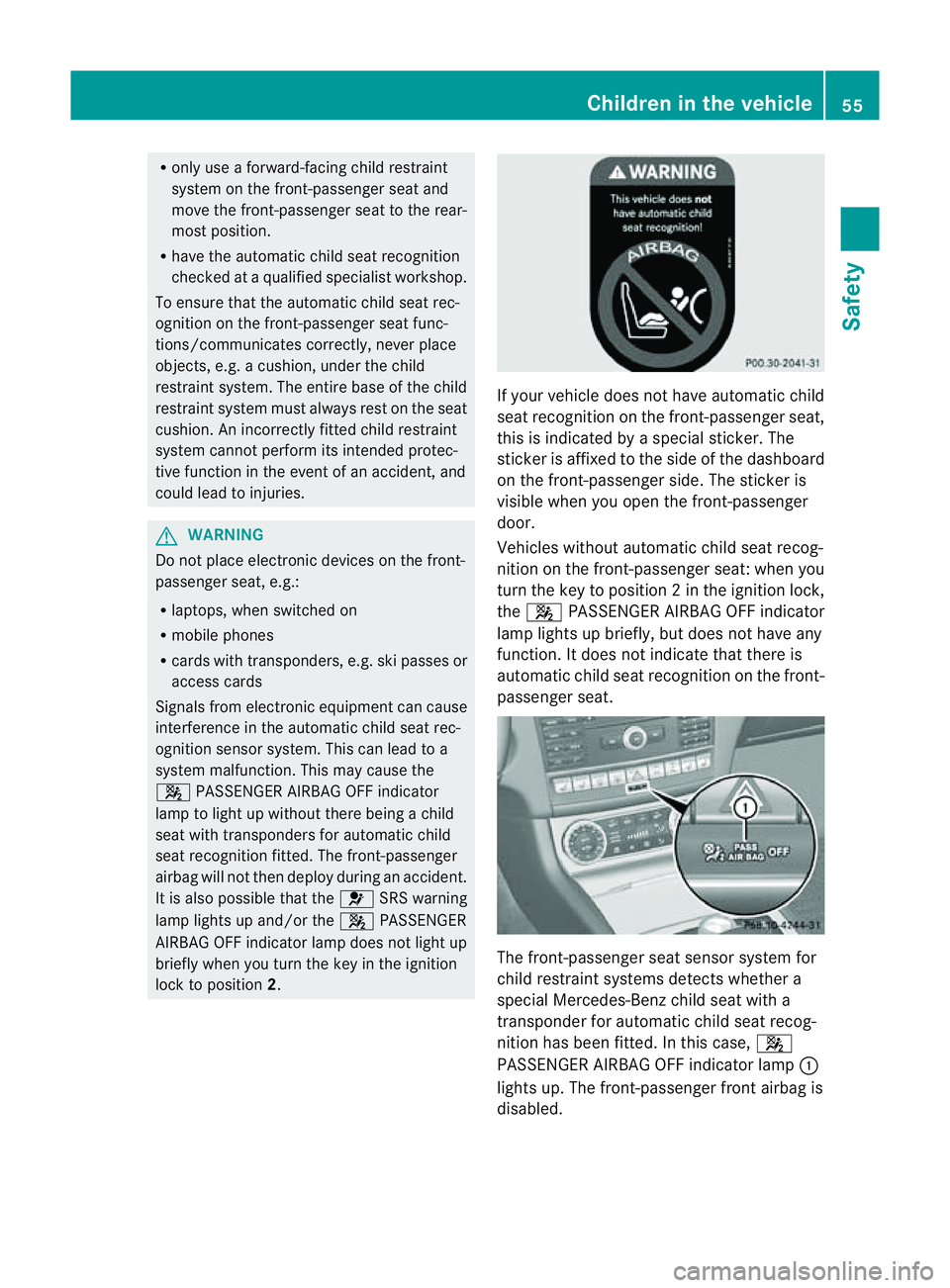
seat recognition on the front-passenger seat,
this is indicated by
aspecial sticker. The
sticker is affixed to the side of the dashboard
on the front-passenger side. The sticker is
visible when you open the front-passenger
door.
Vehicles without automatic child seat recog-
nition on the front-passenger seat: when you
turn the key to position 2inthe ignition lock,
the 4 PASSENGER AIRBAG OFF indicator
lamp lights up briefly, but does not have any
function. It does not indicate that there is
automatic child seat recognition on the front-
passenger seat. The front-passenger seat sensor system for
child restraint systems detectsw
hether a
special Mercedes-Ben zchild seat with a
transponder for automatic child seat recog-
nition has been fitted. In this case, 4
PASSENGER AIRBAG OFF indicator lamp :
lights up. The front-passenger front airbag is
disabled. Children in the vehicle
55Safety Z
Page 80 of 373
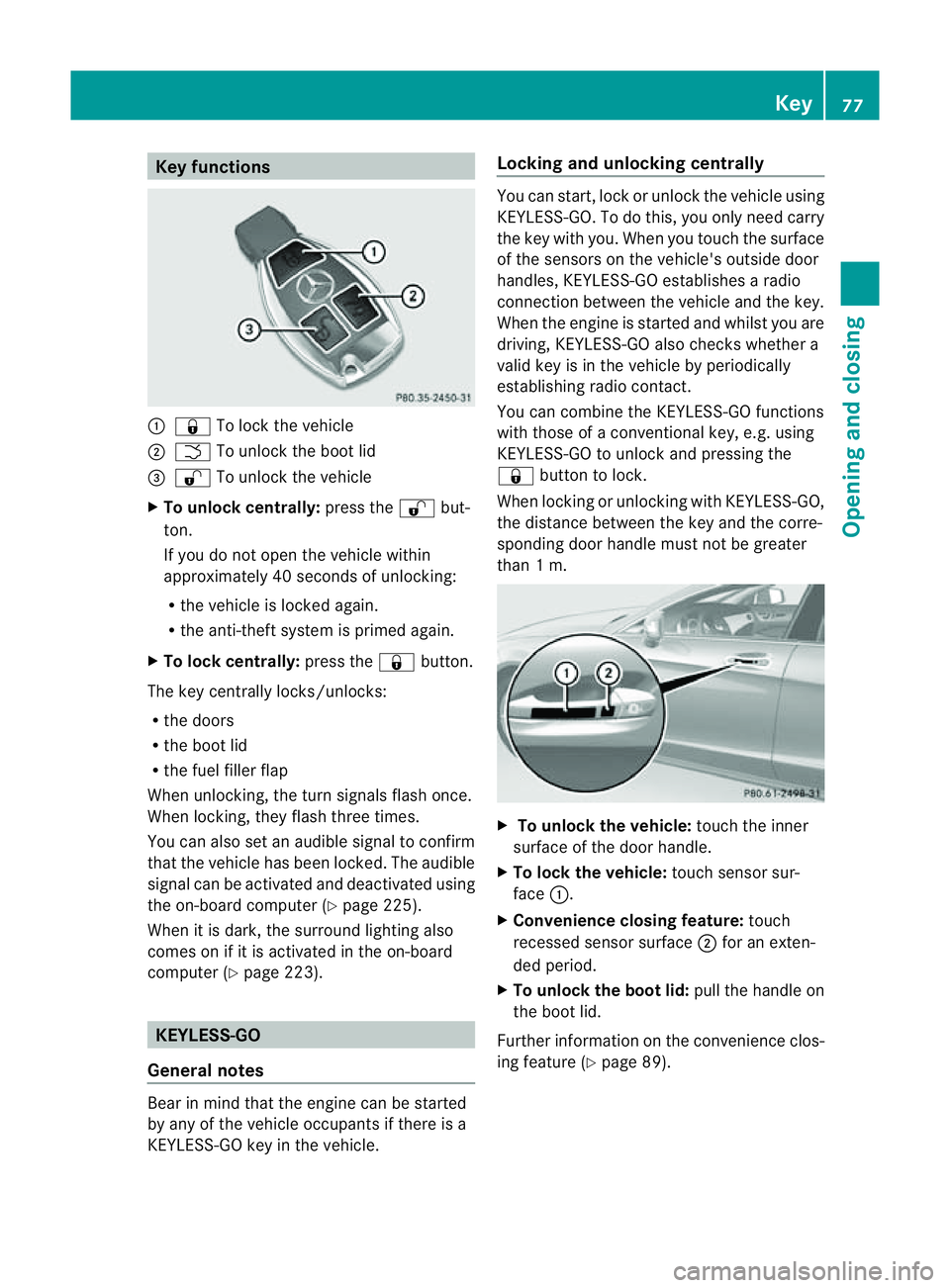
Key functions
:
& To loc kthe vehicle
; F To unlock the boot lid
= % To unlock the vehicle
X To unlock centrally: press the%but-
ton.
If you do not open the vehicle within
approximately 40 seconds of unlocking:
R the vehicle is locked again.
R the anti-theft system is primed again.
X To lock centrally: press the&button.
The key centrally locks/unlocks:
R the doors
R the boot lid
R the fuel filler flap
When unlocking, the turn signals flash once.
When locking, they flash three times.
You can also set an audible signal to confirm
that the vehicle has been locked. The audible
signal can be activated and deactivated using
the on-board computer (Y page 225).
When it is dark, the surround lighting also
comes on if it is activated in the on-board
computer (Y page 223). KEYLESS-GO
General notes Bear in mind that the engine can be started
by any of the vehicle occupants if there is a
KEYLESS-GO key in the vehicle. Locking and unlocking centrally You can start, lock or unlock the vehicle using
KEYLESS-GO. To do this, you only need carry
the key with you. When you touch the surface
of the sensors on the vehicle's outside door
handles, KEYLESS-GO establishes
aradio
connection between the vehicle and the key.
When the engine is started and whilst you are
driving, KEYLESS-GO also checksw hether a
valid key is in the vehicle by periodically
establishing radio contact.
You can combine the KEYLESS-GO functions
with those of aconventional key, e.g. using
KEYLESS-GO to unlock and pressing the
& button to lock.
When locking or unlocking with KEYLESS-GO,
the distance between the key and the corre-
sponding door handle must not be greater
than 1m. X
To unlock the vehicle: touch the inner
surface of the door handle.
X To lock the vehicle: touch sensor sur-
face :.
X Convenience closing feature: touch
recessed sensor surface ;for an exten-
ded period.
X To unlock the boot lid: pull the handle on
the boot lid.
Further information on the convenience clos-
ing feature (Y page 89). Key
77Opening and closing Z
Page 81 of 373
Changing th
esettings of th elocking
system
You can chang ethe settings of th elocking
system. This mean stha tonlyt he driver' sdoor
and th efuel fille rflap are unlocked when the
vehicle is unlocked. This is useful if you fre-
quently travel on your own.
X To chang ethe setting: press and hold
down the %and& buttons on the
key simultaneously for approximately six
seconds until the battery chec klamp
flashes twice ( Ypage 79).
i If th esettin goft helockin gsystem is
changed within th esignal range of th evehi-
cle ,pressin gthe & or% button:
R locks or
R unlock sthe vehicle
The ke ynow function sasfollows:
X To unlock th edriver's door: pressthe
% buttononce.
X To unlock centrally: pressthe % but-
to nt wice.
X To lock centrally: pressthe & button.
The KEYLESS-GO function is changed as fol-
lows:
X To unlock th edriver's door: touch the
inner surface of th edoor handle on the
driver' sdoor.
X To unlock centrally: touch theinner sur-
fac eoft hedoor handle on th efront-
passenger door or th erear door.
X To lock centrally: touch theouter sensor
surface on on eofthedoor handles.
X To restor ethe factor ysettings: press
and hold down the %and& buttons
simultaneousl yfor approximately six sec-
onds until th ebattery check lamp flashes
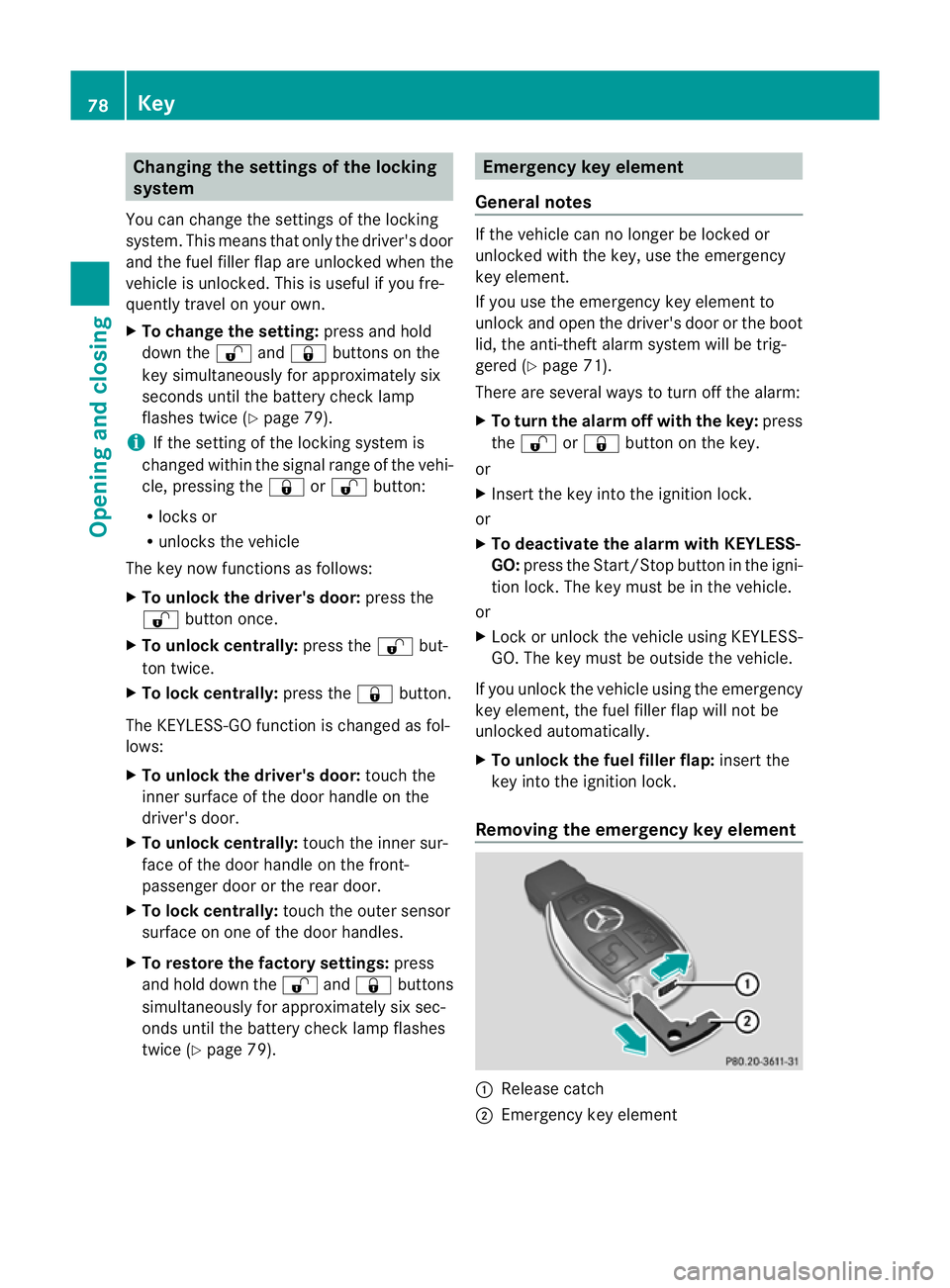
twice (Y page 79). Emergency key element
General notes If th
evehicle can no longer be locke dor
unlocked wit hthe key, use th eemergency
ke ye lement.
If you use th eemergenc ykey element to
unlock and open the driver's door or the boot
lid, the anti-thef talarm system will be trig-
gered (Y page 71).
There are several ways to tur noff the alarm:
X To turn the alarm off with the key: press
the % or& button on the key.
or
X Insert the key into the ignition lock.
or
X To deactivate the alarm with KEYLESS-
GO: press the Start/Stop button in the igni-
tion lock. The key must be in the vehicle.
or
X Lock or unlock the vehicle using KEYLESS-
GO. The key must be outside the vehicle.
If you unlock the vehicle using the emergency
key element, the fuel filler fla pwilln ot be
unlocked automatically.
X To unlock the fuel filler flap: insert the
key into the ignition lock.
Removing the emergency key element :
Releas ecatch
; Emergency key element 78
KeyOpening and closing
Page 116 of 373
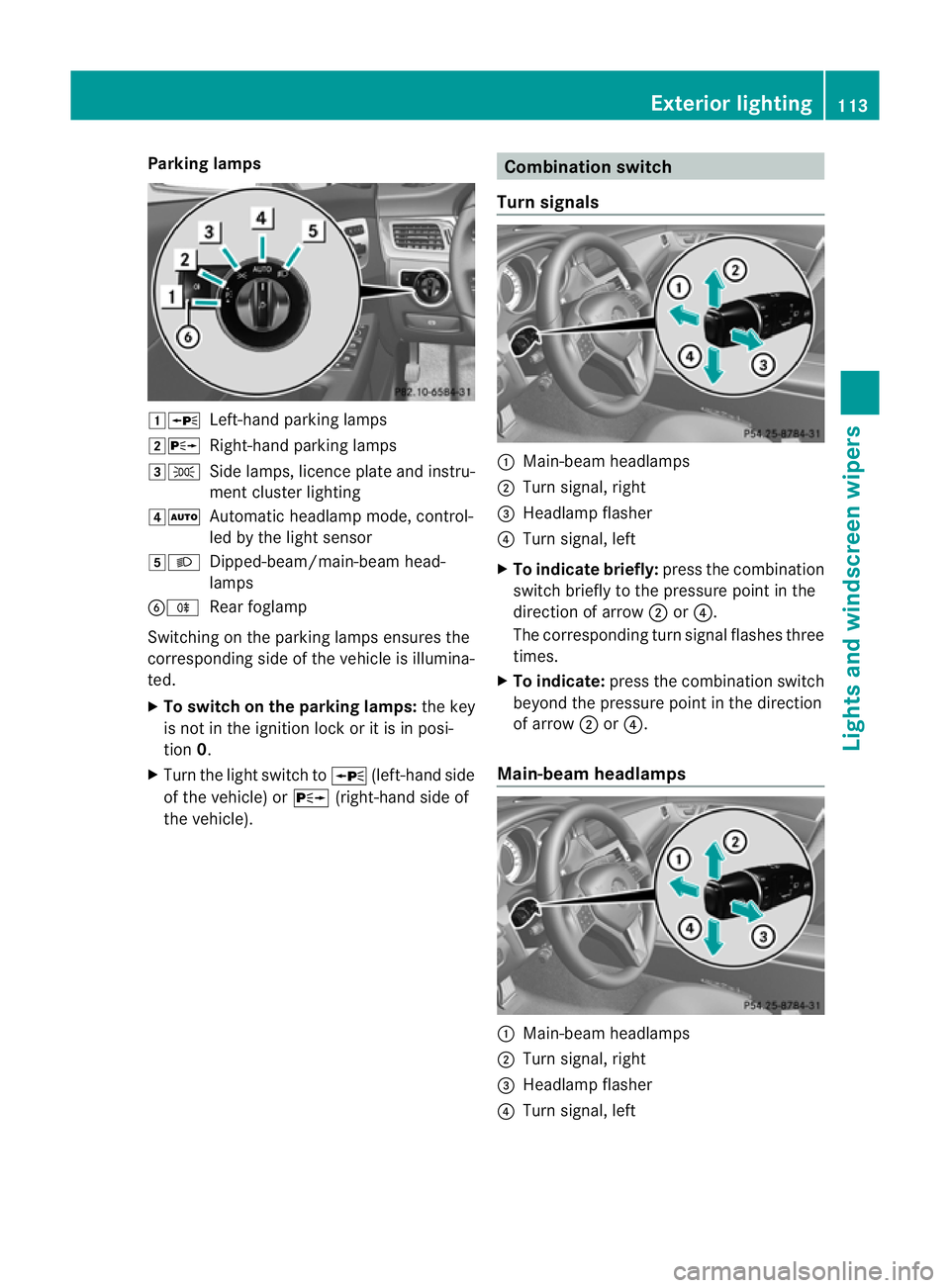
Parking lamps
1W
Left-hand parking lamps
2X Right-hand parking lamps
3T Side lamps, licence plate and instru-
ment cluster lighting
4Ã Automatic headlamp mode, control-
led by the light sensor
5L Dipped-beam/main-beam head-
lamps
BR Rear foglamp
Switchingont he parking lamps ensures the
correspondin gside of the vehicle is illumina-
ted.
X To switch on the parking lamps: the key
is not in the ignition lock or it is in posi-
tion 0.
X Turn the light switch to W(left-hand side
of the vehicle) or X(right-hand side of
the vehicle). Combination switch
Turns ignals :
Main-beam headlamps
; Turn signal, right
= Headlamp flasher
? Turn signal, left
X To indicate briefly: press the combination
switch briefly to the pressure point in the
direction of arrow ;or?.
The correspondin gturn signal flashes three
times.
X To indicate: press the combination switch
beyond the pressure point in the direction
of arrow ;or?.
Main-beam headlamps :
Main-beam headlamps
; Turn signal, right
= Headlamp flasher
? Turn signal, left Exterior lighting
113Lights and windscreen wipers Z