2012 MERCEDES-BENZ CLS COUPE steering
[x] Cancel search: steeringPage 253 of 373
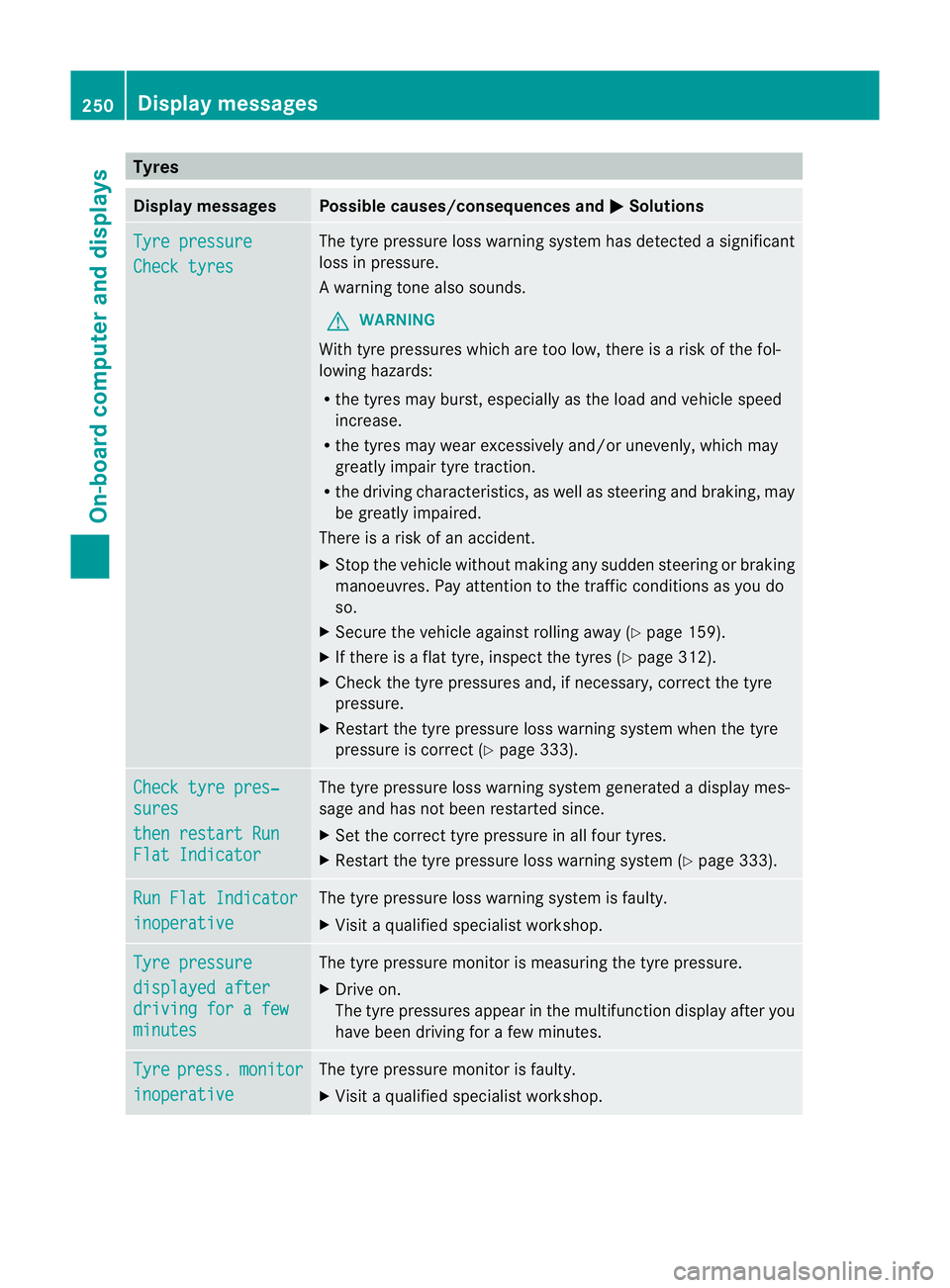
Tyres
Display messages Possible causes/consequence
sand M Solutions
Tyr
epressure Check tyres The tyr
epressure loss warnin gsystem ha sdetecte das ignificant
loss in pressure.
Aw arning tone also sounds.
G WARNING
Wit htyrep ressure swhicha re to olow, there is ariskoft he fol-
lowing hazards:
R the tyres may burst, especiallyast he load and vehicle speed
increase.
R the tyres may wear excessively and/or unevenly, which may
greatly impair tyre traction.
R the driving characteristics, as well as steering and braking, may
be greatly impaired.
There is arisk of an accident.
X Stop the vehicle without making any sudden steering or braking
manoeuvres. Pay attention to the traffic conditionsasy ou do
so.
X Secure the vehicle against rolling away (Y page 159).
X If there is aflat tyre, inspect the tyres (Y page 312).
X Check the tyre pressures and, if necessary, correct the tyre
pressure.
X Restart the tyre pressure loss warning system when the tyre
pressure is correct (Y page 333).Check tyre pres‐
sures
then restart Run
Flat Indicator The tyre pressure loss warning system generated
adisplaym es-
sage and has not been restarted since.
X Set the correct tyre pressure in all four tyres.
X Restart the tyre pressure loss warning system (Y page 333).Run Flat Indicator
inoperative The tyre pressure loss warning system is faulty.
X
Visit aqualified specialist workshop. Tyre pressure
displayed after
driving for
afew minutes The tyre pressure monitor is measuring the tyre pressure.
X
Driv eon.
The tyre pressures appear in the multifunction display after you
have been driving for afew minutes. Tyre press. monitor
inoperative The tyre pressure monitor is faulty.
X
Visit aqualified specialist workshop. 250
Display messagesOn-boar
dcomputer and displays
Page 254 of 373
Display messages Possible causes/consequences and
M Solutions
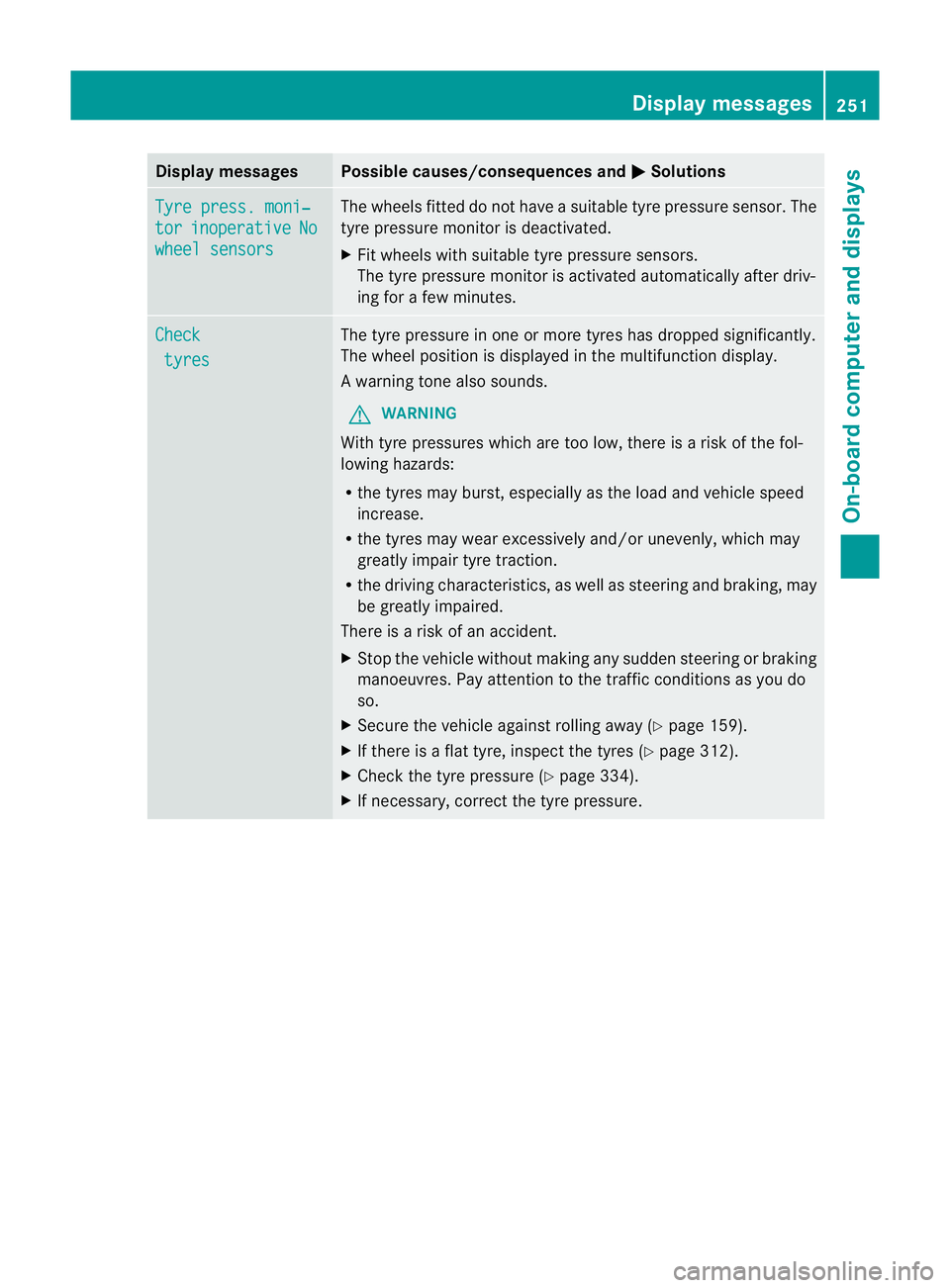
Tyr
ep ress. moni‐ tor inoperative No
wheel sensors The wheels fitte
ddonot haveasuitable tyr epressure sensor .The
tyre pressure monitor is deactivated.
X Fit wheels with suitable tyre pressure sensors.
The tyre pressure monitor is activated automatically after driv-
ing for afew minutes. Check
tyres The tyre pressure in one or more tyres has dropped significantly.
The wheel position is displayed in the multifunction display.
Aw
arning tone also sounds.
G WARNING
Wit htyrep ressure swhicha re to olow, there is ariskoft he fol-
lowing hazards:
R the tyres may burst, especiallyast he load and vehicle speed
increase.
R the tyres may wear excessively and/or unevenly, which may
greatly impair tyre traction.
R the driving characteristics, as well as steering and braking, may
be greatly impaired.
There is arisk of an accident.
X Stop the vehicle without making any sudden steering or braking
manoeuvres. Pay attention to the traffic conditionsasy ou do
so.
X Secure the vehicle against rolling away (Y page 159).
X If there is aflat tyre, inspect the tyres (Y page 312).
X Check the tyre pressure (Y page 334).
X If necessary, correct the tyre pressure. Display messages
251On-board computer and displays Z
Page 256 of 373
Display messages Possible causes/consequences and
M Solutions
h
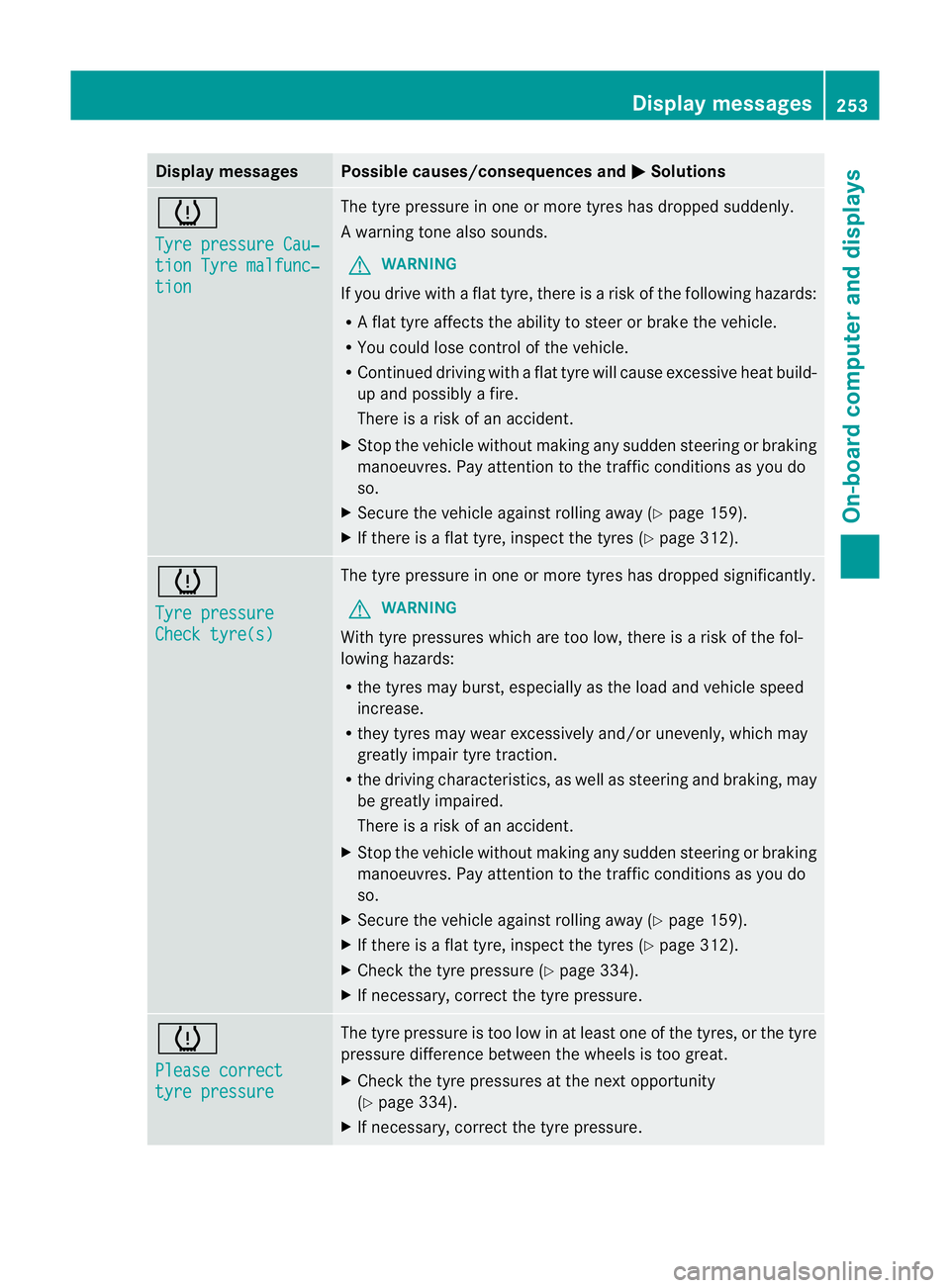
Tyr
ep ressure Cau‐ tio
nT yrem alfunc‐ tion The tyr
epressur einoneor mor etyres has dropped suddenly.
Aw arning tone also sounds.
G WARNING
If you driv ewithaf lat tyre, there is ariskoft he following hazards:
R Af lat tyre affects the ability to steer or brake the vehicle.
R You could lose control of the vehicle.
R Continued driving with aflat tyre will cause excessive heat build-
up and possibly afire.
There is arisk of an accident.
X Stop the vehicle without making any sudden steering or braking
manoeuvres. Pay attention to the traffic conditionsasy ou do
so.
X Secure the vehicle against rolling away (Y page 159).
X If there is aflat tyre, inspect the tyres (Y page 312).h
Tyre pressure
Check tyre(s) The tyre pressure in one or more tyres has dropped significantly.
G WARNING
With tyre pressures which are too low, there is arisk of the fol-
lowing hazards:
R the tyres may burst, especiallyast he load and vehicle speed
increase.
R they tyres may wear excessively and/or unevenly, which may
greatly impair tyre traction.
R the driving characteristics, as well as steering and braking, may
be greatly impaired.
There is arisk of an accident.
X Stop the vehicle without making any sudden steering or braking
manoeuvres. Pay attention to the traffic conditionsasy ou do
so.
X Secure the vehicle against rolling away (Y page 159).
X If there is aflat tyre, inspect the tyres (Y page 312).
X Check the tyre pressure (Y page 334).
X If necessary, correct the tyre pressure. h
Please correct
tyre pressure The tyre pressure is too low in at least one of the tyres, or the tyre
pressure difference between the wheels is too great.
X
Check the tyre pressures at the next opportunity
(Y page 334).
X If necessary, correct the tyre pressure. Display messages
253On-board computer and displays Z
Page 259 of 373
Display messages Possible causes/consequences and
M Solutions
&
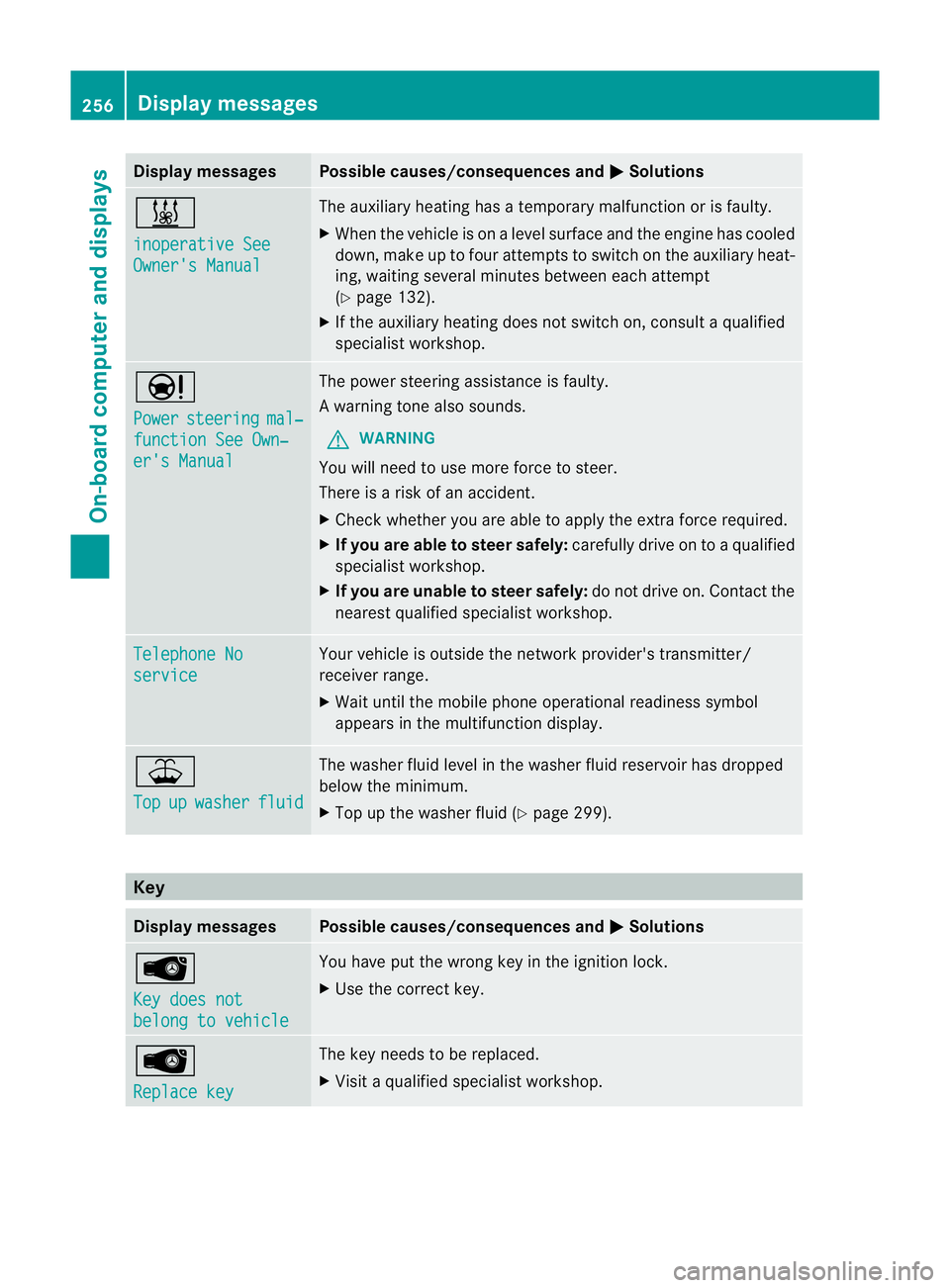
inoperative See
Owner'
sManual The auxiliar
yheatin ghasatem porar ymalfunction or is faulty.
X Whe nthe vehicle is on alevel surface and the engin ehas cooled
down, make up to four attempts to switch on the auxiliary heat-
ing, waiting several minutes between each attempt
(Y page 132).
X If the auxiliary heating does not switch on, consult aqualified
specialist workshop. Ð
Power
steering mal‐
functio
nSee Own‐ er's Manual The power steering assistanc
eisfaulty.
Aw arning tone also sounds.
G WARNING
You will need to use mor eforce to steer.
Ther eisar iskofana ccident.
X Check whethe ryou are able to apply the extraf orce required.
X If you are able to steer safely: carefully drive on toaqualified
specialist workshop.
X If you are unable to steer safely: do not drive on. Contact the
nearest qualified specialist workshop. Telephone No
service Your vehicle is outside the network provider's transmitter/
receiver range.
X
Wait until the mobile phone operational readiness symbol
appears in the multifunction display. ¥
Top
up washer fluid The washer fluid level in the washer fluid reservoir has dropped
below the minimum.
X
Top up the washer fluid (Y page 299).Key
Display messages Possible causes/consequences and
M Solutions
Â
Key does not
belong to vehicle You have put the wrong key in the ignition lock.
X
Use the correc tkey. Â
Replace key The key needs to be replaced.
X
Visit aqualified specialist workshop. 256
Display messagesOn-board computer and displays
Page 273 of 373
Tyres
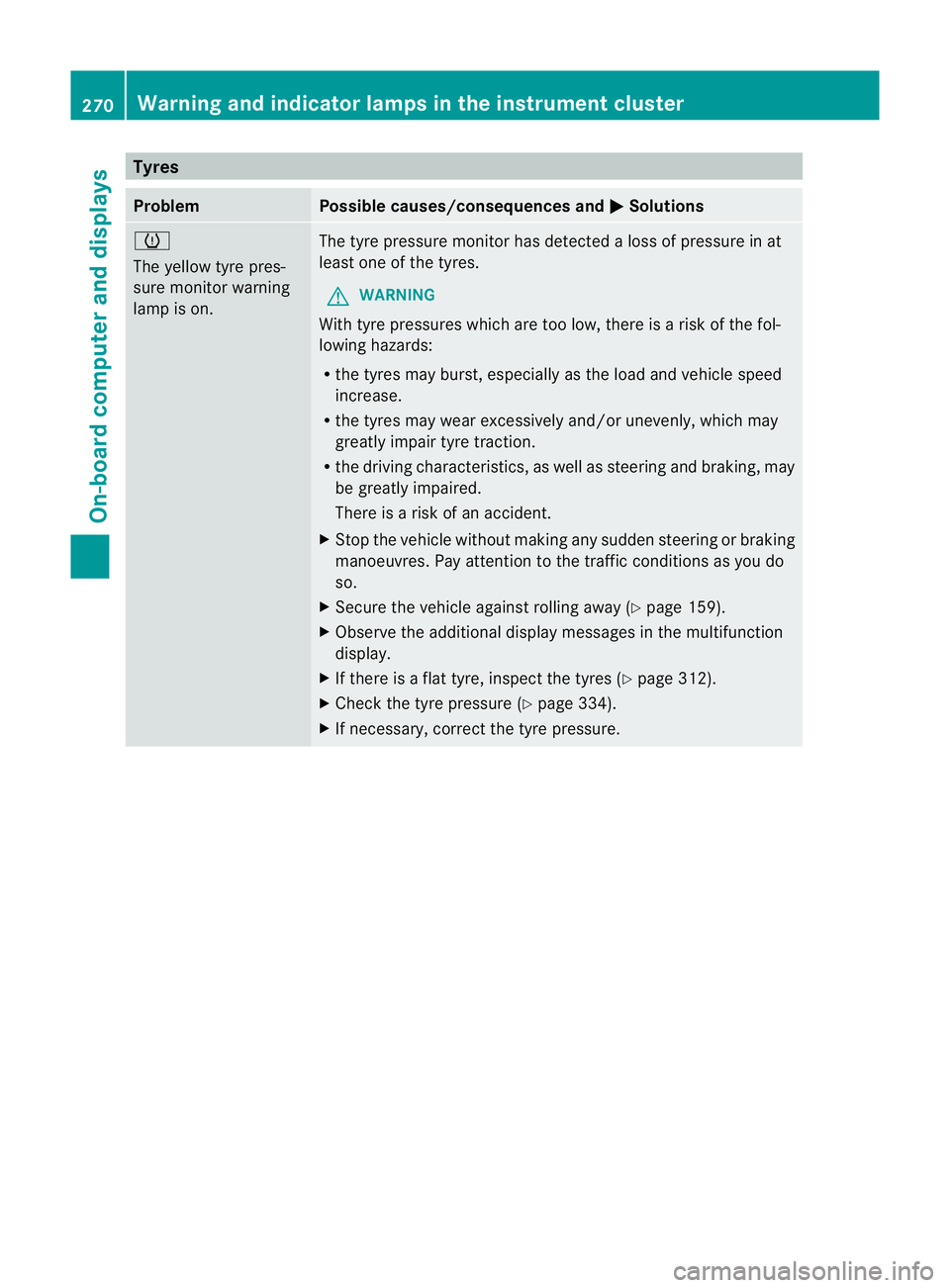
Problem Possible causes/consequence
sand M Solutions
h
The yellow tyr
epres-
sure monitor warning
lamp is on. The tyr
epressure monitor ha sdetecte dalossofp ressure in at
leas tone of the tyres.
G WARNING
With tyr epressures which ar etoo low, ther eisariskoft he fol-
lowing hazards:
R the tyres may burst, especiallyast he load and vehicle speed
increase.
R the tyres may wear excessively and/or unevenly, which may
greatly impair tyre traction.
R the driving characteristics, as well as steering and braking, may
be greatly impaired.
There is arisk of an accident.
X Stop the vehicle without making any sudden steering or braking
manoeuvres. Pay attention to the traffic conditionsasy ou do
so.
X Secure the vehicle against rolling away (Y page 159).
X Observe the additional displaym essages in the multifunction
display.
X If there is aflat tyre, inspect the tyres (Y page 312).
X Check the tyre pressure (Y page 334).
X If necessary, correct the tyre pressure. 270
Warning and indicator lampsint
he instrument clusterOn-board computer and displays
Page 288 of 373
If it is permitted by law to operate communi-
cations equipment whilet
he vehicle is in
motion, you must only do so if the traffic sit-
uationp ermits.Otherwise, yo ucould be dis-
tracted fro mthe traffi cconditions ,cause an
accident and injure yourself and others.
Two-way radios and fa xequipment used with-
out low-reflection exterior aerials can inter-
fere with the vehicle's electronic sand thereby
jeopardise the operatin gsafety of the vehicle
and your safety. Therefore, you must only use
this equipment if it is correctly connected to
as eparate reflection-free exterior aerial. G
WARNING
Excessiv elevels of electromagnetic radiation
may cause damage to your health and the
health of others. Using an exterior aerial takes
int oa ccoun tcurren tscientific discussions
relatin gtothe possible health risk posed by
electromagnetic fields.
Mercedes-Benz recommends the use of an
approved exterior aerial. This ensures:
R optimal mobile phone reception quality in
the vehicle
R mutual influences between the vehicle
electronic sand mobile phones are mini-
mised
An exterior aerial has the following advan-
tages:
R it conducts the electromagnetic fields gen-
erated by awireless device to the exterior.
R the field strengt hinthe vehicle interior is
lower than in avehicle that does not have
an exterior aerial.
i There are various mobile phone brackets
that may be fitted in your vehicle; in some
cases, these are country-specific.
i You can connec taBluetooth ®
-capable
mobile phone with Audio 20, Audio 50 or
COMAND Onlin evia the Bluetooth ®
inter-
face. This also applies if your vehicle is
equipped with convenience telephony. More information on suitable mobile phones,
mobile phone brackets and on connecting
Bluetooth
®
-capable mobile phones with
Audio 20, Audio 50 or COMAND Onlin ecan
be obtained:
R at your Mercedes-Benz Service Centre
R on the Internet at http://www.mercedes-
benz.com/connect
i The function sand services available when
you use the phone depend on your mobile
phone model and servic eprovider.
Using amobile phone If th
emobile phon eisinserted in th emobile
phon ebracket ,you can speak to th eperson
you are callin gusingthe hands-free system.
X Open th etelephone compartment
(Y page 274).
X If required by th edesig noft he mobile
phone bracket, install the sliding adapter
(Y page 286).
X Insert the mobile phone into the mobile
phone bracket (see the separate installa-
tion instructions for the mobile phone fit-
ting).
i On some mobile phone brackets, you first
have to connect the mobile phone via Blue-
tooth ®
to the mobile phone bracket (see
the separate operating instructions for the
mobile phone bracket).
If this is the case, the mobile phone does
not have to be inserted into the bracket for
you to be able to use the telephone func-
tions. However, the charging function and
aerial function are not available.
Operating the mobile phone You can operate the telephone using the
6
and~ buttons on the multifunction
steering wheel. You can operate other mobile
phone functions via the on-board computer
(Y page 217).
When you remove the key from the ignition
lock, the mobile phone stays switched on. Features
285Stowing and features Z
Page 309 of 373
X
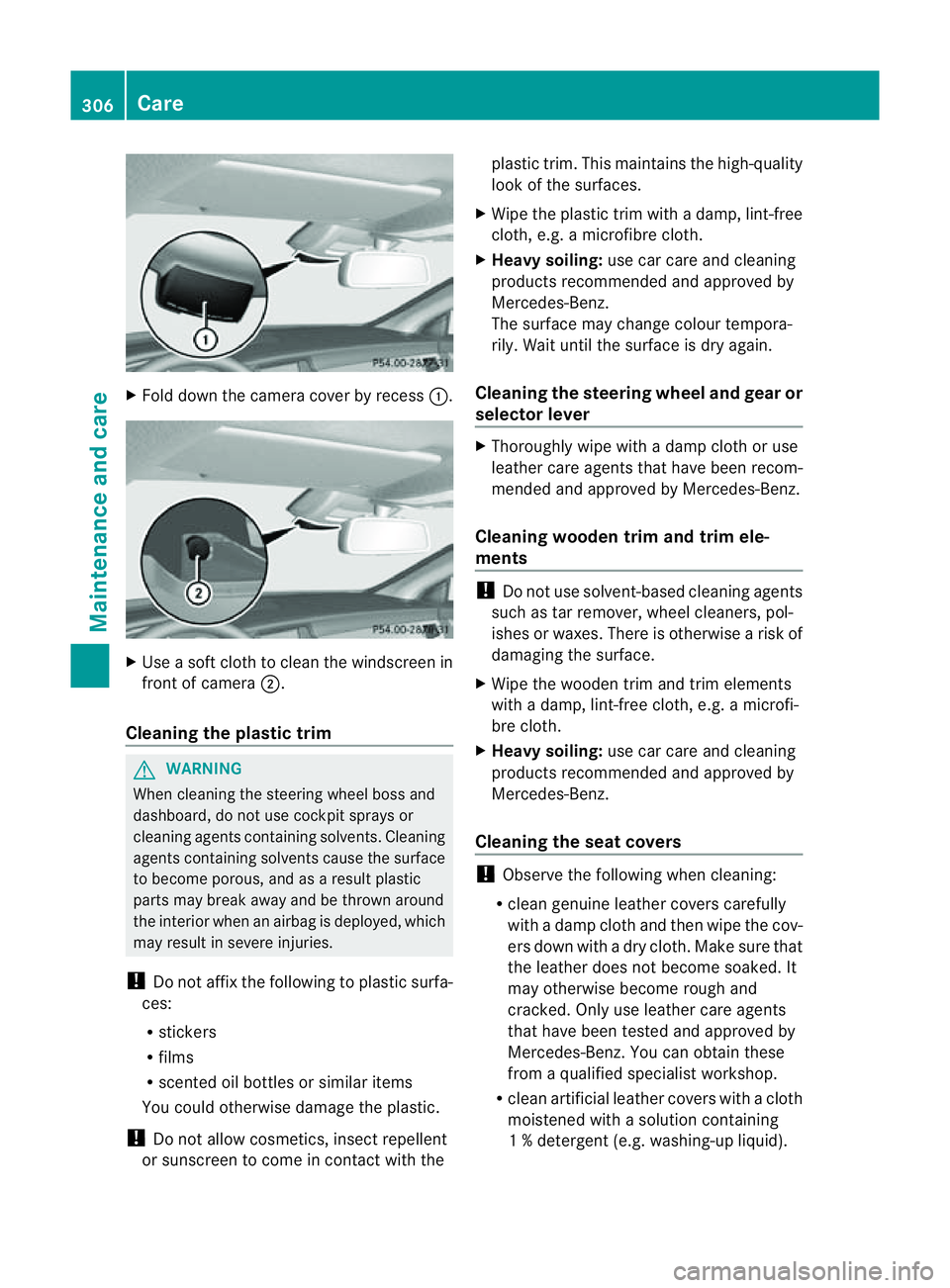
Fold dow nthe camera cover by recess :.X
Use asoft cloth to clean the windscreen in
front of camera ;.
Cleaningt he plastic trim G
WARNING
When cleaning the steering wheel boss and
dashboard, do not use cockpit sprays or
cleaning agents containing solvents. Cleaning
agents containing solvents cause the surface
to become porous, and as aresult plastic
parts may break away and be thrown around
the interior when an airbag is deployed, which
may result in severe injuries.
! Do not affix the following to plastic surfa-
ces:
R stickers
R films
R scented oil bottles or similar items
You could otherwise damage the plastic.
! Do not allow cosmetics, insect repellent
or sunscreen to come in contact with the plastic trim
.This maintains the high-quality
look of the surfaces.
X Wipe the plastic trim with adamp, lint-free
cloth, e.g. amicrofibre cloth.
X Heavy soiling: use car care and cleaning
products recommended and approved by
Mercedes-Benz.
The surface may change colour tempora-
rily. Wait until the surface is dry again.
Cleaningt he steering wheel and gear or
selector lever X
Thoroughly wipe with adamp cloth or use
leather care agents that have been recom-
mended and approved by Mercedes-Benz.
Cleaningw ooden trim and trim ele-
ments !
Do not use solvent-based cleaning agents
such as tar remover, wheel cleaners, pol-
ishes or waxes. There is otherwise arisk of
damaging the surface.
X Wipe the wooden trim and trim elements
with adamp, lint-free cloth, e.g. amicrofi-
bre cloth.
X Heavy soiling: use car care and cleaning
products recommended and approved by
Mercedes-Benz.
Cleaningt he seat covers !
Observe the following when cleaning:
R clean genuine leather covers carefully
with adamp cloth and then wipe the cov-
ers down with adry cloth. Make sure that
the leather does not become soaked. It
may otherwise become rough and
cracked. Only use leather care agents
that have been tested and approved by
Mercedes-Benz. You can obtain these
from aqualified specialist workshop.
R clean artificial leather covers with acloth
moistened with asolution containing
1%d etergen t(e.g. washing-up liquid). 306
CareMaintenance and care
Page 316 of 373

MOExtended tyres (tyres with run-flat
characteristics) G
WARNING
When driving in emergency mode, the driving
characteristics deteriorate, e.g. when corner-
ing, accelerating quickly and when braking.
There is arisk of accident.
Do not exceed the stated maximu mspeed.
Avoid abrupt steering and driving manoeu-
vres, and driving over obstacles (kerbs ,pot-
holes, off-road). This applies in particular to a
laden vehicle.
Stop driving in emergency mode if:
R you hear banging noises.
R the vehicle start stoshake.
R you see smok eand smell rubber.
R ESP ®
is intervening constantly.
R ther eare tears in the sidewalls of the tyre.
After driving in emergency mode, have the
wheel rims checked at aqualified specialist
workshop with regard to their further use. The
faulty tyre must be replaced.
With MOExtended tyres (tyres with run-flat
characteristics), you can continue to drive
your vehicle even if ther eisatotal loss of
pressure in one or more tyres.
MOExtended tyres may only be used in con-
junction with an activ etyre pressure loss
warning system or with an activ etyre pres-
sure monitor.
The maximum driving distance is approx-
imately 80 km when the vehicle is partially
laden, and approximately 30 km when the
vehicle is fully laden.
In addition to the vehicle load, the driving dis-
tanc epossible depends upon:
R speed
R road condition
R outside temperature
The driving distanc epossible in run-flat mode
may be reduced by extreme driving condi-
tions/manoeuvres, or it can be increased
through amoderat estyle of driving. The maximum permissible distanc
ewhich
can be driven in run-flat mode is counted from
the momen tthe tyre pressure loss warning
appears in the multifunction display.
You must not exceed amaximum speed of
80 km/h.
i When replacing one or all tyres, make
sure that you only use tyres marked
"MOExtended". Make sure that you only
use the size of tyre specified for the vehicle. TIREFIT kit
Using the TIREFIT kit TIREFIT is
atyre sealant.
You can use TIREFIT to seal punctures of up
to 4m m, particularly those in the tyre tread.
You can use TIREFIT at outside temperatures
down to Ò20 †. G
WARNING
In the following situations, the tyre sealant is
unable to provide sufficient breakdown assis-
tance, as it is unable to seal the tyre properly:
R there are cuts or punctures in the tyre
larger than those mentioned above.
R the wheel rim is damaged.
R you have driven at very low tyre pressures
or on aflat tyre.
There is arisk of accident.
Do not drive any further. Contact aqualified
specialist workshop. G
WARNING
The tyre sealant is harmful and causes irrita-
tion. It must not come into contact with your
skin, eyes or clothing or be swallowed. Do not
inhale TIREFIT fumes. Keep tyre sealant away
from children. There is arisk of injury. Flat tyre
313Breakdown assistance
Z