Page 218 of 429
You can increase the set cruising
speed in any of these ways:You can decrease the set cruising
speed in any of these ways:
Press and hold the RES/ACCEL
button. When you reach the
desired cruising speed, release the
button.
Push on the accelerator pedal.
Accelerate to the desired cruising
speed, then press the SET/
DECEL button.
Cruise control may not hold the set
speed when you are going up and
down hills. If your vehicle speed
increases going down a hill, use the
brakes to slow down. This will cancel
thecruisecontrol.Toresumetheset
speed, press the RES/ACCEL button.
The CRUISE CONTROL indicator
on the instrument panel will come
back on.
To increase the speed in very
small amounts, tap the RES/
ACCEL button. Each time you do
this, your vehicle will speed up
about 1 mph (1.6 km/h). If you need to decrease your
speed quickly, use the brakes as you
normally would.
Tap the brake pedal lightly with
your f oot. The CRUISE
CONTROL indicator on the
instrument panel will go out.
When the vehicle slows to the
desired speed, press the SET/
DECEL button.
Press and hold the SET/DECEL
button. Release the button when
you reach the desired speed.
To slow down in very small
amounts, tap the SET/DECEL
button. Each time you do this,
your vehicle will slow down about
1 mph (1.6 km/h).
CONT INUED
Changing the Set Speed
Cruise Control
Features
211
NOTE:
Main MenuTable of Contents
Page 221 of 429
Drive the vehicle slowly in circles
at less than 5 mph (8 km/h) until
the center icon turns blue. This
icon also turns blue by continuing
to drive the vehicle under normal
driving conditions. When you see
an actual heading on the compass,
calibration is completed.
The compass may need to be
manually calibrated af ter exposure to
a strong magnetic field. If the
compassseemstocontinuallyshow
the wrong direction, do this.
Do this procedure in an open
area, away f rom buildings, power
lines, and other vehicles.
With the blue center icon
displayed,pressandholdthe
compass button for about 6
seconds. When the center icon
turns red, release the button.
The compass mirror has a light
sensor behind the right side of the
rearview mirror. Make sure the
extended sun visor or an accessory is
not covering the sensor.
2.
1.
Compass
Compass Calibration
214
NOTE:
Main MenuTable of Contents
Page 224 of 429
The HomeLinkUniversal
Transceiver built into your vehicle
canbeprogrammedtooperateupto
three remote controlled devices
around your home, such as garage
doors, lighting, or home security
systems. Bef ore programming your
HomeLink to operate a garage door
opener, conf irm that the opener has
an external entrapment protection
system, such as an ‘‘electronic eye,
Page 263 of 429
�µ
�µ
�µ �µ
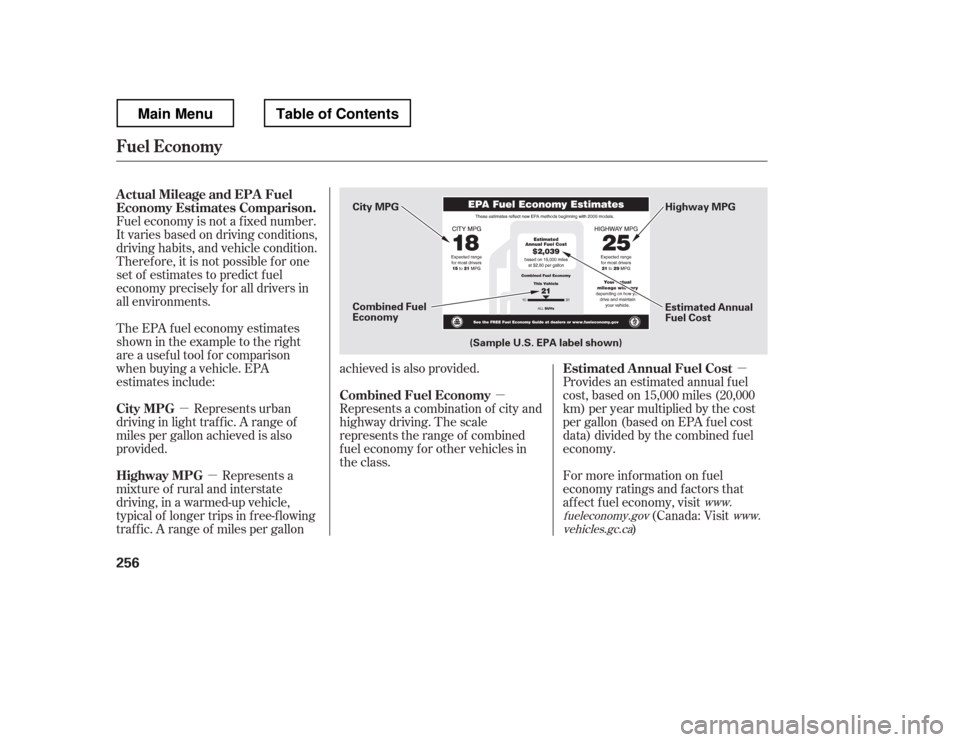
Fuel economy is not a f ixed number.
It varies based on driving conditions,
driving habits, and vehicle condition.
Theref ore, it is not possible f or one
set of estimates to predict fuel
economy precisely f or all drivers in
all environments.
Provides an estimated annual f uel
cost, based on 15,000 miles (20,000
km) per year multiplied by the cost
pergallon(basedonEPAfuelcost
data) divided by the combined f uel
economy.
For more inf ormation on f uel
economy ratings and factors that
af f ect f uel economy, visit(Canada: Visit
)
Represents urban
driving in light traf f ic. A range of
miles per gallon achieved is also
provided.
The EPA f uel economy estimates
shownintheexampletotheright
are a usef ul tool f or comparison
when buying a vehicle. EPA
estimates include:
Represents a
mixture of rural and interstate
driving, in a warmed-up vehicle,
typical of longer trips in f ree-f lowing
traf f ic. A range of miles per gallon achieved is also provided.
Represents a combination of city and
highway driving. The scale
represents the range of combined
f uel economy f or other vehicles in
the class.
www.
fueleconomy.gov www.
vehicles.gc.ca
Actual Mileage and EPA Fuel
Economy Estimates Comparison.
Estimated Annual Fuel Cost
City MPG
Highway MPG Combined Fuel Economy
Fuel Economy
256
Combined Fuel
Economy
(Sample U.S. EPA label shown) Estimated Annual
Fuel Cost
City MPG
Highway MPG
Main MenuTable of Contents
Page 274 of 429
The cargo net can be used to hold
lightweight items in the pickup bed.
Secure all items properly. The net
may not prevent heavy items f rom
beingthrownoutwardinacrashora
sudden stop.Thecargocovercanbeusedto
cover the cargo area on the pickup
bed.
Your vehicle
Page 278 of 429
Youshoulddothefollowingchecks
and adjustments bef ore you drive
your vehicle.Make sure all windows, mirrors,
and outside lights are clean and
unobstructed. Remove f rost, snow,
or ice.
Check that the hood is f ully closed.
Check that the tailgate is f ully
closed when it is not used as an
extended pickup bed.
Visually check the tires. If a tire
looks low, use a gauge to check its
pressure.
Check that any items you may be
carrying are stored properly or
f astened down securely. Check the adjustment of the
inside and outside mirrors (see
page ).
Check the steering wheel
adjustment (see page ).
Make sure the doors and In-Bed
Trunk are securely closed and
locked.
Fasten your seat belt. Check that
your passengers have f astened
their seat belts (see page ).
Check the seat adjustment (see
pages and ). When you start the engine, check
the gauges and indicators in the
instrument panel, and the
messages on the inf ormation
display or multi-inf ormation
display (depending on the model)(
s e e pag es,,, an d
).
1. 2. 3. 4.5. 6. 8.
7. 9.
10. 11.
121 133
99
16
61 76 77
119 89
Preparing to Drive
Driving
271
Main MenuTable of Contents
Page 286 of 429
Press the VTM-4 LOCK button.
The indicator in the button comeson.
To get unstuck, apply light pressure
to the accelerator pedal. Do not spin
the f ront tires f or more than a f ew
seconds. Because of the amount of
torque applied to the rear tires, they
should not spin. This is normal. If
you are not able to move the vehicle,
stop and reverse direction.
If you become stuck, you can
activatetheVTM-4bypressingthe
VTM-4 LOCK button while in f irst
(1), second (2), or reverse (R) gear
below18mph(30km/h).Thismode
overrides the auto system to send
maximum torque to the rear axle.
This mode is only intended f or
intermittent use at low speed to free
your vehicle if it becomes stuck or
when you encounter a steep grade
with one wheel on a slippery surf ace.
Generally, you should f irst allow the
auto mode to operate to adjust for
the available traction conditions.
Turn the ignition switch to the
LOCK (0) position.
Move the shift lever to D.
Press the VTM-4 LOCK button. do
any of the f ollowing:
The VTM-4 Lock will temporarily
disengage when the vehicle speed
exceeds 18 mph (30 km/h). The
indicator in the button will remain on.
The vehicle speed must be below
18 mph (30 km/h).
Move the shift lever to first (1),
second (2), or reverse (R) gear.
1. 2. 3.
VTM-4System
To Engage the VTM-4 Lock:
To Disengage the VTM-4 L ock,
Driving
279
Do not use the VTM-4 LOCK button on
dry, paved roads. Driving on dry,
paved roads with VTM-4 Lock ON may
damage the rear dif f erential when
making a turn. Strange noise and
vibration can also result.
Do not continuously spin the f ront tires
of your vehicle. Continuously spinning
the f ront tires can cause transmission
or rear dif f erential damage.
Main MenuTable of Contents
Page 296 of 429
Make sure the parking brake is
f ully released bef ore driving away.
Driving with the parking brake
partially set can overheat or
damage the rear brakes.
Make sure the moonroof (if
equipped) and the windows are
closed.
Turn of f the lights.
Place any packages, valuables, etc.
in the cargo area in your vehicle or
the In-Bed Trunk, or take them
with you.
Lock the doors.
Check the indicator on the driver