2012 GMC SIERRA 1500 heater
[x] Cancel search: heaterPage 104 of 556

Black plate (36,1)GMC Sierra Owner Manual - 2012 - CRC - 11/15/11
3-36 Seats and Restraints
Additional Factors Affecting
System Operation
Safety belts help keep the
passenger in position on the
seat during vehicle maneuvers
and braking, which helps the
passenger sensing system maintain
the passenger airbag status.
See“Safety Belts” and“Child
Restraints” in the Index for
additional information about the
importance of proper restraint use.
If the shoulder portion of the belt is
pulled out all the way, the child
restraint locking feature will be
engaged. This may unintentionally
cause the passenger sensing
system to turn the airbag off for
some adult size occupants. If this
happens, let the belt go back all the
way and start again.
A thick layer of additional material,
such as a blanket or cushion,
or aftermarket equipment such as
seat covers, seat heaters, and seat
massagers can affect how well the
passenger sensing system operates. We recommend that
you not use seat covers or other
aftermarket equipment except when
approved by GM for your specific
vehicle. See
Adding Equipment to
the Airbag-Equipped Vehicle on
page 3‑37 for more information
about modifications that can affect
how the system operates.
The on indicator may be lit if an
object, such as a briefcase,
handbag, grocery bag, laptop or
other electronic device, is put on an
unoccupied seat. If this is not
desired, remove the object from
the seat.
{WARNING
Stowing of articles under the
passenger seat or between the
passenger seat cushion and
seatback may interfere with the
proper operation of the passenger
sensing system.
Servicing the
Airbag-Equipped Vehicle
Airbags affect how the vehicle
should be serviced. There are parts
of the airbag system in several
places around the vehicle. Your
dealer and the service manual have
information about servicing the
vehicle and the airbag system. To
purchase a service manual, see
Service Publications Ordering
Information on page 13‑16.
{WARNING
For up to 10 seconds after the
vehicle is turned off and the
battery is disconnected, an airbag
can still inflate during improper
service. You can be injured if you
are close to an airbag when it
inflates. Avoid yellow connectors.
They are probably part of the
airbag system. Be sure to follow
(Continued)
Page 105 of 556
Black plate (37,1)GMC Sierra Owner Manual - 2012 - CRC - 11/15/11
Seats and Restraints 3-37
WARNING (Continued)
proper service procedures, and
make sure the person performing
work for you is qualified to do so.
Adding Equipment to the
Airbag-Equipped Vehicle
Q: Is there anything I might addto or change about the vehicle
that could keep the airbags
from working properly?
A: Yes. If you add things that
change your vehicle's frame,
bumper system, height, front end
or side sheet metal, they may
keep the airbag system from
working properly. Changing or
moving any parts of the front
seats, safety belts, the airbag
sensing and diagnostic module,
steering wheel, instrument
panel, roof-rail airbag modules,
ceiling headliner or pillar garnish
trim, overhead console, front sensors, side impact sensors,
or airbag wiring can affect the
operation of the airbag system.
In addition, the vehicle may have
a passenger sensing system
for the right front passenger's
position, which includes sensors
that are part of the passenger's
seat. The passenger sensing
system may not operate properly
if the original seat trim is
replaced with non-GM covers,
upholstery or trim, or with
GM covers, upholstery or
trim designed for a different
vehicle. Any object, such as an
aftermarket seat heater or a
comfort enhancing pad or
device, installed under or on top
of the seat fabric, could also
interfere with the operation of
the passenger sensing system.
This could either prevent proper
deployment of the passenger
airbag(s) or prevent the
passenger sensing system
from properly turning off the
passenger airbag(s). See
Passenger Sensing System on
page 3‑32.
If you have any questions
about this, you should contact
Customer Assistance before you
modify your vehicle. The phone
numbers and addresses for
Customer Assistance are in
Step Two of the Customer
Satisfaction Procedure in
this manual. See
Customer
Satisfaction Procedure (U.S.
and Canada) on page 13‑1 or
Customer Satisfaction
Procedure (Mexico) on
page 13‑3.
If the vehicle has rollover
roof-rail airbags, see Different
Size Tires and Wheels on
page 10‑70 for additional
important information.
Page 215 of 556
Black plate (5,1)GMC Sierra Owner Manual - 2012 - CRC - 11/15/11
Infotainment System 7-5
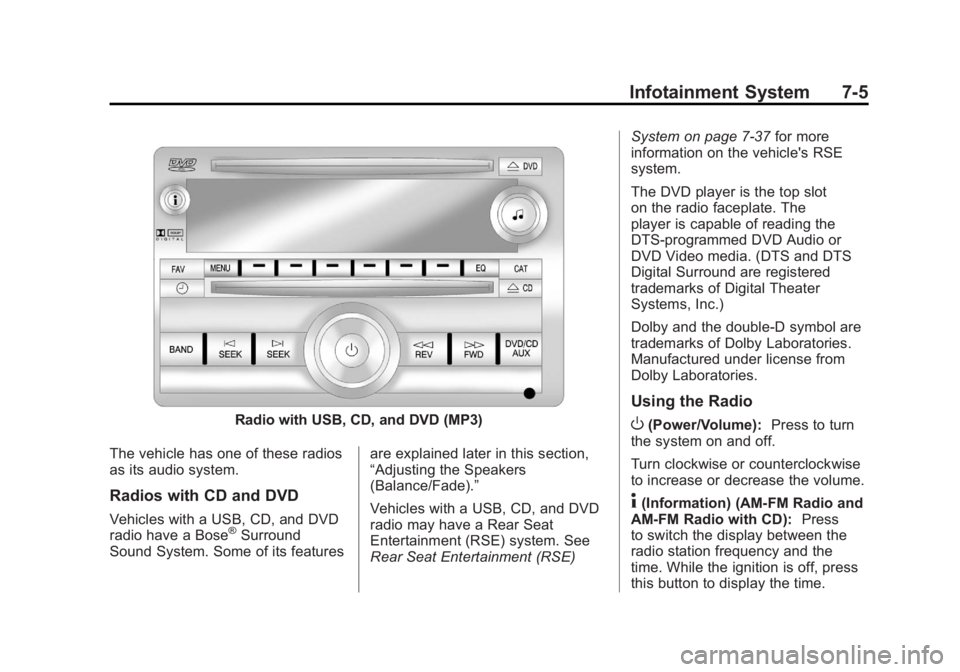
Radio with USB, CD, and DVD (MP3)
The vehicle has one of these radios
as its audio system.
Radios with CD and DVD
Vehicles with a USB, CD, and DVD
radio have a Bose®Surround
Sound System. Some of its features are explained later in this section,
“Adjusting the Speakers
(Balance/Fade).”
Vehicles with a USB, CD, and DVD
radio may have a Rear Seat
Entertainment (RSE) system. See
Rear Seat Entertainment (RSE)System on page 7‑37
for more
information on the vehicle's RSE
system.
The DVD player is the top slot
on the radio faceplate. The
player is capable of reading the
DTS‐programmed DVD Audio or
DVD Video media. (DTS and DTS
Digital Surround are registered
trademarks of Digital Theater
Systems, Inc.)
Dolby and the double-D symbol are
trademarks of Dolby Laboratories.
Manufactured under license from
Dolby Laboratories.
Using the Radio
O(Power/Volume): Press to turn
the system on and off.
Turn clockwise or counterclockwise
to increase or decrease the volume.
4(Information) (AM-FM Radio and
AM-FM Radio with CD): Press
to switch the display between the
radio station frequency and the
time. While the ignition is off, press
this button to display the time.
Page 267 of 556
Black plate (1,1)GMC Sierra Owner Manual - 2012 - CRC - 11/15/11
Climate Controls 8-1
Climate Controls
Climate Control Systems
Climate Control Systems (withAir Conditioning) . . . . . . . . . . . . . 8-1
Climate Control Systems (with Heater Only) . . . . . . . . . . . . . . . . . 8-4
Dual Automatic Climate Control System . . . . . . . . . . . . . . . . . . . . . . 8-5
Air Vents
Air Vents . . . . . . . . . . . . . . . . . . . . . 8-10
Climate Control Systems
Climate Control Systems (with Air Conditioning)
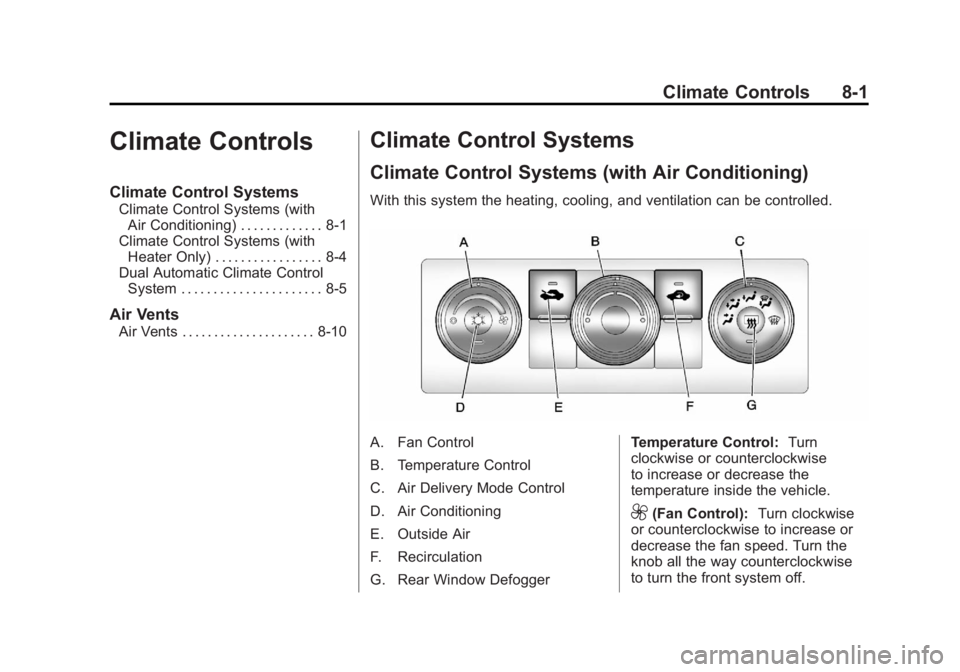
With this system the heating, cooling, and ventilation can be controlled.
A. Fan Control
B. Temperature Control
C. Air Delivery Mode Control
D. Air Conditioning
E. Outside Air
F. Recirculation
G. Rear Window Defogger Temperature Control:
Turn
clockwise or counterclockwise
to increase or decrease the
temperature inside the vehicle.
9(Fan Control): Turn clockwise
or counterclockwise to increase or
decrease the fan speed. Turn the
knob all the way counterclockwise
to turn the front system off.
Page 270 of 556
Black plate (4,1)GMC Sierra Owner Manual - 2012 - CRC - 11/15/11
8-4 Climate Controls
Climate Control Systems (with Heater Only)
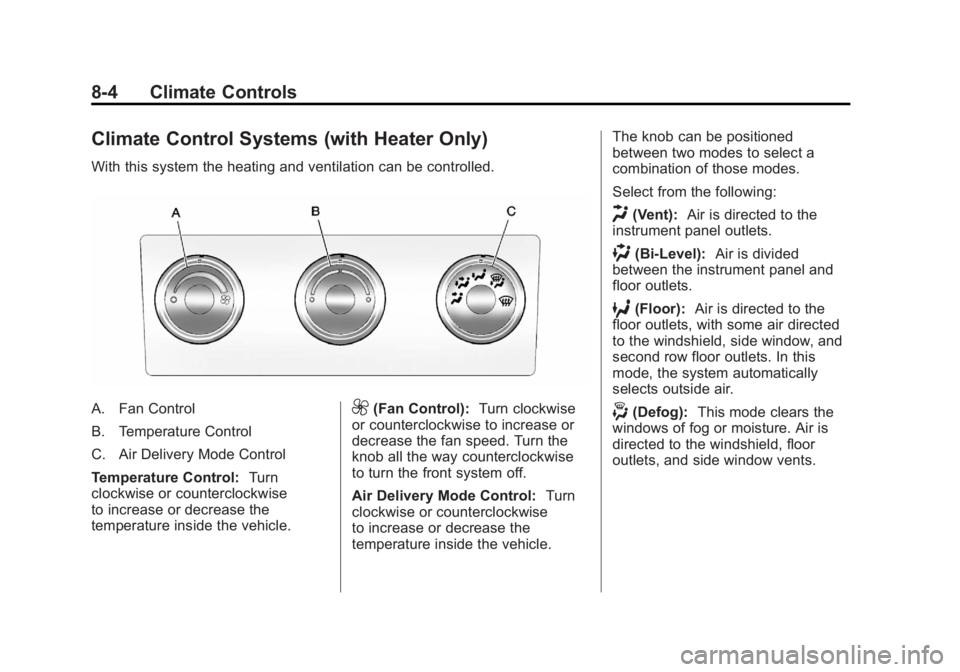
With this system the heating and ventilation can be controlled.
A. Fan Control
B. Temperature Control
C. Air Delivery Mode Control
Temperature Control:Turn
clockwise or counterclockwise
to increase or decrease the
temperature inside the vehicle.9(Fan Control): Turn clockwise
or counterclockwise to increase or
decrease the fan speed. Turn the
knob all the way counterclockwise
to turn the front system off.
Air Delivery Mode Control: Turn
clockwise or counterclockwise
to increase or decrease the
temperature inside the vehicle. The knob can be positioned
between two modes to select a
combination of those modes.
Select from the following:
H(Vent):
Air is directed to the
instrument panel outlets.
)(Bi-Level): Air is divided
between the instrument panel and
floor outlets.
6(Floor): Air is directed to the
floor outlets, with some air directed
to the windshield, side window, and
second row floor outlets. In this
mode, the system automatically
selects outside air.
-(Defog): This mode clears the
windows of fog or moisture. Air is
directed to the windshield, floor
outlets, and side window vents.
Page 277 of 556
Black plate (1,1)GMC Sierra Owner Manual - 2012 - CRC - 11/15/11
Driving and Operating 9-1
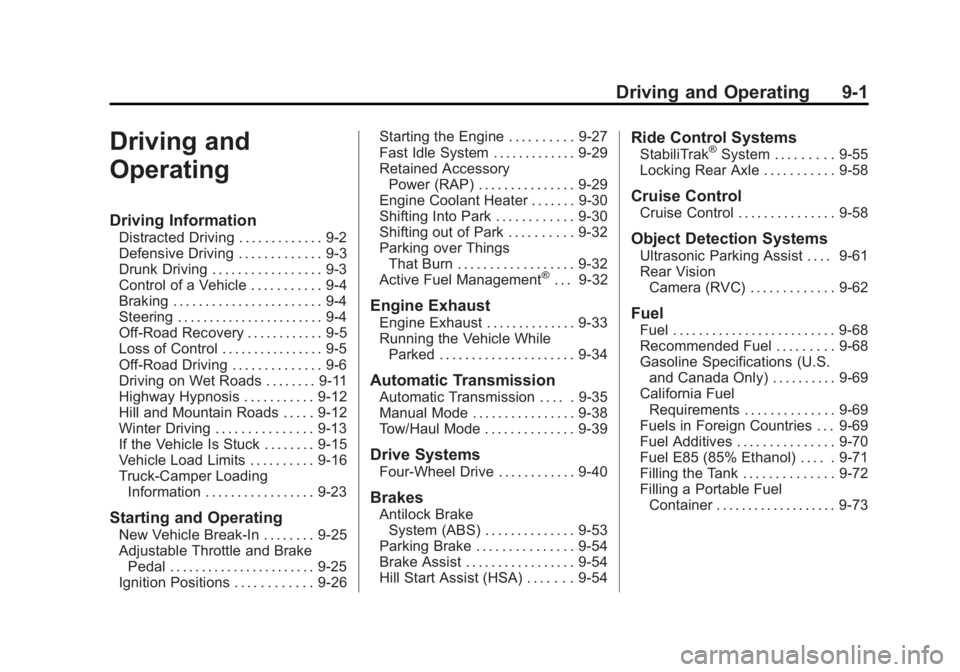
Driving and
Operating
Driving Information
Distracted Driving . . . . . . . . . . . . . 9-2
Defensive Driving . . . . . . . . . . . . . 9-3
Drunk Driving . . . . . . . . . . . . . . . . . 9-3
Control of a Vehicle . . . . . . . . . . . 9-4
Braking . . . . . . . . . . . . . . . . . . . . . . . 9-4
Steering . . . . . . . . . . . . . . . . . . . . . . . 9-4
Off-Road Recovery . . . . . . . . . . . . 9-5
Loss of Control . . . . . . . . . . . . . . . . 9-5
Off-Road Driving . . . . . . . . . . . . . . 9-6
Driving on Wet Roads . . . . . . . . 9-11
Highway Hypnosis . . . . . . . . . . . 9-12
Hill and Mountain Roads . . . . . 9-12
Winter Driving . . . . . . . . . . . . . . . 9-13
If the Vehicle Is Stuck . . . . . . . . 9-15
Vehicle Load Limits . . . . . . . . . . 9-16
Truck-Camper LoadingInformation . . . . . . . . . . . . . . . . . 9-23
Starting and Operating
New Vehicle Break-In . . . . . . . . 9-25
Adjustable Throttle and BrakePedal . . . . . . . . . . . . . . . . . . . . . . . 9-25
Ignition Positions . . . . . . . . . . . . 9-26 Starting the Engine . . . . . . . . . . 9-27
Fast Idle System . . . . . . . . . . . . . 9-29
Retained Accessory
Power (RAP) . . . . . . . . . . . . . . . 9-29
Engine Coolant Heater . . . . . . . 9-30
Shifting Into Park . . . . . . . . . . . . 9-30
Shifting out of Park . . . . . . . . . . 9-32
Parking over Things
That Burn . . . . . . . . . . . . . . . . . . 9-32
Active Fuel Management
®. . . 9-32
Engine Exhaust
Engine Exhaust . . . . . . . . . . . . . . 9-33
Running the Vehicle While Parked . . . . . . . . . . . . . . . . . . . . . 9-34
Automatic Transmission
Automatic Transmission . . . . . 9-35
Manual Mode . . . . . . . . . . . . . . . . 9-38
Tow/Haul Mode . . . . . . . . . . . . . . 9-39
Drive Systems
Four-Wheel Drive . . . . . . . . . . . . 9-40
Brakes
Antilock BrakeSystem (ABS) . . . . . . . . . . . . . . 9-53
Parking Brake . . . . . . . . . . . . . . . 9-54
Brake Assist . . . . . . . . . . . . . . . . . 9-54
Hill Start Assist (HSA) . . . . . . . 9-54
Ride Control Systems
StabiliTrak®System . . . . . . . . . 9-55
Locking Rear Axle . . . . . . . . . . . 9-58
Cruise Control
Cruise Control . . . . . . . . . . . . . . . 9-58
Object Detection Systems
Ultrasonic Parking Assist . . . . 9-61
Rear Vision Camera (RVC) . . . . . . . . . . . . . 9-62
Fuel
Fuel . . . . . . . . . . . . . . . . . . . . . . . . . 9-68
Recommended Fuel . . . . . . . . . 9-68
Gasoline Specifications (U.S.and Canada Only) . . . . . . . . . . 9-69
California Fuel Requirements . . . . . . . . . . . . . . 9-69
Fuels in Foreign Countries . . . 9-69
Fuel Additives . . . . . . . . . . . . . . . 9-70
Fuel E85 (85% Ethanol) . . . . . 9-71
Filling the Tank . . . . . . . . . . . . . . 9-72
Filling a Portable Fuel Container . . . . . . . . . . . . . . . . . . . 9-73
Page 306 of 556
Black plate (30,1)GMC Sierra Owner Manual - 2012 - CRC - 11/15/11
9-30 Driving and Operating
Engine Coolant Heater
The engine heater can provide
easier starting and better fuel
economy during engine warm-up
in cold weather conditions at or
below−18°C (0°F). Vehicles with an
engine heater should be plugged in
at least four hours before starting.
An internal thermostat in the
plug-end of the cord may exist
which will prevent engine coolant
heater operation at temperatures
above −18°C (0°F).
If the vehicle has a diesel engine,
see the Duramax Diesel supplement
for more information.
To Use the Engine Coolant
Heater
1. Turn off the engine.
2. Open the hood and unwrap the electrical cord. The cord
is secured to the Engine
Compartment Fuse Block with
a clip. Carefully remove the wire tie which bundles the
electrical plug. Do not cut the
electrical cord.
3. Plug the cord into a normal, grounded 110-volt AC outlet.
{WARNING
Plugging the cord into an
ungrounded outlet could cause an
electrical shock. Also, the wrong
kind of extension cord could
overheat and cause a fire. You
could be seriously injured. Plug
the cord into a properly grounded
three-prong 110-volt AC outlet.
If the cord will not reach, use a
heavy-duty three-prong extension
cord rated for at least 15 amps.
4. Before starting the engine, be sure to unplug and store the
cord as it was before to keep
it away from moving engine
parts. If you do not, it could be
damaged. The length of time the heater should
remain plugged in depends on
several factors. Ask a dealer in the
area where you will be parking the
vehicle for the best advice on this.
Shifting Into Park
{WARNING
It can be dangerous to get out of
the vehicle if the shift lever is not
fully in P (Park) with the parking
brake firmly set. The vehicle can
roll. If you have left the engine
running, the vehicle can move
suddenly. You or others could be
injured. To be sure the vehicle will
not move, even when you are on
fairly level ground, use the steps
that follow. With four-wheel
drive, if the transfer case is in
N (Neutral), the vehicle will be
free to roll, even if the shift lever
is in P (Park). So, be sure the
transfer case is in a drive
(Continued)
Page 405 of 556
Black plate (19,1)GMC Sierra Owner Manual - 2012 - CRC - 11/15/11
Vehicle Care 10-19
{WARNING
Heater and radiator hoses, and
other engine parts, can be very
hot. Do not touch them. If you do,
you can be burned.
Do not run the engine if there is a
leak. If you run the engine, it
could lose all coolant. That could
cause an engine fire, and you
could be burned. Get any leak
fixed before you drive the vehicle.
Notice: Using coolant other than
DEX-COOL
®can cause premature
engine, heater core, or radiator
corrosion. In addition, the engine
coolant could require changing
sooner, at 50 000 km (30,000 mi)
or 24 months, whichever occurs
first. Any repairs would not
be covered by the vehicle
warranty. Always use DEX-COOL
(silicate-free) coolant in the
vehicle.
Engine Coolant
The cooling system in the vehicle
is filled with DEX-COOL®engine
coolant. This coolant is designed to
remain in the vehicle for 5 years or
240 000 km (150,000 mi), whichever
occurs first.
The following explains the cooling
system and how to check and add
coolant when it is low. If there is a
problem with engine overheating,
see Engine Overheating on
page 10‑22.
What to Use
{WARNING
Adding only plain water or some
other liquid to the cooling system
can be dangerous. Plain water
and other liquids, can boil before
the proper coolant mixture will.
The coolant warning system is set
for the proper coolant mixture.
With plain water or the wrong
(Continued)
WARNING (Continued)
mixture, the engine could get too
hot but you would not get the
overheat warning. The engine
could catch fire and you or
others could be burned. Use a
50/50 mixture of clean, drinkable
water and DEX-COOL coolant.
Use a 50/50 mixture of clean,
drinkable water and DEX-COOL
coolant. If using this mixture,
nothing else needs to be added.
This mixture:
.Gives freezing protection down
to −37°C (−34°F), outside
temperature
.Gives boiling protection up to
129°C (265°F), engine
temperature
.Protects against rust and
corrosion