Page 21 of 380
•Regen Display - A circular arrow symbol appears in the center of the
Battery Gauge when energy is being recaptured through the
regenerative braking system.
Brake Coach Display: The Brake Coach appears after the vehicle has
come to a stop. It coaches you to brake in a manner which maximizes
the amount of energy returned through the regenerative braking system.
By maximizing the use of regenerative braking, you minimize the energy
used up by the hydraulic brakes.
Note: Under certain conditions the actual amount of energy returned to
the high voltage battery will be less than the percentage shown.
Trip Summary and Lifetime Summary: These will be displayed upon
shutting off the vehicle. Trip Summary will appear first, then Lifetime
Summary will be displayed. You can toggle between these displays using
the up and down arrow keys on the left hand steering wheel controls.
Trip Summary data is from the last power cycle, while Lifetime Summary
data is cumulative from the last Lifetime Summary reset done through
the Settings menu in the message center.
Trip Summary:
• Distance - The total distance travelled, and regen distance are
displayed. Regen distance is the estimated range gained from energy
recaptured through regenerative braking.
• Energy Used - The total kilowatt hours and average watt hours per
unit of distance are displayed. The average watt hours per mi (km)
will be shown in blue if less than (better than) the lifetime average
watt hours per mi (km).
• Brake Score - The percentage of braking energy recaptured and
returned to the high voltage battery through regenerative braking. The
brake score will be shown in blue if greater than (better than) the
lifetime brake score.
Lifetime Summary:
• Distance - The total regen distance, which is the estimated range
gained from energy recaptured through regenerative braking.
• Energy Used - The total kilowatt hours.
• Brake Score - The average percentage of braking energy recaptured
and returned to the high voltage battery through regenerative braking.
Instrument Cluster 21
2012 Focus Electric Vehicle(fob)
Owners Guide gf, 1st Printing
USA (fus)
Page 27 of 380
Tutorial
Find Your Way
Brake Coach
Display Mode
Trip1&2
Energy
Surplus
MyKey Info
Admin Keys (Number of admin keys)
MyKeys (Number of MyKeys programmed)
MyKey Miles (km) (Distance traveled using a programmed MyKey)
Driver Alert
Displays the associated driver alert graphic.
System Check
All active warnings will display first if applicable. The system check
menu may appear different based upon equipment options and current
vehicle status. Use the up/down arrow buttons to scroll through the
list.
Settings In this mode, you can configure different driver setting choices.
Note: Some items are optional and may not appear.
Driver Assist
Traction Control On (default setting) / Off
Hill Start Assist On (default setting) / Off
Rear Park Aid On (default on key cycle) / Off
Vehicle
Lighting Home Light Manual or select time interval Auto Light Rain On / Off
Instrument Cluster 27
2012 Focus Electric Vehicle(fob)
Owners Guide gf, 1st Printing
USA (fus)
Page 28 of 380
Vehicle
Remote Start Climate Control
(using this
feature allows
you to select
different climate
control modes
when the vehicle
is started using
the remote start
feature)Heater – A/C Auto / Last
Settings
Rear Defrost Auto / Off
Duration 5 / 10 /15 minutes
Quiet Start On / Off
System Enable / Disable
Tire Mobility Kit Expiration Select number of years
*MyKey
Create MyKey Press and hold OK to create MyKey
Traction Control Always On / User Selectable
Max Speed Set to 80 MPH (130 km/h) / Off
Speed Minder 45 mph (72 km/h), 55 mph (89 km/h), 65 mph (105 km/h), Off
Volume Limiter On / Off
Clear MyKeys Hold OK to Clear All MyKeys
*Some MyKey items will only appear if a MyKey is set.
Display
Language Select the desired language
Units Distance Select the desired units of
measure
Temperature
Brake Coach
Display On / Off
Regen Display On / Off
Liftetime
Summary Energy use, Regen Miles, Brake Score, Hold OK to
Reset
28
Instrument Cluster
2012 Focus Electric Vehicle (fob)
Owners Guide gf, 1st Printing
USA (fus)
Page 29 of 380
INFORMATION MESSAGES
Note:Depending on the vehicle options equipped with your vehicle, not
all of the messages will display or be available. Certain messages may be
abbreviated or shortened depending upon which cluster type you have.
Press the OK button to
acknowledge and remove some
messages from the information
display. Other messages will be
removed automatically after a short
time. Certain messages need to be
confirmed before you can access
the menus.
Some messages will be supplemented by a system specific symbol with a
message indicator.
AdvanceTrac Message Action / Description
Service AdvanceTrac Displayed when the system has
detected a condition that requires
service. Contact your authorized
dealer as soon as possible.
Alarm Message Action / Description
To Stop Alarm, Start Vehicle Displayed when unauthorized entry into the vehicle has
occurred. Turn the ignition on to
stop the alarm.
Brake System Message Action / Description
Brake Fluid Level LOW Indicates the brake fluid level is
low and the brake system should
be inspected immediately.
Check Brake System Displayed when the brake system
needs servicing. If the warning
stays on or continues to come on,
contact your authorized dealer as
soon as possible.
Instrument Cluster 29
2012 Focus Electric Vehicle(fob)
Owners Guide gf, 1st Printing
USA (fus)
Page 30 of 380
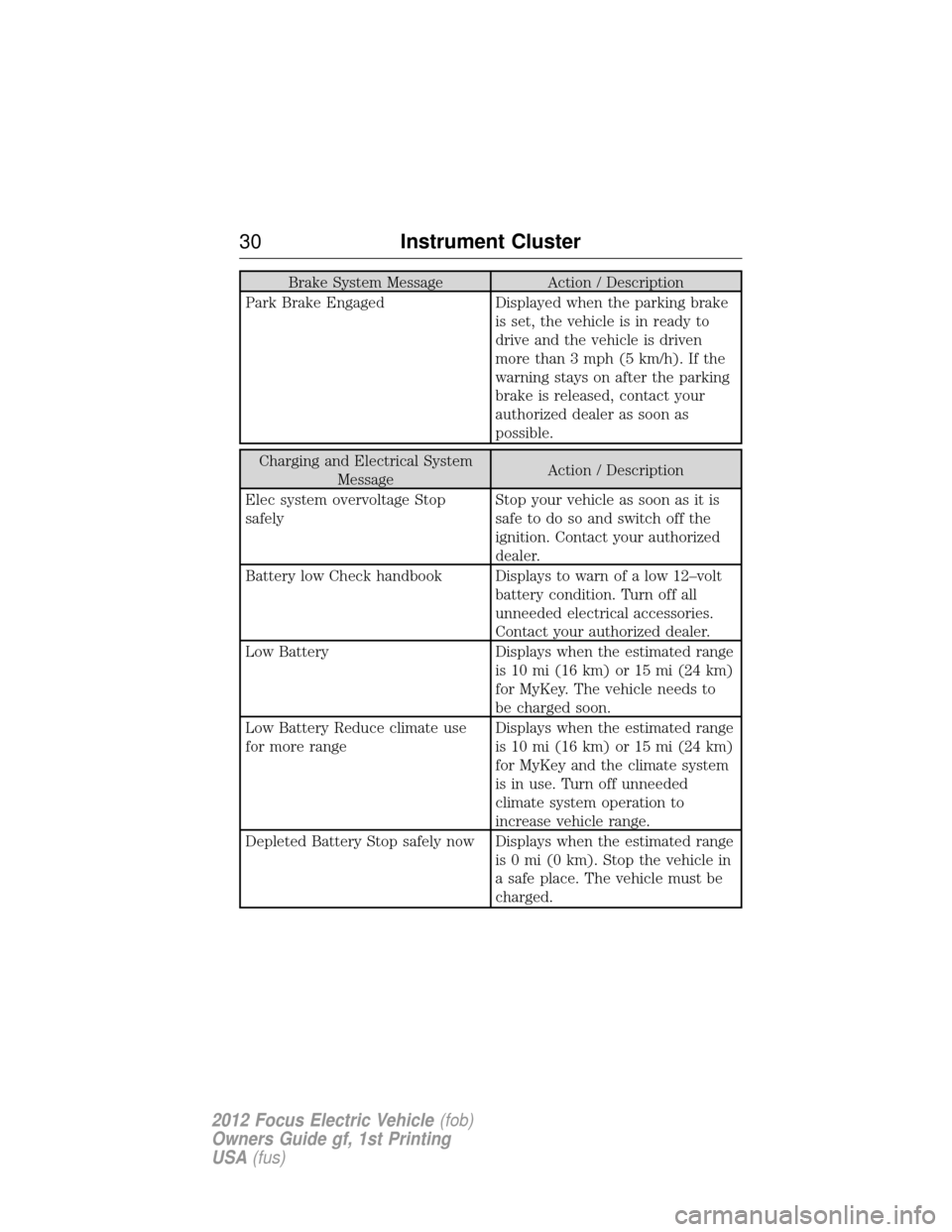
Brake System MessageAction / Description
Park Brake Engaged Displayed when the parking brake
is set, the vehicle is in ready to
drive and the vehicle is driven
more than 3 mph (5 km/h). If the
warning stays on after the parking
brake is released, contact your
authorized dealer as soon as
possible.
Charging and Electrical System Message Action / Description
Elec system overvoltage Stop
safely Stop your vehicle as soon as it is
safe to do so and switch off the
ignition. Contact your authorized
dealer.
Battery low Check handbook Displays to warn of a low 12–volt battery condition. Turn off all
unneeded electrical accessories.
Contact your authorized dealer.
Low Battery Displays when the estimated range is 10 mi (16 km) or 15 mi (24 km)
for MyKey. The vehicle needs to
be charged soon.
Low Battery Reduce climate use
for more range Displays when the estimated range
is 10 mi (16 km) or 15 mi (24 km)
for MyKey and the climate system
is in use. Turn off unneeded
climate system operation to
increase vehicle range.
Depleted Battery Stop safely now Displays when the estimated range is 0 mi (0 km). Stop the vehicle in
a safe place. The vehicle must be
charged.
30Instrument Cluster
2012 Focus Electric Vehicle (fob)
Owners Guide gf, 1st Printing
USA (fus)
Page 34 of 380
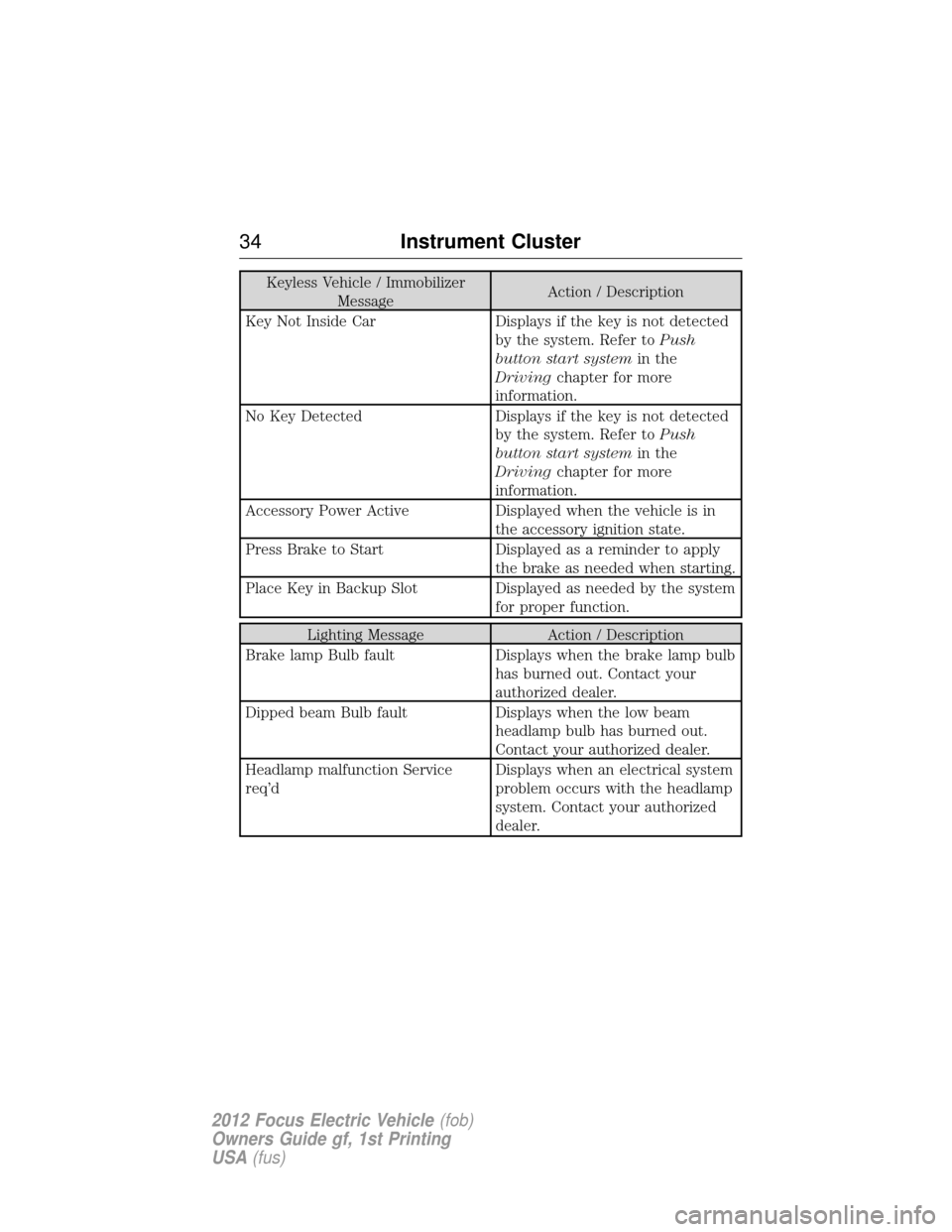
Keyless Vehicle / ImmobilizerMessage Action / Description
Key Not Inside Car Displays if the key is not detected by the system. Refer toPush
button start system in the
Driving chapter for more
information.
No Key Detected Displays if the key is not detected by the system. Refer toPush
button start system in the
Driving chapter for more
information.
Accessory Power Active Displayed when the vehicle is in the accessory ignition state.
Press Brake to Start Displayed as a reminder to apply the brake as needed when starting.
Place Key in Backup Slot Displayed as needed by the system for proper function.
Lighting MessageAction / Description
Brake lamp Bulb fault Displays when the brake lamp bulb
has burned out. Contact your
authorized dealer.
Dipped beam Bulb fault Displays when the low beam
headlamp bulb has burned out.
Contact your authorized dealer.
Headlamp malfunction Service
req’d Displays when an electrical system
problem occurs with the headlamp
system. Contact your authorized
dealer.
34
Instrument Cluster
2012 Focus Electric Vehicle (fob)
Owners Guide gf, 1st Printing
USA (fus)
Page 35 of 380
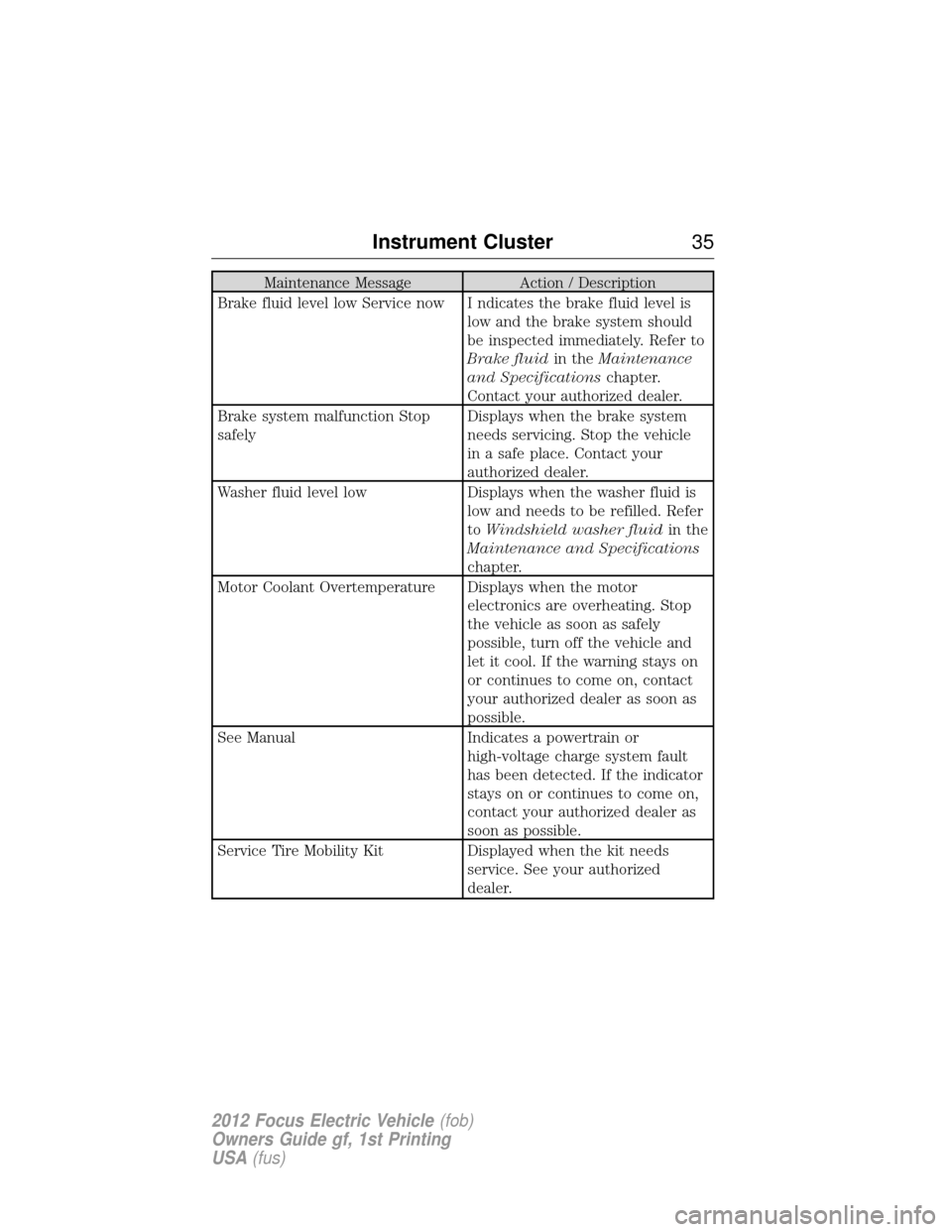
Maintenance MessageAction / Description
Brake fluid level low Service now I ndicates the brake fluid level is low and the brake system should
be inspected immediately. Refer to
Brake fluidin theMaintenance
and Specifications chapter.
Contact your authorized dealer.
Brake system malfunction Stop
safely Displays when the brake system
needs servicing. Stop the vehicle
in a safe place. Contact your
authorized dealer.
Washer fluid level low Displays when the washer fluid is
low and needs to be refilled. Refer
to Windshield washer fluid in the
Maintenance and Specifications
chapter.
Motor Coolant Overtemperature Displays when the motor electronics are overheating. Stop
the vehicle as soon as safely
possible, turn off the vehicle and
let it cool. If the warning stays on
or continues to come on, contact
your authorized dealer as soon as
possible.
See Manual Indicates a powertrain or
high-voltage charge system fault
has been detected. If the indicator
stays on or continues to come on,
contact your authorized dealer as
soon as possible.
Service Tire Mobility Kit Displayed when the kit needs
service. See your authorized
dealer.
Instrument Cluster 35
2012 Focus Electric Vehicle(fob)
Owners Guide gf, 1st Printing
USA (fus)
Page 37 of 380
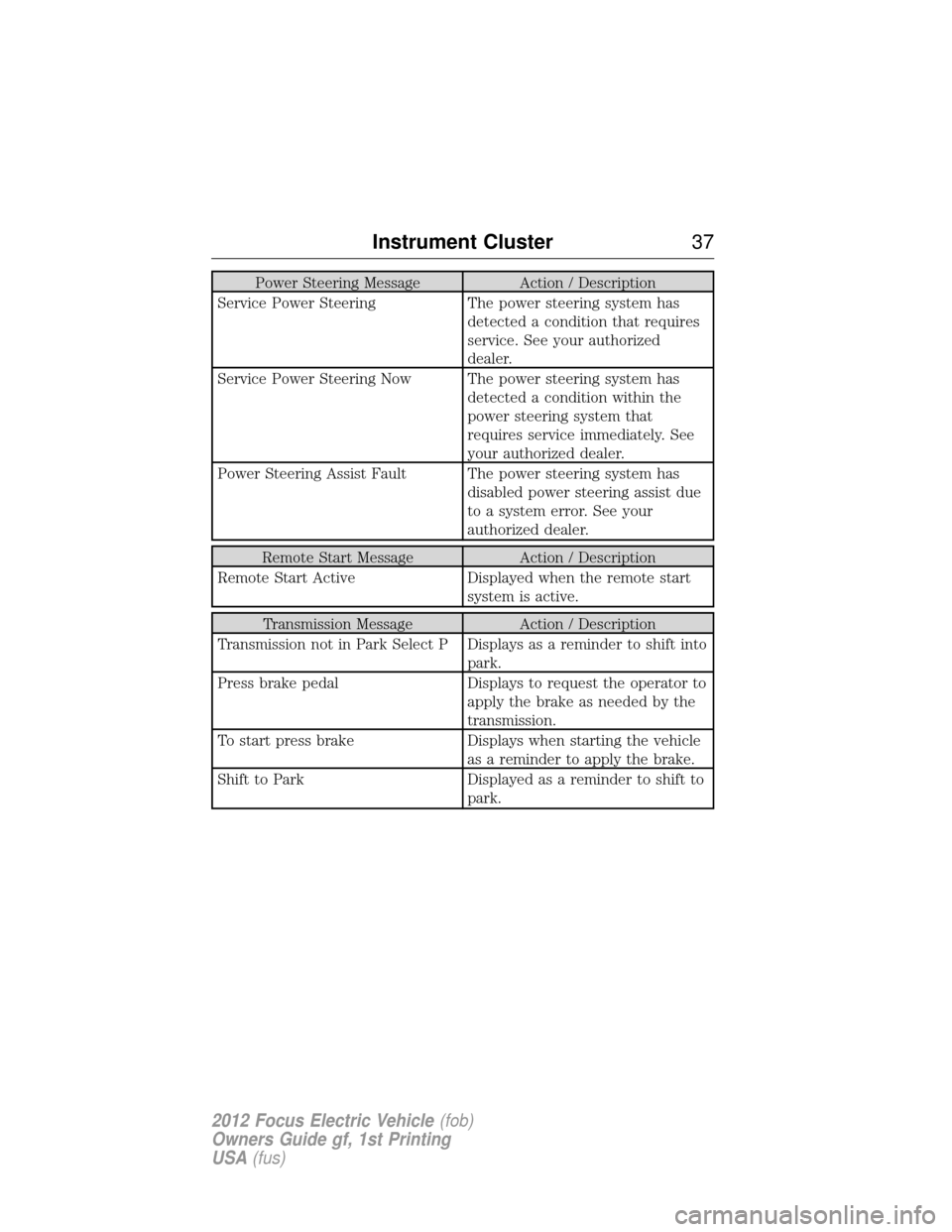
Power Steering MessageAction / Description
Service Power Steering The power steering system has
detected a condition that requires
service. See your authorized
dealer.
Service Power Steering Now The power steering system has detected a condition within the
power steering system that
requires service immediately. See
your authorized dealer.
Power Steering Assist Fault The power steering system has disabled power steering assist due
to a system error. See your
authorized dealer.
Remote Start Message Action / Description
Remote Start Active Displayed when the remote start
system is active.
Transmission Message Action / Description
Transmission not in Park Select P Displays as a reminder to shift into park.
Press brake pedal Displays to request the operator to
apply the brake as needed by the
transmission.
To start press brake Displays when starting the vehicle
as a reminder to apply the brake.
Shift to Park Displayed as a reminder to shift to
park.
Instrument Cluster37
2012 Focus Electric Vehicle(fob)
Owners Guide gf, 1st Printing
USA (fus)