Page 10 of 361
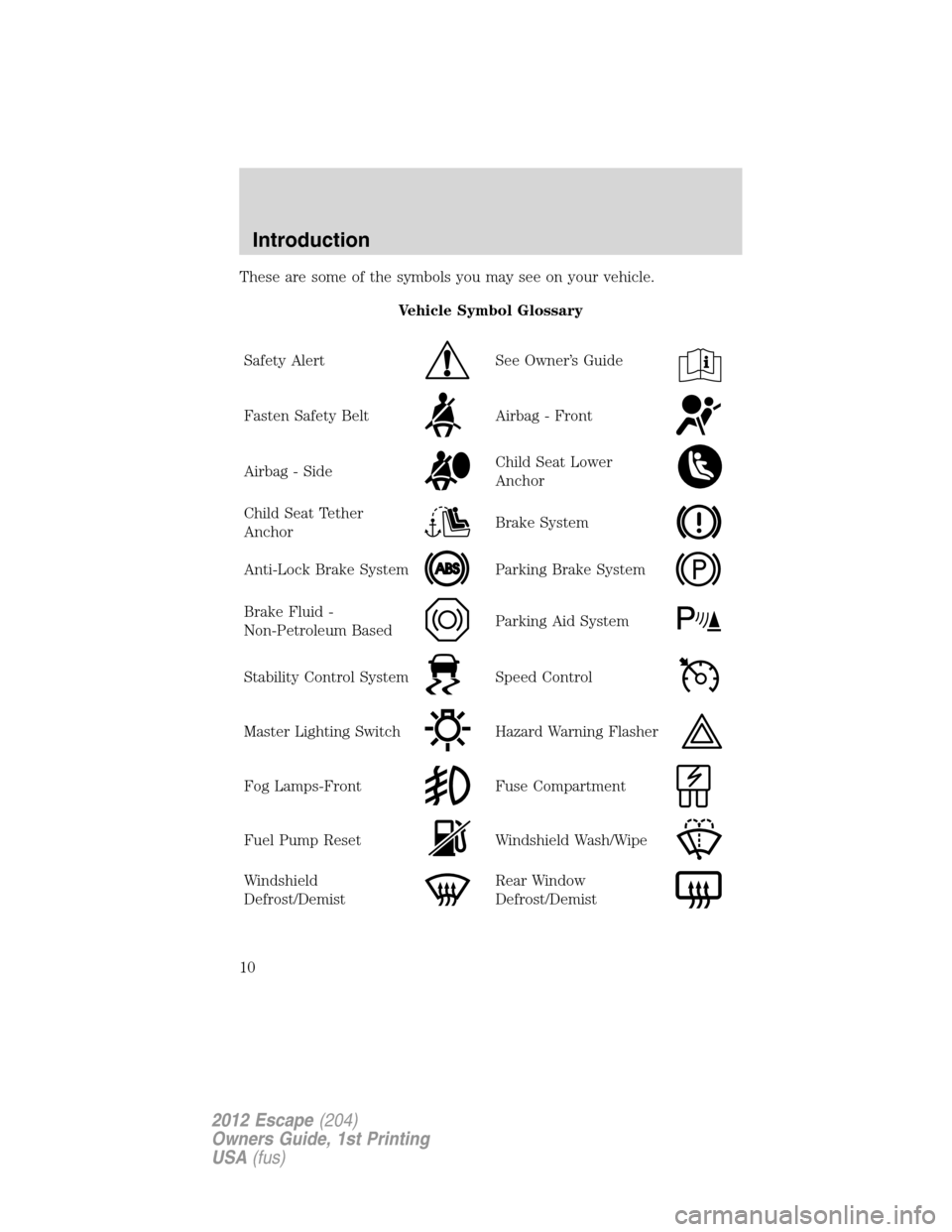
These are some of the symbols you may see on your vehicle.
Vehicle Symbol Glossary
Safety Alert
See Owner’s Guide
Fasten Safety BeltAirbag - Front
Airbag - SideChild Seat Lower
Anchor
Child Seat Tether
AnchorBrake System
Anti-Lock Brake SystemParking Brake System
Brake Fluid -
Non-Petroleum BasedParking Aid System
Stability Control SystemSpeed Control
Master Lighting SwitchHazard Warning Flasher
Fog Lamps-FrontFuse Compartment
Fuel Pump ResetWindshield Wash/Wipe
Windshield
Defrost/DemistRear Window
Defrost/Demist
Introduction
10
2012 Escape(204)
Owners Guide, 1st Printing
USA(fus)
Page 12 of 361
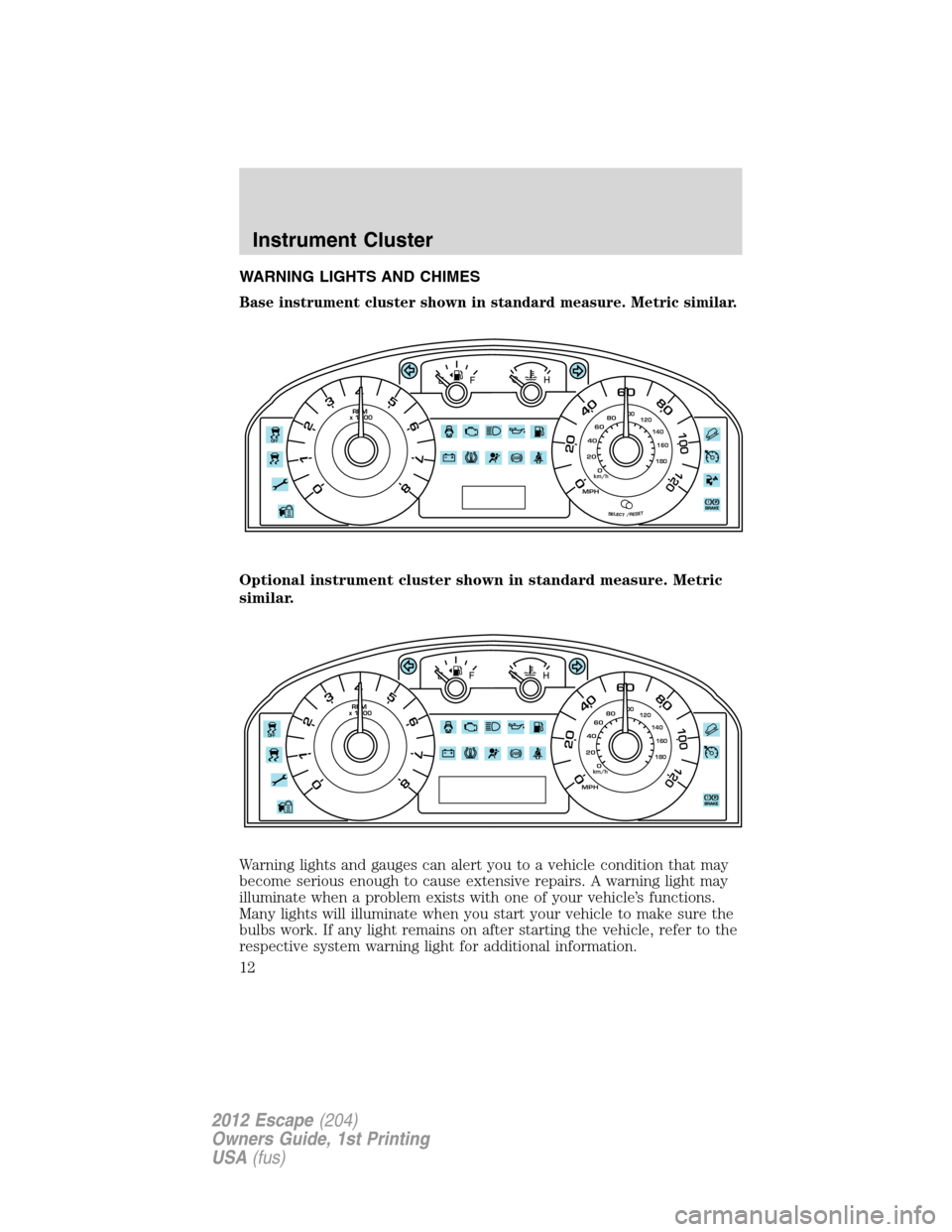
WARNING LIGHTS AND CHIMES
Base instrument cluster shown in standard measure. Metric similar.
Optional instrument cluster shown in standard measure. Metric
similar.
Warning lights and gauges can alert you to a vehicle condition that may
become serious enough to cause extensive repairs. A warning light may
illuminate when a problem exists with one of your vehicle’s functions.
Many lights will illuminate when you start your vehicle to make sure the
bulbs work. If any light remains on after starting the vehicle, refer to the
respective system warning light for additional information.
100
60EFC
H
MPH
6
7
534
2
1
0
RPM
x 1000
80
20
4080
100
120km/h0 20406080
120
140
160
180
S
E
L
E
C
T/RESET
100
60EFC
H
MPH
6
7
534
2
1
0
RPM
x 1000
80
20
4080
100
120km/h0 20406080
120
140
160
180
Instrument Cluster
12
2012 Escape(204)
Owners Guide, 1st Printing
USA(fus)
Page 17 of 361
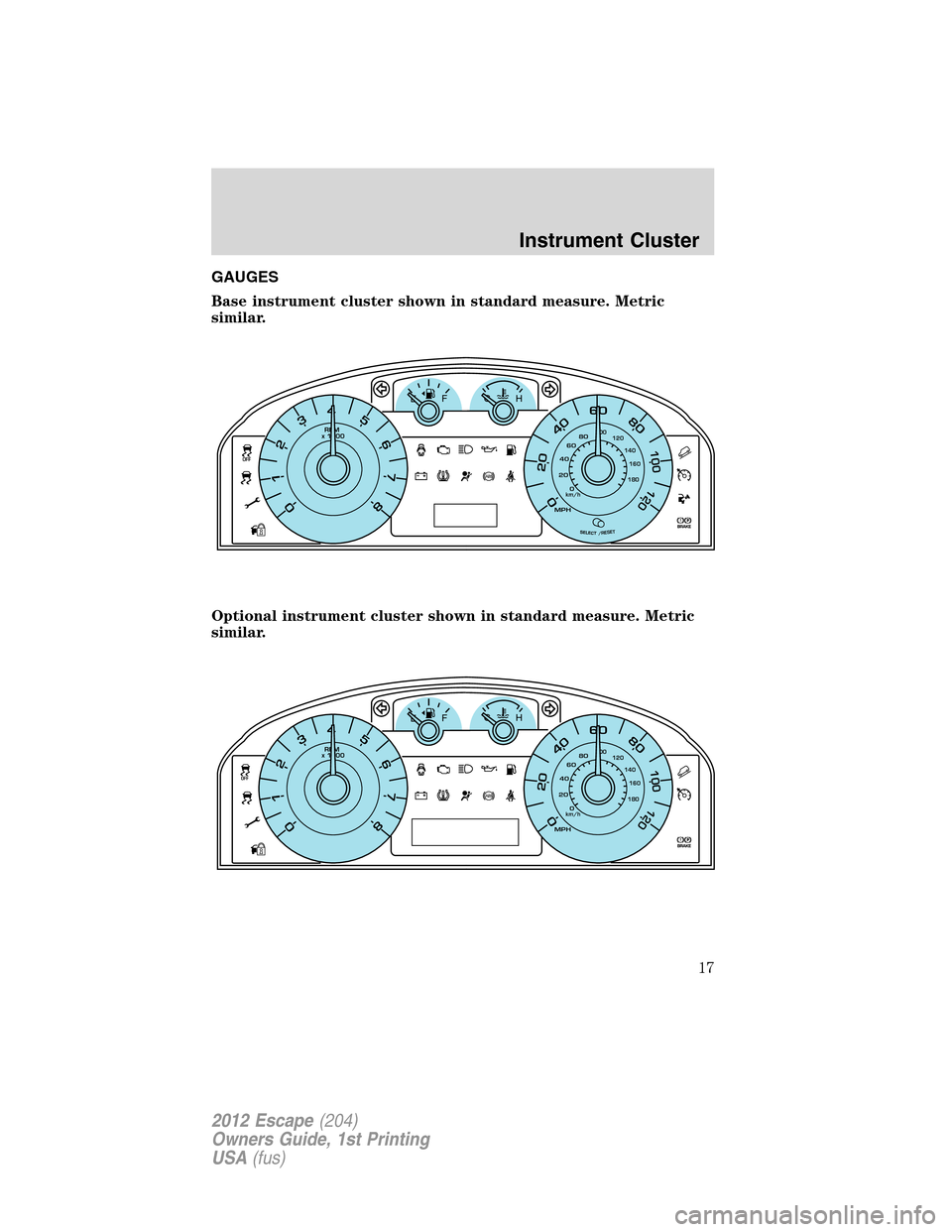
GAUGES
Base instrument cluster shown in standard measure. Metric
similar.
Optional instrument cluster shown in standard measure. Metric
similar.
100
60EFC
H
MPH
6
7
534
2
1
0
RPM
x 1000
80
20
4080
100
120km/h0 20406080
120
140
160
180
S
E
L
E
C
T/RESET
100
60EFC
H
MPH
6
7
534
2
1
0
RPM
x 1000
80
20
4080
100
120km/h0 20406080
120
140
160
180
Instrument Cluster
17
2012 Escape(204)
Owners Guide, 1st Printing
USA(fus)
Page 19 of 361
Tachometer:Indicates the engine
speed in revolutions per minute.
Driving with your tachometer
pointer continuously at the top of
the scale may damage the engine.
Odometer:Registers the total miles
(kilometers) of the vehicle.
If equipped with a message center,
refer toMessage centerin this
chapter on how to switch the
display from Metric to English.
Trip odometer:Registers the miles (kilometers) of individual journeys.
•Standard instrument cluster:
Press the SELECT/RESET control
once to switch from the odometer to
the TRIP A feature. Press the
control again to select the TRIP B
feature. To reset the trip, press and
hold the control again until the trip reading resets.
•Optional instrument cluster:
SeeTRIP A/BunderMessage center
in this chapter.
Instrument Cluster
19
2012 Escape(204)
Owners Guide, 1st Printing
USA(fus)
Page 20 of 361

MESSAGE CENTER (IF EQUIPPED)
Your vehicle’s message center is capable of monitoring many vehicle
systems and will alert you to potential vehicle problems and various
conditions with an informational message followed by a long indicator
chime.
The message center display is located in the instrument cluster.
Info
Press the INFO button repeatedly to
cycle through the following features:
TRIP A/B
Registers the distance of individual journeys. Press and release INFO
button until the A or B trip appears in the display (this represents the
trip mode). Press and hold the RESET button for two seconds to reset.
Refer toUNITSlater in this section to switch the display from Metric to
English.
MYKEY MILES (km) (if programmed)
For more information, refer toMyKey�in theLocks and Security
chapter.
MILES (km) TO E
This displays an estimate of approximately how far you can drive with
the fuel remaining in your tank under normal driving conditions.
Remember to turn the ignition off when refueling to allow this feature to
correctly detect the added fuel.
LOW FUEL LEVEL will display when you have approximately 50 miles
(80 km), to empty. Press RESET to clear this warning message. It will
return at approximately 25 miles (40 km), 10 miles (16 km) and 0 miles
(0 km) miles to empty.
Distance to empty is calculated using a running average fuel economy,
which is based on your recent driving history of 500 miles (800 km).
This value is not the same as the average fuel economy display. The
running average fuel economy is re-initialized to a factory default value if
the battery is disconnected.
Instrument Cluster
20
2012 Escape(204)
Owners Guide, 1st Printing
USA(fus)
Page 21 of 361

AVG MPG (L/100km)
Average fuel economy displays your average fuel economy in miles/gallon
or liters/100 km.
If you calculate your average fuel economy by dividing distance traveled
by gallons of fuel used (liters of fuel used by 100 kilometers traveled),
your figure may be different than displayed for the following reasons:
•Your vehicle was not perfectly level during fill-up
•Differences in the automatic shut-off points on the fuel pumps at
service stations
•Variations in top-off procedure from one fill-up to another
•Rounding of the displayed values to the nearest 0.1 gallon (liter)
1. Drive the vehicle at least 5 miles (8 km) with the speed control
system engaged to display a stabilized average.
2. Record the highway fuel economy for future reference.
It is important to press the RESET button (press and hold RESET for
two seconds in order to reset the function) after setting the speed
control to get accurate highway fuel economy readings.
For more information refer toEssentials of good fuel economyin the
Maintenance and Specificationschapter.
MPG (L/km)
This displays instantaneous fuel economy as a bar graph ranging from↓
poor economy to↑excellent economy.
Your vehicle must be moving to calculate instantaneous fuel economy.
When your vehicle is not moving, this function shows↓, one or no bars
illuminated. Instantaneous fuel economy cannot be reset.
Blank Screen
The message center display will be blank after cycling through all of the
Info menu items.
System check and vehicle feature customization
Press the SETUP button repeatedly
to cycle the message center through
the following features:
Instrument Cluster
21
2012 Escape(204)
Owners Guide, 1st Printing
USA(fus)
Page 22 of 361

PRESS RESET FOR ENGLISH (if in another language)
When entering the setup menu and a non-English language has been
selected, this message will be displayed to change back to English.
Press the RESET button to change back to English.
RESET FOR SYSTEM CHECK
When this message appears, press the RESET button and the message
center will begin to cycle through the following systems and provide a
status of the item if needed.
1. OIL LIFE
2. LIFTGATE AND GLASS
3. BRAKE SYSTEM
4. DTE/FUEL LEVEL
5. REAR PARK AID (if equipped)
6. MYKEY DISTANCE (if a MyKey�is programmed)
7. MYKEY(S) PROGRAMMED
8. ADMIN KEYS PROGRAMMED
Note:Some systems show a message only if a condition is present.
OIL LIFE
This displays the remaining oil life.
An oil change is required whenever indicated by the message center and
according to the recommended maintenance schedule. USE ONLY
RECOMMENDED ENGINE OILS.
To reset the oil monitoring system to 100% after each oil change,
perform the following:
1. Press and release the SETUP button to display “OIL LIFE XXX%
HOLD RESET = NEW”.
2. Press and hold the RESET button for two seconds and release to reset
the oil life to 100%.
UNITS
Displays the current units in English or Metric.
Press RESET to change between English and Metric.
Instrument Cluster
22
2012 Escape(204)
Owners Guide, 1st Printing
USA(fus)
Page 23 of 361

AUTOLAMP (if equipped)
This feature keeps your headlights on for up to three minutes after the
ignition is switched off.
Press the RESET control to select the new Autolamp delay values of 0,
10, 20, 30, 60, 90, 120 or 180 seconds.
AUTOLOCK
This feature automatically locks all vehicle doors when the vehicle is
shifted into any gear, putting the vehicle in motion.
Press RESET to turn autolock on or off.
AUTOUNLOCK
This feature automatically unlocks all vehicle doors when the driver’s
door is opened within 10 minutes of the ignition being turned off.
Press RESET to turn autounlock on or off.
REAR PARK AID (if equipped)
This feature sounds a warning tone to warn the driver of obstacles near
the rear bumper, and functions only when R (Reverse) gear is selected.
Press the RESET button to turn it off or on.
CREATE MYKEY / MYKEY SETUP / CLEAR MYKEY
For more information refer toMyKey�in theLocks and Security
chapter.
ZONE [XX] RESET = CHANGE (if equipped)
For more information on the compass and compass set up, refer to
Electronic compassin theDriver Controlschapter.
RESET FOR CALIBRATION (if equipped)
For more information on the compass and compass set up, refer to
Electronic compassin theDriver Controlschapter.
LANGUAGE = ENGLISH / SPANISH / FRENCH
Allows you to choose which language the message center will display in.
Selectable languages are English, Spanish, or French.
Waiting four seconds or pressing the RESET button cycles the message
center through each of the language choices.
Press and hold the RESET button for two seconds to set the language
choice.
Instrument Cluster
23
2012 Escape(204)
Owners Guide, 1st Printing
USA(fus)