Page 35 of 361
•CHANNEL LOCKOUT MENU-Press OK to enter the Channel Lockout
menu. Press the
/to scroll through the following options:
a. LOCK/UNLOCK THIS CHANNEL:Press OK when LOCK/UNLOCK
THIS CHANNEL is displayed and the display will read ENTER PIN.
Enter your four-digit PIN number (initial PIN is 1234) and the system
will lock/unlock the channel and CHANNEL LOCKED or UNLOCKED
will be displayed.
Note: you must be tuned to the specific channel you want to lock/unlock
when using this feature.
b. CHANGE PIN:Press OK when CHANGE PIN is displayed. The
display will read ENTER OLD PIN. Enter your current (old) PIN number
and when the system accepts your entry it will display ENTER NEW
PIN. Enter your new four-digit PIN and the system will save the new
PIN and PIN SAVED will display.
c. UNLOCK ALL CHANNELS:Press OK when UNLOCK ALL
CHANNELS is displayed and the display will read ENTER PIN. Enter
your four-digit PIN and the system will unlock all channels and the
display will read CHANNEL UNLOCKED.
d. RESET PIN:Press OK when RESET PIN is displayed. The display
will read ARE YOU SURE. Press OK again to automatically reset the PIN
number to its initial password setting (1234). PIN RESET TO DEFAULT
PIN will be displayed.
e. RETURN:Press OK when RETURN is displayed and the system will
exit back to the satellite radio menu.
Sound Adjustments
Press SOUND repeatedly to cycle through the following features:
•BASS:Press
SEEK/TRACKor turn the tune knob to adjust
the level of bass.
•TREBLE:Press
SEEK/TRACKor turn the tune knob to
adjust the level of treble.
•BALANCE:Press
SEEK/TRACKor turn the tune knob to
adjust the audio between the left (L) and right (R) speakers.
•FADE:Press
SEEK/TRACKor turn the tune knob to adjust
the audio between the back (B) and front (F) speakers.
Entertainment Systems
35
2012 Escape(204)
Owners Guide, 1st Printing
USA(fus)
Page 43 of 361

•Terrain: Hills, mountains, tall buildings, bridges, tunnels, freeway
overpasses, parking garages, dense tree foliage and thunderstorms can
interfere with your reception.
•Station overload: When you pass a ground based broadcast repeating
tower, a stronger signal may overtake a weaker one and result in an
audio mute.
Unlike AM/FM audible static, you will hear an audio mute when there is
a satellite radio signal interference. Your radio display may display NO
SIGNAL to indicate the interference.
SIRIUS�satellite radio service:SIRIUS�satellite radio is a
subscription based satellite radio service that broadcasts music, sports,
news and entertainment programming. A service fee is required in order
to receive SIRIUS�service. Vehicles that are equipped with a factory
installed SIRIUS�satellite radio system include hardware and a limited
subscription term, which begins on the date of sale or lease of the
vehicle.
For information on extended subscription terms, the online media player
and other SIRIUS�features, please contact SIRIUS�at 1–888–539–7474.
Note:SIRIUS�reserves the unrestricted right to change, rearrange, add
or delete programming including canceling, moving or adding particular
channels, and its prices, at any time, with or without notice to you. Ford
Motor Company shall not be responsible for any such programming
changes.
Satellite radio electronic serial number (ESN):This 12–digit
Satellite Serial Number is needed to activate, modify or track your
satellite radio account. You will need this number when communicating
with SIRIUS�. While in satellite radio mode, you can view this number on
the radio display by pressing the AUX and preset 1 controls
simultaneously.
Entertainment Systems
43
2012 Escape(204)
Owners Guide, 1st Printing
USA(fus)
Page 44 of 361

Radio Display Condition Action Required
ACQUIRING Radio requires more
than two seconds to
produce audio for the
selected channel.No action required.
This message should
disappear shortly.
SAT FAULT Internal module or
system failure
present.If this message does
not clear within a short
period of time, or with
an ignition key cycle,
your receiver may have
a fault. See your
authorized dealer for
service.
INVALID CHNL Channel no longer
available.This previously
available channel is no
longer available. Tune
to another channel. If
the channel was one of
your presets, you may
choose another channel
for that preset button.
UNSUBSCRIBED Subscription not
available for this
channel.Contact SIRIUS�at
1–888–539–7474 to
subscribe to the
channel or tune to
another channel.
NO TEXT Artist information not
available.Artist information not
available at this time on
this channel. The
system is working
properly.
NO TEXT Song title information
not available.Song title information
not available at this
time on this channel.
The system is working
properly.
Entertainment Systems
44
2012 Escape(204)
Owners Guide, 1st Printing
USA(fus)
Page 55 of 361

Daytime running lamps (DRL) (if equipped)
Turns the low beam headlamps on with a reduced output.
To activate:
•the ignition must be in the on position.
•the headlamp control must be in the off, parking lamps or autolamp
position.
•with automatic transmission, the transmission is not in P (Park),
•with manual transmission, the parking brake must be released.
WARNING:Always remember to turn on your headlamps at
dusk or during inclement weather. The Daytime Running Lamp
(DRL) system does not activate the tail lamps and generally may not
provide adequate lighting during these conditions. Failure to activate
your headlamps under these conditions may result in a collision.
PANEL DIMMER CONTROL
Use to adjust the brightness of the
instrument panel and all applicable
switches in the vehicle during
headlamp and parking lamp
operation.
•Move the control to the full
upright position, past detent, to
turn on the interior lamps.
•Rotate to full down position (past
detent) to prevent interior lamps
from illuminating when the doors are opened.
Note:If the battery is disconnected, discharged, or a new battery is
installed, the dimmer switch requires re-calibration. Rotate the dimmer
switch from the full dim position to the full dome/on position to reset.
This will ensure that your displays are visible under all lighting
conditions.
Lights
55
2012 Escape(204)
Owners Guide, 1st Printing
USA(fus)
Page 58 of 361
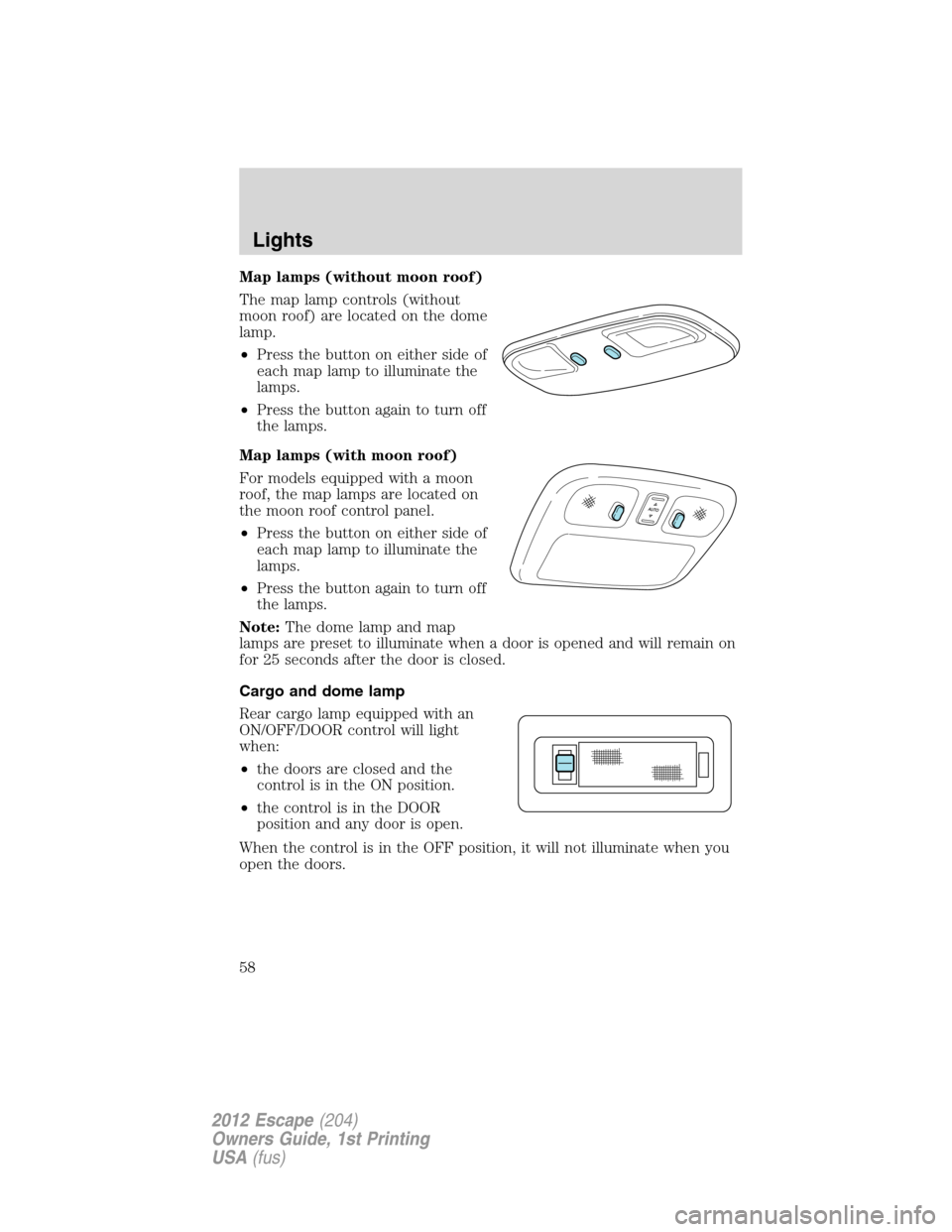
Map lamps (without moon roof)
The map lamp controls (without
moon roof) are located on the dome
lamp.
•Press the button on either side of
each map lamp to illuminate the
lamps.
•Press the button again to turn off
the lamps.
Map lamps (with moon roof)
For models equipped with a moon
roof, the map lamps are located on
the moon roof control panel.
•Press the button on either side of
each map lamp to illuminate the
lamps.
•Press the button again to turn off
the lamps.
Note:The dome lamp and map
lamps are preset to illuminate when a door is opened and will remain on
for 25 seconds after the door is closed.
Cargo and dome lamp
Rear cargo lamp equipped with an
ON/OFF/DOOR control will light
when:
•the doors are closed and the
control is in the ON position.
•the control is in the DOOR
position and any door is open.
When the control is in the OFF position, it will not illuminate when you
open the doors.
Lights
58
2012 Escape(204)
Owners Guide, 1st Printing
USA(fus)
Page 68 of 361

ELECTRONIC COMPASS (IF EQUIPPED)
The compass heading is displayed in the center stack display.
The compass reading may be affected when you drive near large
buildings, bridges, power lines and powerful broadcast antenna. Magnetic
or metallic objects placed in, on or near the vehicle may also affect
compass accuracy.
Usually, when something affects the compass readings, the compass will
correct itself after a few days of operating your vehicle in normal
conditions. If the compass still appears to be inaccurate, a manual
calibration may be necessary. Refer toCompass calibration adjustment.
Most geographic areas (zones) have a magnetic north compass point that
varies slightly from the northerly direction on maps. This variation is four
degrees between adjacent zones and will become noticeable as the
vehicle crosses multiple zones. A correct zone setting will eliminate this
error. Refer toCompass zone adjustment.
Compass zone adjustment
1. Determine which magnetic zone
you are in for your geographic
location by referring to the zone
map.
2. Turn ignition to the on position.
3. Start the engine.
4. Press the SETUP control to select
the Update Zone function and
display the current ZONE XX in the
center stack display.
5. Continue to press the RESET
control until the correct zone
appears in the center stack display.
1 2 3
4
5
6 7 8 9 101112 13 14 15
Driver Controls
68
2012 Escape(204)
Owners Guide, 1st Printing
USA(fus)
Page 69 of 361

6. The direction will display after
the RESET control is released. The
zone is now updated.
Compass calibration adjustment
Perform compass calibration in an open area free from steel structures
and high voltage lines. For optimum calibration, turn off all electrical
accessories (heater/air conditioning, wipers, etc.) and make sure all
vehicle doors are shut.
1. Start the vehicle.
2. To calibrate, press and hold the
RESET control for approximately
ten seconds until CAL appears.
Release the control.
3. Slowly drive the vehicle in a
circle (less than 3 mph [5 km/h]) until the CAL display changes to the
direction value. It may take up to five circles to complete calibration.
4. The compass is now calibrated.
CENTER CONSOLE
Your vehicle is equipped with a variety of console features. These include:
1. Cupholders
2. Utility compartment console lid has
a CD holder, a business card holder
and two pen holders. The utility
compartment has a removable bin
with coin holder slots, a sliding tray, a
cell phone holder and CD holders.
3. Rear power point
4. Rear cupholders
5. Small storage trays and (if
equipped) an ambient light control
switch.
Driver Controls
69
2012 Escape(204)
Owners Guide, 1st Printing
USA(fus)
Page 76 of 361
Turning off speed control
To turn off the speed control, press OFF or turn off the ignition.
Note:When you turn off the speed control or the ignition, your speed
control set speed memory is erased.
STEERING WHEEL CONTROLS (IF EQUIPPED)
Radio control features
VOL + (Volume):Press to increase
the volume.
VOL – (Volume):Press to decrease
the volume.
(Seek):Press to select
the previous/next radio station
preset, CD track or satellite radio
channel (if equipped) depending on
which media mode you are in.
MEDIA:Press repeatedly to scroll
through available audio modes.
Navigation system hands-free
control features (if equipped)
Press and hold
control briefly
until the voice
icon appears on
the navigation display to use the
voice command feature.
Press
to complete a voice
command.
For further information on the
navigation system, refer to theNavigation Systemsupplement.
Driver Controls
76
2012 Escape(204)
Owners Guide, 1st Printing
USA(fus)