Page 3 of 396
CITROËN has a presence on every continent,
a complete product range,
bringing together technology and a permanent spirit of innovation,
for a modern and creative approach to mobility.
We thank you and congratulate you on your choice.
Your vehicle is fitted with only some of theequipment described in this document,
depending on the trim level, version and thespecifications for the country in which it is sold.
The
fitting of electrical equipment or accessories which are not recommended
byCITROËNmay result in a failure of your
vehicle's electronic system. Please note thisspecific warning and contact a CITROËNdealer to be shown the recommendedequipment and accessories.
At the wheel of your new vehicle,
getting to know each system,
each control, each setting,
makes your trips, your journeys
more comfortable and more enjoyable.
Happy motoring!
We draw your attention to the following...
Page 4 of 396
Contents
Contents
6 FA M I L I A R I SAT I O N
34ECO-DRIVING
3
82 VISUAL
SEARCH
38
6 ALPHABETICAL
INDEXMONITORING
38 Instrument panels
42 Rev counter
43Warning and indicator lamps
54Indicators
57 Manual test
60Customisation
Key
sa
fety warning
additional information
contributes to the protection of the environment
programming a function with the configuration menu
001001
refer to the page indicated
Page 7 of 396
CHECKS PRACTICAL
INFORMATIONTECHNICAL DATA AUDIO AND
TELEMATICS
233 Bonnet
234Running out of fuel (Diesel)
235Petrol engines
236 Diesel engines
237 Checking levels
240 Checks
246Te m p o r a ry puncture repair
kit
251 Changing a wheel
258 Changing a bulb
265Changing a fuse
271 12 V battery
274 Energy economy mode
275Changing a wiper blade
275Very cold climate screen
276Fitting roof bars
277 Towing the vehicle
279To w i ng a trailer
281 Accessories
286 Petrol engines
287 Petrol weights
288Diesel engines
289Diesel weights
290Dimensions
291Identifi cation markings
295 Emergency or assistance
297 eMyWay
349 Audio system
012012013013010010011011
Page 23 of 396
21Familiarisation
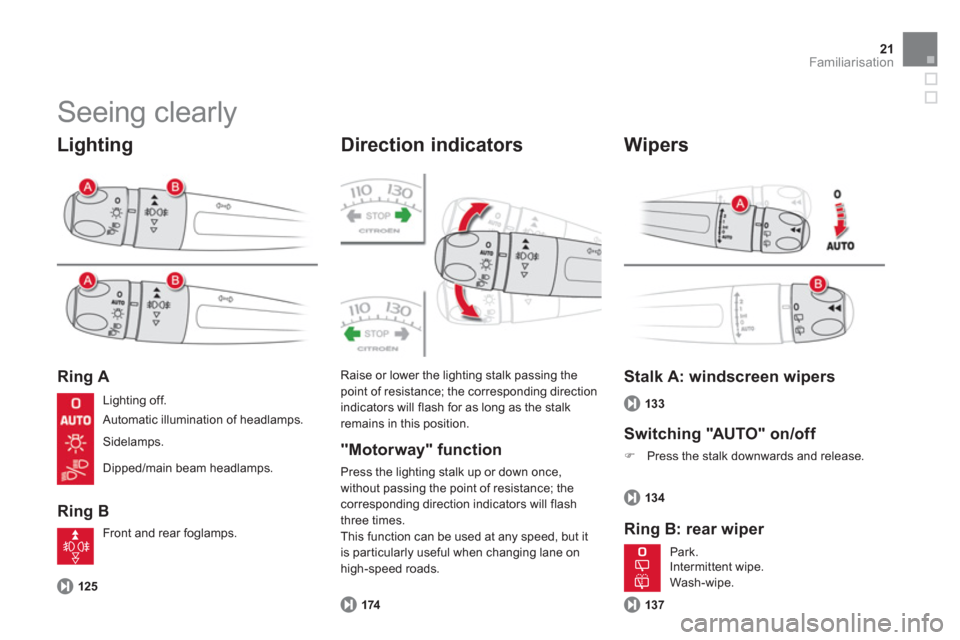
Seeing clearly
Lighting
Ring A
Ring B
Direction indicators
125
Raise or lower the lighting stalk passing thepoint of resistance; the corresponding directionindicators will flash for as long as the stalkremains in this position.
174
Stalk A: windscreen wipers
Switchin
g "AUTO" on/off
)
Press the stalk downwards and release.
Ring B: rear wiper
134
137 Li
ghting off.
Automatic illumination of headlamps.
Sidelamps.
Dipped/main beam headlamps.
Front and rear
foglamps.
P
ark.
Intermittent wipe.
Wash-wi
pe.
"Motorway" function
Press the lighting stalk up or down once,without passing the point of resistance; thecorresponding direction indicators will flash
three times.
This
function can be used at any speed, but it is par ticularly useful when changing lane on high-speed roads.
Wipers
133
Page 24 of 396
Vent ilat ion
Recommended interior settings
Digital air conditioning:
we recommend use of one of the three fully automatic modes by pressing the "AUTO"
button. I re
quire...
Manual Air Conditioning
Air distributionAir flowAir recirculation/Intake of outside airTemperatureManual A/C
HOT
COLD
DEMISTINGDEFROSTING
Page 25 of 396
23Familiarisation
Monitoring
A.With the ignition on, the bars indicate the
level of fuel remaining. B.With the engine running, its associated low
level warning lamp should go off. C.With the ignition on, the oil level indicator should show for a few seconds that thelevel is OK or correct, depending on
version.
If the levels are not correct, top up the levels
whi
ch are low.
Instrument panels
38
1.With the ignition on, the orange and red
warning lamps come on. 2. With the engine running, these warning lamps should go off.
If warning lamps remain on, refer to the page concerned.
Warning lamps
43
A.Make an emergency call.
Central switch panel
175 , 2 95
B.
Access to CITROËN services.
175 , 2 9
5
C. Hazard warning.
17
4
D.Central locking.
10
7
E.Black panel (black screen).
60
Page 27 of 396
25
Familiarisation
Cruise control/speed limiter controls
Steering wheel with
integrated controls
60
Optional functions controls
222, 224
59 2
. Dashboard lighting dimmer.
300, 351
Audio system controls
300, 351
Bluetooth system or telephonecontrols
1.Black panel (black screen).
40
or
Control of the type 2 central instrumentscreen.
138
3. Courtesy lamp on/off.
226
or
Parking space sensors.
Monitoring
Page 30 of 396

Driving safely
Manual application/release
Manual applicationof the parking brake is possible by pulling
the control lever A.With the ignition on, manual release
of the parking brake is possible by pressing the brake pedal
and pulling then releasingthe
control lever A
.
Electric parking brake
Automatic application/release
Press the accelerator pedal and let the clutch
pedal up (manual gearbox), the parking brakeis released automatically and progressively as you move off.
With the vehicle at rest, on switching off
the en
gine the parking brake is applied
automatically.
I
f this warning lamp is on in the
instrument panel, the automatic application/release
is deactivated
; apply and release the parking brake manually. Before leavin
g the
vehicle, check that the
brake warnin
g lamp in the
instrument panel and the Pwarning lamp in thecontrol lever A are on fixed (not flashing).
194
With the engine running, on openingthe driver's door there is an audible warning; apply the parking brakemanually.
Do not leave a child alone inside thevehicle with the ignition on; they mightrelease the parking brake.
If you are towing a trailer or caravan or if the slope might vary (transpor t on a ferry, lorry, towing...) make a maximummanual application with a long pull onthe control lever Ato immobilise the vehicle.