Page 374 of 652
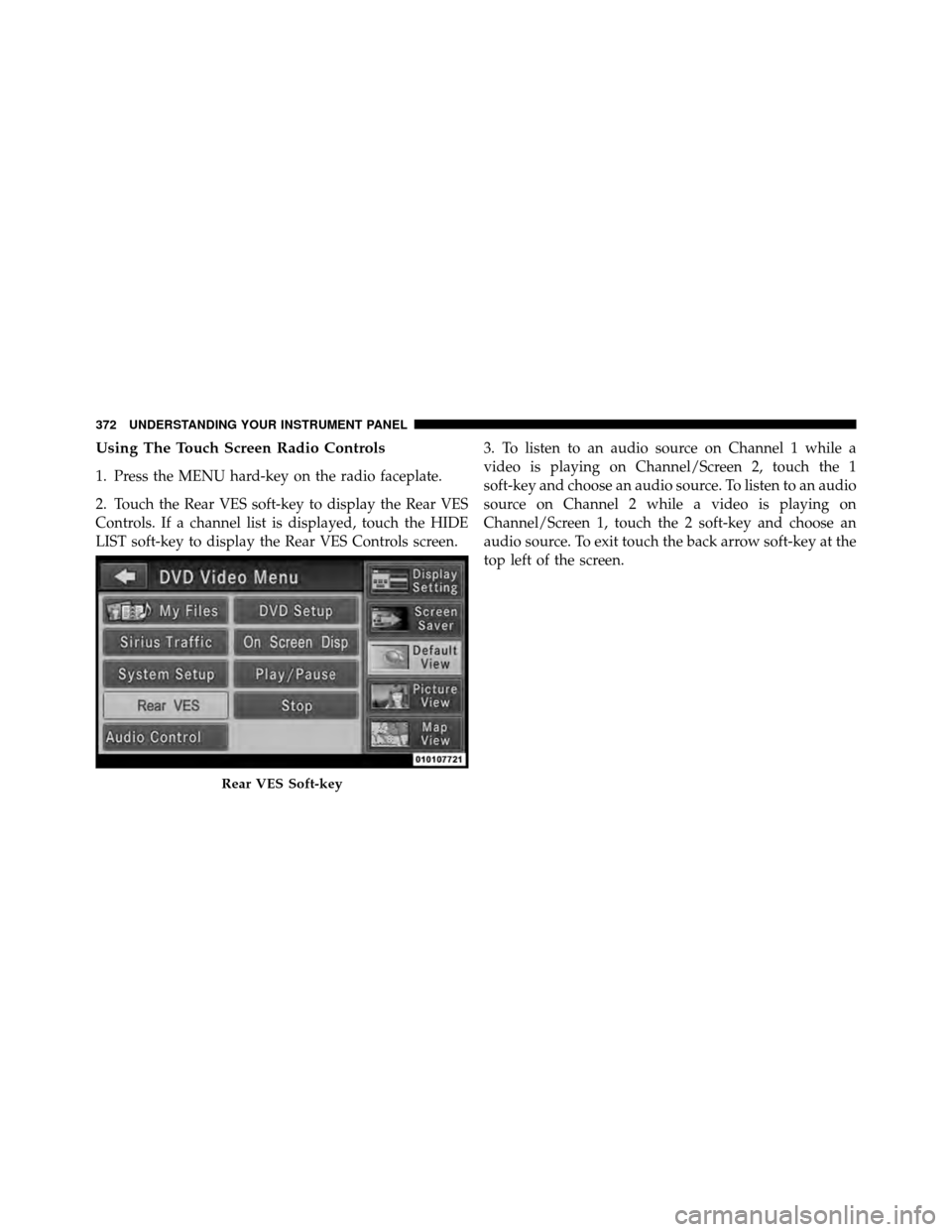
Using The Touch Screen Radio Controls
1. Press the MENU hard-key on the radio faceplate.
2. Touch the Rear VES soft-key to display the Rear VES
Controls. If a channel list is displayed, touch the HIDE
LIST soft-key to display the Rear VES Controls screen.3. To listen to an audio source on Channel 1 while a
video is playing on Channel/Screen 2, touch the 1
soft-key and choose an audio source. To listen to an audio
source on Channel 2 while a video is playing on
Channel/Screen 1, touch the 2 soft-key and choose an
audio source. To exit touch the back arrow soft-key at the
top left of the screen.
Rear VES Soft-key
372 UNDERSTANDING YOUR INSTRUMENT PANEL
Page 377 of 652
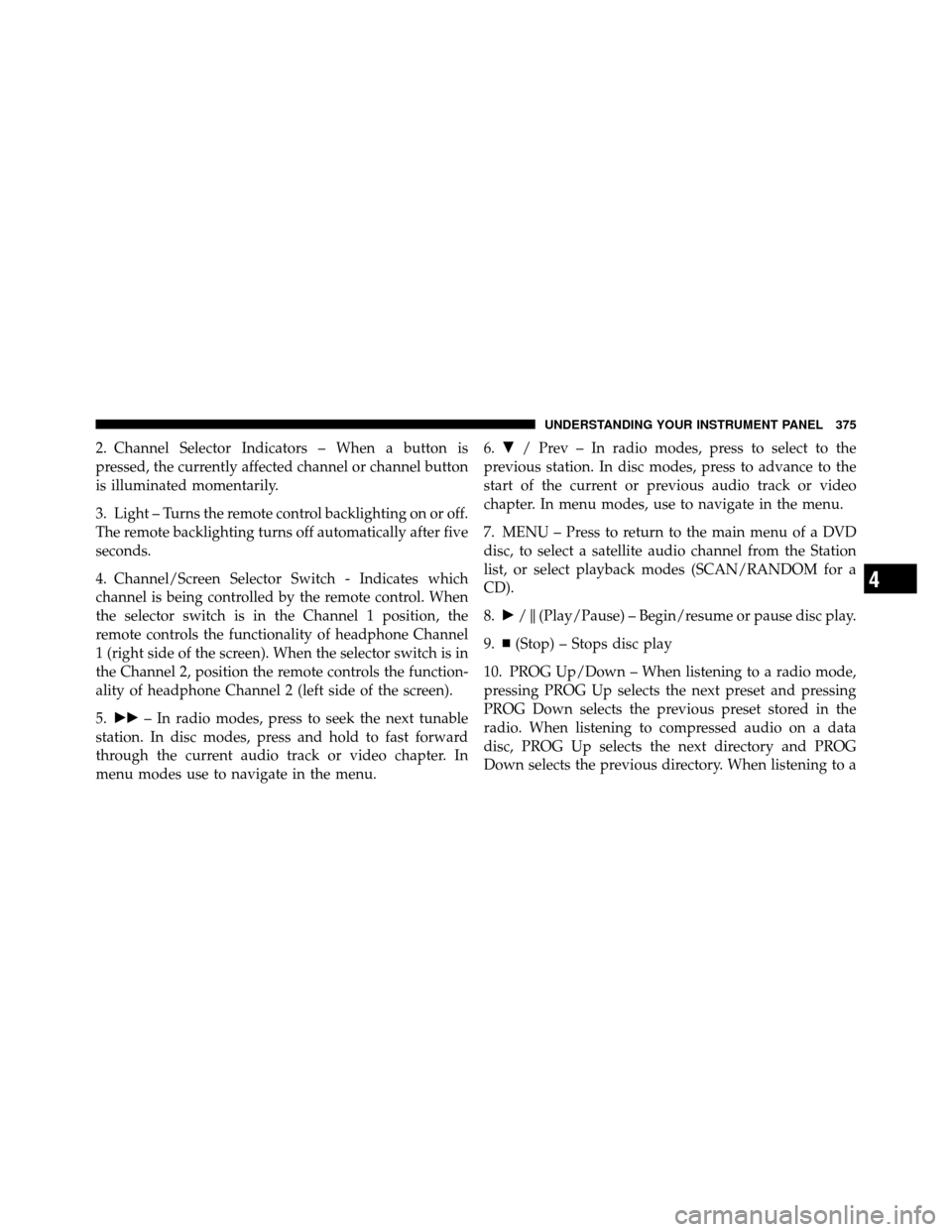
2. Channel Selector Indicators – When a button is
pressed, the currently affected channel or channel button
is illuminated momentarily.
3. Light – Turns the remote control backlighting on or off.
The remote backlighting turns off automatically after five
seconds.
4. Channel/Screen Selector Switch - Indicates which
channel is being controlled by the remote control. When
the selector switch is in the Channel 1 position, the
remote controls the functionality of headphone Channel
1 (right side of the screen). When the selector switch is in
the Channel 2, position the remote controls the function-
ality of headphone Channel 2 (left side of the screen).
5.�� – In radio modes, press to seek the next tunable
station. In disc modes, press and hold to fast forward
through the current audio track or video chapter. In
menu modes use to navigate in the menu. 6.
� / Prev – In radio modes, press to select to the
previous station. In disc modes, press to advance to the
start of the current or previous audio track or video
chapter. In menu modes, use to navigate in the menu.
7. MENU – Press to return to the main menu of a DVD
disc, to select a satellite audio channel from the Station
list, or select playback modes (SCAN/RANDOM for a
CD).
8. �/ (Play/Pause) – Begin/resume or pause disc play.
9.
(Stop) – Stops disc play
10. PROG Up/Down – When listening to a radio mode,
pressing PROG Up selects the next preset and pressing
PROG Down selects the previous preset stored in the
radio. When listening to compressed audio on a data
disc, PROG Up selects the next directory and PROG
Down selects the previous directory. When listening to a
4
UNDERSTANDING YOUR INSTRUMENT PANEL 375
Page 378 of 652
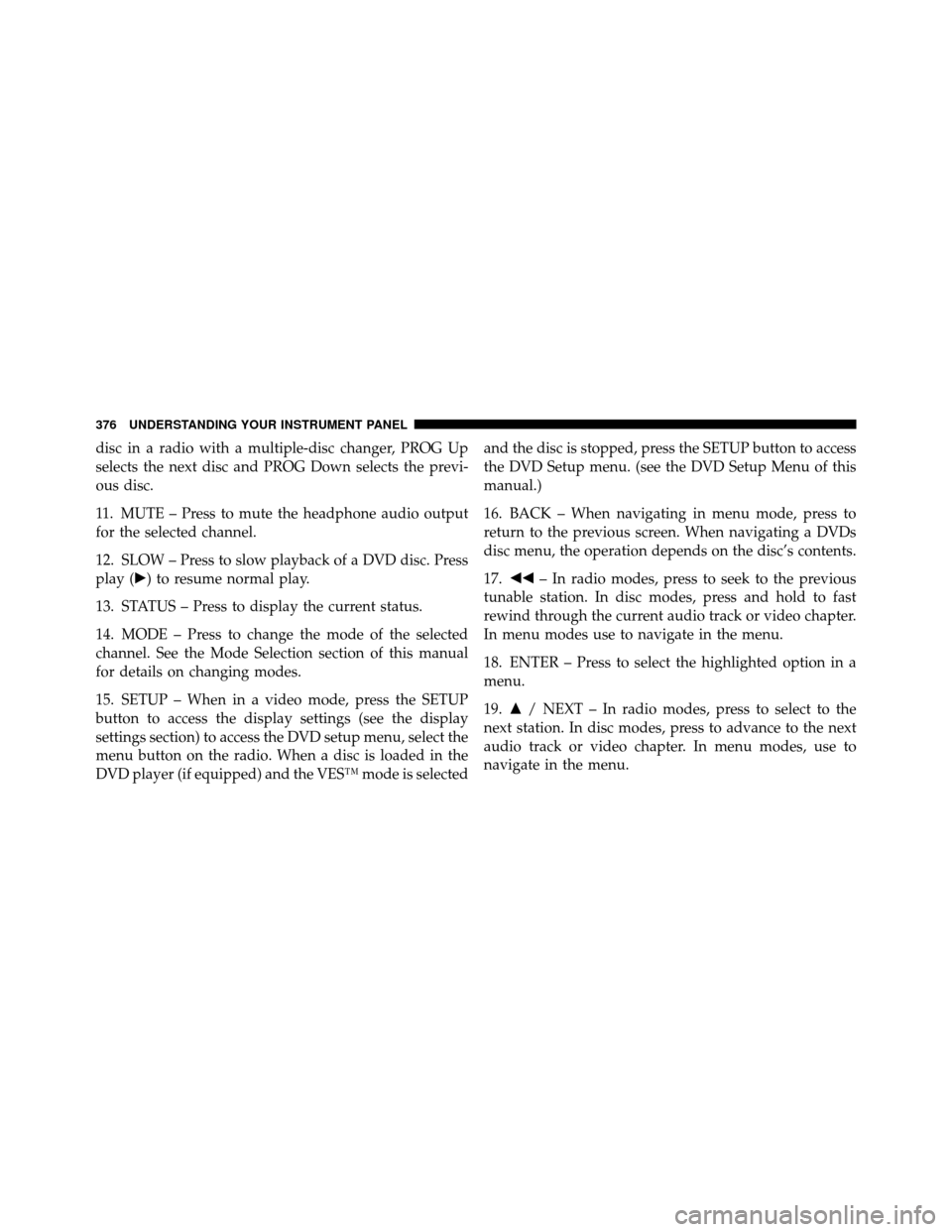
disc in a radio with a multiple-disc changer, PROG Up
selects the next disc and PROG Down selects the previ-
ous disc.
11. MUTE – Press to mute the headphone audio output
for the selected channel.
12. SLOW – Press to slow playback of a DVD disc. Press
play (�) to resume normal play.
13. STATUS – Press to display the current status.
14. MODE – Press to change the mode of the selected
channel. See the Mode Selection section of this manual
for details on changing modes.
15. SETUP – When in a video mode, press the SETUP
button to access the display settings (see the display
settings section) to access the DVD setup menu, select the
menu button on the radio. When a disc is loaded in the
DVD player (if equipped) and the VES™ mode is selectedand the disc is stopped, press the SETUP button to access
the DVD Setup menu. (see the DVD Setup Menu of this
manual.)
16. BACK – When navigating in menu mode, press to
return to the previous screen. When navigating a DVDs
disc menu, the operation depends on the disc’s contents.
17.
�� – In radio modes, press to seek to the previous
tunable station. In disc modes, press and hold to fast
rewind through the current audio track or video chapter.
In menu modes use to navigate in the menu.
18. ENTER – Press to select the highlighted option in a
menu.
19. �/ NEXT – In radio modes, press to select to the
next station. In disc modes, press to advance to the next
audio track or video chapter. In menu modes, use to
navigate in the menu.
376 UNDERSTANDING YOUR INSTRUMENT PANEL
Page 380 of 652
Locking The Remote Control
All remote control functionality can be disabled as a
parental control feature.
•To disable the Remote Control from making any
changes, follow the radio’s instructions (select menu,
rear VES, lock). If the vehicle is not equipped with a
DVD player, follow the radio’s instructions to turn
Video Lock on. The radio and the video screen(s)
indicate when Video Lock is active.
•Pressing the Video Lock again or turning the ignition
OFF turns Video Lock OFF and allows remote control
operation of the VES™.
Replacing The Remote Control Batteries
The remote control requires two AAA batteries for op-
eration. To replace the batteries:
•Locate the battery compartment on the back of the
remote, then slide the battery cover downward.
•Replace the batteries, making sure to orient them
according to the polarity diagram shown.
•Replace the battery compartment cover.
Headphones Operation
The headphones receive two separate channels of audio
using an infrared transmitter from the video screen.
Front seat occupants receive some headphone audio
coverage to allow them to adjust the headphone volume
for the young rear seat occupants that may not be able to
do so for themselves.
If no audio is heard after increasing the volume control,
verify that the screen is turned on and in the down
position and that the channel is not muted and the
headphone channel selector switch is on the desired
channel. If audio is still not heard, check that fully
charged batteries are installed in the headphones.
378 UNDERSTANDING YOUR INSTRUMENT PANEL
Page 382 of 652
•When both switches are on Channel 2, the Remote is
controlling Channel 2 and the headphones are tuned
to the audio of the VES™ Channel 2.
2. Press the MODE button on the remote control.
3. If the video screen is displaying a video source (such
as a DVD Video), pressing STATUS shows the status on a
popup banner at the bottom of the screen. Pressing the
MODE button will advance to the next mode. When the
mode is in an audio only source (such as FM), the Mode
Selection menu appears on screen.
4. When the Mode Selection menu appears on screen,
use the cursor buttons on the remote control to navigate
to the available modes and press the ENTER button to
select the new mode.
5. To cancel out of the Mode Selection menu, press the
BACK button on the remote control.Replacing The Headphone Batteries
Each set of headphones requires two AAA batteries for
operation. To replace the batteries:
•Locate the battery compartment on the left ear cup of
the headphones, and then slide the battery cover
downward.
•Replace the batteries, making sure to orient them
according to the polarity diagram shown.
•Replace the battery compartment cover.
Unwired� Stereo Headphone Lifetime Limited
Warranty
Who Does This Warranty Cover? This warranty covers
the initial user or purchaser (�you� or�your�) of this
particular Unwired Technology LLC (�Unwired�) wire-
less headphone (�Product�). The warranty is not transfer-
able.
380 UNDERSTANDING YOUR INSTRUMENT PANEL
Page 386 of 652
Numeric Keypad Menu
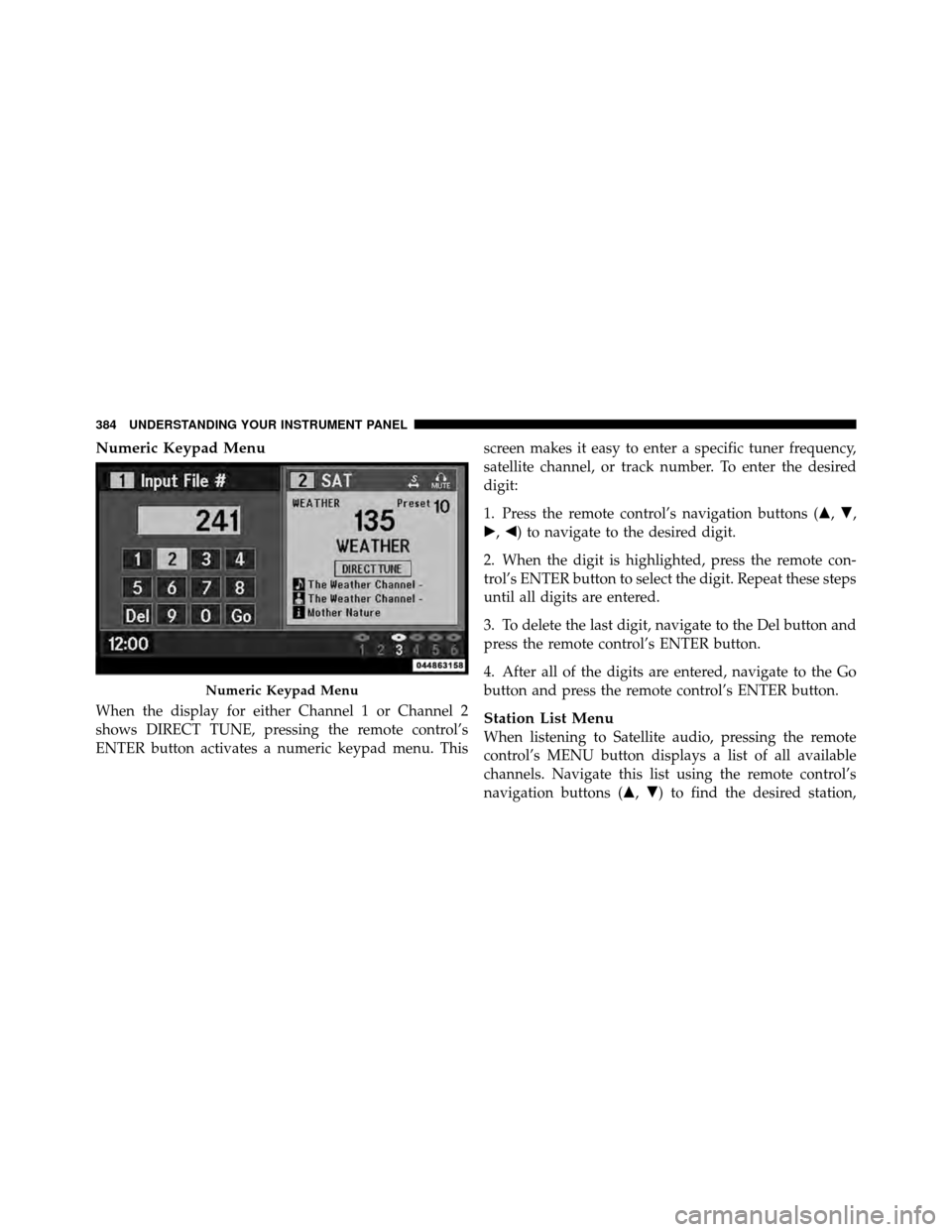
When the display for either Channel 1 or Channel 2
shows DIRECT TUNE, pressing the remote control’s
ENTER button activates a numeric keypad menu. Thisscreen makes it easy to enter a specific tuner frequency,
satellite channel, or track number. To enter the desired
digit:
1. Press the remote control’s navigation buttons (�,
�,
�, �) to navigate to the desired digit.
2. When the digit is highlighted, press the remote con-
trol’s ENTER button to select the digit. Repeat these steps
until all digits are entered.
3. To delete the last digit, navigate to the Del button and
press the remote control’s ENTER button.
4. After all of the digits are entered, navigate to the Go
button and press the remote control’s ENTER button.Station List Menu
When listening to Satellite audio, pressing the remote
control’s MENU button displays a list of all available
channels. Navigate this list using the remote control’s
navigation buttons (�, �) to find the desired station,
Numeric Keypad Menu
384 UNDERSTANDING YOUR INSTRUMENT PANEL
Page 387 of 652
press the remote control’s ENTER button to tune to that
station. To jump through the list more quickly, navigate
to the Page Up and Page Down icons on the screen.
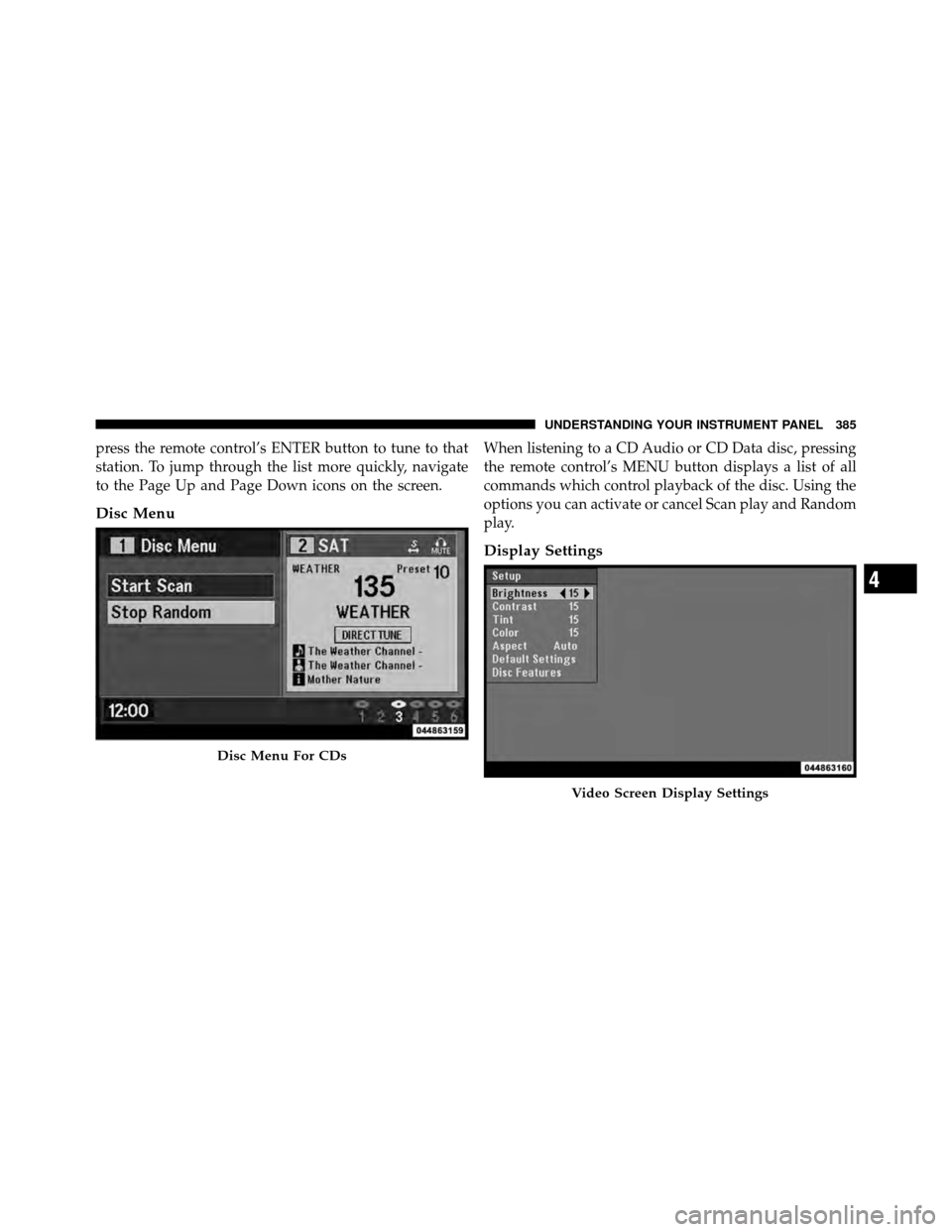
Disc Menu
When listening to a CD Audio or CD Data disc, pressing
the remote control’s MENU button displays a list of all
commands which control playback of the disc. Using the
options you can activate or cancel Scan play and Random
play.
Display Settings
Disc Menu For CDs
Video Screen Display Settings
4
UNDERSTANDING YOUR INSTRUMENT PANEL 385
Page 388 of 652
When watching a video source (DVD Video with the disc
in Play mode, Aux Video, etc.), pressing the remote
control’s SETUP button activates the Display Settings
menu. These settings control the appearance of the video
on the screen. The factory default settings are already set
for optimum viewing, so there is no need to change these
settings under normal circumstances.
To change the settings, press the remote control’s navi-
gation buttons (�,�) to select an item, then press the
remote control’s navigation buttons (�, �) to change the
value for the currently selected item. To reset all values
back to the original settings, select the Default Settings
menu option and press the remote control’s ENTER
button.
Disc Features control the remote DVD player’s (if
equipped) settings of DVD being watched in the remote
player.Listening To Audio With The Screen Closed
To listen to only audio portion of the channel with the
screen closed:
•Set the audio to the desired source and channel.
•Close the video screen.
•To change the current audio mode, press the remote
control’s MODE button. This will automatically select
the next available audio mode without using the Mode
Select menu.
•When the screen is reopened, the video screen will
automatically turn back on and show the appropriate
display menu or media.
If the screen is closed and there is no audio heard, verify
that the headphones are turned on (the ON indicator is
illuminated) and the headphone selector switch is on the
desired channel. If the headphones are turned on, press
386 UNDERSTANDING YOUR INSTRUMENT PANEL