Page 358 of 652
to the next screen of data for that track. Once all
screens have been viewed, the lastINFObutton press
will go back to the play mode screen on the radio.
•Pressing the REPEATbutton will change the audio
device mode to repeat the current playing track or
press the VR button and say �Repeat ON�or�Repeat
Off�.
•Press the SCANbutton to use iPod�/USB/MP3 de-
vice scan mode, which will play the first 10 seconds of
each track in the current list and then forward to the
next song. To stop SCAN mode and start playing the
desired track, when it is playing the track, press the
SCAN button again. During Scan mode, pressing the
<< SEEK andSEEK >> buttons will select the previ-
ous and next tracks.
•RND button (available on sales code RES radio only):
Pressing this button toggles between Shuffle ON and
Shuffle OFF modes for the iPod� or external USBdevice, or press the VR button and say
�Shuffle ON�or
�Shuffle Off�.IftheRND icon is showing on the radio
display, then the shuffle mode is ON.
List Or Browse Mode
During Play mode, pressing any of the buttons described
below, will bring up List mode. List mode enables
scrolling through the list of menus and tracks on the
audio device.
•TUNE control knob: The TUNEcontrol knob functions
in a similar manner as the scroll wheel on the audio
device or external USB device.
•Turning it clockwise (forward) and counterclock-
wise (backward) scrolls through the lists, displaying
the track detail on the radio display. Once the track
to be played is highlighted on the radio display,
press the TUNEcontrol knob to select and start
playing the track. Turning the TUNEcontrol knob
356 UNDERSTANDING YOUR INSTRUMENT PANEL
Page 359 of 652
fast will scroll through the list faster. During fast
scroll, a slight delay in updating the information on
the radio display may be noticeable.
•During all List modes, the iPod�displays all lists in
“wrap-around” mode. So if the track is at the
bottom of the list, just turn the wheel backward
(counterclockwise) to get to the track faster.
•In List mode, the radio PRESETbuttons are used as
shortcuts to the following lists on the iPod� or
external USB device.
•Preset 1 – Playlists
•Preset 2 – Artists
•Preset 3 – Albums
•Preset 4 – Genres
•Preset 5 – Audiobooks
•Preset 6 – Podcasts
•Pressing a PRESET button will display the current
list on the top line and the first item in that list on
the second line.
•To exit List mode without selecting a track, press the
same PRESET button again to go back to Play
mode.
•LIST button: The LISTbutton will display the top
level menu of the iPod� or external USB device. Turn
the TUNE control knob to list the top-menu item to be
selected and press the TUNEcontrol knob. This will
display the next sub-menu list item on the audio
device, then follow the same steps to go to the desired
track in that list. Not all iPod� or external USB device
sub-menu levels are available on this system.
•MUSIC TYPE button: TheMUSIC TYPE button is
another shortcut button to the genre listing on your
audio device.
4
UNDERSTANDING YOUR INSTRUMENT PANEL 357
Page 364 of 652
Using The Touch-Screen Radio Controls
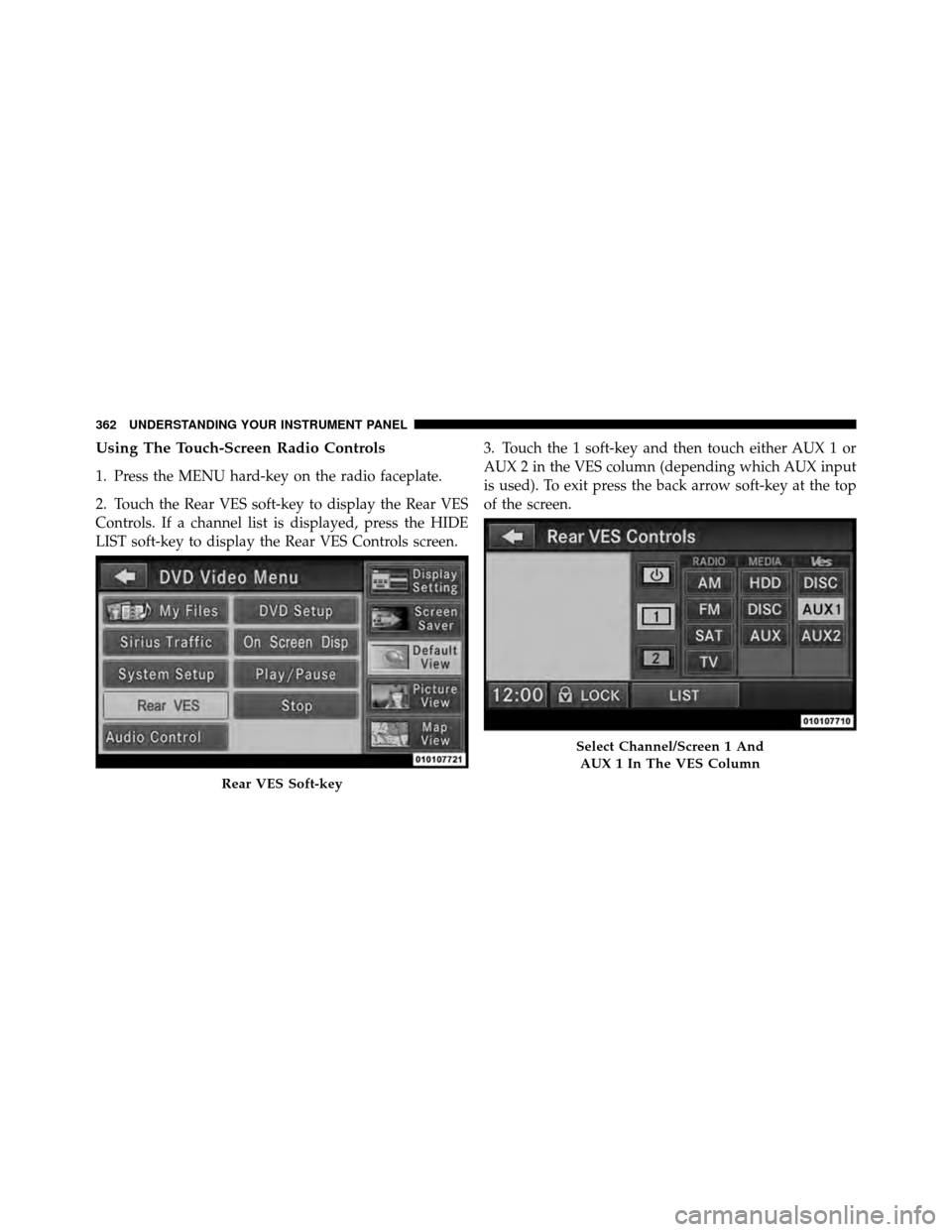
1. Press the MENU hard-key on the radio faceplate.
2. Touch the Rear VES soft-key to display the Rear VES
Controls. If a channel list is displayed, press the HIDE
LIST soft-key to display the Rear VES Controls screen.3. Touch the 1 soft-key and then touch either AUX 1 or
AUX 2 in the VES column (depending which AUX input
is used). To exit press the back arrow soft-key at the top
of the screen.
Rear VES Soft-key
Select Channel/Screen 1 And
AUX 1 In The VES Column
362 UNDERSTANDING YOUR INSTRUMENT PANEL
Page 366 of 652
Using The Touch-Screen Radio Controls
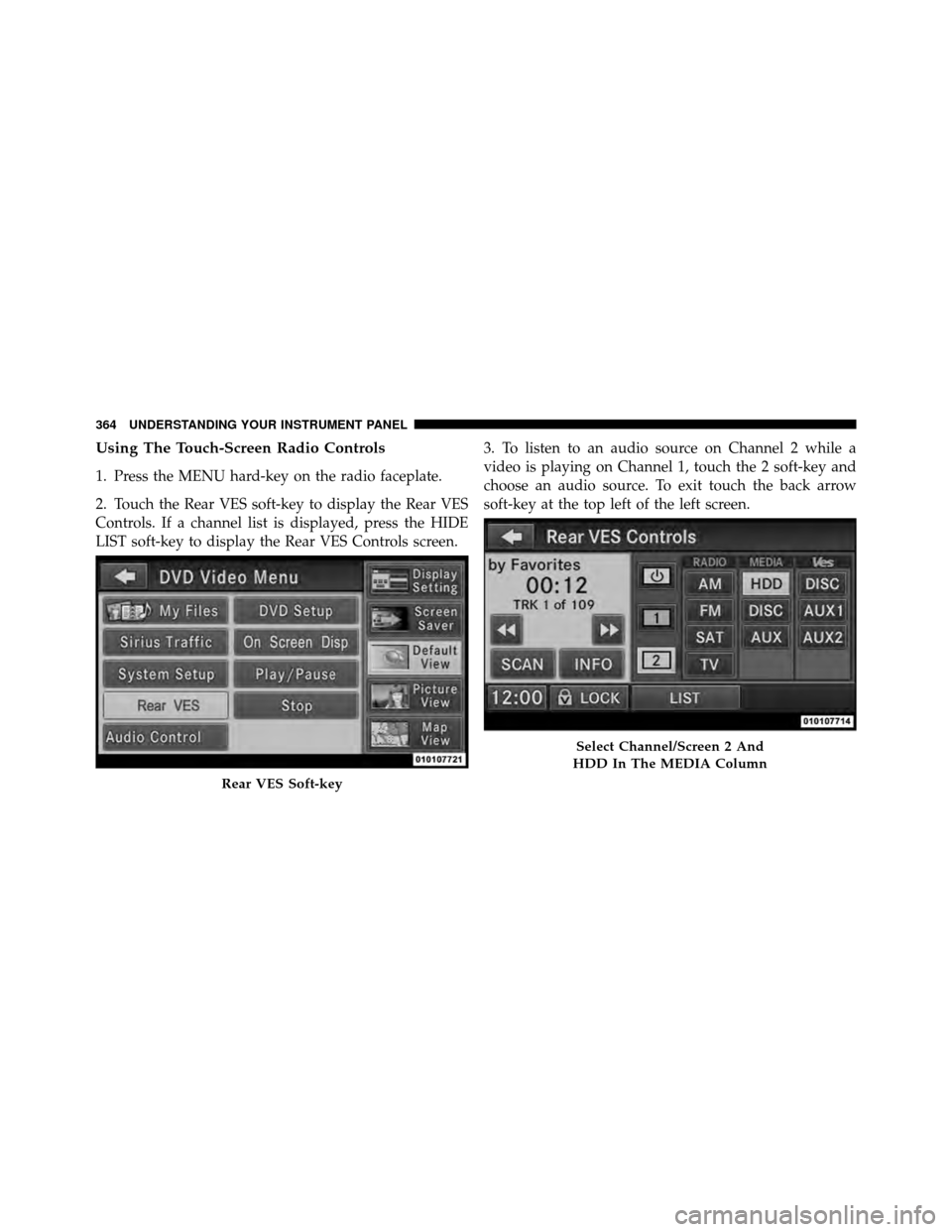
1. Press the MENU hard-key on the radio faceplate.
2. Touch the Rear VES soft-key to display the Rear VES
Controls. If a channel list is displayed, press the HIDE
LIST soft-key to display the Rear VES Controls screen.3. To listen to an audio source on Channel 2 while a
video is playing on Channel 1, touch the 2 soft-key and
choose an audio source. To exit touch the back arrow
soft-key at the top left of the left screen.
Rear VES Soft-key
Select Channel/Screen 2 And
HDD In The MEDIA Column
364 UNDERSTANDING YOUR INSTRUMENT PANEL
Page 367 of 652
Dual Video Screen
NOTE:Typically there are two different ways to operate
the features of the Video Entertainment System (VES)™.
•The Remote Control
•The Touch-Screen Radio (If Equipped)
Play A DVD Using The Touch-Screen Radio
1. Press the OPEN/CLOSE or LOAD hard-key on the
radio faceplate (Touch-Screen).
2. Insert the DVD with the label facing up. The radio
automatically selects the appropriate mode after the disc
is recognized and displays the menu screen or starts
playing the first track. 3. To watch a DVD on Screen 1 for second row passen-
gers, ensure the Remote Control and Headphone switch
is on Channel 1.
4. To watch a DVD on Screen 2 for third row passengers,
ensure the Remote Control and Headphone switch is on
Channel 2.
4
UNDERSTANDING YOUR INSTRUMENT PANEL 365
Page 368 of 652
Using The Remote Control
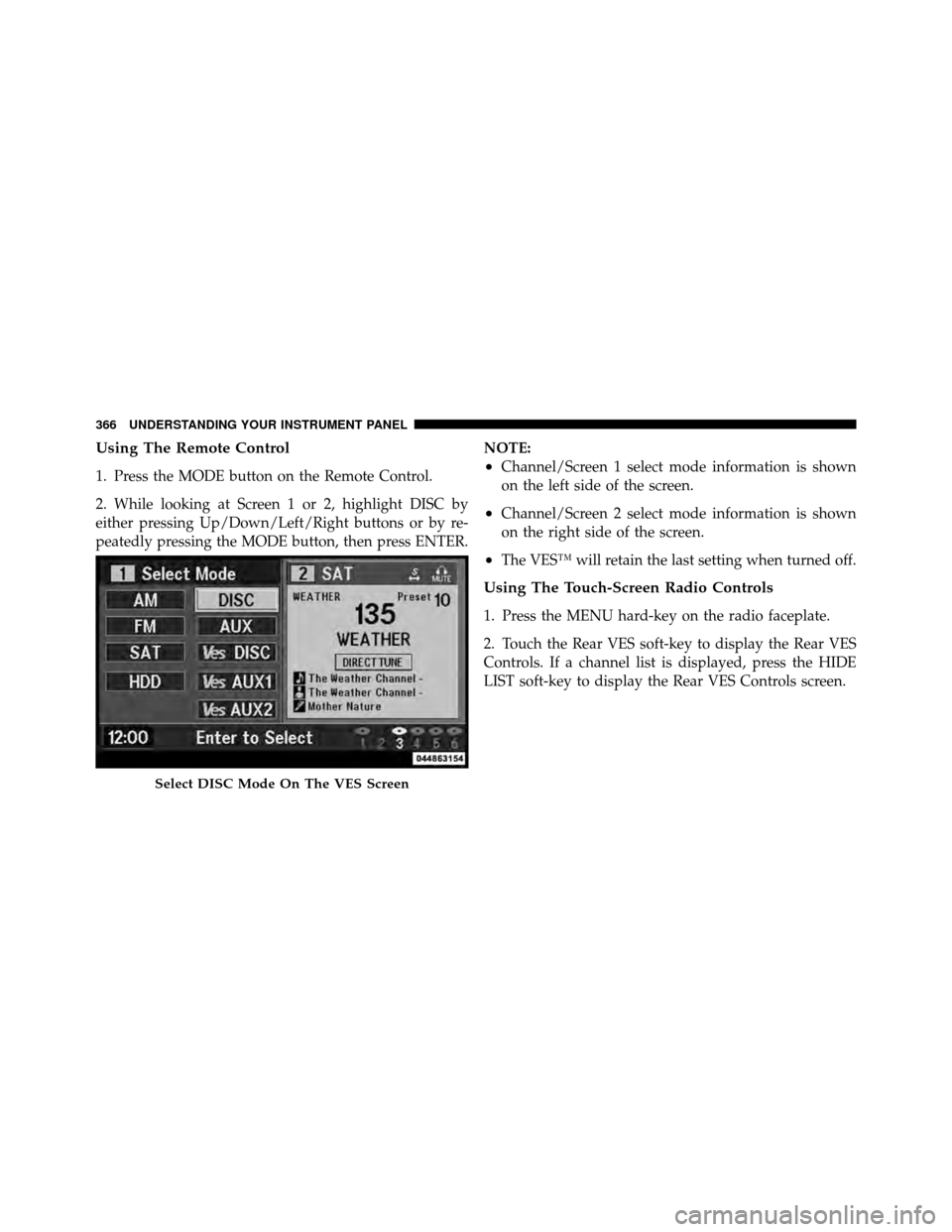
1. Press the MODE button on the Remote Control.
2. While looking at Screen 1 or 2, highlight DISC by
either pressing Up/Down/Left/Right buttons or by re-
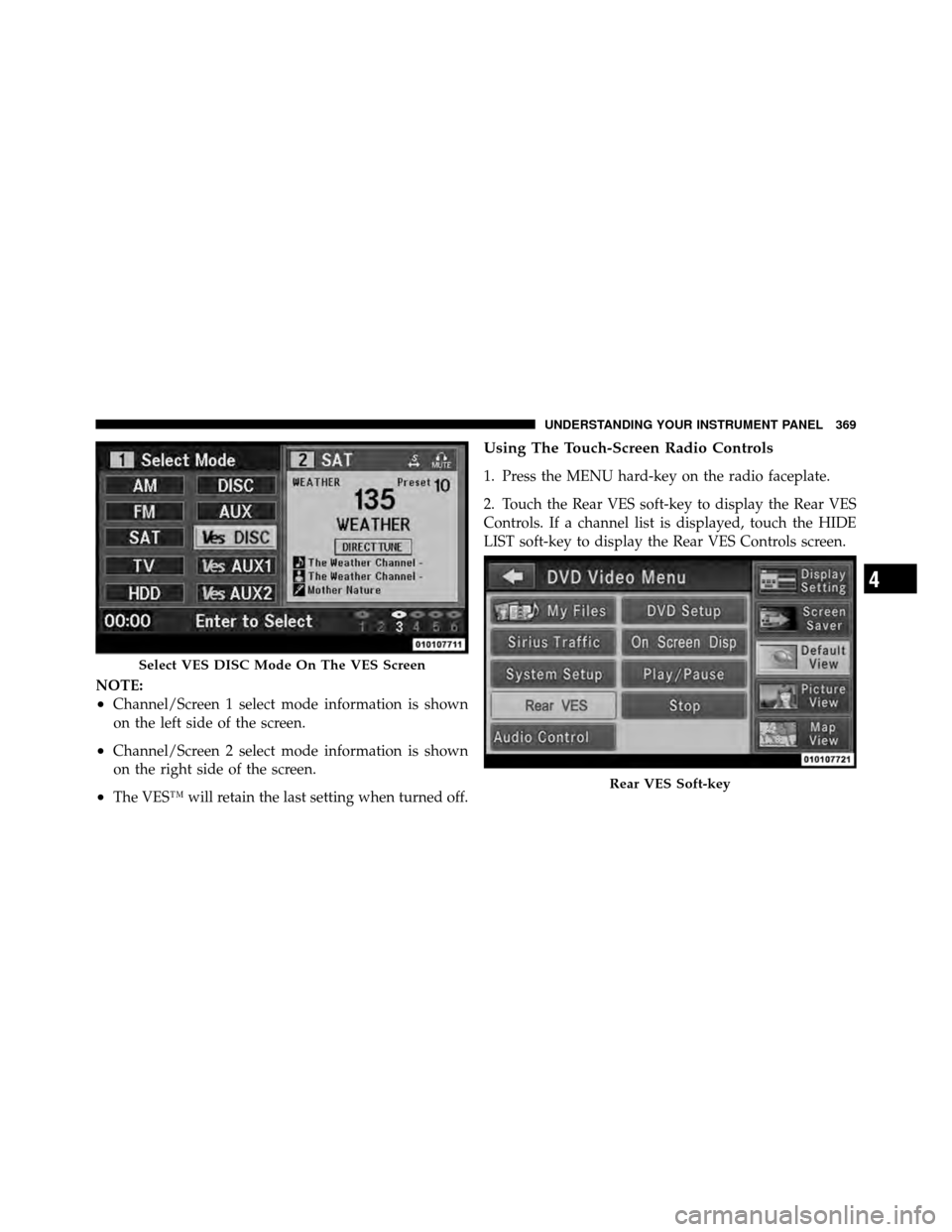
peatedly pressing the MODE button, then press ENTER.NOTE:•Channel/Screen 1 select mode information is shown
on the left side of the screen.
•Channel/Screen 2 select mode information is shown
on the right side of the screen.
•The VES™ will retain the last setting when turned off.
Using The Touch-Screen Radio Controls
1. Press the MENU hard-key on the radio faceplate.
2. Touch the Rear VES soft-key to display the Rear VES
Controls. If a channel list is displayed, press the HIDE
LIST soft-key to display the Rear VES Controls screen.
Select DISC Mode On The VES Screen
366 UNDERSTANDING YOUR INSTRUMENT PANEL
Page 370 of 652
•Viewing a DVD on the Touch-Screen radio screen is
not available in all states/provinces, and the vehicle
must be stopped, and the shift lever must be in the
PARK position for vehicles with automatic transmis-
sion. In vehicles with manual transmission the parking
brake must be engaged.
•Touching the screen on a Touch-Screen radio while a
DVD is playing brings up basic remote control func-
tions for DVD play such as scene selection, Play,
Pause, FF, RW, and Stop. Pressing the X in the upper
corner will turn off the remote control screen
functions.
Play A DVD Using The VES™ Player (If Equipped)
1. Insert the DVD with the label facing up. The VES™
player automatically selects the appropriate mode after
the disc is recognized and starts playing the DVD.NOTE:
The VES™ player has basic DVD control func-
tion such as Menu, Play, Pause, FF, RW and Stop
2. To watch a DVD on Screen 1 for second row passen-
gers, ensure the Remote Control and Headphone switch
is on Channel 1.
3. To watch a DVD on Screen 2 for third row passengers,
ensure the Remote Control and Headphone switch is on
Channel 2.
Using The Remote Control
1. Press the MODE button on the Remote Control.
2. While looking at Screen 1 or 2, highlight VES DISC by
either pressing Up/Down/Left/Right buttons or by re-
peatedly pressing the MODE button, then press ENTER
on the Remote Control.
368 UNDERSTANDING YOUR INSTRUMENT PANEL
Page 371 of 652
NOTE:
•Channel/Screen 1 select mode information is shown
on the left side of the screen.
•Channel/Screen 2 select mode information is shown
on the right side of the screen.
•The VES™ will retain the last setting when turned off.
Using The Touch-Screen Radio Controls
1. Press the MENU hard-key on the radio faceplate.
2. Touch the Rear VES soft-key to display the Rear VES
Controls. If a channel list is displayed, touch the HIDE
LIST soft-key to display the Rear VES Controls screen.
Select VES DISC Mode On The VES Screen
Rear VES Soft-key
4
UNDERSTANDING YOUR INSTRUMENT PANEL 369