Page 268 of 378
Black plate (34,1)Chevrolet Orlando Owner Manual - 2012
10-34 Vehicle Care
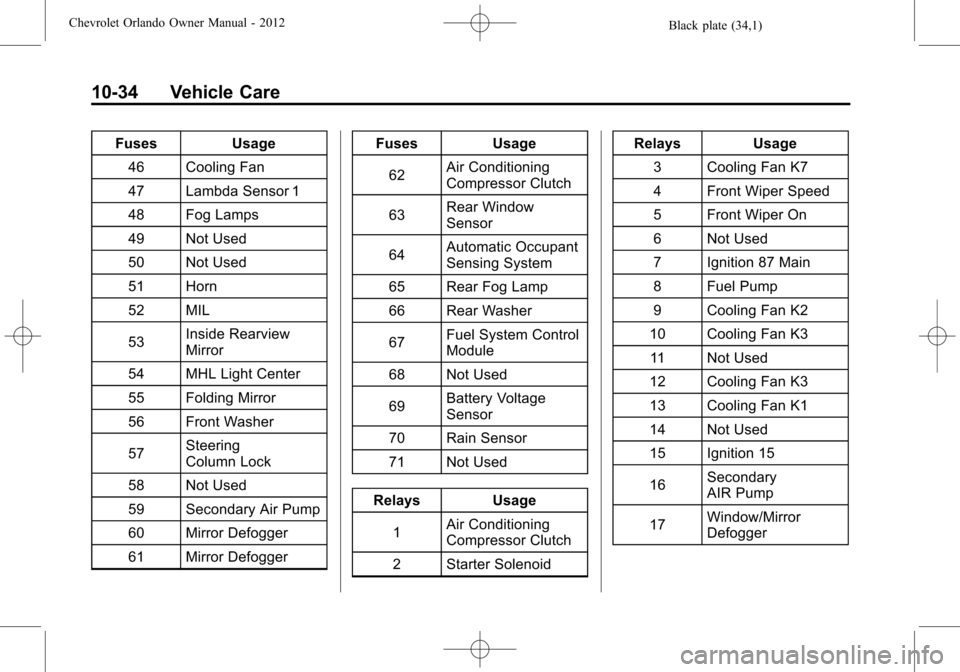
FusesUsage
46 Cooling Fan
47 Lambda Sensor 1
48 Fog Lamps
49 Not Used
50 Not Used
51 Horn
52 MIL
53 Inside Rearview
Mirror
54 MHL Light Center
55 Folding Mirror
56 Front Washer
57 Steering
Column Lock
58 Not Used
59 Secondary Air Pump
60 Mirror Defogger
61 Mirror Defogger Fuses
Usage
62 Air Conditioning
Compressor Clutch
63 Rear Window
Sensor
64 Automatic Occupant
Sensing System
65 Rear Fog Lamp
66 Rear Washer
67 Fuel System Control
Module
68 Not Used
69 Battery Voltage
Sensor
70 Rain Sensor
71 Not Used
Relays Usage 1 Air Conditioning
Compressor Clutch
2 Starter Solenoid Relays Usage
3 Cooling Fan K7
4 Front Wiper Speed
5 Front Wiper On
6 Not Used
7 Ignition 87 Main
8 Fuel Pump
9 Cooling Fan K2
10 Cooling Fan K3 11 Not Used
12 Cooling Fan K3
13 Cooling Fan K1
14 Not Used
15 Ignition 15
16 Secondary
AIR Pump
17 Window/Mirror
Defogger
Page 269 of 378
Black plate (35,1)Chevrolet Orlando Owner Manual - 2012
Vehicle Care 10-35
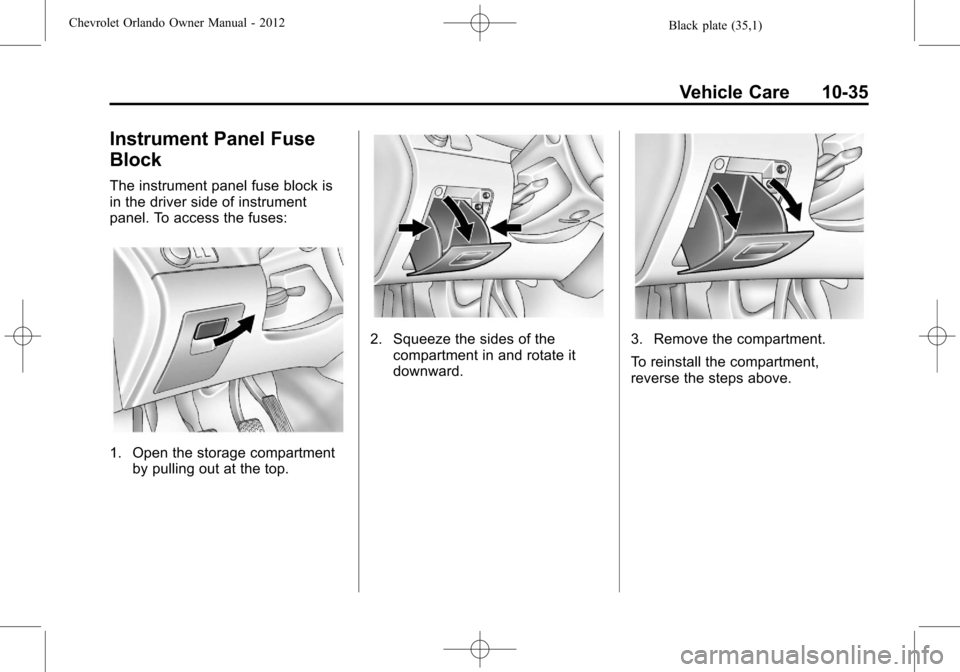
Instrument Panel Fuse
Block
The instrument panel fuse block is
in the driver side of instrument
panel. To access the fuses:
1. Open the storage compartmentby pulling out at the top.
2. Squeeze the sides of the
compartment in and rotate it
downward.3. Remove the compartment.
To reinstall the compartment,
reverse the steps above.
Page 270 of 378
Black plate (36,1)Chevrolet Orlando Owner Manual - 2012
10-36 Vehicle Care
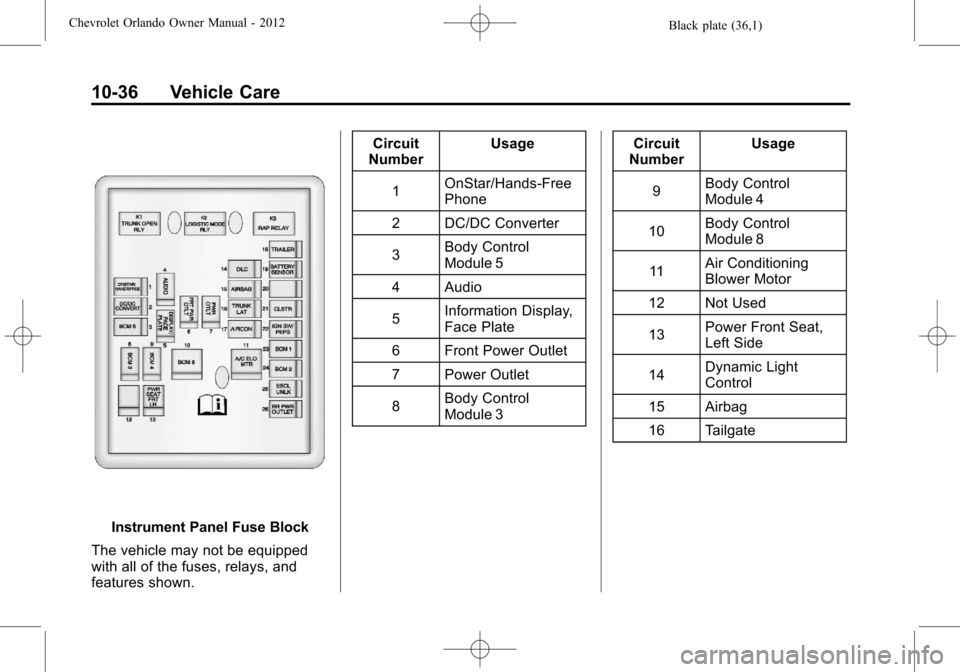
Instrument Panel Fuse Block
The vehicle may not be equipped
with all of the fuses, relays, and
features shown. Circuit
Number Usage
1 OnStar/Hands‐Free
Phone
2 DC/DC Converter
3 Body Control
Module 5
4 Audio
5 Information Display,
Face Plate
6 Front Power Outlet
7 Power Outlet
8 Body Control
Module 3 Circuit
Number Usage
9 Body Control
Module 4
10 Body Control
Module 8
11 Air Conditioning
Blower Motor
12 Not Used
13 Power Front Seat,
Left Side
14 Dynamic Light
Control
15 Airbag
16 Tailgate
Page 271 of 378
Black plate (37,1)Chevrolet Orlando Owner Manual - 2012
Vehicle Care 10-37
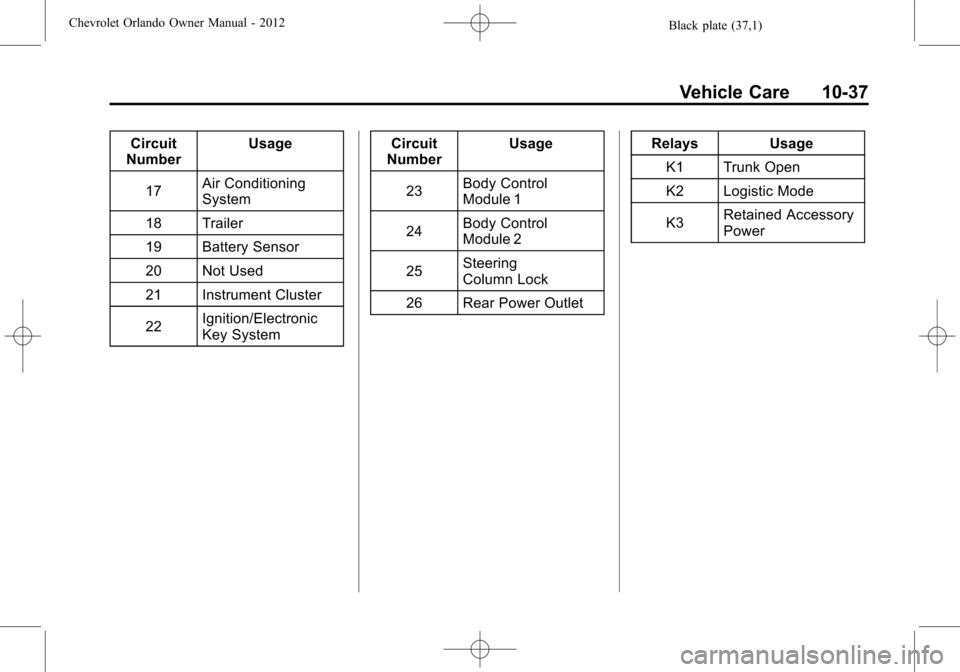
Circuit
Number Usage
17 Air Conditioning
System
18 Trailer
19 Battery Sensor
20 Not Used
21 Instrument Cluster
22 Ignition/Electronic
Key System Circuit
Number Usage
23 Body Control
Module 1
24 Body Control
Module 2
25 Steering
Column Lock
26 Rear Power Outlet Relays Usage
K1 Trunk Open
K2 Logistic Mode
K3 Retained Accessory
Power
Page 283 of 378
Black plate (49,1)Chevrolet Orlando Owner Manual - 2012
Vehicle Care 10-49
A horn chirp confirms that the
sensor identification code has
been matched to this tire and
wheel position.
9. Proceed to the passenger side front tire, and repeat the
procedure in Step 8.
10. Proceed to the passenger side rear tire, and repeat the
procedure in Step 8.
11. Proceed to the driver side rear tire, and repeat the procedure
in Step 8. The horn sounds two
times to indicate the sensor
identification code has been
matched to the driver side rear
tire, and the TPMS sensor
matching process is no longer
active. The TIRE LEARNING
ACTIVE message on the DIC
display screen goes off.
12. Turn the ignition to LOCK/OFF.
13. Set all four tires to the recommended air pressure
level as indicated on the Tire
and Loading Information label.Tire Inspection
We recommend that the tires,
including the spare tire, if the
vehicle has one, be inspected
for signs of wear or damage at
least once a month.
Replace the tire if:
.The indicators at three or
more places around the tire
can be seen.
.There is cord or fabric
showing through the tire's
rubber.
.The tread or sidewall is
cracked, cut, or snagged
deep enough to show cord or
fabric.
.The tire has a bump, bulge,
or split.
.The tire has a puncture, cut,
or other damage that cannot
be repaired well because of
the size or location of the
damage.
Tire Rotation
Tires should be rotated every
12 000 km (7,500 mi). See
Maintenance Schedule on
page 11‑3.
Tires are rotated to achieve a
more uniform wear for all tires.
The first rotation is the most
important.
Any time unusual wear is
noticed, rotate the tires as soon
as possible and check the wheel
alignment. Also check for
damaged tires or wheels. See
When It Is Time for New Tires
on page 10‑50 andWheel
Replacement on page 10‑55.
Page 286 of 378
Black plate (52,1)Chevrolet Orlando Owner Manual - 2012
10-52 Vehicle Care
If the tires have an all‐season tread
design, the TPC spec number will
be followed by MS, for mud and
snow. SeeTire Sidewall Labeling on
page 10‑39 for additional
information.
GM recommends replacing all the
tires at the same time. Uniform tread
depth on all tires will help to
maintain the performance of the
vehicle. Braking and handling
performance may be adversely
affected if all the tires are not
replaced at the same time. See Tire
Inspection on page 10‑49 andTire
Rotation on page 10‑49 for
information on proper tire rotation.
{WARNING
Tires could explode during
improper service. Attempting
to mount or dismount a tire
could cause injury or death.
Only your dealer or authorized
tire service center should
mount or dismount the tires.
{WARNING
Mixing tires of different sizes,
brands, or types may cause
loss of control of the vehicle,
resulting in a crash or other
vehicle damage. Use the
correct size, brand, and type
of tire on all wheels.
{WARNING
Using bias-ply tires on the
vehicle may cause the wheel
rim flanges to develop cracks
after many miles of driving.
A tire and/or wheel could fail
suddenly and cause a crash.
Use only radial-ply tires with
the wheels on the vehicle.
If the vehicle tires must be replaced
with a tire that does not have a TPC
Spec number, make sure they are the same size, load range, speed
rating, and construction (radial) as
the original tires.
Vehicles that have a tire pressure
monitoring system could give an
inaccurate low‐pressure warning if
non‐TPC Spec rated tires are
installed. See
Tire Pressure Monitor
System on page 10‑45.
The Tire and Loading Information
Label indicates the original
equipment tires on the vehicle. See
Vehicle Load Limits on page 9‑10,
for the label location and more
information about the Tire and
Loading Information label.
Different Size Tires and
Wheels
If wheels or tires are installed that
are a different size than the original
equipment wheels and tires, vehicle
performance, including its braking,
ride and handling characteristics,
stability, and resistance to rollover
may be affected. If the vehicle has
electronic systems such as antilock
Page 291 of 378
Black plate (57,1)Chevrolet Orlando Owner Manual - 2012
Vehicle Care 10-57
WARNING (Continued)
changing a flat tire. If it is used for
anything else, you or others could
be badly injured or killed if the
vehicle slips off the jack. If a jack
is provided with the vehicle, only
use it for changing a flat tire.
If a tire goes flat, avoid further tire
and wheel damage by driving slowly
to a level place, well off the road,
if possible. Turn on the hazard
warning flashers. See Hazard
Warning Flashers on page 6‑3.
{WARNING
Changing a tire can be
dangerous. The vehicle can slip
off the jack and roll over or fall
causing injury or death. Find a
level place to change the tire. To
help prevent the vehicle from
moving:
1. Set the parking brake firmly.
2. Put an automatic transmission in P (Park) or a
manual transmission in
1 (First) or R (Reverse).
3. Turn off the engine and do not restart while the vehicle
is raised.
4. Do not allow passengers to remain in the vehicle.
5. Place wheel blocks on both sides of the tire at the
opposite corner of the tire
being changed. This vehicle may come with a jack
and spare tire or a tire sealant and
compressor kit. To use the jacking
equipment to change a spare tire
safely, follow the instructions below.
Then see
Tire Changing on
page 10‑66. To use the tire sealant
and compressor kit, see Tire
Sealant and Compressor Kit on
page 10‑58.
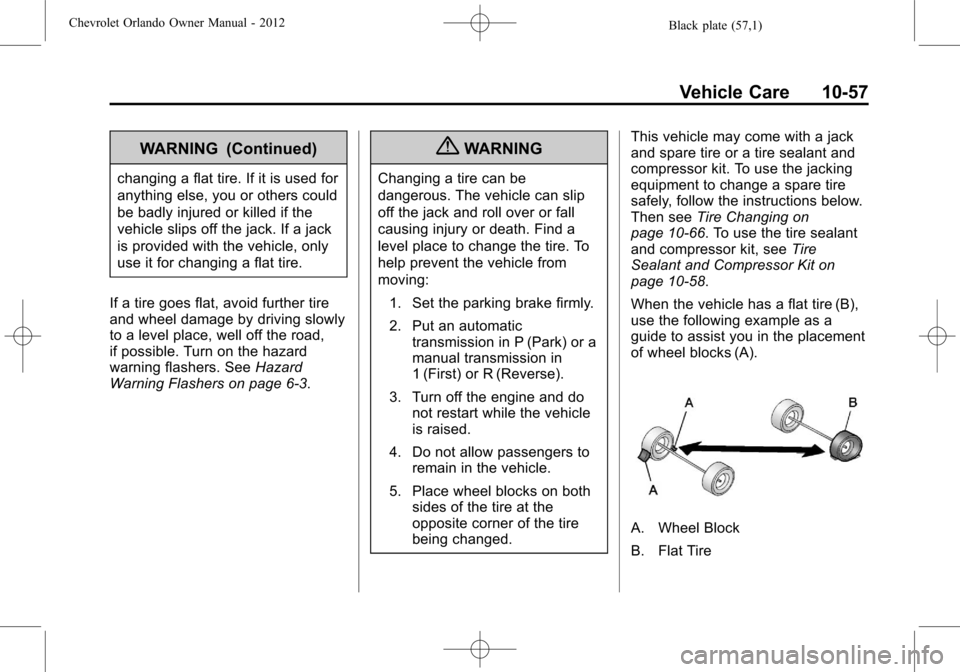
When the vehicle has a flat tire (B),
use the following example as a
guide to assist you in the placement
of wheel blocks (A).
A. Wheel Block
B. Flat Tire
Page 294 of 378
Black plate (60,1)Chevrolet Orlando Owner Manual - 2012
10-60 Vehicle Care
Do not remove any objects that
have penetrated the tire.
1. Remove the tire sealantcanister (D) and compressor
from its storage location. See
Storing the Tire Sealant and
Compressor Kit on page 10‑65.
2. Remove the air only hose (J) and the power plug (I) from the
bottom of the compressor.
3. Place the compressor on the ground near the flat tire.
4. Attach the air only hose (J) tothe sealant canister inlet
valve (A) by turning it clockwise
until tight.5. Slide the base of the tire sealantcanister (C) into the slot on the
top of the compressor (F) to hold
it upright.
Make sure the tire valve stem is
positioned close to the ground
so the hose will reach it.
6. Remove the valve stem cap from the flat tire by turning it
counterclockwise.