2012 CHEVROLET MALIBU lock
[x] Cancel search: lockPage 155 of 398
Black plate (5,1)Chevrolet Malibu Owner Manual - 2012
Infotainment System 7-5
If a station's frequency is weak or if
there is static, decrease the treble.
To quickly adjust bass, midrange,
or treble to the middle position,
press the softkey positioned under
the BASS, MID, or TREB tab for
more than two seconds. A beep
sounds and the level adjusts to the
middle position.
To quickly adjust all tone and
speaker controls to the middle
position, press the
fknob for more
than two seconds until a beep
sounds.
EQ (Equalization): Press this
button to choose bass and treble
equalization settings designed for
different types of music. Selecting
MANUAL or changing bass or
treble, returns the EQ to the manual
bass and treble settings.
Unique EQ settings can be saved
for each source.
If the radio has a Bose
®audio
system, the EQ settings are either
MANUAL or TALK.
Adjusting the Speakers
(Balance/Fade) Radio with CD
To adjust the balance or fade:
1. Press the
`or press the
fknob until the speaker control
label displays.
2. To adjust the setting, do one of the following:
.Turn thefknob.
.Press either¨SEEK,
or
©SEEK button.
.Press either\FWD,
or
sREV button.
Adjusting the Speakers
(Balance/Fade) Radio with
CD (MP3) and USB Port,
Radio with CD (MP3)
BAL/FADE (Balance/Fade):
To adjust the balance or fade:
1. Press the
fknob until the
speaker control tabs display.
2. Highlight the desired speaker control tab by doing one of the
following:
.Pressing thefknob.
.Press the softkey under the
desired tab.
3. Adjust the setting by doing one of the following:
.Turn thefknob clockwise
or counterclockwise.
.Press the¨SEEK,
or
©SEEK button.
.Press the\FWD,
or
sREV button.
Page 156 of 398
Black plate (6,1)Chevrolet Malibu Owner Manual - 2012
7-6 Infotainment System
To quickly adjust all speaker and
tone controls to the middle position,
press the
fknob for more than
two seconds.
If the Rear Seat Audio (RSA) is
turned on, the radio disables FADE
and mutes the rear speakers.
Radio Messages
Calibration Error: Displays if the
radio is no longer calibrated
properly for the vehicle. The vehicle
must be returned to your dealer for
service.
Loc or Locked: Displays when the
TheftLock
®system has activated.
Take the vehicle to your dealer for
service.
If any error occurs repeatedly or
if an error cannot be corrected,
contact your dealer.
Radio
AM-FM Radio
Radio Data System (RDS)
The radio may have RDS. The RDS
feature is available for use only on
FM stations that broadcast RDS
information. This system relies upon
receiving specific information from
these stations and only works when
the information is available. While
the radio is tuned to an FM-RDS
station, the station name or call
letters display. In rare cases, a radio
station could broadcast incorrect
information that causes the radio
features to work improperly. If this
happens, contact the radio station.
4(Information) (RDS Features):
For vehicles with RDS features,
press
4to display additional text
information related to the current FM-RDS station. If information is
available, the song title information
displays on the top line of the
display and artist information
displays on the bottom line.
When information is not available,
“NO INFO”
displays.
Auto Text (RDS Features):
If additional information is available
for the current song being played,
Auto Text will automatically
page/scroll the information every
three seconds above the FAV
presets on the radio display.
By default, Auto Text is enabled.
To change the Auto Text setting:
1. Press MENU to display the radio setup menu.
2. Press the softkey under AUTO TXT tab on the radio display.
3. Press the softkey under the ON or OFF tab on the radio display.
Page 162 of 398

Black plate (12,1)Chevrolet Malibu Owner Manual - 2012
7-12 Infotainment System
XM Radio Messages
XL (Explicit Language
Channels):These channels,
or any others, can be blocked at a
customer's request, by calling
1-800-929-2100 in the U.S. and
1-877-438-9677 in Canada.
XM Updating: The encryption code
in the receiver is being updated, and
no action is required. This process
should take no longer than
30 seconds.
No XM Signal: The system is
functioning correctly, but the vehicle
is in a location that is blocking the
XM™ signal. When the vehicle is
moved into an open area, the signal
should return.
Loading XM: The audio system is
acquiring and processing audio and
text data. No action is needed.
This message should disappear
shortly. Channel Off Air:
This channel is
not currently in service. Tune in to
another channel.
Channel Unauth : This channel is
blocked or cannot be received with
your XM Subscription package.
Channel Unavail: This previously
assigned channel is no longer
assigned. Tune to another station.
If this station was one of the
presets, choose another station for
that preset button.
No Artist Info: No artist
information is available at this time
on this channel. The system is
working properly.
No Title Info: No song title
information is available at this time
on this channel. The system is
working properly.
No CAT Info: No category
information is available at this time
on this channel. The system is
working properly. No Information:
No text or
informational messages are
available at this time on this
channel. The system is working
properly.
No Subscription Please Renew:
XM subscription needs to be
reactivated. Contact XM at
www.xmradio.com or call
1-800-929-2100 in the U.S. and
www.xmradio.ca or call
1-877-438-9677 in Canada.
CAT Not Found: There are no
channels available for the selected
category. The system is working
properly.
XM Theftlocked: The XM receiver
in the vehicle could have previously
been in another vehicle. For security
purposes, XM receivers cannot be
swapped between vehicles. If this
message is received after having
the vehicle serviced, check with
your dealer.
Page 184 of 398
Black plate (2,1)Chevrolet Malibu Owner Manual - 2012
8-2 Climate Controls
Operation
Temperature Control:Turn
clockwise or counterclockwise to
increase or decrease the
temperature inside the vehicle.
When it is cold outside −18°C (0°F)
or lower, use the engine coolant
heater, if vehicle has one, to provide
warmer air faster to the vehicle.
An engine coolant heater warms
the coolant the engine uses that
provides heat to warm the inside of
the vehicle. For more information,
see Engine Heater on page 9‑20.
9(Fan Control): Turn clockwise
or counterclockwise to increase or
decrease the fan speed. The fan
must be on to run the
air-conditioning compressor.
Air Delivery Mode Control:
Turn clockwise or counterclockwise
to change the current airflow mode. Select from the following:
H(Vent):
Air is directed to the
instrument panel outlets.
)(Bi-Level): Air is divided
between the instrument panel and
floor outlets. Some air will be
directed toward the side windows.
6(Floor): Air is directed to the
floor outlets with some air directed
to the windshield and side window
outlets.
-(Defog): This mode clears the
windows of fog or moisture. Air is
directed to the windshield and floor
outlets, with some air directed to the
side windows. When this mode is
selected, the system automatically
turns off recirculation and runs the
air-conditioning compressor unless
the outside temperature is at or
below freezing. The air-conditioning
compressor operates although
the indicator light is not on.
The air-conditioning indicator light
turns off when defog is selected. If the air-conditioning button is
pressed while in defog mode, the
indicator light will turn on. If the
button is pressed again, the light
will turn off. The recirculation mode
cannot be selected while in the
defog mode. Do not drive the
vehicle until all the windows are
clear.
1(Defrost):
This mode quickly
clears the windshield of fog or frost.
Air is directed to the windshield with
some air directed to the floor vents.
In this mode, outside air is pulled
into the vehicle. The air-conditioning
compressor will not run unless the
outside temperature is at or below
freezing. The air-conditioning
compressor operates although
the indicator light is not on.
The air-conditioning indicator light
turns off when defrost is selected.
Page 188 of 398

Black plate (6,1)Chevrolet Malibu Owner Manual - 2012
8-6 Climate Controls
2. Set the temperature.An initial setting of 73°F (23°C)
is recommended. Allow about
20 minutes for the system to
regulate. Press
worxto
adjust the temperature setting as
necessary. If the temperature is
set at 60°F (15°C) the system
remains at the maximum cooling
setting. If the temperature is set
at 90°F (32°C) the system
remains at the maximum heat
setting. Choosing either
maximum setting does not
cause the vehicle to heat or
cool any faster.
Do not to cover the sensor
located on the top of the
instrument panel near the
windshield. This sensor
regulates air temperature based
on the intensity of the sun. Also do not cover the sensor
grille on the lower right side of
the climate control faceplate,
as this regulates the inside
temperature.
To avoid blowing cold air at
engine start-up in cold weather,
the system delays turning on the
fan until warm air is available.
The length of delay depends on
the engine coolant temperature.
Turning the fan knob overrides
this delay and changes the fan
to the selected speed.
Manual Operation
o(Off):
Select this position on the
fan knob to turn off the entire
climate control system. Outside air
still enters the vehicle. The airflow
direction and temperature can be
adjusted.
x/wTemperature Control:
Press the arrows to increase or
decrease the temperature inside the
vehicle.
9(Fan Control): Turn clockwise
or counterclockwise to increase or
decrease the fan speed.
Air Delivery Mode Control: Turn
clockwise or counterclockwise to
change the direction of the airflow in
the vehicle.
Page 191 of 398
Black plate (9,1)Chevrolet Malibu Owner Manual - 2012
Climate Controls 8-9
Remote Start Climate Control
Operation
For vehicles with remote start, when
it is activated the climate control
system heats and cools the inside of
the vehicle using the previous
system settings before the vehicle
was turned off. The climate control
knobs will remain active during a
remote start. However, the climate
control buttons will be inactive until
the ignition is turned on by the key.
If the fan is off, the climate control
system will not operate during
remote start.
With the automatic climate control
system, the climate control displays
“RS”in place of the temperature
to indicate that remote start is
activated. For best performance,
turn both the fan and mode knobs to
AUTO. If the temperature is cold
enough and the mode knob is set to
AUTO, the system begins in defrost
to clear the windows. See Remote
Keyless Entry (RKE) System
Operation on page 2‑3.Air Vents
Use the lever located in the center
of each outlet by moving it either up
and down or side-to-side, to change
the direction and amount of airflow
in the vehicle.
Operation Tips
.Clear away any ice, snow,
or leaves from the air inlets at
the base of the windshield that
may block the flow of air into the
vehicle.
.Do not use non-GM approved
hood deflectors as they could
adversely affect the performance
of the system.
.Keep the path under the front
seats clear of objects to help
circulate the air inside of the
vehicle more effectively.
.When an objectionable odor
outside the vehicle is
encountered, use the
recirculation mode, with the
temperature knob at a
comfortable setting to prevent
the odor from entering the
vehicle through the ventilation
system. This can be helpful
when driving through a long
tunnel with poor ventilation.
However, extended usage of this
mode in cold or cool weather
can cause window fogging.
Page 193 of 398
Black plate (1,1)Chevrolet Malibu Owner Manual - 2012
Driving and Operating 9-1
Driving and
Operating
Driving Information
Distracted Driving . . . . . . . . . . . . . 9-2
Defensive Driving . . . . . . . . . . . . . 9-3
Drunk Driving . . . . . . . . . . . . . . . . . 9-3
Control of a Vehicle . . . . . . . . . . . 9-3
Braking . . . . . . . . . . . . . . . . . . . . . . . 9-3
Steering . . . . . . . . . . . . . . . . . . . . . . . 9-4
Off-Road Recovery . . . . . . . . . . . . 9-5
Loss of Control . . . . . . . . . . . . . . . . 9-6
Driving on Wet Roads . . . . . . . . . 9-6
Highway Hypnosis . . . . . . . . . . . . 9-7
Hill and Mountain Roads . . . . . . 9-8
Winter Driving . . . . . . . . . . . . . . . . . 9-8
If the Vehicle Is Stuck . . . . . . . . 9-10
Vehicle Load Limits . . . . . . . . . . 9-11
Starting and Operating
New Vehicle Break-In . . . . . . . . 9-16
Ignition Positions . . . . . . . . . . . . 9-16
Starting the Engine . . . . . . . . . . 9-18
Engine Heater . . . . . . . . . . . . . . . 9-20
Retained AccessoryPower (RAP) . . . . . . . . . . . . . . . 9-21 Shifting Into Park . . . . . . . . . . . . 9-21
Shifting out of Park . . . . . . . . . . 9-22
Parking over Things
That Burn . . . . . . . . . . . . . . . . . . 9-23
Engine Exhaust
Engine Exhaust . . . . . . . . . . . . . . 9-23
Running the Vehicle WhileParked . . . . . . . . . . . . . . . . . . . . . 9-24
Automatic Transmission
Automatic Transmission . . . . . 9-24
Manual Mode . . . . . . . . . . . . . . . . 9-26
Brakes
Antilock BrakeSystem (ABS) . . . . . . . . . . . . . . 9-28
Parking Brake . . . . . . . . . . . . . . . 9-29
Brake Assist . . . . . . . . . . . . . . . . . 9-29
Ride Control Systems
Traction Control System (TCS) . . . . . . . . . . . . . . 9-30
Electronic Stability Control (ESC) . . . . . . . . . . . . . . 9-32
Cruise Control
Cruise Control . . . . . . . . . . . . . . . 9-33
Fuel
Fuel . . . . . . . . . . . . . . . . . . . . . . . . . 9-36
Recommended Fuel . . . . . . . . . 9-36
Gasoline Specifications(U.S. and Canada Only) . . . . 9-37
California Fuel
Requirements . . . . . . . . . . . . . . 9-37
Fuels in Foreign Countries . . . 9-37
Fuel Additives . . . . . . . . . . . . . . . 9-37
Fuel E85 (85% Ethanol) . . . . . 9-39
Filling the Tank . . . . . . . . . . . . . . 9-40
Filling a Portable Fuel Container . . . . . . . . . . . . . . . . . . . 9-41
Towing
General TowingInformation . . . . . . . . . . . . . . . . . 9-42
Driving Characteristics and
Towing Tips . . . . . . . . . . . . . . . . 9-42
Trailer Towing . . . . . . . . . . . . . . . . 9-46
Towing Equipment . . . . . . . . . . . 9-47
Conversions and Add-Ons
Add-On Electrical Equipment . . . . . . . . . . . . . . . . . 9-48
Page 197 of 398
Black plate (5,1)Chevrolet Malibu Owner Manual - 2012
Driving and Operating 9-5
Hydraulic Power Steering
If your vehicle has hydraulic
power steering, it may require
maintenance. See Power Steering
FluidPower Steering Fluid on
page 10‑22.
If power steering assist is lost
because the engine stops or the
power steering system is not
functioning, the vehicle can be
steered but may require increased
effort. See your dealer if there is a
problem.
Curve Tips
.Take curves at a reasonable
speed.
.Reduce speed before entering
a curve.
.Maintain a reasonable steady
speed through the curve
.Wait until the vehicle is out of
the curve before accelerating
gently into the straightaway.
Steering in Emergencies
.There are some situations when
steering around a problem may
be more effective than braking.
.Holding both sides of the
steering wheel allows you to turn
180 degrees without removing
a hand.
.Antilock Brake System (ABS)
allows steering while braking.
Off-Road Recovery
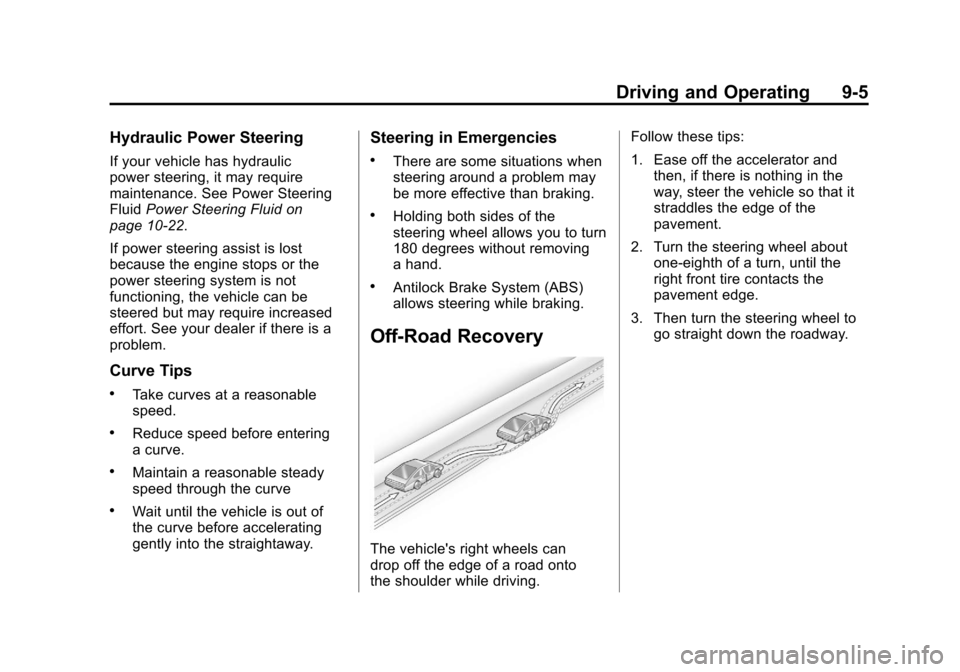
The vehicle's right wheels can
drop off the edge of a road onto
the shoulder while driving. Follow these tips:
1. Ease off the accelerator and
then, if there is nothing in the
way, steer the vehicle so that it
straddles the edge of the
pavement.
2. Turn the steering wheel about one-eighth of a turn, until the
right front tire contacts the
pavement edge.
3. Then turn the steering wheel to go straight down the roadway.