2012 CADILLAC CTS lock
[x] Cancel search: lockPage 14 of 496
Black plate (8,1)Cadillac CTS/CTS-V Owner Manual (Include Mex) - 2012
1-8 In Brief
The trunk may be opened by
pressing the remote trunk release
button on the driver door, or
Von
the Remote Keyless Entry (RKE)
transmitter, or the trunk release
button located on the rear of the
trunk above the license plate.
Vehicles with the Keyless Access
System, if the vehicle is locked, the
keyless access transmitter must be
within 1 m (3 ft) of the trunk for it to
be recognized, then the trunk can
be opened by the trunk release
button located above the license
plate. See Trunk (Sedan, Coupe) on
page 2‑18 for more information.
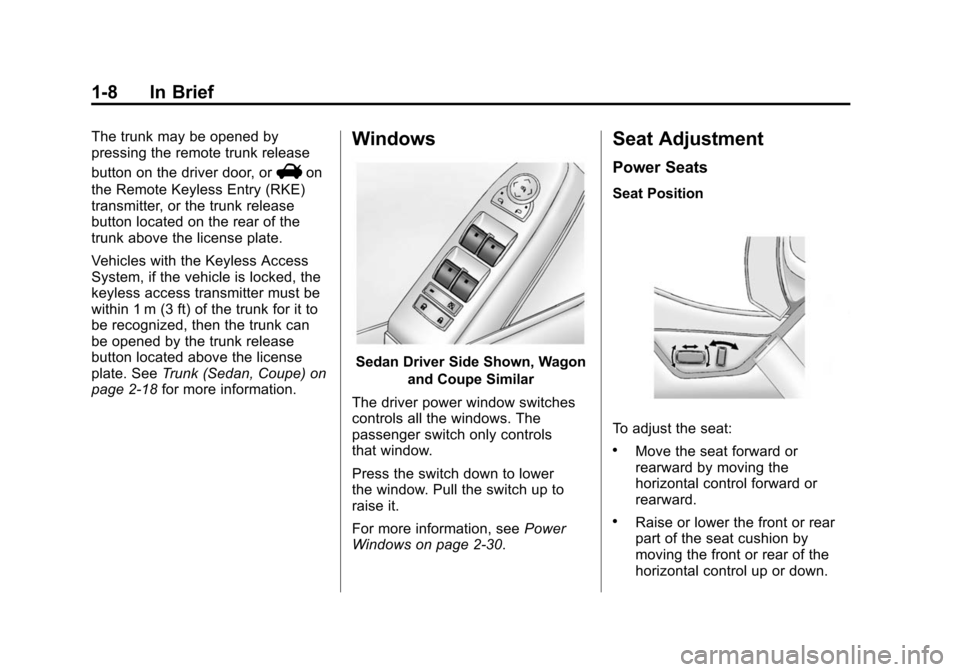
Windows
Sedan Driver Side Shown, Wagon
and Coupe Similar
The driver power window switches
controls all the windows. The
passenger switch only controls
that window.
Press the switch down to lower
the window. Pull the switch up to
raise it.
For more information, see Power
Windows on page 2‑30.
Seat Adjustment
Power Seats
Seat Position
To adjust the seat:
.Move the seat forward or
rearward by moving the
horizontal control forward or
rearward.
.Raise or lower the front or rear
part of the seat cushion by
moving the front or rear of the
horizontal control up or down.
Page 18 of 496

Black plate (12,1)Cadillac CTS/CTS-V Owner Manual (Include Mex) - 2012
1-12 In Brief
affected by the passenger sensing
system. SeePassenger Airbag
Status Indicator on page 5‑18 for
more information.
The passenger airbag status
indicator will be visible on the
instrument panel when the vehicle is
started.
Mirror Adjustment
Exterior
Controls for the outside power
mirrors are on the driver door. To adjust each mirrors:
1. Press (A) or (B) to select the
driver or passenger side mirror.
2. Press the arrows on the control pad to move the mirror up,
down, right, or left.
3. Adjust each mirror so that a little of the vehicle and the area
behind it can be seen.
4. Press (A) or (B) again to deselect the mirror.
See Power Mirrors on page 2‑28.
Interior
The vehicle has an automatic
dimming inside rearview mirror.
Automatic dimming reduces the
glare of headlamps from behind
you. The dimming feature comes on
and the indicator light illuminates
each time the vehicle is started.
SeeAutomatic Dimming Rearview
Mirror on page 2‑29.
Steering Wheel
Adjustment
To adjust the steering wheel:
1. Pull the lever down.
2. Move the steering wheel up or down.
3. Pull or push the steering wheel closer or away from you.
4. Pull the lever up to lock the steering wheel in place.
Page 20 of 496

Black plate (14,1)Cadillac CTS/CTS-V Owner Manual (Include Mex) - 2012
1-14 In Brief
;:Turns on the parking lamps,
together with the sidemarker lamps,
taillamps, license plate lamps, and
instrument panel lights.
5: Turns on the headlamps,
together with the parking lamps,
sidemarker lamps, taillamps, license
plate lamps, and instrument panel
lights.
For more information, see:
.Exterior Lamp Controls on
page 6‑1.
.Daytime Running Lamps (DRL)
on page 6‑3.
.Fog Lamps on page 6‑6.
Windshield Wiper/Washer
The windshield wiper lever is on the
right side of the steering column.
Sedan and Coupe Model shown
Wagon Model shown
Move the windshield wiper lever to
select the wiper speed.
8: Use for a single wipe. Briefly
move the lever down and release.
For several wipes, hold the
lever down.
(: Use to turn the wipers off.
3:For a delayed wiping cycle.
Turn the band up for more frequent
wipes or down for less frequent
wipes.
1 : Use for slow wipes.
2 : Use for fast wipes.
Windshield Washer
{WARNING
In freezing weather, do not use
the washer until the windshield is
warmed. Otherwise the washer
fluid can form ice on the
windshield, blocking your vision.
Sedan and Coupe Model
K: Press the button with this
symbol, on the end of the
windshield washer lever, to wash
the windshield. The washer fluid
sprays onto the windshield and the
wipers run for a few cycles to clear
the windshield. Press and hold
K
for more wash cycles.
Page 22 of 496

Black plate (16,1)Cadillac CTS/CTS-V Owner Manual (Include Mex) - 2012
1-16 In Brief
Transmission
Automatic Transmission
Driver Shift Control (DSC) or Tap
Shift
Driver Shift Control (DSC) allows
shifting an automatic transmission
similar to a manual transmission.
DSC can be enabled through the
shift lever or the Tap Shift controls,
located on the back of the steering
wheel (if equipped). SeeManual
Mode on page 9‑29.
Manual Transmission
Skip Shift (CTS‐V)
Under light acceleration, the
transmission will only allow shifting
from 1 (First) to 4 (Fourth). This
helps improve fuel mileage. Under
harder acceleration, Skip Shift is
disabled, and all gears are
available. See Manual Transmission
on page 9‑31.
Vehicle Features
Radio(s)
VOL/O: Press to turn the system
on and off. Turn to increase or
decrease the volume.
FM/AM: Press to select between
FM or AM.
m: Press to select XM™,
if equipped.
TUNE/TONE: Turn to select radio
stations.
¨SEEK or©SEEK: Press to seek
the next or previous station.
INFO: Press to display additional
information that may be available for
the current song. When information
is not available, No Information
displays.
For more information about these
and other radio features, see
Operation on page 7‑3.
Storing a Favorite Station
A maximum of 36 stations can be
programmed as favorites using the
six softkeys below the radio station
frequency tabs on the display and
by using the radio favorites page
button (FAV button). Press the FAV
button to go through up to six pages
of favorites, each having six favorite
stations available per page. Each
page of favorites can contain any
combination of AM, FM, or XM
stations.
For more information, see AM-FM
Radio on page 7‑8.
Setting the Clock
The analog clock is located on the
instrument panel above the radio.
The clock is not connected with any
other vehicle system and runs by
itself. To adjust the clock:
1. Locate the adjustment buttons
directly below the clock face.
2. Push and hold the right adjustment button to move the
clock hands forward, or the left
Page 23 of 496

Black plate (17,1)Cadillac CTS/CTS-V Owner Manual (Include Mex) - 2012
In Brief 1-17
adjustment button to make the
clock hands go backward.
Holding either button down will
cause the clock to advance
faster. Release the button before
the desired time is reached.
3. Push and release either button to adjust the time by one minute
increments until the desired time
is reached.
For more information on setting the
clock, see Clock on page 5‑8.
Satellite Radio
Vehicles with an XM™ satellite radio
tuner and a valid XM satellite radio
subscription can receive XM
programming.
XM Satellite Radio Service
XM is a satellite radio service based
in the 48 contiguous United States
and 10 Canadian provinces. XM
satellite radio has a wide variety of
programming and commercial-free music, coast to coast, and in
digital-quality sound. A fee is
required to receive the XM service.
For more information refer to:
.www.xmradio.com or call
1-800-929-2100 (U.S.).
.www.xmradio.ca or call
1-877-438-9677 (Canada).
For more information, see Satellite
Radio on page 7‑11.
Portable Audio Devices
Some vehicles have a 3.5 mm
(1/8 in) auxiliary input and a USB
port located in the center console.
External devices such as iPods
®,
laptop computers, MP3 players, CD
changers, and USB storage devices
may be connected, depending on
the audio system.
For more information, see Auxiliary
Devices on page 7‑33.
Bluetooth®
The Bluetooth system allows users
with a Bluetooth-enabled cell phone
to make and receive hands-free
calls using the vehicle audio system
and controls.
The Bluetooth-enabled cell phone
must be paired with the in-vehicle
Bluetooth system before it can be
used in the vehicle. Not all phones
will support all functions.
See Bluetooth on page 7‑35.
Mobile Apps
Mobile Apps
Mobile apps are available for
download through iTunes®to then
access the iPhone®App Store and
Google™ Marketplace for
Android™. Search for the apps to
download. The apps are free of
charge; however, myCadillac
requires the user to link their own
vehicle and OnStar MyLink requires
an active OnStar subscription.
Page 26 of 496

Black plate (20,1)Cadillac CTS/CTS-V Owner Manual (Include Mex) - 2012
1-20 In Brief
Vehicle Customization
Some vehicle features can be
programmed by using the DIC
buttons on the instrument panel to
the left of the steering wheel. These
features include:
.Language
.Door Lock and Unlock Settings
.Lighting
.Chime Volume
.Memory Settings
See Vehicle Personalization on
page 5‑46.
Rear Vision
Camera (RVC)
The rear vision camera displays a
view of the area behind the vehicle
on either the navigation screen or
the inside rearview mirror when the
vehicle is shifted into R (Reverse).
Once shifted out of R (Reverse), the
navigation screen will go back to the last screen that had been displayed,
after a delay or the video image
automatically disappears from the
inside rearview mirror.
To clean the camera lens, located
above the license plate, rinse it with
water and wipe it with a soft cloth.
See
Rear Vision Camera (RVC) on
page 9‑48 for more information.
Ultrasonic Parking Assist
If available, Ultrasonic Rear Parking
Assist (URPA) uses sensors on the
rear bumper to detect objects while
parking the vehicle. It operates at
speeds less than 8 km/h (5 mph).
URPA uses audible beeps to
provide distance and system
information.
Keep the sensors on the vehicle's
rear bumper clean to ensure proper
operation.
SeeUltrasonic Parking Assist on
page 9‑44 for more information.
Storage Compartments
Press the bottom of the load floor
handle assembly to lift the top on
the handle. Pull up on the handle to
open the cargo management
system.
SeeCargo Management System
(Wagon Only) on page 4‑3 for more
information.
Page 33 of 496

Black plate (1,1)Cadillac CTS/CTS-V Owner Manual (Include Mex) - 2012
Keys, Doors, and Windows 2-1
Keys, Doors, and
Windows
Keys and Locks
Keys . . . . . . . . . . . . . . . . . . . . . . . . . . 2-2
Remote Keyless Entry (RKE)System . . . . . . . . . . . . . . . . . . . . . . 2-4
Remote Keyless Entry (RKE) System Operation (Key
Access) . . . . . . . . . . . . . . . . . . . . . 2-5
Remote Keyless Entry (RKE) System Operation (Keyless
Access) . . . . . . . . . . . . . . . . . . . . . 2-6
Remote Vehicle Start . . . . . . . . 2-12
Door Locks (Sedan and Wagon) . . . . . . . . . . . . . . . . . . . . 2-14
Door Locks (Coupe) . . . . . . . . . 2-15
Central Door Unlocking System . . . . . . . . . . . . . . . . . . . . . 2-16 Power Door Locks . . . . . . . . . . . 2-16
Delayed Locking . . . . . . . . . . . . . 2-17
Automatic Door Locks . . . . . . . 2-17
Lockout Protection . . . . . . . . . . . 2-17
Safety Locks (Sedan and
Wagon) . . . . . . . . . . . . . . . . . . . . 2-18Doors
Trunk (Sedan, Coupe) . . . . . . . 2-18
Liftgate . . . . . . . . . . . . . . . . . . . . . . 2-20
Vehicle Security
Vehicle Security . . . . . . . . . . . . . . 2-24
Anti-theft Alarm System . . . . . . 2-24
Immobilizer . . . . . . . . . . . . . . . . . . 2-25
Immobilizer Operation(Key Access) . . . . . . . . . . . . . . . 2-25
Immobilizer Operation (Keyless Access) . . . . . . . . . . . 2-26
Exterior Mirrors
Convex Mirrors . . . . . . . . . . . . . . 2-28
Power Mirrors . . . . . . . . . . . . . . . . 2-28
Folding Mirrors . . . . . . . . . . . . . . . 2-28
Heated Mirrors . . . . . . . . . . . . . . . 2-28
Interior Mirrors
Automatic Dimming RearviewMirror . . . . . . . . . . . . . . . . . . . . . . . 2-29
Windows
Windows . . . . . . . . . . . . . . . . . . . . . 2-29
Power Windows . . . . . . . . . . . . . 2-30
Sun Visors . . . . . . . . . . . . . . . . . . . 2-32
Roof
Sunroof . . . . . . . . . . . . . . . . . . . . . . 2-32
Page 34 of 496

Black plate (2,1)Cadillac CTS/CTS-V Owner Manual (Include Mex) - 2012
2-2 Keys, Doors, and Windows
Keys and Locks
Keys
{WARNING
Leaving children in a vehicle with
the ignition key is dangerous for
many reasons. Children or others
could be badly injured or even
killed. They could operate the
power windows or other controls
or even make the vehicle move.
The windows will function with the
keys in the ignition and children
could be seriously injured or killed
if caught in the path of a closing
window. Do not leave the keys in
a vehicle with children.
{WARNING
Leaving children in a vehicle with
the Remote Keyless Entry (RKE)
transmitter is dangerous for many
reasons; children or others could
be badly injured or even killed.
They could operate the power
windows or other controls or even
make the vehicle move. The
windows will function with the
RKE transmitter in the vehicle
and they could be seriously
injured or killed if caught in the
path of a closing window. Do not
leave the RKE transmitter in a
vehicle with children.
One of the following keys comes
with the vehicle.