2012 AUDI A5 COUPE radio
[x] Cancel search: radioPage 42 of 316

40 Openin g and clo sing
the ignition lock, the e lectronic immob ilizer is
automatically activated once again.
0) Tips
- The vehicle cannot be s tarted if an unau
thorized key is used. The vehicle may not
start if another radio device such as a key
for another vehicle or a transponder is located on the key ring.
- For Declarat ion of Compliance to United
States FCC and Industry Canada regu la
tions
Q page 296.
Power locking system
General description
The power locking system locks or unlocks all
doors and the rear lid simultaneously.
You can lock and unlock the vehicle centrally.
You have the following choices:
- Remote master key
Q page 41,
-Door handles with convenience key*
c:>page 42,
- Lock cylinder at the driver's door
Q page43, or
- Power locking switc h inside
Q page 43 .
Selective unlocking
When they a re closed, the door and rea r lid
a re locked. When unlocking, you can set in the
radio or MM!* whether
only t he drive r's door
or the entire vehicle shou ld be un locked
Q page 41.
Automatic locking
The automat ic loc king featu re locks all the ve
h icle doors and the rear lid when you drive
faste r than 9 mph ( 15 km/h).
The car is un locked again once the ignition key
is removed. In addition, the veh icle can be un
l ocked if the opening fu nction in the power
l o cki ng system switch or a t one of the door
l evers is act uated . The Auto Lock function can
be turned on and off in the rad io or
MMI*
c:::> page41.
Additionally , in the event of a crash with air
bag dep loyment the doors are automatically
u nlocked to allow access to the vehicle .
Anti-theft alarm warning system
If the an ti- theft alarm warning system de
tects a b reak-in into the vehicle, acoustic and
vis ual warning signals are triggered .
T he anti-theft wa rning system is activated au
tomat ica lly when you lock the vehi cle. It is de
activated when unlocking using the
remot e
k ey,
with the me chanical key , and when you
switch on the ignition.
T he alarm also t urns off when the a larm cy cle
has expired .
Turn signal s
When you unlock the veh icle, the turn s ignals
flash twice, when you lock it once. If they do
not flash, one of the doo rs, the rear lid o r the
hood is not lo cked.
Unintentionally locking yourself out
In the following cases there safeguards to
prevent yo u lock ing your remote master key in
the ve hicle:
- The vehicle does not lock w ith the central
locking switc h
Q page 43 if the driver's
door is open .
- On veh ides w ith convenience key*, if the
most recently used master key is in the lug
gage compa rtment, the rear lid is a utomat i
cally u nlocked again after it is closed.
Do not lock your veh icle w ith the
r e mot e m as
ter key or con ven ienc e ke y*
until all doors
and the rear lid are closed . In this way you
avo id lock ing you rself out a ccidentally.
_& WARNING
-
- W hen you leave the ve hicle, always re
move the ignition key and take it with
you . This will prevent passengers (chil
dren, for example) from acc identally be
ing locked in the vehicle shou ld they acci
dentally press the power locking switch in the front doors.
Page 43 of 316
-Do not leave children inside the vehicle
unsupervised. In an emergency it would
be impossible to open the doors from
the outside without the key.
(D Tips
- In the event of a crash with airbag de
ployment all locked doors will be auto
matically unlocked to give access to the
vehicle occupants from the outside .
- If the power lock ing system should mal
function, you can lock the driver's door
using the mechanical key
q page 44.
- If the power lock ing system should fail,
you can still open the fuel tank flap in an
emergency
c:> page 235 .
-You are well advised not to keep valua
bles inside an unattended vehicle, visible
or not . Even a properly locked vehicle
cannot provide the security of a safe.
- If the LED in the upper edge of the driv
er's door panel comes on for about 30
seconds after the vehicle is locked, there
i s a ma lfunction in the power locking or
the anti-theft warning system. Have the
malfunction corrected by an authorized
Audi dealership or qualified repair facili
ty.
Setting power locking
The driver can determine the functions for
power locking in the radio or MMI*.
In the Central locking menu you can decide
which doors should be unlocked when open
ing the vehicle.
.,. Se lect :
I CAR I funct ion button > Central lock-
ing .
For example, if you switch the item Unlocking
single door On ,
the passenger 's doo r is no
longer included in the power Locking system,
and will not be unlocked by p ress ing the un
l ock button on the master key remote control.
You can continue to unloc k all the doors and
the rear lid as before. Press the open ing but
ton on the master key tw ice.
Opening and closing 41
In addition to this, the Auto locking can be
switched on and off.
When locki ng the vehicle, all doors and the
trunk lid are locked automatically.
If you switch
Trunk lid/tailgate On, then the
handle on the rear lid
c:> page 44 , fig. 42 is
locked . In this case the rear lid can be opened
with the button
cs on the master key
c:> page 41, fig. 36 or with the un locking
button in the dr iver 's door
c:> page 44,
fig .
41 .
When yo u se lect Confirmation tone On, a
confirmation tone sounds when yo u lock the
vehicle.
Unlocking and locking the vehicle with
the remote control
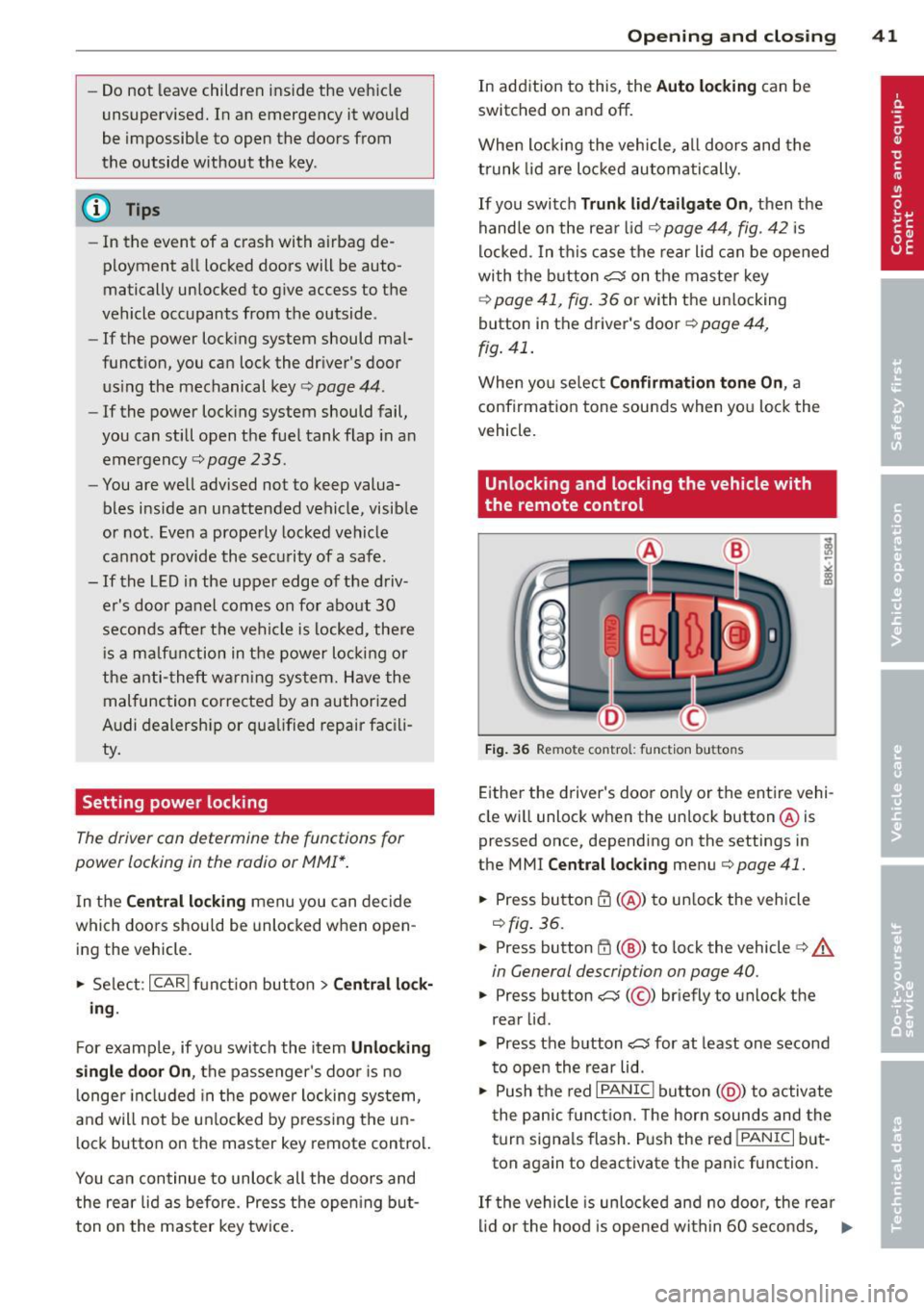
Fig. 36 Remote control: f unc tion buttons
Either the driver's door on ly or the entire vehi
cle wi ll unlock when the unlock button @is
pressed once, depending on the settings in
the MMI
Central locking menu c:> page 41 .
.,. Press button ffi (@ ) to unlock the vehicle
c:> fig. 36.
.,. Press button ffi (@ ) to lock the vehicle ¢ A
in General description on page 40 .
.,. Press button cs( @) briefly to unlock the
rear lid .
.,. Press the button
cs for at least one second
to open the rear lid .
.,. Push the red
I PANIC I button ( @ ) to activate
the panic function. The horn sounds and the
turn signa ls flash . P ush the red
!PANIC I but
ton again to deactivate the panic function.
If th e vehicle is unlocked and no door, the rear
lid or the hood is opened within 60 seconds, .,._
Page 44 of 316

42 Openin g and clo sing
the vehicle locks itself again automatically.
This feature prevents the vehicle from being
accidentally left unlocked over a long period
of time.
It depends on the settings in the radio or
MMI* whether the entire vehicle is unlocked
or only certain doors
c::> page 41.
On vehicles w ith automatic transmission*, the
se lector lever must be in the
P position, other
wise the vehicle cannot be locked .
A WARNING
Read and follow all WARNINGS ¢.& in
General description on page 40.
(D Tips
- In order to make sure the locking func
tion is working, you shou ld always keep
your eye on the vehicle to make sure it is proper ly locked.
- Do not use the remote control if you are
inside the car, otherwise you may unin
tentionally lock the vehicle, and then you
would set off the anti-theft alarm when
you try to start the engine or open a door. In case this happens anyhow, push
the un lock button
0.
- Use the panic funct ion only if you are in
an emergency situation.
Unlocking and locking with convenience
key
Applies to vehicles: with co nve nience key
The doors and the rear lid can be unlocked
and locked without operating the master key.
Fig . 37 Conve nien ce key: Locking the vehicle
Unlocking v ehicle
.,. Take ho ld of the door handle. The door is
un locked automatically.
.,. Pull the handle to open the door.
Locking vehicle
.,. Move the selector lever to the P position
(automatic transmission*), otherwise the
veh icle canno t be locked.
.,. Touch the sensor at the door handle
on ce
c::> fig. 3 7 to lock the vehicle¢ A. in General
description on page 40.
Do not reach inside
the door handle.
The vehicle can be locked and un locked at any
door .
It depends on the settings in the radio
or MMI* whether the ent ire vehicle is un
locked or one of the doors ¢
page 41. The
master key must be w ith in a range of about
1.5 m from the appropriate door or the rear
l id .
It makes no difference whethe r the mas
te r key is in your jacket pocket or in you r brief
case.
If you grip the door handle while locking, this
can adversely affect the locking function .
It is not possible to re-open the door for a
brief period directly after closing it. This al
lows you to ensure that the doors are properly
locked .
A WARNING
Read and follow all WARNINGS c::> .& in
General description on page 40.
(D Tips
-
If your vehicle has been standing for an ex
tended per iod, please note the following:
- The prox imity sensors are deactivated af-
ter a few days to save power. You then
have to pull on the door handle once to
unloc k the vehicle and a second t ime to
open the vehicle.
- T o prevent the battery from bei ng d is
charged and to preserve you r vehicle's
ability to sta rt for as long as possib le,
t he energy management sys tem gradu
ally switches off unnecessary
Page 52 of 316
50 Clear vis ion
MM I* men u r=> page 50 in the automat
ic driving Lights function .
- When you remove your key from the igni
tion wh ile the vehicle's lights a re turned
on, a buzze r sounds as long as the driv
er's door is open.
- Please obey all laws when using t he
li ghting systems described here .
- The coming home/leaving home func
tion * is availab le only with the sw itch in
the AUTO position.
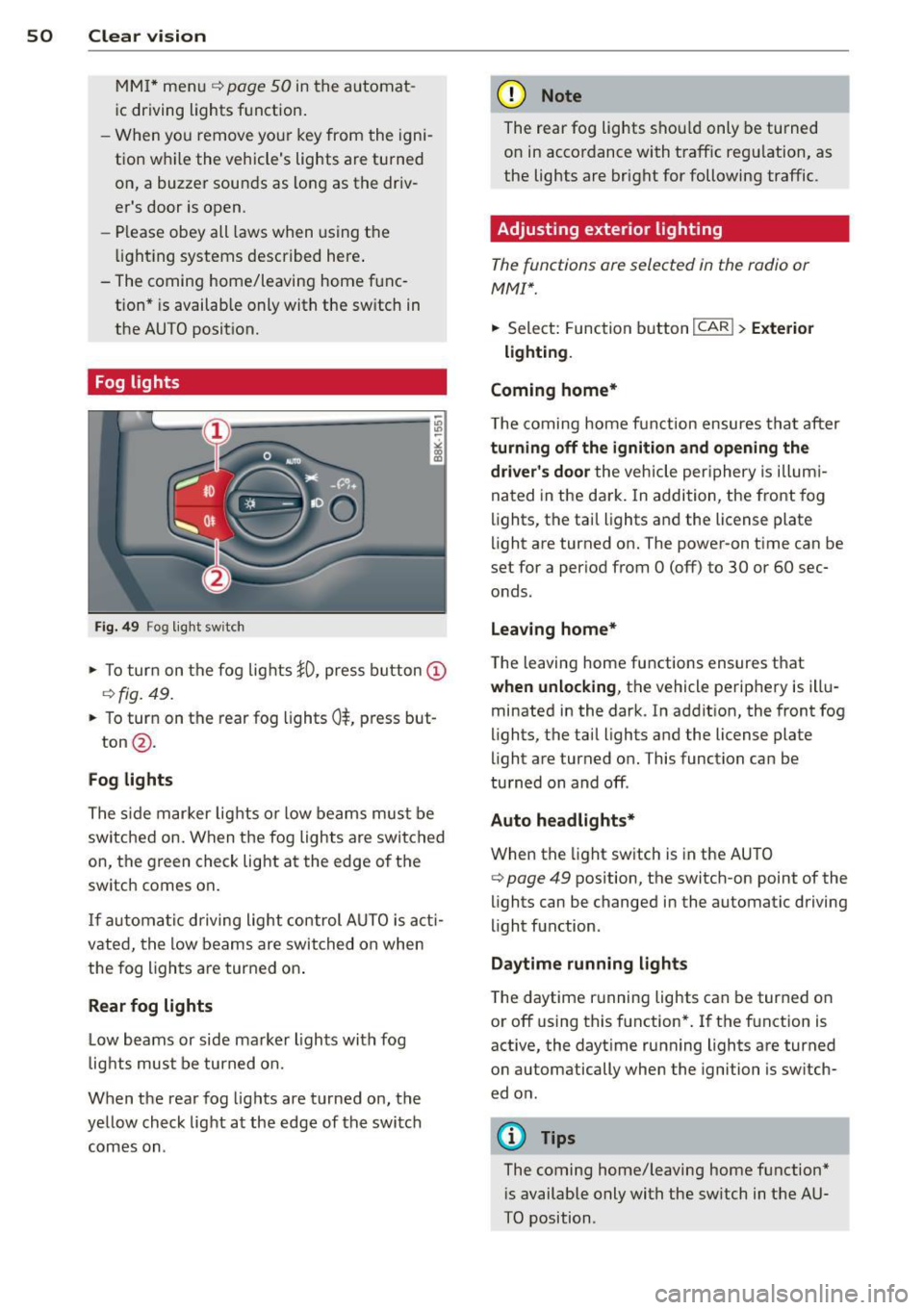
Fog lights
F ig. 49 F og light sw itch
,. To turn on the fog lights JO, press button @
r=>fig. 49.
,. To turn on the rear fog lights Ot press but-
ton @.
Fog lights
The s ide mar ker Lig hts or low beams must be
switched on. When the fog Lights are switched
on, the g reen check Light at the edge of the
switch comes on .
If autom atic driving light control AUTO is act i
vated, t he low beams are switched on when
the fog l igh ts are turned on .
Rear fog lights
Low beams or side marker Lights with fog
l ight s must be turned on.
When the rear fog lights are turned on, the
yellow check light at the edge of the switch
comes on .
(D Note
The rear fog Lights sho uld only be turned
on in accordance with traff ic regu lation, as
the lights are bright for following traffic .
Adjusting exterior lighting
The functions are selected in the radio or
MM!*.
,. Select: Function b utton ICAR ! > Exterio r
lighting .
Coming home*
T he coming home funct ion ensures tha t after
turning off the ignition and opening the
driver' s door
the veh icle per iphery is illum i
nated in the da rk . I n addition, the front fog
lights, the tai l lights and the License plate
li ght are turned on. The power -on t ime can be
set for a per iod from O (off) to 30 or 60 sec
onds.
Leav ing home*
The leaving home functions ensures that
when unlo cking , the vehicle perip hery is illu
minated in the dark . In add it ion, the front fog
lights, the tail Lights and the license plate
light are turned on. This function can be
tu rned on and off .
Auto headlights*
When the light switch is in the AUTO
r=> page 49 position, the switch-on point of the
lights can be changed in the automatic driving
li ght function.
Daytime running lights
The daytime r unning lights can be turned on
or off using this function* . If the f unction is
active, the dayt ime runn ing lights are turned
on automatically when the ignition is sw itch
ed on .
(D Tips
The coming home/leaving home function*
i s available only with the sw itch in t he AU
TO position .
Page 68 of 316

66 Seats and storage
is unlocked , the settings assigned to the
remote contro l key are restored.
If your vehicle is driven by other persons using
your remote control key , you sho uld save yo ur
individual seat position on one o f the memory
buttons . You can recall your settings again
simply and conven iently by pressing the corre
sponding memory button. When the vehicle is locked, these settings are automatically re-as
signed to the remote control key and stored .
A WARNING
-For safety reasons, the seat setting can
only be reca lled when the veh icle is sta
tionary -otherwise you risk having an ac
ci dent.
- In an emergency the recall procedure can
be cancelled by pressing the
I ON/OF F I
switch or by tapping of the the memory
buttons .
Activating remote control key memory
Applies to vehicles: with seat memo ry
To assign the driver's seat settings to the re
mote contro l key when locking the vehicle , the
function must be activated in the radio or
MMI*
.. Select: Function button
ICARI > Seat adjust
ment > Driver's seat > Key mem . profile
>
On .
@ Tips
If you do not want another driver's set
tings to be assigned to the remote key,
sw itch off the memory function using the
rad io or MMI* or the
!O FF ! button
c:>page 65.
Seat adjustments in MMI
Applies to vehicles: wit h seat memory and MMI
The passenger 's seat can be adjusted to vari
ous positions by the driver .
Convenience side view
.. Select: Function button I CAR!> Seat adjust
ment > Passenger's seat > Convenience side
view.
.. Continue to press the control knob until the
ad justment process is complete .
Seat symmetry
.. Select: Function button I CAR !> Seat adjust
ment > Passenger's seat > Seat symmetry.
.. Continue to press the control knob until the
adjustment process is complete .
U sing the
Convenience side view function, the
passenger's seat is adjusted so tha t the driver
has the best poss ible view to the right . When
the Conven ience s ide v iew is set, the specific
pos ition of the driver's seat is taken into con
s ideration .
Using the
Seat symmetry function, the pas
senger's seat can be moved to the same posi
t ion as the driver's seat. The settings for the
drive r's seat are imported and set automati
cally .
Page 83 of 316

Button(s )
AC
----·
Meaning
Turn cooling system on/off
<=> page 83
Seat heating
<=>page 91
aJ The reg ulato r is a lso used to set the fan speed, ai r di s
tributio n an d seat h eat ing.
(D Tips
The grille on the controls <=> fig. 94 must
remain unobstructed and must not be tap
ed over. Measuring sensors are located be
hind it.
Turning the climate control system on and off
Applies to vehicles: with deluxe automatic climate co ntrol
.. Briefly press the IOFFI button, or press the
IAUTOI button to turn the climate control
system
on .
.. Press the ~ ,o~ F=F ~I button to turn the climate
control system off and to block the a ir sup
ply from the outside.
The climate control system switches back on
when a control button is operated.
Automatic mode~
Applies to vehicles: with deluxe automatic cl imate control
The standard operating mode for all times of
the year.
Tu rning on au tomatic mode
.. Set the temperature between 60° F (+16°()
and 84°F (+28°() .
.. Press the
!AUTO l button.
Automatic mode ensures constant tempe ra
tures in the interior and dehumidifies the air
ins ide the veh icle. Air temperat ure, volume
and d istribution are controlled automatically
to reach or maintain the desired inter ior tem
perature as quickly as possible . Fluctuations
i n exte rior temperature and the effects of
temperature from the pos ition of the sun are
compensated fo r automat ically.
W arm and cold 81
This operating mode wo rks on ly in an adjusta
ble temperature range of 60°F (+16°() to
84°F (+28°(). If a temperature be low 60°F
( + 16°() is selected,
LO appears in the disp lay.
At temperatures above 84°F (+28°(),
HI is
displayed . At both extreme settings, climate
control runs co ntinuously at maximum cool
ing o r heating powe r. The re is no temperature
r egulation.
Setting the temperature
Applies to vehicles: with deluxe automatic climate control
Fig. 95 Tempe rat ure sett ing regula tor
.. Rotate the regulator to the left to reduce
the temperature, or to the right to i ncrease
the temperature<=>
fig. 95 .
The selected temperature appears on the cl i
mate control display. The temperature setting
will also appear for a few seconds in the radio
or MM I* display .
Fan[!]
Applies to vehicles: with deluxe a utomatic clima te control
The automatically preset fan speed can be re
duced or increased .
Fig . 9 6 Fan button a nd regu lato r
.. Press the~ button.
Page 84 of 316

82 Warm and cold
• Rotate the regulator to set the desired fan
speed (air volume) .
We re commend a lways running the fan at a
l ow speed when driv ing s low ly .
To prevent polluted outside air (smell) from
entering the in terior of the vehicle, sw itch to
recircul ation mode by press ing the button 1- 1.
When the radio or MMI* is turned on, the fan
speed setting appears for a few seconds on
the s creen .
@ Tips
-It is possible that the fan speed may
change automati cally. This occurs to en
su re that the desired temperature set
ting is re ached as quickly as poss ible.
- The fan speed cannot be regulated sepa
r ately for the dr iver and front passenge r.
Recirculation mode I:;;]
Appli es to vehicles: with deluxe automa tic climate control
The recirculation mode prevents polluted out
side air from entering the vehicle interior .
Activating
• Press the bu tton 1.,,,,1 q _&. .
Deact ivating
• Press the button 1-1 aga in, or
• press the
IAU TO I button .
I n recirculation mode, air is drawn from the
vehicle interior, f iltered and recirculated. We
recommend selecting recirculation mode un
der the following conditions :
When driv ing through a tunnel or in a traffic
jam so that exhaust fumes and odors cannot
ente r the veh icle inter ior .
.&_ WARNING
You should not use the recirculation mode
for an extended per iod since no fresh air is
drawn in. With the ai r-conditioning switch
ed off, the windows can fog up, which in
creases the risk of an acc ident!
Air distribution ~
Applies to vehicles: with del uxe automatic climate control
The automatically preset air distribution can
be changed .
Fig . 97 A ir di str ib ut io n b utton and reg ulator
• Press th e ~ button.
,.. Rotate the regulator to the desi red setting .
You can adjust the air d istr ibut ion so that air
flows from specific vents . In positio n
:0 air
flows on ly to the windows, in posit io n
;n, it
flows to the d river or passenger, and in pos i
tion
!,!) it flows to the footwell . The re a re ad
ditional combinations availab le to adj ust air
distribution as needed .
T o reg ulate air d istribution a utomat ically,
switch to
IAU TOI.
When the radio or MMI* is turned on, the air
dist ribution setti ng appears for a few seconds
o n the sc reen .
Defrost ~
Applies to vehicles: with deluxe automat ic climate control
The windshield and side windows ore defrost
ed or cleared of condensation as quickly os
possible .
• Press t he button~ to tur n on the defrost
er.
• Press the button ~ again, or press the
IAUTO I button to turn it off .
T empera ture is con tro lled autom atically . T he
maximum amo unt of air flows ma inly from
the vents below the winds hield .
Pressing the~ button sw itches off reci rcula
t io n mode.
Page 92 of 316

90 Warm and cold
If the climate control is operating in cool
ing mode, a ir flows primarily from the
vents in the center console. To achieve ad
equate cooling, you should never close
these vents completely.
Economical use of the climate control
system
A ppl ies to vehicles: w it h Deluxe au toma tic clima te co n
tro l p lus
Economical use of the climate control system
helps save fuel.
When the climate contro l system is working in
coo ling mode, engine performance is reduced
and fuel consumption is affected. To keep the
time the cl imate control system is on as short
as possible, you should do the follow ing:
.. To save fuel, turn off cooling mode by press
ing the AC button (indicator light goes out) .
.. In add ition, if you open the window or the
panoramic sliding/tilt ing sunroof* while
dr iv ing, turn off cooling mode by pressing
the AC button (indicator light goes out) .
.. If the vehicle is extremely hot due to the
heat of the sun, briefly open doors and win
dows.
@ For the sake of the environment
When you save fuel, you reduce em ission s
from the vehicle.
Deluxe automatic
climate control plus -
basic settings
General information
Ap plies to veh icles: w it h Deluxe automat ic climate co n
tro l p lus
The basic climate control settings can be ad
justed in the radio or MM!*.
.. Select: Funct ion button ICARI > Control but
ton
AC .
The follow ing funct ions can be selected: -
Auto reci rculat.
q page 90
- Synchronization
q page 90
Automatic recirculation
App lies to vehicles : with Del uxe a uto mat ic clima te con
tro l pl us
An air quality sensor detects increased con
centrations of pollutants in the outside air
and automatically switches to recirculation
mode.
We recommend that you always keep auto
matic recirculation ON to prevent polluted
outside air from entering the vehicle interior.
If the
air quality sensor located in the climate
control system detects polluted outside air,
the sensor dec ides whether the air pollut io n
can be reduced by the factory-installed pollu
tant filter or w hether it is necessary to switc h
to recirculation. With heavy concentr ations of
po llutants, the climate control system is
switched automatica lly to recirc ulation mode
and the supply of o utside air is blocked . As
soon as the concentration of pollutants in the
outside air drops, fresh air is supplied to the
vehicle interior aga in .
In the event that the windows fog up during
automatic recircu lation, press the~ button
immediately .
Under certain operating conditions, automatic
recirculation is switched off automatically.
When outside temperatures are below about
SO °F (+10 °C), automatic recirculat ion is lim
ited to 30 seconds. When outside tempera
tures are be low about 30 °F (-1 °C), automatic
recirculation is lim ited to 15 seconds .
Synchronization
Applies to veh icles : with Del uxe a uto mat ic climate con
tr ol pl us
One climate control setting for all seats.
After Syn chronization is set to On , all of the
subsequent climate control settings (except
for seat heating *) for the driver are transfer-
red to the front passenger. ..,.