2011 TOYOTA VERSO S stop start
[x] Cancel search: stop startPage 480 of 664
4806-4. Using the other interior features
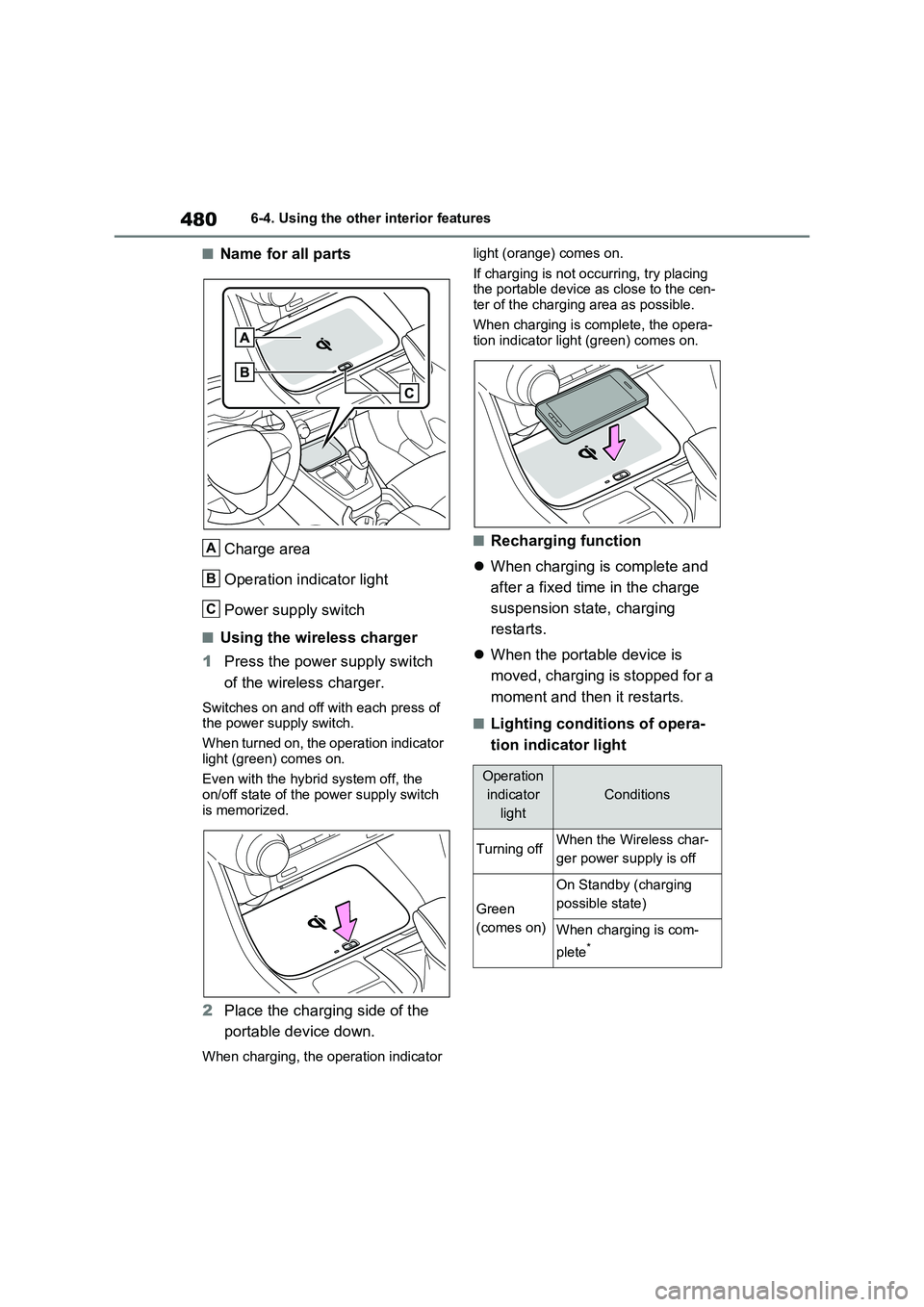
■Name for all parts
Charge area
Operation indicator light
Power supply switch
■Using the wireless charger
1Press the power supply switch
of the wireless charger.
Switches on and off with each press of
the power supply switch.
When turned on, the operation indicator
light (green) comes on.
Even with the hybrid system off, the
on/off state of the power supply switch
is memorized.
2Place the charging side of the
portable device down.
When charging, the operation indicator light (orange) comes on.
If charging is not occurring, try placing
the portable device as close to the cen-
ter of the charging area as possible.
When charging is complete, the opera-
tion indicator light (green) comes on.
■Recharging function
When charging is complete and
after a fixed time in the charge
suspension state, charging
restarts.
When the portable device is
moved, charging is stopped for a
moment and then it restarts.
■Lighting conditions of opera-
tion indicator light
A
B
C
Operation
indicator
light
Conditions
Turning offWhen the Wireless char-
ger power supply is off
Green
(comes on)
On Standby (charging
possible state)
When charging is com-
plete
*
Page 482 of 664
4826-4. Using the other interior features
• Repeatedly flashes 4 times con-
tinuously (Orange)
■The wireless charger can be oper-
ated when
The power switch is in ACC or ON.
■Usable portable devices
Qi standard wireless charge standard
can be used on compatible devices.
However, not all Qi standard devices
and compatibility are guaranteed.
Starting with mobile phones and
smartphones, it is aimed for low power
electrically supplied portable devices of
no more than 5W.
■When covers and accessories are
attached to portable devices
Do not charge in situations where cover
and accessories not able to handle Qi
are attached to the portable device.
Depending on the type of cover and
accessory, it may not be possible to
charge. When charging is not performed
even with the portable device placed on
the charge area, remove the cover and
accessories.
■While charging, noise enters the
AM radio
Turn off the wireless charger and con-
firm that the noise has decreased. If the
noise decreases, continuously pushing
the power supply switch of the wireless
charger for 2 seconds, the frequency of
the charger can be changed and the
noise can be reduced.Also, on that
occasion, the operation indicator light
will flash orange 2 times.
■Important points of the wireless
charger
●If the electronic key cannot be detected within the vehicle interior,
charging cannot be done. When the
door is opened and closed, charging
may be temporarily suspended.
●When charging, the wireless charging
device and portable device will get
warmer, however this is not a mal-
function.
When a portable device gets warm
while charging, charging may stop
due to the protection function on the
portable device side. In this case,
when the temperature of the portable
device drops significantly, charge
again.
●Depending on usage of the portable
device, it may not be fully charged.
This is not a malfunction.
●When using a mobile phone near a
wireless charger, the call sensitivity
and communication speed may be
reduced.
■Operation sounds
When the power supply is turned on,
while searching for the portable device a
sound will be produced, however this is
not a malfunction.
■Cleaning the wireless charger
P.492
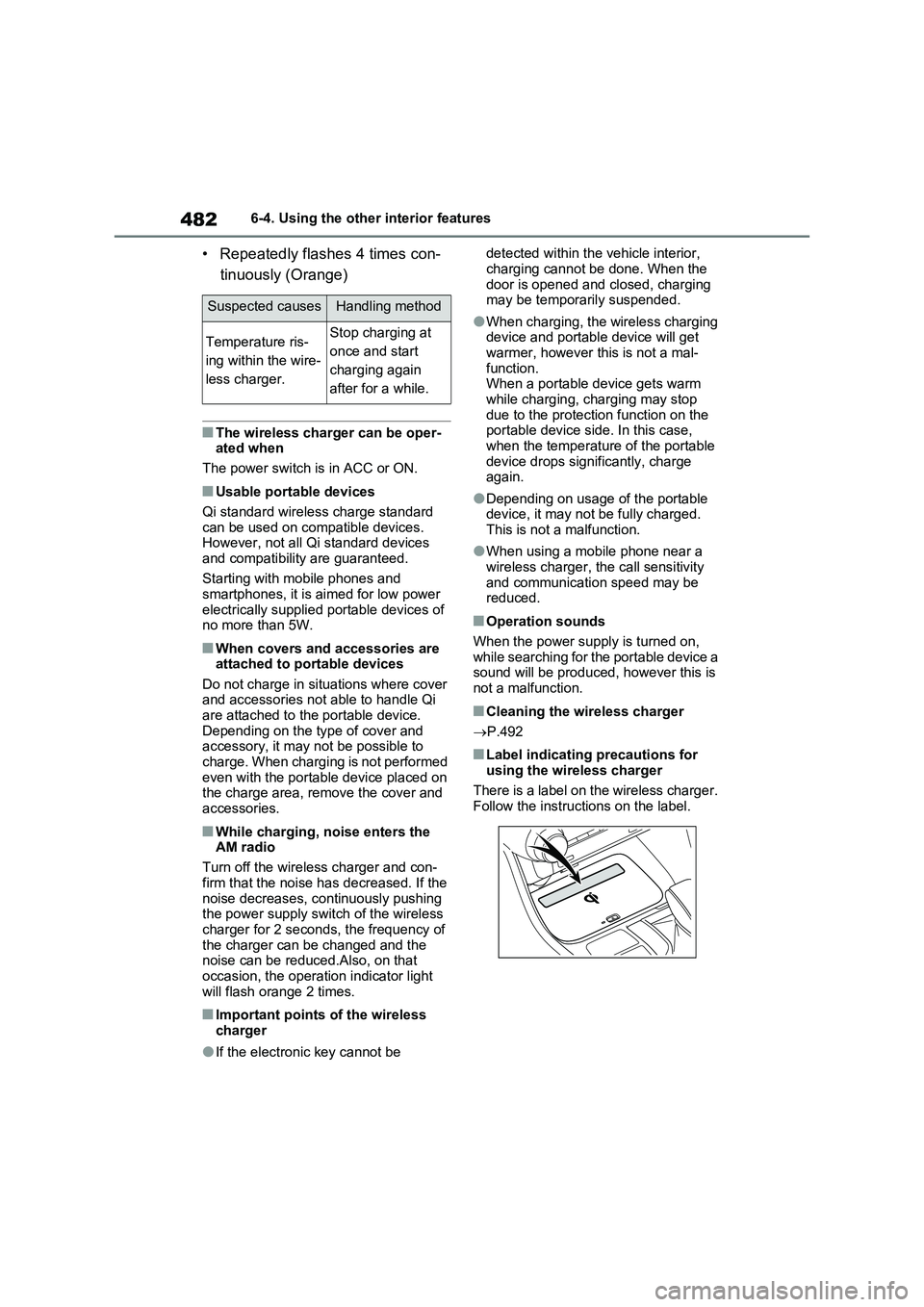
■Label indicating precautions for
using the wireless charger
There is a label on the wireless charger.
Follow the instructions on the label.
Suspected causesHandling method
Temperature ris-
ing within the wire-
less charger.Stop charging at
once and start
charging again
after for a while.
Page 538 of 664
5387-3. Do-it-yourself maintenance
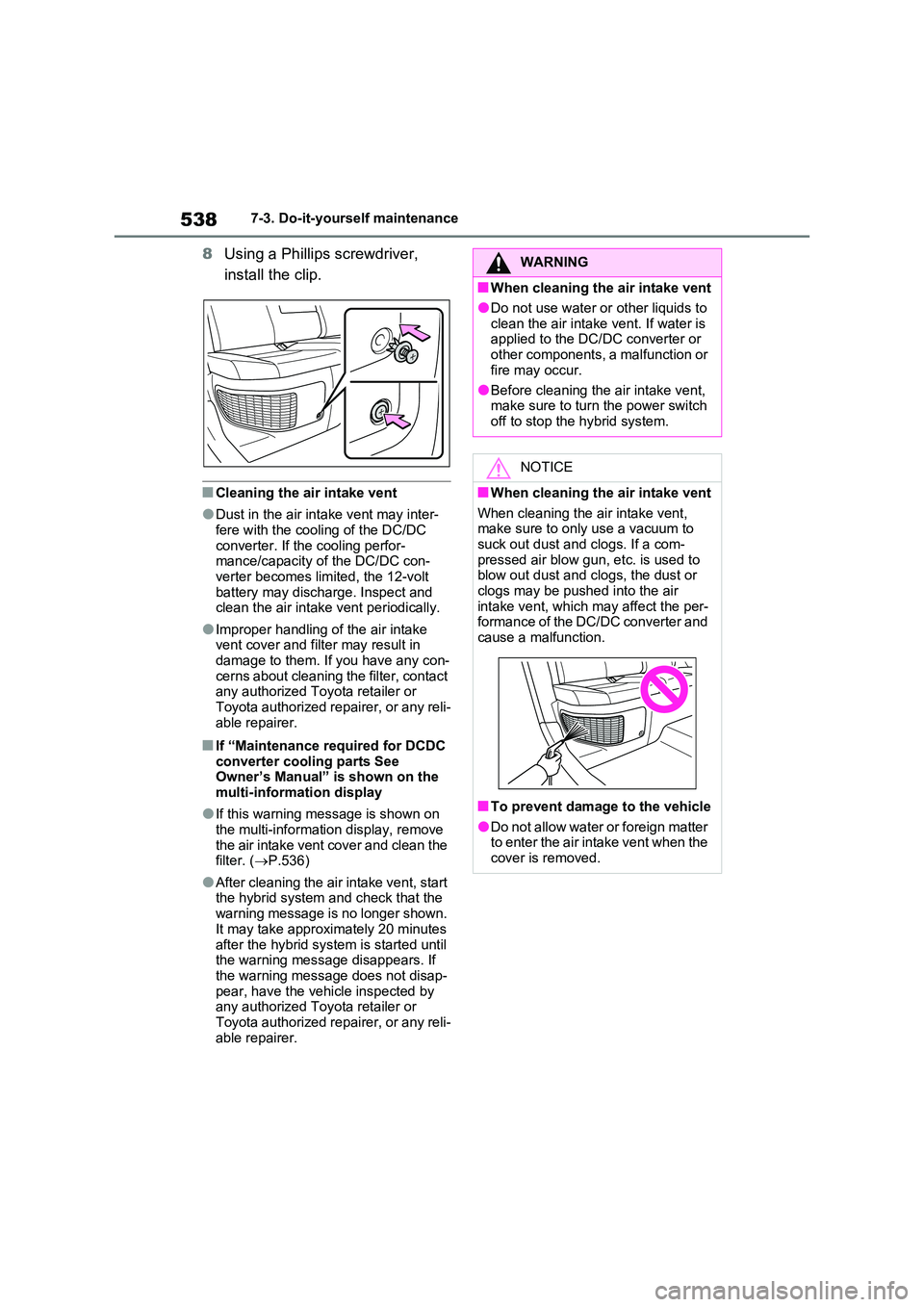
8Using a Phillips screwdriver,
install the clip.
■Cleaning the air intake vent
●Dust in the air intake vent may inter- fere with the cooling of the DC/DC
converter. If the cooling perfor- mance/capacity of the DC/DC con-verter becomes limited, the 12-volt
battery may discharge. Inspect and clean the air intake vent periodically.
●Improper handling of the air intake vent cover and filter may result in damage to them. If you have any con-
cerns about cleaning the filter, contact any authorized Toyota retailer or Toyota authorized repairer, or any reli-
able repairer.
■If “Maintenance required for DCDC converter cooling parts See Owner’s Manual” is shown on the
multi-information display
●If this warning message is shown on
the multi-information display, remove the air intake vent cover and clean the filter. ( P.536)
●After cleaning the air intake vent, start the hybrid system and check that the
warning message is no longer shown. It may take approximately 20 minutes
after the hybrid system is started until the warning message disappears. If the warning message does not disap-
pear, have the vehicle inspected by any authorized Toyota retailer or Toyota authorized repairer, or any reli-
able repairer.
WARNING
■When cleaning the air intake vent
●Do not use water or other liquids to
clean the air intake vent. If water is applied to the DC/DC converter or other components, a malfunction or
fire may occur.
●Before cleaning the air intake vent, make sure to turn the power switch
off to stop the hybrid system.
NOTICE
■When cleaning the air intake vent
When cleaning the air intake vent, make sure to only use a vacuum to suck out dust and clogs. If a com-
pressed air blow gun, etc. is used to blow out dust and clogs, the dust or clogs may be pushed into the air
intake vent, which may affect the per- formance of the DC/DC converter and cause a malfunction.
■To prevent damage to the vehicle
●Do not allow water or foreign matter to enter the air intake vent when the cover is removed.
Page 541 of 664
541
7
7-3. Do-it-yourself maintenance
Maintenance and care
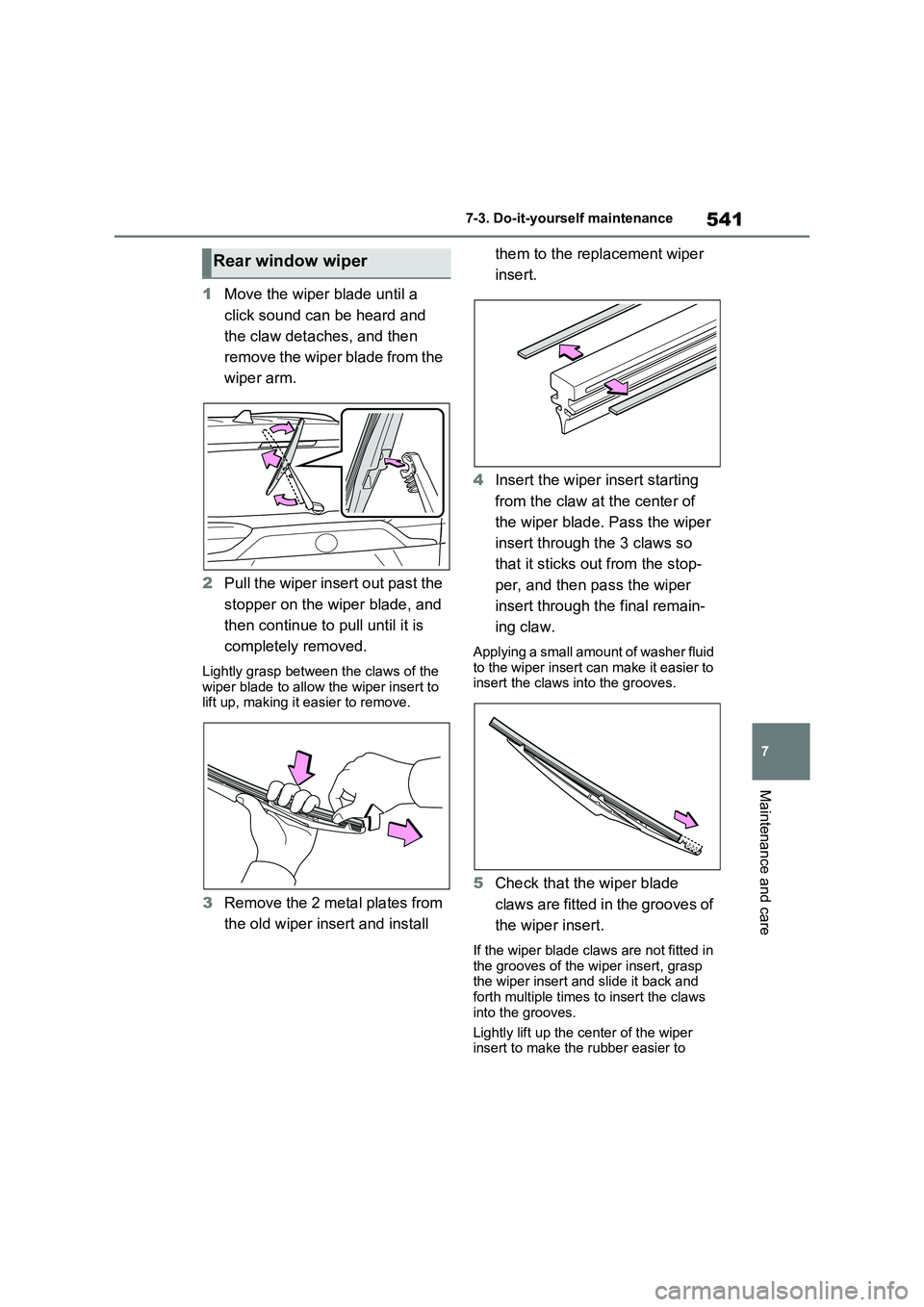
1 Move the wiper blade until a
click sound can be heard and
the claw detaches, and then
remove the wiper blade from the
wiper arm.
2 Pull the wiper insert out past the
stopper on the wiper blade, and
then continue to pull until it is
completely removed.
Lightly grasp between the claws of the wiper blade to allow the wiper insert to lift up, making it easier to remove.
3 Remove the 2 metal plates from
the old wiper insert and install
them to the replacement wiper
insert.
4 Insert the wiper insert starting
from the claw at the center of
the wiper blade. Pass the wiper
insert through the 3 claws so
that it sticks out from the stop-
per, and then pass the wiper
insert through the final remain-
ing claw.
Applying a small amount of washer fluid to the wiper insert can make it easier to insert the claws into the grooves.
5 Check that the wiper blade
claws are fitted in the grooves of
the wiper insert.
If the wiper blade claws are not fitted in
the grooves of the wiper insert, grasp the wiper insert and slide it back and forth multiple times to insert the claws
into the grooves.
Lightly lift up the center of the wiper insert to make the rubber easier to
Rear window wiper
Page 559 of 664
8
559
8
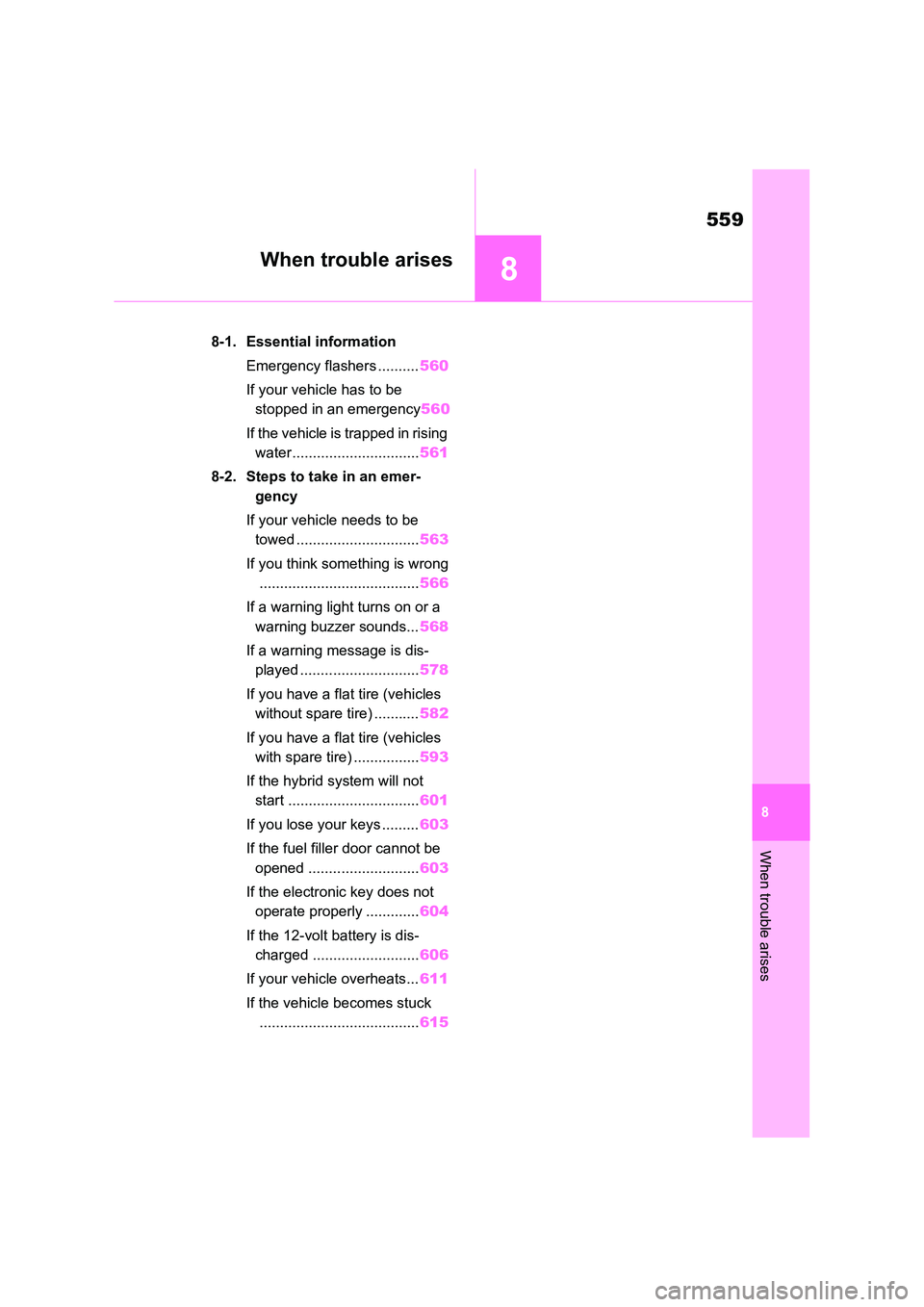
When trouble arises
When trouble arises
8-1. Essential information
Emergency flashers .......... 560
If your vehicle has to be
stopped in an emergency 560
If the vehicle is trapped in rising
water............................... 561
8-2. Steps to take in an emer-
gency
If your vehicle needs to be
towed .............................. 563
If you think something is wrong
....................................... 566
If a warning light turns on or a
warning buzzer sounds... 568
If a warning message is dis-
played ............................. 578
If you have a flat tire (vehicles
without spare tire) ........... 582
If you have a flat tire (vehicles
with spare tire) ................ 593
If the hybrid system will not
start ................................ 601
If you lose your keys ......... 603
If the fuel filler door cannot be
opened ........................... 603
If the electronic key does not
operate properly ............. 604
If the 12-volt battery is dis-
charged .......................... 606
If your vehicle overheats... 611
If the vehicle becomes stuck
....................................... 615
Page 579 of 664
579
8
8-2. Steps to take in an emergency
When trouble arises
A warning message about an operation
of the brake pedal may be shown while
the driving support systems such as
PCS (Pre-Collision system) (if
equipped) or the dynamic radar cruise
control with full-speed range (if
equipped) is operating. If a warning
message is shown, be sure to deceler-
ate the vehicle or follow an instruction
shown on the multi-information display.
• A warning message is shown when
Brake Override System operates. ( P.301, 574) • A warning message is shown when
Drive-Start Control or Parking Support Brake function (if equipped) operates ( P.301, 420). Follow the instructions
on the multi-information display.
●If a message about an operation of
the power switch is shown
An instruction for operation of the power
switch is shown when the incorrect pro-
cedure for starting the hybrid system is
performed or the power switch is oper-
ated incorrectly. Follow the instructions
shown on the multi-information display
to operate the power switch again.
●If a message about a shift lever opera-
tion is shown
To prevent the shift lever from being
operated incorrectly or the vehicle from
moving unexpectedly, a message that
requires shifting the shift lever may be
shown on the multi-information display.
In that case, follow the instruction of the
message and shift the shift lever.
●If a message or image about an
open/close state of a part or replen- ishment of a consumable is shown
Confirm the part indicated by the multi-
information display or a warning light,
and then perform the coping method
such as closing the open door or replen-
ishing a consumable.
■If a message that indicates the
need for visiting any authorized Toyota retailer or Toyota autho-rized repairer, or any reliable
repairer is displayed
The system or part shown on the multi- information display is malfunctioning.
Have the vehicle inspected by any authorized Toyota retailer or Toyota authorized repairer, or any reliable
repairer immediately.
■If a message that indicates the need for referring to Owner’s Man-ual is displayed
●If the following messages are shown, follow the instructions, accordingly.
• “Blind Spot Monitor Unavailable” ( P.394, 578) • “RCTA Unavailable” ( P.394, 578)
• “Engine Coolant Temp High” ( P.611) • “Exhaust Filter Full” ( P.437)
●If the following messages are shown, there may be a malfunction. Immedi-
ately stop the vehicle in a safe place and contact any authorized Toyota retailer or Toyota authorized repairer,
or any reliable repairer. Continuing to drive the vehicle may be dangerous.• “Plug-in charging system malfunction”
• “Hybrid System Malfunction” • “Charging System Malfunction”• “Check Engine”
• “Hybrid Battery System Malfunction” • “Accelerator System Malfunction”• “Smart Entry & Start System Malfunc-
tion”
●If the following messages are shown,
there may be a malfunction. Immedi- ately have the vehicle inspected by any authorized Toyota retailer or
Toyota authorized repairer, or any reli- able repairer.•“Oil Pressure Low”
• “Braking Power Low”
●If any of the following messages are
shown on the multi-information dis- play, the vehicle may have run out of fuel. Stop the vehicle in a safe place
and, if the fuel level is low, refuel the
Page 580 of 664
5808-2. Steps to take in an emergency
vehicle.
• “Hybrid System Stopped” • “Engine Stopped”
●If “Maintenance required for DCDC converter cooling parts See Owner’s Manual” is shown, the filter may be
clogged, the air intake vent may be blocked, or there may be a gap in the duct. Therefore, perform the following
correction procedure. • If the air intake vent or filter of the DC/DC converter are dirty, perform
the procedures on P.536 to clean them.• If the warning message is shown
when the air intake vent and filter of the DC/DC converter are not dirty, have the vehicle inspected at any
authorized Toyota retailer or Toyota authorized repairer, or any reliable repairer.
●If “12-Volt Battery Charging System Malfunction Stop in a Safe Place See
Owner’s Manual” is shown
Indicates a malfunction in the vehicle’s
charging system. Pull over and stop the
vehicle as soon as it is safe to do so.
While the message is displayed, the
functions of the air conditioning, etc.
may be partially limited in order to
reduce the power consumption of the
12-volt battery.
■If “Hybrid System Overheated Out- put Power Reduced” is shown
The message may be shown when driv-
ing under severe operating conditions. (For example, when driving up a long steep hill or driving up a steep hill in
reverse.)
Coping method: P.611
■If “Traction Battery Needs to be Protected Refrain from the Use of N
Position” is shown
This message may be displayed when the shift lever is in N.
As the hybrid battery (traction battery) cannot be charged when the shift lever
is in N, shift the shift lever to P when the
vehicle is stopped.
■If “Traction Battery Needs to be Protected Shift into P to Restart” is shown
This message is displayed when the hybrid battery (traction battery) charge has become extremely low because the
shift lever has been left in N for a certain amount of time.
When operating the vehicle, shift to P
and restart the hybrid system.
■If “Shift to P when Parked” is shown
Message is displayed when the driver’s
door is opened without turning the power switch to OFF with the shift lever in any position other than P.
Shift the shift lever to P.
■If “Shift is in N Release Accelerator Before Shifting” is shown
Message is displayed when the acceler-
ator pedal has been depressed and the shift lever is in N. Release the accelera-tor pedal and shift the shift lever to D or
R.
■If “Press Brake when Vehicle is Stopped Hybrid System may Over-heat” is shown
Message is displayed when the acceler- ator pedal is depressed to maintain the vehicle position when stopped on a
upward slope, etc.
If this continues, the hybrid system may overheat.
Release the accelerator pedal and depress the brake pedal.
■If “Auto Power OFF to Conserve Battery” is shown
Power was turned off due to the auto- matic power off function.
Next time when starting the hybrid sys-
tem, operate the hybrid system for approximately 5 minutes to recharge the 12-volt battery.
Page 581 of 664
581
8
8-2. Steps to take in an emergency
When trouble arises
■If “Engine Oil Level Low Add or
Replace” is displayed
The engine oil level may be low. Check the level of the engine oil, and add
engine oil if necessary. This message may be displayed if the vehicle is stopped on a slope. Move the vehicle to
a level surface and check if the mes- sage disappears.
■If a message that indicates the mal-function of front camera is dis-
played (if equipped)
The following systems may be sus- pended until the problem shown in the
message is resolved. ( P.353, 568)
●PCS (Pre-Collision System)*
●LTA (Lane Tracing Assist)*
●Automatic High Beam*
●RSA (Road Sign Assist)*
●Dynamic radar cruise control with full-
speed range*
*: If equipped
■If “Radar Cruise Control Unavail- able See Owner’s Manual” is
shown (if equipped)
The dynamic radar cruise control with full-speed range system (if equipped) is
suspended temporarily or until the prob- lem shown in the message is resolved. (causes and coping methods: P.353)
■If “Radar Cruise Control Unavail-
able” is shown (if equipped)
The dynamic radar cruise control with full-speed range system (if equipped)
cannot be used temporarily. Use the system when it becomes available again.
■Warning buzzer
P.576
WARNING
■If a warning light comes on or a warning buzzer sounds when a
warning message is shown on the multi-information display
P.577
NOTICE
■“High Power Consumption Par- tial Limit On AC/Heater Opera-
tion” is frequently shown
There is a possible malfunction relat- ing to the charging system or the 12-
volt battery may be deteriorating. Have the vehicle inspected by any authorized Toyota retailer or Toyota
authorized repairer, or any reliable repairer.
■If “Maintenance required For Traction Battery At Your Dealer” is shown
The hybrid battery (traction battery) is scheduled to be inspected or replaced. Have the vehicle inspected
by any authorized Toyota retailer or Toyota authorized repairer, or any
reliable repairer immediately.
●Continuing to drive the vehicle with- out having the hybrid battery (trac-
tion battery) inspected will cause the hybrid system not to start.
●If the hybrid system does not start, contact any authorized Toyota retailer or Toyota authorized
repairer, or any reliable repairer immediately.