2011 TOYOTA VERSO S stop start
[x] Cancel search: stop startPage 438 of 664
4385-5. Using the driving support systems
■ECB (Electronically Con-
trolled Brake System)
The electronically controlled sys-
tem generates braking force corre-
sponding to the brake operation
■ABS (Anti-lock Brake System)
Helps to prevent wheel lock when
the brakes are applied suddenly, or
if the brakes are applied while driv-
ing on a slippery road surface
■Brake assist
Generates an increased level of
braking force after the brake pedal
is depressed when the system
detects a panic stop situation
■VSC (Vehicle Stability Control)
Helps the driver to control skidding
when swerving suddenly or turning
on slippery road surfaces.
■VSC+ (Vehicle Stability Con-
trol+)
Provides cooperative control of the
ABS, TRC, VSC and EPS.
Helps to maintain directional stabil-
ity when swerving on slippery road
surfaces by controlling steering per-
formance.
■Trailer Sway Control
Helps the driver to control trailer
sway by selectively applying brake
pressure for individual wheels and
reducing driving torque when trailer
sway is detected.
■TRC (Traction Control)
Helps to maintain drive power and
prevent the drive wheels from spin-
ning when starting the vehicle or
accelerating on slippery roads
■Active Cornering Assist (ACA)
Helps to prevent the vehicle from
drifting to the outer side by perform-
ing inner wheel brake control when
attempting to accelerate while turn-
ing
■Hill-start assist control
Helps to reduce the backward
movement of the vehicle when
starting on an uphill
■EPS (Electric Power Steering)
Employs an electric motor to
reduce the amount of effort needed
to turn the steering wheel
Driving assist systems
To keep driving safety and per-
formance, the following sys-
tems operate automatically in
response to various driving sit-
uations. Be aware, however,
that these systems are supple-
mentary and should not be
relied upon too heavily when
operating the vehicle.
Summary of the driving
assist systems
Page 439 of 664

439
5 5-5. Using the driving support systems
Driving
■E-Four (Electronic On-Demand
AWD system)
Automatically switches from front
wheel drive to all-wheel drive
(AWD) according to the driving con-
ditions, helping to ensure reliable
handling and stability. Examples of
conditions where the system will
switch to AWD are when cornering,
going uphill, starting off or acceler-
ating, and when the road surface is
slippery due to snow, rain, etc.
■Emergency brake signal
When the brakes are applied sud-
denly, the emergency flashers
automatically flash to alert the vehi-
cle behind.
■The Secondary Collision
Brake (if equipped)
When the SRS airbag sensor
detects a collision and the system
operates, the brakes and brake
lights are automatically controlled
to reduce the vehicle speed and
help reduce the possibility of further
damage due to a secondary colli-
sion.
■When the TRC/VSC/ABS/Trailer
Sway Control systems are operat-
ing
The slip indicator light will flash while the
TRC/VSC/ABS/Trailer Sway Control
systems are operating.
■Disabling the TRC system
If the vehicle gets stuck in mud, dirt or
snow, the TRC system may reduce
power from the hybrid system to the
wheels.
Pressing to turn the system off may
make it easier for you to rock the vehicle
in order to free it.
To turn the TRC system off, quickly
press and release .
“Traction Control Turned OFF” will be
shown on the multi-information display.
Press again to turn the system back
on.
■Turning off the TRC/VSC/Trailer
Sway Control systems
To turn the TRC/VSC/Trailer Sway Con-
trol systems off, press and hold for
more than 3 seconds while the vehicle is
stopped.
The VSC OFF indicator light will come
on and the “Traction Control Turned
OFF” will be shown on the multi-infor-
mation display.
*
Press again to turn the systems
back on.
*: On vehicles with PCS (Pre-Collision
Page 440 of 664
4405-5. Using the driving support systems
System), PCS will also be disabled
(only Pre-Collision warning is avail-
able). The PCS warning light will
come on and a message will be dis-
played on the multi-information dis-
play. (P.361)
■When the message is displayed on
the multi-information display show-
ing that TRC has been disabled
even if has not been pressed
TRC is temporary deactivated. If the
information continues to show, contact
any authorized Toyota retailer or Toyota
authorized repairer, or any reliable
repairer.
■Operating conditions of hill-start
assist control
When the following four conditions are
met, the hill-start assist control will oper-
ate:
●The shift lever is in a position other
than P or N (when starting off for-
ward/backward on an upward incline).
●The vehicle is stopped.
●The accelerator pedal is not
depressed.
●The parking brake is not engaged.
■Automatic system cancelation of
hill-start assist control
The hill-start assist control will turn off in
any of the following situations:
●The shift lever is shifted to P or N.
●The accelerator pedal is depressed.
●The parking brake is engaged.
●No more than 2 seconds have
elapsed after the brake pedal is
released.
■Sounds and vibrations caused by
the ABS, brake assist, VSC, Trailer
Sway Control, TRC and hill-start
assist control systems
●A sound may be heard from the
engine compartment when the brake
pedal is depressed repeatedly, when the hybrid system is started or just
after the vehicle begins to move. This
sound does not indicate that a mal-
function has occurred in any of these
systems.
●Any of the following conditions may
occur when the above systems are
operating. None of these indicates
that a malfunction has occurred.
• Vibrations may be felt through the
vehicle body and steering.
• A motor sound may be heard also
after the vehicle comes to a stop.
■ECB operating sound
ECB operating sound may be heard in
the following cases, but it does not indi-
cate that a malfunction has occurred.
●Operating sound heard from the
engine compartment when the brake
pedal is operated.
●Motor sound of the brake system
heard from the front part of the vehicle
when the driver’ door is opened.
●Operating sound heard from the
engine compartment when one or two
minutes passed after the stop of the
hybrid system.
■Active Cornering Assist operation
sounds and vibrations
When the Active Cornering Assist is
operated, operation sounds and vibra-
tions may be generated from the brake
system, but this is not a malfunction.
■EPS operation sound
When the steering wheel is operated, a
motor sound (whirring sound) may be
heard. This does not indicate a malfunc-
tion.
■Automatic reactivation of TRC,
Trailer Sway Control and VSC sys-
tems
After turning the TRC, Trailer Sway
Control and VSC systems off, the sys-
tems will be automatically re-enabled in
the following situations:
●When the power switch is turned off.
●If only the TRC system is turned off,
Page 443 of 664
443
5
5-5. Using the driving support systems
Driving
WARNING
●When driving over roads with pot- holes or uneven surfaces
■TRC/VSC may not operate effec-tively when
Directional control and power may not be achievable while driving on slip-pery road surfaces, even if the
TRC/VSC system is operating. Drive the vehicle carefully in condi-tions where stability and power may
be lost.
■Active Cornering Assist does not
operate effectively when
●Do not overly rely on Active Corner- ing Assist. Active Cornering Assist
may not operate effectively when accelerating down slopes or driving on slippery road surfaces.
●When Active Cornering Assist fre-quently operates, Active Cornering
Assist may temporarily stop operat- ing to ensure proper operation of the brakes, TRC and VSC.
■Hill-start assist control does not operate effectively when
●Do not overly rely on hill-start assist control. Hill-start assist control may not operate effectively on steep
inclines and roads covered with ice.
●Unlike the parking brake, hill-start
assist control is not intended to hold the vehicle stationary for an extended period of time. Do not
attempt to use hill-start assist con- trol to hold the vehicle on an incline, as doing so may lead to an acci-
dent.
■When the TRC/ABS/VSC/Trailer
Sway Control is activated
The slip indicator light flashes. Always drive carefully. Reckless driving may
cause an accident. Exercise particular care when the indicator light flashes.
■When the TRC/VSC/Trailer Sway Control systems are turned off
Be especially careful and drive at a
speed appropriate to the road condi- tions. As these are the systems to help ensure vehicle stability and driv-
ing force, do not turn the TRC/VSC/Trailer Sway Control sys-tems off unless necessary.
Trailer Sway Control is part of the VSC system and will not operate if VSC is turned off or experiences a
malfunction.
■Replacing tires
Make sure that all tires are of the specified size, brand, tread pattern and total load capacity. In addition,
make sure that the tires are inflated to the recommended tire inflation pres-sure level.
The ABS, TRC and VSC/Trailer Sway Control systems will not function cor-rectly if different tires are installed on
the vehicle. Contact any authorized Toyota retailer or Toyota authorized repairer,
or any reliable repairer for further information when replacing tires or wheels.
■Handling of tires and the suspen-sion
Using tires with any kind of problem or modifying the suspension will affect the driving assist systems, and may
cause a system to malfunction.
■Trailer Sway Control precaution
The Trailer Sway Control system is not able to reduce trailer sway in all situations. Depending on many fac-
tors such as the conditions of the vehicle, trailer, road surface and driv-ing environment, the Trailer Sway
Control system may not be effective. Refer to your trailer owner’s manual for information on how to tow your
trailer properly.
Page 455 of 664
455
6 6-1. Using the air conditioning system and defogger
Interior features
• is operating
■Water droplets during air condi-
tioning operation
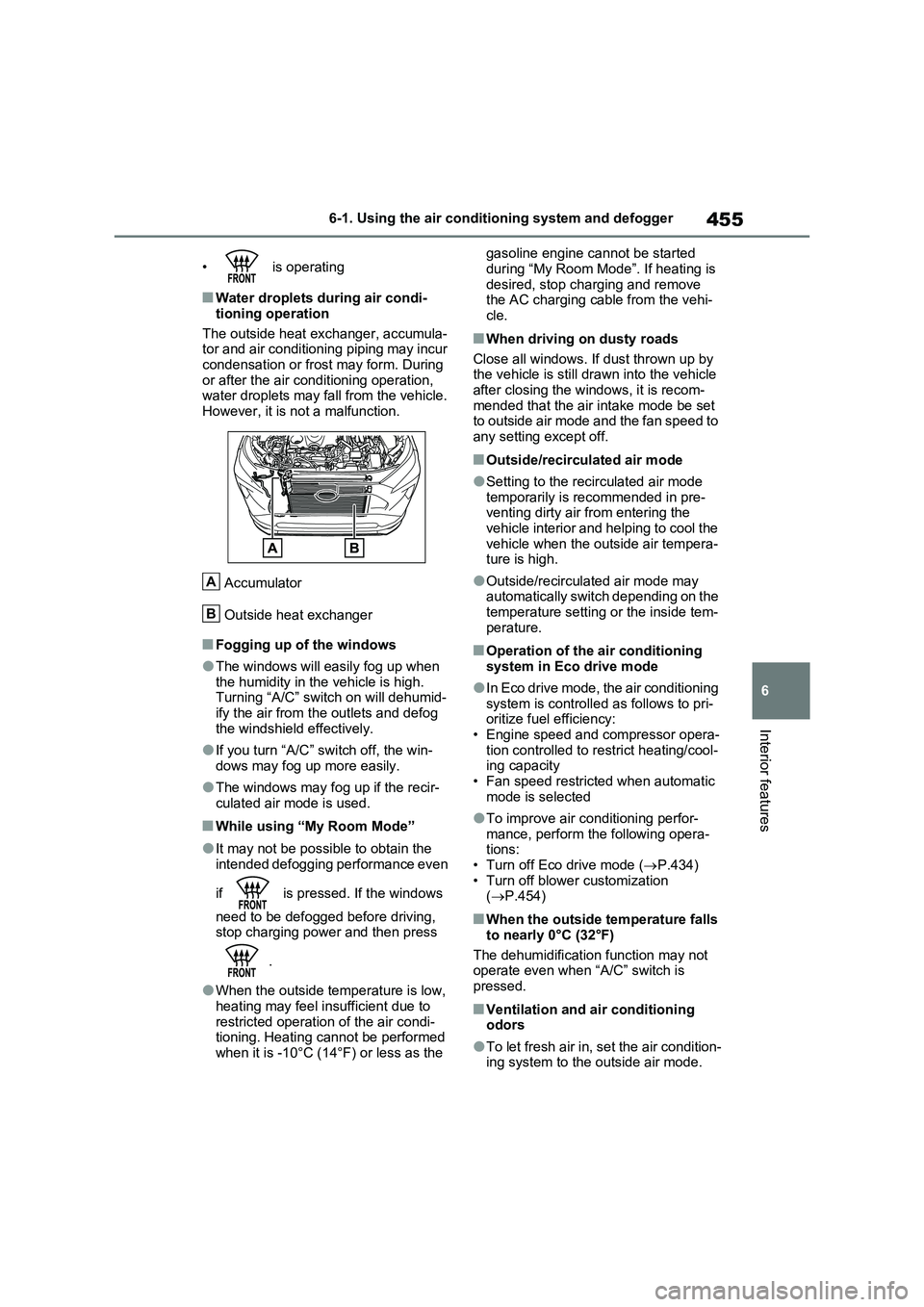
The outside heat exchanger, accumula-
tor and air conditioning piping may incur
condensation or frost may form. During
or after the air conditioning operation,
water droplets may fall from the vehicle.
However, it is not a malfunction.
Accumulator
Outside heat exchanger
■Fogging up of the windows
●The windows will easily fog up when
the humidity in the vehicle is high.
Turning “A/C” switch on will dehumid-
ify the air from the outlets and defog
the windshield effectively.
●If you turn “A/C” switch off, the win-
dows may fog up more easily.
●The windows may fog up if the recir-
culated air mode is used.
■While using “My Room Mode”
●It may not be possible to obtain the
intended defogging performance even
if is pressed. If the windows
need to be defogged before driving,
stop charging power and then press
.
●When the outside temperature is low,
heating may feel insufficient due to
restricted operation of the air condi-
tioning. Heating cannot be performed
when it is -10°C (14°F) or less as the gasoline engine cannot be started
during “My Room Mode”. If heating is
desired, stop charging and remove
the AC charging cable from the vehi-
cle.
■When driving on dusty roads
Close all windows. If dust thrown up by
the vehicle is still drawn into the vehicle
after closing the windows, it is recom-
mended that the air intake mode be set
to outside air mode and the fan speed to
any setting except off.
■Outside/recirculated air mode
●Setting to the recirculated air mode
temporarily is recommended in pre-
venting dirty air from entering the
vehicle interior and helping to cool the
vehicle when the outside air tempera-
ture is high.
●Outside/recirculated air mode may
automatically switch depending on the
temperature setting or the inside tem-
perature.
■Operation of the air conditioning
system in Eco drive mode
●In Eco drive mode, the air conditioning
system is controlled as follows to pri-
oritize fuel efficiency:
• Engine speed and compressor opera-
tion controlled to restrict heating/cool-
ing capacity
• Fan speed restricted when automatic
mode is selected
●To improve air conditioning perfor-
mance, perform the following opera-
tions:
• Turn off Eco drive mode (P.434)
• Turn off blower customization
(P.454)
■When the outside temperature falls
to nearly 0°C (32°F)
The dehumidification function may not
operate even when “A/C” switch is
pressed.
■Ventilation and air conditioning
odors
●To let fresh air in, set the air condition-
ing system to the outside air mode.
A
B
Page 456 of 664
4566-1. Using the air conditioning system and defogger
●During use, various odors from inside
and outside the vehicle may enter into and accumulate in the air conditioning system. This may then cause odor to
be emitted from the vents.
●To reduce potential odors from occur-
ring: • It is recommended that the air condi-tioning system be set to outside air
mode prior to turning the vehicle off. • The start timing of the blower may be delayed for a short period of time
immediately after the air conditioning system is started in automatic mode.
●When parking, the system automati-cally switches to outside air mode to encourage better air circulation
throughout the vehicle, helping to reduce odors that occur when starting the vehicle.
■Air conditioning filter
P.532
■Noise from air conditioning system
Approximately 90 seconds after the power switch turned to OFF, you may
hear sound coming from air conditioning system. This is the sound of a air condi-tioning system initialize and, it does not
indicate a malfunction.
■Customization
Settings (e.g. A/C Auto switch opera- tion) can be changed.
(Customizable features: P.640)
1Press the “AUTO” switch.
The dehumidification function begins to
operate. Air outlets and fan speed are automatically adjusted according to the temperature setting and humidity.
2 Adjust the temperature setting.
3 To stop the operation, press the
“OFF” switch.
If the fan speed setting or air flow
modes are operated, the automatic
mode indicator goes off. However,
automatic mode for functions other
than that operated is maintained.
■Using automatic mode
Fan speed is adjusted automatically
according to the temperature setting and the ambient conditions.
WARNING
■Cautions for using “My Room Mode”
Do not leave children, people who need assistance, or pets inside the vehicle. The system may turn off
automatically and the interior tem- perature may become high or low, resulting in heat stroke, dehydration
or hypothermia. Failure to do so may result in death or serious injury.
■To prevent the windshield from fogging up
Do not use the windshield defogger
switch during cool air operation in extremely humid weather.The difference between the tempera-
ture of the outside air and that of the windshield can cause the outer sur-face of the windshield to fog up,
blocking your vision.
■When the outside rear view mir-
ror defoggers are operating
Do not touch the rear view mirror sur- faces when the outside rear view mir-
ror defoggers are on.
NOTICE
■To prevent 12-volt battery dis- charge
Do not leave the air conditioning sys- tem on longer than necessary when the hybrid system is off.
Using automatic mode
Page 458 of 664
4586-1. Using the air conditioning system and defogger
tributing to increased fuel effi-
ciency.
Front seat concentrated airflow
mode operates in the following situ-
ations.
No passengers are detected in
the rear seats
The windshield defogger is not
operating
While operating, illuminates.
■Manually turning front seat
concentrated airflow mode
on/off
In front seat concentrated airflow
mode, directing airflow to the front
seats only and to all seats can be
switched via switch operation.
When the mode has been switched
manually, automatic airflow control
stops operating.
Press the on the air condition-
ing operation panel and switch the
airflow.
Indicator illuminated: Airflow to
the front seats only
Indicator off: Airflow to all the
seats
■Operation of automatic airflow con-
trol
●In order to maintain a comfortable
interior, airflow may be directed to
seats without passengers immediately
after the hybrid system is started and
at other times depending on the out-
side temperature.
●After the hybrid system is started, if passengers move around inside or
enter/exit the vehicle, the system can-
not accurately detect the presence of
passengers and automatic airflow
control will not operate.
■Operation of manual airflow control
Even if the function is manually switched
to directing airflow to only the front
seats, when a rear seat is occupied, it
may automatically direct airflow to all
seats.
■To return to automatic airflow con-
trol
1With the indicator off, turn the power
switch off.
2After 60 minutes or more elapse,
turn the power switch to ON.
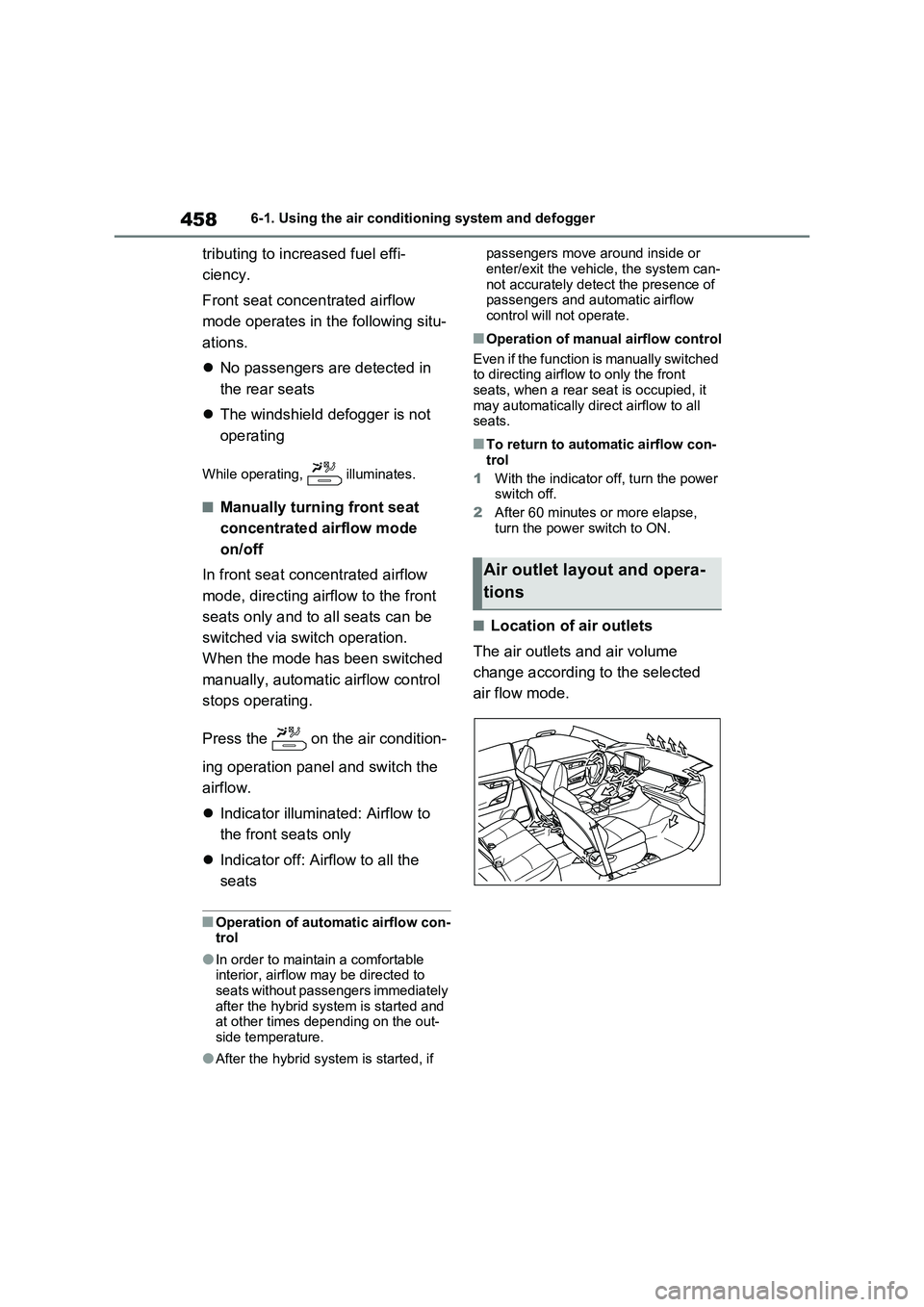
■Location of air outlets
The air outlets and air volume
change according to the selected
air flow mode.
Air outlet layout and opera-
tions
Page 460 of 664
4606-1. Using the air conditioning system and defogger
If the Remote Air Conditioning Sys-
tem is used while the AC charging
cable is connected to the vehicle,
electricity from an external power
source can be used minimizing the
drop in charge of the hybrid battery
(traction battery).
Charging will be conducted automati-
cally after the Remote Air Conditioning
System is stopped.
Check the temperature setting of
the air conditioning system.
(P.452)
The Remote Air Conditioning System
will operate in accordance with the tem-
perature settings of the air conditioning
system.
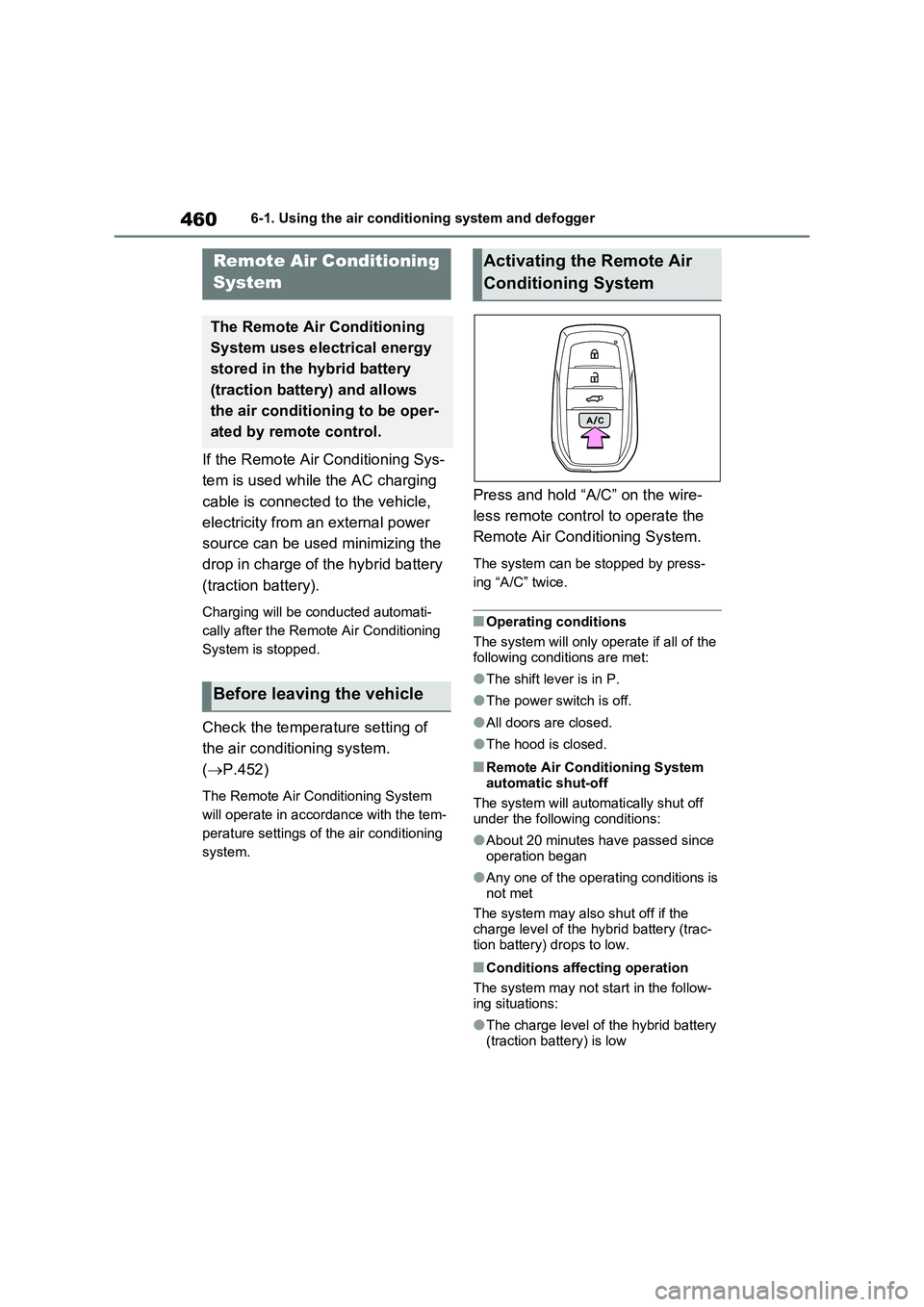
Press and hold “A/C” on the wire-
less remote control to operate the
Remote Air Conditioning System.
The system can be stopped by press-
ing “A/C” twice.
■Operating conditions
The system will only operate if all of the
following conditions are met:
●The shift lever is in P.
●The power switch is off.
●All doors are closed.
●The hood is closed.
■Remote Air Conditioning System
automatic shut-off
The system will automatically shut off
under the following conditions:
●About 20 minutes have passed since
operation began
●Any one of the operating conditions is
not met
The system may also shut off if the
charge level of the hybrid battery (trac-
tion battery) drops to low.
■Conditions affecting operation
The system may not start in the follow-
ing situations:
●The charge level of the hybrid battery
(traction battery) is low
Remote Air Conditioning
System
The Remote Air Conditioning
System uses electrical energy
stored in the hybrid battery
(traction battery) and allows
the air conditioning to be oper-
ated by remote control.
Before leaving the vehicle
Activating the Remote Air
Conditioning System