2011 TOYOTA VERSO S display
[x] Cancel search: displayPage 190 of 664
1903-1. Instrument cluster
■Suggestion to enable the
power back door (if equipped)
If the power back door system is
disabled on the screen and the
power back door switch on the
instrument panel is operated, a
suggestion message will be dis-
played asking if you wish to enable
the power back door system. To
enable the power back door sys-
tem, select “Yes”.
After enabling the power back door sys-
tem, press the power back door switch
again to open or close the power back
door.
■Suggestion to turn on the
headlights
If the headlight switch is in other
than or , and the vehicle
speed is 5 km/h (3 mph) or higher
for a certain amount of time when
the surroundings are dark, a sug-
gestion message will be displayed.
■Suggestion to turn off the
headlights
If the headlights are left on for a
certain amount of time after the
power switch has been turned off, a
suggestion message will be dis-
played.
■Suggestion to close the power
windows (linked to windshield
wiper operation)
If the windshield wipers are oper-
ated with a power window open, a
suggestion message will be dis-
played asking if you wish to close the power windows. To close all of
the power windows, select “Yes”.
■Suggestion to close the power
windows (driving at high
speeds)
If the vehicle speed exceeds a cer-
tain speed with a power window
open, a suggestion message will be
displayed asking if you wish to
close the power windows. To close
all of the power windows, select
“Yes”.
■Customization
The suggestion function can be turned
on/off. (Customizable features: P.631)
Page 191 of 664
191
3
3-1. Instrument cluster
Vehicle status information and indicators
*: If equipped
Illustrations used in this text are
intended as examples, and may differ
from the image that is actually dis-
played by the head-up display.
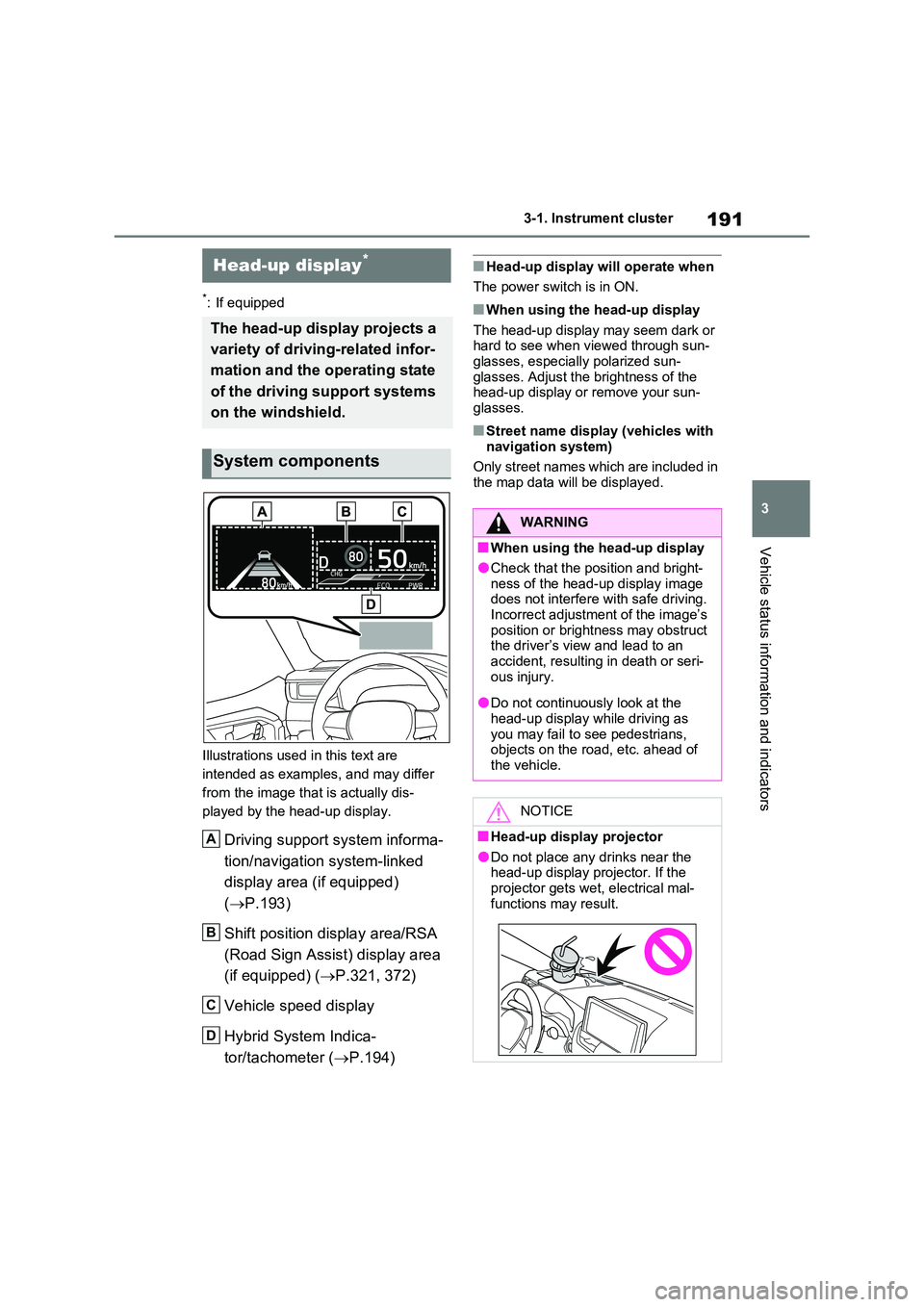
Driving support system informa-
tion/navigation system-linked
display area (if equipped)
( P.193)
Shift position display area/RSA
(Road Sign Assist) display area
(if equipped) ( P.321, 372)
Vehicle speed display
Hybrid System Indica-
tor/tachometer ( P.194)
■Head-up display will operate when
The power switch is in ON.
■When using the head-up display
The head-up display may seem dark or hard to see when viewed through sun-glasses, especially polarized sun-
glasses. Adjust the brightness of the head-up display or remove your sun-glasses.
■Street name display (vehicles with
navigation system)
Only street names which are included in the map data will be displayed.
Head-up display*
The head-up display projects a
variety of driving-related infor-
mation and the operating state
of the driving support systems
on the windshield.
System components
A
B
C
D
WARNING
■When using the head-up display
●Check that the position and bright-
ness of the head-up display image does not interfere with safe driving. Incorrect adjustment of the image’s
position or brightness may obstruct the driver’s view and lead to an accident, resulting in death or seri-
ous injury.
●Do not continuously look at the
head-up display while driving as you may fail to see pedestrians, objects on the road, etc. ahead of
the vehicle.
NOTICE
■Head-up display projector
●Do not place any drinks near the head-up display projector. If the projector gets wet, electrical mal-
functions may result.
Page 192 of 664
1923-1. Instrument cluster
Vehicle settings and the content
displayed on the head-up display
can be changed by using the meter
control switches.
1 Operate or of the meter
control switches and select
on the multi-information display.
2 Operate or of the meter
control switches and select
“HUD Main” to set up the follow-
ing items.
■Enabling/disabling the head-
up display
Press to enable/disable the
head-up display.
■Changing the head-up display
settings
Press and hold to display the
setting screen and change the fol-
lowing settings:
Brightness and vertical position
of the head-up display
Select to adjust the brightness or verti-
cal position of the head-up display.
Display content
Select to change the display between
the following:
• No content
• Hybrid System Indicator
• Tachometer
Select to enable/disable the following
items:
• Route guidance to destination (if
equipped)
NOTICE
●Do not place anything on or put stickers onto the head-up display
projector. Doing so could interrupt head-up display indications.
●Do not touch the inside of the head-up display projector or thrust sharp
edges or the like into the projector. Doing so could cause mechanical malfunctions.
Using the head-up display
Page 193 of 664
193
3
3-1. Instrument cluster
Vehicle status information and indicators
• Driving support system information
display
• Compass (if equipped)
• Audio system operation status
Display angle
Select to adjust the angle of the head-
up display.
■Enabling/disabling of the head-up display
If the head-up display is disabled, it will remain disabled when the power switch is turned off then back to ON.
■Display brightness
The brightness of the head-up display
can be adjusted on screen of the
multi-information display. Also, it is auto-
matically adjusted according to the ambient brightness.
■Driving support system infor-
mation display
Displays the operational status of
the following systems:
LTA (Lane Tracing Assist) (if
equipped) ( P.362)
Dynamic radar cruise control
with full-speed range (if
equipped) ( P.376)
Displayed content is the same as that
displayed on the multi-information dis-
play. For details, refer to the explana-
tions of each system.
■Navigation system-linked dis-
play area (if equipped)
Displays the following items which
are linked to the navigation system:
Street name
Route guidance to destination
Compass
Pop-up displays for the following
systems will be displayed when
necessary:
■Driving support systems
Displays a warning/sugges-
tion/advice message or the operat-
ing state of a relevant system.
PCS (Pre-Collision System) (if
equipped) ( P.355)
WARNING
■Caution for changing settings of the head-up display
If the hybrid system is operating when
changing the display settings, ensure that the vehicle is parked in a place with adequate ventilation. In a closed
area such as a garage, exhaust gases including harmful carbon mon-oxide (CO) may collect and enter the
vehicle. This may lead to death or a serious health hazard.
NOTICE
■When changing the settings of the head-up display
To prevent 12-volt battery discharge,
ensure that the hybrid system is oper- ating while changing the settings of the head-up display.
Driving support system
information/navigation sys-
tem-linked display area (if
equipped)
Pop-up display
Page 194 of 664
1943-1. Instrument cluster
Brake Override System
(P.301)
Drive-Start Control (P.301)
Parking Support Brake function
(static objects) (if equipped)
(P.424)
Displayed content is the same as that
displayed on the meter. For details,
refer to the explanations of each sys-
tem.
■ / icons
Displays the following multi-infor-
mation display linked icons:
: Master warning icon
Displayed when a warning message is
displayed on the multi-information dis-
play.
: Information icon
Displayed when a suggestion/advice
pop-up display is displayed on the
multi-information display.
■Warning message
Some warning messages are dis-
played when necessary, according
to certain conditions.
Displayed content is the same as that
displayed on the multi-information dis-
play. For details, refer to the explana-
tions of each system.
■Audio system operation status
Displayed when an audio remote
control switch on the steering wheel
is operated.
■Hands-free system status (if
equipped)
Displayed when the hands-free system is operated.
■Outside temperature display
Displayed when the power switch is
turned to ON or when the low out-
side temperature indicator is flash-
ing.
■When a pop-up display is displayed
When a pop-up display is displayed, a
current display may no longer be dis-
played. In this case, the display will
return after the pop-up display disap-
pears.
■Outside temperature display
●When the ambient temperature is
approximately 3°C (37°F) or lower,
will flash for approximately 10
seconds and the outside temperature
display will turn off.
●In the following situations, the correct
outside temperature may not be dis-
played, or the display may take longer
than normal to change:
• When stopped (including when using
“My Room Mode”), or driving at low
speeds (less than 20 km/h [12 mph])
• When the outside temperature has
changed suddenly (at the
entrance/exit of a garage, tunnel, etc.)
●When “--” or “E” is displayed, the sys-
tem may be malfunctioning.
Take your vehicle to any authorized
Toyota retailer or Toyota authorized
repairer, or any reliable repairer.
Display content selected by “HUD
Driving Support” on the screen
is displayed. (P.192)
Hybrid System Indica-
tor/Tachometer
Page 195 of 664
195
3 3-1. Instrument cluster
Vehicle status information and indicators
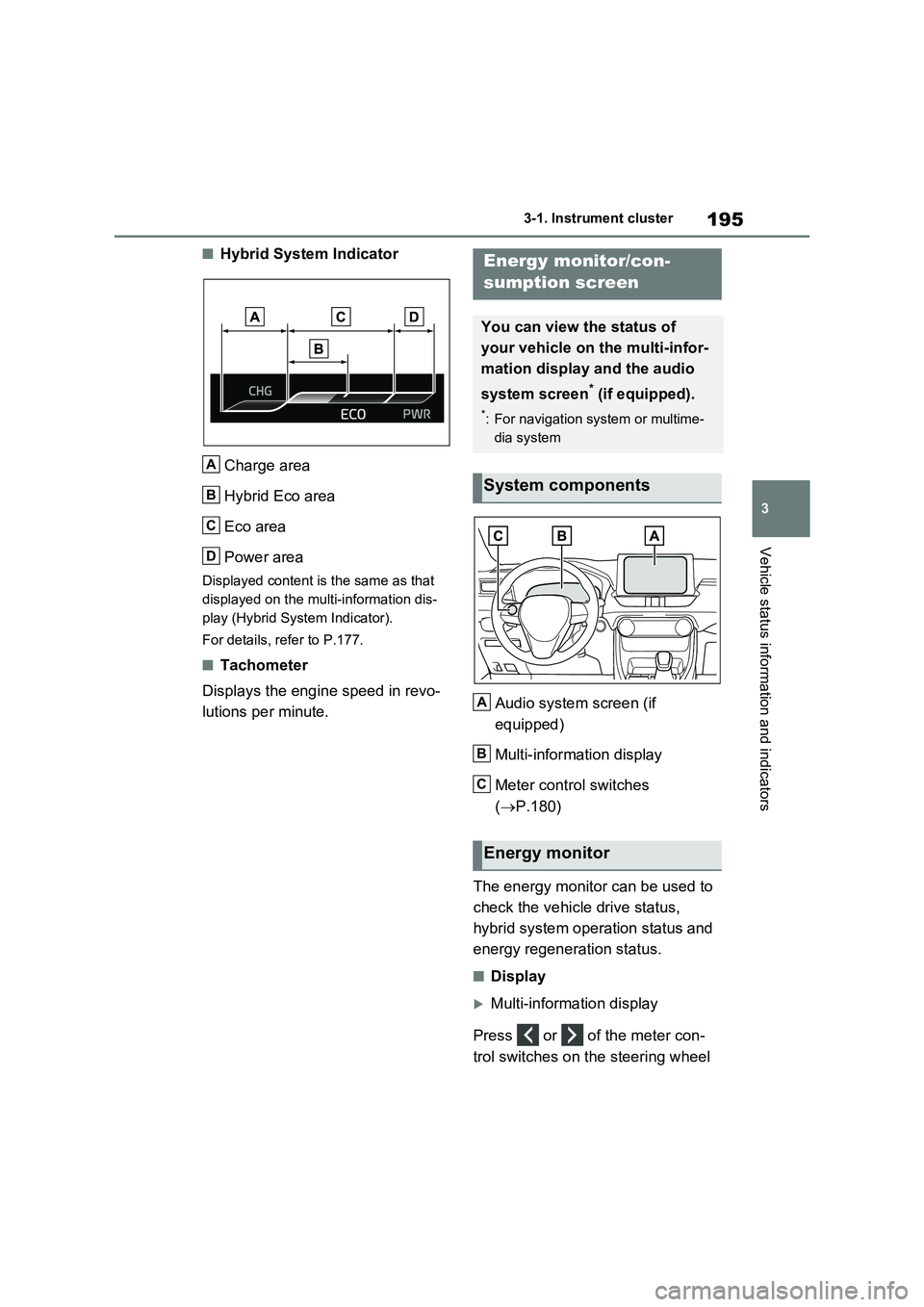
■Hybrid System Indicator
Charge area
Hybrid Eco area
Eco area
Power area
Displayed content is the same as that
displayed on the multi-information dis-
play (Hybrid System Indicator).
For details, refer to P.177.
■Tachometer
Displays the engine speed in revo-
lutions per minute.Audio system screen (if
equipped)
Multi-information display
Meter control switches
(P.180)
The energy monitor can be used to
check the vehicle drive status,
hybrid system operation status and
energy regeneration status.
■Display
Multi-information display
Press or of the meter con-
trol switches on the steering wheel
A
B
C
D
Energy monitor/con-
sumption screen
You can view the status of
your vehicle on the multi-infor-
mation display and the audio
system screen
* (if equipped).
*: For navigation system or multime-
dia system
System components
Energy monitor
A
B
C
Page 196 of 664
1963-1. Instrument cluster
and select , and then press
or to select the energy mon-
itor display.
Audio system screen (without
navigation function)
1Press the “MENU” button.
2Select “Info” on the “Menu”
screen.
If a screen other than “Energy monitor”
is displayed, select “Energy”.
Audio system screen (with navi-
gation function)
1Press the “MENU” button.
2Select “Info” on the “Menu”
screen.
3Select “ECO” on the “Informa-
tion” screen.
If a screen other than “Energy monitor”
is displayed, select “Energy”.
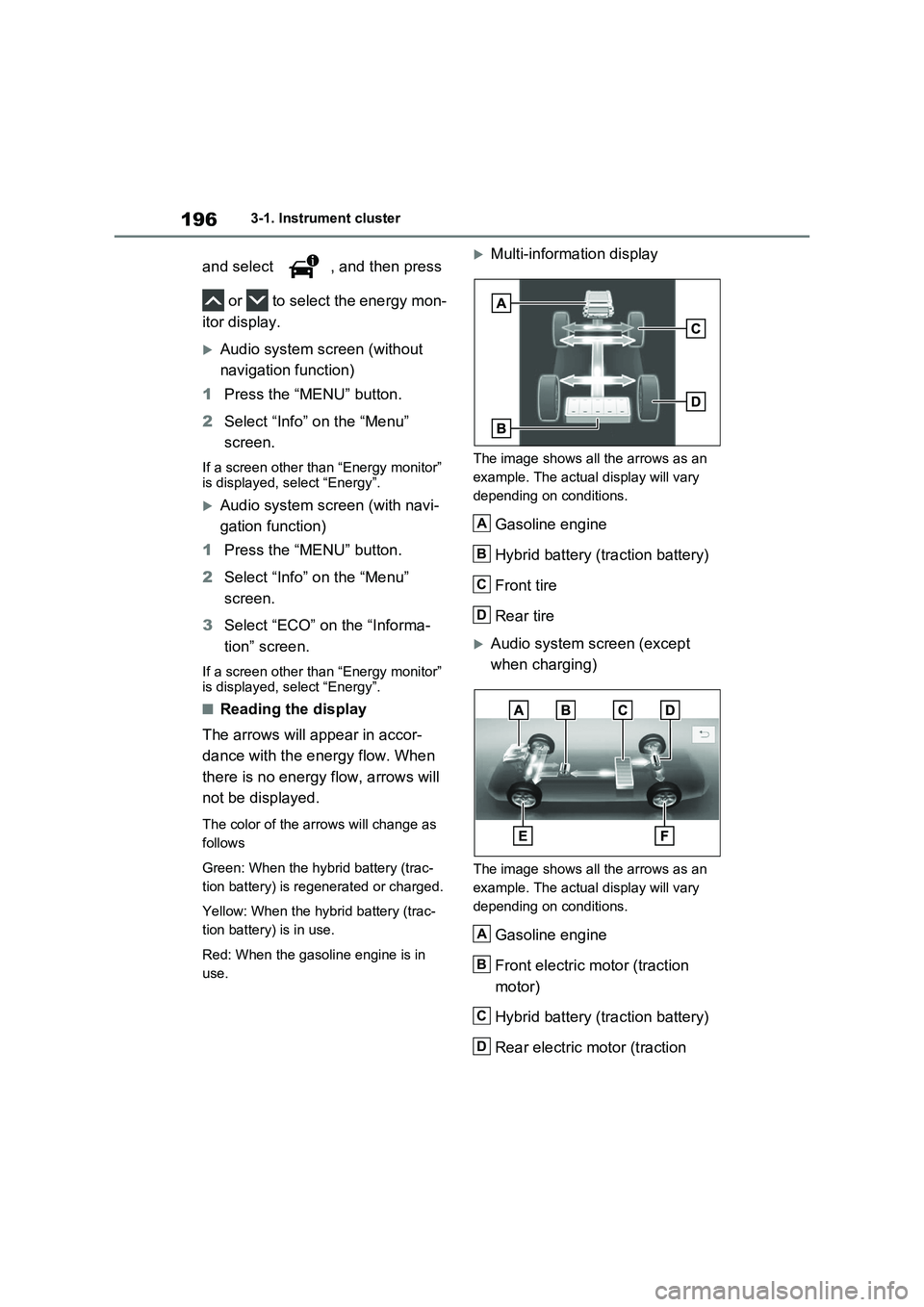
■Reading the display
The arrows will appear in accor-
dance with the energy flow. When
there is no energy flow, arrows will
not be displayed.
The color of the arrows will change as
follows
Green: When the hybrid battery (trac-
tion battery) is regenerated or charged.
Yellow: When the hybrid battery (trac-
tion battery) is in use.
Red: When the gasoline engine is in
use.
Multi-information display
The image shows all the arrows as an
example. The actual display will vary
depending on conditions.
Gasoline engine
Hybrid battery (traction battery)
Front tire
Rear tire
Audio system screen (except
when charging)
The image shows all the arrows as an
example. The actual display will vary
depending on conditions.
Gasoline engine
Front electric motor (traction
motor)
Hybrid battery (traction battery)
Rear electric motor (traction
A
B
C
D
A
B
C
D
Page 197 of 664
197
3 3-1. Instrument cluster
Vehicle status information and indicators
motor)
Front tire
Rear tire
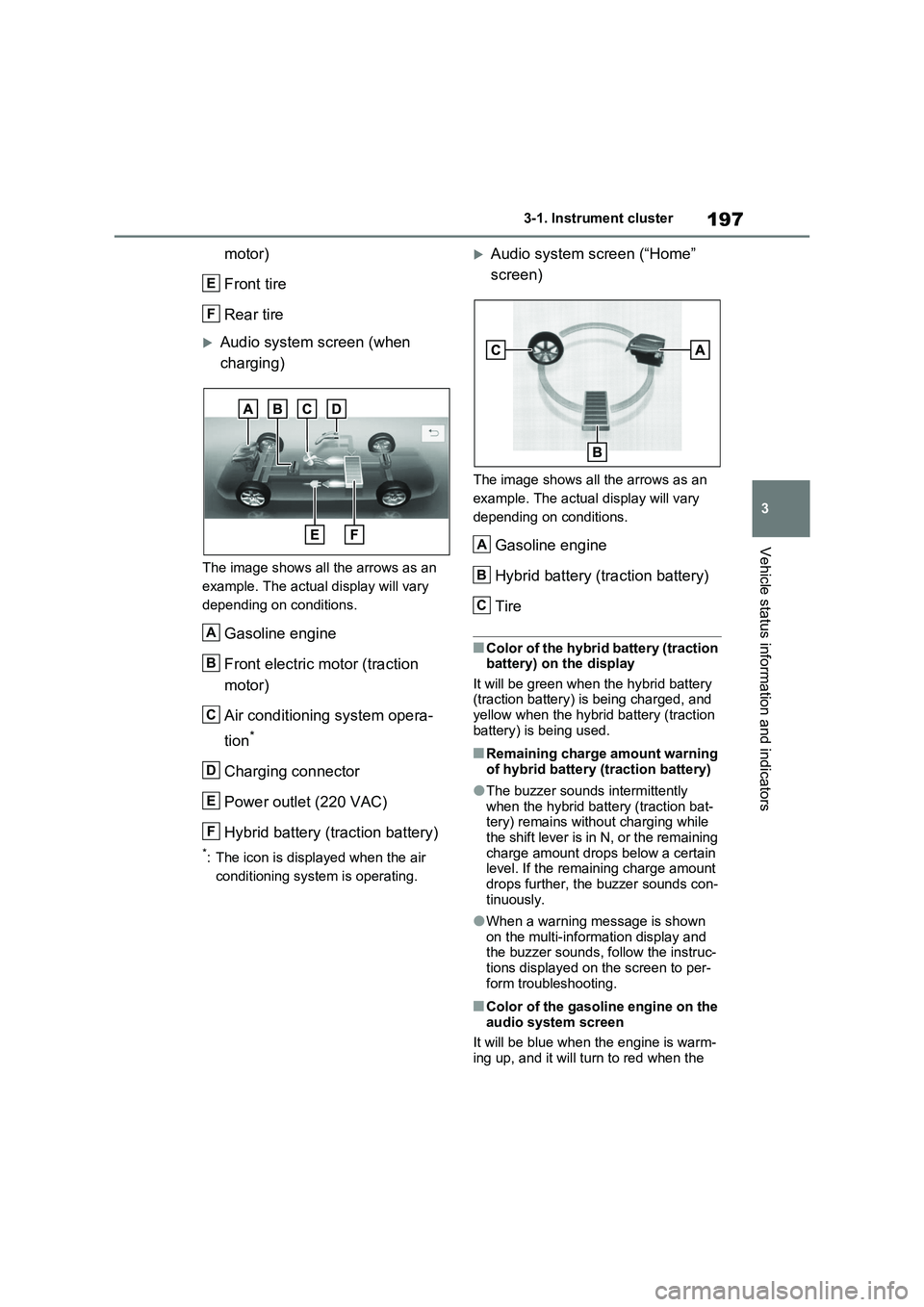
Audio system screen (when
charging)
The image shows all the arrows as an
example. The actual display will vary
depending on conditions.
Gasoline engine
Front electric motor (traction
motor)
Air conditioning system opera-
tion
*
Charging connector
Power outlet (220 VAC)
Hybrid battery (traction battery)
*: The icon is displayed when the air
conditioning system is operating.
Audio system screen (“Home”
screen)
The image shows all the arrows as an
example. The actual display will vary
depending on conditions.
Gasoline engine
Hybrid battery (traction battery)
Tire
■Color of the hybrid battery (traction
battery) on the display
It will be green when the hybrid battery
(traction battery) is being charged, and
yellow when the hybrid battery (traction
battery) is being used.
■Remaining charge amount warning
of hybrid battery (traction battery)
●The buzzer sounds intermittently
when the hybrid battery (traction bat-
tery) remains without charging while
the shift lever is in N, or the remaining
charge amount drops below a certain
level. If the remaining charge amount
drops further, the buzzer sounds con-
tinuously.
●When a warning message is shown
on the multi-information display and
the buzzer sounds, follow the instruc-
tions displayed on the screen to per-
form troubleshooting.
■Color of the gasoline engine on the
audio system screen
It will be blue when the engine is warm-
ing up, and it will turn to red when the
E
F
A
B
C
D
E
F
A
B
C