Page 473 of 664
473
6
6-3. Using the storage features
Interior features
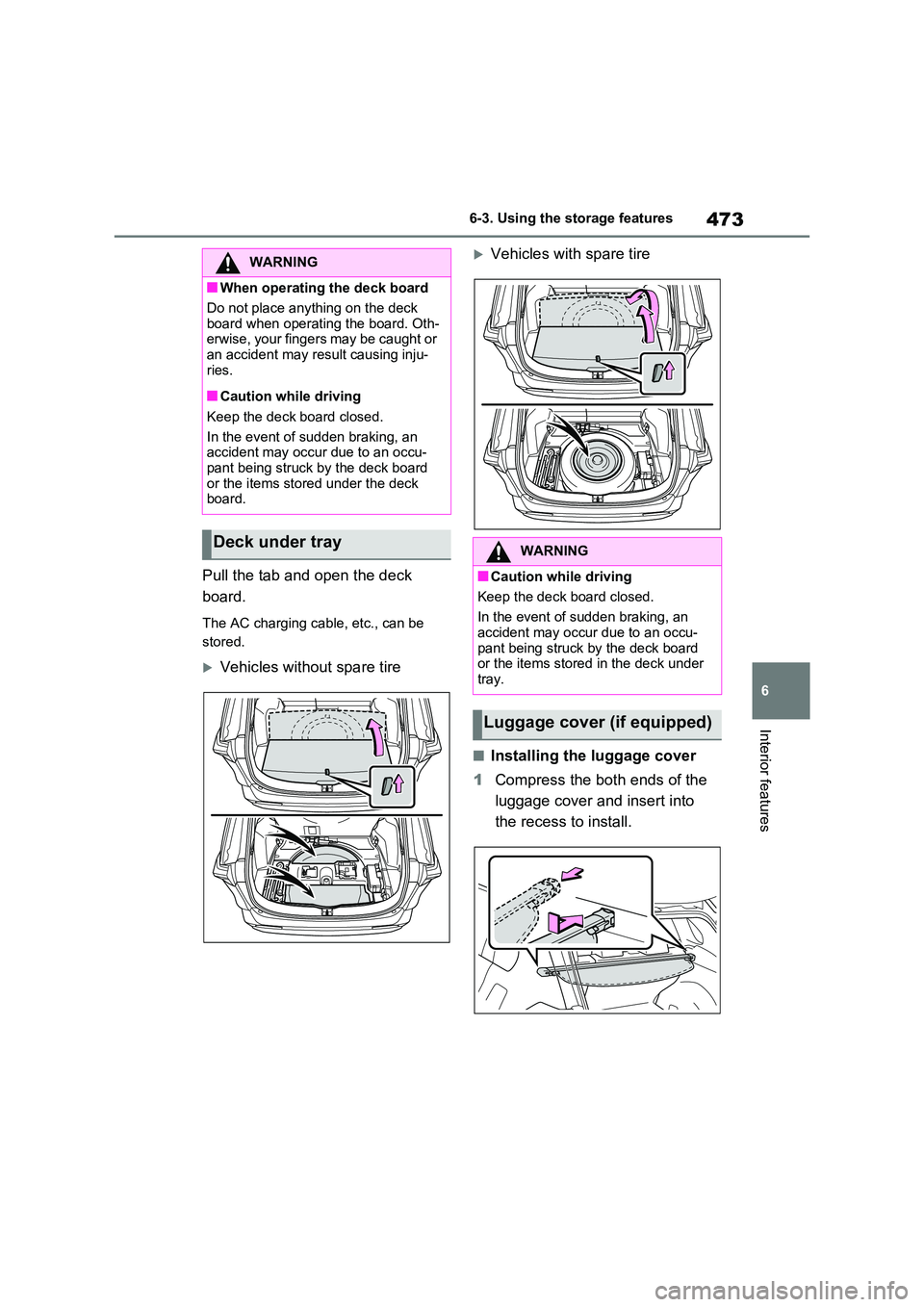
Pull the tab and open the deck
board.
The AC charging cable, etc., can be
stored.
Vehicles without spare tire
Vehicles with spare tire
■Installing the luggage cover
1 Compress the both ends of the
luggage cover and insert into
the recess to install.
WARNING
■When operating the deck board
Do not place anything on the deck
board when operating the board. Oth- erwise, your fingers may be caught or an accident may result causing inju-
ries.
■Caution while driving
Keep the deck board closed.
In the event of sudden braking, an accident may occur due to an occu-
pant being struck by the deck board or the items stored under the deck board.
Deck under trayWARNING
■Caution while driving
Keep the deck board closed.
In the event of sudden braking, an
accident may occur due to an occu- pant being struck by the deck board or the items stored in the deck under
tray.
Luggage cover (if equipped)
Page 474 of 664
4746-3. Using the storage features
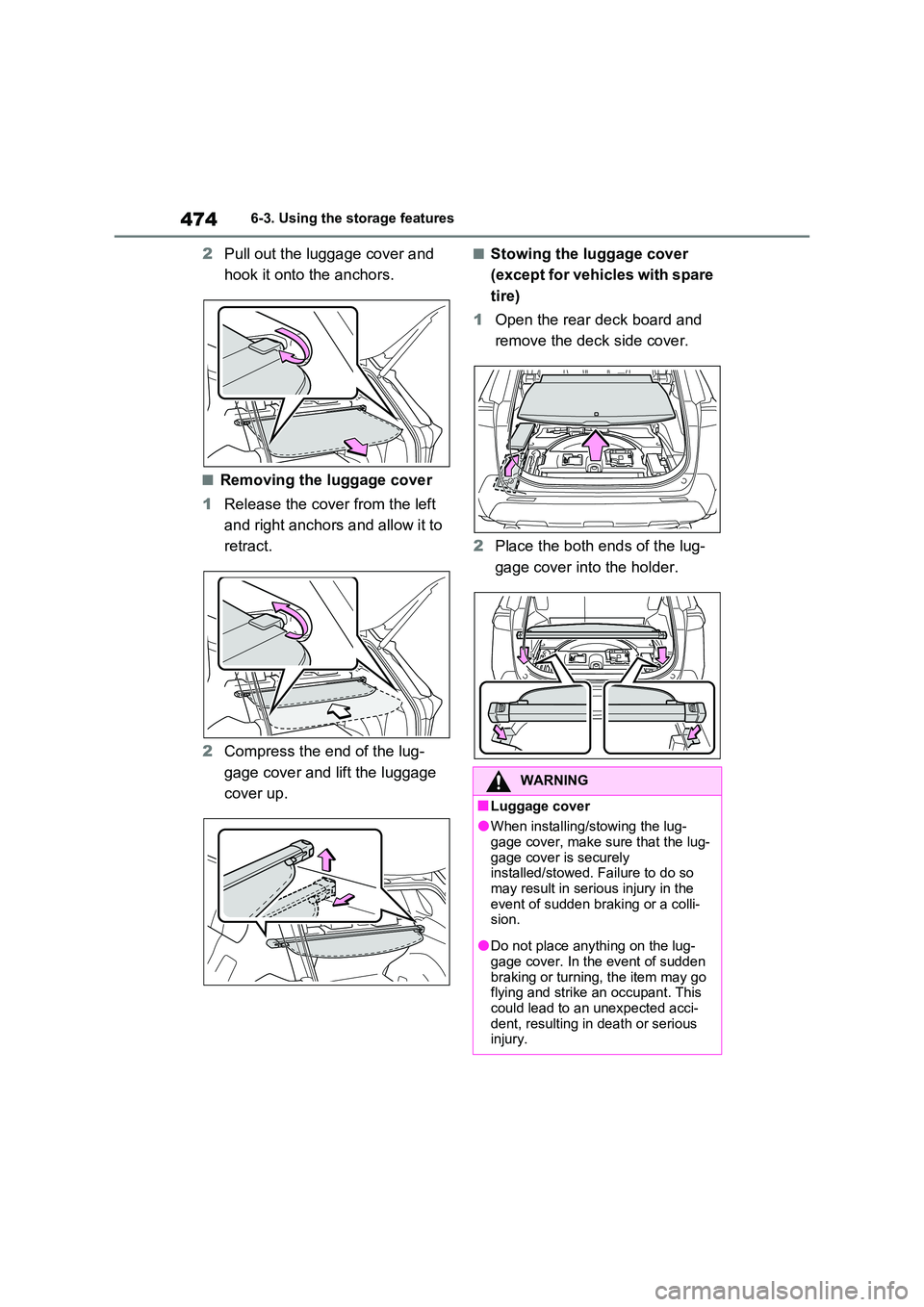
2Pull out the luggage cover and
hook it onto the anchors.
■Removing the luggage cover
1 Release the cover from the left
and right anchors and allow it to
retract.
2 Compress the end of the lug-
gage cover and lift the luggage
cover up.
■Stowing the luggage cover
(except for vehicles with spare
tire)
1 Open the rear deck board and
remove the deck side cover.
2 Place the both ends of the lug-
gage cover into the holder.
WARNING
■Luggage cover
●When installing/stowing the lug-
gage cover, make sure that the lug- gage cover is securely installed/stowed. Failure to do so
may result in serious injury in the event of sudden braking or a colli-sion.
●Do not place anything on the lug-gage cover. In the event of sudden
braking or turning, the item may go flying and strike an occupant. This could lead to an unexpected acci-
dent, resulting in death or serious injury.
Page 475 of 664
475
6
6-3. Using the storage features
Interior features
WARNING
●Do not allow children to climb on the luggage cover. Climbing on the
luggage cover could result in dam- age to the luggage cover, possibly causing death or serious injury to
the child.
NOTICE
■To prevent damage to the lug- gage cover
Do not place anything on top of the luggage cover. When rolling up the luggage cover, objects may be caught
in the cover, damaging the cover and generating noise.
Page 476 of 664
4766-4. Using the other interior features
6-4.Using the o ther interio r fea tures
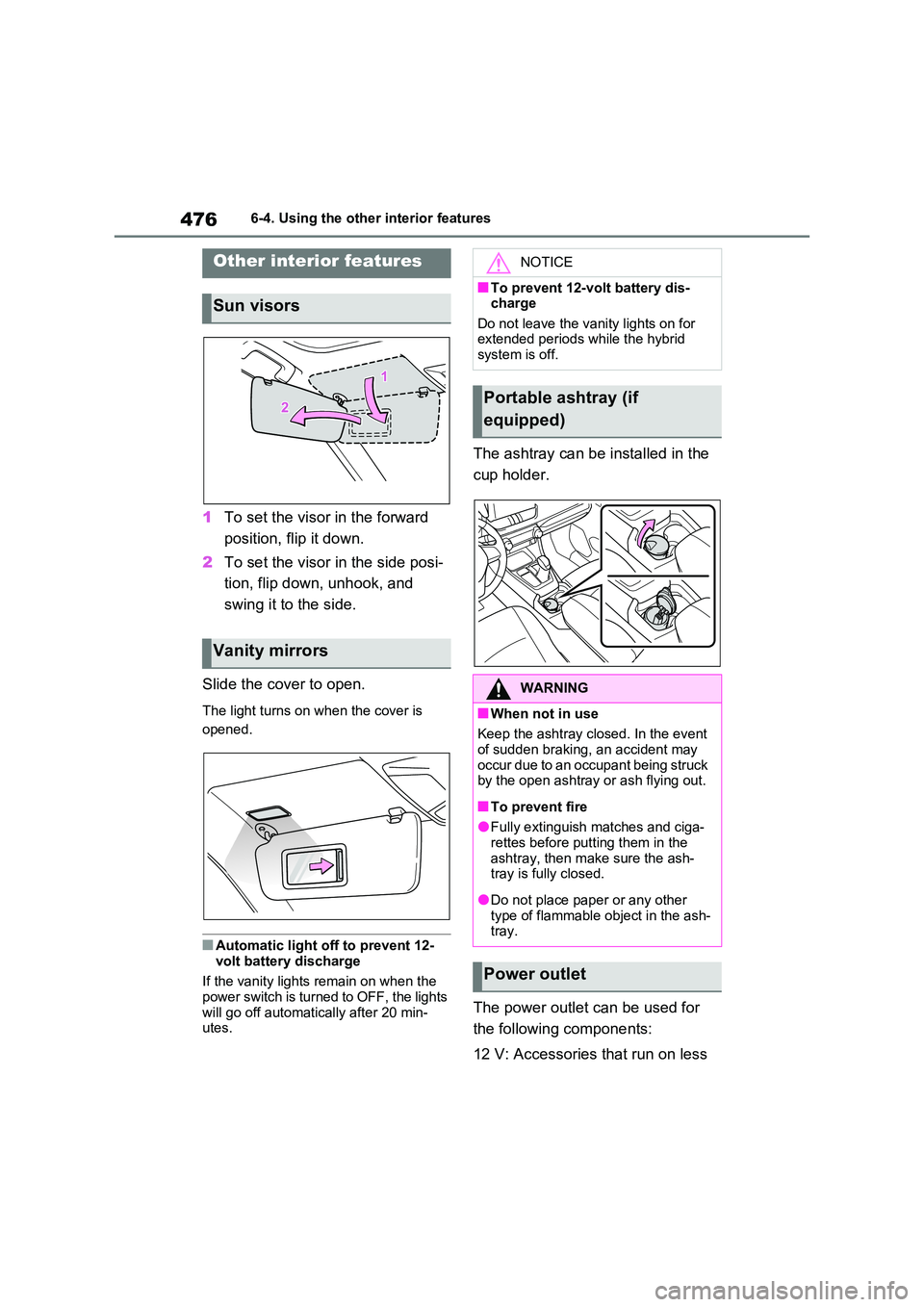
1To set the visor in the forward
position, flip it down.
2 To set the visor in the side posi-
tion, flip down, unhook, and
swing it to the side.
Slide the cover to open.
The light turns on when the cover is
opened.
■Automatic light off to prevent 12-
volt battery discharge
If the vanity lights remain on when the power switch is turned to OFF, the lights
will go off automatically after 20 min- utes.
The ashtray can be installed in the
cup holder.
The power outlet can be used for
the following components:
12 V: Accessories that run on less
Other interior features
Sun visors
Vanity mirrors
NOTICE
■To prevent 12-volt battery dis- charge
Do not leave the vanity lights on for extended periods while the hybrid system is off.
Portable ashtray (if
equipped)
WARNING
■When not in use
Keep the ashtray closed. In the event of sudden braking, an accident may
occur due to an occupant being struck by the open ashtray or ash flying out.
■To prevent fire
●Fully extinguish matches and ciga-rettes before putting them in the
ashtray, then make sure the ash- tray is fully closed.
●Do not place paper or any other type of flammable object in the ash-tray.
Power outlet
Page 483 of 664
483
6
6-4. Using the other interior features
Interior features
WARNING
■Caution while driving
When charging a portable device, for
safety reasons, the driver should not operate the main part of the portable device while driving.
■Caution regarding interference with electronic devices
People with implantable cardiac pace- makers, cardiac resynchronization therapy-pacemakers or implantable
cardioverter defibrillators, as well as any other electrical medical device, should consult their physician about
the usage of the wireless charger. The operations of the wireless char-ger may have an affect on medical
devices.
■To prevent damage or burns
Observe the following precautions. Failure to do so may result in a possi-bility of equipment failure and dam-
age, catch fire, burns due to overheat.
●Do not insert any metallic objects between the charging area and the
portable device while charging
●Do not place containers with liquid
such as water on the wireless char- ger.
●Do not attach stickers, metallic objects, etc., to the charger area or portable device
●Do not cover with cloth, etc., and charge
●Do not charge portable devices other than designated
●Do not attempt to dismantle for dis-assembly or modifications
●Do not hit or apply a strong force
NOTICE
■Conditions in which the function may not operate correctly
In the following conditions, it may not operate correctly
●The portable device is fully charged
●There is foreign matter between the charge area and portable device
●The temperature of the portable device gets higher from charging
●The charging surface of the porta-ble device is facing up
●The placement of the portable device is out of alignment with the
charge area
●Near a TV tower, electric power
plant, gas station, radio station, large display, airport or other facility that generates strong radio waves
or electrical noise
●When the electronic key is in con-
tact with, or is covered by the fol- lowing metallic objects
• Cards to which aluminum foil is
attached
• Cigarette boxes that have alumi- num foil inside
• Metallic wallets or bags
•Coins
• Hand warmers made of metal
• Media such as CDs and DVDs
●When other wireless keys (that emit
radio waves) are being used nearby
In addition, excluding the above-men-
tioned, when the charger does not
perform normally or the operation dis-
play lamp is flashing continuously, it is
considered that the wireless charger
is malfunctioning. Contact authorized
Toyota dealer.
Page 484 of 664
4846-4. Using the other interior features
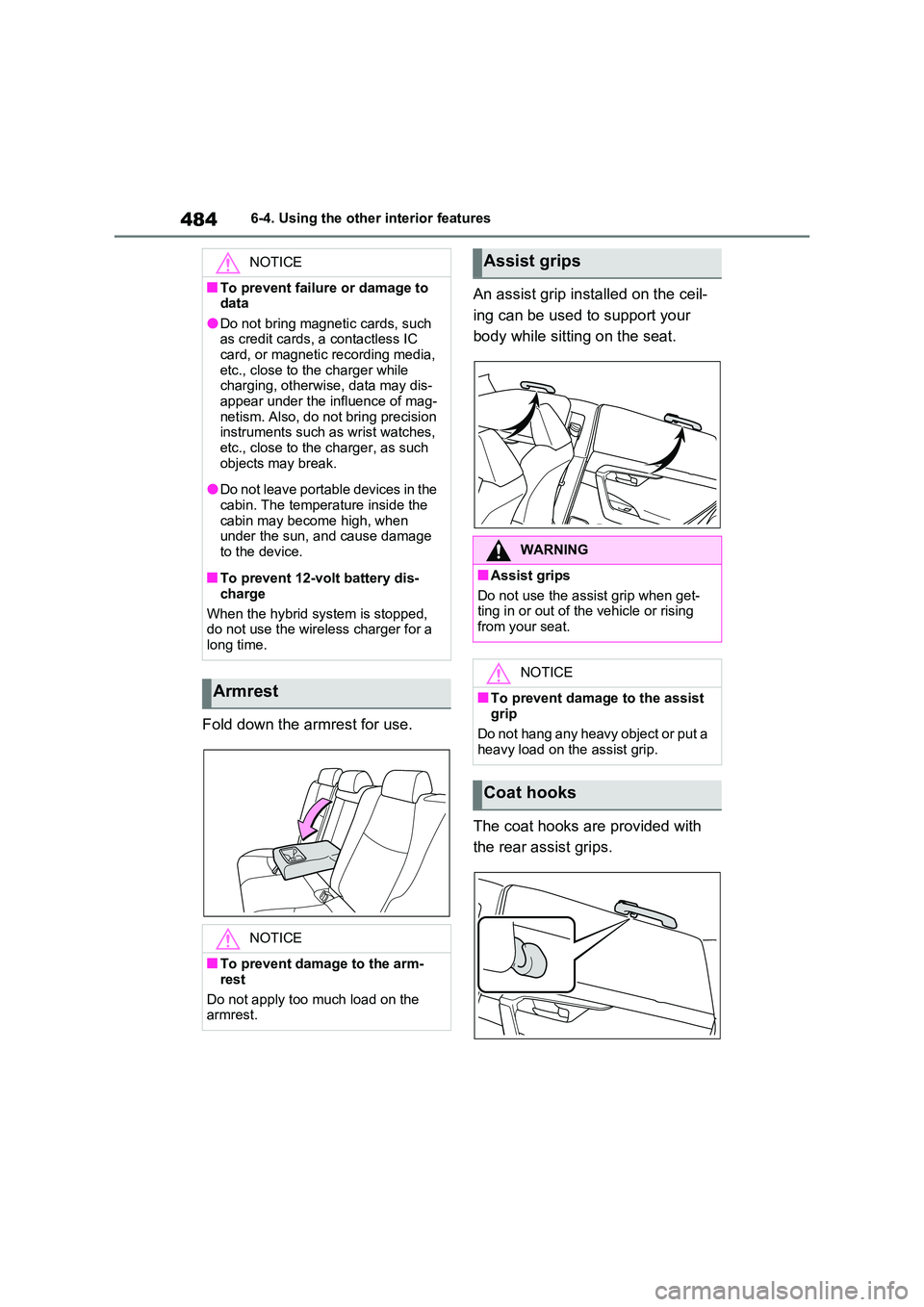
Fold down the armrest for use.
An assist grip installed on the ceil-
ing can be used to support your
body while sitting on the seat.
The coat hooks are provided with
the rear assist grips.
NOTICE
■To prevent failure or damage to data
●Do not bring magnetic cards, such as credit cards, a contactless IC card, or magnetic recording media,
etc., close to the charger while charging, otherwise, data may dis-appear under the influence of mag-
netism. Also, do not bring precision instruments such as wrist watches, etc., close to the charger, as such
objects may break.
●Do not leave portable devices in the
cabin. The temperature inside the cabin may become high, when under the sun, and cause damage
to the device.
■To prevent 12-volt battery dis-
charge
When the hybrid system is stopped, do not use the wireless charger for a
long time.
Armrest
NOTICE
■To prevent damage to the arm-
rest
Do not apply too much load on the armrest.
Assist grips
WARNING
■Assist grips
Do not use the assist grip when get- ting in or out of the vehicle or rising
from your seat.
NOTICE
■To prevent damage to the assist
grip
Do not hang any heavy object or put a heavy load on the assist grip.
Coat hooks
Page 485 of 664
485
6
6-4. Using the other interior features
Interior features
WARNING
■Items that must not be hanged on the hook
Do not hang coat hangers or other hard or sharp objects on the hook. If the SRS curtain shield airbags
deploy, these items may become pro- jectiles, causing death or serious injury.
Page 489 of 664

489
7
7-1. Maintenance and care
Maintenance and care
■Front side windows water-repel-
lent coating (except quarter win- dow)
●The following precautions can extend the effectiveness of the water-repel-lent coating.
• Remove any dirt, etc., from the front side windows regularly.• Do not allow dirt and dust to accumu-
late on the windows for a long period. Clean the windows with a soft, damp cloth as soon as possible.
• Do not use wax or glass cleaners that contain abrasives when cleaning the windows.
• Do not use any metallic objects to remove condensation build up.
■Bumpers
Do not scrub with abrasive cleaners.
■Plated portions
If dirt cannot be removed, clean the parts as follows:
●Use a soft cloth dampened with an approximately 5% solution of neutral detergent and water to clean the dirt
off.
●Wipe the surface with a dry, soft cloth
to remove any remaining moisture.
●To remove oily deposits, use alcohol
wet wipes or a similar product.
WARNING
■When washing the vehicle
Do not apply water to the inside of the
engine compartment. Doing so may cause the electrical components, etc. to catch fire.
■When cleaning the windshield
Set the wiper switch to off. If the wiper switch is in “AUTO”, the
wipers may operate unexpectedly in the following situations, and may result in hands being caught or other
serious injuries and cause damage to the wiper blades.
Off
“AUTO”
●When the upper part of the wind-
shield where the raindrop sensor is located is touched by hand
●When a wet rag or similar is held close to the raindrop sensor
●If something bumps against the windshield
●If you directly touch the raindrop sensor body or if something bumps
into the raindrop sensor
■Precautions regarding the
exhaust pipes
Exhaust gasses cause the exhaust pipes to become quite hot.
When washing the vehicle, be careful not to touch the pipes until they have cooled sufficiently, as touching hot
exhaust pipes can cause burns.
A
B