2011 TOYOTA VERSO S steering
[x] Cancel search: steeringPage 43 of 664
43
1
1-1. For safe use
For safety and security
repairer as soon as possible.
●Any of the SRS airbags have been inflated.
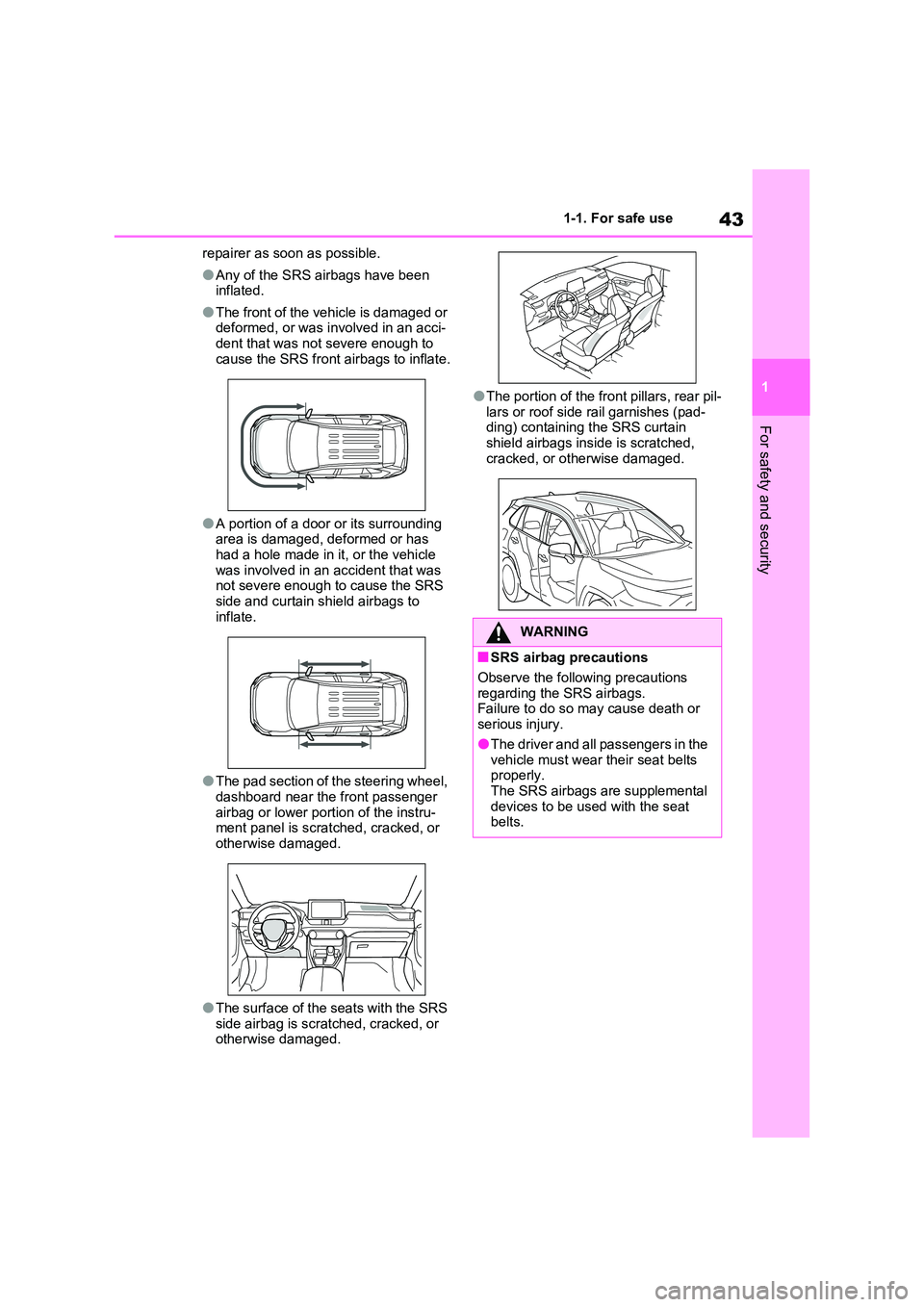
●The front of the vehicle is damaged or deformed, or was involved in an acci-
dent that was not severe enough to cause the SRS front airbags to inflate.
●A portion of a door or its surrounding area is damaged, deformed or has had a hole made in it, or the vehicle
was involved in an accident that was not severe enough to cause the SRS side and curtain shield airbags to
inflate.
●The pad section of the steering wheel,
dashboard near the front passenger airbag or lower portion of the instru-ment panel is scratched, cracked, or
otherwise damaged.
●The surface of the seats with the SRS
side airbag is scratched, cracked, or otherwise damaged.
●The portion of the front pillars, rear pil-
lars or roof side rail garnishes (pad- ding) containing the SRS curtain shield airbags inside is scratched,
cracked, or otherwise damaged.
WARNING
■SRS airbag precautions
Observe the following precautions
regarding the SRS airbags. Failure to do so may cause death or serious injury.
●The driver and all passengers in the vehicle must wear their seat belts properly.
The SRS airbags are supplemental devices to be used with the seat belts.
Page 44 of 664
441-1. For safe use
WARNING
●The SRS driver airbag deploys with considerable force, and can cause
death or serious injury especially if the driver is very close to the air-bag.
Since the risk zone for the driver’s air-
bag is the first 50 - 75 mm (2 - 3 in.) of
inflation, placing yourself 250 mm (10
in.) from your driver airbag provides
you with a clear margin of safety. This
distance is measured from the center
of the steering wheel to your breast-
bone. If you sit less than 250 mm (10
in.) away now, you can change your
driving position in several ways:
• Move your seat to the rear as far as
you can while still reaching the ped- als comfortably.
• Slightly recline the back of the seat. Although vehicle designs vary, many drivers can achieve the 250
mm (10 in.) distance, even with the driver seat all the way forward, sim-ply by reclining the back of the seat
somewhat. If reclining the back of your seat makes it hard to see the road, raise yourself by using a firm,
non-slippery cushion, or raise the seat if your vehicle has that feature.
• If your steering wheel is adjustable, tilt it downward. This points the air-bag toward your chest instead of
your head and neck.
The seat should be adjusted as rec- ommended above, while still main-
taining control of the foot pedals, steering wheel, and your view of the instrument panel controls.
●The SRS front passenger airbag also deploys with considerable force, and can cause death or seri-
ous injury especially if the front pas- senger is very close to the airbag. The front passenger seat should be
as far from the airbag as possible with the seatback adjusted, so the front passenger sits upright.
●Improperly seated and/or restrained infants and children can be killed or
seriously injured by a deploying air- bag. An infant or child who is too small to use a seat belt should be
properly secured using a child restraint system. Toyota strongly recommends that all infants and
children be placed in the rear seats of the vehicle and properly restrained. The rear seats are safer
for infants and children than the front passenger seat. ( P.50)
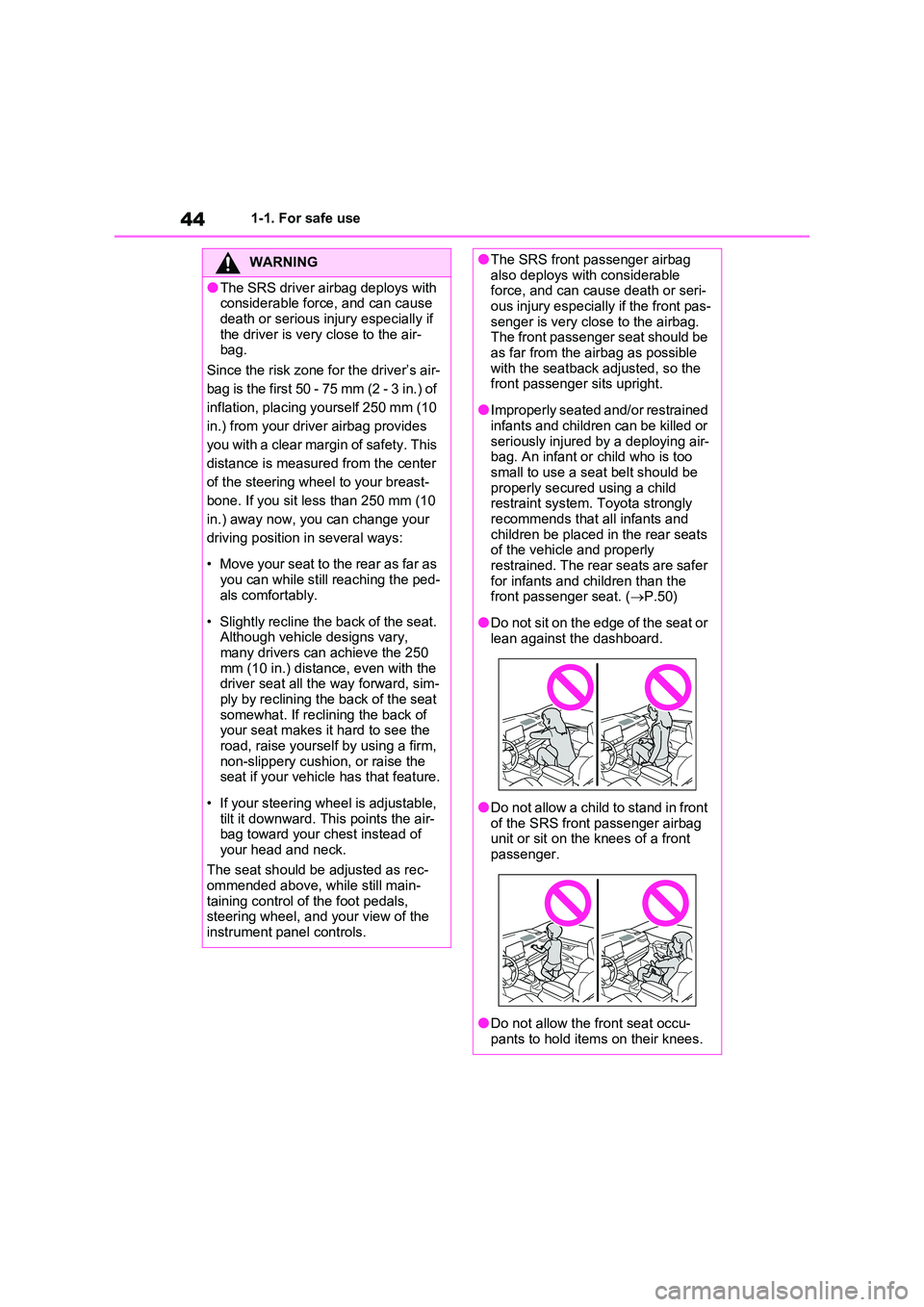
●Do not sit on the edge of the seat or lean against the dashboard.
●Do not allow a child to stand in front of the SRS front passenger airbag unit or sit on the knees of a front
passenger.
●Do not allow the front seat occu-
pants to hold items on their knees.
Page 45 of 664
45
1
1-1. For safe use
For safety and security
WARNING
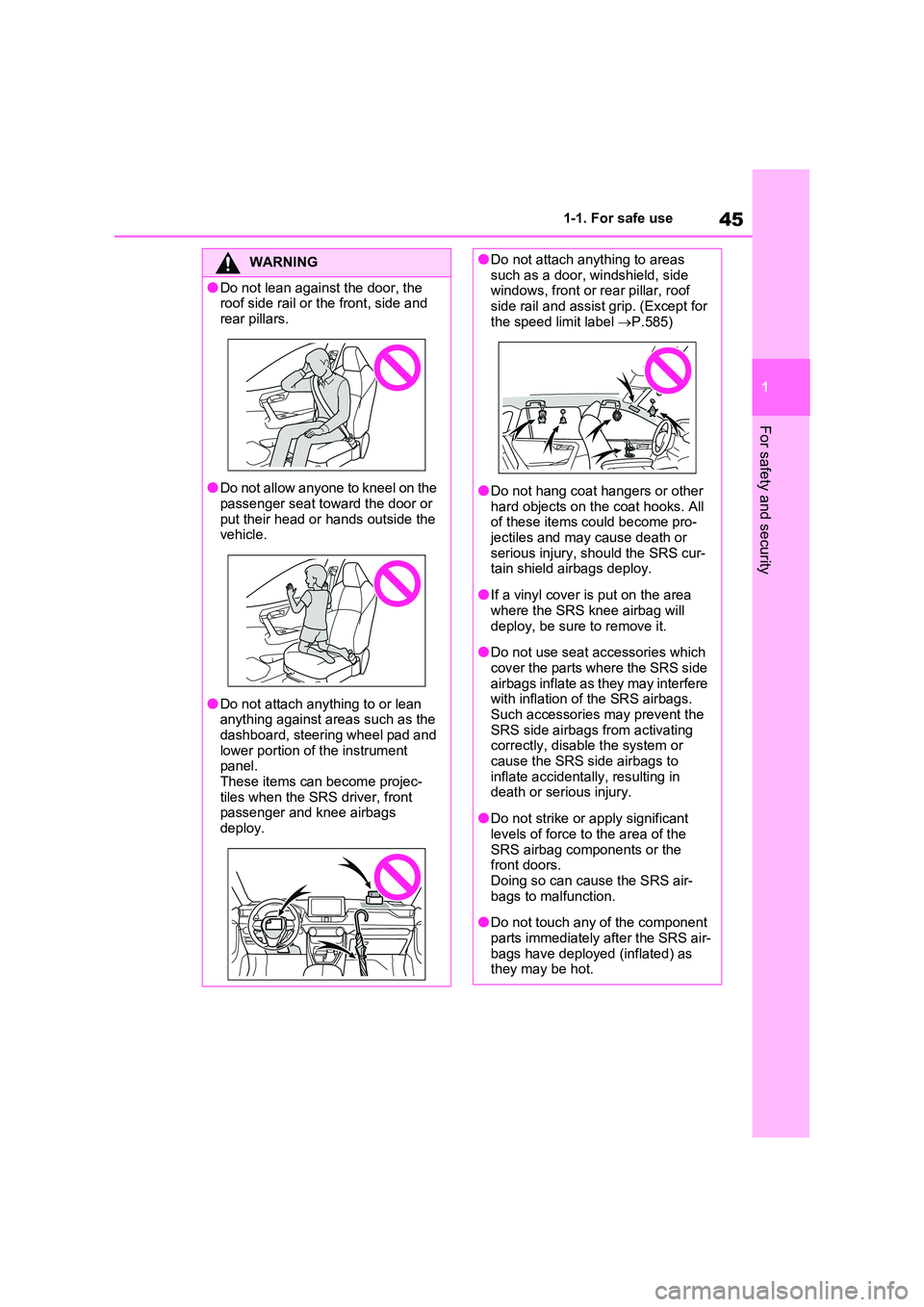
●Do not lean against the door, the roof side rail or the front, side and
rear pillars.
●Do not allow anyone to kneel on the
passenger seat toward the door or put their head or hands outside the vehicle.
●Do not attach anything to or lean anything against areas such as the
dashboard, steering wheel pad and lower portion of the instrument panel.
These items can become projec- tiles when the SRS driver, front passenger and knee airbags
deploy.
●Do not attach anything to areas such as a door, windshield, side windows, front or rear pillar, roof
side rail and assist grip. (Except for the speed limit label P.585)
●Do not hang coat hangers or other hard objects on the coat hooks. All of these items could become pro-
jectiles and may cause death or serious injury, should the SRS cur-tain shield airbags deploy.
●If a vinyl cover is put on the area where the SRS knee airbag will
deploy, be sure to remove it.
●Do not use seat accessories which
cover the parts where the SRS side airbags inflate as they may interfere with inflation of the SRS airbags.
Such accessories may prevent the SRS side airbags from activating correctly, disable the system or
cause the SRS side airbags to inflate accidentally, resulting in death or serious injury.
●Do not strike or apply significant levels of force to the area of the
SRS airbag components or the front doors.Doing so can cause the SRS air-
bags to malfunction.
●Do not touch any of the component
parts immediately after the SRS air- bags have deployed (inflated) as they may be hot.
Page 46 of 664
461-1. For safe use
WARNING
●If breathing becomes difficult after the SRS airbags have deployed,
open a door or side window to allow fresh air in, or leave the vehicle if it is safe to do so. Wash off any resi-
due as soon as possible to prevent skin irritation.
●If the areas where the SRS airbags are stored, such as the steering wheel pad and front and rear pillar
garnishes, are damaged or cracked, have them replaced by any authorized Toyota retailer or
Toyota authorized repairer, or any reliable repairer.
■Modification and disposal of SRS airbag system components
Do not dispose of your vehicle or per-
form any of the following modifica- tions without consulting any authorized Toyota retailer or Toyota
authorized repairer, or any reliable repairer. The SRS airbags may mal-function or deploy (inflate) acciden-
tally, causing death or serious injury.
●Installation, removal, disassembly and repair of the SRS airbags
●Repairs, modifications, removal or replacement of the steering wheel,
instrument panel, dashboard, seats or seat upholstery, front, side and rear pillars, roof side rails, front
door panels, front door trims or front door speakers
●Modifications to the front door panel (such as making a hole in it)
●Repairs or modifications of the front fender, front bumper, or side of the occupant compartment
●Installation of a grille guard (bull bars, kangaroo bar, etc.), snow
plows or winches
●Modifications to the vehicle’s sus-
pension system
●Installation of electronic devices such as mobile two-way radios (RF-transmitter) and CD players
Page 67 of 664
67
1
1-3. Emergency assistance
For safety and security
at the following URL.
http://www.opensourceautomotive.com/dcm/toyota/
WARNING
■When the Emergency Call may
not be made
●It may not be possible to make Emergency Calls in any of the fol-
lowing situations. In such cases, report to emergency services pro-vider (112 system etc.) by other
means such as nearby public phones.
• Even when the vehicle is in the cel-
lular phone service area, it may be difficult to connect to the eCall con-trol center if the reception is poor or
the line is busy. In such cases, even though the system attempts to connect to the eCall control center,
you may not be able to connect to the eCall control center to make Emergency Calls and contact emer-
gency services.
• When the vehicle is out of the cellu-
lar phone service area, the Emer- gency Calls cannot be made.
• When any related equipment (such as the “SOS” button panel, indicator lights, microphone, speaker, DCM,
antenna, or any wires connecting the equipment) is malfunctioning, damaged or broken, the Emer-
gency Call cannot be made.
• During an Emergency Call, the sys-
tem makes repeated attempts to connect to the eCall control center. However, if it cannot connect to the
eCall control center due to poor radio wave reception, the system may not be able to connect to the
cellular network and the call may finish without connecting. The red indicator light will blink for approxi-
mately 30 seconds to indicate this disconnection.
●If the 12-volt battery’s voltage decreases or there is a disconnec-tion, the system may not be able to
connect to the eCall control center.
■When the Emergency Call sys-
tem is replaced with a new one
The Emergency Call system should be registered. Contact any authorized
Toyota retailer or Toyota authorized repairer, or any reliable repairer.
■For your safety
●Please drive safely.The function of this system is to
assist you in making the Emer- gency Call in case of accidents such as traffic accidents or sudden
medical emergencies, and it does not protect the driver or passengers in any way. Please drive safely and
fasten your seatbelts at all times for your safety.
●In case of an emergency, make lives the top priority.
●If you smell anything burning or other unusual smells, leave the vehicle and evacuate to a safe area
immediately.
●If the airbags deploy when the sys-
tem is operating normally, the sys- tem makes emergency call. The system also makes emergency call
when the vehicle is struck from the rear or rolls over, even if the air-bags do not deploy.
●For safety, do not make the Emer-gency Call while driving.
Making calls during driving may cause mishandling of the steering wheel, which may lead to unex-
pected accidents. Stop the vehicle and confirm the safety of your surroundings before
making the Emergency Call.
Page 101 of 664
101
2 2-1. Plug-in hybrid system
Plug-in hybrid system
to EV mode or AUTO EV/HV
mode after leaving the freeway.
(P.86)
Turn the “A/C” switch off when it
is not needed. Doing so can help
reduce excessive electricity and
fuel consumption.
In summer: When the ambient tem-
perature is high, use the recirculated air
mode. Doing so will help to reduce the
burden on the air conditioning system
and reduce electricity and fuel con-
sumption as well.
In winter: Avoid excessive and unnec-
essary use of the heater. Usage of the
heated steering wheel (if equipped)
(P.462) and seat heaters (P.463)
are effective.
Using the Remote Air Condition-
ing System (P.460) while the
AC charging cable is connected
to the vehicle can reduce elec-
tricity consumption immediately
after starting off by operating air
conditioning mainly using elec-
tricity from an external power
source.
When setting the charging
schedule, setting the charging
mode to “Departure” and “Cli-
mate Prep” to on can reduce
electricity consumption immedi-
ately after starting off by operat-
ing air conditioning before
charging is completed. (P.144)Make sure to check the tire inflation
pressure frequently. If there is
improper tire inflation pressure in
the tires, the EV driving range will
become shorter, and fuel consump-
tion when in HV mode will increase.
Also, as snow tires can cause large
amounts of friction, their use on dry
roads can lead to increased fuel
and electricity consumption.
Carrying heavy luggage will lead to
poor fuel economy. Avoid carrying
unnecessary luggage. Installing a
large roof rack will also cause poor
fuel economy.
Since the gasoline engine starts up
and cuts out automatically, warm-
ing up is not necessary.
Air conditioning
Checking tire inflation pres-
sure
Luggage
Warming up before driving
Page 103 of 664
103
2 2-1. Plug-in hybrid system
Plug-in hybrid system
■When starting off, depress the
accelerator pedal smoothly to
accelerate
As a guide, accelerate up to
approximately 20 km/h (12mph) in
the first 5 seconds.
Electrical and fuel efficiency can be
improved just by using the ECO
Accelerator Guidance displayed on
the multi-information display and
taking care to start off gently.
(P.182)
When the driving mode is set to Eco
drive mode, depressing the accelerator
pedal generates smooth torque that
makes it easier to operate the accelera-
tor gently.
■Maintain sufficient vehicle-to-
vehicle distance and do not
accelerate or decelerate
unnecessarily
Try to maintain a fixed speed while
driving. Driving at a short vehicle-
to-vehicle distance will result in
repeating wasteful acceleration and
deceleration, which will worsen the
electrical and fuel efficiency.
■Release the accelerator pedal
early before stopping the vehi-
cle, such as at a traffic light
The regenerative brake will operate
to convert the kinetic energy of the
vehicle into electrical energy, which
will charge the hybrid battery (trac-
tion battery).
The regeneration status can be
checked from the Hybrid System
Indicator. (P.177)When the brake pedal is depressed
lightly during deceleration, the
regeneration amount increases,
enabling more electrical energy to
be recovered.
If the brake pedal is depressed too
strongly, the recovered amount indica-
tor will reach the maximum level and
the upper limit of the recoverable
energy will be exceeded. Therefore, be
sure to operate the brake pedal early.
■Use the air conditioning sys-
tem appropriately, and also
utilize the heated steering
wheel (if equipped) and seat
heaters
In EV mode, the vehicle is cooled
and heated by electrical energy.
(Except in extremely cold tempera-
tures of approximately -10°C (14°F)
or less.)
Preventing excessive cooling or
heating of the vehicle will reduce
power consumption and improve
electrical efficiency.
The heated steering wheel (if
equipped) and seat heaters are effi-
cient heating device that directly
warm the body using less electric
power.
When used together with the air condi-
tioning system, a low temperature set-
ting can be used to improve electrical
and fuel efficiency.
■Check the tire pressure
If the tire pressure is lower than the
specified value, it will worsen the
electrical and fuel efficiency.
Page 154 of 664
1542-2. Charging
■When a door is unlocked while
using “My Room Mode”
The charging connector unlocks,
charging stops and “My Room Mode”
stops. In order to use “My Room Mode”
again, reconnect the AC charging cable
and start “My Room Mode” (P.153).
When using “My Room Mode” with pub-
lic charging station, operation to start
charging using the charger may be
required again before starting “My Room
Mode”.
■Meter display during charging
If “My Room Mode” is not turned on for
approximately 100 seconds after the
power switch is turned on during
charging, the power switch will automat-
ically turn off.
■While using “My Room Mode”
Any of the following may occur.
●When the remaining charge of the
hybrid battery (traction battery)
reaches the lower limit, the air condi-
tioning system automatically turns off.
In this situation, the air conditioning
system cannot be used until the
remaining charge of the hybrid battery
(traction battery) increases. Turn the
power switch off and use “My Room
Mode” after the remaining charge of
the hybrid battery (traction battery) is
restored.
●When the outside temperature is low,
the heater output may be limited due
to the air conditioning system opera-
tion being restricted.
●Warning lights and indicators such as
electric power steering system warn-
ing light (yellow) and malfunction indi-
cator lamp may turn on, but this is not
a malfunction.
Also, when the surrounding area is
dark, the headlights are turned on.
(P.332)
■When a charging schedule is regis-
tered
When “My Room Mode” starts while the
charging schedule is on standby, charging schedules are ignored and
charging starts.
■When “My Room Mode” is used
while the hybrid battery (traction
battery) is fully charged
When the power switch is turned on
while the hybrid battery (traction battery)
is fully charged and the charging con-
nector that supplies power is connected,
“Charging Port Lid is Open” is displayed
on the multi-information display. In this
case, press of the meter control
switches to display the setting screen of
“My Room Mode”, and then select “My
Room Mode”.
When “My Room Mode” is used while
the hybrid battery (traction battery) is
fully charged, the electric power of the
hybrid battery (traction battery) may be
consumed. In this case, charging may
be performed again.
■When a message related to “My
Room Mode” is displayed
When a message is displayed on the
multi-information display while using or
attempting to start “My Room Mode”,
take the following correction proce-
dures.
●“Traction battery is too low for “My
Room Mode””
There is insufficient remaining charge in
the hybrid battery (traction battery) for
starting “My Room Mode”.
Wait until the charge of the hybrid bat-
tery (traction battery) increases, then
start “My Room Mode”.
●““My Room Mode” has stopped due to
low traction battery”
The remaining charge in the hybrid bat-
tery (traction battery) is insufficient.
Stop using “My Room Mode” and
charge the hybrid battery (traction bat-
tery).
●““My Room Mode” will stop when trac-
tion battery is too low Reduce power
usage to continue using “My Room