2011 TOYOTA VERSO S remote control
[x] Cancel search: remote controlPage 129 of 664
129
2 2-2. Charging
Plug-in hybrid system
■Hybrid battery (traction bat-
tery) warming control (Green-
land only)
This control operates after the AC
charging cable remains connected
to the vehicle for 3 days and “Bat-
tery Heater” automatically stops. It
automatically insulates the hybrid
battery (traction battery) in
extremely low temperatures.
This control stops 31 days after
the AC charging cable is con-
nected, even if it is still con-
nected to the vehicle.
When this control operates,
charging schedule settings are
ignored and charging starts.
■“Battery Cooler”
When the hybrid battery (traction
battery) is hot and the AC charging
cable is connected to the vehicle,
this function cools the hybrid bat-
tery (traction battery) before
charging is carried out.
“Battery Cooler” will operate when
the “Battery Cooler” of the
“Charging Settings” on the multi-
information display is on. (P.187)
■Traction battery heating and cool-
ing system (“Battery Heater” and
“Battery Cooler”)
●The system operates when the hybrid
battery (traction battery) is below or
above a certain temperature.
●The system may operate when
charging is not being performed.
●When the charging schedule is used
(P.144), this function will operate according to the charging schedule.
■“Battery Heater”
●When “Battery Heater” is operating,
the charging indicator illuminates.
●When the AC charging cable is
removed from the vehicle or remains
connected to the vehicle for approxi-
mately 3 days, the system automati-
cally stops.
●When “Battery Heater” is operating
during charging, the charging time
may be longer than normal.
●If the outside temperature becomes
high while “Battery Heater” is operat-
ing, charging may complete earlier
than the “Departure” time set.
(P.144)
●When the traction battery is almost
completely charged, “Battery Cooler”
may not be implemented.
●When the following operations are
performed while “Battery Heater” is
operating, the hybrid battery (traction
battery) heating operation stops.
• The shift lever is changed to any posi-
tion other than P
• The Remote Air Conditioning System
is operated (P.460)
●“Battery Heater” may operate even
when the hybrid battery (traction bat-
tery) is fully charged depending on the
temperature of the hybrid battery
(traction battery).
• The remaining charge of the hybrid
battery (traction battery) decreases
when “Battery Heater” operates. The
charging operation may start again to
charge the hybrid battery (traction bat-
tery).
• “Charging Stopped Due to Pulled
Charging Connector” may be shown
when the charging connector is
removed while recharging. (P.160)
■“Battery Cooler”
●The charging indicator is illuminated
while “Battery Cooler” is on standby or
operating.
●“Battery Cooler” is implemented for a
Page 159 of 664
159
2 2-2. Charging
Plug-in hybrid system
■Charging starts, even though charging schedule is registered
Likely causeCorrection procedure
“Charge Now” is set to on
When charging according to the charging
schedule, set “Charge Now” to off.
(P.150)
charging schedule is set to offCheck that charging schedule is not set
to off. (P.149)
Charging mode is set to “Departure” and
schedule departure time is close to cur-
rent timeWhen the system determines that there
is no time to finish charging by the set
scheduled departure time, it starts
charging. Check the charging schedules.
AC charging cable was removed and
reinserted while charging indicator of the
charging port was flashing
If the AC charging cable is removed and
reinserted while the charging indicator is
flashing, the charging schedule is can-
celed (P.138).
Temporarily remove the AC charging
cable, and then reconnect it.
The Remote Air Conditioning System
was operated
When the Remote Air Conditioning Sys-
tem is operated, the system will start
charging, even if the charging schedule
is registered. To carry out charging using
the charging schedule, stop the Remote
Air Conditioning System, and then recon-
nect the AC charging cable.
“Battery Heater” (P.128) operated
When the charging mode is set to
“Departure”, “Battery Heater” may oper-
ate before charging starts. Check the
status of the charging indicator of the
charging port. (P.106)
Outside temperature is low and hybrid
battery (traction battery) warming control
(P.129) operated (Greenland only)
When hybrid battery (traction battery)
warming control operates, the charging
schedules are ignored and charging
starts. In order to protect the hybrid bat-
tery (traction battery), allow charging to
continue.
Page 194 of 664
1943-1. Instrument cluster
Brake Override System
(P.301)
Drive-Start Control (P.301)
Parking Support Brake function
(static objects) (if equipped)
(P.424)
Displayed content is the same as that
displayed on the meter. For details,
refer to the explanations of each sys-
tem.
■ / icons
Displays the following multi-infor-
mation display linked icons:
: Master warning icon
Displayed when a warning message is
displayed on the multi-information dis-
play.
: Information icon
Displayed when a suggestion/advice
pop-up display is displayed on the
multi-information display.
■Warning message
Some warning messages are dis-
played when necessary, according
to certain conditions.
Displayed content is the same as that
displayed on the multi-information dis-
play. For details, refer to the explana-
tions of each system.
■Audio system operation status
Displayed when an audio remote
control switch on the steering wheel
is operated.
■Hands-free system status (if
equipped)
Displayed when the hands-free system is operated.
■Outside temperature display
Displayed when the power switch is
turned to ON or when the low out-
side temperature indicator is flash-
ing.
■When a pop-up display is displayed
When a pop-up display is displayed, a
current display may no longer be dis-
played. In this case, the display will
return after the pop-up display disap-
pears.
■Outside temperature display
●When the ambient temperature is
approximately 3°C (37°F) or lower,
will flash for approximately 10
seconds and the outside temperature
display will turn off.
●In the following situations, the correct
outside temperature may not be dis-
played, or the display may take longer
than normal to change:
• When stopped (including when using
“My Room Mode”), or driving at low
speeds (less than 20 km/h [12 mph])
• When the outside temperature has
changed suddenly (at the
entrance/exit of a garage, tunnel, etc.)
●When “--” or “E” is displayed, the sys-
tem may be malfunctioning.
Take your vehicle to any authorized
Toyota retailer or Toyota authorized
repairer, or any reliable repairer.
Display content selected by “HUD
Driving Support” on the screen
is displayed. (P.192)
Hybrid System Indica-
tor/Tachometer
Page 202 of 664
2024-1. Key information
4-1.Key info rmation
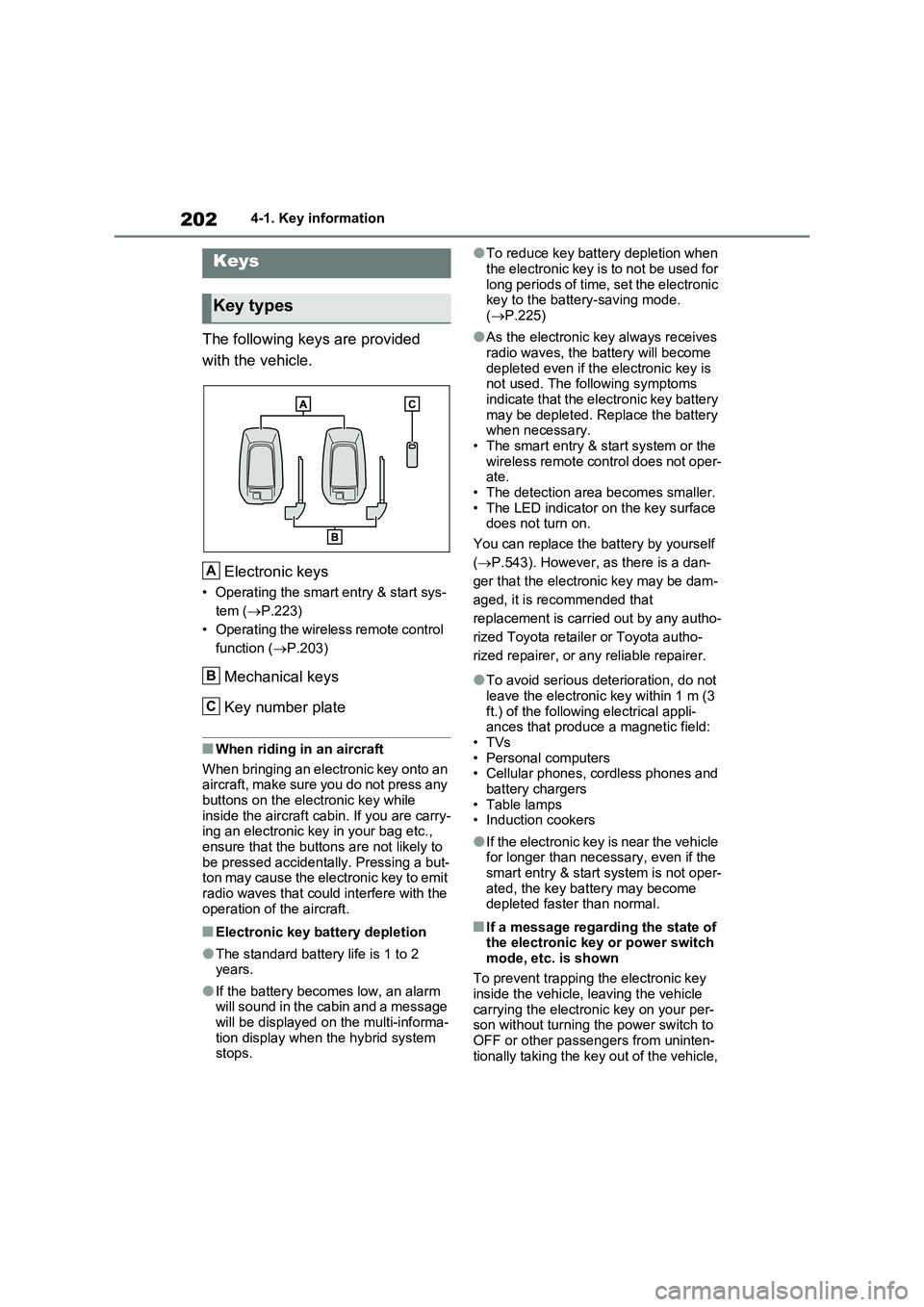
The following keys are provided
with the vehicle.
Electronic keys
• Operating the smart entry & start sys-
tem ( P.223)
• Operating the wireless remote control
function ( P.203)
Mechanical keys
Key number plate
■When riding in an aircraft
When bringing an electronic key onto an aircraft, make sure you do not press any
buttons on the electronic key while inside the aircraft cabin. If you are carry-ing an electronic key in your bag etc.,
ensure that the buttons are not likely to be pressed accidentally. Pressing a but-ton may cause the electronic key to emit
radio waves that could interfere with the operation of the aircraft.
■Electronic key battery depletion
●The standard battery life is 1 to 2 years.
●If the battery becomes low, an alarm will sound in the cabin and a message will be displayed on the multi-informa-
tion display when the hybrid system stops.
●To reduce key battery depletion when
the electronic key is to not be used for long periods of time, set the electronic key to the battery-saving mode.
( P.225)
●As the electronic key always receives
radio waves, the battery will become depleted even if the electronic key is not used. The following symptoms
indicate that the electronic key battery may be depleted. Replace the battery when necessary.
• The smart entry & start system or the wireless remote control does not oper-ate.
• The detection area becomes smaller. • The LED indicator on the key surface does not turn on.
You can replace the battery by yourself
( P.543). However, as there is a dan-
ger that the electronic key may be dam-
aged, it is recommended that
replacement is carried out by any autho-
rized Toyota retailer or Toyota autho-
rized repairer, or any reliable repairer.
●To avoid serious deterioration, do not leave the electronic key within 1 m (3
ft.) of the following electrical appli- ances that produce a magnetic field:•TVs
• Personal computers • Cellular phones, cordless phones and battery chargers
•Table lamps • Induction cookers
●If the electronic key is near the vehicle for longer than necessary, even if the smart entry & start system is not oper-
ated, the key battery may become depleted faster than normal.
■If a message regarding the state of the electronic key or power switch
mode, etc. is shown
To prevent trapping the electronic key inside the vehicle, leaving the vehicle
carrying the electronic key on your per- son without turning the power switch to OFF or other passengers from uninten-
tionally taking the key out of the vehicle,
Keys
Key types
A
B
C
Page 203 of 664
203
4
4-1. Key information
Before driving
etc., a message that prompts the user to
confirm the state of the electronic key or power switch mode may be shown on the multi-information display. In those
cases, follow the instructions on the dis- play immediately.
■If “Key Battery Low Replace Key Battery” is displayed on the multi-
information display
The electronic key has a low battery. Replace the electronic key battery.
( P.543)
■Replacing the battery
P.543
■Confirmation of the registered key number
The number of keys already registered to the vehicle can be confirmed. Ask any authorized Toyota retailer or Toyota
authorized repairer, or any reliable repairer for details.
■If “A New Key has been Registered Contact Your Dealer for Details” is
displayed on the multi-information display
This message will be displayed each
time the driver’s door is opened when the doors are unlocked from the outside for approximately 10 days after a new
electronic key has been registered. If this message is displayed but you have not had a new electronic key regis-
tered, ask any authorized Toyota retailer or Toyota authorized repairer, or any reliable repairer to check if an unknown
electronic key (other than those in your possession) has been registered.
The electronic keys are equipped
with the following wireless remote
control:
NOTICE
■To prevent key damage
●Do not drop the keys, subject them to strong shocks or bend them.
●Do not expose the keys to high temperatures for long periods of time.
●Do not get the keys wet or wash them in an ultrasonic washer, etc.
●Do not attach metallic or magnetic materials to the keys or place the keys close to such materials.
●Do not disassemble the keys.
●Do not attach a sticker or anything else to the surface of the electronic key.
●Do not place the keys near objects that produce magnetic fields, such
as TVs, audio systems and induc- tion cookers.
●Do not place the keys near medical electrical equipment such as low-frequency therapy equipment or
microwave therapy equipment, and do not receive medical attention with the keys on your person.
■Carrying the electronic key on your person
Carry the electronic key 10 cm (3.9 in.) or more away from electric appli-ances that are turned on. Radio
waves emitted from electric appli- ances within 10 cm (3.9 in.) of the electronic key may interfere with the
key, causing the key to not function properly.
■In case of a smart entry & start system malfunction or other key-related problems
P.604
■When an electronic key is lost
P.603
Wireless remote control
Page 205 of 664

205
4
4-2. Opening, closing and locking the doors
Before driving
4-2.Opening, closing and lo cking th e d oors
■Using the entry function
Carry the electronic key to enable
this function.
1 Grip the front door handle to
unlock the doors.
Make sure to touch the sensor on the
back of the handle.
The doors cannot be unlocked for 3
seconds after the doors are locked.
2 Touch the lock sensor (the
indentation on the upper part of
the door handle) to lock the
doors.
Check that the door is securely locked.
■Using the wireless remote
control
1 Locks all the doors
Check that the door is securely locked.
Press and hold to close the side win-
dows and panoramic moon roof (if
equipped).*
2 Unlocks all the doors
Press and hold to open the side win-
dows and panoramic moon roof (if
equipped).*
*: These settings must be customized
at any authorized Toyota retailer or
Toyota authorized repairer, or any
reliable repairer.
■Switching the door unlock function
It is possible to set which doors the entry function unlocks using the wireless
remote control. Operate the switching operation in the vehicle or within approx-imately 1 m (3.2 ft.) of the vehicle.
1 Turn the power switch to OFF.
2 Cancel the intrusion sensor and tilt
sensor of the alarm system to pre- vent unintended triggering of the
alarm while changing the settings. (if equipped) ( P.79)
3 When the indicator light on the key surface is not on, press and hold
or for approximately
5 seconds while pressing and hold-
ing .
Side doors
The vehicle can be locked and
unlocked using the entry func-
tion, wireless remote control,
door lock switches or inside
lock buttons.
Charging port lid and charging
connector will also be locked and
unlocked. ( P.121)
Unlocking and locking the
doors from the outside
Page 206 of 664

2064-2. Opening, closing and locking the doors
The setting changes each time an oper-
ation is performed, as shown below.
(When changing the setting continu-
ously, release the buttons, wait for at
least 5 seconds, and repeat step 3.)
Vehicles with alarm: To prevent unin-
tended triggering of the alarm, unlock
the doors using the wireless remote
control and open and close a door once
after the settings have been changed. (If
a door is not opened within 30 seconds
after is pressed, the doors will
be locked again and the alarm will auto-
matically be set.)
In a case that the alarm is triggered,
immediately stop the alarm. (P.78)
■Impact detection door lock release
system
In the event that the vehicle is subject to
a strong impact, all the doors are
unlocked. Depending on the force of the
impact or the type of accident, however,
the system may not operate.
■Operation signals
Doors: The emergency flashers flash to
indicate that the doors have been
locked/unlocked. (Locked: Once;
Unlocked: Twice)
Side windows and panoramic moon roof
(if equipped): A buzzer sounds to indi-
cate that the side windows and pan-
oramic moon roof are operating.
■Security feature
If a door is not opened within approxi-
mately 30 seconds after the vehicle is
unlocked, the security feature automati-
cally locks the vehicle again. (However,
depending on the location of the elec-
tronic key, the key may be detected as
being in the vehicle. In this case, vehicle
may be unlocked.)
■When the door cannot be locked by
the lock sensor on the upper part of
the door handle
If the door will not lock even when the
topside sensor area is touched, try
touching both the topside and underside
sensor areas at the same time.
When gloves are being worn, remove
the gloves.
■Door lock buzzer
A buzzer sounds continuously for 5 sec-
onds in the following situations. Fully
close all the doors and lock the vehicle
once more.
●If an attempt to lock the doors using
the smart entry & start system is made
when a door other than the door you
are locking is open.
●If an attempt to lock the doors using
the wireless remote control is made
when a door is open.
Multi-information
display/BeepUnlocking function
(Left-hand drive
vehicles)
(Right-hand drive
vehicles)
Exterior: Beeps 3
times
Holding the driver’s
door handle
unlocks only the
driver’s door.
Holding the front
passenger’s door
handle or pressing
the back door
opener switch
unlocks all the
doors.
Exterior: Beeps
twice
Holding either front
door handle or
pressing the back
door opener switch
unlocks all the
doors.
Page 207 of 664
207
4
4-2. Opening, closing and locking the doors
Before driving
■Setting the alarm (if equipped)
Locking the doors will set the alarm sys- tem. ( P.78)
■Conditions affecting the operation of the smart entry & start system or
wireless remote control
P.225
■If the smart entry & start system or the wireless remote control does
not operate properly
●Use the mechanical key to lock and
unlock the doors. ( P.604)
●Replace the key battery with a new
one if it is depleted. ( P.543)
■If the 12-volt battery is discharged
The doors cannot be locked and unlocked using the smart entry & start
system or wireless remote control. Lock or unlock the doors using the mechani-cal key. ( P.604)
■Rear seat reminder function
●In order to remind you not to forget luggage, etc. in the rear seat, when
the power switch is turned to OFF after any of the following conditions are met, a buzzer will sound and a
message will be displayed on the multi-information display for approxi-mately 6 seconds.
• The hybrid system is started within 10 minutes after opening and closing a rear door.
• A rear door has been opened and closed after the hybrid system was started.
However, if a rear door is opened and
then closed within approximately 2 sec-
onds, the rear seat reminder function
may not operate.
●The rear seat reminder function deter- mines that luggage, etc. has been
placed in a rear seat based on open- ing and closing of a rear door. There-fore, depending on the situation, the
rear seat reminder function may not operate and you may still forget lug-gage, etc. in the rear seat, or it may
operate unnecessarily.
●The rear seat reminder function can be enabled/disabled. ( P.629)
■Customization
Settings (e.g. unlocking function using a key) can be changed.(Customizable features: P.633)
WARNING
■To prevent an accident
Observe the following precautions while driving the vehicle.
Failure to do so may result in a door opening and an occupant could be thrown out of the vehicle, resulting in
death or serious injury.
●Ensure that all doors are properly closed.
●Do not pull the inside handle of the doors while driving.
Be especially careful for the front doors, as the doors may be opened even if the inside lock buttons are in
locked position.
●Set the rear door child-protector
locks when children are seated in the rear seats.
■When opening or closing a door
Check the surroundings of the vehicle such as whether the vehicle is on an
incline, whether there is enough space for a door to open and whether a strong wind is blowing. When open-
ing or closing the door, hold the door handle tightly to prepare for any unpredictable movement.