Page 543 of 664
543
7
7-3. Do-it-yourself maintenance
Maintenance and care
■If the key battery is depleted
The following symptoms may occur:
●The smart entry & start system and
wireless remote control will not func- tion properly.
●The operational range will be reduced.
Prepare the following before replac-
ing the battery:
Flathead screwdriver
Small flathead screwdriver
Lithium battery CR2450
■Use a CR2450 lithium battery
●Batteries can be purchased at any
authorized Toyota retailer or Toyota authorized repairer, or any reliable repairer, local electrical appliance
shops or camera stores.
●Replace only with the same or equiva-
lent type recommended by the manu- facturer.
●Dispose of used batteries according to the local laws.
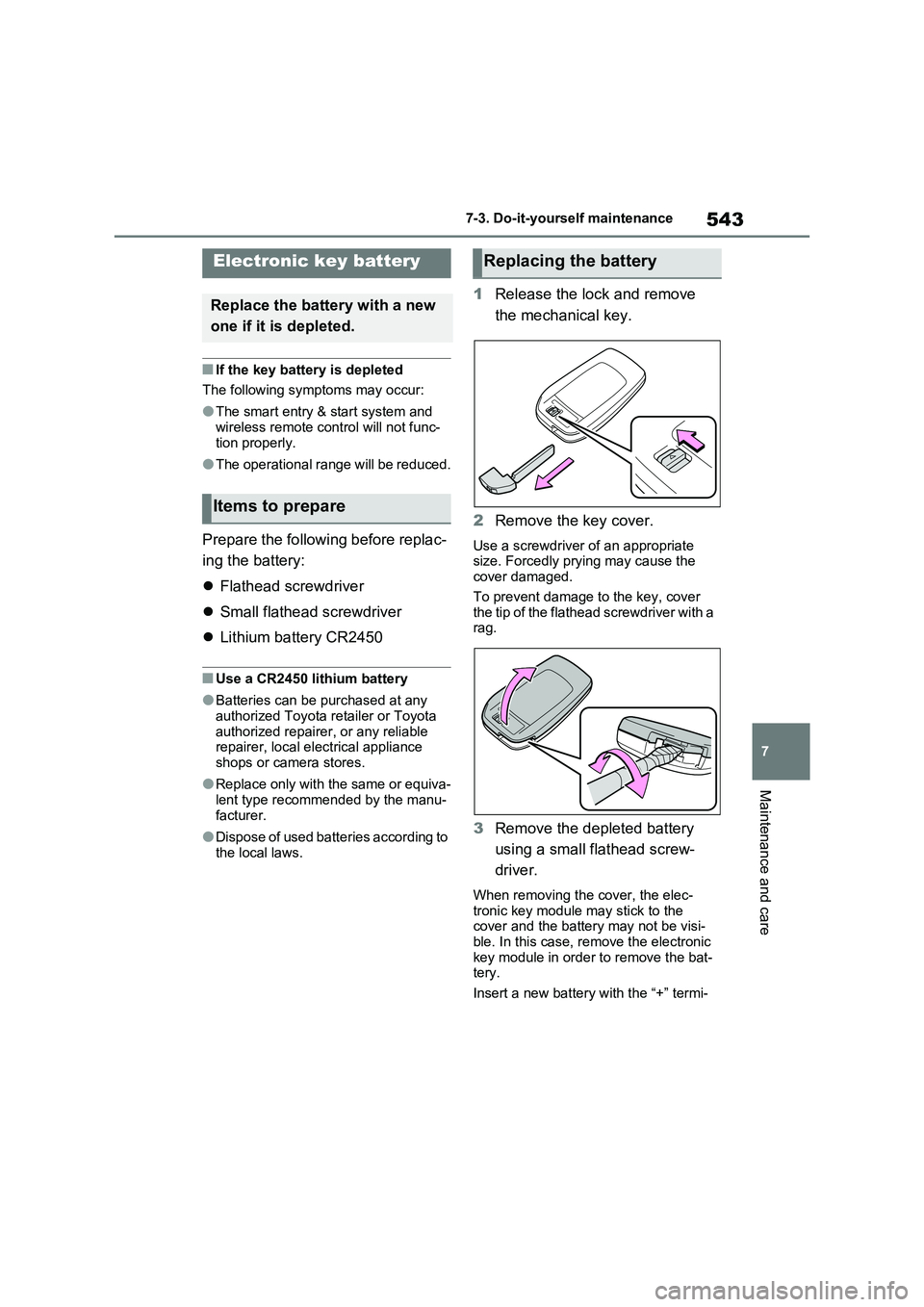
1 Release the lock and remove
the mechanical key.
2 Remove the key cover.
Use a screwdriver of an appropriate size. Forcedly prying may cause the cover damaged.
To prevent damage to the key, cover the tip of the flathead screwdriver with a rag.
3 Remove the depleted battery
using a small flathead screw-
driver.
When removing the cover, the elec- tronic key module may stick to the cover and the battery may not be visi-
ble. In this case, remove the electronic key module in order to remove the bat-tery.
Insert a new battery with the “+” termi-
Electronic key battery
Replace the battery with a new
one if it is depleted.
Items to prepare
Replacing the battery
Page 604 of 664
6048-2. Steps to take in an emergency
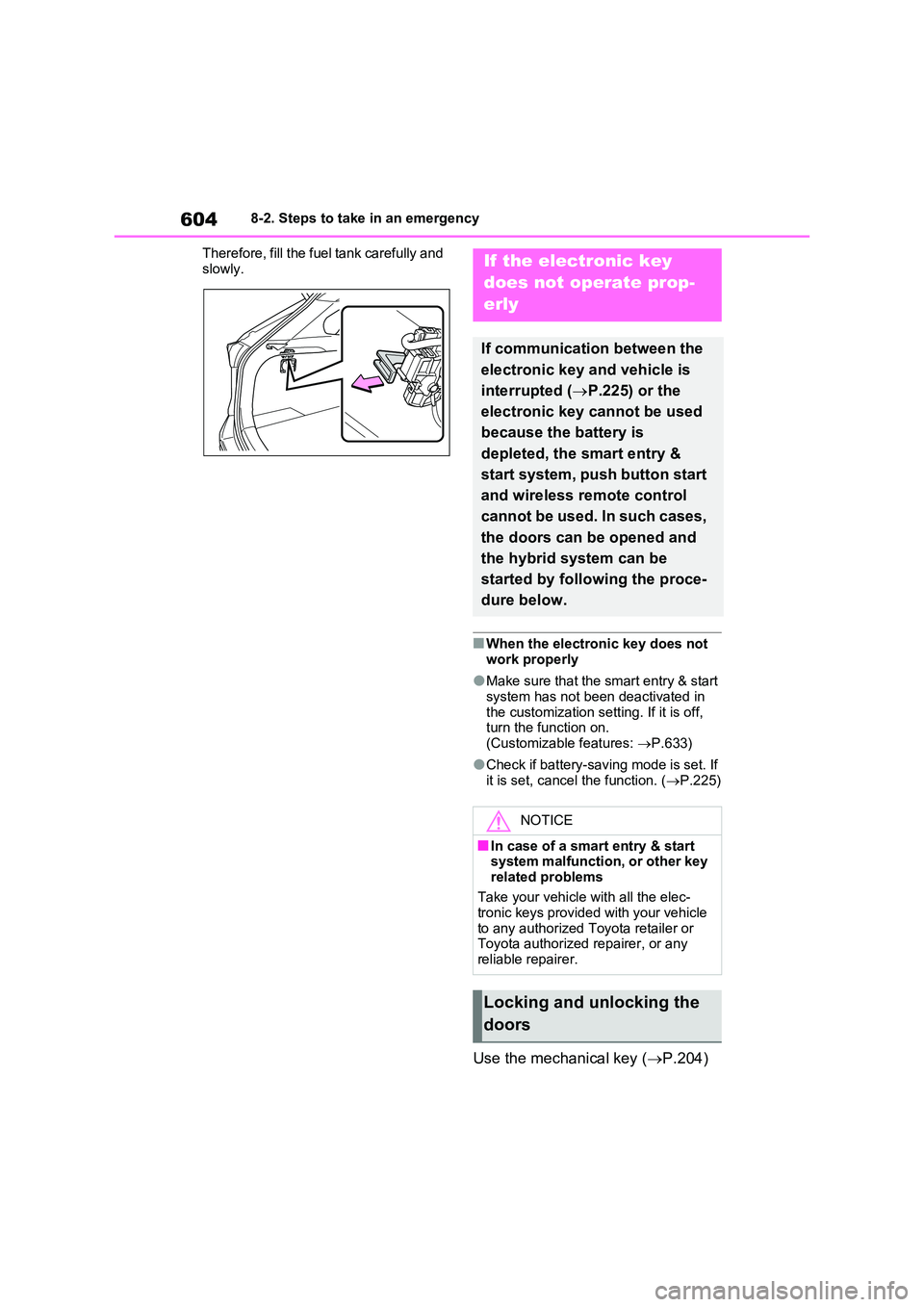
Therefore, fill the fuel tank carefully and
slowly.
■When the electronic key does not work properly
●Make sure that the smart entry & start system has not been deactivated in
the customization setting. If it is off, turn the function on. (Customizable features: P.633)
●Check if battery-saving mode is set. If it is set, cancel the function. ( P.225)
Use the mechanical key (P.204)
If the electronic key
does not operate prop-
erly
If communication between the
electronic key and vehicle is
interrupted ( P.225) or the
electronic key cannot be used
because the battery is
depleted, the smart entry &
start system, push button start
and wireless remote control
cannot be used. In such cases,
the doors can be opened and
the hybrid system can be
started by following the proce-
dure below.
NOTICE
■In case of a smart entry & start system malfunction, or other key
related problems
Take your vehicle with all the elec- tronic keys provided with your vehicle
to any authorized Toyota retailer or Toyota authorized repairer, or any reliable repairer.
Locking and unlocking the
doors
Page 608 of 664
6088-2. Steps to take in an emergency
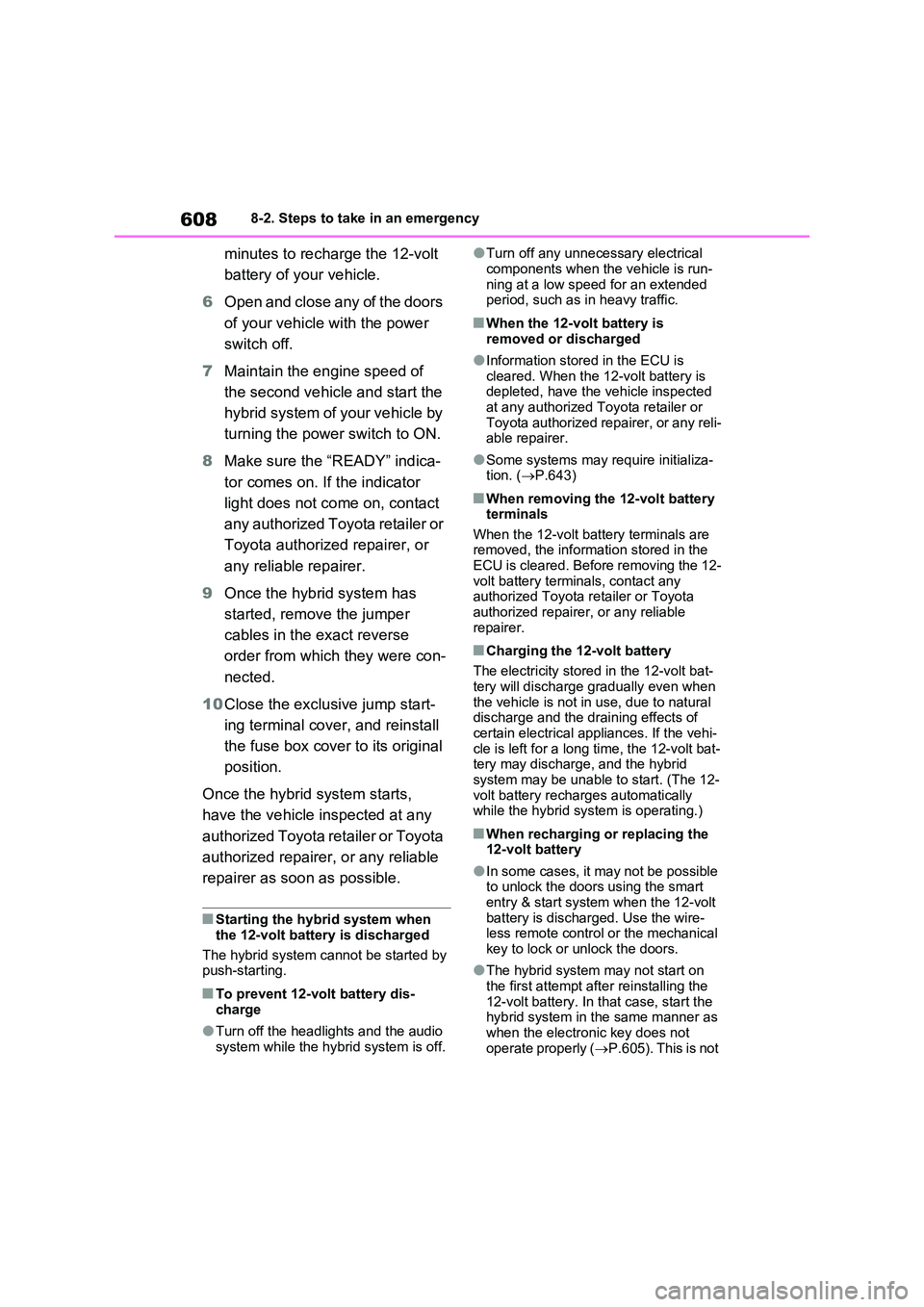
minutes to recharge the 12-volt
battery of your vehicle.
6 Open and close any of the doors
of your vehicle with the power
switch off.
7 Maintain the engine speed of
the second vehicle and start the
hybrid system of your vehicle by
turning the power switch to ON.
8 Make sure the “READY” indica-
tor comes on. If the indicator
light does not come on, contact
any authorized Toyota retailer or
Toyota authorized repairer, or
any reliable repairer.
9 Once the hybrid system has
started, remove the jumper
cables in the exact reverse
order from which they were con-
nected.
10 Close the exclusive jump start-
ing terminal cover, and reinstall
the fuse box cover to its original
position.
Once the hybrid system starts,
have the vehicle inspected at any
authorized Toyota retailer or Toyota
authorized repairer, or any reliable
repairer as soon as possible.
■Starting the hybrid system when
the 12-volt battery is discharged
The hybrid system cannot be started by push-starting.
■To prevent 12-volt battery dis-
charge
●Turn off the headlights and the audio
system while the hybrid system is off.
●Turn off any unnecessary electrical
components when the vehicle is run- ning at a low speed for an extended period, such as in heavy traffic.
■When the 12-volt battery is
removed or discharged
●Information stored in the ECU is
cleared. When the 12-volt battery is depleted, have the vehicle inspected at any authorized Toyota retailer or
Toyota authorized repairer, or any reli- able repairer.
●Some systems may require initializa-tion. ( P.643)
■When removing the 12-volt battery terminals
When the 12-volt battery terminals are removed, the information stored in the ECU is cleared. Before removing the 12-
volt battery terminals, contact any authorized Toyota retailer or Toyota authorized repairer, or any reliable
repairer.
■Charging the 12-volt battery
The electricity stored in the 12-volt bat- tery will discharge gradually even when
the vehicle is not in use, due to natural discharge and the draining effects of certain electrical appliances. If the vehi-
cle is left for a long time, the 12-volt bat- tery may discharge, and the hybrid system may be unable to start. (The 12-
volt battery recharges automatically while the hybrid system is operating.)
■When recharging or replacing the 12-volt battery
●In some cases, it may not be possible to unlock the doors using the smart
entry & start system when the 12-volt battery is discharged. Use the wire-less remote control or the mechanical
key to lock or unlock the doors.
●The hybrid system may not start on
the first attempt after reinstalling the 12-volt battery. In that case, start the hybrid system in the same manner as
when the electronic key does not operate properly ( P.605). This is not
Page 633 of 664
633
9 9-2. Customization
Vehicle specifications
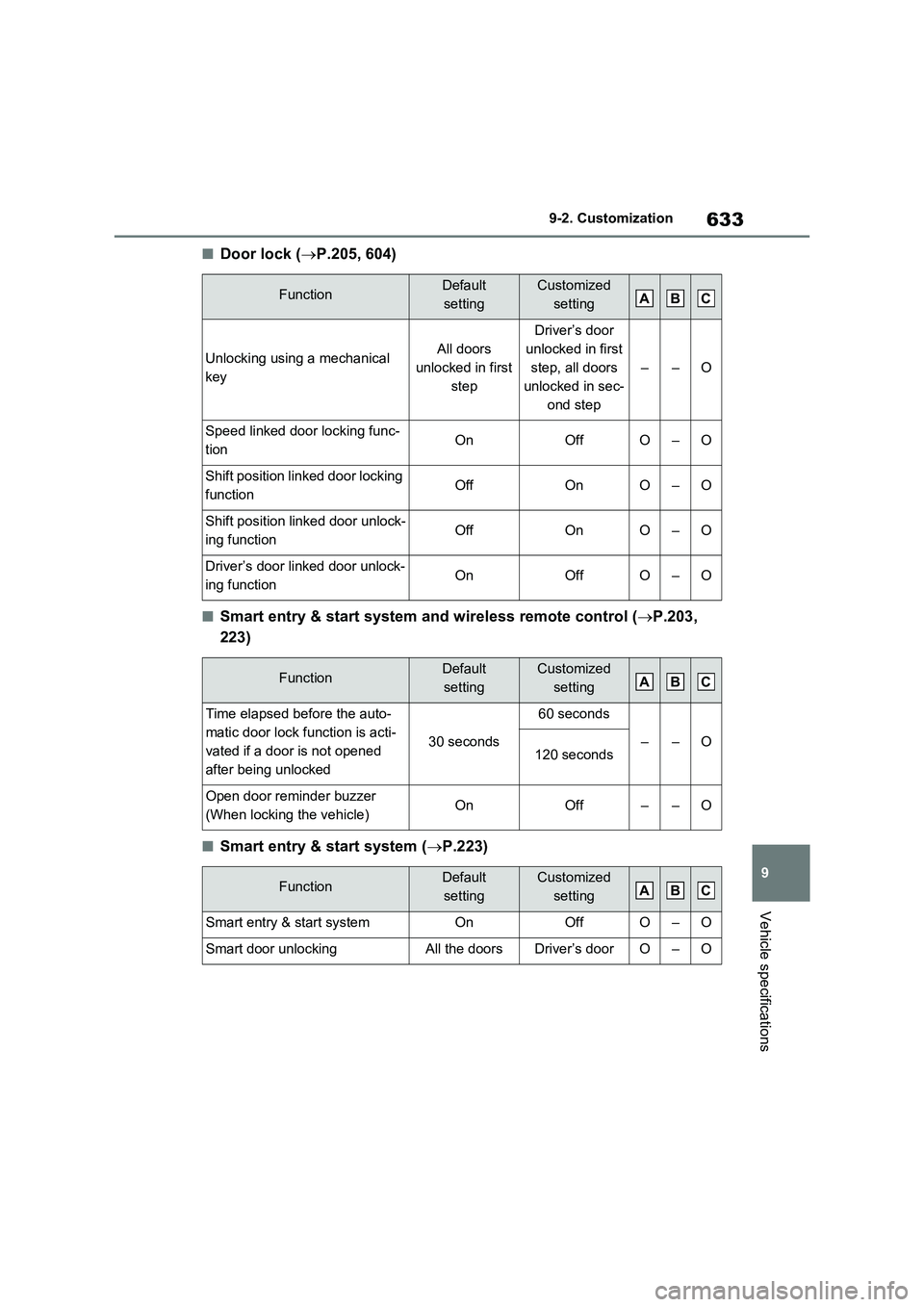
■Door lock (P.205, 604)
■Smart entry & start system and wireless remote control (P.203,
223)
■Smart entry & start system (P.223)
FunctionDefault
settingCustomized
setting
Unlocking using a mechanical
keyAll doors
unlocked in first
step
Driver’s door
unlocked in first
step, all doors
unlocked in sec-
ond step
––O
Speed linked door locking func-
tionOnOffO–O
Shift position linked door locking
functionOffOnO–O
Shift position linked door unlock-
ing functionOffOnO–O
Driver’s door linked door unlock-
ing functionOnOffO–O
FunctionDefault
settingCustomized
setting
Time elapsed before the auto-
matic door lock function is acti-
vated if a door is not opened
after being unlocked
30 seconds
60 seconds
––O120 seconds
Open door reminder buzzer
(When locking the vehicle)OnOff––O
FunctionDefault
settingCustomized
setting
Smart entry & start systemOnOffO–O
Smart door unlockingAll the doorsDriver’s doorO–O
ABC
ABC
ABC
Page 634 of 664
6349-2. Customization
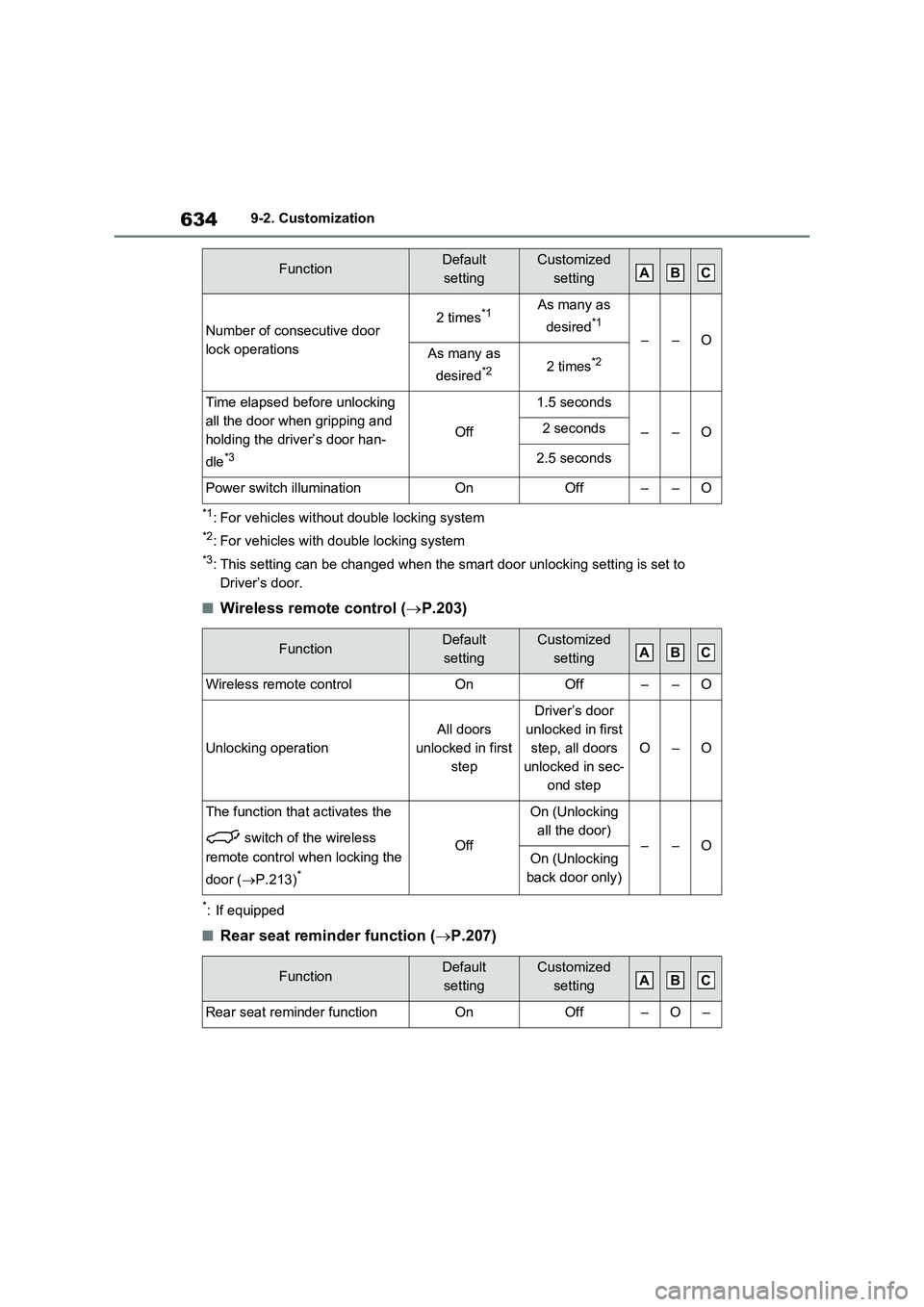
*1: For vehicles without double locking system
*2: For vehicles with double locking system
*3: This setting can be changed when the smart door unlocking setting is set to
Driver’s door.
■Wireless remote control (P.203)
*: If equipped
■Rear seat reminder function (P.207)
Number of consecutive door
lock operations2 times*1As many as
desired
*1
––OAs many as
desired
*22 times*2
Time elapsed before unlocking
all the door when gripping and
holding the driver’s door han-
dle
*3
Off
1.5 seconds
––O2 seconds
2.5 seconds
Power switch illuminationOnOff––O
FunctionDefault
settingCustomized
setting
Wireless remote controlOnOff––O
Unlocking operation
All doors
unlocked in first
step
Driver’s door
unlocked in first
step, all doors
unlocked in sec-
ond step
O–O
The function that activates the
switch of the wireless
remote control when locking the
door (P.213)
*
Off
On (Unlocking
all the door)
––OOn (Unlocking
back door only)
FunctionDefault
settingCustomized
setting
Rear seat reminder functionOnOff–O–
FunctionDefault
settingCustomized
settingABC
ABC
ABC
Page 635 of 664
635
9 9-2. Customization
Vehicle specifications
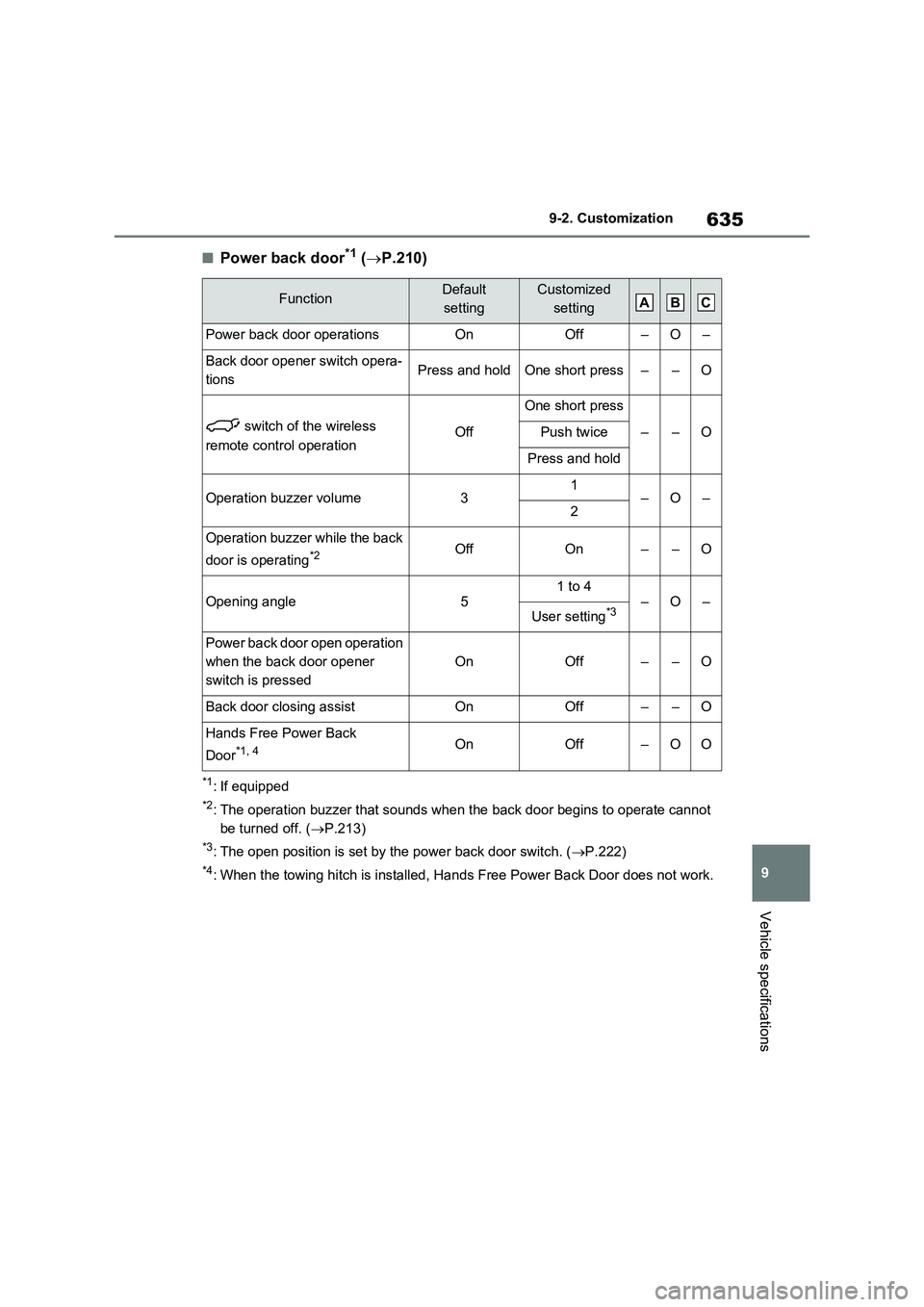
■Power back door*1 (P.210)
*1: If equipped
*2: The operation buzzer that sounds when the back door begins to operate cannot
be turned off. (P.213)
*3: The open position is set by the power back door switch. (P.222)
*4: When the towing hitch is installed, Hands Free Power Back Door does not work.
FunctionDefault
settingCustomized
setting
Power back door operationsOnOff–O–
Back door opener switch opera-
tionsPress and holdOne short press––O
switch of the wireless
remote control operationOff
One short press
––OPush twice
Press and hold
Operation buzzer volume31–O–2
Operation buzzer while the back
door is operating
*2OffOn––O
Opening angle51 to 4–O–User setting*3
Power back door open operation
when the back door opener
switch is pressed
OnOff––O
Back door closing assistOnOff––O
Hands Free Power Back
Door
*1, 4OnOff–OO
ABC
Page 636 of 664
6369-2. Customization
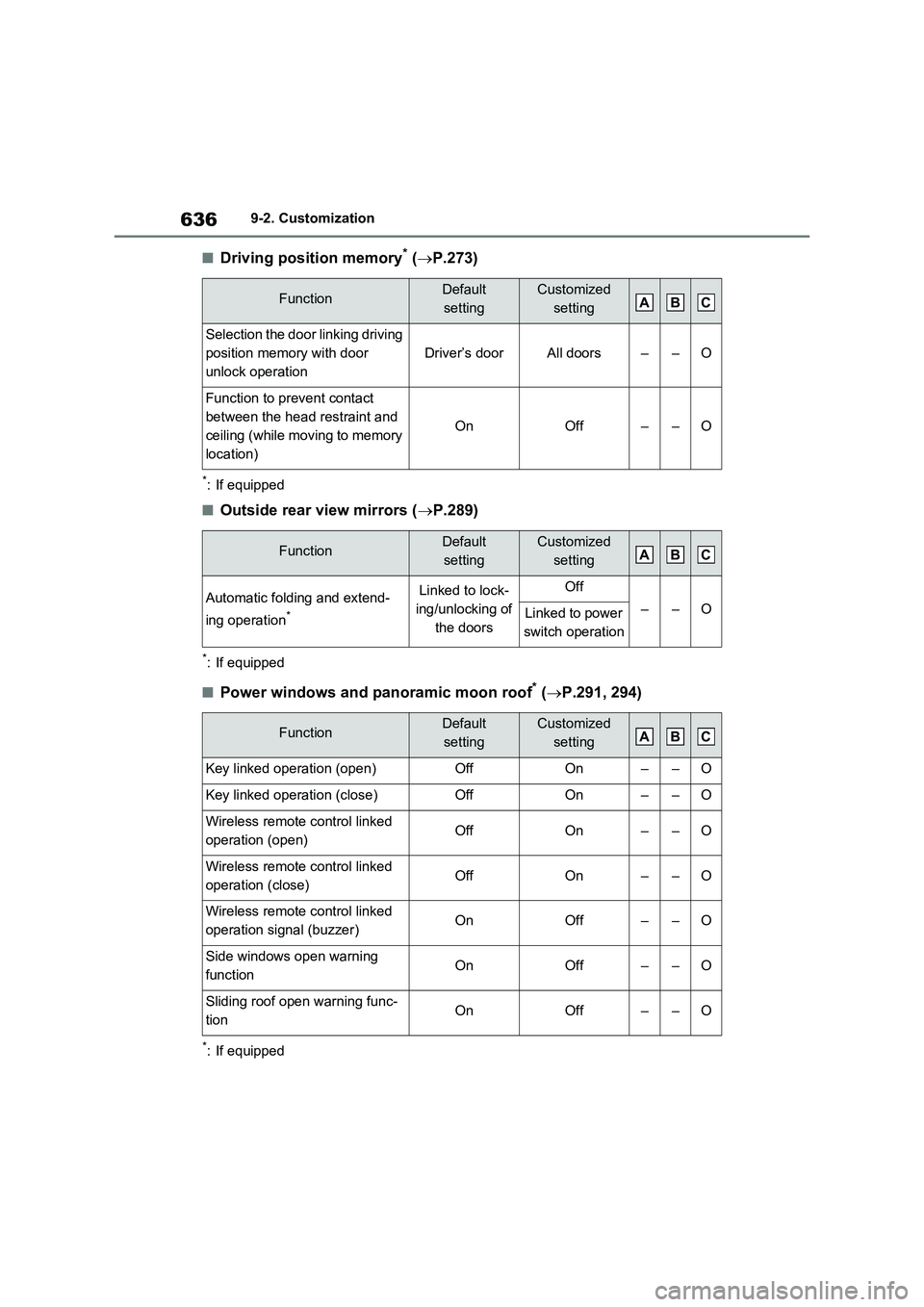
■Driving position memory* (P.273)
*: If equipped
■Outside rear view mirrors (P.289)
*: If equipped
■Power windows and panoramic moon roof* (P.291, 294)
*: If equipped
FunctionDefault
settingCustomized
setting
Selection the door linking driving
position memory with door
unlock operation
Driver’s doorAll doors––O
Function to prevent contact
between the head restraint and
ceiling (while moving to memory
location)
OnOff––O
FunctionDefault
settingCustomized
setting
Automatic folding and extend-
ing operation
*
Linked to lock-
ing/unlocking of
the doorsOff
––OLinked to power
switch operation
FunctionDefault
settingCustomized
setting
Key linked operation (open)OffOn––O
Key linked operation (close)OffOn––O
Wireless remote control linked
operation (open)OffOn––O
Wireless remote control linked
operation (close)OffOn––O
Wireless remote control linked
operation signal (buzzer)OnOff––O
Side windows open warning
functionOnOff––O
Sliding roof open warning func-
tion OnOff––O
ABC
ABC
ABC
Page 641 of 664
641
9 9-2. Customization
Vehicle specifications
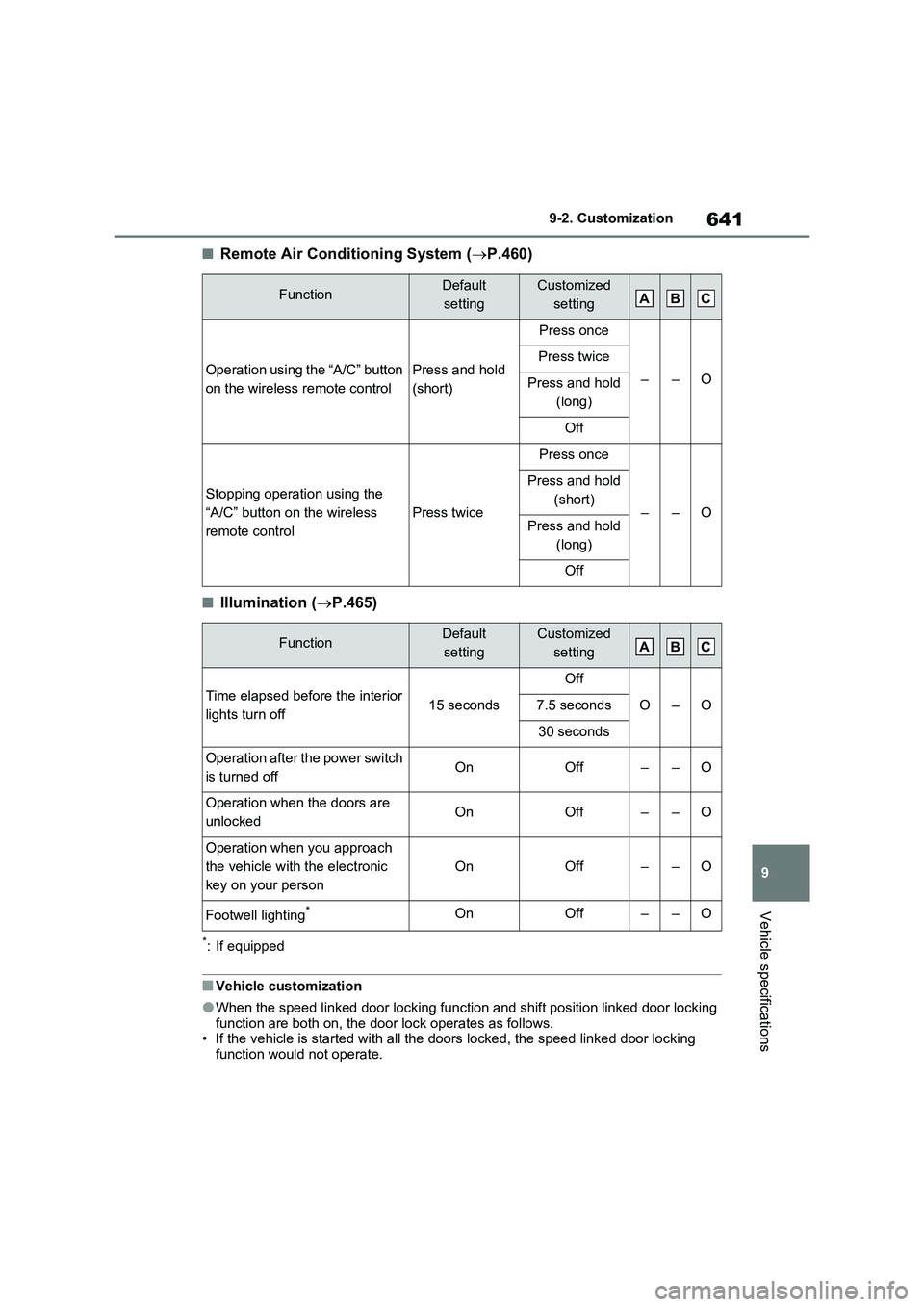
■Remote Air Conditioning System (P.460)
■Illumination (P.465)
*: If equipped
■Vehicle customization
●When the speed linked door locking function and shift position linked door locking
function are both on, the door lock operates as follows.
• If the vehicle is started with all the doors locked, the speed linked door locking
function would not operate.
FunctionDefault
settingCustomized
setting
Operation using the “A/C” button
on the wireless remote controlPress and hold
(short)
Press once
––O
Press twice
Press and hold
(long)
Off
Stopping operation using the
“A/C” button on the wireless
remote control
Press twice
Press once
––O
Press and hold
(short)
Press and hold
(long)
Off
FunctionDefault
settingCustomized
setting
Time elapsed before the interior
lights turn off15 seconds
Off
O–O7.5 seconds
30 seconds
Operation after the power switch
is turned offOnOff––O
Operation when the doors are
unlockedOnOff––O
Operation when you approach
the vehicle with the electronic
key on your person
OnOff––O
Footwell lighting*OnOff––O
ABC
ABC