2011 TOYOTA VERSO S lock
[x] Cancel search: lockPage 319 of 664
319
5
5-2. Driving procedures
Driving
power switch to OFF, the hybrid sys-
tem may not start in some cases. After turning the power switch to OFF, please wait a few seconds before
restarting the hybrid system.
■Customization
If the smart entry & start system has been deactivated in a customized set-
ting, refer to P.605.
1 Stop the vehicle completely.
2 If the parking brake is in manual
mode, set the parking brake.
( P.326)
Check the parking brake indicator is
illuminated.
3 Shift the shift lever to P.
4 Press the power switch shortly
and firmly.
The hybrid system will stop, and the meter display will be extinguished.
Release the shift lever when pressing the power switch.
5 Release the brake pedal and
check that “ACCESSORY” or
“IGNITION ON” is not shown on
the multi-information display.
WARNING
■When starting the hybrid system
Always start the hybrid system while
sitting in the driver’s seat. Do not depress the accelerator pedal while starting the hybrid system under any
circumstances. Doing so may cause an accident resulting in death or serious injury.
■Caution while driving
If hybrid system failure occurs while
the vehicle is moving, do not lock or open the doors until the vehicle reaches a safe and complete stop.
Activation of the steering lock in this circumstance may lead to an acci-dent, resulting in death or serious
injury.
NOTICE
■When starting the hybrid system
If the hybrid system becomes difficult to start, have your vehicle checked by
any authorized Toyota retailer or Toyota authorized repairer, or any reliable repairer immediately.
■Symptoms indicating a malfunc-tion with the power switch
If the power switch seems to be oper- ating somewhat differently than usual, such as the switch sticking slightly,
there may be a malfunction. Contact any authorized Toyota retailer or Toyota authorized repairer, or any
reliable repairer immediately.
Stopping the hybrid system
WARNING
■Stopping the hybrid system in an emergency
●If you want to stop the hybrid sys-tem in an emergency while driving the vehicle, press and hold the
power switch for more than 2 sec- onds, or press it briefly 3 times or more in succession. ( P.560)
However, do not touch the power switch while driving except in an emergency. Turning the hybrid sys-
tem off while driving will not cause a loss of steering or braking control. However, power assist for the
steering wheel may be lost making it difficult to steer smoothly before stopping the vehicle depending on
the remaining charge in the 12-volt battery or usage conditions. In this situation, you should pull over and
stop the vehicle as soon as it is safe to do so.
Page 323 of 664
323
5
5-2. Driving procedures
Driving
shifted from P, the brake pedal must
be depressed before the shift release
button is pushed. If the shift release
button is pushed first, the shift lock
will not be released.
■Shift lock system
The shift lock system is a system to pre- vent accidental operation of the shift
lever in starting. The shift lever can be shifted from P only when the power switch is in ON, the
brake pedal is depressed and the shift release button is pushed.
■If the shift lever cannot be shifted from P
First, check whether the brake pedal is being depressed.If the shift lever cannot be shifted even
though the brake pedal is depressed and the shift release button is pushed, there may be a problem with the shift
lock system. Have the vehicle inspected by any authorized Toyota retailer or Toyota authorized repairer, or any reli-
able repairer immediately. The following steps may be used as an emergency measure to ensure that the
shift lever can be shifted.
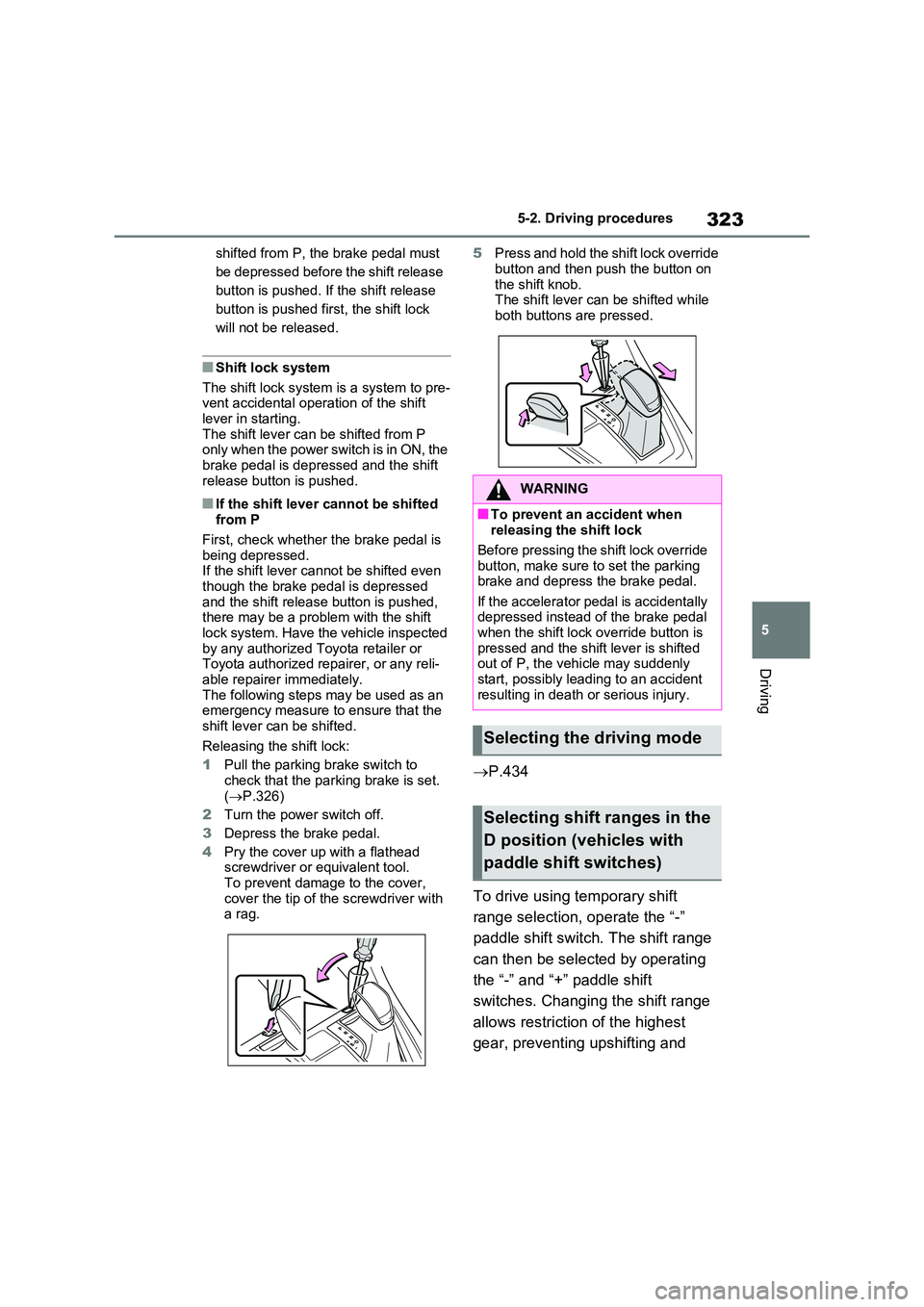
Releasing the shift lock:
1 Pull the parking brake switch to
check that the parking brake is set. ( P.326)
2 Turn the power switch off.
3 Depress the brake pedal.
4 Pry the cover up with a flathead screwdriver or equivalent tool.
To prevent damage to the cover, cover the tip of the screwdriver with a rag.
5 Press and hold the shift lock override
button and then push the button on the shift knob.The shift lever can be shifted while
both buttons are pressed.
P.434
To drive using temporary shift
range selection, operate the “-”
paddle shift switch. The shift range
can then be selected by operating
the “-” and “+” paddle shift
switches. Changing the shift range
allows restriction of the highest
gear, preventing upshifting and
WARNING
■To prevent an accident when releasing the shift lock
Before pressing the shift lock override button, make sure to set the parking brake and depress the brake pedal.
If the accelerator pedal is accidentally depressed instead of the brake pedal when the shift lock override button is
pressed and the shift lever is shifted out of P, the vehicle may suddenly start, possibly leading to an accident
resulting in death or serious injury.
Selecting the driving mode
Selecting shift ranges in the
D position (vehicles with
paddle shift switches)
Page 332 of 664

3325-3. Operating the lights and wipers
5-3.Operating the lights and wipers
Operating the switch turns
on the lights as follows:
1 The front position, tail,
license plate and instrument
panel lights turn on.
2 The headlights and all lights
listed above turn on.
3 The headlights, daytime
running lights ( P.332) and all
the lights listed above turn on
and off automatically.
■AUTO mode can be used when
The power switch is in ON.
■Daytime running light system
To make your vehicle more visible to
other drivers during daytime driving, the
daytime running lights turn on automati-
cally whenever the hybrid system is started and the parking brake is released with the headlight switch in the
position. (Illuminate brighter than
the front position lights.) Daytime run- ning lights are not designed for use at
night.
■Headlight control sensor
The sensor may not function properly if an object is placed on the sensor, or
anything that blocks the sensor is affixed to the windshield. Doing so inter-feres with the sensor detecting the level
of ambient light and may cause the automatic headlight system to malfunc-tion.
■Automatic light off system
●When the light switch is in or
position: The headlights and front fog
lights turn off after the power switch is turned to ACC or OFF.
●When the light switch is in posi-
tion: The headlights and all lights turn off after the power switch is turned to
ACC or OFF.
To turn the lights on again, turn the power switch to ON, or turn the light
switch to position once and then
back to or position.
■Light reminder buzzer
A buzzer sounds when the driver’s door
is opened while the lights are turned on
with the power switch in ACC or OFF.
Headlight switch
The headlights can be oper-
ated manually or automati-
cally.
Turning on the headlights
Page 339 of 664

339
5
5-3. Operating the lights and wipers
Driving
■The windshield wipers and washer can be operated when
The power switch is in ON.
■Effects of vehicle speed on wiper operation
With low speed windshield wiper opera-
tion selected, wiper operation will be switched from low speed to intermittent wiper operation when the vehicle is sta-
tionary. (However, when the sensor sen- sitivity is adjusted to the highest level, the mode will not switch.)
■Raindrop sensor
●The raindrop sensor judges the
amount of raindrops.* An optical sen- sor is adopted. It may not operate properly when sunlight from the rising
or setting of the sun intermittently strikes the windshield, or if bugs, etc. are present on the windshield.
●If the wiper switch is turned to the “AUTO” position while the power
switch is in ON, the wipers will operate once to show that “AUTO” mode is activated.
●If the wiper sensitivity is adjusted to higher, the wiper may operate once to
indicate the change of sensitivity.
●If the temperature of the raindrop sen-
sor is 85°C (185°F) or higher, or -15°C (5°F) or lower, the automatic opera-tion may not occur. In this case, oper-
ate the wipers in any mode other than “AUTO”.*: It may be located on the opposite side
depending on the target region.
■If no windshield washer fluid
sprays
Check that the washer nozzles are not blocked if there is washer fluid in the
windshield washer fluid reservoir.
■Washer nozzle heaters (if equipped)
The washer nozzle heaters operate to
prevent frozen nozzle when the outside temperature is 5°C (41°F) or less and the power switch is in ON.
WARNING
■Caution regarding the use of windshield wipers in “AUTO” mode
The windshield wipers may operate unexpectedly if the sensor is touched or the windshield is subject to vibra-
tion in “AUTO” mode. Take care that your fingers or anything else does not become caught in the windshield wip-
ers.
■Caution regarding the use of
washer fluid
When it is cold, do not use the washer fluid until the windshield becomes
warm. The fluid may freeze on the windshield and cause low visibility. This may lead to an accident, result-
ing in death or serious injury.
■When the washer nozzle heaters
are operating (if equipped)
Do not touch the area around the washer nozzle, as they can become
very hot and burn you.
NOTICE
■When the washer fluid tank is empty
Do not operate the switch continually
as the washer fluid pump may over- heat.
Page 340 of 664
3405-3. Operating the lights and wipers
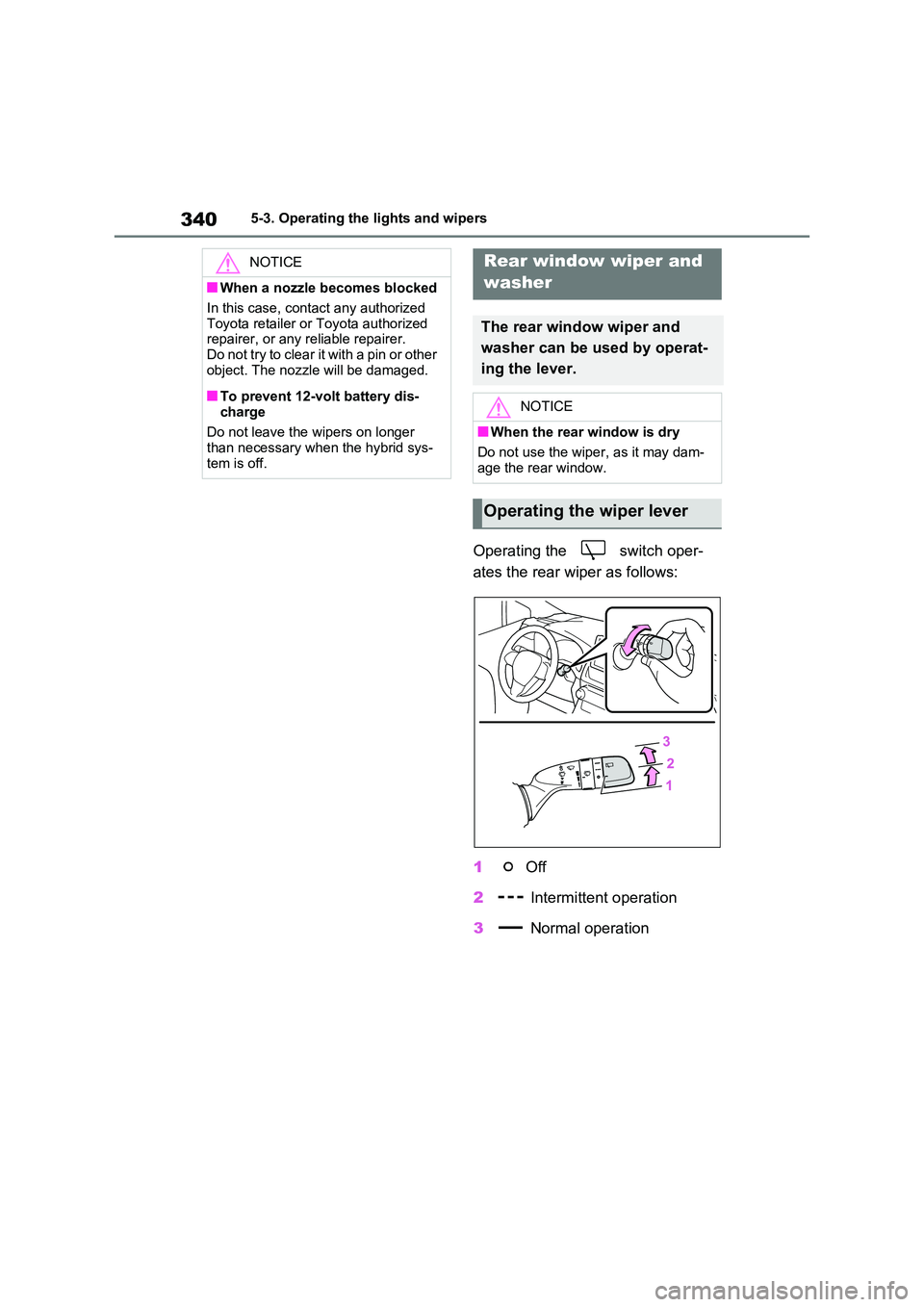
Operating the switch oper-
ates the rear wiper as follows:
1 Off
2 Intermittent operation
3 Normal operation
NOTICE
■When a nozzle becomes blocked
In this case, contact any authorized
Toyota retailer or Toyota authorized repairer, or any reliable repairer.Do not try to clear it with a pin or other
object. The nozzle will be damaged.
■To prevent 12-volt battery dis-
charge
Do not leave the wipers on longer than necessary when the hybrid sys-
tem is off.
Rear window wiper and
washer
The rear window wiper and
washer can be used by operat-
ing the lever.
NOTICE
■When the rear window is dry
Do not use the wiper, as it may dam-
age the rear window.
Operating the wiper lever
Page 341 of 664
341
5
5-3. Operating the lights and wipers
Driving
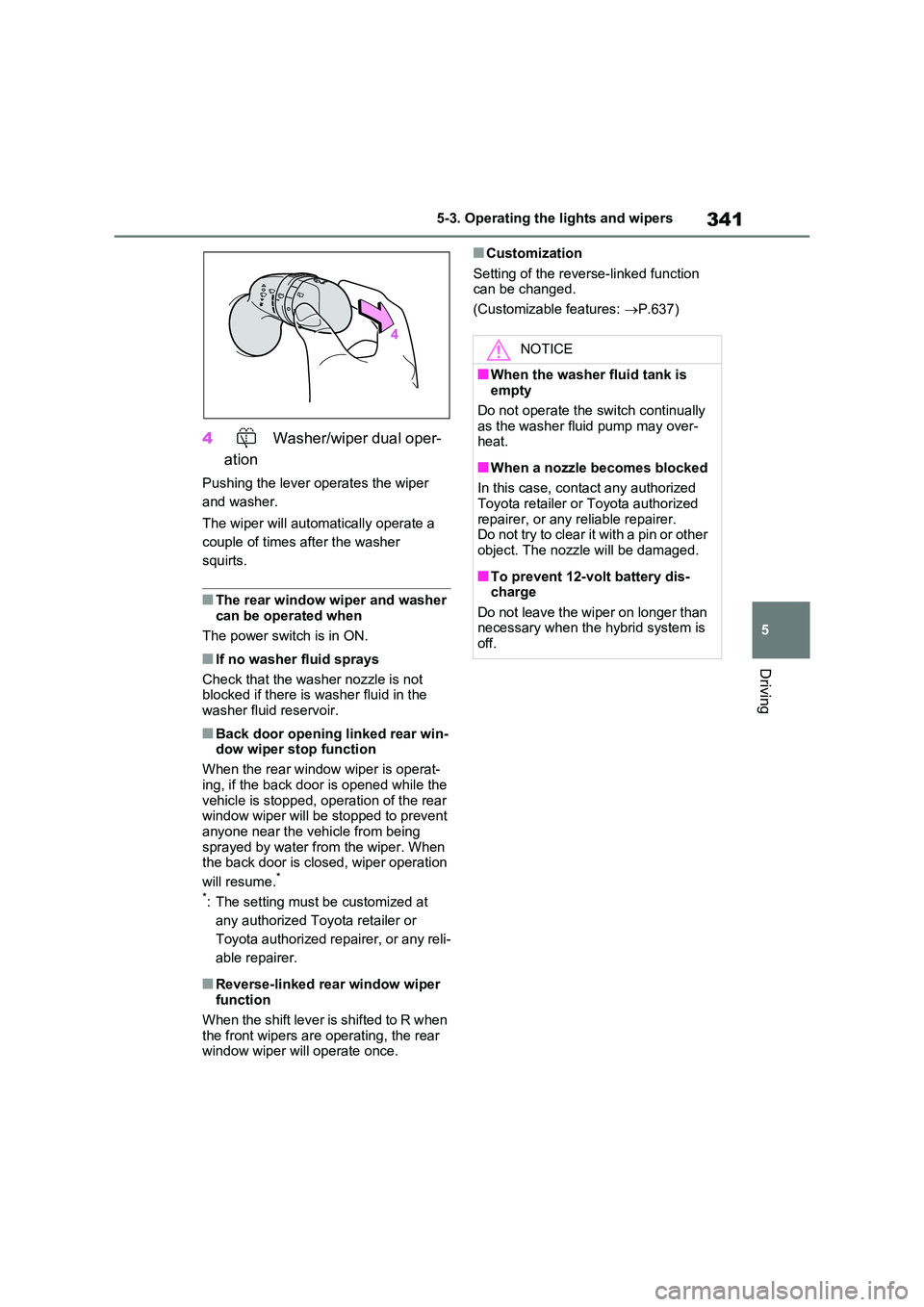
4 Washer/wiper dual oper-
ation
Pushing the lever operates the wiper
and washer.
The wiper will automatically operate a
couple of times after the washer
squirts.
■The rear window wiper and washer can be operated when
The power switch is in ON.
■If no washer fluid sprays
Check that the washer nozzle is not blocked if there is washer fluid in the
washer fluid reservoir.
■Back door opening linked rear win- dow wiper stop function
When the rear window wiper is operat-
ing, if the back door is opened while the vehicle is stopped, operation of the rear window wiper will be stopped to prevent
anyone near the vehicle from being sprayed by water from the wiper. When the back door is closed, wiper operation
will resume.*
*: The setting must be customized at
any authorized Toyota retailer or
Toyota authorized repairer, or any reli-
able repairer.
■Reverse-linked rear window wiper function
When the shift lever is shifted to R when
the front wipers are operating, the rear window wiper will operate once.
■Customization
Setting of the reverse-linked function can be changed.
(Customizable features: P.637)
NOTICE
■When the washer fluid tank is empty
Do not operate the switch continually
as the washer fluid pump may over- heat.
■When a nozzle becomes blocked
In this case, contact any authorized Toyota retailer or Toyota authorized
repairer, or any reliable repairer. Do not try to clear it with a pin or other object. The nozzle will be damaged.
■To prevent 12-volt battery dis-charge
Do not leave the wiper on longer than necessary when the hybrid system is off.
Page 361 of 664

361
5 5-5. Using the driving support systems
Driving
• If a vehicle ahead has extremely high
ground clearance
• If a vehicle ahead is carrying a load
which protrudes past its rear bumper
• If a vehicle ahead is irregularly
shaped, such as a tractor or side car
• If a vehicle ahead is a child sized bicy-
cle, a bicycle that is carrying a large
load, a bicycle ridden by more than
one person, or a uniquely shaped
bicycle (bicycle with a child seat, tan-
dem bicycle, etc.)
• If a pedestrian/or the riding height of a
bicyclist ahead is shorter than approx-
imately 1 m (3.2 ft.) or taller than
approximately 2 m (6.5 ft.)
• If a pedestrian/bicyclist is wearing
oversized clothing (a rain coat, long
skirt, etc.), making their silhouette
obscure
• If a pedestrian is bending forward or
squatting or bicyclist is bending for-
ward
• If a pedestrian/bicyclist is moving fast
• If a pedestrian is pushing a stroller,
wheelchair, bicycle or other vehicle
• When driving in inclement weather
such as heavy rain, fog, snow or a
sandstorm
• When driving through steam or smoke
• When the surrounding area is dim,
such as at dawn or dusk, or while at
night or in a tunnel, making a detect-
able object appear to be nearly the same color as its surroundings
• When driving in a place where the sur-
rounding brightness changes sud-
denly, such as at the entrance or exit
of a tunnel
• After the hybrid system has started
the vehicle has not been driven for a
certain amount of time
• While making a left/right turn and for a
few seconds after making a left/right
turn
• While driving on a curve and for a few
seconds after driving on a curve
• If your vehicle is skidding
• If the front of the vehicle is raised or
lowered
• If the wheels are misaligned
• If a wiper blade is blocking the front
camera
• The vehicle is being driven at
extremely high speeds
• When driving on a hill
• If the radar sensor or front camera is
misaligned
●In some situations such as the follow-
ing, sufficient braking force may not
be obtained, preventing the system
from performing properly:
• If the braking functions cannot operate
to their full extent, such as when the
brake parts are extremely cold,
extremely hot, or wet
• If the vehicle is not properly main-
tained (brakes or tires are excessively
worn, improper tire inflation pressure,
etc.)
• When the vehicle is being driven on a
gravel road or other slippery surface
■If VSC is disabled
●If VSC is disabled (P.439), the pre-
collision brake assist and pre-collision
braking functions are also disabled.
Page 438 of 664
4385-5. Using the driving support systems
■ECB (Electronically Con-
trolled Brake System)
The electronically controlled sys-
tem generates braking force corre-
sponding to the brake operation
■ABS (Anti-lock Brake System)
Helps to prevent wheel lock when
the brakes are applied suddenly, or
if the brakes are applied while driv-
ing on a slippery road surface
■Brake assist
Generates an increased level of
braking force after the brake pedal
is depressed when the system
detects a panic stop situation
■VSC (Vehicle Stability Control)
Helps the driver to control skidding
when swerving suddenly or turning
on slippery road surfaces.
■VSC+ (Vehicle Stability Con-
trol+)
Provides cooperative control of the
ABS, TRC, VSC and EPS.
Helps to maintain directional stabil-
ity when swerving on slippery road
surfaces by controlling steering per-
formance.
■Trailer Sway Control
Helps the driver to control trailer
sway by selectively applying brake
pressure for individual wheels and
reducing driving torque when trailer
sway is detected.
■TRC (Traction Control)
Helps to maintain drive power and
prevent the drive wheels from spin-
ning when starting the vehicle or
accelerating on slippery roads
■Active Cornering Assist (ACA)
Helps to prevent the vehicle from
drifting to the outer side by perform-
ing inner wheel brake control when
attempting to accelerate while turn-
ing
■Hill-start assist control
Helps to reduce the backward
movement of the vehicle when
starting on an uphill
■EPS (Electric Power Steering)
Employs an electric motor to
reduce the amount of effort needed
to turn the steering wheel
Driving assist systems
To keep driving safety and per-
formance, the following sys-
tems operate automatically in
response to various driving sit-
uations. Be aware, however,
that these systems are supple-
mentary and should not be
relied upon too heavily when
operating the vehicle.
Summary of the driving
assist systems