2011 SKODA YETI lights
[x] Cancel search: lightsPage 128 of 252

CD change
Fig. 113 The CD changer
The CD changer for the radio and radio navigation system is housed on the left-
hand side of the luggage compartment.
Insert a CD
– Touch the button A
⇒ fig. 113 and guide the CD (compact disc) into the CD-
case B . The CD is automatically loaded onto the lowest free position in the CD
changer. The LED in the corresponding button D stops flashing.
Fill CD changer with CDs
– Hold the button A pressed and guide the CDs one after the other (maximum
6
CDs) into the CD case B . The LEDs in the buttons
D are no longer flashing.
Inserting a CD to one definite position
– Press on the button A . The LEDs in the buttons
D light up at the memory
spaces, which are already assigned and flash in the case of free memory
spaces.
– Touch the button D and insert the CD into the CD slot
B .
Ejecting a CD
– Briefly press on the button C , in order to eject a CD. For assigned memory
spaces, now the LEDs light up in the buttons D .
– Touch the corresponding button D . The CD is ejected.
Ejecting all CDs
– Hold the button C pressed for more than 2 seconds, in order to eject the CDs.
All CDs in the CD-changer are ejected consecutively. Note
● Always guide the CD into the CD-case B with the printed side pointing up-
wards.
● Never push the CD with force into the CD-case as the insertion is performed
automatically.
● After loading a CD into the CD-changer, you must wait until the LED of the cor-
responding button D lights up. Then the CD-case
B is free to load the next CD.
● If you have selected a position, on which a CD is already located, this CD will be
ejected. Take out the ejected CD and load the desired CD.
DVD-preinstallation Fig. 114 Seat backrest - left front seat/right front seat
Description
Openings for attachment of DVD player holder
Audio/video input
Connection input, DVD player
Only one DVD pre-installation is factory-installed in the seat backrest of the front
seat.
The DVD player holder and DVD player can be purchased from the range of the
ŠKODA Original Accessories. For a description of the controls, refer to the operat-
ing instructions for these devices and equipment. £
A B
C126
Communication
Page 147 of 252

If the airbag was switched off using diagnostic equipment:
●
The warning light for the airbag system lights up for 4 seconds after switching
on the ignition and then flashes for 12 seconds afterwards in 2 second intervals.
The following situation applies if the airbag has been switched off using the
switch for the airbag in the storage compartment:
● the airbag indicator light in the instrument cluster comes on for about 4 sec-
onds each time the ignition is switched on;
● switching off the airbag is indicated in the middle of the dash panel by the
lighting up of the yellow indicator light in display
⇒ fig. 129 . Note
Your authorised ŠKODA Service Partner will be able to advise you whether nation-
al legislation in your country allows airbags in your vehicle to be deactivated, and
which ones.
Switch for the front passenger front airbag Fig. 129 Storage compartment: Switch for the front passenger front airbag/warning light for
a switched off front seat passenger airbag
Only the front passenger front airbag is deactivated with the switch.
Deactivating an airbag
– Switch off the ignition.
– Turn the slot of the airbag switch using the key in the position 2 (
OFF)
⇒ fig. 129 .
– Check whether the airbag indicator light in the display
in
the middle of the dash panel lights up when the ignition is switched on
⇒ fig. 129 - right. Switching on an airbag
–
Switch off the ignition.
– Turn the slot of the airbag switch using the key in the position 1 (
ON)
⇒ fig. 129 .
– Check whether the airbag indicator light in the display
in
the middle of the dash panel lights up when the ignition is switched on
⇒ fig. 129 - right. The warning light goes out 65 seconds after the ignition
is switched on.
The airbag should only be switched off under exceptional circumstances
⇒ page 144.
Indicator light in display (airbag switched off)
The airbag indicator light is located in the middle of the dash panel ⇒ fig. 129 -
right.
If the front passenger front airbag is switched off, the warning light comes on
about 4 seconds after the ignition is switched on.
There is a system fault present in the airbag switch off ⇒ if the indicator light
flashes. Please have the car inspected immediately by a specialist garage. WARNING
● The driver is responsible for whether the airbag is switched on or switched
off.
● Only switch off the airbag when the ignition is switched off! Otherwise a
fault can occur in the system for the airbag deactivation.
● If the yellow indicator light in display
(airbag switched
off) flashes:
–Front passenger airbag is not deployed in the event of an accident!
– It is also important to have the system inspected without delay by a
specialist garage. 145
Airbag system Using the system Safety Driving Tips General Maintenance Breakdown assistance Technical data
Page 155 of 252

Driving Tips
Intelligent technology Electronic stability programme (ESP)
General Fig. 137 ESP system: Switch for TCS
The ESP aids you in maintaining control of your vehicle in situations in which the
vehicle is driving at its dynamic limits, such as entering a curve fast. The risk of
skidding is reduced and your car thus offers greater driving stability depending on
the conditions of the road surface. The system operates at all speeds.
The following systems are integrated into the electronic stability programme:
● Electronic Differential Lock (EDL),
● Traction control system (TCS),
● active driver-steering recommendation (DSR),
● Antilock brake system (ABS),
● Brake Assist,
● Uphill Start Assist.
The ESP system cannot be switched off with the
⇒ fig. 137 button; only the TCS
system is switched off, the warning light in the instrument cluster lights up. Operating principle
The ESP switches on automatically when the engine is started and then conducts
a self-test. The ESP control unit processes data from the individual systems. It al-
so processes additional measurement data which are supplied by highly sensitive
sensors: the rotational velocity of the vehicle about its vertical axis, the lateral ac-
celeration of the vehicle, the braking pressure and the steering angle.
The direction which the driver wishes to take is determined based on the steering
angle and the speed of the vehicle and is constantly compared with the actual be-
haviour of the vehicle. If differences exist, such as the car beginning to skid, the
ESP will automatically brake the appropriate wheel.
The car is stabilised again by the forces which take effect when the wheel is
braked. Intervention into the brake system takes place primarily on the outer front
wheel of a vehicle which tends to oversteer (tendency for the rear of the vehicle
to break away) while occurs this is on the inner rear wheel of a vehicle which
tends to understeer (tendency to shift out of the curve). This braking control cycle
is accompanied by noises.
During an intervention of the system, the warning light flashes in the instru-
ment cluster ⇒
page 27.
The ESP operates in combination with the ABS ⇒ page 157, Antilock brake system
(ABS). If there is a fault in the ABS system, the ESP also does not operate.
The ESP warning light lights up in the instrument cluster when there is a fault on
the ESP ⇒ page 27. WARNING
It is also not possible for the ESP to overcome the physical limits of the vehi-
cle. Even if a vehicle fitted with ESP you should still always adapt your style of
driving to the condition of the road surface and the traffic situation. This par-
ticularly applies when driving on slippery and wet roads. The increased safety
offered must not tempt you to take greater risks than otherwise - risk of an
accident! £ 153
Intelligent technology Using the system Safety Driving Tips General Maintenance Breakdown assistance Technical data
Page 157 of 252

Operating principle
The TCS switches on automatically when the engine is started and then conducts
a self-test. The system monitors the speeds of the driven wheels with the aid of
the ABS sensors. If the wheels are spinning, the force transmitted to the road sur-
face is automatically adapted by reducing the engine speed. The system operates
at all speeds.
The TCS operates in combination with the ABS ⇒ page 157,
Antilock brake system
(ABS). The TCS will not function if a fault exists in the ABS system.
The TCS warning light lights up in the instrument cluster when there is a fault on
the TCS ⇒ page 27.
During an intervention of the system, the TCS warning light flashes in the in-
strument cluster ⇒ page 27.
Switching off
You can also switch off the TCS system by pressing the ⇒ fig. 138 button, or, in ve-
hicles with ESP, by pressing the ⇒ fig. 137 button. The TCS warning light lights up
in the instrument cluster when the TCS is switched off .
The TCS should normally always be switched on. It may be good practice in certain
exceptional cases, such as when you wish to have wheel slip, to switch off the
system.
Examples:
● when driving with snow chains,
● when driving in deep snow or on a loose surface,
● when it is necessary to rock a car free when it has become stuck.
then you should switch on the TCS again.
TCS Off-road
After switching on the Off-road mode ⇒ page 160
, TCS Off-road is activated.
TCS Off-road provides a more effective acceleration of the vehicle on an unfirm
ground, as it allows higher traction between the slipping wheels and the ground.
The system operates when starting off or at low speeds. WARNING
You should always adjust your style of driving to the conditions of the road
surface and the traffic situation. The increased safety offered must not tempt
you to take greater risks than otherwise - risk of an accident! Note
● All four wheels must be fitted with the same tyres in order to achieve prob-
lem-free operation of the TCS. Differing rolling circumferences of the tyres can
lead to an undesirable reduction in the engine output.
● Changes to vehicle (e.g. on engine, on the brakes, on chassis or another combi-
nation of tyres and wheels) can influence the function of the TCS ⇒
page 207, Ac-
cessories, changes and replacement of parts.
Active driver-steering recommendation (DSR) This function indicates to the driver in critical situations a steering recommenda-
tion in order to stabilise the vehicle. The active driver-steering recommendation is
activated, for example, on the right and left vehicle side when braking sharply on
different road surfaces. WARNING
Even with this function the vehicle cannot steer itself! The driver is further-
more responsible for the steering of the vehicle!
Brakes What has a negative effect on braking efficiency?
Wear-and-tear
Wear-and-tear to the brake pads is greatly dependent on the operating conditions
of the vehicle and your style of driving. Particularly if you drive a great deal in
towns and over short distances or if you adopt a sporty style of driving, it may be
necessary to have the thickness of the brake pads inspected at a specialist garage
between the service inspections.
Wet roads or road salt
There may be a certain delay before the brakes take full effect under certain con-
ditions such as when driving through water, during heavy rain showers or after
the vehicle has been washed in an automatic vehicle wash, since the brake discs
and brake pads may be moist or even have a coating of ice on them in winter. You
should dry the brakes as soon as possible by applying and releasing the brakes
several times. £ 155
Intelligent technology Using the system Safety Driving Tips General Maintenance Breakdown assistance Technical data
Page 160 of 252
The Brake Assist is able to help you achieve a shorter braking distance in emer-
gency situations by rapidly producing the pressure required in the brake system. It
fully exploits the attributes of the ABS. After you release the brake pedal, the
function of the Brake Assist is automatically switched off and the brakes operate
in the normal way.
The Brake Assist is part of the ESP system. If a fault occurs in the ESP, the Brake
Assist function is also not available. Further information on the ESP
⇒ page 153.WARNING
● The Brake Assist is also not able to overcome the physical limits of your car
in terms of the braking distance required.
● Adapt your speed to the conditions of the road surface and to the traffic
situation.
● The increased safety offered by the Brake Assist must not tempt you to
take a greater safety risk than otherwise.
Uphill Start Assist The uphill start assist makes it easier to start off on steep hills. The system assists
a start off by holding the brake pressure produced by the brake pedal actuation
for approx. 2 seconds after releasing the brake pedal. The driver can therefore
move his foot from the brake pedal to the accelerator pedal and start off on the
slope, without having to actuate the handbrake. The brake pressure drops gradu-
ally the more you operate the accelerator pedal. If the vehicle does not start off
within 2 seconds, it starts to roll back.
The uphill start assist is active as of a 3 % slope, if the driver door is closed. It is
always active on slopes when in forward or reverse start off. When driving down-
hill, it is inactive.
Electromechanical power steering The power steering enables you to steer the vehicle with less physical force.
With the electromechanical power steering, the steering assist is automatically
adapted to the speed and to the steering angle.
It is still possible to fully steer the vehicle if the power steering fails or if the en-
gine is not running (vehicle being towed in). The only difference is that greater
physical effort is required. If there is a fault in the power steering, the warning light
or lights up in the
instrument cluster ⇒
page 25. WARNING
Contact your specialist garage if the power steering is defective.
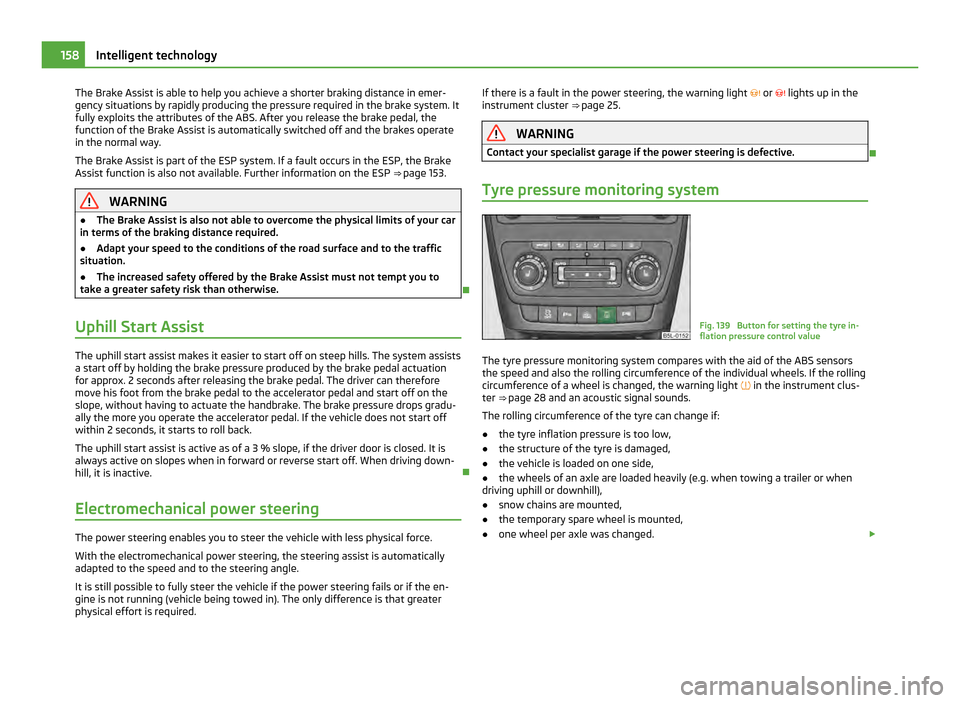
Tyre pressure monitoring system Fig. 139 Button for setting the tyre in-
flation pressure control value
The tyre pressure monitoring system compares with the aid of the ABS sensors
the speed and also the rolling circumference of the individual wheels. If the rolling
circumference of a wheel is changed, the warning light
in the instrument clus-
ter ⇒ page 28 and an acoustic signal sounds.
The rolling circumference of the tyre can change if:
● the tyre inflation pressure is too low,
● the structure of the tyre is damaged,
● the vehicle is loaded on one side,
● the wheels of an axle are loaded heavily (e.g. when towing a trailer or when
driving uphill or downhill),
● snow chains are mounted,
● the temporary spare wheel is mounted,
● one wheel per axle was changed. £158
Intelligent technology
Page 161 of 252

Basic setting of the system
After changing the tyre inflation pressures, after changing one or several wheels,
the position of a wheel on the vehicle (e.g. exchanging the wheels between the
axles) or when the warning light lights up while driving, a basic setting of the sys-
tem must be carried out as follows.
● Inflate all tyres to the specified inflation pressure ⇒ page 201.
● Switch on the ignition.
● Press button
⇒ fig. 139
for more than 2
seconds. While pressing the but-
ton, the warning light lights up. At the same time the memory of the system is
erased and the new calibration is started, which is confirmed with an audible sig-
nal and then the warning light goes out.
● If the warning light does not go out after the basic setting, there is a fault in
the system. Have the vehicle inspected by your nearest specialist garage.
Warning light lights up
If the tyre inflation pressure of at least one wheel is insufficiently inflated in com-
parison to the stored basic value, the warning light ⇒ lights up.
Warning light flashes
If the warning light flashes, there is a system fault. Have the vehicle inspected by
your nearest specialist garage. WARNING
● When the warning light lights up, immediately reduce the speed and
avoid sudden steering and brake manoeuvres. Please stop the vehicle without
delay at the nearest possible stop and inspect the tyres and their inflation
pressures.
● The driver is responsible for the correct tyre inflation pressures. For this
reason, the tyre inflation pressures must be checked regularly.
● Under certain circumstances (e.g. sporty style of driving, wintry or unpaved
roads) the warning light can be delayed or does not light up at all.
● The tyre pressure monitoring system does not take away the responsibility
from the driver for the correct tyre inflation pressure. Note
The tyre pressure monitoring system:
● does not replace the regular tyre inflation pressure control, because the sys-
tem cannot detect an even pressure loss; ●
cannot warn in case of very rapid tyre inflation pressure loss, e.g. in case of
sudden tyre damage. In this case carefully bring the vehicle to a standstill without
sudden steering movements and without sharp braking.
● In order to ensure a proper functioning of the tyre inflation pressure-control
system, it is necessary to carry out the basic setting again every 10 000 km or 1x a
year.
Diesel particle filter (diesel engine) In the diesel particle filter the resulting soot particles are collected
and burnt during the combustion of diesel fuel. Fig. 140 Vehicle data sticker
Code 7GG , 7MB or 7MG on the vehicle data sticker, see ⇒ fig. 140 , indicates that
your vehicle is equipped with a diesel particle filter. The vehicle data sticker is lo-
cated on the floor of the luggage compartment and is also stated in the Service
schedule.
The diesel particle filter filters the soot particles completely from the exhaust. The
soot is collected in the diesel particle filter and burnt regularly. To assist this pro-
cedure, we recommend not to drive regularly over short distances.
If the diesel particle filter is full or there is a fault, it is indicated by the warning
light . £ 159
Intelligent technology Using the system Safety Driving Tips General Maintenance Breakdown assistance Technical data
Page 162 of 252

WARNING
● The diesel particle filter achieves very high temperatures. Therefore do not
park at points where the hot filter comes into direct contact with dry grass or
other combustible materials - risk of fire!
● Never use additional underbody protection or corrosion-protection agents
for the exhaust pipes, catalytic converters, diesel particle filter or heat shields.
When the engine reaches its operating temperature, these materials might ig-
nite – risk of fire. Note
When using diesel fuel with high sulphur content the life of the diesel particle fil-
ter is clearly reduced. A specialist garage will be able to tell you which countries
use only diesel fuel with high sulphur content.
Off-road General Fig. 141 Off-road switch
The Off-road mode comprises functions which assist off-road driving.
The following functions are integrated in the Off-road mode:
● Start-Off Assist ⇒ page 160,
● Downhill Drive Support ⇒ page 161 ,
● EDL Off-road ⇒ page 154,
● TCS Off-road ⇒ page 154,
● ABS Off-road ⇒ page 156. Switch on Off-road
The Off-road mode is switched on by pressing the button
⇒
fig. 141. The warning
light in the button lights up. The warning light lights up in the instrument cluster
if the system is switched on ⇒ page 30.
Switch off Off-road
The Off-road mode is switched off by repeated pressing of the button. The warn-
ing light in the button goes out. When switching off the ignition, the Off-road
mode is also switched off and can be switched on again, if necessary, after
switching on the ignition. If the engine is switched off by accident and restarted
within 30 seconds, the Off-road mode remains switched on.
All four wheels must be fitted with the same tyres in order to achieve proper op-
eration of the Off-road mode. Differing rolling circumferences of the tyres can lead
to an undesirable reduction in the engine output. WARNING
● Always adjust your speed to suit weather, road and traffic conditions. The
increased safety must not tempt you to take a greater safety risk than other-
wise - risk of accident!
● The Off-road equipment can also not overcome the physical limits of your
vehicle.
● The effect of the Off-road equipment depends as well on the tyres.
● The Off-road equipment is not designed for the use on common roads.
Start-Off Assist The Start-Off Assist enhances the driving comfort and can be used when starting
off, in particular on a slope. When the vehicle is stationary, the Start-Off Assist is
activated after switching it on using the button for the Off-road mode ⇒
fig. 141
.
Operating principle
When depressing the accelerator pedal fully, the engine speed required for the
start-up procedure of the stationary vehicle is restricted. The overspeed trip unit
is automatically deactivated after terminating the start-up procedure. As part of
the Assist System, the accelerator pedal is adapted in its characteristics for an
easier start-off on slippery and loose soil. 160
Intelligent technology
Page 163 of 252

Downhill Drive Support
Operating principle
The Downhill Drive Support maintains a constant speed on a steep downhill sec-
tion when driving forwards and backwards by automatically intervening in the
brake system of all wheels. It prevents the wheels locking because the ABS re-
mains active. The warning light in the instrument cluster indicates that the
Downhill Drive Support is available ⇒ page 30.
The vehicle speed, which is maintained by the Assist System, is selected by the
driver while driving on a downhill section as of the moment the first intervention
of the Assist System is performed or else, while driving on a downhill section, the
driver must control the vehicle speed until the Assist System intervenes for the
first time. When the Assist System actively intervenes, this is indicated by the
warning light flashing or by a pulsating movement of the brake pedal, similar to
the intervention of the ABS.
You can increase or reduce the speed, even when no gear is engaged, by operat-
ing the accelerator or brake pedal. Thus the function is always interrupted and is
reactivated afterwards.
The Downhill Drive Support is activated automatically if the following conditions
are met:
● the Off-road mode is switched on and the warning light lights up in the in-
strument cluster,
● the engine of the vehicle is running and either the 1st, 2nd, 3rd gear, the re-
verse gear or no gear is engaged,
● the engine of the vehicle is running, the selector lever of the automatic gear-
box is in the position R, N, D, S or Tiptronic,
● the speed is less than 30 km/h,
● the downhill gradient is at least 10 % (when driving over sleepers the limit can
briefly drop to 8 %),
● neither the accelerator nor the brake pedal is operated.
It is however a requirement that the vehicle has sufficient grip on the soil. The
Downhill Drive Support cannot properly fulfil its function on slushy soil due to
physical reasons (ice or mud).
The Downhill Drive Support is deactivated when braking or accelerating or if the
downhill gradient is less than 8 %. Manual gearbox
The vehicle speed is steadily regulated by the Assist System depending on the
type of gearbox or engine:
● 1. gear - approx. 8 1)
- 30 km/h
● 2. gear - approx. 13 1 )
- 30 km/h
● 3. gear - approx. 22 1 )
- 30 km/h
● Reverse gear - approx. 9 1 )
- 30 km/h
● Neutral for driving forwards - as well as driving backwards - approx. 2 1 )
- 30
km/h
Automatic gearbox
● Selector lever in the position D, S or Tiptronic (for the 1st, 2nd, 3rd gear) for
driving forwards - approx. 2 - 30
km/h
● Selector lever in the position R for driving backwards - approx. 2 - 30 km/h
● Selector lever in the position N for driving forwards as well as backwards - ap-
prox. 2 - 30
km/h Note
● During an intervention of the Downhill Drive Support, the brake lights do not
light up.
● Do not switch off the Off-road mode during an intervention of the Assist Sys-
tem. 1)
The indicated values represent the average of the lower speed limits if a gear is engaged (depending
on the type of gearbox or engine). 161
Intelligent technology Using the system Safety Driving Tips General Maintenance Breakdown assistance Technical data