2011 SKODA OCTAVIA TOUR engine
[x] Cancel search: enginePage 78 of 183

Starting-off and Driving77
Using the system
Safety
Driving Tips
General Maintenance
Breakdown assistance
Technical Data
Caution
Each time the vehicle is parked, first of all apply the handbrake and then additionally
engage the 1st gear.Rear parking aid*The parking aid provides a warnin g of obstacles behind the vehicle.The audible parking aid determines the distance from the rear bumper to an
obstacle behind the car with the aid of ultrasound sensors. These ultrasound
sensors are integrated in the rear bumper.
Range of sensors
The clearance warning begins at a distance of about 160 cm from the obstacle (area
fig. 87 ). The interval between the warning signals becomes shorter as the
clearance is reduced.
A continuous tone sounds from a distance of approx. 30 cm (area ) - danger area.
Do not reverse any further after this signal sounds! If the vehicle is equipped with
a factory-fitted towing device*, the border of the danger area - continuous tone -
extends 5 cm further behind the vehicle. The vehicle can be extended through an
installed detachable towing device.
On vehicles equipped with a factory-fitted radio*, the distance to the obstruction is
shown graphically in the display. On vehicl es with a factory-fitted towing device, the
sensors are deactivated when towing a trailer. The driver is informed about this by
a graphic display (vehicle towing a trailer) in the radio* display. The factory-fitted
radio* can be set so that the play function volume decreases when activating the
parking aid, see Owner's Manual radio*. This improves the audibility of the parking
aid. Activating
The parking aid is activated automatically when
reverse gear is engaged and the
ignition is turned on. This is confirmed by a brief acknowledgement signal.
Deactivating
The parking aid is deactivated by taking the car out of reverse gear.
WARNING
•
The parking aid is not a substitute for the driver paying proper attention and
it is always the driver's responsibility to take care when parking the vehicle or
carrying out similar manoeuvres.
•
You should therefore satisfy yourself, before reversing, that there is no small
obstacle, such as a rock, thin post, traile r drawbar etc., behind your vehicle. Such
obstacles might not be within the range detected by the sensors.
•
Under certain circumstances, surfaces of certain objects and types of
clothing cannot reflect the signal of the pa rking aid. Thus, such objects or people
may not be recognised by the sensors of the parking aid.Note
•
The parking aid does not operate if you are towing a trailer (applies to models
which feature a factory-fitted towing device*).
•
If a warning signal sounds for about 3 seconds after switching the ignition on
and engaging reverse gear, and there is no obstacle close to your vehicle, this indi-
cates a system fault. Have the fault rectified by a specialist workshop.
•
The sensors must be kept clean and free of ice to enable the parking aid to
operate properly.
Cruise control system (CCS)*IntroductionThe cruise control system (CCS) maintains a constant speed, above approx. 30 km/h
(20 mph), once it has been set, without yo u having to depress the accelerator pedal.
This is only possible to the extent pe rmitted by the power output and braking
power of the engine. The cruise control syst em makes it possible - particularly on
long journeys - for you to rest your “accelerator foot”.
Fig. 87 Parking aid: Detection range of
rear sensors
A
B
s2lk.2.book Page 77 Monday, April 18, 2011 7:41 AM
Page 79 of 183
Starting-off and Driving
78WARNING
•
The cruise control system must not, for safety reasons, be used in dense
traffic or on unfavourable road surfaces (such as icy roads, slippery roads or
loose chippings) - risk of accident!
•
In order to prevent unintentional use of the cruise control system, always
switch off the system after use.Note
•
Always depress the clutch pedal if you switch on the cruise control system when
the gearbox is in Neutral. Otherwise the engine can rev up unintentionally.
•
The cruise control system is not able to maintain a constant speed when driving
on steep downhill sections. The weight of the vehicle increases the speed at which
it travels. One should shift down in good time to a lower gear or slow the vehicle
down by applying the foot brake.
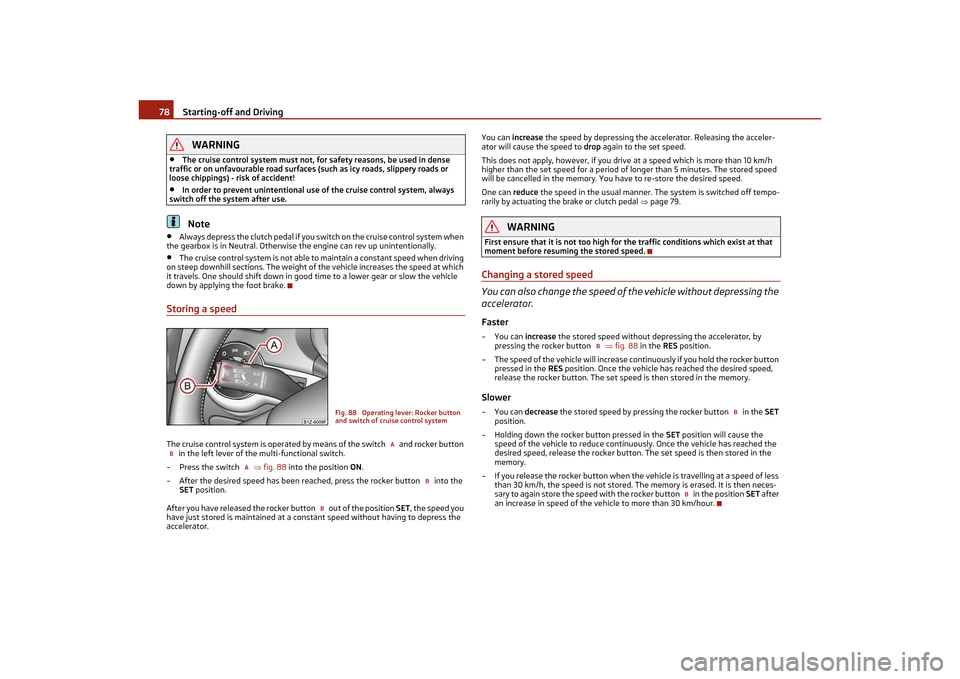
Storing a speedThe cruise control system is operated by means of the switch and rocker button in the left lever of the multi-functional switch.
– Press the switch fig. 88 into the position ON.
– After the desired speed has been reached, press the rocker button into the SET position.
After you have released the rocker button out of the position SET, the speed you
have just stored is maintained at a cons tant speed without having to depress the
accelerator. You can
increase the speed by depressing the accelerator. Releasing the acceler-
ator will cause the speed to drop again to the set speed.
This does not apply, however, if you driv e at a speed which is more than 10 km/h
higher than the set speed for a period of longer than 5 minutes. The stored speed
will be cancelled in the memory. You have to re-store the desired speed.
One can reduce the speed in the usual manner. The system is switched off tempo-
rarily by actuating the brake or clutch pedal page 79.
WARNING
First ensure that it is not too high for the traffic conditions which exist at that
moment before resuming the stored speed.Changing a stored speed
You can also change the speed of the vehicle without depressing the
accelerator.Faster–You can increase the stored speed without depr essing the accelerator, by
pressing the rocker button fig. 88 in the RES position.
– The speed of the vehicle will increase continuously if you hold the rocker button pressed in the RES position. Once the vehicle has reached the desired speed,
release the rocker button. The set speed is then stored in the memory.Slower–You can decrease the stored speed by pressing the rocker button in the SET
position.
– Holding down the rocker button pressed in the SET position will cause the
speed of the vehicle to reduce continuously. Once the vehicle has reached the
desired speed, release the rocker button. The set speed is then stored in the
memory.
– If you release the rocker button when the vehicle is travelling at a speed of less than 30 km/h, the speed is not stored. The memory is erased. It is then neces-
sary to again store the speed with the rocker button in the position SET after
an increase in speed of the ve hicle to more than 30 km/hour.
Fig. 88 Operating lever: Rocker button
and switch of cruise control system
A
B
A
B
B
B
B
B
s2lk.2.book Page 78 Monday, April 18, 2011 7:41 AM
Page 91 of 183
Airbag system
90
The airbags are not deployed in the case of minor frontal and side collisions, in the
case of rear-end collisions and vehicle rollover.
Deployment factors
It is not possible to state globally which deployment conditions apply to the airbag
system in every situation as the circumstances which exist in the case of accidents
vary greatly. An important role in this case is played by factors such as the type of
object against which the vehicle impacts (hard, soft), the angle of impact, the rela-
tive speed during the accident etc.
A decisive factor for the deployment of th e airbags is the deceleration which occurs
during a collision. The control unit analyses the nature of the collision and activates
the relevant restraint system. If the vehicle deceleration which occurs and is meas-
ured during the collision remains below the prescribed reference values specified in
the control unit, the airbags are not deployed although the vehicle may well suffer
severe damage to the bodywork as a consequence of the accident.
The airbags are not deployed if:•
ignition off,
•
a minor frontal collision,
•
a minor side collision,
•
a rear-end collision,
•
Rollover of the vehicle.Note
•
A grey white, non harmful gas is released when airbag is inflated. This is
perfectly normal and is not an indi cation of a fire in the vehicle.
•
In the event of an accident in which the airbags are deployed:
−The interior lighting comes on (if the switch for the interior light is in the door
contact position),
− The hazard warning light is switched on,
− All the doors are unlocked,
− the fuel supply to the engine is interrupted.
Front airbagsDescription of the front airbags
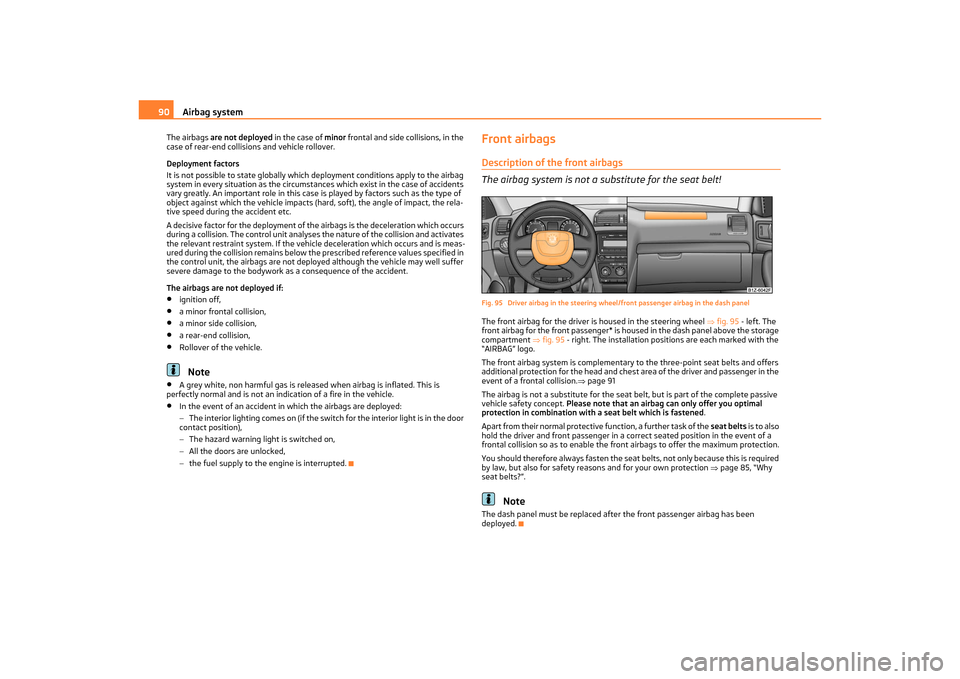
The airbag system is not a substitute for the seat belt!Fig. 95 Driver airbag in the steering wheel /front passenger airbag in the dash panelThe front airbag for the driver is housed in the steering wheel fig. 95 - left. The
front airbag for the front passenger* is housed in the dash panel above the storage
compartment fig. 95 - right. The installation positions are each marked with the
“AIRBAG” logo.
The front airbag system is complementary to the three-point seat belts and offers
additional protection for the head and chest area of the driver and passenger in the
event of a frontal collision. page 91
The airbag is not a substitute for the seat belt, but is part of the complete passive
vehicle safety concept. Please note that an airbag can only offer you optimal
protection in combination with a seat belt which is fastened .
Apart from their normal protective function, a further task of the seat belts i s t o a l s o
hold the driver and front passenger in a co rrect seated position in the event of a
frontal collision so as to enable the fron t airbags to offer the maximum protection.
You should therefore always fasten the seat belts, not only because this is required
by law, but also for safety reasons and for your own protection page 85, “Why
seat belts?”.
Note
The dash panel must be replaced after the front passenger airbag has been
deployed.
s2lk.2.book Page 90 Monday, April 18, 2011 7:41 AM
Page 106 of 183

Intelligent Technology105
Using the system
Safety
Driving Tips
General Maintenance
Breakdown assistance
Technical Data
Driving TipsIntelligent TechnologyElectronic stability programme (ESP)*GeneralThe ESP aids you in maintaining control of your vehicle in situations in which the
vehicle is driving at its dynamic limits, such as entering a curve fast. The risk of skid-
ding is reduced and your vehicle thus offers greater driving stability depending on
the conditions of the road surface. The system operates at all speeds.
The following systems are integrated into the electronic stability programme:•
Electronic Differential Lock (EDL),
•
Traction control system (TCS),
•
active driver-steering recommendation (DSR),
•
Antilock brake system (ABS),
•
Brake Assist,
•
Uphill-Start off-Assist.
The ESP system cannot be switched off, only the TCS system can be switched off by
pressing the button fig. 111 , the warning light
lights up.
Operating principle
The ESP switches on automatically when th e engine is started and then conducts a
self-test. The ESP control unit processes data from the individual systems. It also
processes additional measurement data which are supplied by highly sensitive sensors: the rotational velocity of the ve
hicle about its vertical axis, the lateral
acceleration of the vehicle, the braking pressure and the steering angle.
The direction which the driver wishes to take is determined based on the steering
angle and the speed of the vehicle and is constantly compared with the actual
behaviour of the vehicle. If differences exist, such as the vehicle beginning to skid,
the ESP will automatically brake the appropriate wheel.
The car is stabilised again by the forces which take effect when the wheel is braked.
Intervention into the brake system takes pl ace primarily on the outer front wheel of
a vehicle which tends to oversteer (tendency for the rear of the vehicle to break
away) while occurs this is on the inner re ar wheel of a vehicle which tends to under-
steer (tendency to shift out of the curve). This braking control cycle is accompanied
by noises.
During an intervention of the system, the warning light
flashes quickly in the
instrument cluster page 25.
The ESP operates in combination with the ABS page 108, “Antilock brake system
(ABS)”. If there is a fault in the ABS system, the ESP also does not operate.
The ESP warning light lights up in the instrument cluster when there is a fault on
the ESP
page 25.
WARNING
It is also not possible for the ESP to over come the physical limits of the vehicle.
Even if a vehicle fitted with ESP you sh ould still always adapt your style of
driving to the condition of the road surfac e and the traffic situation. This partic-
ularly applies when driving on slippery and wet roads. The increased safety
offered must not tempt you to take greate r risks than otherwise - risk of an acci-
dent!
Note
•
All four wheels must be fitted with the same tyres in order to achieve problem-
free operation of the ESP. Differing rolling circumferences of the tyres can lead to
an undesirable reduction in the engine output.
Fig. 111 ESP switch
s2lk.2.book Page 105 Monday, April 18, 2011 7:41 AM
Page 107 of 183

Intelligent Technology
106
•
Changes to vehicle (e.g. on engine, on the brakes, on chassis or another combi-
nation of tyres and wheels) can influence the function of the ESP page 146,
“Accessories, changing and replacing parts”.
Electronic Differential Lock (EDL)*
The electronic differential lock prevents an individual wheel from
slipping.Models fitted with ESP are equipped with electronic differential lock (EDL).
General
The EDL makes it much easier, and sometimes at all possible, to start off, accelerate
and climb a steep hill when the conditions of the road surface are unfavourable.
Operating principle
The EDL is activated automatically, that is without any action on the part of the
driver. It monitors the speeds of the driven wheels with the aid of the ABS sensors.
Should only one drive wheel begin spinning on a slippery surface there will be an
appreciable difference in the speed of the driven wheels. The EDL function brakes
the slipping wheel and the differential transmits a greater driving force to the other
driven wheel. This control process is also accompanied by noises.
Overheating of the brakes
The EDL switches off automatically if unusually severe stresses exist in order to
avoid excessive heat genera tion in the disc brake on the wheel which is being
braked. The vehicle can continue to be driven and has the same characteristics as a
vehicle not fitted with EDL.
The EDL switches on again automatically as soon as the brake has cooled down.
WARNING
•
Carefully depress the accelerator when accelerating on uniformly slippery
road surfaces, such as ice and snow. The driven wheels might still spin despite
the EDL and affect the stability of the vehicle - risk of an accident!
•
You should always adapt your style of dr iving to the condition of road surface
and to the traffic situation even when your vehicle is fitted with EDL. The
increased safety offered must not temp t you to take greater risks than other-
wise - risk of an accident!
Note
•
If the ABS or ESP warning light comes on, this may also indicate a fault in the
EDL. Please have the vehicle inspected as soon as possible by a specialist garage.
•
Changes to vehicle (e.g. on engine, on the brakes, on chassis or another combi-
nation of tyres and wheels) can in fluence the function of the EDL page 146,
“Accessories, changing and replacing parts”.
Traction control system (TCS)
The traction control system prevents the driven wheels from spin-
ning when accelerating.General
The TCS makes it much easier, and sometimes at all possible, to start off, accelerate
and climb a steep hill when the conditions of the road surface are unfavourable.
Operating principle
The TCS switches on automatically when the engine is started and then conducts a
self-test. The system monitors the speeds of the driven wheels with the aid of the
ABS sensors. If the wheels are spinning, th e force transmitted to the road surface is
automatically adapted by reducing the engi ne speed. The system operates at all
speeds.
The TCS operates in combination with the ABS page 108, “Antilock brake system
(ABS)”. The TCS will not function if a fault exists in the ABS system.
The TCS warning light lights up in the instrument cluster when there is a fault on
the TCS
page 25.
During an intervention of th e system, the TCS warning light
flashes in the instru-
ment cluster page 25.
Fig. 112 TCS switch
s2lk.2.book Page 106 Monday, April 18, 2011 7:41 AM
Page 108 of 183

Intelligent Technology107
Using the system
Safety
Driving Tips
General Maintenance
Breakdown assistance
Technical Data
Switching off
You can switch the TCS off and on again as you wish by pressing the button
page 106, fig. 112 . The TCS warning light lights up in the instrument cluster when
the TCS is switched off
page 25.
The TCS should normally always be switched on. It may be good practice in certain
exceptional cases, such as when you wish to have wheel slip, to switch off the
system.
Examples:
•
when driving with snow chains
•
when driving in deep snow or on a loose surface
•
when it is necessary to rock a vehicle when it has become stuck.
then you should switch on the TCS again.
WARNING
You should always adjust your style of driving to the conditions of the road
surface and the traffic situation. The in creased safety offered must not tempt
you to take greater risks than ot herwise - risk of an accident!
Note
•
All four wheels must be fitted with the same tyres in order to achieve problem-
free operation of the TCS. Differing rolling circumferences of the tyres can lead to
an undesirable reduction in the engine output.
•
Changes to vehicle (e.g. on engine, on the brakes, on chassis or another combi-
nation of tyres and wheels) can influence the function of the TCS page 146,
“Accessories, changing and replacing parts”.
Active driver-steerin g recommendation (DSR)*Vehicles with ESP are equipped with active driver-steering recommendation (DSR).
This function indicates to the driver in critical situations a steering recommendation
in order to stabilise the vehicle. The active driver-steering recommendation is acti-
vated, for example, on the right and left vehicle side when braking sharply on
different road surfaces.
WARNING
Even with this function the vehicle cannot steer itself! The driver is furthermore
responsible for the steering of the vehicle!BrakesWhat has a negative effect on braking efficiency?Wear-and-tear
Wear-and-tear to the brake pads is greatly dependent on the operating conditions
of the vehicle and your style of driving. Particularly if you drive a great deal in towns
and over short distances or if you adopt a sp orty style of driving, it may be necessary
to have the thickness of the brake pads inspected at a specialist garage between
the service inspections.
Wet roads or road salt
There may be a certain delay before the brakes take full effect under certain condi-
tions such as when driving through water, during heavy rain showers or after the
vehicle has been washed in an automatic vehicle wash, since the brake discs and
brake pads may be moist or even have a coating of ice on them in winter. You should
dry the brakes as soon as possible by applying and releasing the brakes several
times.
There also may be a certain delay before the full braking efficiency is available when
driving on roads which have been treated wi th road salt if you have not used the
brakes for some considerable time beforehand. The layer of salt on the brake discs
and brake pads must first be rubbed off when you apply the brakes.
Corrosion
Corrosion on the brake discs and dirt on the bake pads occur if the vehicle has been
parked for a long period and if you do not make much use of the braking system.
We recommend cleaning the brake discs by firmly applying the brakes at a fairly high
speed if you do not make much use of the braking system or if surface corrosion is
present .
Faults in the brake surface
If you notice that the braking distance has suddenly become longer and that the
brake pedal can be depressed further, it is possible that a brake circuit of the dual-
circuit brake system has failed. Drive, in such cases, to the nearest specialist garage
without delay in order to have the problem rectified. Drive at a reduced speed while
on your way to the dealer and adapt your style of driving to the higher brake pedal
pressure required.
s2lk.2.book Page 107 Monday, April 18, 2011 7:41 AM
Page 109 of 183
Intelligent Technology
108
Low brake fluid level
An insufficient level of brake fluid may result in problems in the brake system. The
level of the brake fluid is monitored electronically page 27, “Brake system ”.
WARNING
•
Only apply the brakes for the purpose of drying and cleaning the brake discs
if the traffic conditions permit this. Do not place any other road users in jeop-
ardy.
•
When retrospectively mounting a front spoiler, solid wheel hubs etc. one
must ensure that the air supply to the front wheel brakes is not reduced other-
wise the braking system could run too hot.
•
Allow for the fact that new brake pads do not achieve their full braking effi-
ciency until after the first 200 kilometres. New brake pads must be first “run in”
before they develop their optimal friction force. You can, however, compensate
for this slightly reduced braking force by increasing the pressure on the brake
pedal. This guideline also applies to an y new brake pads installed at a future
date.Caution
•
Never allow the brakes to rub by applying slight pressure if you do not wish to
brake the vehicle. This causes the brakes to overheat and can also result in a longer
braking distance and excessive wear.
•
Before negotiating a steep downhill section, reduce your speed, shift down into
the next lower gear. This enables you to ma ke full use of the braking power of the
vehicle and reduces the strain on the brakes. Any additional braking should be done
intermittently, no t continuously.Note
The brake light flashes automatically in ca se of an emergency braking at speeds
greater than 60 km/h or with the interven tion of the ABS, which lasts longer than
1.5 seconds. After the speed was reduced below 10 km/h or the vehicle was stopped,
the brake light stops flashing and the hazard warning light system switches on. The
hazard warning light system is switched off automatically after accelerating or
driving off again.Brake boosterThe brake booster boosts the pressure wh ich you generate with the brake pedal.
The necessary pressure is only generated when the engine is running.
WARNING
•
Never switch off the engine be fore the vehicle is stationary.
•
The brake booster only operates when the engine is running. Greater phys-
ical effort for braking is required when en gine is switched off. Because if you do
not stop as normal, this can caus e an accident and severe injuries.
Antilock brake system (ABS)ABS prevents the wheels locking when braking.General
The ABS contributes significantly to enhancing the active safety of your vehicle.
Compared to a vehicle not fitted with ABS, you are able to retain optimal steering
ability even during a full brake application on a slippe ry road surface because the
wheels do not lock up.
You must not expect, however, that the braking distance will be shorter under all
circumstances as a result of the ABS. The braking distance for example on gravel
and fresh snow, when you should anyway be driving slowly and cautiously, will be
longer.
Operating principle
The brake pressure will be reduced on a wheel which is rotating at a speed which is
too low for the speed of the vehicle and tending to lock. This control cycle is notice-
able from a pulsating movement of the brake pedal which is accompanied by
noises. This is consciously intended to pr ovide the driver with the information that
the wheels are tending to lock (ABS control range). You must always keep the brake
pedal depressed to enable the ABS to optimally control the brake application in this
braking range. Never interrupt the application of the brakes!
WARNING
•
The ABS can also not overcome the physical limits of your vehicle. Please do
not forget this, particularly when driving on icy or wet road surfaces. If the ABS
is operating within the control range, adapt your speed immediately to the
conditions of the road surface and the traffic situation. The increased safety
offered by the ABS must not tempt you to take greater risks than otherwise -
risk of an accident!
•
The normal braking system is still fully functional if there is an ABS fault.
Visit a specialist garage as quickly as poss ible and adjust your style of driving to
s2lk.2.book Page 108 Monday, April 18, 2011 7:41 AM
Page 110 of 183

Intelligent Technology109
Using the system
Safety
Driving Tips
General Maintenance
Breakdown assistance
Technical Data
take account of the ABS fault in the meantime since you will not know the
extent of the fault and in how far
the braking efficiency is affected.
Note
•
A warning light comes on if a fault occurs in the ABS system
page 26.
•
Changes to vehicle (e.g. on engine, on the brakes, on chassis or another combi-
nation of tyres and wheels) can influence the function of the ABS page 146,
“Accessories, changing and replacing parts”.
Brake Assist*During a severe brake application (e.g. if a hazard exists), the Brake Assist increases
the braking force and thus makes it possible to rapidly produce the pressure
required in the brake system.
The majority of drivers do apply the brakes in good time in dangerous situations, but
do not depress the brake pedal with sufficient pressure. Consequently, it is not
possible for the vehicle to achieve its maximum deceleration and the vehicle covers
a greater distance than necessary.
The Brake Assist is activated by the very quick operation of the brake pedal. In such
cases, a much greater braking pressure exists than during a normal brake applica-
tion. This makes it possible, even with a relatively low resistance of the brake pedal,
to produce an adequate pressure in the brake system in the shortest possible time,
which is required for maximum deceleration of the car. You must apply the brake
pedal firmly and hold it in this position in order to achieve the shortest possible
braking distance.
The Brake Assist is able to help you achi eve a shorter braking distance in emergency
situations by rapidly producing the pressure required in the brake system. It fully
exploits the attributes of the ABS. After you release the brake pedal, the function
of the Brake Assist is automatically swit ched off and the brakes operate in the
normal way.
The Brake Assist is part of the ESP system. If a fault occurs in the ESP, the Brake
Assist function is also not availa ble. Further information on the ESP page 105.
WARNING
•
The Brake Assist is also not able to overcome the physical limits of your
vehicle in terms of the braking distance required.
•
Adapt your speed to the conditions of th e road surface and to the traffic situ-
ation.
•
The increased safety offered by the Brake Assist must not tempt you to take
a greater safety risk than otherwise.
Electromechanical power steeringThe power steering enables you to steer the vehicle with less physical force.
With the electromechanical power steering, the steering assist is automatically
adapted to the speed and to the steering angle.
It is still possible to fully steer the vehicle if the power steering fails or if the engine
is not running (vehicle being towed in). The only difference is that greater physical
effort is required.
If there is a fault in the power steering, the warning light
or lights up in the
instrument cluster page 24.
WARNING
Contact your specialist garage if the power steering is defective.Tyre inflation pressure-control system*The tyre inflation pressure-control system compares with the aid of the ABS
sensors the speed and also the rolling circumference of the individual wheels. If the
rolling circumference of a wheel is changed, the warning light
lights up in the
WARNING (continued)
WARNING (continued)
Fig. 113 Button for setting the tyre infla-
tion pressure control value
s2lk.2.book Page 109 Monday, April 18, 2011 7:41 AM