2011 Seat Alhambra trailer
[x] Cancel search: trailerPage 97 of 385
95
Lights and visibility
Lights and visibility
Lights Introduction The legal requirements regarding the use of vehicle lights in each country
mus
t
be observed.
The driver is personally responsible for the correct use and adjustment of
the lights in all situations.
Additional information and warnings:
● SEAT information system ⇒ page 62
● Ch
anging bulbs ⇒ page 326 WARNING
If the headlights are set too high and the main beam is not used correct-
ly, ther e i
s a risk of dazzling or distracting other road users. This could
result in serious accident.
● Always make sure that the headlamps are correctly adjusted.
● Never use the main beam or flashed headlamps as this could dazzle
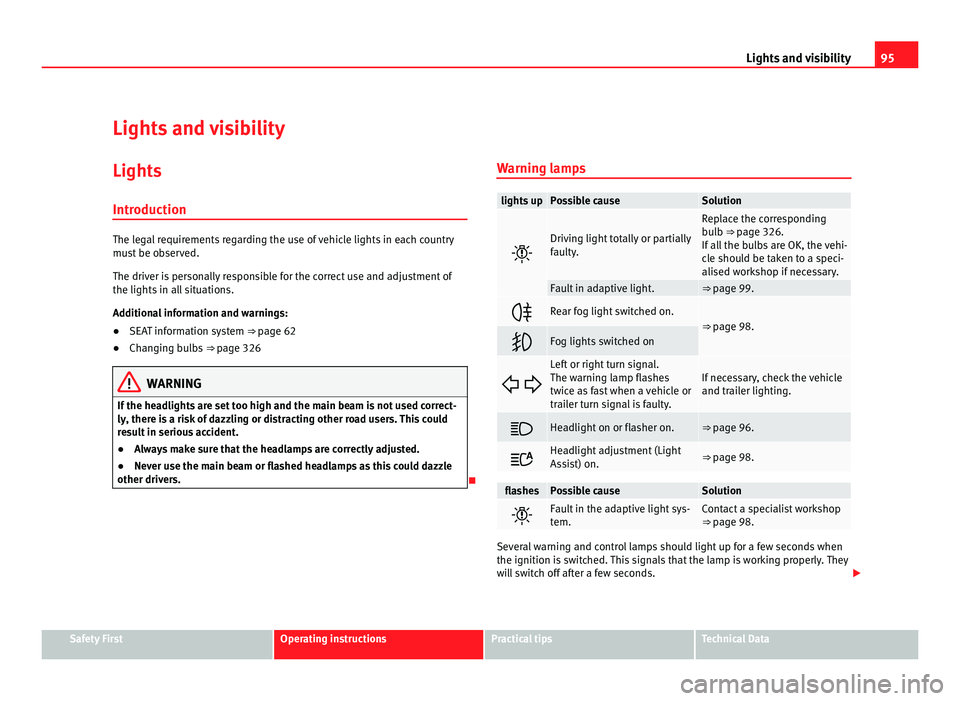
other drivers. Warning lamps lights up Possible cause Solution
Driving light totally or partially
fau
lty
. Replace the corresponding
bu
l
b ⇒ page 326.
If all the bulbs are OK, the vehi-
cle should be taken to a speci-
alised workshop if necessary. Fault in adaptive light. ⇒ page 99.
Rear fog light switched on.
⇒ page 98.
Fog lights switched on
Left or right turn signal.
The warnin
g l
amp flashes
twice as fast when a vehicle or
trailer turn signal is faulty. If necessary, check the vehicle
and trai
l
er lighting. Headlight on or flasher on. ⇒ page 96.
Headlight adjustment (Light
Ass
i
st) on. ⇒ page 98.
flashes Possible cause Solution
Fault in the adaptive light sys-
tem. Contact a specialist workshop
⇒ pag
e 98. Several warning and control lamps should light up for a few seconds when
the ignition is
sw
itched. This signals that the lamp is working properly. They
will switch off after a few seconds. Safety First Operating instructions Practical tips Technical Data
Page 99 of 385

97
Lights and visibility
The control turn signals are switched on and off from the menu Lights & Visi-
bility on the instrument panel display ⇒ page 62. This function can be dis-
connected at a specialised workshop for those vehicles which do not have
the menu Lights & Visibility .WARNING
Incorrect use of the headlamps may cause accidents and serious injury,
as the m
ain beam may distract or dazzle other drivers. Note
● The turn signal only works when the ignition is switched on. The hazard
w arnin
g lights also work when the ignition is switched off ⇒ page 312.
● If a turn signal on the vehicle or trailer is faulty, the warning lamp flash-
es tw
ice as fast as usual.
● The main beam headligh
ts can only be switched on if the dipped beam
headlights are already on.
Turning lights on and off Fig. 62 Next to the steering wheel: diagram of some of
the type
s
of light switch.
The legal requirements regarding the use of vehicle lights in each country
mus t
be observed.
In vehicles with tow bar fitted as standard: If the trailer is connected electri-
cally and is fitted with a rear fog light, this is automatically switched off on
the vehicle. Turn the light switch to the required position
⇒ fig. 62:Safety First Operating instructions Practical tips Technical Data
Page 104 of 385

102
Lights and visibility
Headlight range control, instrument and switch lighting Fig. 63 Next to the
st
eerin
g wheel: instru-
ment and switch lighting
control 1 and headlight
ran g
e control 2 .
1 Instrument and switch lighting
When the hea dlights
are switched on, the brightness of the instruments
and switch lighting can be regulated to suit your requirements by turning
the switch ⇒ fig. 63 1 .
2 Headlight range control
The hea dlight
range control 2 is modified according to the value of the
hea dlight
beam and the vehicle load status. This offers the driver optimum
visibility and the headlights do not dazzle oncoming drivers ⇒ .
The hea dlights
can only be adjusted when the dipped beam is switched on.
To reset, turn switch 2 :
Value Vehicle load status
a) – Two front occupants, luggage compartment empty
1 All seats occupied, luggage compartment empty Value Vehicle load status
a) 2 All seats occupied, luggage compartment full. With trailer
and minimum sup
por
t load 3 Driver only, luggage compartment full. With trailer and
max
imum s
upport load a)
If the vehicle load does not correspond to those shown in the table, it is possible to select
intermedi ar
y positions.
Dynamic headlight range control
The control 2 is not mounted in vehicles with dynamic headlight range
contr o
l. The headlight range is automatically adjusted according to the ve-
hicle load status when the headlights are switched on. WARNING
Heavy objects in the vehicle may mean that the headlights dazzle and
dis tr
act other drivers. This could result in serious accident.
● Adjust the light beam to the vehicle load status so that it does not
blind other driver
s.
Interior and reading lights Button /
Swit c
h Function
Switches interior lights off.
Switches interior lights on.
Page 184 of 385

182
Driving
Recommended gear indication In some vehicles, the recommended gear for reducing fuel consumption is
dis
p
layed on the instrument panel: Display Meaning
Optimum gear.
Recommendation to change up a gear.
Recommendation to change down a gear.
Information for cleaning the diesel particulate filter
The exh
au
st gas system control recognises when the diesel particulate filter
is blocked, and helps to clean it by recommending a specific gear for driv-
ing. It may therefore be necessary to drive with the engine at an exception-
ally high speed ⇒ page 228. WARNING
The recommended gear display is intended as a guideline only; it should
never r ep
lace the driver's attention to driving carefully.
● Responsibility for selecting the correct gear for each situation contin-
ues t
o lie with the driver, for example when overtaking, climbing a hill or
towing a trailer. For the sake of the environment
Selecting the most appropriate gear for the situation will help you to save
fuel . Note
The recommended gear display is switched off when the clutch pedal is
pre s
sed.
Page 191 of 385

189
Driving Note
When checking the front brake pads, take the time to also check the rear
brak e p
ads. The thickness of the brake pads should be checked visually and
regularly, by looking through the openings in the wheel rims or from under-
neath the vehicle. If necessary, remove the wheels to check them thorough-
ly. SEAT recommends visiting a Technical Service.
Assisted braking systems The assisted braking systems ESC (ESP), ABS, BAS, ASR (TCS) and EDS only
operat
e when the ignition i
s switched on. They contribute significantly to in-
creasing active safety.
Electronic stability programme ESC (ESP)
ESC (ESP) reduces the risk of skidding and increases the vehicle stability by
braking individual wheels under specific driving conditions. ESC (ESP) de-
tects critical handling situations, such as understeer, oversteer and wheel-
spin on the drive wheels. The system stabilises the vehicle by braking indi-
vidual wheels or by reducing the engine torque.
The ESC (ESP) has limits. It is important to realise that the ESC (ESP) is also
subject to the laws of physics. ESC (ESP) will not be able to deal with all sit-
uations with which drivers may be faced. For example, if the road surface
changes suddenly then ESC (ESP) will not be useful in all cases. If the vehi-
cle suddenly enters a section covered by water, mud or snow then ESC (ESP)
will not provide assistance in the same way as on dry ground. If the vehicle
loses its grip on the ground and moves on a film of water (“aquaplaning”),
the ESC (ESP) will not be able to assist the driver to control the vehicle due
to the loss of adherence with the road surface preventing braking and steer-
ing. If the vehicle is driven through series of bends at high speed, the ESC
(ESP) will not always be as effective: the vehicle reaction to aggressive driv-
ing is not the same as at reduced speeds. When driving with a trailer, ESC
(ESP) does not provide the same amount of vehicle control as without a
trailer. Adjust your speed and driving style to road, traffic and weather conditions.
ESC (E
SP) cannot push the limits of the laws of physics; improve the trans-
mission available or maintain the vehicle on the road if a lack of driver at-
tention creates an inevitable situation. Otherwise, ESC (ESP) assists in
maintaining vehicle control in extreme situations and uses the movements
of the steering made by the driver to maintain the vehicle moving in the de-
sired direction. If the vehicle is driven at such a speed that it will leave the
road before ESC (ESP) can intervene then the system cannot provide assis-
tance.
The ABS, BAS, ASR (TCS) and EDS systems are incorporated into the ESC
(ESP). The ESC (ESP) is always on. The ESC (ESP) should only be turned off
using the ASR (TCS) button ⇒ fig. 136 when traction is insufficient. Always remember to turn on the ASR (TCS) once more when the vehicle has traction
once again.
Anti-lock brake system (ABS)
ABS can prevent the wheels from locking during braking until just before
the vehicle stops thus helping the driver to steer the vehicle and maintain
control. This means that, even during full braking, the risk of skidding is re-
duced:
● Press and hold the brake pedal fully. Do not remove your foot from the
brake ped
al or reduce braking force!
● Do not “pump” the brake pedal, or reduce braking force!
● Maintain vehicle direction when braking fully.
● When the brake pedal is released or when the brake force is reduced,
ABS is
turned off.
ABS control can be observed by vibration of the brake pedal and noise. You
should never expect the ABS to reduce the braking distance under any cir-
cumstances. Braking distances will increase when driving on gravel, recent
snow or on icy and slippery ground.
When driving on loose ground, the all-terrain configuration of the ABS is au-
tomatically turned on. When ABS is activated, the front wheels may lock
briefly. This shortens the braking distance in off-road situations as the Safety First Operating instructions Practical tips Technical Data
Page 200 of 385

198
Driving
Parking sensor system*
Introduction The parking sensor system assists the driver when parking. When the vehi-
cl
e ap
proaches an obstacle, forwards or backwards, an intermittent sound
will be heard, higher or lower depending on the distance. The shorter the
distance, the shorter the intervals between tones. If the vehicle is too close
to the obstacle, the sound signal becomes constant.
If you continue to approach an obstacle when the sound is continuous, this
means the system can no longer measure the distance.
The sensor system on the bumpers transmit and receive ultrasound. Using
the ultrasound signal (transmission, reflection from the obstacle and recep-
tion), this system continuously calculates the distance between the bumper
and the obstacle.
Additional information and warnings:
● Park Assist system ⇒ page 202
● A
ccessories, parts replacement, repairs and modifications ⇒ page 257WARNING
The parking sensor system and the optical parking system cannot re-
pl ac
e driver awareness.
● The sensors have blind spots in which obstacles and people are not
regi
stered.
● Always observe the area around the vehicle, as the sensors do not al-
way
s detect small children, animals or objects. WARNING (Continued)
● The s urface of certain objects and some clothing do not reflect the ul-
tr a
sound signals from the parking distance system. The system cannot
detect or incorrectly detects these objects and people wearing these
types of clothes.
● External sound sources can affect the parking distance aid signals. In
this c
ase, under certain circumstances, people and objects will not be de-
tected. CAUTION
● The sensors may not always be able to detect objects such as trailer
dr a
w bars, thin rails, fences, posts, trees and open boots, etc. This could re-
sult in damage to your car.
● Although the parking sensor system detects and warns of the presence
of an ob
stacle, the obstacle could disappear from the angle of measure-
ment of the sensors if it is too high or low and the system would no longer
indicate it. Therefore, it will not warn you of these objects. Ignoring the
warnings of the parking sensor system could cause considerable damage to
the vehicle.
● The bumper sensors may become damaged or misaligned, for example,
when parkin
g.
● To ensure that the system works properly, the bumper sensors must be
kept c
lean, free of ice and snow and uncovered.
● When cleaning the sensors with high-pressure or steam cleaning equip-
ment, spra
y the sensors briefly at a distance of no less than 10 cm (4 in-
ches). Note
Acoustic sources may lead to erroneous warnings on the parking sensor
sys t
em, e.g. rough tarmac, cobbles or the noise of other vehicles.
Page 203 of 385

201
Driving Distance from the vehicle to the
ob
s
tacle Acoustic sig-
nal Displayed in colour on
the sc r
een: colour of the
segment if an obstacle is recognised in front: approx. 31 – 120 cm
behind: ap
pr
ox. 31 – 160 cm beeping
sound Yellow
approx. 0 – 30 cm
in fr
ont or be-
hind a) permanent
sound Red
a)
The permanent sound starts at a somewhat greater distance on vehicles with a factory-fit-
ted t o
wing bracket.
With towing bracket
A specific image is displayed on the screen of vehicles with a factory-fitted
towing bracket and an electrically connected trailer. In this case, the distan-
ces behind the vehicle are not indicated.
Switching the parking sensor system sound on and off
If the button on the radio or navigation system screen may mute the
sound of OP
S warnings. To switch the warnings back on, press the button
again briefly.
When the OPS is switched off and back on again, muting is cancelled. Error
messages cannot be switched off. WARNING
Do not be distracted from the traffic when looking at the screen.
Safety First Operating instructions Practical tips Technical Data
Page 204 of 385

202
Driving
Park Assist system*
Introduction The Park Assist system helps the driver to find a suitable place to park, to
inser
t
the vehicle into parallel and perpendicular parking places and to
leave parallel parking places.
The Park Assist system is limited to the system abilities and requires that
the driver is especially attentive ⇒ .
The park in
g sensor system is a component of the Park Assist system that
helps to park the vehicle.
For vehicles with the optical parking system, the radio navigation systems
screen displays the detected zones in front of and behind the vehicle, indi-
cating - within the limits of the system - the position of obstacles compared
to the vehicle.
The park assist system cannot be switched on if the factory-fitted towing
bracket is electrically connected to a trailer.
Additional information and warnings:
● Braking, stopping and parking ⇒ page 183
● P
arking sensor system ⇒ page 198
● C
aring for and cleaning the vehicle exterior ⇒ page 242
● A
ccessories, parts replacement, repairs and modifications ⇒ page 257 WARNING
Despite the assistance provided by the park assist system, do not run
any ri
sks when parking. The system is not a replacement for driver
awareness.
● Unintentional movements of the vehicle could cause serious injury.
● Adjust your speed and driving style to visibility, road, traffic and
weather c
onditions.
● The surface of certain objects and items of clothing and external
sound sourc
es may have a negative affect on the park assist signals or on
the system sensors or may not reflect its signals.
● The sensors have blind spots in which obstacles and people are not
regi
stered.
● Always observe the area around the vehicle, as the sensors do not al-
way
s detect small children, animals or objects. CAUTION
● The park assist system aims exclusively at other parked vehicles, with-
out t
aking curbs or other circumstances into account. Make sure you do not
damage the tyres and wheel rims when parking. Where necessary, stop ma-
noeuvring to avoid damaging the vehicle.
● The sensors may not always be able to detect objects such as trailer
draw b
ars, thin rails, fences, posts and trees, etc. This could result in dam-
age to your car.
● Although the parking sensor system detects and warns of the presence
of an ob
stacle, the obstacle could disappear from the angle of measure-
ment of the sensors if it is too high or low and the system would no longer
indicate it. Therefore, it will not warn you of these objects. Ignoring the
warnings of the parking sensor system could cause considerable damage to
the vehicle. This is also valid when using the park assist (e.g. to park be-
hind a truck or motorcycle). Therefore, always keep a close watch on the
area in front of and behind the vehicle while parking, and intervene prompt-
ly if necessary.