Page 146 of 200
04
7
8
9
9.10
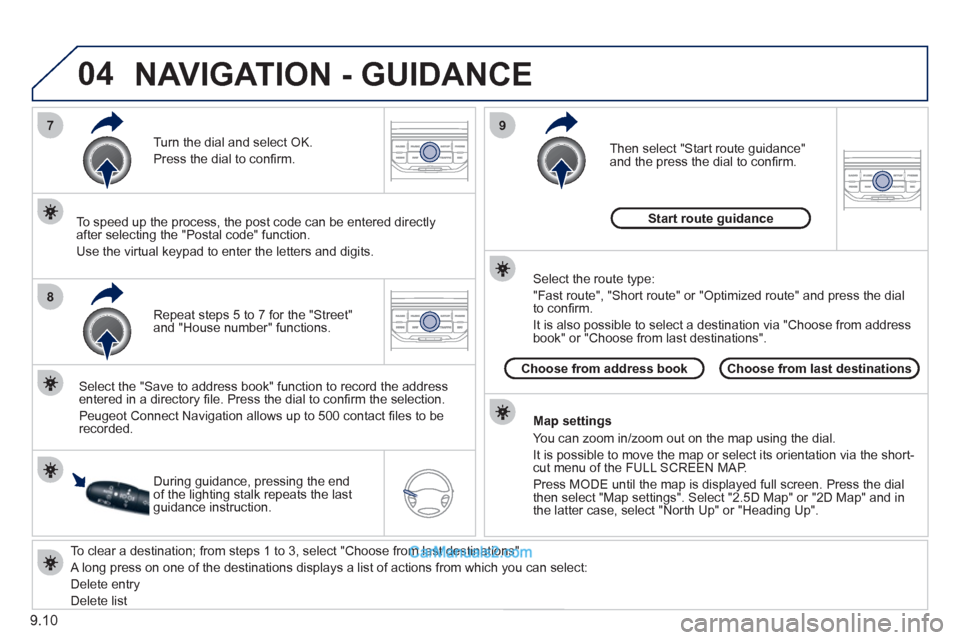
To clear a destination; from steps 1 to 3, select "Choose from last destinations".
A long press on one of the destinations displays a list of actions from which you can select:
Delete entr
y
D
elete listRepeat steps 5 to 7
for the "Street" and "House number" functions. Turn the dial and select
OK.
Pr
ess the dial to confi rm.
Select the "Save to address book" function to record the address
entered in a directory fi le. Press the dial to confi rm the selection.
Peu
geot Connect Navigation allows up to 500 contact fi les to be
recorded.
To speed up the process, the post code can be entered directl
y
after selecting the "Postal code" function.
Use the virtual ke
ypad to enter the letters and digits.
Then select "
Start route guidance"
and the press the dial to confi rm.
During guidance, pressing the endof the lighting stalk repeats the last guidance instruction.
Map settin
gs
You can zoom in/zoom out on the map usin
g the dial.
It is possible to move the map or select its orientation via the short-cut menu of the FULL SCREEN MAP.
Press M
ODE until the map is displayed full screen. Press the dial
then select "Map settings". Select "2.5D Map" or "2D Map" and in
the latter case, select "North Up" or "Heading Up".
Select the route type:
"Fast route", "
Short route" or "Optimized route" and press the dial
to confi rm.
It is also
possible to select a destination via "Choose from address
book" or "Choose from last destinations".
Choose from last destinations Choose from address bookStart route
guidance
NAVIGATION - GUIDANCE
Page 172 of 200
9.36
01
1
22
10101111
133144155
33445566778899
122
FIRST STEPS
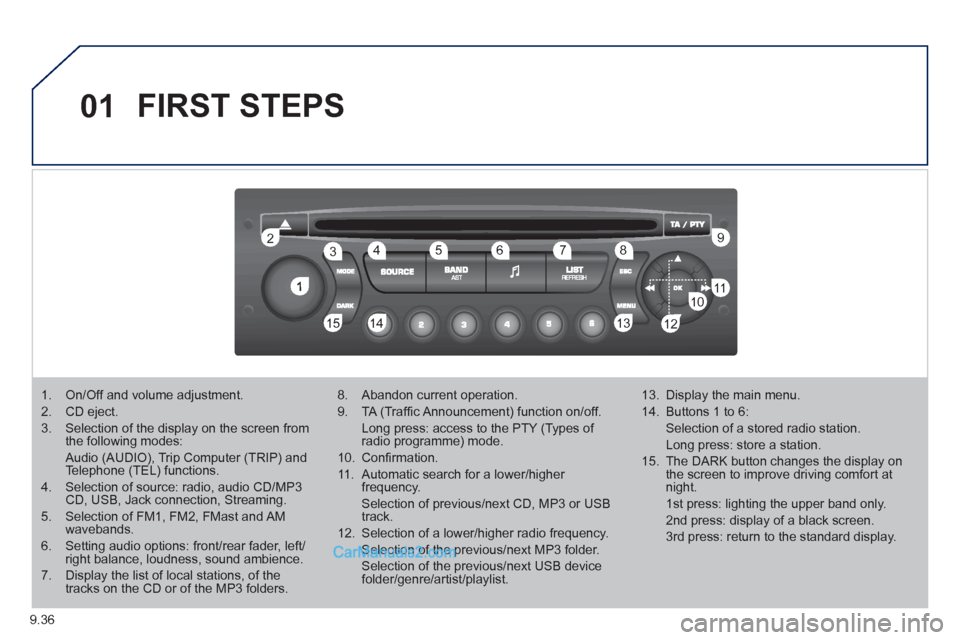
1. On/Off and volume adjustment.
2. CD eject.
3. Selection of the display on the screen from the following modes:
Audio (AUDIO), Trip Computer (TRIP) and Telephone (TEL) functions.
4. Selection of source: radio, audio CD/MP3CD, USB, Jack connection, Streaming.
5. Selection of FM1, FM2, FMast and AMwavebands.
6. Setting audio options: front/rear fader, left/right balance, loudness, sound ambience.
7. Display the list of local stations, of thetracks on the CD or of the MP3 folders.
8. Abandon current operation.
9. TA (Traffi c Announcement) function on/off.
Long press: access to the PTY (Types of radio programme) mode.
10. Confi rmation.
11. Automatic search for a lower/higher frequency.
Selection of previous/next CD, MP3 or USB track.
12. Selection of a lower/higher radio frequency.
Selection of the previous/next MP3 folder.
Selection of the previous/next USB devicefolder/genre/artist/playlist.
13. Display the main menu.
14. Buttons 1 to 6:
Selection of a stored radio station.
Long press: store a station.
15. The DARK button changes the display on the screen to improve driving comfort at night.
1st press: lighting the upper band only.
2nd press: display of a black screen.
3rd press: return to the standard display.
Page 194 of 200
136
Instruments and controls
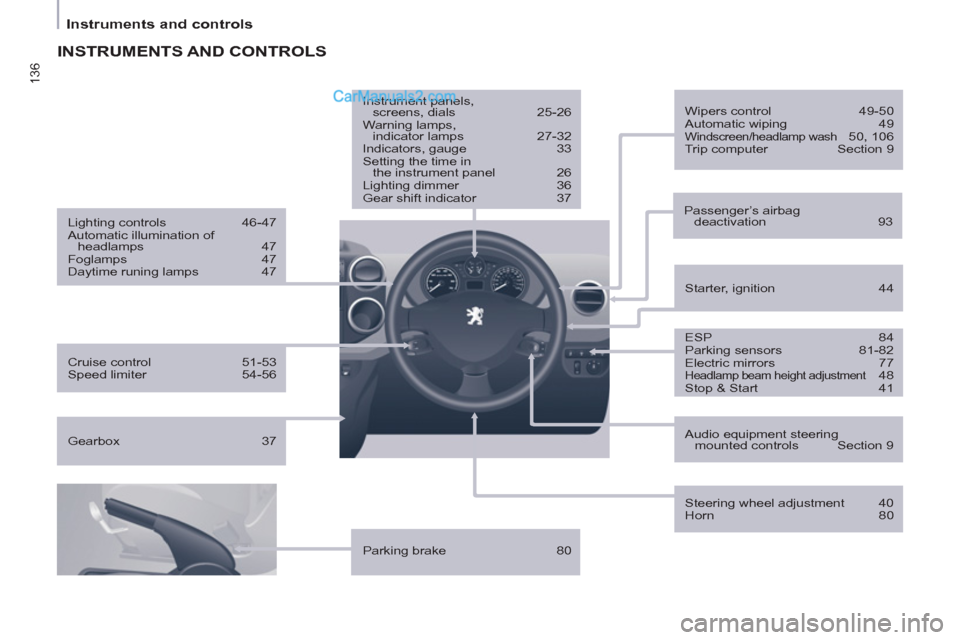
INSTRUMENTS AND CONTROLS
ESP 84
Parking sensors 81-82
Electric mirrors 77
Headlamp beam height adjustment 48
Stop & Start 41
Starter, ignition 44
Wipers control 49-50
Automatic wiping 49
Windscreen/headlamp wash 50, 106
Trip computer Section 9
Cruise control 51-53
Speed limiter 54-56
Lighting controls 46-47
Automatic illumination of
headlamps 47
Foglamps 47
Daytime runing lamps 47
Parking brake 80
Instrument panels,
screens, dials 25-26
Warning lamps,
indicator lamps 27-32
Indicators, gauge 33
Setting the time in
the instrument panel 26
Lighting dimmer 36
Gear shift indicator 37
Audio equipment steering
mounted controls Section 9
Steering wheel adjustment 40
Horn 80
Passenger’s airbag
deactivation 93
Gearbox 37
Page 197 of 200
139
Technical data - Maintenance
VISUAL SEARCH
10
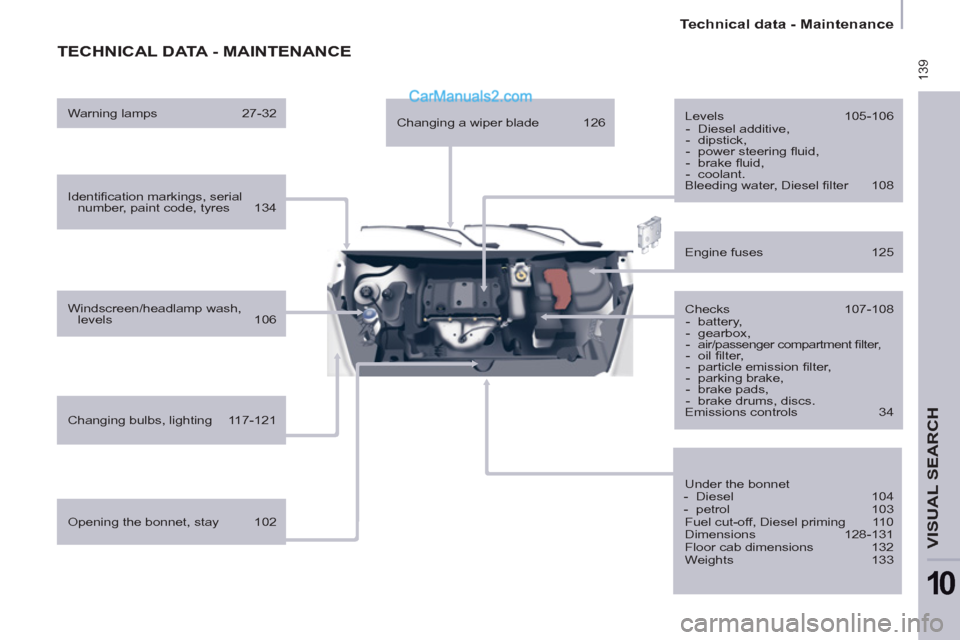
TECHNICAL DATA - MAINTENANCE
Identifi cation markings, serial
number, paint code, tyres 134
Windscreen/headlamp wash,
levels 106
Changing bulbs, lighting 117-121
Checks 107-108
- battery,
- gearbox,
-
air/passenger compartment fi lter,
- oil fi lter,
- particle emission fi lter,
- parking brake,
- brake pads,
- brake drums, discs.
Emissions controls 34
Engine fuses 125
Under the bonnet
- Diesel 104
- petrol 103
Fuel cut-off, Diesel priming 110
Dimensions 128-131
Floor cab dimensions 132
Weights 133
Opening the bonnet, stay 102
Levels 105-106
- Diesel additive,
- dipstick,
- power steering fl uid,
- brake fl uid,
- coolant.
Bleeding water, Diesel fi lter 108
Warning lamps 27-32
Changing a wiper blade 126