Page 123 of 340

4
121
i
i
Driving
Speed limiter
System which prevents the vehicle from
exceeding the speed programmed by the driver.
When the programmed speed limit is reached,
pressing the accelerator pedal no longer
has any effect unless it is pressed firmly,
which allows you to temporarily exceed the
programmed speed.
To return to the programmed speed, simply
slow down to a speed below the programmed
speed by releasing the accelerator.
The speed limiter is switched on
manually: it
requires a programmed speed of at least
20 mph (30 km/h).
The speed limiter is switched off
by manual
operation of the control.
The programmed speed remains in the memory
when the ignition is switched off.
The speed limiter cannot, in any
circumstances, replace the need to
obser ve speed limits, nor can it replace
the need for vigilance and responsibility
on the par t of the driver.
This information also appears in the
head-up display.
For more information on the head-up
display, refer to the relevant page in this
"Driving" section.
1.
Speed limiter mode selection button
2.
Programmed value decrease button
3.
Programmed value increase button
4.
Suspend/restore speed limiter (pause)
5.
Speed limiter off button
Steering mounted controls
The programmed information is grouped
together in the instrument panel screen.
Displays in the instrument panel
A.
Speed limiter on/pause indication
B.
Speed limiter mode selection indication
C.
Programmed speed value
Page 125 of 340

4
123
i
i
Driving
Cruise control
System which automatically maintains the
speed of the vehicle at the value programmed
by the driver, without any action on the
accelerator pedal.
The cruise control is switched on
manually: it
requires a minimum vehicle speed of 25 mph
(40 km/h) and the engaging:
- 4th gear or higher on a manual gearbox,
- 2nd gear or higher on an electronic gear
control gearbox or automatic gearbox,
- position A
on the electronic gear control
gearbox or D
on the automatic gearbox.
The cruise control is switched off
manually
or by pressing the brake or clutch pedal or
on triggering of the ESP system for safety
reasons.
It is possible to exceed the programmed speed
temporarily by pressing the accelerator pedal.
To return to the programmed speed, simply
release the accelerator pedal.
Switching off the ignition cancels any
programmed speed value.
1.
Cruise control mode selection button
2.
Speed programming/programmed value
decrease button
3.
Speed programming/programmed value
increase button
4.
Cruise control suspension/resume button
(pause)
5.
Cruise control off button
Steering mounted controls
The cruise control cannot, in any
circumstances, replace the need to
obser ve speed limits, nor can it replace
the need for vigilance and responsibility
on the par t of the driver.
This information also appears in the
head-up display.
For more information on the head-up
display, refer to the relevant page in this
"Driving" section. The programmed information is grouped
together in the instrument panel screen.
Displays in the instrument panel
A.
Cruise control on/pause indication
B.
Cruise control mode selection indication
C.
Programmed speed value
Page 127 of 340

4
125
!
Driving
This system indicates the proximity of an
obstacle (person, vehicle, tree, gate, etc.) which
comes within the field of detection of sensors
located in the bumper.
Cer tain types of obstacle (stake, roadworks
cone, etc.) detected initially will no longer be
detected at the end of the manoeuvre due to
the presence of blind spots.
Parking sensors
This function cannot, in any
circumstances, take the place of the
vigilance and responsibility of the driver.
The system is switched on by engaging reverse
gear. This is accompanied by an audible signal.
The system is switched off when you exit
reverse gear.
Rear parking sensors
Audible assistance
The proximity information is given by an
intermittent audible signal, the frequency of which
increases as the vehicle approaches the obstacle.
The sound emitted by the speaker (right or
left) indicates the side on which the obstacle is
located.
When the distance between the vehicle and
the obstacle becomes less than approximately
thirty centimetres, the audible signal becomes
continuous.
Visual assistance
This supplements the audible signal by
displaying bars in the multifunction screen
which move progressively nearer to the vehicle.
When the obstacle is near, the "Danger"
symbol is also displayed in the screen.
Page 131 of 340

5
129 Visibility
Lighting controls
System for selection and control of the various front and rear lamps providing the vehicle's lighting and signalling.
Main lighting
The various front and rear lamps of the vehicle
are designed to provide the best visibility for the
driver and to signal the presence of the vehicle
to other road users:
- sidelamps, to be seen,
- dipped beam headlamps to see without
dazzling other drivers,
- main beam headlamps to see clearly when
the road is clear,
- directional headlamps for improved
visibility when cornering.
Additional lighting
Other lamps are installed to fulfil the
requirements of par ticular driving conditions:
- rear foglamps to better signal the presence
of the vehicle in foggy conditions,
- front foglamps for better visibility in foggy
conditions and to improve lighting at
intersections and when parking,
- daytime running lamps to be seen during
the day.
Automatic lighting
functions
Various automatic lighting functions are also
available depending on options:
- guide-me-home lighting,
- directional headlamps,
- welcome lighting,
- daytime running lamps,
- automatic illumination of headlamps,
- automatic headlamp dipping.
Page 132 of 340
130
Visibility
Model without AUTO lighting
Model with AUTO lighting
Selection ring for main lighting
mode
Turn the ring to position the symbol required
facing the mark.
Lighting off.
Automatic illumination of headlamps.
Sidelamps only.
Dipped or main beam headlamps.
Stalk for switching headlamps
Pull the stalk to switch the lighting between
dipped/main beam headlamps.
In the lighting off and sidelamps modes, the
driver can switch on the main beam headlamps
temporarily ("headlamp flash") by maintaining a
pull on the stalk.
Displays
Illumination of the corresponding indicator lamp
in the instrument panel confirms the lighting
switched on.
Page 133 of 340
5
131
!
Visibility
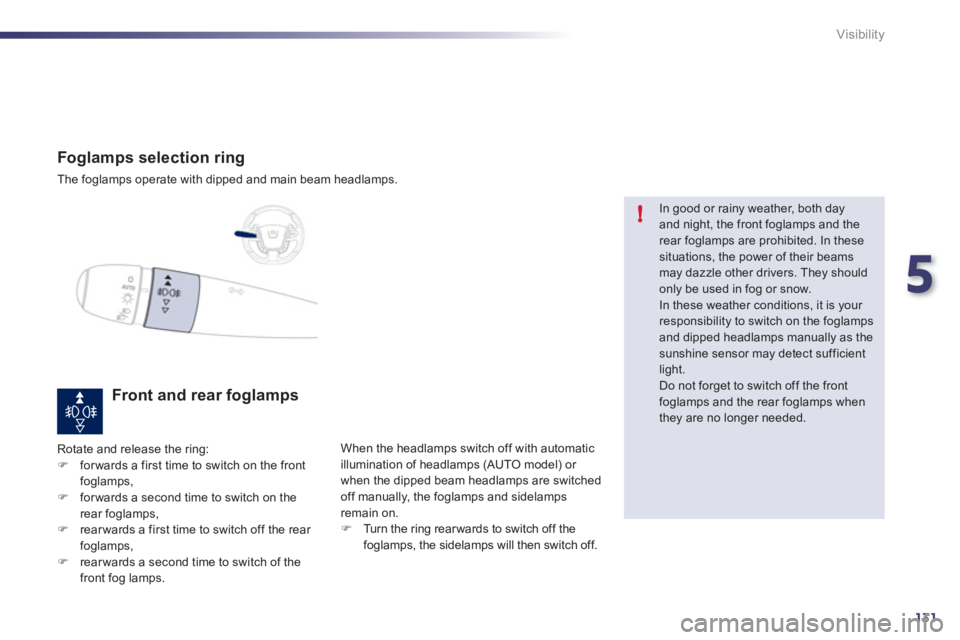
Foglamps selection ring
The foglamps operate with dipped and main beam headlamps.
Front and rear foglamps
Rotate and release the ring:
)
for wards a first time to switch on the front
foglamps,
)
for wards a second time to switch on the
rear foglamps,
)
rear wards a first time to switch off the rear
foglamps,
)
rear wards a second time to switch of the
front fog lamps. When the headlamps switch off with automatic
illumination of headlamps (AUTO model) or
when the dipped beam headlamps are switched
off manually, the foglamps and sidelamps
remain on.
)
Turn the ring rear wards to switch off the
foglamps, the sidelamps will then switch off.
In good or rainy weather, both day
and night, the front foglamps and the
rear foglamps are prohibited. In these
situations, the power of their beams
may dazzle other drivers. They should
only be used in fog or snow.
In these weather conditions, it is your
responsibility to switch on the foglamps
and dipped headlamps manually as the
sunshine sensor may detect sufficient
light.
Do not forget to switch off the front
foglamps and the rear foglamps when
they are no longer needed.
Page 134 of 340

132
i
ii
Visibility
Lighting left on audible
signal
An audible signal when a front door
is opened warns the driver that the
vehicle's exterior lighting is on, with the
ignition off and in manual lighting mode.
In this case, switching off the lighting
stops the audible signal.
With the ignition off, if the dipped
headlamps remain on, the vehicle goes
into "ECO" mode to avoid discharging
the battery. In some weather conditions (e.g. low
temperature or humidity), the presence
of misting on the internal sur face of the
glass of the headlamps and rear lamps
is normal; it disappears after the lamps
have been on for a few minutes.
Daytime lighting, compulsory in cer tain
countries, which comes on automatically when
the engine is star ted making the vehicle more
visible to other road users.
Daytime running lamps
This function is assured:
- in countries where it is imposed by
regulations, by illumination of the dipped
beam headlamps with the sidelamps and
number plate lamps.
- for other countries where it is provided, by
the use of dedicated lamps.
This function can be activated
or deactivated via the vehicle
configuration menu.
The lighting goes off when you switch
off the ignition, but you can always
switch it on again using the lighting
control stalk.
Page 135 of 340

5
133
Visibility
Parking lamps
Side markers for the vehicle by illumination of
the sidelamps on the traffic side only.
)
Within one minute of switching off the
ignition, operate the lighting control stalk up
or down depending on the traffic side (for
example: when parking on the left; lighting
control stalk upwards; the right hand
sidelamps are on).
This is confirmed by an audible signal and
illumination of the corresponding direction
indicator warning lamp in the instrument panel.
To switch off the parking lamps, return the
lighting control stalk to position 0 or switch on
the ignition. Temporarily keeping the dipped beam
headlamps on after the vehicle's ignition has
been switched off makes the driver's exit easier
when the light is poor.
Manual guide-me-home
lighting
Switching on
)
Within 30 seconds or a minute after
switching of the ignition (according to the
automatic guide-me-home lighting duration
programmed in the configuration menu),
"flash" the headlamps using the lighting
stalk.
)
A fur ther "headlamp flash" switches the
function off.
Switching off
The manual guide-me-home lighting switches
off automatically after a set time.
