2011 Peugeot 508 driver
[x] Cancel search: driverPage 112 of 340

110
i
Driving
6-speed electronic gear control gearbox
Six-speed electronic gear control gearbox
which offers a choice between the comfor t of
fully automatic operation or the pleasure of
manual gear changing.
There are two driving modes:
- automatic
mode for automatic control of
the gears by the gearbox,
- manual
mode for sequential gear changing
by the driver.
In automatic mode, it remains possible to
change gear manually by using the steering
mounted control paddles when required, when
over taking, for example.
R.
Reverse
)
With your foot on the brake, lift the lever
and push for wards.
N.
Neutral.
)
With your foot on the brake, select this
position to start.
A.
Automatic mode.
)
Move the lever backwards to select this
mode.
M.
Manual mode with sequential gear
changing.
)
Move the lever to the left to select this
mode, then use the steering mounted
control paddles to change gear:
Gear lever
+.
Change up paddle to the right of the steering
wheel.
)
Press the back of the "+"
steering mounted
paddle to change up a gear.
-.
Change down paddle to the left of the
steering wheel.
)
Press the back of the "-"
steering mounted
paddle to change down a gear.
Steering mounted control paddles
The steering mounted paddles cannot
be used to select neutral or to engage
or disengage reverse gear.
Page 113 of 340

4
111
i
i
i
Driving
Engagement of reverse gear is
accompanied by an audible signal.
N
flashes in the instrument panel,
accompanied by an audible signal
and a message in the instrument
panel screen, if the gear lever is not in
position N
on star ting.
Foot on brake
flashes on the
instrument panel, accompanied by an
audible signal and a message in the
instrument panel screen, if the brake
pedal is not pressed on star ting.
For optimum acceleration, for example
when over taking another vehicle, press
the accelerator pedal firmly past the
point of resistance.
Displays in the instrument
panel
Gear lever positions
N.
Neutral
R.
Reverse
1, 2, 3, 4, 5, 6.
Gears in manual mode
A.
This comes on when the automatic mode
is selected. It switches off on changing to
manual mode.
)
Place your foot on the brake
when a message appears in the
instrument panel screen.
Moving off
)
Select position N
.
)
Press the brake pedal down fully.
)
Star t the engine.
N
appears in the instrument panel
screen.
)
Select first gear (position M
or A
) or
reverse (position R
).
)
Release the parking brake unless it is
programmed to automatic mode.
)
Take your foot off the brake pedal, then
accelerate.
A
and 1
or R
appears in the
instrument panel screen.
Automatic mode
)
After star ting the vehicle, select position A
for enter automatic mode.
A
and the gear engaged appear in
the instrument panel screen.
The gearbox is then operating in auto-active
mode, without any action on the par t of the
driver. It continuously selects the most suitable
gear, depending on the:
- style of driving,
- profile of the road.
Page 114 of 340

112
i
!
Driving
Manual gear changing
)
When the vehicle has moved off, select
position M
to change to manual mode.
- Pull the lever towards the +
sign to
change up a gear.
- Push the lever towards the -
sign to
change down a gear.
At very low speed, if reverse gear
is requested, this will only be taken
into account when the vehicle is
immobilised. A warning lamp appears in
the instrument panel screen.
On sharp acceleration, the gearbox will
not change up unless the driver acts on
the gear lever or the steering mounted
paddles.
Never select neutral N
while the vehicle
is moving.
Only engage reverse gear R
when the
vehicle is immobilised with the brake
pedal pressed.
A
disappears and M
appears with the
gears engaged successively, in the
instrument panel screen.
The gear change requests are only carried out
if the engine speed permits.
It is not necessary to release the accelerator
during gear changes.
When braking or slowing down, the gearbox
changes down automatically to permit
acceleration in the correct gear. This selective gear change mode enables you
to over take, for example, while still remaining in
automatic mode.
)
Operate the +
or -
steering mounted control
paddle.
The gearbox engages the gear requested if the
engine speed permits. A
is still displayed in the
instrument panel.
After a few moments without any action on
the controls, the gearbox resumes automatic
control of the gears.
Manual mode
Page 116 of 340

114
i
!
Driving
Stop & Start
The Stop & Start system puts the engine temporarily into standby - STOP mode - during stops in the traffic (red lights, traffic jams, or other...).
The engine restarts automatically - START mode - as soon as you want to move off. The restart takes place instantly, quickly and silently.
Per fect for urban use, the Stop & Start system reduces fuel consumption and exhaust emissions as well as the noise level when stationary.
Operation
Going into engine STOP mode
The "ECO"
warning lamp comes
on in the instrument panel and the
engine goes into standby:
- with the electronic gear control
gearbox,
at speeds below 4 mph (6 km/h),
press the brake pedal or put the selector
lever in position N
.
If your vehicle is fitted with the system, a time
counter calculates the sum of the periods in
STOP mode during a journey. It rests itself to zero
every time the ignition is switched on with the key.
Never refuel with the engine in STOP
mode; you must switch off the ignition
with the key.
For your comfor t, during parking
maoeuvres, STOP mode is not available
for a few seconds after coming out of
reverse gear.
STOP mode does not affect the
functionality of the vehicle, such as for
example, braking, power steering...
Special cases: STOP mode not
available
STOP mode is not invoked when:
- the driver's door is open,
- the driver's seat belt is not fastened,
- the vehicle has not exceeded 6 mph
(10 km/h) since the last engine star t using
the key,
- the electric parking brake is applied or
being applied,
- the engine is needed to maintain a
comfor table temperature in the passenger
compartment,
- demisting is active,
- some special conditions (battery charge,
engine temperature, braking assistance,
ambient temperature...) where the engine is
needed to assure control of a system.
In this case, the "ECO"
warning lamp
flashes for a few seconds then goes
off.
This operation is per fectly normal.
Page 117 of 340

4
115
i
Driving
Going into engine START mode
The "ECO"
warning lamp goes
off and the engine star ts with an
electronic gear control gearbox
:
●
selector lever in position A
or M
, release
the brake pedal,
●
or selector lever in position N
and the brake
pedal released, move the selector lever to
position A
or M
,
●
or engage reverse gear.
START mode is invoked automatically when:
Special cases: START invoked
automatically
- the driver's door is open,
- the driver's seat belt is not fastened,
- the speed of the vehicle exceeds 7 mph
(11 km/h) with the electronic gear control
gearbox,
- the electric parking brake is being
applied,
- some special conditions (battery
charge, engine temperature, braking
assistance, ambient temperature...) where
the engine is needed for control of a
system.
In this case the "ECO"
warning lamp
flashes for a few seconds, then goes
off.
This operation is per fectly normal.
If the system has been deactivated
in STOP mode, the engine restarts
immediately.
At any time, press the "ECO OFF"
switch to
deactivate the system.
This is confirmed by the switch warning lamp
coming on accompanied by a message in the
screen.
Deactivation
Page 119 of 340

4
117
!
Driving
Hill start assist
System which keeps your vehicle immobilised
temporarily (approximately 2 seconds) when
starting on a gradient, the time it takes to
move your foot from the brake pedal to the
accelerator pedal.
This system only operates when:
- the vehicle is completely stationary, with
your foot on the brake pedal,
- in par ticular conditions on a slope,
- with the driver’s door closed.
The hill star t assist system cannot be
deactivated.
On an ascending slope, with the vehicle
stationar y, the vehicle is held for a momentarily
when you release the brake pedal:
- provided you are in first gear or neutral on
a manual gearbox,
- provided you are in A
or M
on an electronic
gear control gearbox,
- provided you are in D
or M
on an automatic
gearbox.
Operation
On a descending slope, with the vehicle
stationar y and reverse gear engaged, the
vehicle is held momentarily when you
release the brake pedal.
Do not exit the vehicle while it is being
held in the hill star t assist phase.
If you need to exit the vehicle with
the engine running, apply the parking
brake manually then ensure that the
parking brake warning lamp (and the
warning lamp P
in the lever of the
electric parking brake) are on fixed (not
flashing).
Operating fault
If a fault in the system occurs, these warning
lamps come on. Contact a PEUGEOT dealer
or a qualified workshop to have the system
checked.
Page 120 of 340

118
i
Driving
Head-up display
System which projects various information onto
a smoked strip in the field of vision of the driver
so that they do not have to take their eyes off
the road.
This system operates when the engine is
running and the settings are stored when the
ignition is switched off.
1.
Head-up display on.
2.
Head-up display off (long press).
3.
Brightness adjustment.
4.
Display height adjustment.
Buttons
Once the system has been activated, the
following information is grouped together in the
head-up display:
A.
The speed of your vehicle.
B.
Cruise control/speed limiter information.
Displays during operation
C.
Navigation information (according to
version).
For more information on the navigation
system, refer to the "Audio and
telematic" section.
Page 122 of 340
120
!
Driving
Memorising speeds
This memorising of speeds applies to both the speed limiter and the cruise control.
You can memorise up to 5 speeds in the
system.
By default, some speeds are already
memorised.
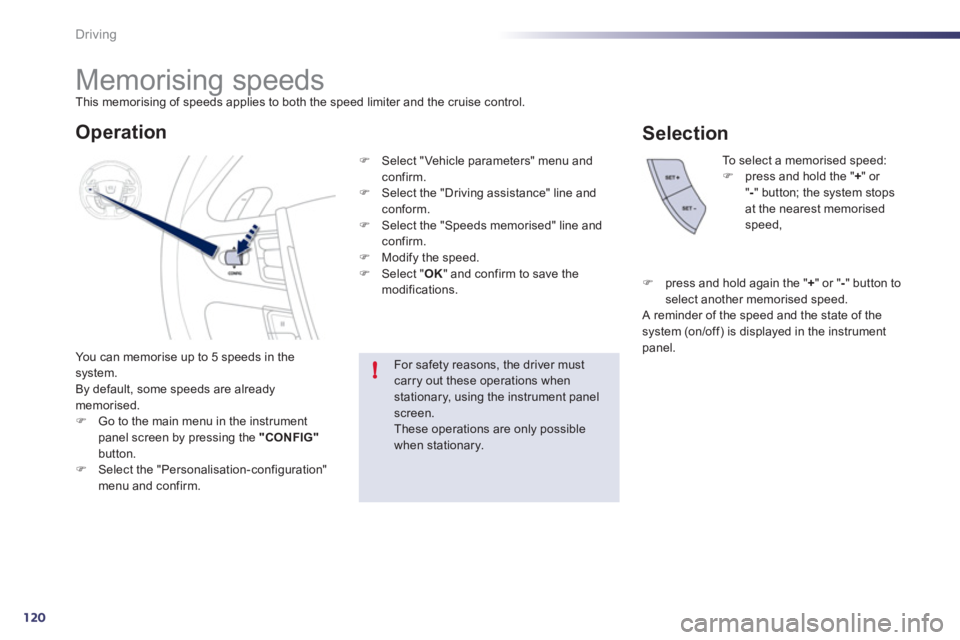
)
Go to the main menu in the instrument
panel screen by pressing the "CONFIG"
button.
)
Select the "Personalisation-configuration"
menu and confirm. To select a memorised speed:
)
press and hold the " +
" or
" -
" button; the system stops
at the nearest memorised
speed,
For safety reasons, the driver must
carry out these operations when
stationary, using the instrument panel
screen.
These operations are only possible
when stationary.
Operation
)
Select "Vehicle parameters" menu and
confirm.
)
Select the "Driving assistance" line and
conform.
)
Select the "Speeds memorised" line and
confirm.
)
Modify the speed.
)
Select " OK
" and confirm to save the
modifications.
Selection
)
press and hold again the " +
" or " -
" button to
select another memorised speed.
A reminder of the speed and the state of the
system (on/off) is displayed in the instrument
panel.